

Description
По-русски
RuShop связывает магазин на WooCommerce с 1С:Предприятием так же, как стандартный обмен 1С с 1С-Битрикс: в 1С вы добавляете обычный узел «Обмен с сайтом», а на стороне сайта ничего дописывать не нужно. Интерфейс плагина и журнал обмена на русском языке.
Каталог из 1С на сайт
- группы товаров становятся категориями (вложенность сохраняется), свойства становятся атрибутами WooCommerce;
- товары, характеристики (вариативные товары), цены, старые цены, остатки по выбранным складам, картинки;
- при полной выгрузке товары, которых больше нет в 1С, можно скрывать (черновик, корзина или нулевой остаток), а вернувшиеся в выгрузку публикуются снова;
- большие каталоги обмениваются частями.
Заказы
- заказы с сайта в 1С: физические лица и организации (ИНН, КПП), доставка отдельной строкой;
- статус заказа, состав и оплаты, проведённые в 1С, возвращаются в заказ на сайте (соответствие статусов настраивается в таблице);
- совместим с HPOS (высокопроизводительным хранилищем заказов WooCommerce).
Контроль
- журнал обмена: каждый запрос, каждый файл и изменение каждого товара и заказа, выгрузка журнала в CSV;
- протоколы CommerceML 2.x и 3.1, настройка версии формата для разных конфигураций 1С;
- проверено с 1С:Розница 3.0.
В планах: платежи ЮKassa и СБП с чеками, доставка СДЭК, реквизиты организаций.
Как подключить
- Установите и включите WooCommerce, затем RuShop.
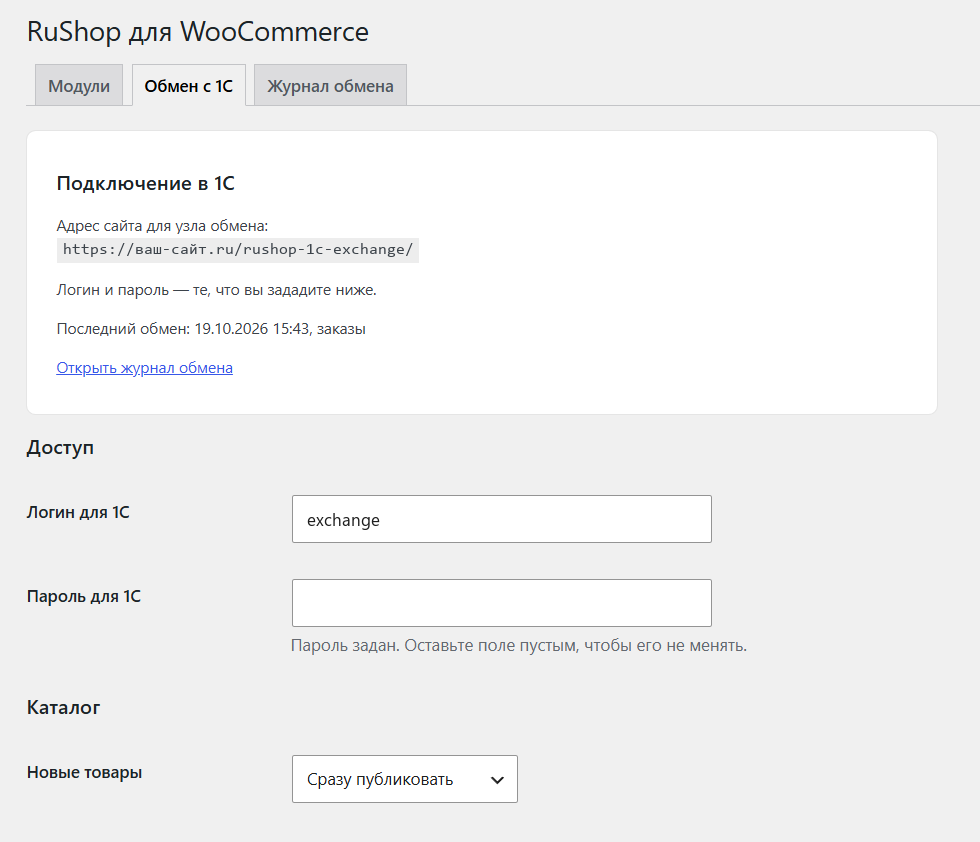
- Откройте «WooCommerce RuShop Обмен с 1С» и задайте логин и пароль для обмена.
- В 1С создайте узел «Обмен с сайтом» с адресом, который показан на странице настроек, и этими логином и паролем.
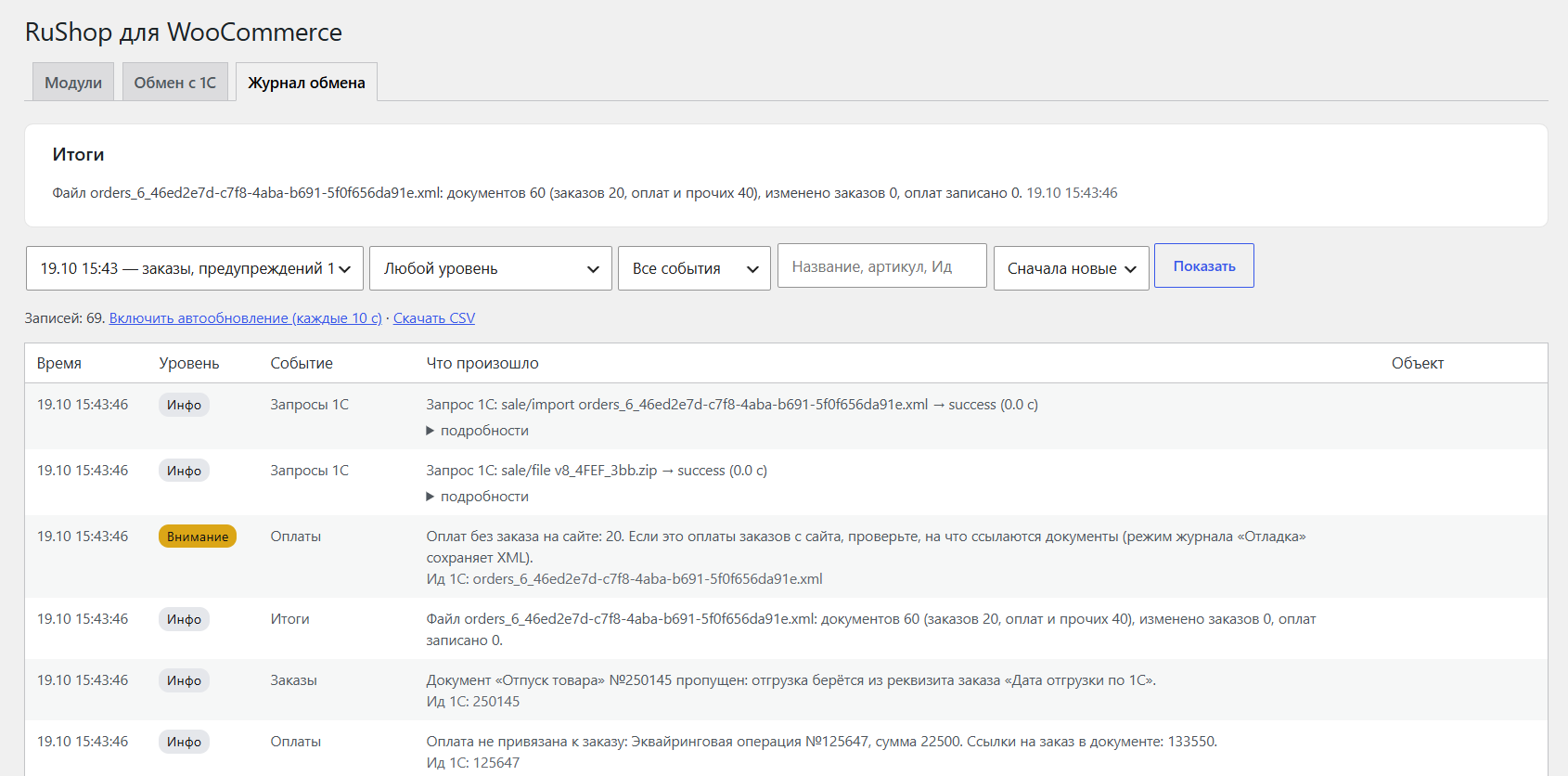
- Запустите обмен в 1С и посмотрите результат на вкладке «Журнал обмена».
Перед работой на живом магазине проверьте обмен на копии сайта и копии базы 1С.
Плагин не обращается ни к каким внешним серверам и ничего не отправляет разработчикам: данные ходят только между вашим сайтом и вашей 1С. WooCommerce — товарный знак Automattic Inc., 1С — товарный знак фирмы «1С». RuShop — независимый продукт и не связан с их владельцами и не одобрен ими.
English
RuShop connects a WooCommerce store to 1C:Enterprise the same way the standard 1C exchange works with Bitrix: you add the standard “Exchange with website” node in 1C, and nothing has to be written on the site side. The plugin interface and the exchange log are in Russian.
Catalog from 1C to the site
- product groups become categories (nesting is kept), properties become WooCommerce attributes;
- products, characteristics (variable products), prices, old prices, stock by chosen warehouses, images;
- full export: products that disappeared from 1C can be hidden (draft, trash or zero stock), returned products are published again;
- large catalogs are exchanged in parts.
Orders
- orders from the site to 1C: individuals and legal entities (INN, KPP), delivery as a separate line;
- order status, order items and payments posted in 1C come back to the order on the site (configurable mapping table);
- compatible with HPOS (WooCommerce high-performance order storage).
Control
- exchange log with every request, file and the change of each product and order, with CSV export;
- CommerceML 2.x and 3.1 protocols, a setting for the exchange format version for different 1C configurations;
- tested with 1C:Retail 3.0 (exchange module from 1C:Small Business Management).
Planned modules: YooKassa and SBP payments with fiscal receipts, CDEK delivery, legal-entity details.
Need help configuring the exchange for your 1C configuration, or custom work? Contact the developers: https://b-wave.ru/
External services
The plugin does not connect to any external server and sends nothing to the developers. Data is exchanged only between your site and your own 1C, at the address you set in 1C.
Trademarks
WooCommerce is a trademark of Automattic Inc., 1C is a trademark of the 1C company. RuShop is an independent product, not affiliated with or endorsed by their owners.
Screenshots
Installation
- Install and activate WooCommerce.
- Install RuShop (Plugins > Add New) and activate it.
- Open WooCommerce > RuShop > “Обмен с 1С” (1C exchange) and set the exchange login and password.
- In 1C create an “Exchange with website” node with the address shown on the settings page and that login and password.
- Start the exchange in 1C and check the result on the “Журнал обмена” (exchange log) tab.
Before using it on a live store, test the exchange on a copy of the site and a copy of the 1C database.
FAQ
-
Which 1C configurations are supported?
-
CommerceML 2.x and 3.1, like the standard 1C exchange with Bitrix. Tested with 1C:Retail 3.0. If your configuration is different and the exchange does not work, send the exchange log.
-
Is the plugin paid?
-
No. The plugin is free and open source (GPL v2 or later).
-
1C says “Could not get XML version” (Не удалось получить версию XML)
-
Open the exchange settings and change “Версия формата для 1С” (format version for 1C) to the value your 1C accepts (2.10 works for 1C:Retail 3.0).
-
Will the plugin delete my products when uninstalled?
-
No. Uninstalling removes only the plugin settings, the exchange log and the exchange folder. Products, orders and categories stay.
Reviews

Contributors & Developers
“RuShop” is open source software. The following people have contributed to this plugin.
Contributors
Translate “RuShop” into your language.
Interested in development?
Browse the code, check out the SVN repository, or subscribe to the development log by RSS.
Changelog
0.5.1
- Archives sent by 1C are extracted entry by entry: paths with “..”, absolute paths, symbolic links and file types other than XML and images are skipped, and size limits apply.
- The admin page loads its own CSS and JS files (wp_enqueue) instead of printing inline tags; the old log entries are cleaned daily by a scheduled event instead of when the log page is opened.
- The settings page checks the user capability before it is shown.
0.5.0
- The plugin is now completely free: license keys and the trial period were removed, and the plugin does not connect to external servers.
- 1C exchange: the format version in the init answer for orders is chosen in the settings (default 2.10, works for 1C:Retail 3.0).
- 1C exchange: orders are no longer sent twice within one exchange (fixes a loop in protocol 3.1).
- Uninstalling removes the plugin settings, the log and the exchange folder.
- Code cleanup after Plugin Check.
0.3.0
- First working run of the 1C exchange module: catalog, orders, documents from 1C.