

Description
RJVV Tools Translate for WPML translates the ACF fields of your posts and custom post types,
not just the title and the content.
On a site built with Advanced Custom Fields, a lot of the content lives in repeaters,
flexible content and nested groups rather than in the editor. When a translation is created,
those field values are copied across as they are. This plugin walks that structure and
translates the text inside it.
Translations are created as real WPML translations: same translation group as the original,
correct language assignment, marked as complete. They are not duplicates sitting outside
WPML.
What it translates
- Post title, slug, content and excerpt, for posts and any custom post type WPML marks as
translatable. On WooCommerce the excerpt is the product short description. - ACF text fields (text, textarea, wysiwyg), including those inside repeaters, flexible
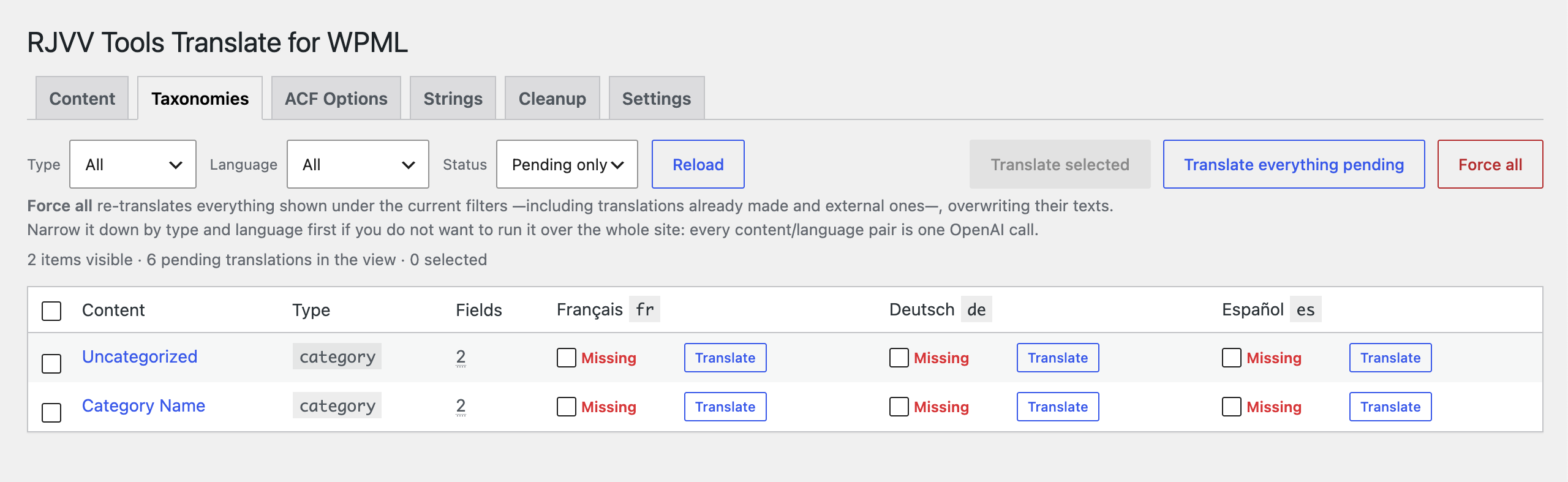
content and nested groups, at any depth. - Taxonomy terms: name, slug, description and their own ACF fields. Term assignments are
copied to the translation, whichwp_insert_post()does not do on its own. - ACF options pages, when the theme stores one set of values per language.
- WPML String Translation strings, grouped by domain.
How it decides what to send
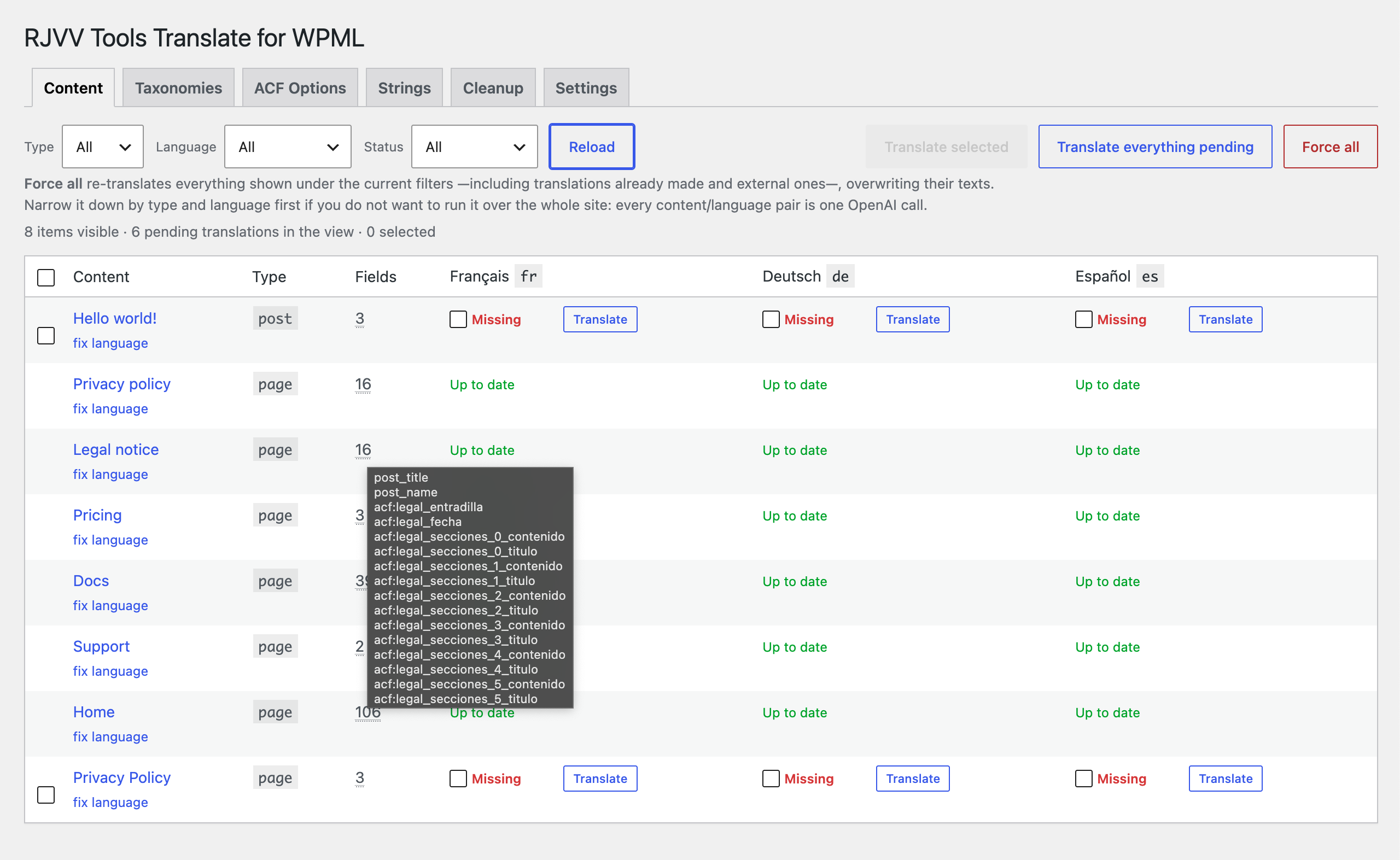
Every field is hashed. When you edit the original, only the fields that actually changed are
sent again — you do not pay to re-translate a whole page because one paragraph moved. The
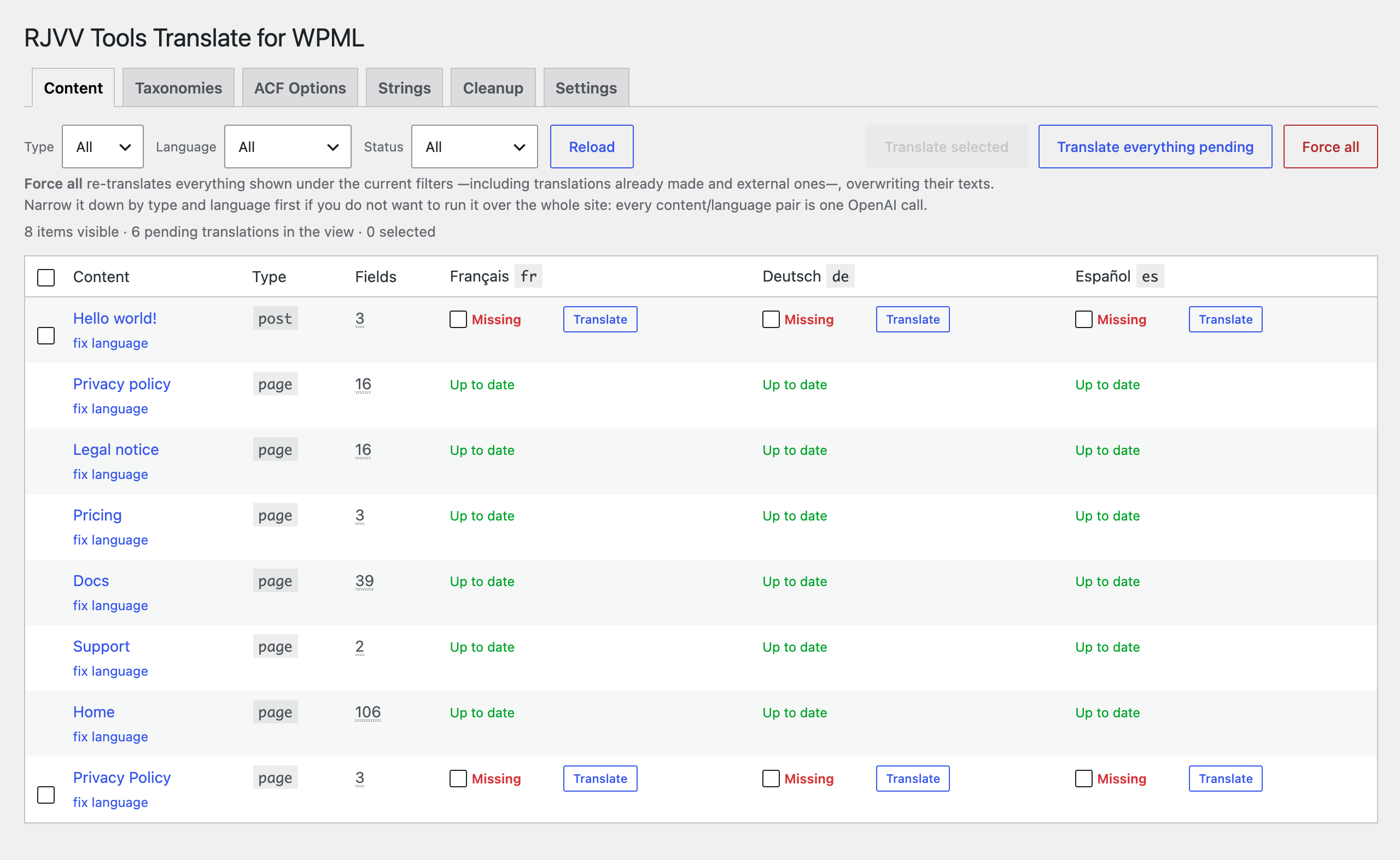
table shows, per language, whether a translation is missing, outdated (and how many fields
changed), up to date, or was made outside the plugin.
Your own API key
You connect your own OpenAI API key, so you pay OpenAI for what you use and nothing else.
There is no per-word cost and no translation credits. The request uses structured outputs,
so the model can only return the same keys it received: it cannot reshape your field
structure.
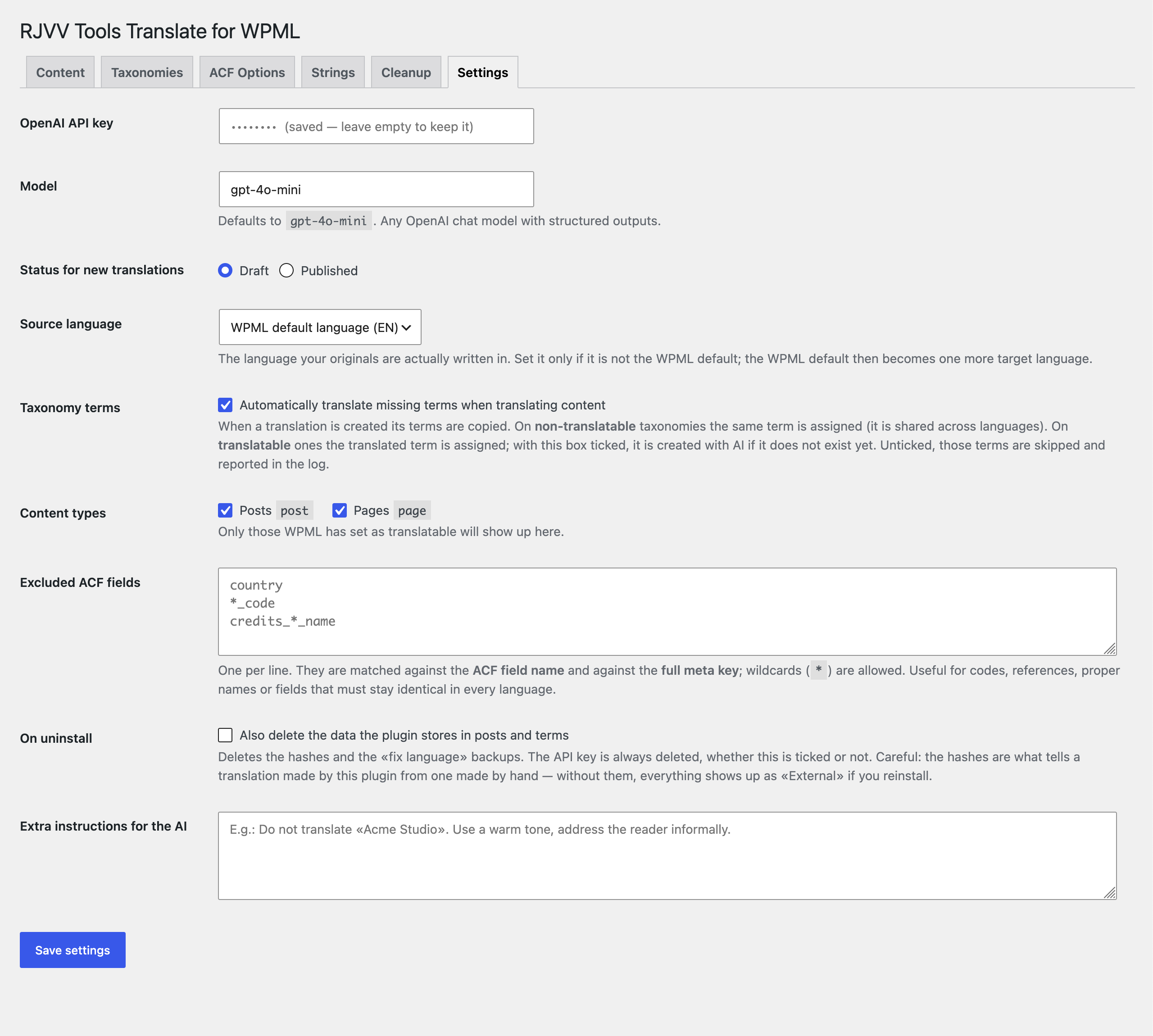
You can give the model standing instructions (tone, names never to translate) and exclude
fields by name or pattern — useful for codes, references and proper names that must stay
identical in every language.
Free vs Pro
The free version translates posts, custom post types and their ACF fields — title,
slug, content, excerpt and every text field inside repeaters, flexible content and nested
groups.
Pro adds the rest of a full multilingual site:
- Taxonomies — term names, slugs, descriptions and their ACF fields.
- ACF options pages — one set of values per language.
- WPML String Translation — theme and plugin strings, by domain.
- Source language — translate from the language content is actually written in,
which does not have to be the WPML default. - Fix language — content written in the wrong language, moved and translated in
place, with a backup. - Reassign terms — repair term assignments after changing WPML settings, at no API cost.
Requirements
- WPML Multilingual CMS — required. WPML String Translation only for the Strings tab.
- Advanced Custom Fields — optional. Without it the plugin still translates titles,
slugs and content; with it, every text field too. ACF PRO for repeaters and flexible content. - An OpenAI API key.
External services
This plugin sends content to the OpenAI API in order to translate it.
What is sent: the texts you choose to translate — post titles, slugs, content, ACF field
values, taxonomy term names and descriptions, or WPML strings — together with the source and
target language and any extra instructions you configure. Nothing is sent until you press a
translate button: there is no background or scheduled sending.
When: only on your explicit action from the plugin’s admin screens.
Who receives it: OpenAI, L.L.C., through https://api.openai.com/v1/chat/completions,
authenticated with the API key you provide.
- Terms of use: https://openai.com/policies/row-terms-of-use/
- Privacy policy: https://openai.com/policies/row-privacy-policy/
The plugin does not send your content anywhere else, and the plugin author receives no data.
Screenshots
Installation
- Install and activate the plugin. WPML must be active first. ACF is optional: without it the plugin translates titles, slugs and content, and with it the custom fields too.
- Go to AI Translate Settings and paste your OpenAI API key.
- Choose the model, the status for new translations (draft or published), the content types and, if the texts are written in a language other than the WPML default, the source language.
- Open the Content tab: you will see every original with its status per language.
FAQ
-
Does it need WPML?
-
Yes. The plugin creates translations through WPML’s own API and links them to the original’s
translation group. It does not work with other multilingual plugins. -
Does it need ACF?
-
No. WPML is the only hard requirement. Without ACF the plugin translates the title, the
slug, the content and the excerpt of posts and custom post types. ACF support is an
addition, not a condition for the plugin to work. -
Does it work with ACF free?
-
Yes for plain text, textarea and wysiwyg fields. Repeaters and flexible content need ACF PRO,
since those field types are PRO features. -
Will it overwrite translations I made by hand?
-
No. Translations the plugin did not create are shown as “External” and are skipped. You have
to force them explicitly, one by one or from the toolbar. -
Does it re-translate everything when I edit a page?
-
No. It compares a hash per field and only sends the ones that changed.
-
Why is a content type missing from the list?
-
Because WPML does not have it set as translatable. Check WPML Settings Post Types
Translation. Without that, WPML cannot link a translation to its original.
Reviews
There are no reviews for this plugin.
Contributors & Developers
“RJVV Tools Translate for WPML” is open source software. The following people have contributed to this plugin.
Contributors

Translate “RJVV Tools Translate for WPML” into your language.
Interested in development?
Browse the code, check out the SVN repository, or subscribe to the development log by RSS.
Changelog
0.17.1
- Fixed the admin screen: the stylesheet and script were not being loaded, so the content
list stayed on “Loading”.
0.17.0
- Renamed to RJVV Tools Translate for WPML.
- Fixed a deprecation notice on PHP 8.4.
- Translation files are no longer bundled; WordPress.org language packs are used instead.
0.16.3
- Updated Freemius SDK to the latest version.
0.16.2
- The API key field is no longer filled in by password managers, and a value that is not
an OpenAI key can no longer overwrite the one you had saved.
0.16.1
- Fixed a licence check: in the paid build the source language setting worked without a
valid licence.
0.16.0
- The Pro settings are no longer drawn as disabled controls in the free version: that code
now lives entirely in the premium files, so it is absent rather than switched off.
0.15.2
- The translator comments now survive the free build, so Plugin Check passes on the
package that is actually distributed.
0.15.1
- Passes Plugin Check: translator comments on every string with placeholders, and the
.gitignore no longer travels inside the package.
0.15.0
- The excerpt is translated. On WooCommerce that is the product short description, the one
shown next to the price; it used to stay in the original language.
0.14.0
- ACF is no longer required. Without it the plugin still translates titles, slugs and
content; WPML remains the only hard requirement.
0.13.1
- Fixed the licence check: a free build with a valid licence showed the Pro interface with
nothing behind it.
0.13.0
- Prepared for the WordPress.org submission: readme, external services disclosure and
uninstall handling.
0.12.0
- Uninstall now goes through Freemius, so the cleanup runs in both builds.
0.11.0
- Pro code is stripped from the free build instead of being hidden at runtime.
0.10.0
- Freemius integration: licensing, checkout and the free/Pro split.
0.9.0
- Free and Pro feature split.
0.8.0
- Term deletion hardened; English by default everywhere.
0.7.0
- readme, uninstall handling and a text domain loading fix.
0.6.0
- Full internationalisation: source strings in English, Spanish translation bundled.
0.5.0
- Source language setting: translate from the language the content is actually written in,
which does not have to be the WPML default. - Bulk action to fix the language of several items at once.
- ACF internal post types are never translated.
0.4.0
- Strings tab for WPML String Translation, with a domain selector.
0.3.0
- Force re-translation, and a cleanup screen for terms created by the plugin.
0.2.0
- Taxonomies, ACF options pages, and in-place language fixing with backup.
0.1.0
- First release: posts, custom post types and ACF fields.