

Description
ReplyPlex is an AI powered help desk for WordPress stores, with a customer portal that lives
on your own site. This plugin connects your WordPress site to the hosted
ReplyPlex service: your customers open and follow tickets from your
pages, your agents see live WooCommerce, Easy Digital Downloads or FluentCart orders and
licences beside every conversation, and the AI answers from your documentation, your
Markdown files and your team’s own past replies, with every claim traceable to its source.
A ReplyPlex account is required. Tickets, replies, the AI and the agent tools live in
ReplyPlex, not in your WordPress database. This plugin is the store-side half of the pair.
It does not include live chat.
AI drafts that cite their sources
Open a ticket and a reply is already waiting in the composer, written from the thread, the
customer’s purchase records and your knowledge base. Every draft shows:
- Where the answer came from. Each claim taken from your docs, an approved answer or a
past reply is linked, so the agent can open the source before sending. - What the AI could not establish. Unknowns are listed above the Send button instead of
being papered over. The model is told it cannot see system state it was not given, so it
asks or defers rather than inventing a refund, a licence status or a promise. - An Undo. One click restores exactly what was there before any AI action.
The AI never sends a draft an agent asked for. Drafts go out through the same send path,
signature and undo window as any other reply. Rewrite transforms (shorter, warmer, more
technical, fix grammar, translate) act on what the agent already wrote, and a Summarize
control produces a short catch-up of a long thread that says how many messages have arrived
since it was written.
AI on Autopilot, with gates
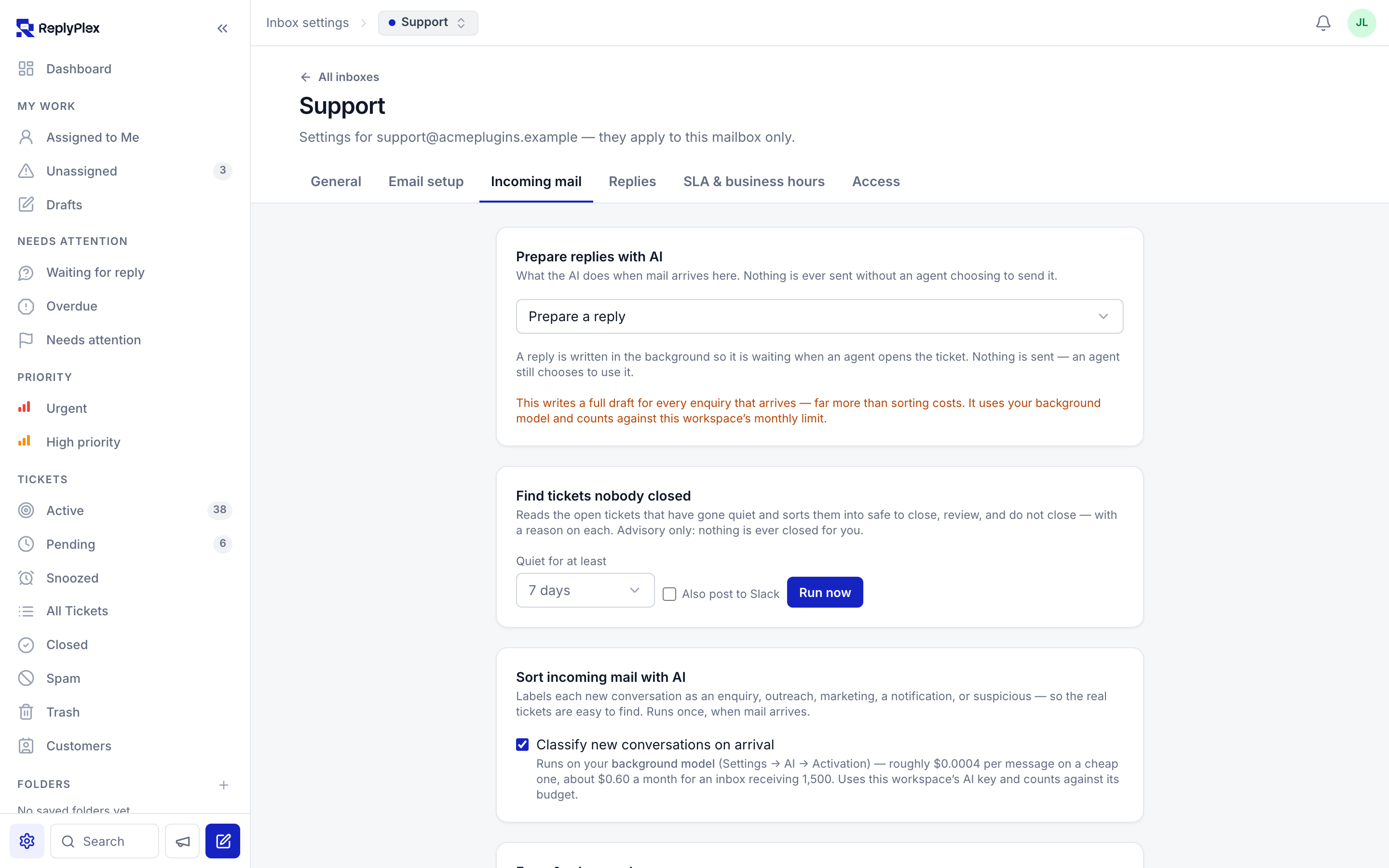
Each mailbox has its own AI mode, and all three start off:
- Off — nothing is generated when mail arrives.
- Prepare a reply — a reply is written in the background and waits in the composer. A
human still sends it. - Reply automatically — Autopilot sends the reply itself, but only when it is confident,
has nothing it could not establish, and can cite where the answer came from. Anything else
is prepared for a person instead.
Autopilot never answers the same customer twice: a reply to an automatic answer hands the
ticket to a human for good. Autonomous replies carry an AI badge, get a timeline entry, keep
the undo window, sign with the name and role you choose, and are listed together under
Handled by AI. Before you turn it on anywhere, the “If Autopilot had been on” panel
shows how many prepared replies would have gone out unread and exactly what stopped the rest.
A knowledge base the AI actually reads
Point ReplyPlex at what you already have:
- Documentation sites. Add a docs URL and the pages beneath it are indexed.
- Markdown files. Upload
.md,.markdown,.txtor.csvfiles straight from your
repository or your policy folder. A refund policy written as a.mdfile becomes something
the AI can quote. - GitHub repositories. Connect a repo and index its docs folder, scoped to a path filter
such asdocs/**/*.md. Every re-index records the commit it answered from. - Resolved tickets. Learn from what your team already answered well.
- Approved answers. Write the exact wording for the questions customers keep asking.
When one closely matches, the draft uses your words instead of paraphrasing.
Knowledge can be shared across every mailbox or scoped to one, so one product’s docs never
answer another product’s ticket. A Knowledge panel beside each conversation searches the
same index and pre-searches the customer’s question. Try it shows the exact passages a
draft would be built from, with their retrieval scores, without calling a model.
AI with instructions
House rules the AI follows in everything it writes: tone, what to offer, what never to
promise, when to hand off to a person. Rules are ordered, can be enabled per mailbox, and can
apply to customer-facing replies, agent-facing notes, or both. A business description and
an AI name and role give every reply its background and its signature.
AI filters and AI automations
With classification switched on for a mailbox, every inbound message is sorted as an
enquiry, suspicious, outreach, marketing or a notification, and a Real enquiries view
shows only the mail that needs a person. The verdict is also an automation condition —
what the AI thinks it is — so marketing can file itself into a folder, outreach can wait
in pending, and suspicious mail can be marked as spam, alongside the usual rules on subject,
sender, tags, assignment, priority, snooze, notes, folders and forwarding. Classification is
per mailbox and off by default. A triage sweep can also read the open tickets that have gone
quiet and sort them into safe to close, review, and do not close, with a reason on each; it
is advisory only, and nothing is ever closed for you.
Measured, capped, and billed to you
Each workspace brings its own OpenRouter key, encrypted at rest. Until a key is added,
nothing is ever sent to a model provider. The model is chosen from a live catalogue with
the provider’s published prices, with a separate cheaper model for background work and a
fallback for outages. A monthly ceiling and a per-conversation ceiling are checked before
every request. An Evaluation dashboard reports, per model, how many drafts were sent,
how much of each was rewritten, how often knowledge was found and cited, and the cost per
sent draft.
An MCP server for Claude, ChatGPT and your IDE
ReplyPlex is also an MCP server. Add one URL as a connector in Claude, ChatGPT, Claude Code
or Cursor, sign in to ReplyPlex, and the assistant can list inboxes, search tickets and
customers, search your knowledge base and read workspace reports. With write scope it can
also add notes, apply tags, assign, set status, priority and custom fields, and every action
is attributed in the ticket timeline as done via that app. Sign-in uses OAuth 2.1 with
consent; connections appear in Settings Developer and can be revoked at any moment.
Connected apps cannot send email unless an admin turns that on separately.
Purchase context beside the ticket
The plugin adds a small, authenticated REST endpoint to your site. When an agent opens a
ticket, ReplyPlex calls it with the customer’s email address and shows what comes back
beside the conversation: recent orders, subscriptions, licences and their activations, with a
link to the customer’s record in your store admin. Every answer is read live at the moment it
is asked for. Nothing is copied, mirrored or synced. The same records feed the AI draft, with
licence keys and other credentials masked before anything leaves.
With Easy Digital Downloads Software Licensing, an agent with permission can deactivate a
single site from a licence without leaving the ticket. Each use is recorded as a note.
Supported stores, detected automatically and reported on the settings page:
- WooCommerce — orders, and subscriptions through WooCommerce Subscriptions
- Easy Digital Downloads — purchases, licences through EDD Software Licensing, and
subscriptions through EDD Recurring - FluentCart — orders, and licences through FluentCart Pro
Customer support portal on your site
- Add the ReplyPlex Portal block or
[replyplex_portal]for “my tickets”. - Add the ReplyPlex Ticket Form block or
[replyplex_ticket_form]for a new-ticket form. - Signed-in WordPress users are signed in to the portal automatically after a one-time email
verification. Guests use an email code. - The form can offer a product or licence selector drawn from the customer’s own purchases,
so the agent and the AI know which product the ticket is about before reading it.
The portal is off until you enable it in both ReplyPlex and this plugin.
Move your ticket history when you switch
If you already run a helpdesk on this site, the plugin can hand its history to ReplyPlex:
tickets, replies, notes, customers, agents, tags, custom fields and attachments, with the
original dates and authors. Currently supported: Fluent Support. The export is read-only,
uses its own key, is only registered when a supported helpdesk is found, and closes itself
after 30 days. Your existing helpdesk keeps running throughout.
How the connector works
- Commerce context: inbound only. ReplyPlex calls your site with the API key you
generated, one customer at a time, when an agent opens a ticket. No schedule, no
background job. - Portal: your page embeds the portal from your ReplyPlex portal address. For a signed-in
WordPress user, your server makes one short-lived, signed request to that address to sign
them in. - AI: runs in the ReplyPlex service, on the model and key your workspace chose. This
plugin makes no AI requests of its own.
External services
This plugin connects to the ReplyPlex service, which is operated by ReplyPlex. The
connection has three parts, and two of them are off until you turn them on.
1. Commerce context (inbound to your site). The plugin does not send store data
anywhere on its own. ReplyPlex connects to your site’s REST endpoint with the API key you
generated, and only then does the plugin answer. It returns, for the email address in the
request, that customer’s recent orders, subscriptions and licences from the stores listed
above, plus their WordPress display name. It returns nothing for an address with no
purchases. This happens only when an agent opens a ticket. Revoke the key on the settings
page to stop it immediately.
2. Customer portal (optional, off by default). When you enable the portal in Settings
ReplyPlex, pages carrying the portal block or shortcode embed the portal from the HTTPS
portal address you configured. Your visitors’ browsers load that address directly, as they
would any embedded page.
When a visitor who is signed in to WordPress opens the portal, your server sends one request
to that portal address to sign them in. The request contains: your approved site ID and
integration ID, your site’s URL, the visitor’s WordPress user ID and email address, a
one-time code challenge chosen by their browser, and a 60-second expiry. It is signed with a
key derived from your API key; the API key itself is never sent. No request is made for
guests, who sign in with an email code inside the portal.
When the product selector is enabled in your ReplyPlex workspace, ReplyPlex calls a second
authenticated endpoint on your site to list a verified customer’s product names and
order or licence references. Licence keys, payment details, activation sites and store-admin
links are not included.
3. Helpdesk migration (optional, off by default). While an export window you opened is
open, ReplyPlex reads your existing helpdesk’s tickets, replies, notes, customers, agents,
tags, custom fields and attachments through the migration endpoints, with the migration key.
The window closes itself after 30 days.
AI processing happens inside ReplyPlex, not in this plugin. When your workspace admin
adds a model key, ReplyPlex sends ticket text, the knowledge you indexed and the commerce
records it fetched from your site (with credentials masked) to the model provider your
workspace chose, through OpenRouter, under your own key and account. No model is called
until a key is added.
ReplyPlex’s handling of the data it receives is governed by its
terms of service and
privacy policy. Only enable a portal address you trust.
Privacy
The plugin stores its own settings in your site’s options table and nothing else: the API
key, the portal settings when enabled, and, only while an export window is open, a migration
key and its expiry time. It creates no tables, writes no logs, sets no cookies of its own and
does not profile anyone. Uninstalling deletes all of them, on every site of a multisite
network. What is sent to ReplyPlex, and when, is listed under External services.
Security
- Every endpoint requires
Authorization: Bearer <key>, verified in constant time. - Keys are generated with WordPress’s own CSPRNG and can be regenerated or revoked at any
moment from the settings page. - Commerce and history export use separate keys, and neither is accepted on the other’s
endpoints. - The portal sign-in handoff is requested only by the signed-in visitor’s own browser, with a
cookie and nonce check that excludes application passwords and machine authentication. The
assertion expires after 60 seconds and is signed with a key derived from, never equal to,
your API key. - The portal embed accepts only an HTTPS origin without a path, and is rendered in a
sandboxed frame with no referrer. - The history-export endpoints are registered only when a supported helpdesk is detected,
refuse every request while the window is closed or expired, and are read-only. - Attachment downloads are confined to your uploads directory, so a malformed file path in
the helpdesk’s own records cannot be used to read anything else. - Only
httpandhttpsURLs are ever included in a response.
REST API (replyplex/v1)
Commerce, authenticated with the API key:
GET /wp-json/replyplex/v1/ping— verify the connection; reports detected stores and helpdesks.GET /wp-json/replyplex/v1/customer?email=<email>— normalized commerce context.GET /wp-json/replyplex/v1/portal/products?email=<email>— product names and order or licence references for the portal’s ticket selector.POST /wp-json/replyplex/v1/license/deactivate-site— registered only when EDD Software Licensing is active.
Portal, same-site only (cookie and nonce):
POST /wp-json/replyplex/v1/portal/grant— the signed-in visitor’s own sign-in handoff.
History export, authenticated with the migration key and only while the window is open:
GET /wp-json/replyplex/v1/migration/meta— what is here to migrate, and how much of it.GET /wp-json/replyplex/v1/migration/export?entity=<entity>&after_id=<id>— one page of records.GET /wp-json/replyplex/v1/migration/attachment/<id>— one attachment’s contents.
Screenshots




Installation
- Install and activate the plugin.
- Go to Settings ReplyPlex and generate an API key. The page lists which stores were detected, so you can confirm the right one was found.
- In ReplyPlex, open Manage Integrations, add a WordPress connection, and paste your Site URL and API key. Commerce context appears beside tickets from that moment.
Turning on the AI:
- In ReplyPlex, open AI Activation, add your OpenRouter key and choose a model.
- Under AI Knowledge, add a documentation URL, upload your
.mdfiles, or connect a GitHub repository. Add house rules under Instructions and exact wording under Answers. - Set each mailbox to Prepare a reply first. Read the “If Autopilot had been on” panel under Evaluation before switching any mailbox to Reply automatically.
Customer portal (optional):
- In ReplyPlex, activate the portal for your workspace and approve this site’s exact HTTPS address and connection.
- Copy the portal URL, site ID and integration ID into Settings ReplyPlex Portal and enable it.
- Add the ReplyPlex Portal block (or
[replyplex_portal]) to a “My tickets” page, and the ReplyPlex Ticket Form block (or[replyplex_ticket_form]) to a contact page.
Connecting an AI app over MCP: in ReplyPlex, open Settings Developer Connect an AI app, copy the MCP URL, add it as a connector in Claude, ChatGPT, Claude Code or Cursor, and sign in when prompted.
Moving an existing helpdesk’s history (optional): the settings page shows a Migrate history to ReplyPlex section only when a supported helpdesk is found. Open the export window there, paste the migration key into ReplyPlex, run the import, and close the window when it finishes.
FAQ
-
Is this a standalone help desk for WordPress?
-
No. It is the connector between your WordPress site and the hosted ReplyPlex service.
Tickets, replies, the AI, automations and reporting live in ReplyPlex. If you want a ticket
system that stores everything in your WordPress database, this is not that. -
Do I need a ReplyPlex account? Is it paid?
-
Yes, you need a ReplyPlex workspace; the plugin does nothing without one. Plans are
described at replyplex.com. The plugin itself is free and all of its
code is GPL. -
Does the AI send replies to my customers on its own?
-
Only if you switch a mailbox to Reply automatically, and even then only when the draft
is confident, has nothing it could not establish, and cites a source. Every mailbox starts
off. With Prepare a reply, the AI writes and a person sends. Autonomous replies are badged,
logged, undoable, and never sent to the same customer twice in one thread. -
Which AI model does it use? Do I need my own key?
-
Each workspace brings its own OpenRouter key and chooses any model from the live catalogue,
with prices shown. You can set a cheaper model for background work and a fallback for
outages. Until a key is added, no model is ever called. Usage is billed to your own account,
and ReplyPlex enforces the monthly and per-conversation ceilings you set before each request. -
What can I feed the AI? Can it read Markdown files?
-
Documentation URLs, uploaded
.md,.markdown,.txtand.csvfiles, GitHub
repositories with a path filter, your resolved tickets, and curated question-and-answer
pairs. PDF is not supported yet. Knowledge can be shared across all mailboxes or scoped to
one. -
How do I know a draft is not making things up?
-
Every claim taken from your knowledge is linked to its source, and the draft lists what it
could not establish above the Send button. The model is told it cannot see any system state
it was not given. Try it under AI shows the exact passages a draft would use, with
scores, so you can check what the AI knows before customers ask. -
What is the MCP server for?
-
It lets an assistant you already use, such as Claude, ChatGPT or Cursor, work with your
ReplyPlex workspace: triage, search tickets and customers, search your knowledge base and
read reports. Sign-in is OAuth 2.1 with consent, every action is attributed to the app in the
timeline, and connected apps cannot send email unless an admin turns that on. -
Does the plugin send my customer data to ReplyPlex?
-
Commerce context never leaves your site unless ReplyPlex asks for it with your API key, one
customer at a time, while an agent is reading that customer’s ticket. Nothing is copied or
mirrored. The one case where your server sends something first is portal sign-in for a
signed-in WordPress user, and that request is described in full under External services. -
Is my store data synced to ReplyPlex?
-
No. Every answer is read live from your store when it is asked for. There is no background
job, no schedule and no stored copy. -
Which stores and extensions work?
-
WooCommerce (orders; subscriptions with WooCommerce Subscriptions), Easy Digital Downloads
(purchases; licences with EDD Software Licensing; subscriptions with EDD Recurring) and
FluentCart (orders; licences with FluentCart Pro). You need at least one of them for
commerce context. The settings page tells you what was detected. -
Can guests use the portal, or only registered users?
-
Both. A signed-in WordPress user is signed in to the portal automatically after a one-time
email verification. A guest signs in with a code sent to their email address. -
Does this include live chat?
-
No. ReplyPlex is email-first: tickets opened in the portal are answered by email and the
answer also appears in the portal. -
Will this slow down my store?
-
No. Nothing runs on page loads, on cron, or for visitors who never open the portal. The
commerce endpoint does work only while answering a request, and its queries are capped and
indexed. The portal block loads one embedded frame on the pages where you place it. -
Does it work with full-page caching?
-
Commerce context and migration are unaffected. For automatic WordPress sign-in to the
portal, the page carrying the portal block should be excluded from full-page caching, because
the sign-in handoff is tied to the visitor’s session. If a cached page is served, the portal
still works; the visitor is simply asked for an email code instead. -
Does the history export change my existing helpdesk?
-
No. It only reads. Your helpdesk keeps running exactly as before, during the export and
after it. The window closes on its own after 30 days and deletes its key. -
How do I revoke access?
-
Revoke or regenerate the API key on the settings page: the commerce endpoint refuses every
request from that moment. Disable the portal on the same page to remove its embeds, and
remove this site’s approval in ReplyPlex to end existing portal sessions. Revoke a connected
AI app under Settings Developer in ReplyPlex. Deleting the plugin removes every key and
setting, on every site of a multisite network. -
Does it work on multisite?
-
Yes. Each site in the network has its own keys, its own portal settings and its own
connection.
Reviews
There are no reviews for this plugin.
Contributors & Developers
“ReplyPlex – AI Powered Help Desk, Customer Portal & MCP Server for WordPress Stores” is open source software. The following people have contributed to this plugin.
Contributors
Interested in development?
Browse the code, check out the SVN repository, or subscribe to the development log by RSS.
Changelog
1.1.0
- Updated the WordPress.org listing with AI, Autopilot, knowledge and MCP documentation, plus new fictional screenshots, banners and icons.
- Established verified releases from GitHub to WordPress.org. Existing commerce, migration and optional customer portal connections keep their settings and keys.
1.0.0
- First public release: EDD, WooCommerce and FluentCart commerce context for ReplyPlex, served over an API-key-authenticated REST endpoint.
- Optional customer portal and ticket-form blocks/shortcodes, with mailbox-verified WordPress sign-in.
- Separate authenticated product/licence references for the customer portal’s optional ticket selector.
- The commerce card carries a link to the customer’s profile in the store’s own admin, and each EDD licence carries its pre-filled renewal checkout link (EDD).
- A ReplyPlex agent with permission can deactivate a single site from an EDD licence without leaving the ticket. The endpoint exists only when EDD Software Licensing can do it, is idempotent, and every use is recorded as a note on the ReplyPlex conversation.
- Move an existing helpdesk’s history to ReplyPlex — tickets, replies, notes, customers, agents, tags, custom fields and attachments, with their original dates and authors. Supports Fluent Support. Read-only, off by default, uses its own key, and closes itself after 30 days.
- Upgrading from a hand-installed build: your API key still works and no reconnection is needed. This release adds multisite-aware cleanup on uninstall, a fully translatable admin screen, and restricts emitted links to http/https.