Description
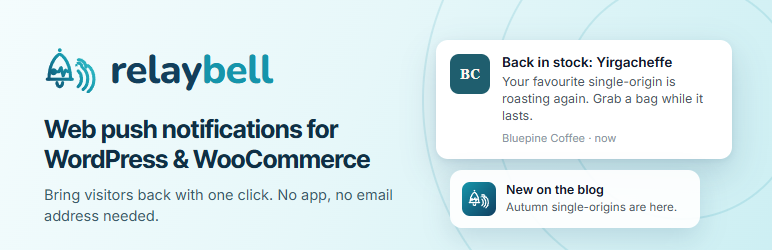
relaybell turns visitors into subscribers you can bring back with one click — no
app, and no email address needed. A notification reaches them even when your site
isn’t open, and each one can carry the product or post that this subscriber is
likely to want, picked from what they viewed, read and bought on your site.
Connect in about a minute. Then new posts go out as a push when you publish,
abandoned carts get a reminder, sold-out products tell their waitlist when they’re
back, and you see which notifications brought visitors and sales back.
What you get
- More returning visitors, without paying for every click.
- Sales you’d otherwise lose: cart reminders, back-in-stock and price-drop
alerts go out on their own. - Notifications people open: recommendations matched to each subscriber,
delivered at the hour they usually read. - Clear numbers: delivered, clicked and revenue for every notification.
Features
Grow subscribers
- One-click Connect to relaybell — sign in or create a free account, approve
your site, done. Nothing to copy or paste. - Opt-in prompt as a slide-in, bar, modal or the browser’s own prompt; shown after
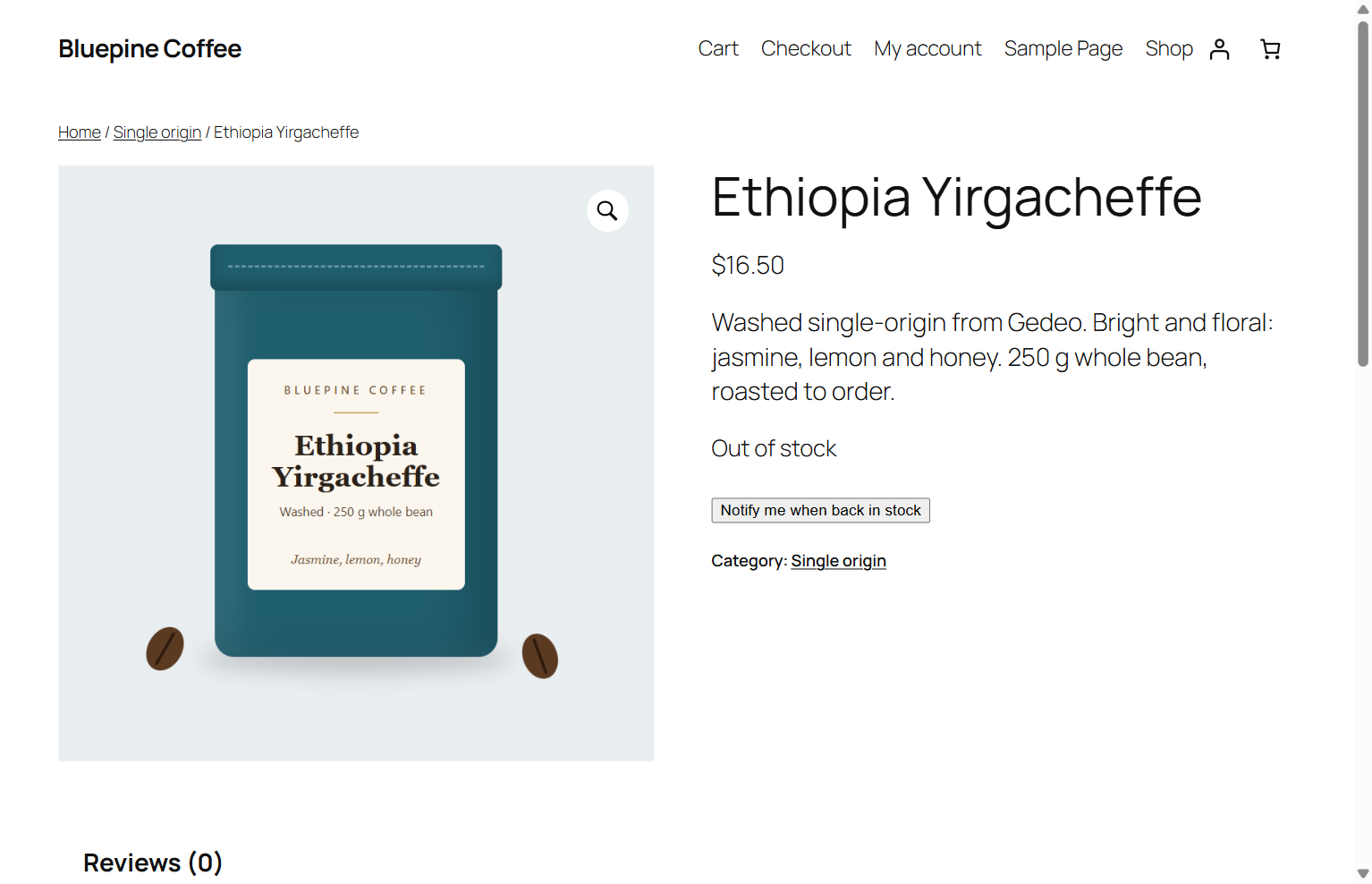
a delay, on scroll, on exit intent or on a click; A/B-test its wording. - Topics subscribers choose, and a “Notify me when back in stock” button.
- Chrome, Firefox, Edge, Opera, Samsung Internet and Brave on desktop and Android;
Safari on macOS 13+ and on iPhone/iPad (iOS 16.4+, from the Home Screen).
Personalized notifications
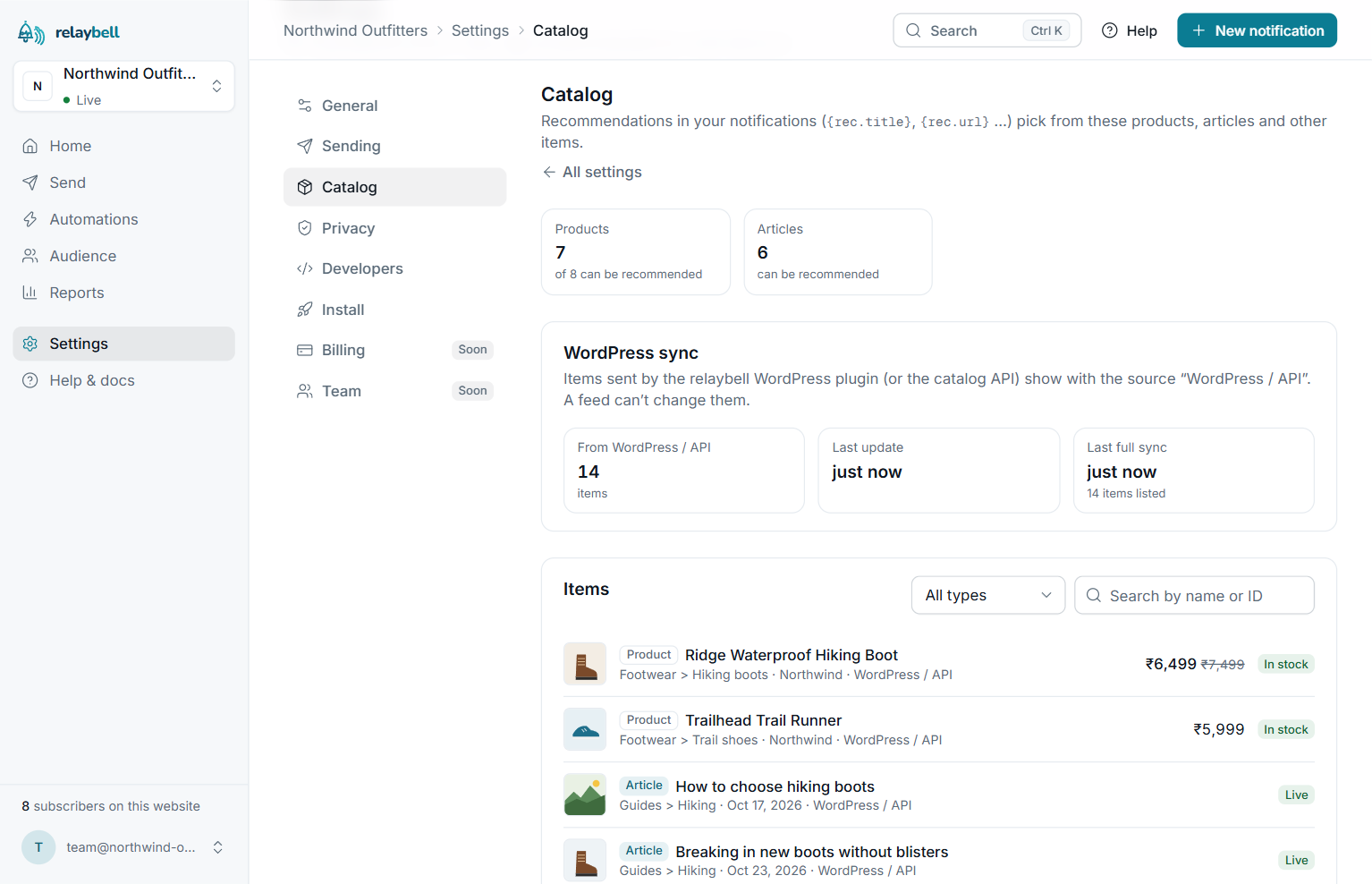
- Catalog sync: published WooCommerce products and blog posts are sent to
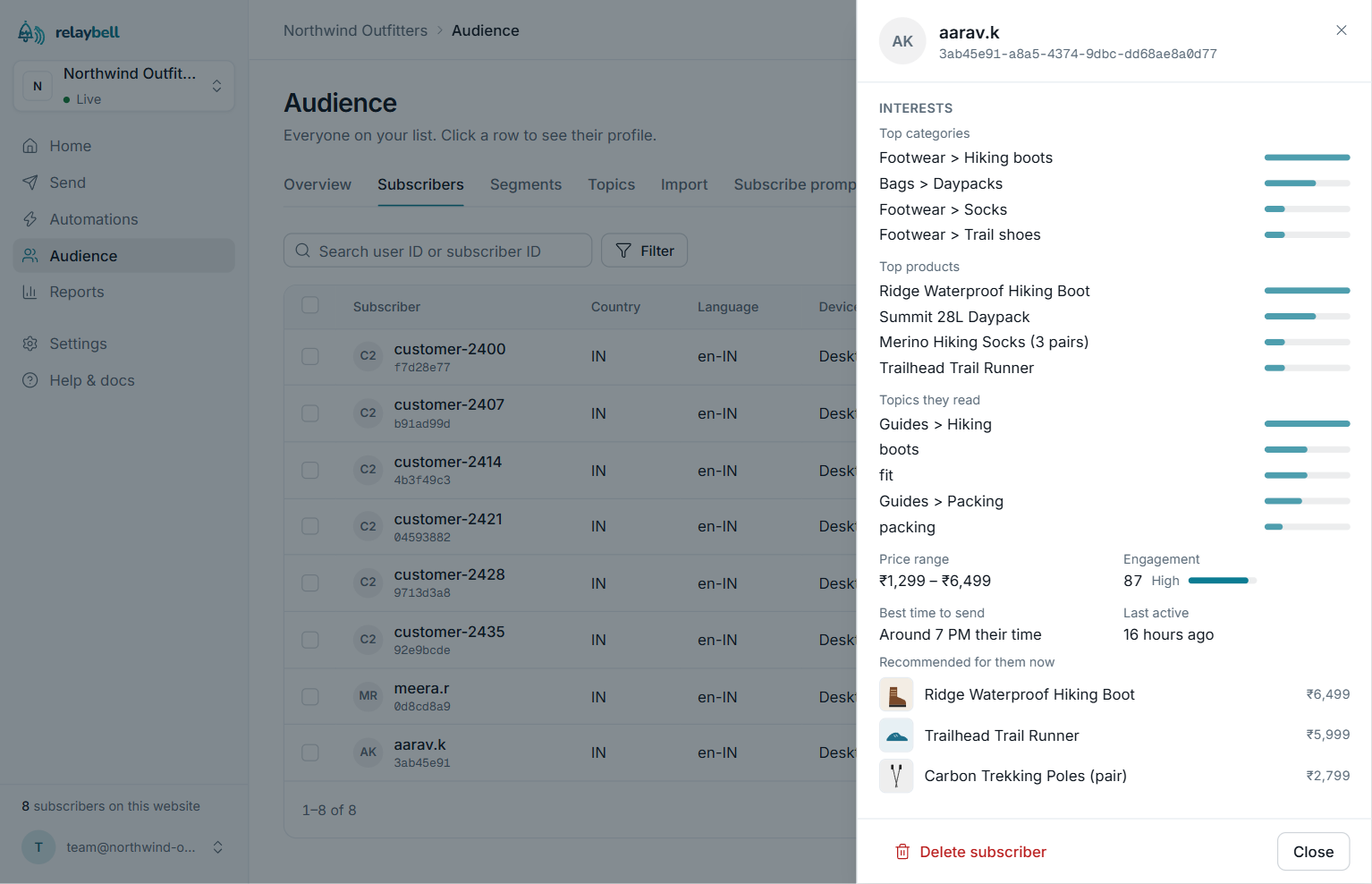
relaybell in the background and updated within about a minute of each change. - Per-subscriber interests, learned from what each subscriber views, reads,
adds to the cart and buys on your site — your own first-party data only. - Product and article recommendations: put
{rec.title},{rec.price}or
{rec.summary} in a notification and each subscriber gets their own pick.
Out-of-stock products are skipped at send time. - GA4 events with no code: relaybell can use the Google Analytics 4
e-commerce events your site already sends through Google Tag Manager or gtag.js. - Smart timing: delivery at each subscriber’s usual hour, in their time zone,
within your quiet hours and frequency cap. - Past orders (optional): import 90 days of orders for a head start.
Automations & journeys
- Push new posts on publish, with the featured image, for the post types you pick.
- Welcome series and custom journeys with delays and branches; subscribers leave
when they buy. - Automations triggered by anything a subscriber does on your site.
- Recurring campaigns, RSS-to-push, scheduling and A/B-tested notifications.
WooCommerce
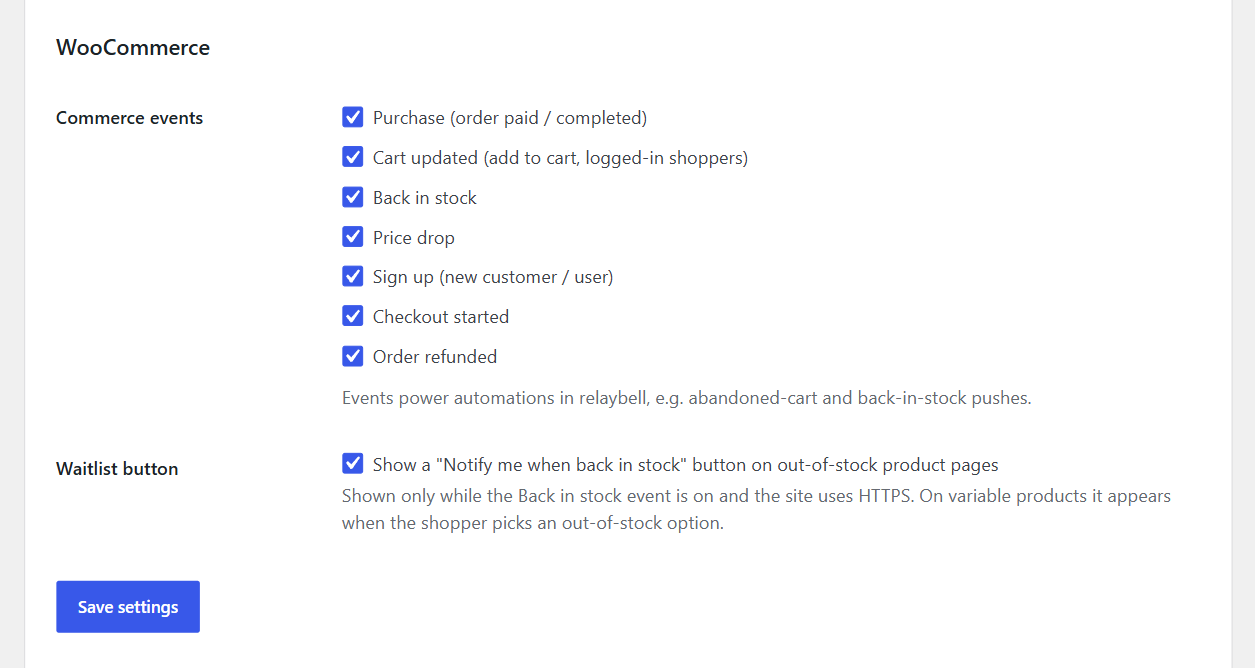
- Cart reminders for shoppers who added to cart or started checkout.
- Back in stock alerts to the product’s waitlist.
- Price drop alerts to shoppers who viewed, carted or wait-listed it.
- Order updates: thank-you and follow-up messages after purchases and refunds.
- Revenue attribution, with each order counted once.
- Classic checkout, the Checkout block and HPOS.
Analytics & delivery health
- Delivered, clicks, conversions and revenue per notification; CSV export.
- Delivery health: why a notification didn’t arrive, in plain words.
- Conversion goals with a funnel.
Privacy & control
- Consent: Google Consent Mode, or wait for your cookie banner’s consent.
- GDPR: export or erase everything held about a subscriber.
- Identity verification: logged-in visitors’ IDs are signed by your server, so
nobody can pose as a customer to get their notifications. On from the start. - A switch for each WooCommerce event and for catalog sync.
- Suggested privacy policy text for your site, under Settings Privacy.
Works with
WooCommerce, Google Tag Manager and GA4, Zapier, the relaybell REST API and
webhooks, server SDKs for Node.js and PHP, and common page-cache plugins.
Why relaybell
- Set up in about a minute: one click, no keys, no code, no theme changes.
- It checks itself: the status panel tests eight things — connection, HTTPS,
the script, the service worker, your browser, your public pages, page caches
and sign-in IDs — and says how to fix anything that isn’t right. - Never slows your site: events are sent after the page is built; the catalog
and past orders go out in small background batches; saving a post never waits
for relaybell. - Built for real hosting: the service worker is a static file in the plugin
folder (no clash with PWA plugins, any permalink setting), its address avoids
patterns hosting firewalls block, and 13 common page caches are cleared when
your set-up changes. - Secure by default: signed visitor IDs, HTTPS-only connection settings, and
the API key is cancelled when you disconnect. - Open: GPL plugin, documented REST API and webhooks, CSV export.
Your data
Nothing is sent until you connect. The catalog holds only what is public on your
site — never password-protected, private or hidden items, and no customer data.
Activity is recorded only for visitors who subscribed. Order events carry the
customer’s email (or your hashed ID) only to find their subscription — no names,
addresses or phone numbers. Past orders are sent only when you ask. Every request
is listed under “External services”.
External services
This plugin connects to relaybell (https://relaybell.com), a web push
notification service operated by Nexistech. relaybell is required: browser push
notifications can’t be stored or delivered without a push service, and this
plugin is the WordPress client for it. You need a relaybell account and API key.
1. Browser SDK (https://relaybell.com/relaybell-sdk.js)
Loaded on every front-end page once a Project ID is saved, so visitors can opt in.
On each page view it also fetches your project’s public settings (GET
https://relaybell.com/api/v1/projects/{project id}/config: push key, prompt and
on-site message settings). Browsers send their normal request data (IP address,
user agent, your site’s address). If you use them, it also reports, without
personal data, which A/B prompt version was shown (POST …/prompt-event) and
on-site message views and clicks (POST …/onsite-event).
2. Subscribing (POST https://relaybell.com/api/v1/projects/{project id}/subscriptions)
When a visitor accepts the notification prompt: the browser’s push endpoint URL
and encryption keys, the page URL, language, time zone, prompt version, and your
topics or tags (for logged-in users, their WordPress role). The service worker
re-sends a subscription the browser replaced. Topic choices made in the box
opened by RelayBell.showPreferences() are saved (GET/POST …/preferences).
For a logged-in visitor (never an administrator) who opted in, their account email
is sent as externalId, with a userHash signature (see 9). Hash it with the
relaybell_external_id filter, or turn off “Link subscribers to their account
email”.
3. Publish pushes (POST https://relaybell.com/api/v1/notifications)
With “Send on publish” on: the post’s title, first 20 words, permalink, featured
image URL and (with “Category topic”) topic. Never for password-protected posts.
4. WooCommerce events from your server (POST https://relaybell.com/api/v1/events)
With your API key, at the end of the request that caused them: purchase and
checkout.started (order id and number, total, currency, and up to 50 products:
id, name, category, unit price, quantity); order.refunded (order id and number,
amount, currency); cart.updated (product name, id and URL, cart value);
signup (user id); back_in_stock and price_drop (product name, id, URL, and
old and new price). All on by default; each can be turned off under Settings
relaybell. While “Link subscribers to their account email” is on, the
customer’s email (account email, else the billing email, or your
relaybell_external_id value) is sent with purchase, checkout.started,
cart.updated, signup and order.refunded; with it off, they’re sent without
it and cart.updated not at all. cart.updated is only sent for logged-in
shoppers. back_in_stock and price_drop never include customer data.
5. Visitor activity (POST https://relaybell.com/api/v1/projects/{project id}/events)
From the browser, only for visitors subscribed to your notifications:
waitlist.join (the “Notify me” button), product.viewed (a product page, while
Price drop or “Send my products” is on: product id, category, price, currency,
brand, page URL, image) and content.viewed (a post, while “Send my posts” is
on: post id, title, type, category, up to 10 tags, permalink), followed once by
content.read when they scrolled 75% of the page or stayed 30 seconds. Each
carries your project id, the push endpoint URL and, for a logged-in visitor with
“Link subscribers…” on, their externalId and userHash.
6. Delivery and click reports (POST https://relaybell.com/api/v1/notifications/{id}/receipt and /click)
From the service worker: the notification id, a signed token and the
subscription’s id — no page content or personal data.
7. Connecting (https://relaybell.com/connect/wordpress, POST https://relaybell.com/api/v1/connect/exchange)
Connect to relaybell sends the administrator’s browser to relaybell with your
site’s address and name, the wp-admin return address and a one-time security
value. Your server then trades the one-time code (with your site address) for
your Project ID and an API key, saved in your database.
8. Admin status and test push (https://relaybell.com/api/v1/…)
From your server, with your API key: subscriber count (GET /stats), that the
Project ID matches the key (GET /me), and when relaybell last ran on your pages
(GET /setup-status); the Plugins screen re-checks an unverified account at most
hourly. The administrator’s browser fetches the script and public settings to
check they aren’t blocked, and your server occasionally fetches your own home page
to detect a stale page cache (that request stays on your site). Subscribe this
browser subscribes the admin’s browser (see 2) and marks it as a test device
(POST /test-devices: its endpoint URL); Send test push sends a test to test
devices only (POST /test-devices/send: test title, text, home page address); a
“send test to my device” link registers that browser (POST /test-devices/claim:
the code and endpoint URL). Advanced relaybell host changes where these
requests go (https only).
9. Identity verification (GET and PUT https://relaybell.com/api/v1/identity)
Your server fetches your project’s identity secret — when you connect, when you
open Settings relaybell, and daily — and the first time asks relaybell to
accept only verified sign-in IDs (changeable in your relaybell dashboard). The
secret signs logged-in visitors’ IDs on your server and never appears in your
pages. No visitor data is sent.
10. Disconnecting (DELETE https://relaybell.com/api/v1/keys/current)
Disconnect cancels the API key one-click Connect created (only the key is
sent). A key entered by hand is left alone.
11. Catalog (POST https://relaybell.com/api/v1/catalog/items and /catalog/items/delete)
So notifications can recommend them, your server sends the public details of
published WooCommerce products (“Send my products”) and posts (“Send my posts”),
both on by default: id, title, permalink, image URL, price and sale price with
the currency, category path, brand, tags, a short plain-text summary, stock
status and publication date. Never password-protected, private, draft or hidden
items, and no customer data. WP-Cron sends them in the background, 100 per run:
everything when you connect, update the plugin, change these settings or click
Sync now, and weekly; and each product or post you publish, edit,
unpublish, trash or delete within about a minute (for the last three, only its
id). Turning a switch off removes those items from relaybell.
12. Past orders (POST https://relaybell.com/api/v1/events/import)
Only after an administrator clicks Import the last 90 days of orders: that
period’s paid orders as purchase events, 50 per background run — the details of
a live purchase (see 4), the payment date, and the customer’s email (or your
relaybell_external_id value) to find their subscription. relaybell keeps only
orders of customers who already get your notifications, never counts an order
twice, and gets no names, addresses or phone numbers.
Nothing is sent until you connect (or save a Project ID and API key manually).
Service provider: Nexistech (https://nexistech.in)
Terms of service: https://relaybell.com/terms
Privacy policy: https://relaybell.com/privacy
Data processing agreement: https://relaybell.com/dpa
Screenshots



Installation
- In your WordPress admin go to Plugins Add New, search for relaybell, then click Install Now and Activate. (Or upload the ZIP from Plugins Add New Upload Plugin.)
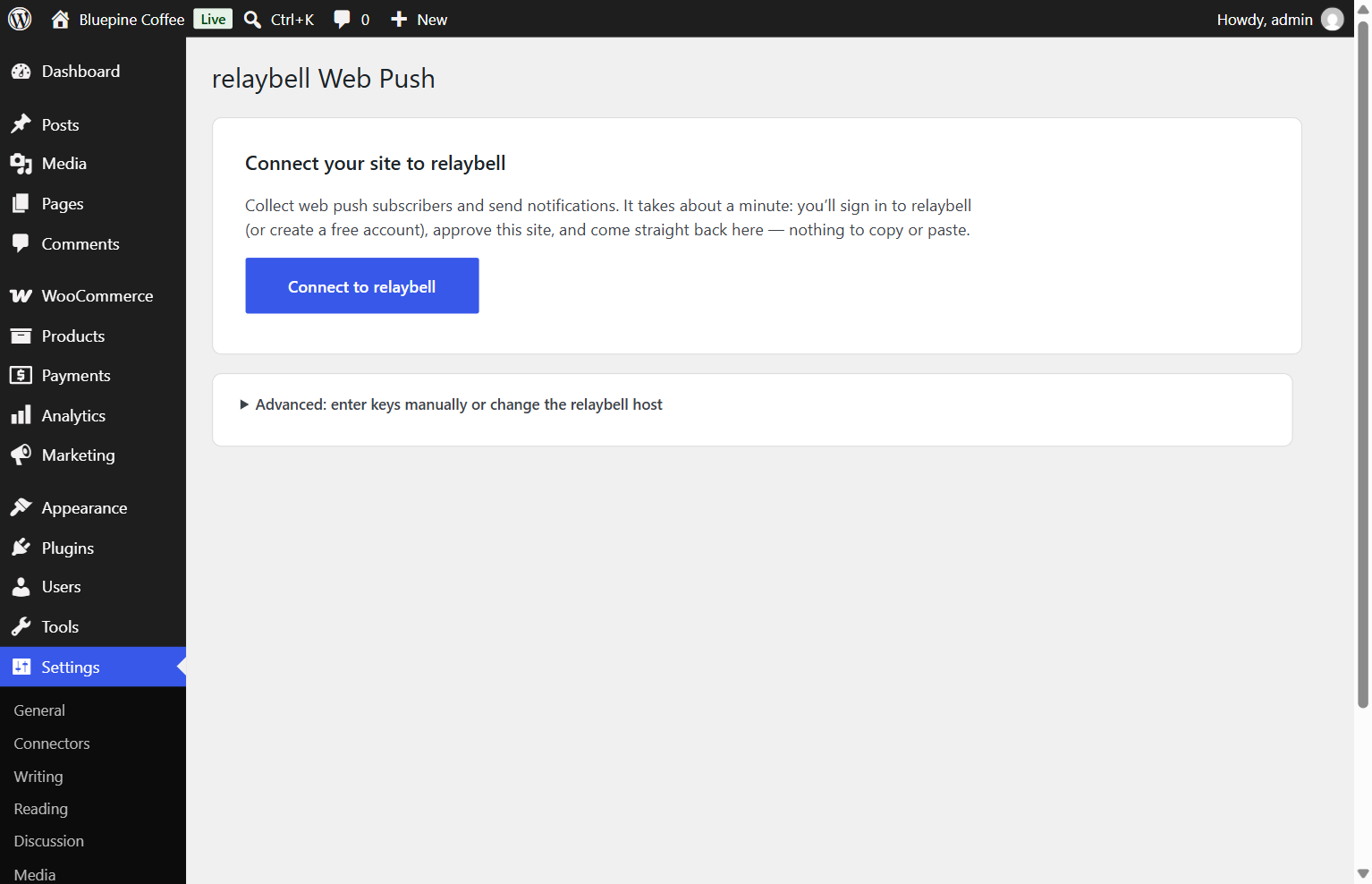
- Go to Settings relaybell and click Connect to relaybell. Sign in (or create a free account), approve your site, and you’ll land back in WordPress connected.
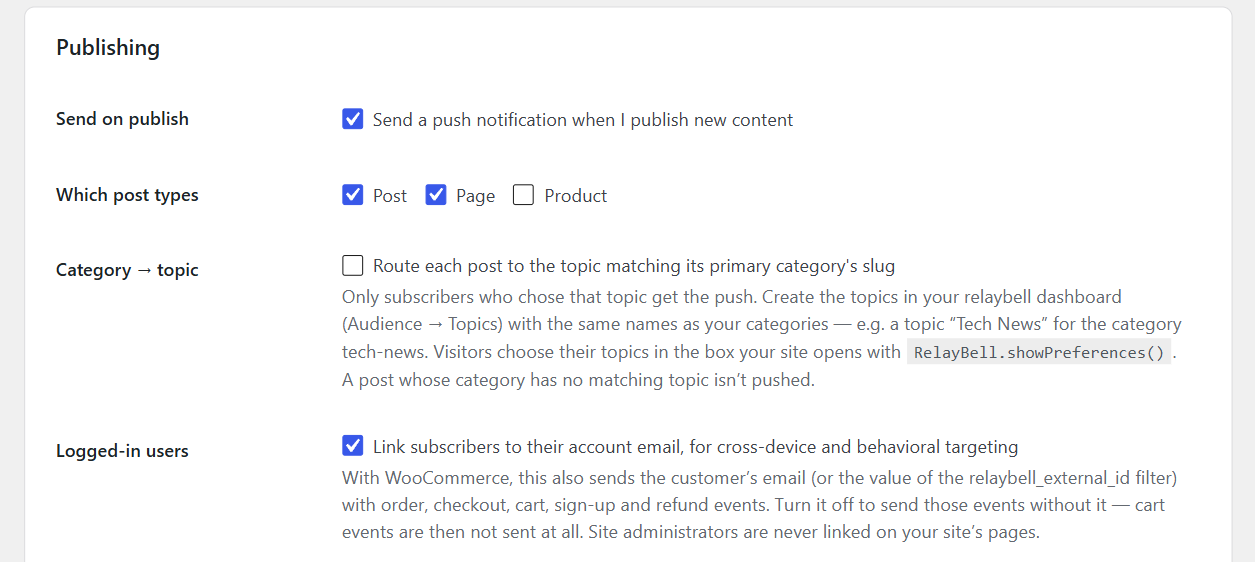
- Optionally turn on Send on publish and pick which post types push.
- Your products and posts start syncing to relaybell in the background. With WooCommerce, you can also click Import the last 90 days of orders.
Your site must use HTTPS — browsers only allow push notifications on secure sites (and on localhost for testing). The status panel tells you if anything needs attention.
The WooCommerce integration loads by itself when WooCommerce is active — there is nothing extra to set up.
FAQ
-
Do I need WooCommerce?
-
No. Without WooCommerce you get the opt-in prompt, publish-time pushes and post
recommendations. The commerce features switch on by themselves when WooCommerce
is active. -
Do subscribers need to give an email address?
-
No. Web push works from the browser subscription alone. If a user is logged in,
relaybell also binds their account email as anexternalIdfor richer targeting;
you can substitute a hashed value with therelaybell_external_idfilter. -
How do recommendations work?
-
The plugin keeps relaybell’s copy of your catalog up to date (products and posts),
and records what each subscribed visitor opens. relaybell turns that, plus their
cart adds, purchases and notification clicks, into an interest profile per
subscriber. Put{rec.title},{rec.url},{rec.price}or{rec.summary}in a
notification — or choose “Recommend a product” in the relaybell composer — and
each subscriber gets their own pick. Someone relaybell doesn’t know yet gets your
popular items. -
What exactly is sent for the catalog? Can I leave something out?
-
The public details of published products and posts: title, link, image, price,
category, brand, tags, a short summary and stock status — see “External
services” (11). Untick Send my products or Send my posts under
Settings relaybell Personalization to stop sending them (they are then
removed from relaybell). Developers can leave out single items or change what is
sent with therelaybell_catalog_itemfilter. -
Will syncing slow down my site or my edits?
-
No. Saving a post or a product only notes its id; WP-Cron sends the changes in
the background within about a minute, and the full catalog goes out 100 items per
run, picking up where it stopped if a run is interrupted. On a site with little
traffic, WP-Cron runs less often, so a large first sync can take a while — the
status on Settings relaybell shows how far it got. -
Can I recommend courses, listings or other custom post types?
-
Yes. Add your post type with the
relaybell_catalog_post_typesfilter, and use
relaybell_catalog_item_type to send it as acourseorlisting(it is an
article otherwise). -
What does “Import the last 90 days of orders” send? Is it safe to run twice?
-
The paid orders of the last 90 days, with the same details as a new order’s
purchase event. relaybell keeps only orders from customers who already get your
notifications, and never counts an order twice — not even one it already got
when it was placed — so you can run it again at any time. -
How do I send a test notification?
-
On Settings relaybell, click Subscribe this browser (allow notifications
when your browser asks), then Send test push. The test goes only to your own
browser — never to your subscribers — and appears within a few seconds. The
settings page then tells you whether it reached this browser, and what to check
if you don’t see it.If no permission pop-up appears, look for a bell icon in the address bar and
choose Allow. If notifications are blocked, the status panel explains how to
unblock them. -
The test push works, but my visitors never get my posts
-
Most often your relaybell account email isn’t verified yet. Until it is,
relaybell doesn’t send anything to your visitors — new-post pushes, campaigns
and automations are all held back — while test pushes to your own browser still
work. Click the link in the email relaybell sent when you signed up (check your
spam folder), or send it again from your relaybell dashboard. The status panel
and the Plugins screen show a red warning while this is the case.Also check that Send on publish is turned on (it is off by default) and,
if you use Category topic, that relaybell has a topic for the post’s
category. Password-protected posts are never pushed. -
I use a page cache or a CDN — do I need to do anything?
-
relaybell’s set-up is part of every page, so a cached page keeps the set-up it
was saved with. When you connect, disconnect, change the connection or update
the plugin, relaybell clears the cache of WP Rocket, LiteSpeed Cache, W3 Total
Cache, WP Super Cache, SiteGround Speed Optimizer, Breeze, Nginx Helper, Cache
Enabler, WP Fastest Cache, WP-Optimize, Hummingbird, WP Engine and Kinsta. If
your host or a CDN such as Cloudflare caches your pages too, clear that cache
yourself. The status panel warns when visitors still get an older copy, and
shows when relaybell last ran on your public pages. (Developers: other caches
can hook intorelaybell_purge_page_caches.) -
How does “Category topic” work?
-
With it on, each new post is sent only to subscribers who follow the relaybell
topic named like the post’s primary category — for example a topic “Tech News”
for the categorytech-news. Create those topics in your relaybell dashboard
(Audience Topics) first: a post whose category has no matching topic isn’t
pushed. Visitors choose their topics in the box your site opens with
RelayBell.showPreferences() (for example from a “Notification settings” link). -
The status panel says my site isn’t on HTTPS
-
Browsers only allow push notifications on HTTPS sites, plus
localhostfor
development. Enable HTTPS (most hosts offer a free certificate), and make sure
both addresses under Settings General start withhttps://. -
Connect doesn’t work on my server
-
Your server must be able to make outgoing HTTPS requests to relaybell.com. If
your host blocks that, open Advanced on the settings page and enter your
Project ID and an API key from the relaybell dashboard manually. -
Does it support HPOS (custom order tables)?
-
Yes. The plugin declares
custom_order_tablescompatibility and uses the
WooCommerce CRUD APIs throughout. -
Which hooks/filters can I use?
-
relaybell_external_id— swap the account email for a hashed id. Also applied
to the customer email sent with WooCommerce events and the past-orders import
($useris null for a guest order).relaybell_sdk_init— modify the full SDK init options. For a logged-in
visitor the plugin identified, theuserHashfor theexternalIdyou return is
added afterwards.relaybell_user_hash( $external_id )(function) — theuserHashfor an id your
own code passes to relaybell (e.g. toRelayBell.identify( id, hash )), so
relaybell accepts it while User ID verification is on.relaybell_publish_payload— modify the publish push body.relaybell_category_topic— map a post’s primary category to a relaybell
topic (its slug, or its id).relaybell_woo_event_payload— modify any commerce event body before sending.relaybell_catalog_post_types— the post types sent to the catalog as content
(default:post).relaybell_catalog_item_type— a post’s catalog type:article(default),
course,listing,productorother.relaybell_catalog_item— change a catalog item before it is sent, or return
null to leave it out.relaybell_catalog_brand_taxonomies— where a product’s brand is read from.relaybell_purge_page_caches(action) — clear a page cache or CDN relaybell
doesn’t know, whenever relaybell clears page caches.
Reviews
There are no reviews for this plugin.
Contributors & Developers
“relaybell” is open source software. The following people have contributed to this plugin.
Contributors
Translate “relaybell” into your language.
Interested in development?
Browse the code, check out the SVN repository, or subscribe to the development log by RSS.
Changelog
1.3.0
- New: personalized recommendations. Your published WooCommerce products and blog
posts are sent to relaybell’s catalog — the public details only (title, link,
image, price, category, brand, tags, a short summary, stock) — so notifications
can recommend the right product or post to each subscriber. Two switches under
Settings relaybell Personalization, both on by default. - New: the catalog is sent in the background by WP-Cron, 100 items per run,
resuming where it stopped; publishing, editing, unpublishing, trashing or
deleting a product or post, and stock changes, reach relaybell within about a
minute. Saving never waits for relaybell. A Sync now button and a status in
plain words (last full sync, items sent, last error). - New: reading activity. For subscribed visitors, single posts record
content.viewed, andcontent.readonce the reader scrolled 75% of the page or
stayed 30 seconds. - New:
product.viewednow carries the product’s category, price, currency,
brand, page address and image, and is recorded while Price drop or “Send my
products” is on. - New:
purchaseandcheckout.startednow carry the order number and the
products bought (id, name, category, price, quantity — up to 50);
order.refunded carries the order number. - New: Import the last 90 days of orders (optional, WooCommerce): past paid
orders give recommendations a head start. Only orders from customers who already
get your notifications are kept, running it again never counts an order twice,
and an imported order isn’t sent again when its status changes later. - New: suggested privacy policy text (Settings Privacy Policy guide) saying
what relaybell receives about subscribers and customers. - New: filters
relaybell_catalog_post_types,relaybell_catalog_item_type,
relaybell_catalog_item andrelaybell_catalog_brand_taxonomies. - Change: after updating, the first visit to wp-admin starts one full catalog
sync in the background. - Docs: the plugin page describes every feature, and “External services” lists
the new catalog, reading-activity and import requests.
1.2.6
- Change: the “Connect relaybell” and “account email isn’t verified” notices now
appear only on the Plugins screen, only for administrators, and can be dismissed
for good. They no longer appear on the Dashboard. Settings relaybell keeps
showing the same status.
1.2.5
- Change: the settings page’s styles and scripts are now regular files
(assets/relaybell-admin.css,assets/relaybell-admin.js,
assets/relaybell-notice.js) loaded through WordPress’s script and style
queues, instead of being printed into the page. The page works exactly as
before. - Change: the “Notify me when back in stock” button’s markup is escaped when it
is printed. - Fix: the status panel now says “1 subscriber” instead of “1 subscribers”.
- Change: the status panel checks that the relaybell script is reachable without
running it in wp-admin, and the Disconnect confirmation is part of the
settings script. - Change: the relaybell host (Advanced) must be an https:// address, and the
home-page cache check keeps TLS certificate checks on. - Change: the clean-up that runs when you delete the plugin uses prepared
database queries. It removes the same data as before. - Docs: “External services” now lists every request, including the opt-in
prompt and on-site message stats, topic preferences, test devices and
cancelling the API key on disconnect. - Docs: older changelog entries moved to
changelog.txt.
1.2.4
- Security: someone could send relaybell a logged-in customer’s email from their
own browser and then get that customer’s notifications (cart reminders and other
personal pushes). Your site now signs each logged-in visitor’s ID with a secret
only your server and relaybell know, and the plugin turns on relaybell’s User ID
verification for your project, so an ID without a valid signature is ignored.
It picks up the secret when you connect, when you open Settings relaybell, and
once a day. Nothing to set up. - New: a status row on Settings relaybell says whether visitor sign-in IDs are
verified. - New:
relaybell_user_hash()for themes and plugins that pass their own IDs to
relaybell.
Older versions are listed in changelog.txt in the plugin folder.