

Description
This plugin moves your store data from WooCommerce into FluentCart, one entity at a time, in small AJAX batches so large catalogs don’t hit PHP timeouts.
What gets migrated
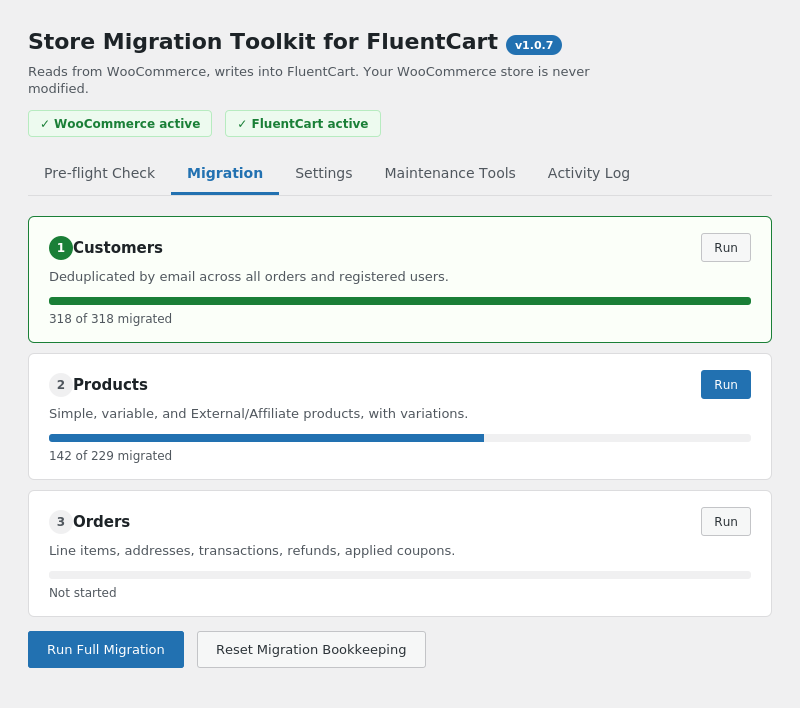
- Customers — deduplicated by email, from orders and registered users, with billing/shipping addresses.
- Products — simple and variable, with variations, pricing, stock, and featured image.
- Orders — line items, billing/shipping addresses, transactions, refunds, applied coupon codes.
- Coupons — code, type, amount, usage limits, expiry, product restrictions.
- Subscriptions — only if WooCommerce Subscriptions is active. Renewal orders are linked back to the subscription’s parent order.
- Recount & Verify — rebuilds customer lifetime value / purchase counts and coupon use counts from the orders actually migrated.
What does NOT get migrated (do these manually afterward)
- Product categories and tags — FluentCart’s category model differs structurally.
- Downloadable file attachments — re-attach under each product’s Downloadable Asset(s).
- Payment gateway credentials — reconnect Stripe/PayPal/etc. in FluentCart using the same accounts.
- Email templates — FluentCart has its own notification system.
- Order status history / WooCommerce order notes.
- Tax rate configuration — set up FluentCart’s tax classes and rates directly.
- WooCommerce Subscriptions “requires manual renewal” fine print beyond collection_method, and any bill-times cap (WooCommerce subscriptions normally run until cancelled, so
bill_timesis imported as 0/unlimited).
How it works
Each step (Customers, Products, Orders, Coupons, Subscriptions, Recount) runs as a series of small AJAX batches. A mapping table ({prefix}pxwfcm_id_map) records which WooCommerce ID became which FluentCart ID, so re-running a step skips records already migrated instead of duplicating them. A log table ({prefix}pxwfcm_log) records anything skipped or errored for review.
Run the steps in order: Customers, Products, Orders, Coupons, Subscriptions, Recount. Orders depend on Customers and Products already being migrated; Subscriptions depend on Orders; Recount depends on everything else.
This plugin does not modify WooCommerce data. It only reads from WooCommerce and writes into FluentCart.
Rehearse first
There is no dry-run mode. Test on a staging copy of your site before running against production, and take a database backup first regardless.
Requirements
- WooCommerce active on the site.
- FluentCart installed and active.
- WordPress 6.0 or newer.
- PHP 7.4 or newer.
Screenshots
Installation
- Make sure both WooCommerce and FluentCart are installed and active.
- Upload the plugin files to the
/wp-content/plugins/pxelcode-migration-toolkit-for-fluentcartdirectory, or install the plugin through the WordPress plugins screen directly. - Activate the plugin through the ‘Plugins’ screen in WordPress.
- Go to the plugin’s admin page (under the FluentCart menu, or its own top-level menu) and run the Pre-flight Check before migrating anything.
- Take a full database backup, then run the migration steps in order.
FAQ
-
Does this modify my WooCommerce store?
-
No. The plugin only reads from WooCommerce. It writes exclusively into FluentCart’s own tables.
-
Can I re-run a step if something goes wrong?
-
Yes. Every step is idempotent — already-migrated records are recognized via the internal ID map and skipped, not duplicated.
-
Is there a dry-run mode?
-
Not currently. Test on a staging copy of your site first, and take a database backup before running against production.
-
These are not migrated automatically because FluentCart’s data model differs structurally. They need to be re-created/re-attached manually in FluentCart after migration.
Reviews
There are no reviews for this plugin.
Contributors & Developers
“PxelCode Migration Toolkit for FluentCart” is open source software. The following people have contributed to this plugin.
Contributors

Translate “PxelCode Migration Toolkit for FluentCart” into your language.
Interested in development?
Browse the code, check out the SVN repository, or subscribe to the development log by RSS.
Changelog
1.0.7
- Fixed: variable-product variations with real, in-stock quantities (e.g. 5 in stock) still showed as unlimited stock even after the 1.0.6 fix. FluentCart’s purchase check only enforces a variation’s stock count when its parent product row is ALSO flagged as stock-managed — the parent flag was still being set from the raw (and often-off) WooCommerce store setting instead of following the same corrected logic as its variations. Both migration and the “Fix Stock” repair tool now roll the correct flag up to the parent.
- Fixed: “WC Migrator” under FluentCart’s own admin menu could 404 and bounce to the dashboard, because our submenu was registered before FluentCart’s own top-level menu existed (a well-known WordPress admin_menu timing issue). Now registered at a later priority so FluentCart’s menu is guaranteed to exist first. The “WC FluentCart” top-level menu item (separate from FluentCart’s menu) was unaffected and still works either way.
1.0.6
- Fixed: in-stock variable-product variations with a real WooCommerce quantity (e.g. 5 in stock) still migrated as unlimited stock — the 1.0.5 fix only forced manage_stock on for out-of-stock items, but managing_stock() itself returns false for every product when the store’s global “Manage stock” option is off, even when individual products/variations carry a real quantity. Stock resolution no longer relies on managing_stock() at all — if WooCommerce has a quantity on record, it’s now trusted and carried over.
1.0.5
- Fixed: out-of-stock products/variations migrated as unlimited stock whenever WooCommerce wasn’t quantity-tracking them (i.e. “Manage stock” off, Stock status set to Out of stock manually) — FluentCart only enforces out-of-stock when manage_stock is on, so this is now forced for out-of-stock items regardless of WooCommerce’s tracking setting.
- Fixed: variable products whose variations were entirely out of stock and hidden from the catalog (a common WooCommerce setting) fell through to a “no variations” fallback that stored $0 as the price and unlimited stock. Variations are now fetched directly (not filtered by catalog visibility), so out-of-stock variations migrate with their real price and correct stock status.
- Added: “Fix Stock” maintenance tool to repair products/variations already migrated before this fix, without re-running the full migration.
1.0.3
- Maintenance release.
1.0.2
- Renamed from “Store Migration Toolkit for FluentCart” (slug store-migration-toolkit-for-fluentcart) to “PxelCode Migration Toolkit for FluentCart” (slug pxelcode-migration-toolkit-for-fluentcart) per WordPress.org trademark-naming guidelines — the display name now leads with a distinctive term instead of a generic descriptive phrase. This is a new slug, not an in-place update: deactivate/delete the old plugin and install this one.
1.0.1
- Security/compliance hardening: replaced mt_rand() with wp_rand() in UUID generation, escaped an exception message that could carry unescaped output, and guarded set_time_limit() with a function_exists() check.
- Documented and justified direct-database-query usage against the plugin’s own fixed-name tables to satisfy Plugin Check.
1.0.0
- Initial release. Migrates customers, products, orders, coupons, and subscriptions from a WooCommerce store into FluentCart, with a read-only Pre-flight Check to scan for likely problem spots before migrating.