

Description
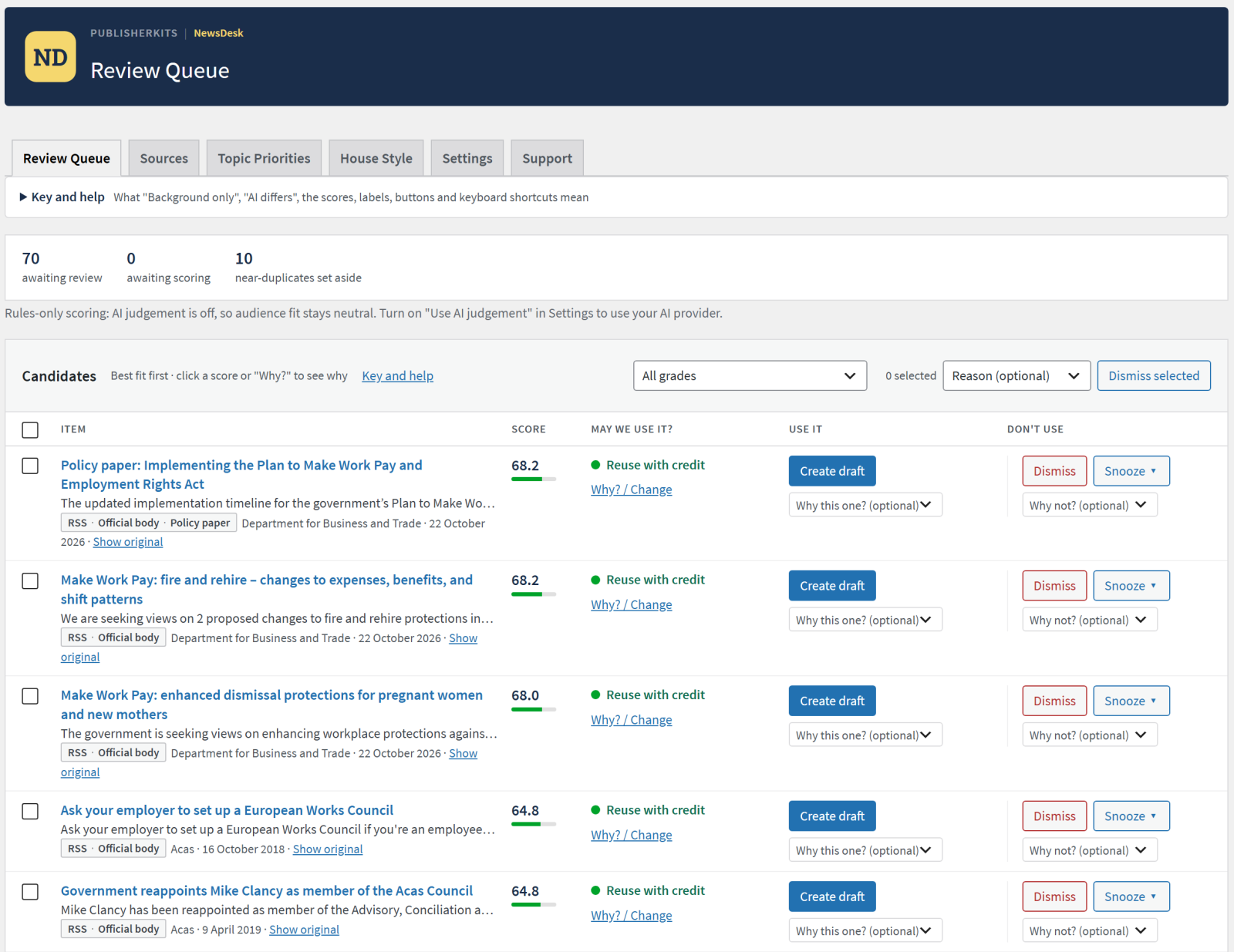
NewsDesk Manager is an editorial inbox for news and trade publishers. It collects the press releases, newsroom feeds and official announcements your site may republish, scores each one against your audience and interests, and gives your editor one ranked queue to work through. Nothing is ever published on its own: the editor decides, and NewsDesk prepares a WordPress draft.
Sources you are allowed to use
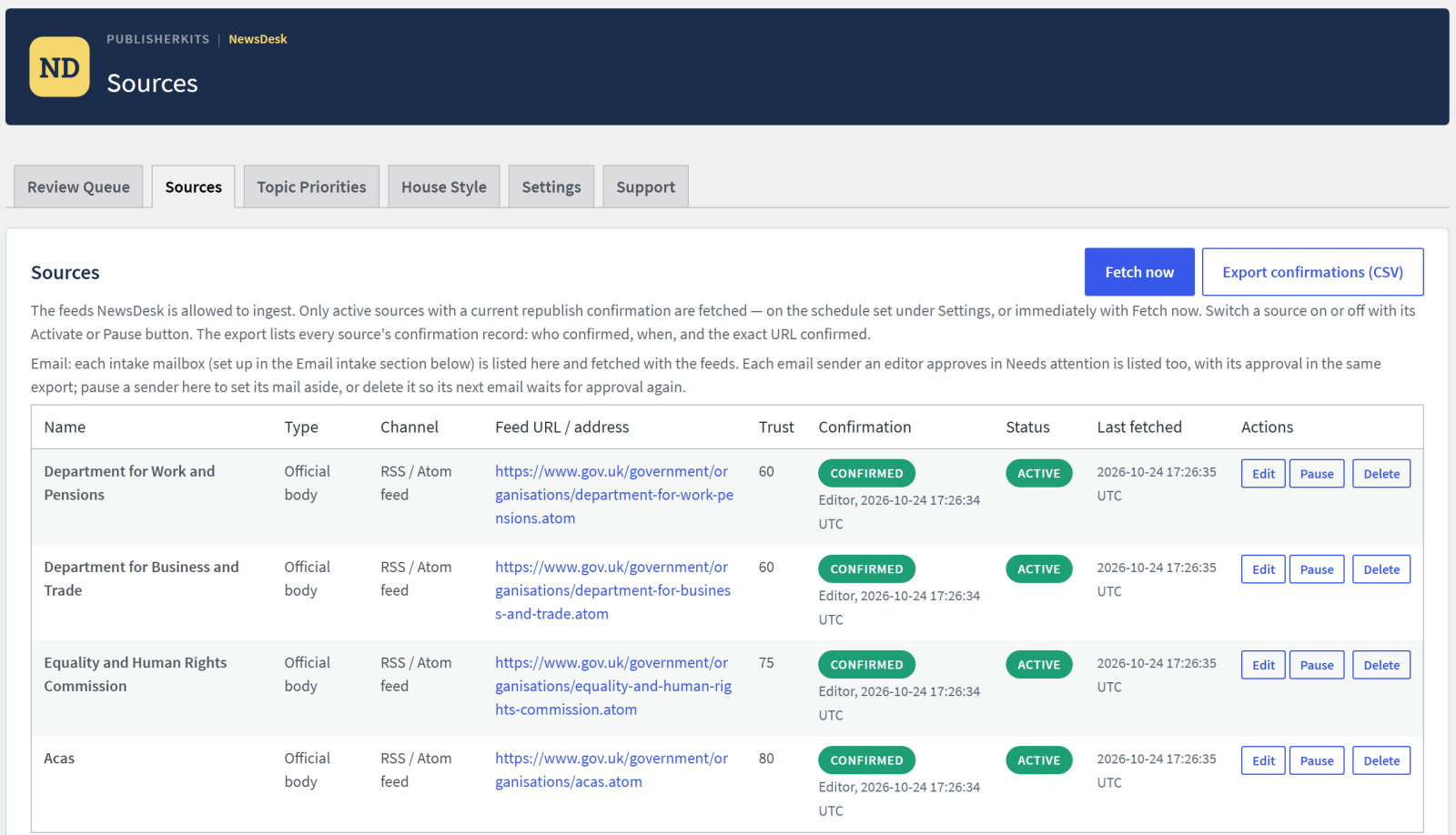
- RSS and newsroom feeds: press release wires, company newsrooms, official bodies, trade associations and partner feeds.
- Email: a dedicated mailbox read over IMAP. Mail from a new sender waits in Needs attention until an editor approves the sender.
- Every source needs a recorded republish confirmation before anything is fetched.
Reuse rights on every item
Every candidate is graded Direct reuse, Reuse with credit, Background only or Off limits, with the reasons shown. The grade decides what a draft may contain: a Background only item never has its text copied, and an Off limits item cannot be drafted. Embargoed items are held until their release time. Copies of the same release sent to several addresses are folded into one.
A ranked review queue
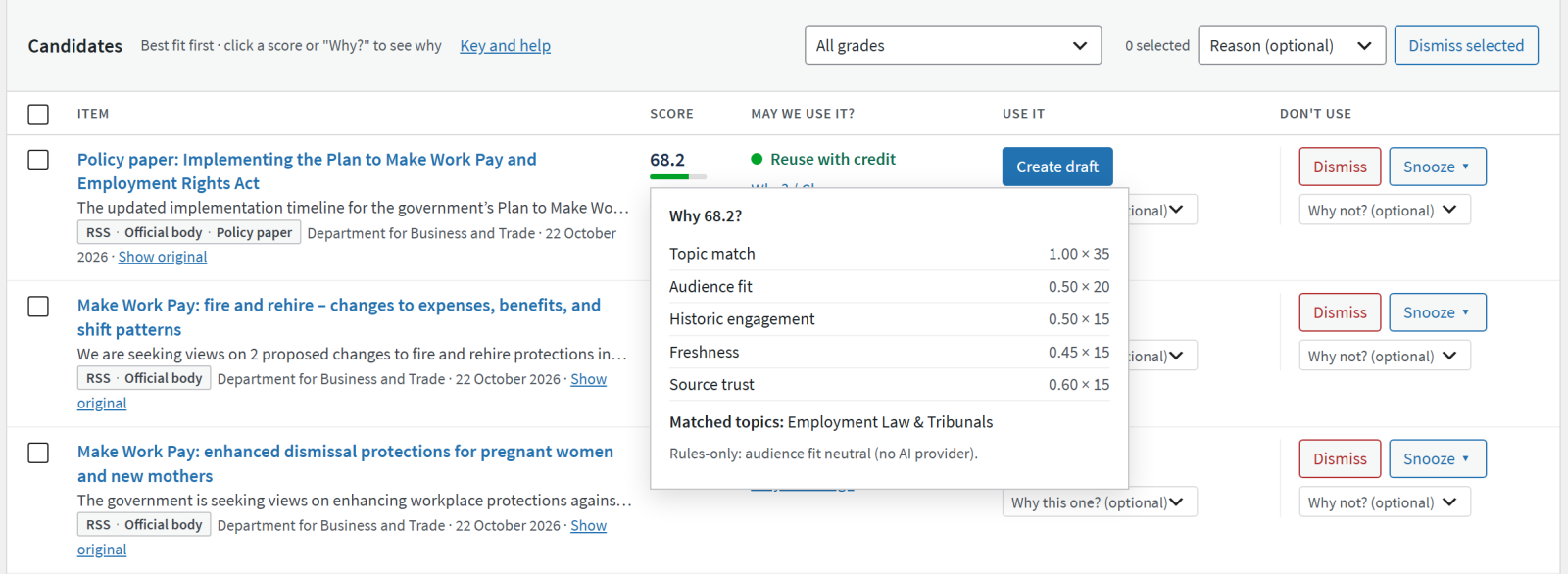
Items are scored on topic match, audience fit, your site’s past engagement, freshness and source trust, with the breakdown one click away. Editors create a draft, dismiss or snooze, and every decision is recorded on your site so you can see what your desk prefers.
Drafts ready to edit
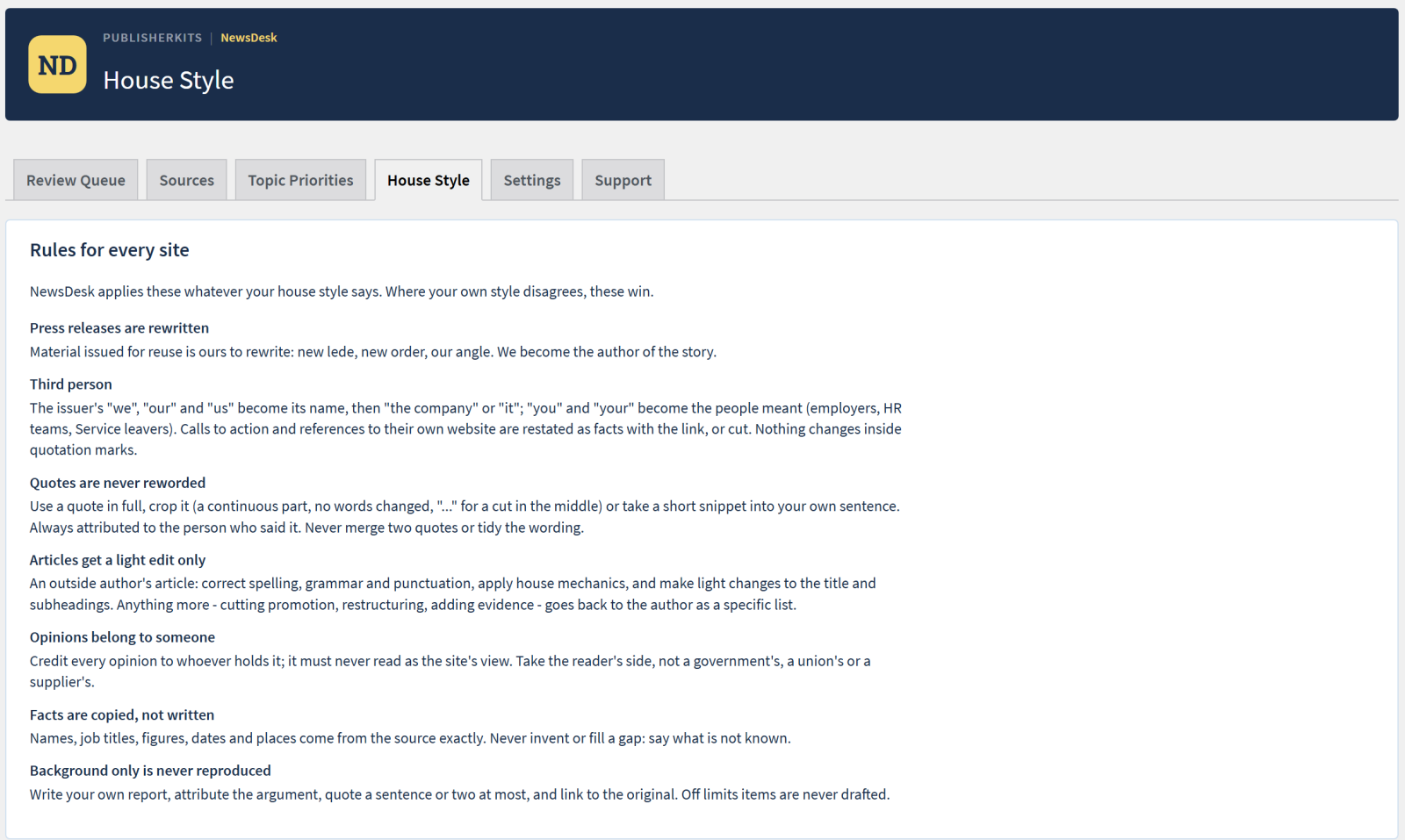
Create draft makes a WordPress draft with the source text, the credit, a link to the original and provenance details. Summary-only feed items are read in full from the source’s own website (robots.txt respected). Images that came with an item are listed with their clearance, and added to the Media Library only when an editor chooses one. A House Style tab holds your site’s style rules, shown beside every draft.
AI optional
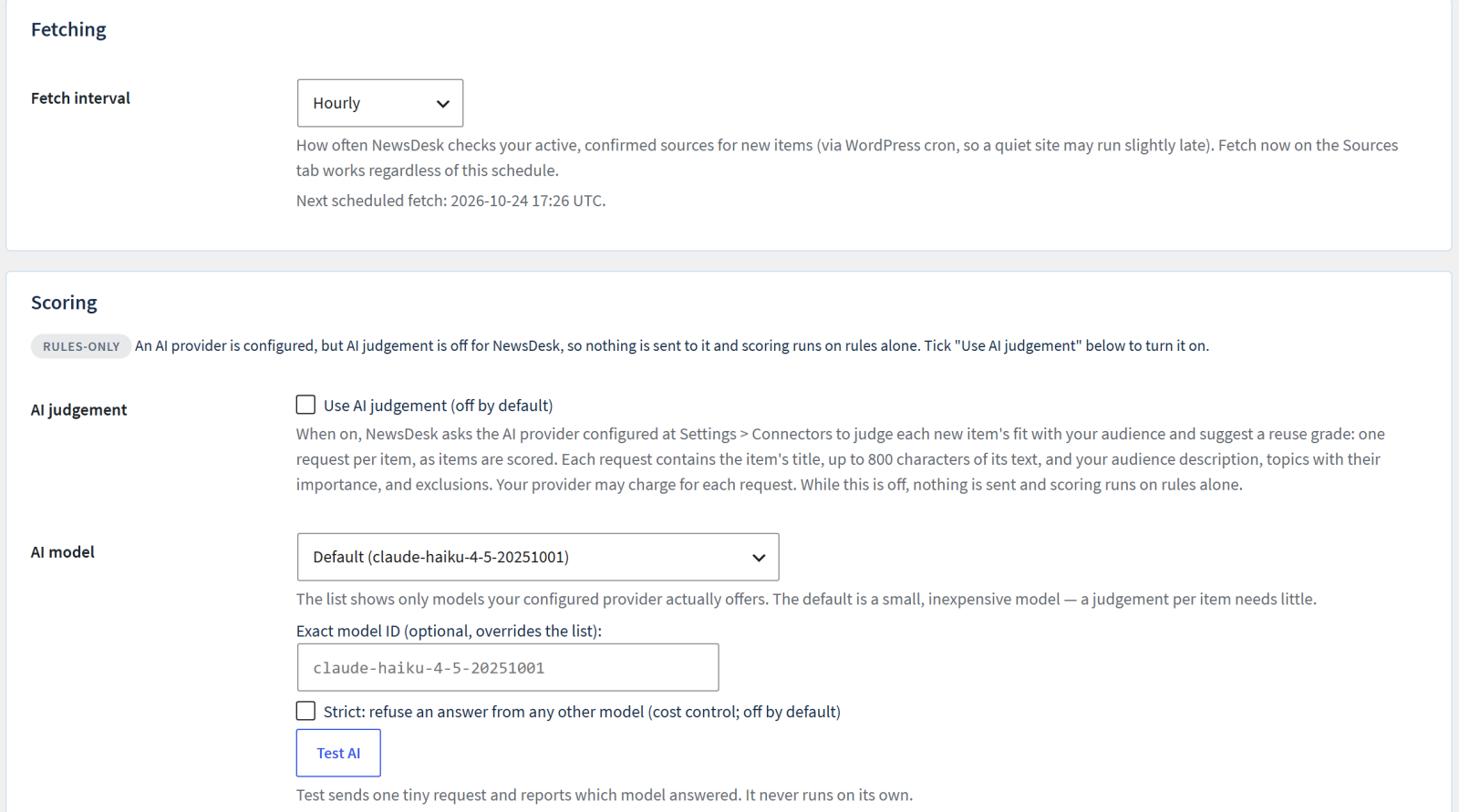
NewsDesk works with no AI at all: scoring falls back to rules and says so. On WordPress 7.0 or later, with an AI provider configured at Settings > Connectors, you can switch on “Use AI judgement” in NewsDesk Settings (off by default) and NewsDesk uses the WordPress AI Client to judge audience fit and suggest a reuse grade. NewsDesk stores no AI key of its own.
PublisherKits Site Profile
If your site has a PublisherKits Site Profile, NewsDesk reads your topics, audience and exclusions from it. Without one, describe your interests on NewsDesk’s own Interests tab.
NewsDesk Manager Pro is a separate paid version that adds AI drafting to your house style with every quote and figure checked against the source, combining several items into one story, several mailboxes and AI sorting of new senders. Everything described above is in this free plugin and is not time-limited.
External services
NewsDesk contacts the services below only as described. It never sends your readers’ or subscribers’ data anywhere.
1. News feeds you register
The RSS or newsroom feeds you add, fetched through the WordPress HTTP API on the schedule set in Settings, only after you complete each source’s recorded republish confirmation. Each feed is governed by its publisher’s terms.
2. Your intake mailbox (optional)
Only if you connect one. NewsDesk logs in to the IMAP server you enter (encrypted connection, certificate checked) on the fetch schedule, on Fetch now and on Test connection, sending only the username and password, to that server only. It reads message headers and text and changes nothing in the mailbox. The password is stored encrypted with a key from your wp-config.php secret keys. Links in messages are never opened, remote images are never loaded and attachments are never downloaded.
3. Full articles and images from the source’s own website
When a feed item has only a summary, NewsDesk requests that one page from the address the feed gave, only on the source’s own website, after checking its robots.txt, identifying itself as PublisherKits-NewsDesk with your site address. For GOV.UK items it uses the public GOV.UK Content API (https://www.gov.uk/api/content/…). Terms: https://www.gov.uk/help/terms-conditions. This can be switched off per source. Images are downloaded only when an editor clicks “Use this image”, from the address the source published (or from your own mailbox for email). Draft previews of feed images load in your browser from the source’s website without a referrer.
4. Your AI provider, via the WordPress AI Client (optional)
On WordPress 7.0 or later with a provider configured at Settings > Connectors, NewsDesk asks the WordPress AI Client to send each item being scored to that provider: its title and the first 800 characters of its text, with your interests and their importance, audience description and exclusions. The answer is a fit judgement and a suggested reuse grade. Nothing is sent unless an administrator ticks “Use AI judgement” in NewsDesk Settings (off by default); then it happens once per scored item. Test AI sends one tiny request when clicked. NewsDesk stores no AI key; removing the provider stops all calls. With the PublisherKits Content Classifier plugin active, topic sorting sends the title and first 1,500 characters to that plugin’s provider under its own disclosures; otherwise sorting runs on your server. In NewsDesk Manager Pro only (not part of this plugin), an AI draft sends one item (title, source, date, link, up to 16,000 characters) with your house style when an editor asks for it.
The data is governed by your provider’s terms. For Anthropic, the default model: https://www.anthropic.com/legal/consumer-terms and https://www.anthropic.com/legal/privacy
5. PublisherKits Support Service (optional help assistant)
The Help button opens a support assistant backed by the PublisherKits support service at https://bwtlsupport.com/ (Black and White Trading Ltd). Nothing is sent until an administrator opens it and accepts its privacy notice. With an AI provider configured on your site, the assistant tries that provider first: your question goes to your provider, and the service is asked only for documentation matched to your installed version (no question or chat text is sent to it). If that local answer fails and your site is authorised to use the service, the assistant automatically falls back to the service, and your question and recent chat history are then sent to it as well. Without an AI provider, the service answers within a monthly allowance.
Sent with each request: your site address (to authorise it and apply the fair-use limit; a derived value is kept against a monthly counter for two months), plugin versions, the admin screen, a short list of non-sensitive counts (sources, channels, whether the AI judge is on and its model preference), support tier and question category, and the question and chat history (used to answer, not retained). The versions, diagnostics and response timings are kept only as aggregated daily counts. Press releases, drafts, passwords and keys are never sent. Only if you click “Send to support” are the transcript, diagnostics and the email you give kept so a person can reply.
Terms: https://publisherkits.com/terms/ Privacy: https://publisherkits.com/privacy-policy/
6. Freemius (licensing and optional usage data)
The Freemius SDK manages licences and updates for the paid version. On activation it asks whether you want to share basic site data (site address, WordPress, PHP and plugin versions, admin email) with Freemius. Nothing is sent unless you opt in, and you can opt out from the plugin’s Account page.
Terms: https://freemius.com/terms/ Privacy: https://freemius.com/privacy/
Screenshots
Installation
- Install and activate the plugin from Plugins > Add New, or upload the zip.
- Open PublisherKits > NewsDesk.
- On the Sources tab, add a feed and complete its republish confirmation, or connect an intake mailbox.
- Set your interests on the Interests tab (or Topic Priorities, with a Site Profile) and your style on the House Style tab.
- Click Fetch now, or wait for the scheduled fetch. New items appear on the Queue tab.
FAQ
-
Does NewsDesk publish anything automatically?
-
No. It only creates drafts when an editor asks. Publishing is always a person’s decision.
-
Do I need an AI provider?
-
No. Without one, scoring runs on rules and the screens say so. With WordPress 7.0 or later and a provider configured at Settings > Connectors, you can switch on “Use AI judgement” in NewsDesk Settings to add an AI judgement of audience fit. It is off until you do.
-
Will it change my mailbox?
-
No. NewsDesk reads mail without deleting, moving or marking it as read. Links in messages are never opened, remote images are never loaded and attachments are never downloaded.
-
Which mail services work?
-
Any mailbox reachable over IMAP with a password, including Google Workspace with an app password. Microsoft 365 does not allow password sign-in: forward its mail to a mailbox on your web host.
-
What happens to my data if I delete the plugin?
-
By default your settings, sources, confirmations and decisions are kept, so a reinstall picks up where you left off. Tick “Delete all plugin data when uninstalling” in Settings to remove them.
Reviews
There are no reviews for this plugin.
Contributors & Developers
“PublisherKits NewsDesk Manager” is open source software. The following people have contributed to this plugin.
Contributors
Translate “PublisherKits NewsDesk Manager” into your language.
Interested in development?
Browse the code, check out the SVN repository, or subscribe to the development log by RSS.
Changelog
1.1.0 – 2026-10-24
- Changed: AI judgement is now an explicit choice. With an AI provider configured at Settings > Connectors, NewsDesk sends nothing to it until you tick “Use AI judgement” in NewsDesk Settings (off by default). The setting says exactly what each request contains. If you used AI judgement before, tick the box once to keep it.
- Fixed: the Help assistant’s privacy notice, the Support settings and this readme now say that when your site’s own AI cannot answer and the site is authorised for the PublisherKits support service, the assistant falls back to that service and sends it your question and recent chat history.
- Fixed: on the PublisherKits Site Profile, tick-box questions that sit inside another question (such as which sources you have, or reader seniority) now save; previously those answers were lost on save.
- Improved: settings forms read only their own fields, never the whole request, and the Support settings no longer strip a character from saved values.
1.0.1 – 2026-10-15
- Updated Freemius SDK to the latest version.
1.0.0 – 2026-10-01
- First public release.
- Intake: RSS and newsroom feeds, and a dedicated mailbox read over IMAP (never deleting, moving or marking mail as read). Every source needs a recorded republish confirmation before anything is fetched; mail from a new sender waits in Needs attention until an editor approves the sender.
- Reuse rights: every item is graded Direct reuse, Reuse with credit, Background only or Off limits, with the reasons shown, and the grade decides what a draft may contain. Embargoed items are held until their release time; duplicate copies of a release are folded into one.
- Review queue: items ranked on topic match, audience fit, past engagement, freshness and source trust, with the breakdown one click away. Create draft, dismiss or snooze; every decision is recorded on your site.
- Drafts: a WordPress draft with the source text, credit, link to the original and provenance. Summary-only feed items are read in full from the source’s own site (robots.txt respected); images are listed with their clearance and imported only when an editor chooses one.
- House Style tab, shown beside every draft. Reads your PublisherKits Site Profile when the site has one.
- Optional AI judgement of audience fit and reuse grade through the WordPress AI Client (WordPress 7.0+); without a provider, scoring runs on rules and says so.