
Description
When a shop in the EU announces a price reduction, the prior price it shows must be the lowest price applied during at least the 30 days before the reduction (Price Indication Directive 98/6/EC, Art. 6a, added by the “Omnibus” Directive (EU) 2019/2161).
PN Scripts Price History for Discounts records every price change of your products and variations, works out that lowest prior price and prints it under the price:
Lowest price in the 30 days before the discount: €21.00
It is built around one promise: if the price history cannot prove the number, the plugin shows nothing. No guesses, no “current price” fallbacks.
Records every price change
- Simple products, external products and each variation separately, regular and sale price, including the sale schedule.
- Every way a price is saved: product editor, quick edit, bulk edit, CSV import, REST API, WP-CLI, WooCommerce’s scheduled sale start and end, and code that calls
$product->save(). Price fields written directly to the database by other software are picked up at the end of the request. - Stored in its own database table (not in posts or post meta), only when the price actually changes. A record takes about 210 bytes with its indexes (50,000 records ≈ 10 MB, measured on MySQL 8.0); the Tools tab shows the table size.
- A background job (Action Scheduler) records the starting prices of your catalogue after installation. No catalogue scans on page load.
- Keeps 90 days of history by default (configurable, minimum 31) and never deletes prices that a running discount still needs.
Calculates the prior price the way the rules describe it
- The period ends when the current discount started, not today.
- Progressive discounts (lowering the sale price again) keep the start of the first reduction, so the prior price does not drift down to the previous sale price.
- Every price in force during the period counts, including earlier promotions and a lower regular price.
- The period is counted in calendar days in your shop’s time zone and is never shorter than 30 days.
- New products: hide the notice (strict, default) or, where your country allows a shorter period, use the lowest price since launch.
- Perishable goods: optional exemption per product or per category, off by default.
- Prices are shown with or without tax exactly like your shop shows its prices.
- History gaps (the plugin was inactive, a price was changed outside WooCommerce) are detected and make the result “unknown”.
Shows it in classic and block themes
- Product pages, shop and category pages, related products and product blocks (the Product Price block and product collections in block themes such as Twenty Twenty-Five).
- The selected variation of a variable product.
- Anywhere else with the shortcode
[pnscripts_price_history]or[pnscripts_price_history id="123"]. - Your own wording with
{price},{days}and{date}placeholders, or the translated default.
Brings your existing history
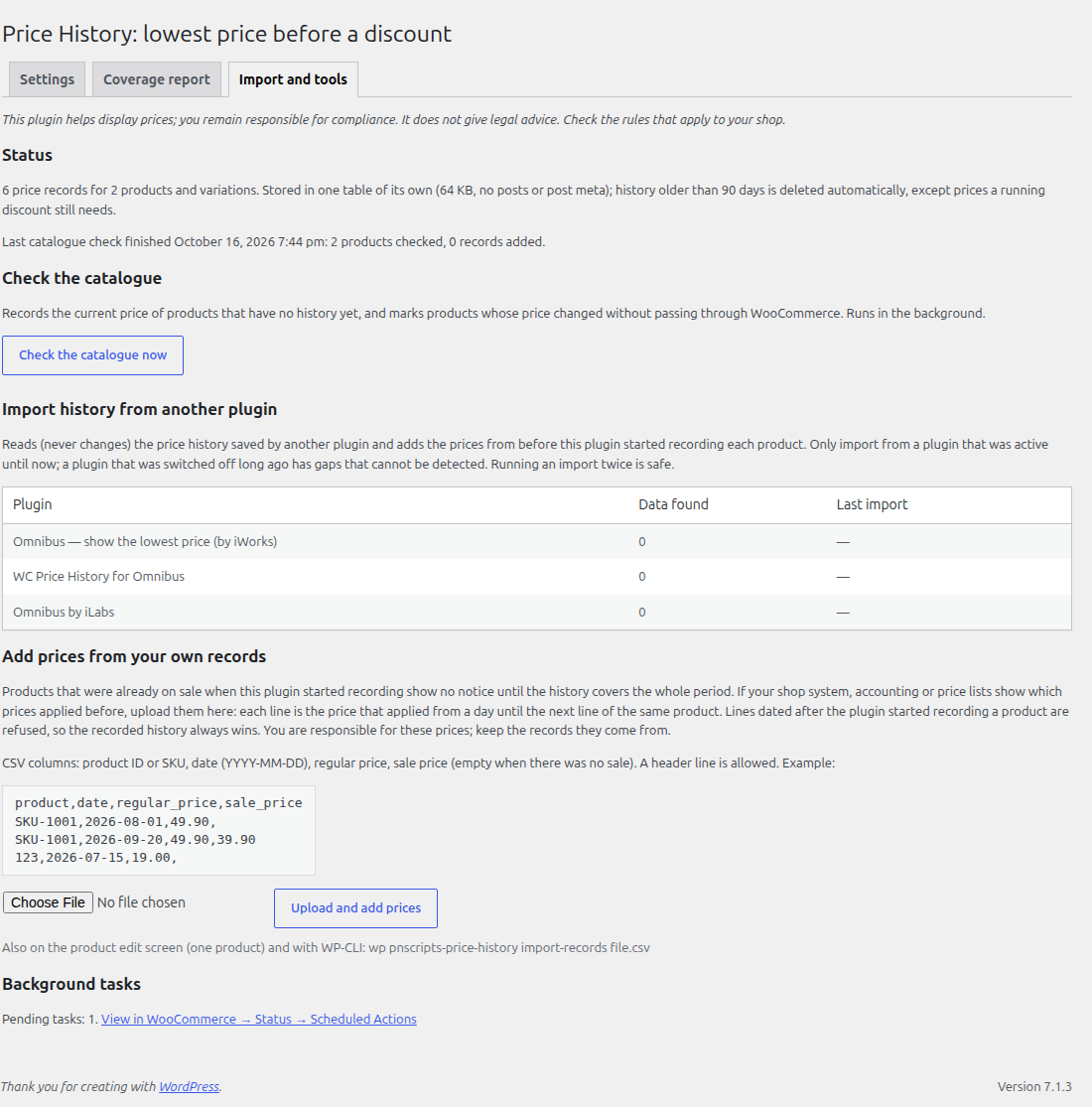
One-click, read-only import of the price history saved by Omnibus — show the lowest price (iWorks), WC Price History for Omnibus and Omnibus by iLabs (separate plugins by other authors). Imported prices only fill the time before this plugin started recording.
Day one, even mid-sale
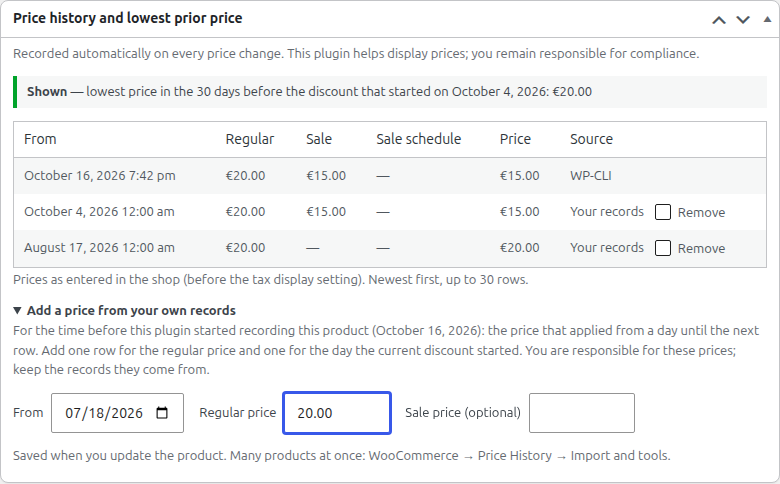
Products that were already on sale when you installed the plugin normally show nothing until 30 days of history exist. If your shop system, accounting or price lists show the earlier prices, add them from your own records: on the product screen, as a CSV upload (product ID or SKU, date, regular price, sale price) or with WP-CLI. They only fill the time before the plugin’s own first record, never overwrite it, and are labelled “Your records” in the history.
Admin tools
- Settings under WooCommerce Price History, with rule presets (EU strict, Bulgaria, Germany, Poland, custom).
- Coverage report: every product and variation on sale, the prior price shown, or why nothing is shown.
- A price history table and the computed prior price on the product edit screen.
- WP-CLI:
wp pnscripts-price-history reference|history|backfill|import|prune.
Compatibility
- WooCommerce High-Performance Order Storage (HPOS) and the Cart and Checkout blocks: declared compatible (the plugin does not touch orders or checkout).
- Multisite: each site keeps its own history.
- Translations included: Bulgarian, Polish, German.
Important
This plugin helps display prices; you remain responsible for compliance. It does not give legal advice and cannot know every national rule. The presets are starting points; check the rules of the countries you sell to.
Privacy
The plugin stores product prices only. It stores no personal data, sets no cookies and makes no external requests.
Screenshots


Installation
- Install and activate WooCommerce 9.0 or newer.
- Upload the
pnscripts-price-historyfolder to/wp-content/plugins/or install the plugin from the Plugins screen, then activate it. - Open WooCommerce Price History, choose a preset and check the display options.
- Optional: on the Import and tools tab, import the history of another lowest-price plugin you used before.
- Wait: for products that were already on sale when you installed the plugin, the notice appears once the history covers the whole period. The Coverage report tab tells you, product by product.
FAQ
-
Is this plugin enough to comply with the Omnibus Directive?
-
No plugin can promise that. It records prices and shows the lowest prior price according to the rules you configure; you remain responsible for your prices, your promotions and how you announce them. This FAQ is not legal advice.
-
Why is no notice shown for some discounted products?
-
Because the history cannot prove the number yet: the product was already on sale when recording started, it was launched recently and your rules hide the notice for new products, or prices were changed while the plugin was inactive. The Coverage report shows the reason for every product.
-
My products were already on sale when I installed the plugin. Do I have to wait 30 days?
-
Not if you know the earlier prices. Import them from another lowest-price plugin, or add them from your own records (product screen, CSV upload under WooCommerce Price History Import and tools, or
wp pnscripts-price-history import-records file.csv): one line for the regular price from a day at least 30 days before the discount, one line for the day the discount started. You are responsible for these prices, so keep the records they come from. -
Will it fill my database?
-
No. Prices are stored in one table of the plugin’s own, one row only when a price really changes (not on every save or page view), and rows older than the retention period (90 days by default) are deleted automatically, except those a running discount still needs. Nothing is written to posts or post meta. For scale: 50,000 price changes take about 10 MB (MySQL 8.0).
-
Does it catch prices changed by bulk editors and imports?
-
Yes, when they save through WooCommerce (product editor, quick and bulk edit, CSV import, REST API, WP-CLI, spreadsheet-style editors that call WooCommerce). Prices written straight into the database by other software are detected at the end of the request, and the “Check the catalogue” tool finds changes that bypassed WordPress entirely; such gaps make the notice disappear instead of showing a wrong number.
-
Which price does it use with role or wholesale pricing plugins?
-
The product’s own regular and sale prices as saved in WooCommerce. Prices that a plugin calculates on the fly for a customer group are not part of the history; if your shop shows such a price as a discount, the notice is hidden for it (“a discount that is not in the recorded prices”).
-
What happens to a progressive discount?
-
If you lower a sale price again without ending the sale, the period still ends when the first reduction started, so the notice keeps the price from before the first reduction.
-
Are earlier promotions counted?
-
Yes. Every price that was in force during the period counts, including an earlier sale.
-
Does it show prices with or without tax?
-
The same way as your shop: it follows WooCommerce’s “Display prices in the shop” setting. Prices are stored as entered, so after a change of the tax rates (when prices are entered without tax or shown without tax), of “Prices entered with tax” or of “Enable taxes”, and after a change of the shop currency, the notice is hidden until the whole period lies after the change.
-
Does it work with variable products?
-
Yes. Each variation has its own history and its own prior price. The notice appears when a shopper selects a variation. Price ranges of the parent product carry no notice.
-
Does it change the sale badge or the struck-through price?
-
No. The free plugin adds the notice only.
-
Can I place the notice somewhere else?
-
Use the shortcode
[pnscripts_price_history]on a product page or[pnscripts_price_history id="123"]anywhere, and switch off the automatic notice on product pages if you want only the shortcode. -
Does it slow down my shop?
-
Prices are written only when they change, reads use an indexed table and results are cached. The catalogue is processed in the background with Action Scheduler.
-
What is removed when I delete the plugin?
-
Nothing, unless you tick “Delete the price history and settings when the plugin is deleted” in the settings. Keeping the history is the safer default.
-
Which plugins can I import from?
-
Omnibus — show the lowest price (iWorks), WC Price History for Omnibus, and Omnibus by iLabs. The import only reads their data.
Reviews
There are no reviews for this plugin.
Contributors & Developers
“PN Scripts Price History for Discounts” is open source software. The following people have contributed to this plugin.
Contributors
Translate “PN Scripts Price History for Discounts” into your language.
Interested in development?
Browse the code, check out the SVN repository, or subscribe to the development log by RSS.
Changelog
1.1.0
- New: add prices from your own records (product screen, CSV upload, WP-CLI) so products that were already on sale at installation can show a provable notice on day one. Stored like imported history: only before the plugin’s own records, never over them.
- New: the Tools tab shows the size of the history table and the retention period.
- WooCommerce tested up to 11.2; Bulgarian, German and Polish translations updated.
1.0.3
- Renamed to PN Scripts Price History for Discounts (slug and text domain
pnscripts-price-history) after the WordPress.org review. Settings move to WooCommerce Price History, the WP-CLI command iswp pnscripts-price-history, the shortcode is[pnscripts_price_history](the 1.0.0 tag[pnscripts_omnibus_price]still works), and the plugin’s address is https://pnscripts.com/marketplace/pnscripts-price-history. Settings and price history are kept.
1.0.2
- Interim rename during the WordPress.org review (not published).
1.0.1
- Direct-access guard in every PHP file (WordPress.org review). No functional change.
1.0.0
- First release.