

Description
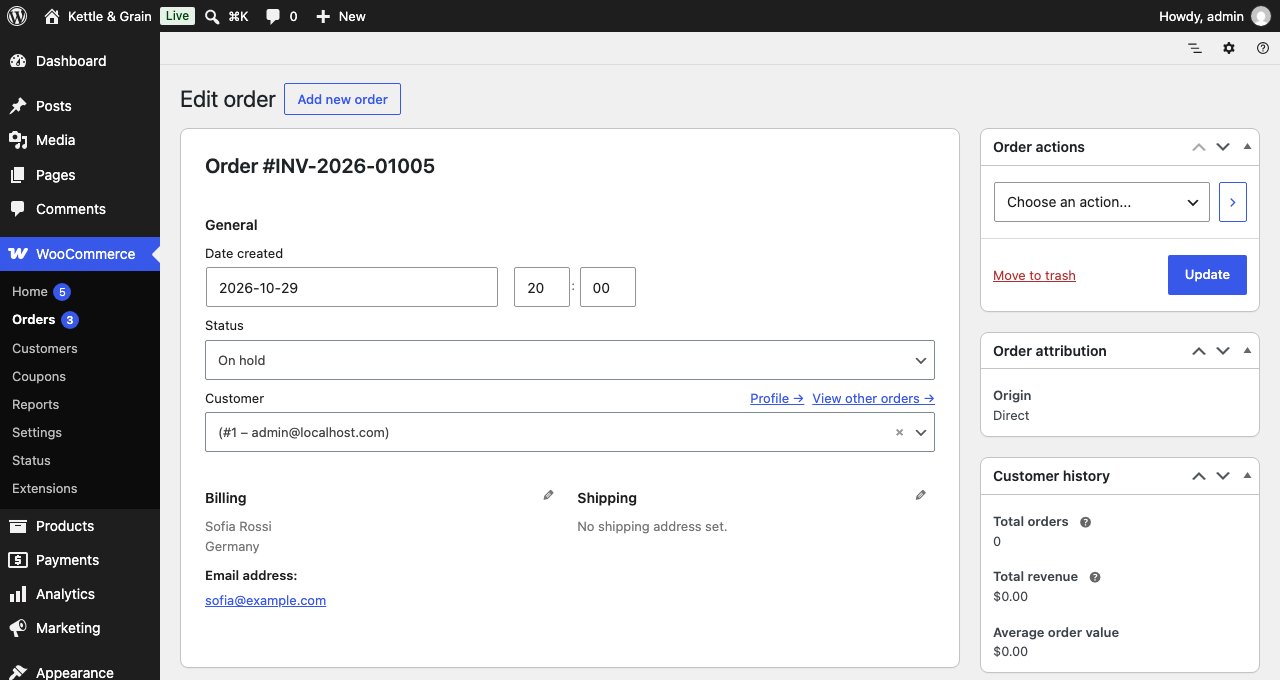
WooCommerce uses the database ID as the order number, so numbers jump (1052, 1057, 1063) because products, coupons and abandoned checkouts share the same counter. This plugin gives every new order a clean sequential number, such as INV-2026-01001, INV-2026-01002, INV-2026-01003.
Set it up in a minute under WooCommerce > Settings > Order numbers: choose a start number, a prefix and the minimum number of digits, and the next number is previewed before you save. The number then shows everywhere WooCommerce shows an order number: the Orders screen, the order page, customer emails, My account and the order-received page.
Why this one
- No gaps from abandoned checkouts. The cart and checkout blocks create draft orders before the customer pays. Many numbering plugins give those drafts a number, so your sequence skips. Here drafts never take a number.
- No duplicates under load. The counter is updated atomically, so two orders placed in the same second never get the same number.
- Both order storage modes. Tested with High-Performance Order Storage (HPOS) and the classic posts storage, including search by number.
- Order tracking works. Customers can type the new number (with prefix) into the WooCommerce order tracking form.
- Lightweight and private. No external services, no tracking, no nag screens.
Features
- Sequential numbers for new orders: 1, 2, 3 or any start number you choose.
- Prefix with date tokens:
{YYYY},{YY},{MM},{DD}(for exampleINV-{YYYY}-gives INV-2026-00042). - Zero padding to a minimum number of digits.
- Abandoned block-checkout drafts and unsaved admin orders never use a number.
- Two orders placed at the same moment never get the same number (atomic counter).
- Raising the start number moves the sequence forward; lowering it never reuses numbers.
- Existing orders keep their current numbers.
- Search orders by number on the Orders screen.
- Customers can use the number in the WooCommerce order tracking form.
- Works with High-Performance Order Storage (HPOS) and the classic order storage, and with the cart and checkout blocks.
- No external services, no tracking.
Pro add-on (optional)
Everything above is free and stays free. A separate paid add-on adds:
- A suffix with date tokens (for example
-{YY}). - Restart the counter every year, month or day (INV-2027-00001 on 1 January).
- A custom increment (count in steps of 2, 10, …).
- A separate sequence for free orders (for example FREE-0001).
- Number only paid orders, for a gap-free invoice-style sequence.
Plainclause Order Numbers Pro costs from $29 a year for one site, with a 30-day money-back guarantee. It is sold by Freemius, our reseller and merchant of record.
More from Plainclause
- Plainclause EU Withdrawal Button & Legal Guarantee Notice: the withdrawal function and legal guarantee notice EU shops need.
For developers
pcon_get_order_id_by_number( $number )returns the order ID for a number.- Filters:
pcon_should_assign,pcon_sequence_key,pcon_increment,pcon_number_parts,pcon_settings_fields. Action:pcon_number_assigned.
Screenshots



Installation
- Install and activate the plugin (WooCommerce must be active).
- Go to WooCommerce > Settings > Order numbers.
- Choose the start number, prefix and minimum digits, and save. The next number is shown below the settings.
FAQ
-
Will my existing orders be renumbered?
-
No. Orders placed before activation keep their current number. Only new orders get sequential numbers.
-
Can numbers repeat or skip?
-
Numbers never repeat. Orders that are abandoned as block-checkout drafts never take a number. Failed or cancelled orders that were placed do keep their number; the Pro add-on can number only paid orders if you need a gap-free sequence.
-
What happens if I deactivate the plugin?
-
Orders show their database ID again. The numbers stay stored on the orders and come back when you reactivate.
-
Does it work with High-Performance Order Storage (HPOS)?
-
Yes. It works with HPOS and with the classic order storage, and with the cart and checkout blocks and the classic checkout.
-
Can I search for an order by its new number?
-
Yes. Type the number, with or without the prefix, into the search box on the Orders screen.
-
Can I use the year or month in the number?
-
Yes. Use
{YYYY},{YY},{MM}and{DD}in the prefix; they use the order date. The Pro add-on can also restart the counter every year, month or day. -
Is this accounting or tax advice?
-
No. Check your local invoicing rules; some countries require gap-free invoice numbering.
Reviews
There are no reviews for this plugin.
Contributors & Developers
“Plainclause Sequential Order Numbers for WooCommerce” is open source software. The following people have contributed to this plugin.
Contributors
Translate “Plainclause Sequential Order Numbers for WooCommerce” into your language.
Interested in development?
Browse the code, check out the SVN repository, or subscribe to the development log by RSS.
Changelog
1.0.1
- New display name. Links to the optional Pro add-on and to rate the plugin on the Plugins screen. No changes to numbering.
1.0.0
- First release.