

Description
PetrichorCraft Countdown Campaigns by PetrichorCraft is a complete urgency and scarcity plugin for WordPress and WooCommerce.
Create shipping cutoffs, flash sales, product launches, evergreen offers, sticky announcement bars, email countdown images, and promotional deals pages — without writing code or stacking multiple plugins.
Campaign types
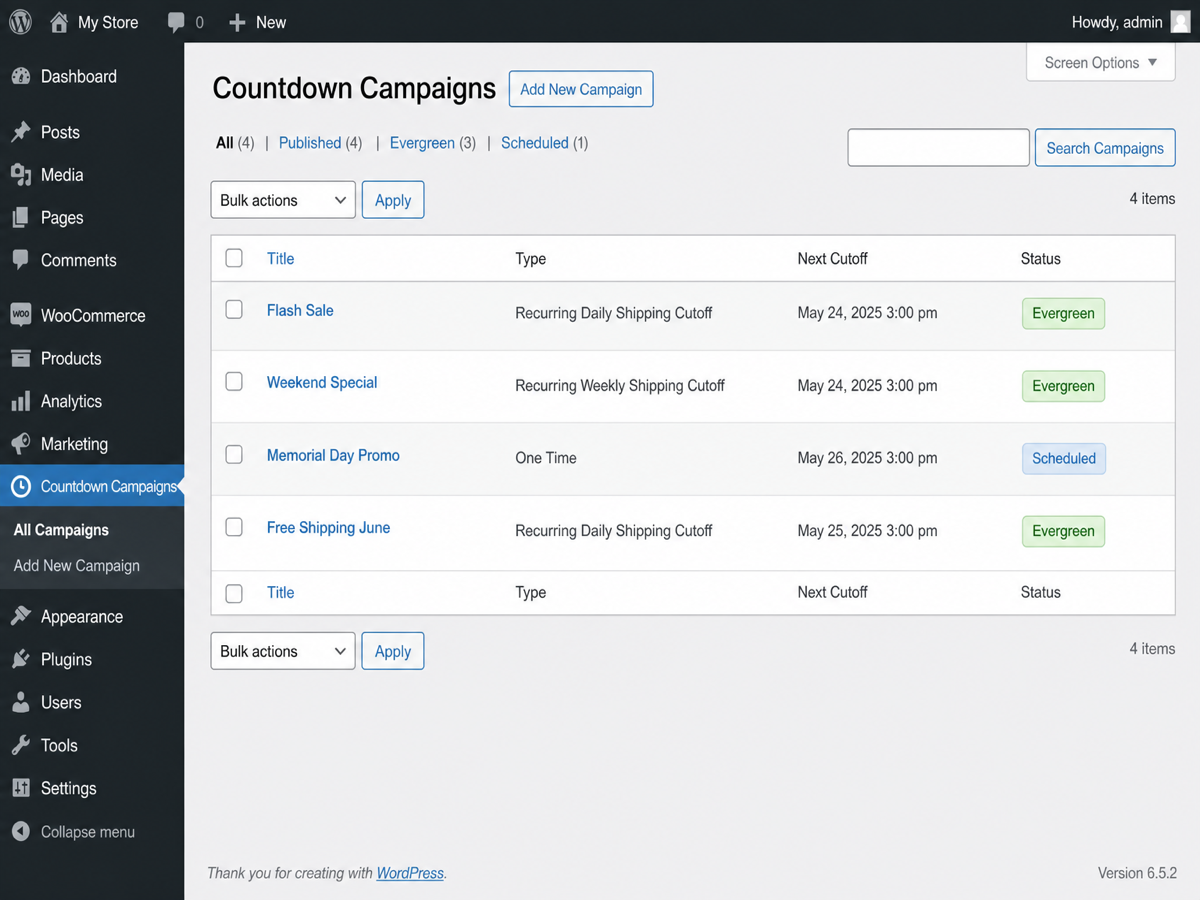
- Recurring — daily, weekly, every N hours, or every X days (perfect for same-day shipping cutoffs)
- Fixed deadline — one shared end date/time for everyone (Black Friday, launches, events)
- Evergreen — unique per-visitor timer with optional auto-restart
- Optional campaign schedule window (only show between two dates)
- Per-campaign timezone support
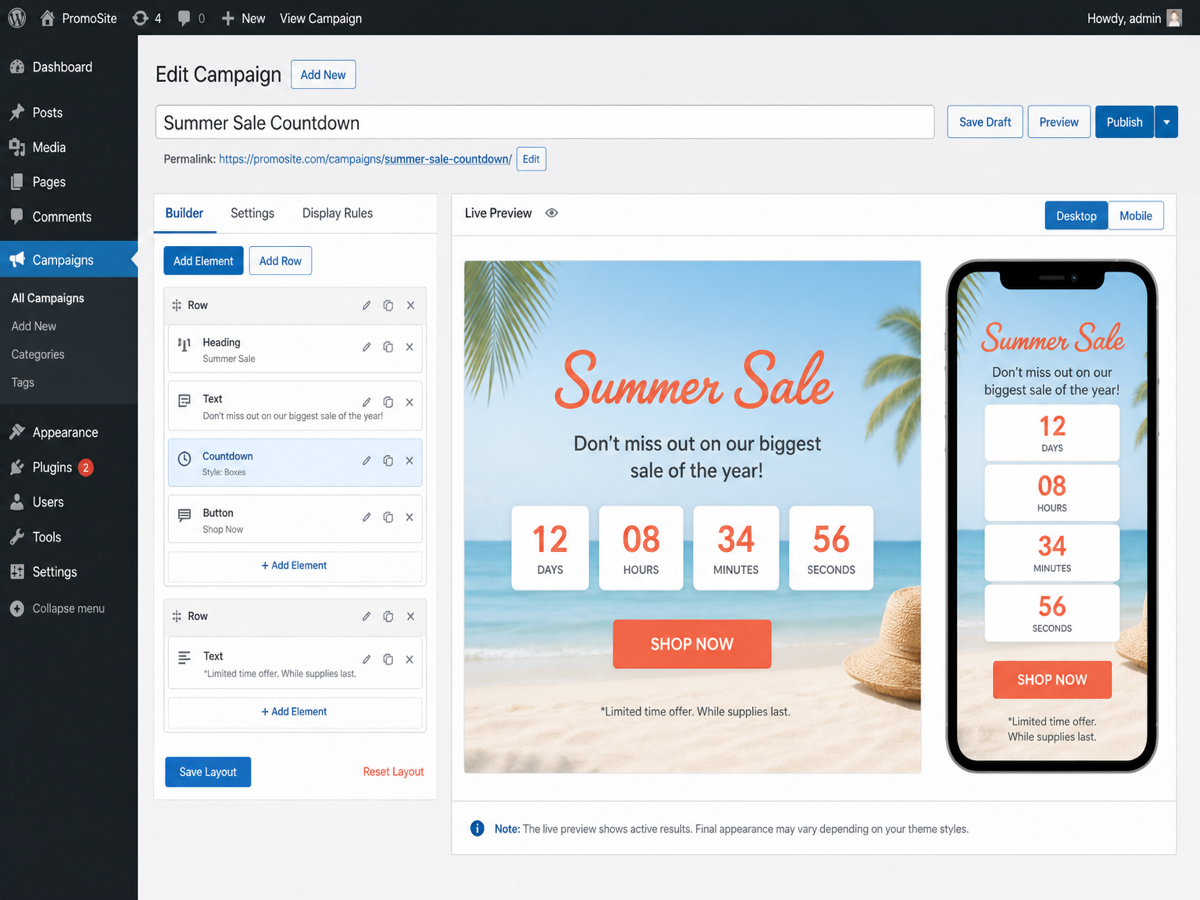
Visual layout builder
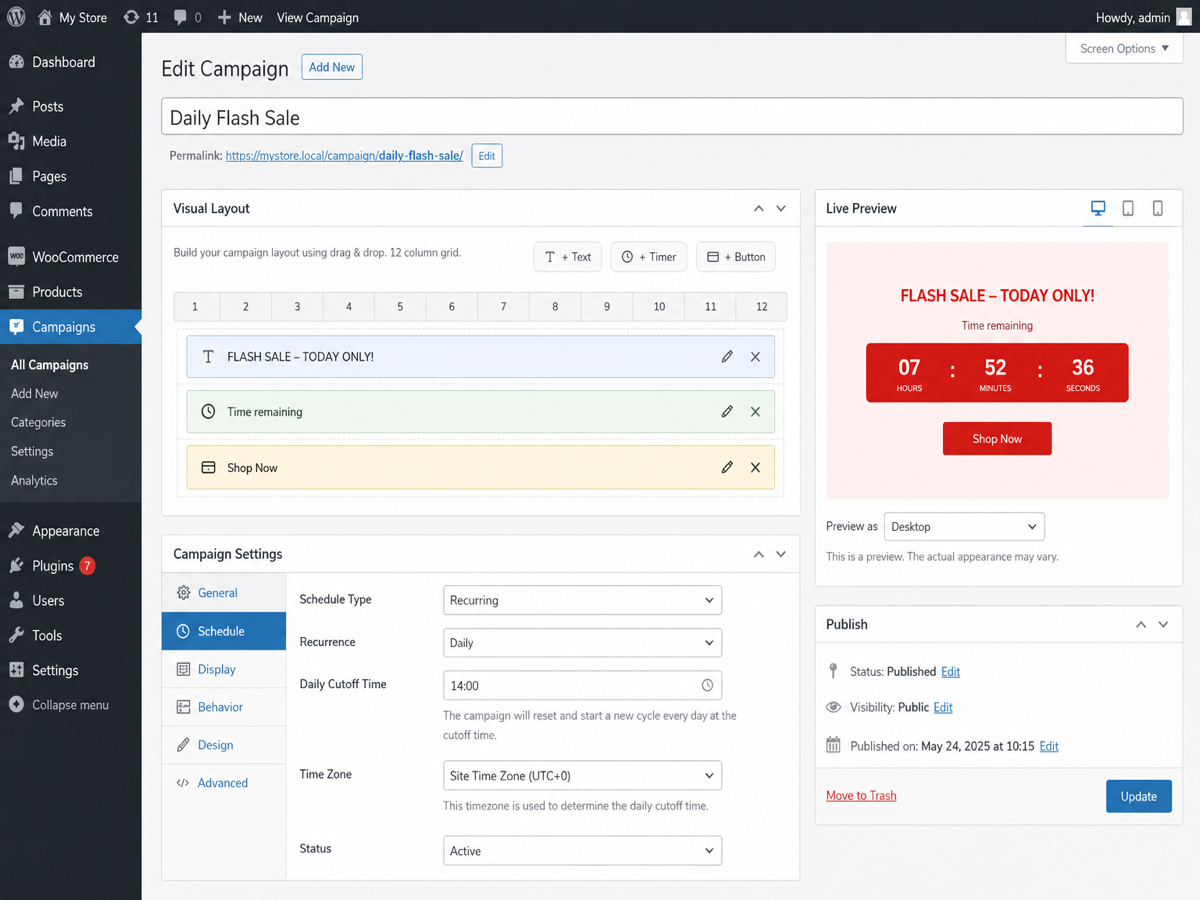
- Drag-and-drop 12-column grid with optional second row
- Elements: Text, Timer, Button, Scarcity bar, Sale price, Discount badge, Inventory text, Coupon code
- Layout presets including announcement bar, stacked, compact, and full urgency
- Timer digit styles: block, inline, compact, minimal, text-only
- Live desktop / mobile preview in the campaign editor
- Mobile modes: stack, wrap, or keep desktop layout
- Colors, gap, padding, and alignment (advanced CSS via the theme Customizer)
Urgency elements
- Scarcity / progress bar — manual sold/total or WooCommerce stock-based
- Sale price — manual was/now or live product prices
- Discount badge — pill, banner, or ribbon styles
- Inventory text — “Only X left” with threshold control
- Coupon code — display + one-click copy
Display options
- Shortcode:
[pctc_countdown id="123"] - Gutenberg block
- Sticky top/bottom announcement bar (Elementor-safe)
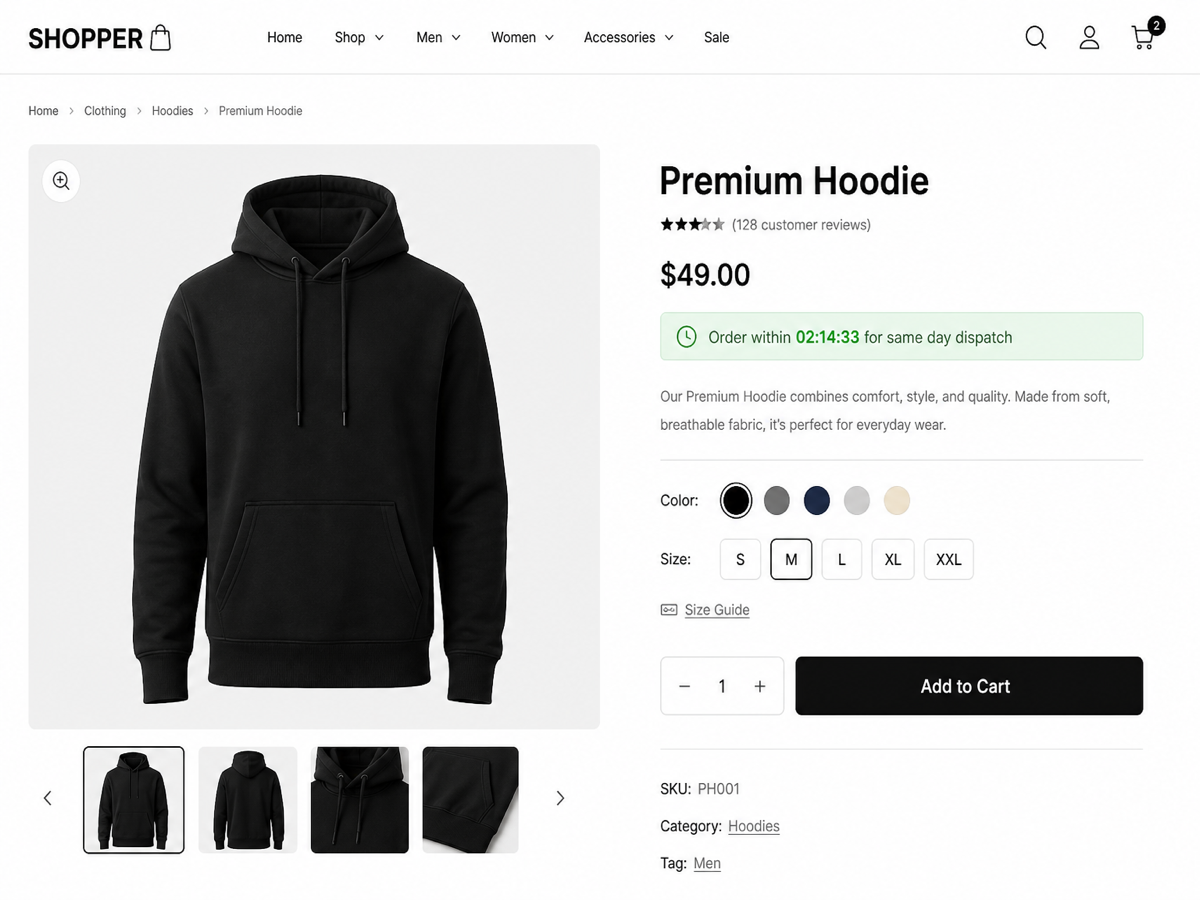
- WooCommerce product page auto-placement
- Shop / category / tag loop cards (separate layouts)
- Checkout urgency bar
- Deals grid shortcode for landing pages:
[pctc_deals id="123" limit="8" columns="3"] - Auto product discounts with highlighted sale price (no coupon required)
- Auto-apply coupon codes with product and cart notices
WooCommerce product placements
- Before / after product title
- After short description
- After price
- Before / after Add to Cart
- After product meta
- Before / after product tabs
- Per-product campaign override on the product edit screen
WooCommerce discounts & pricing
- Apply percent or fixed discounts while a campaign is active
- Dynamic pricing (does not permanently overwrite product prices)
- Target all products, on-sale products, specific IDs, categories, or tags
- Exclude products
- Early bird tiers — first N buyers get a deeper discount
- Stock-based pricing — change discounts as inventory drops
- Coming soon / launch mode — hide Add to Cart (and optionally price) until the timer ends
- Cart & checkout coupon expiry countdown
- Expiry actions: hide Add to Cart, expire coupon, change stock status, redirect, hide timer, show message
Email countdown timers
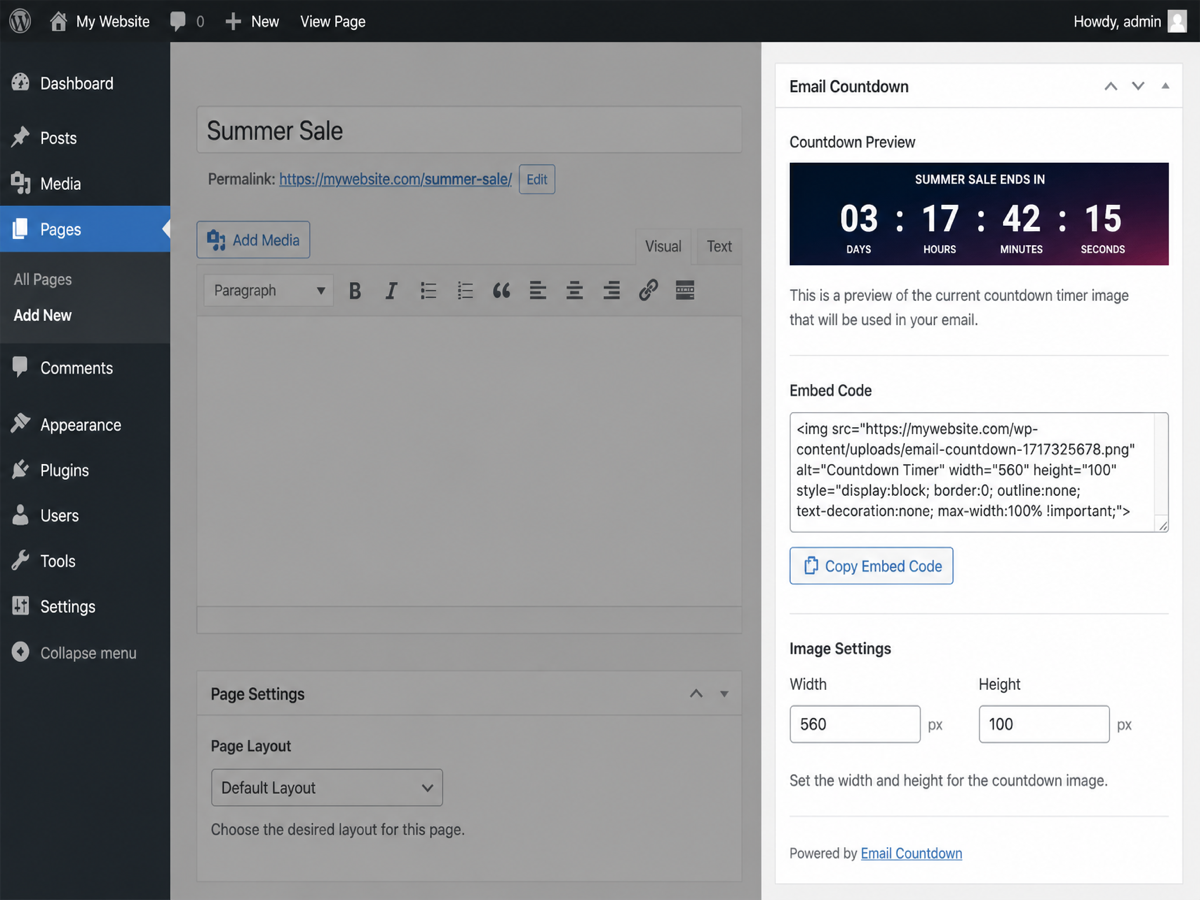
- Dynamic PNG image via REST API (works with Mailchimp, Klaviyo, and most ESPs)
- Supports recurring, fixed, and evergreen timers
- Evergreen merge-tag support with
?uid= - Requires PHP GD extension
Developer friendly
- REST API:
/wp-json/pctc/v1/sync/{id}and/expire/{id} - Email image endpoint:
/wp-json/pctc/v1/email/{id} - GPL-licensed, no phone-home tracking
Support
Email: support@petrichorcraft.com
Website: petrichorcraft.com
Screenshots



Blocks
This plugin provides 1 block.
- PetrichorCraft Countdown Campaigns Display a countdown timer campaign.
Installation
- Upload the plugin folder to
/wp-content/plugins/or install via Plugins Add New - Activate PetrichorCraft Countdown Campaigns
- Go to Countdown Campaigns Add New
- Configure campaign type, visual layout, and (optionally) WooCommerce rules
- Copy
[pctc_countdown id="123"]or use the Gutenberg block / deals grid shortcode
FAQ
-
Does this work with Elementor?
-
Yes. Use the Shortcode widget with
[pctc_countdown id="123"]. Sticky bars are moved to the document body so Elementor sections do not break fixed positioning. -
Do I need WooCommerce?
-
No. Core countdown features work on any WordPress site. WooCommerce is only required for product discounts, catalog loops, checkout bar, coming soon, and stock-aware elements.
-
How do email countdown timers work?
-
Email clients cannot run JavaScript. This plugin generates a dynamic PNG via REST API that updates when the email is opened. Copy the HTML embed from the campaign Email Countdown panel.
-
What is early bird pricing?
-
Enable Product Discount + Early Bird tiers. The first N completed/processing orders matching the campaign receive the first-tier discount, then later tiers apply.
-
What is the deals grid shortcode?
-
[pctc_deals id=”123″ limit=”8″ columns=”3″] renders a responsive product grid for the campaign’s targeted products, each with price, countdown, and a View deal button.
-
Does stock-based pricing require managed stock?
-
Yes. Products must manage stock in WooCommerce for stock steps to apply.
-
What happens when the timer expires?
-
Choose an expiry action: show a message, hide the countdown, redirect, hide Add to Cart, expire a coupon, or change stock status.
Reviews
There are no reviews for this plugin.
Contributors & Developers
“PetrichorCraft Countdown Campaigns” is open source software. The following people have contributed to this plugin.
Contributors
Translate “PetrichorCraft Countdown Campaigns” into your language.
Interested in development?
Browse the code, check out the SVN repository, or subscribe to the development log by RSS.
Changelog
1.11.1
- Fix campaign color CSS variables on product, shop, and archive layouts
- Fix multi-class sanitization so layout context classes apply correctly
1.11.0
- Renamed to PetrichorCraft Countdown Campaigns (distinctive slug/text domain)
- Removed arbitrary custom CSS insertion (use theme Additional CSS)
- Hardened public expire REST route with signed tokens and cookie-only evergreen timing
- Capped evergreen email visitor storage to prevent options bloat
- Prefixed shortcodes, REST namespace, post type, options, and PHP symbols (pctc / PCTC)
1.10.0
- Separate countdown layouts for product, shop, archive, and checkout
- Independent shop vs category/tag archive display toggles
- Highlight auto product discounts with sale badge (no coupon required)
- Product-page “auto discount” notice
- Auto-apply WooCommerce coupons with product and cart notices
1.9.1
- Security: public expire REST endpoint only runs after the campaign period has ended
- readme tags limited to 5 (WordPress.org requirement)
- Uninstall cleans campaign sales options and expiry backups
- Declares WooCommerce HPOS and Cart/Checkout Blocks compatibility
- translators comments for early-bird / stock-pricing admin strings
1.9.0
- Early bird discount tiers based on campaign order count
- Stock-based pricing steps as inventory drops
- Deals grid shortcode for landing pages
- Expanded WordPress.org feature documentation
1.8.0
- More product page placements (title, excerpt, meta, tabs)
- Shop / category / tag loop countdowns
- Checkout urgency bar
1.7.0
- WooCommerce product discounts (percent or fixed) while campaign is active
- Coming soon / launch mode — hide Add to Cart until timer ends
- Cart & checkout coupon expiry countdown
- Dynamic pricing (no permanent product overwrite)
1.6.0
- New builder elements: scarcity bar, sale price, discount badge, inventory text, coupon code
- Urgency element settings with WooCommerce product/stock modes
- Live preview support for new elements
- Copy-to-clipboard for coupon codes
- New “Full urgency” layout preset
1.5.0
- Mobile layout modes (stack, wrap, keep) with breakpoint control
- Live desktop/mobile preview in campaign editor
- Visual layout builder with 12-column row + optional second row
- WordPress.org submission package and Plugin Check compliance
- Gutenberg block API version 3
1.4.0
- 12-column visual grid (4×3 expanded layout)
- Optional second row with auto-hide when empty
1.3.0
- Drag-and-drop visual template builder
- Inline row presets and grid alignment
1.2.0
- Layout options (block, inline, compact, minimal, text-only)
- Email countdown PNG generation
- WooCommerce integration
1.0.0
- Initial release: recurring, fixed, evergreen campaigns