
Description
Internal links are one of the most underused SEO levers. Most sites have orphan pages, missed keyword opportunities, and wasted link equity — and never know it.
Ozi Internal Link Booster gives you a full picture of your site’s internal link health and a simple, safe system to fix it — without expensive tools, bloated plugins, or risky automation.
Everything runs entirely inside WordPress. No external APIs. No data leaves your server. No monthly subscription.
🔍 What You Can Do With This Plugin
Find orphan pages instantly. Pages with zero internal links are invisible to search engines. This plugin finds every one of them — and shows you which ones need fixing first.
Map keywords to your important pages. Assign keywords to your Service pages, Location pages, Pricing page, or any other page you want to rank. The plugin tracks every time those keywords appear in your content and flags missed linking opportunities.
See your Internal Link Health Score. A simple 0–100 indicator that reflects how well your content is connected — updated every time you run a scan.
Optional SEO-safe auto-linking. If you choose to enable it, the plugin can automatically insert internal links in your content when mapped keywords appear — with strict limits (max 3 per post) and full protection for headings, existing links, and code blocks.
Works inside the editor. A sidebar panel in every post/page editor shows you keyword matches, link suggestions, incoming and outgoing link counts, and a per-post link score — without leaving the editor.
✅ Who This Plugin Is For
- Bloggers and content creators who want their older posts to rank better.
- Small business owners who want their service pages to get more link equity from their blog.
- SEO professionals and consultants who want a fast way to audit client sites.
- Agencies managing multiple WordPress sites.
🔑 Key Features (Lite — Free)
- Keyword Page Mapping — Assign any keyword or phrase to a target URL. Supports unlimited keyword mappings.
- Orphan Page Detection — Find every page and post on your site with zero internal links pointing to it. Lite shows the top 10.
- Internal Link Health Score — A 0–100 score that updates every time you re-scan.
- Per-Post Editor Sidebar — See keyword matches, missing opportunities, incoming links, outbound links, and a post-level score in every editor screen.
- SEO-Safe Auto-Linking — Optional. Conservative. Skips headings (H1–H6), existing links,
<code>,<pre>,<script>, and<style>blocks. Max 3 links per post. - Export Keywords as CSV — Download your full keyword-to-URL mapping as a CSV file.
- Last Scanned Timestamp — See when your last scan ran directly on the dashboard.
- First-Time Setup Wizard — 3-step onboarding gets you scanning in under 2 minutes.
- Upgrade to Pro Banner — Optional, fully dismissible. No spam.
- Zero external API calls — Everything runs locally. No data collection. No tracking.
- Compatible with Divi, Elementor, Gutenberg, and Classic Editor.
📊 How the Health Score Works
The Internal Link Health Score is calculated from two factors:
- Keyword Coverage — How many of your mapped keywords actually appear in your published content.
- Orphan Page Penalty — Pages with no incoming internal links reduce your score.
A score of 70+ is Strong. 40–69 is Fair. Under 40 is Poor — and usually fixable quickly by connecting your orphan pages.
🔒 Privacy
This plugin does not collect any data. No analytics. No tracking pixels. No third-party services. All processing happens inside your WordPress site.
🚀 Get More With Pro
Ozi Internal Link Booster Pro adds:
- Full orphan page list (unlimited, not just 10)
- Site-wide link opportunity report
- Bulk fix workflows — fix multiple orphan pages from one screen
- Priority page targeting — push link equity to your most important pages
- Full CSV export with link opportunity data
- Historical score tracking
- Priority email support from the developer
Screenshots

Dashboard Overview — Internal Link Health Score with progress bar, last scanned timestamp, and Re-Scan button. 
Orphan Pages List — Pages with zero incoming internal links, with direct edit links for each. 
Stats Grid — Total keywords, posts scanned, orphan count, and Pro lock card — all at a glance. 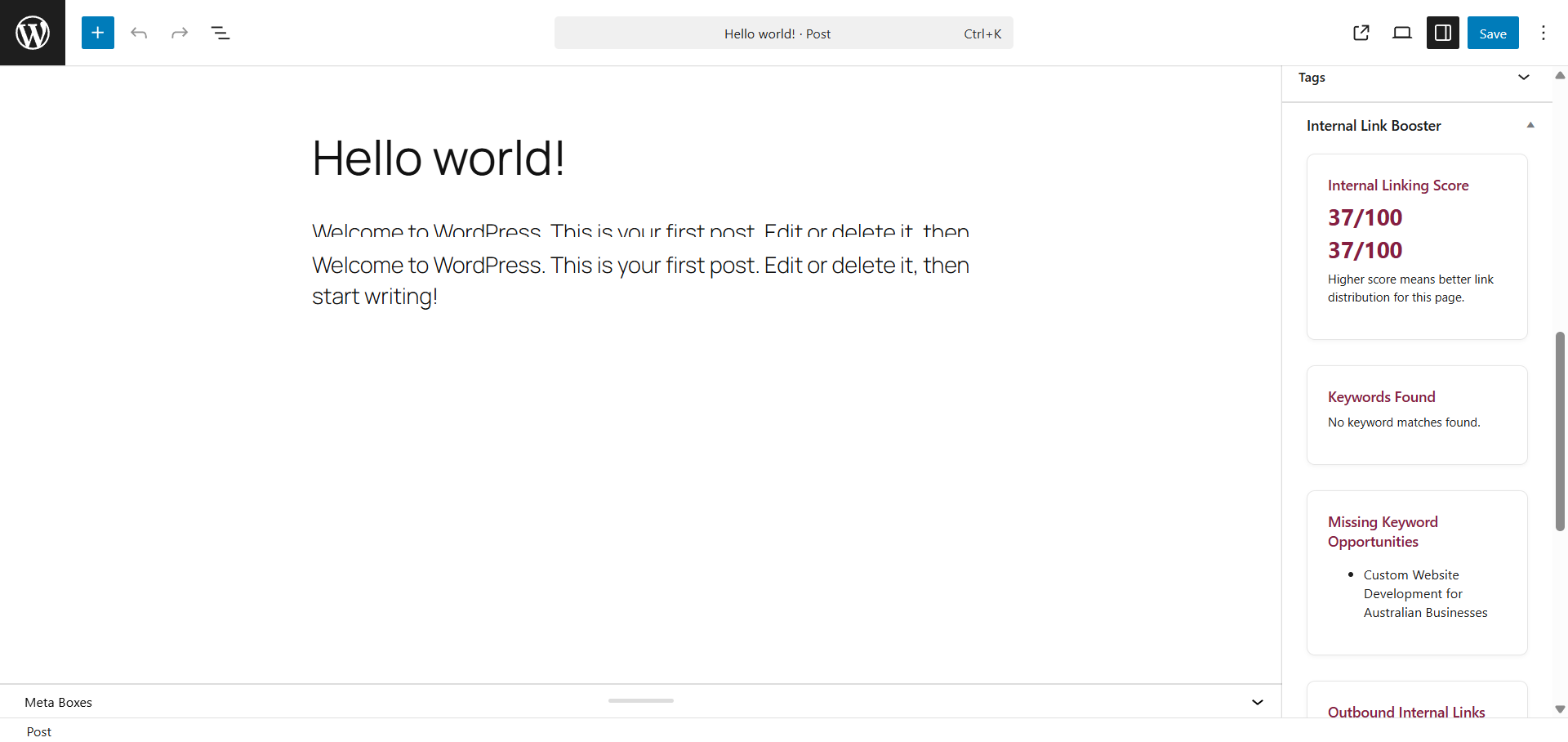
Keyword Mappings — Clean table view of all keyword-to-URL mappings with CSV export button.
Installation
- Go to Plugins Add New in your WordPress dashboard.
- Search for Ozi Internal Link Booster.
- Click Install Now, then Activate.
- The setup wizard will appear automatically — complete it in under 2 minutes.
- Or go to Ozi Link Booster Dashboard to start exploring.
Manual Install:
1. Download the plugin ZIP from WordPress.org.
2. Go to Plugins Add New Upload Plugin.
3. Upload the ZIP and activate.
FAQ
-
How is this different from Link Whisper?
-
Link Whisper is a paid tool (starts around $77/year) focused on automated link suggestion popups inside the editor. Ozi Internal Link Booster focuses on site-level health visibility — your Health Score, orphan page list, and keyword coverage — plus SEO-safe auto-linking. Lite is completely free. You don’t need to pay to see what’s broken on your site.
-
How is this different from Rank Math’s internal linking?
-
Rank Math includes some basic internal link suggestions as part of its broader SEO suite. Ozi Internal Link Booster is purpose-built for internal linking — which means more depth: orphan detection, keyword-level coverage analysis, a site-wide health score, and a dedicated dashboard. It also works independently of your SEO plugin of choice.
-
How is this different from Internal Link Juicer?
-
Internal Link Juicer focuses almost entirely on auto-linking. Ozi Internal Link Booster includes auto-linking as an optional feature, but pairs it with a full diagnostic layer — so you understand your link structure, not just automate it. The orphan page detection and health score are features Internal Link Juicer doesn’t offer.
-
Does this plugin use any external APIs or services?
-
No. All logic runs locally inside your WordPress installation. No data is sent anywhere. No internet connection is required for the plugin to function.
-
Is the free version genuinely useful on its own?
-
Yes. The free Lite version includes keyword mapping, orphan detection (top 10 pages), health scoring, per-post editor insights, CSV export of keywords, auto-linking, and the setup wizard. You can run a meaningful internal link audit of your site without paying anything.
-
Will auto-linking hurt my SEO or look spammy?
-
The auto-linker is intentionally conservative. It only links once per keyword per post, respects a configurable max (default: 3 links per post), and never inserts links inside headings, existing anchor tags, code blocks, or script/style elements. This mirrors best-practice guidance from Google’s own content quality guidelines.
-
Does this work with WooCommerce?
-
The plugin is designed for Posts and Pages. It deliberately avoids running on WooCommerce order screens to prevent conflicts. WooCommerce product pages are available to select in Settings if needed.
-
Does this work with page builders like Divi or Elementor?
-
Yes. The plugin reads and writes standard WordPress post content and works with Divi, Elementor, Gutenberg blocks, and Classic Editor without modification.
-
Is there a Pro version?
-
Yes. Ozi Internal Link Booster Pro is an optional add-on plugin for advanced workflows. The Lite version on WordPress.org is fully functional and will remain free indefinitely.
-
How do I run a scan?
-
Go to Ozi Link Booster Dashboard and click the Re-Scan Internal Links button. Scans are cached for 6 hours to keep your site fast — the button forces a fresh scan instantly.
-
Can I export my keywords?
-
Yes. Go to the Keywords page or Dashboard and click Export Keywords as CSV. This downloads a UTF-8 CSV file compatible with Excel.
Reviews
There are no reviews for this plugin.
Contributors & Developers
“Ozi Internal Link Booster — Smart Internal Linking for SEO” is open source software. The following people have contributed to this plugin.
Contributors
Translate “Ozi Internal Link Booster — Smart Internal Linking for SEO” into your language.
Interested in development?
Browse the code, check out the SVN repository, or subscribe to the development log by RSS.
Changelog
1.4.0
- New: Dismissible “Upgrade to Pro” banner on dashboard
- New: Orphan pages admin notice (shows count, links to dashboard, dismissible)
- New: Export Keywords as CSV (UTF-8 BOM for Excel compatibility)
- New: “Last Scanned” timestamp on dashboard
- New: 3-step first-time setup wizard (auto-linking choice, first keyword, first scan)
- New: “Add Another Row” button on Keywords page (no more page reload)
- New: Pro upgrade page with feature comparison table and direct product link
- Improved: Pro page now links directly to ozinexustechnologies.com/product/ozi-link-booster-pro/
- Improved: Plugin action links include ⭐ Go Pro shortcut
- Fixed: Orphan notice dismiss now properly persists after rescan
- Fixed: Reset action now clears all v1.4.0 option keys
- Fixed: Uninstall clears all new option keys and transients
1.3.1
- Stability release
1.3.0
- Dashboard polish (health-first layout)
- Rescan button and clearer health status
- Improved orphan page visibility in Lite
- Performance improvements for dashboard scan flow
- Cached scan snapshot (6-hour TTL)
1.2.2
- UI refinements and minor copy improvements
1.2.1
- Improved admin UI layout
- Fixed asset loading via WordPress enqueue APIs
- Improved internal link analysis accuracy
- Performance and stability improvements
1.0.0
- Initial release
- Keyword mapping and auto-linking engine
- Orphan page detection
- Per-post internal link insights