

Description
Let customers pay your WooCommerce store in crypto, and get paid for real. Oxialink tracks every payment to on-chain confirmation, credits a wallet you control, and marks the order paid by itself. No chargebacks, no rolling reserves, no card network in between. Processing starts at 0.2% per payment, with a free account and no KYC to get started.
How it works
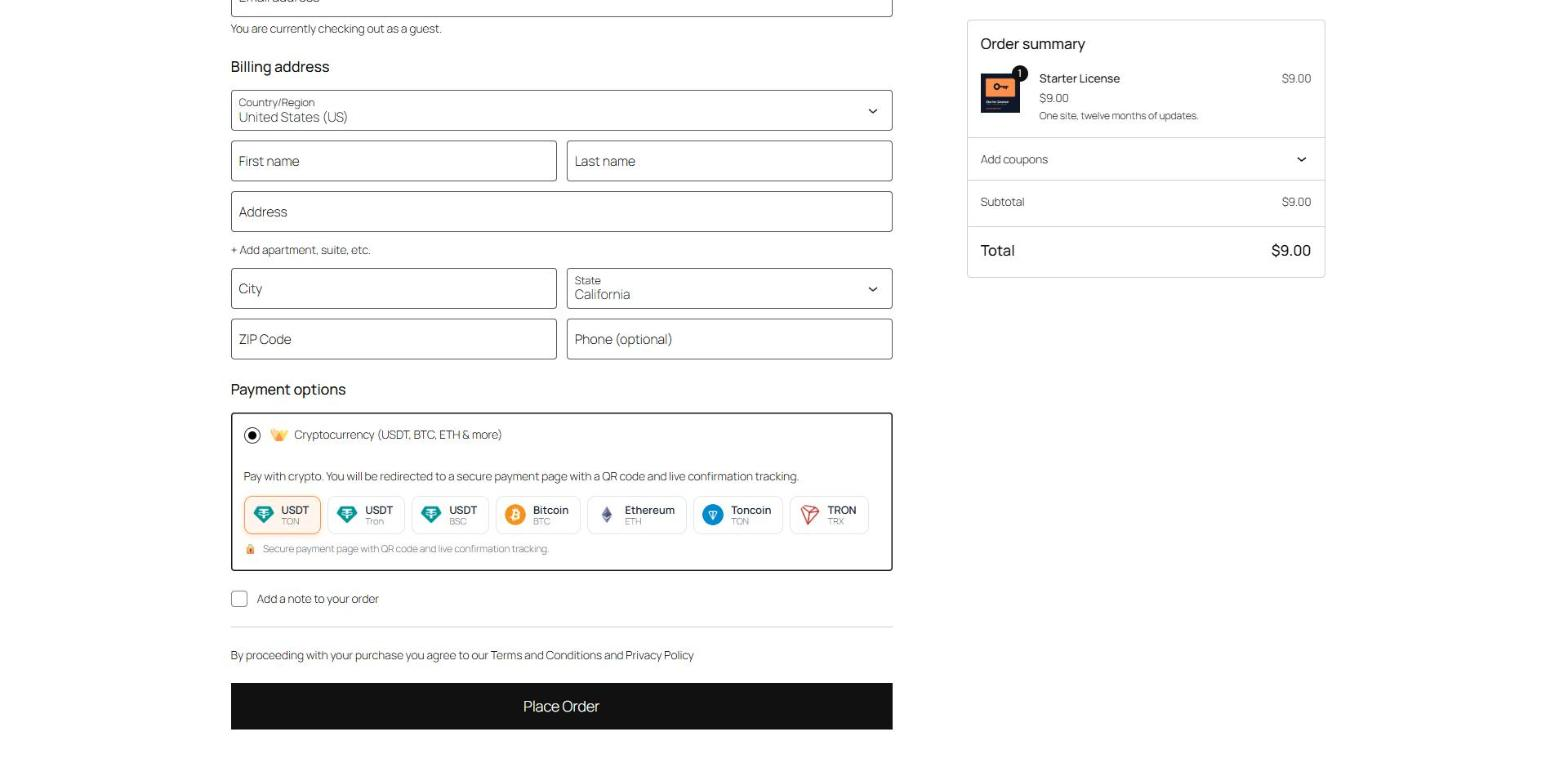
- The customer picks “Cryptocurrency” at checkout and chooses a coin from the ones you offer.
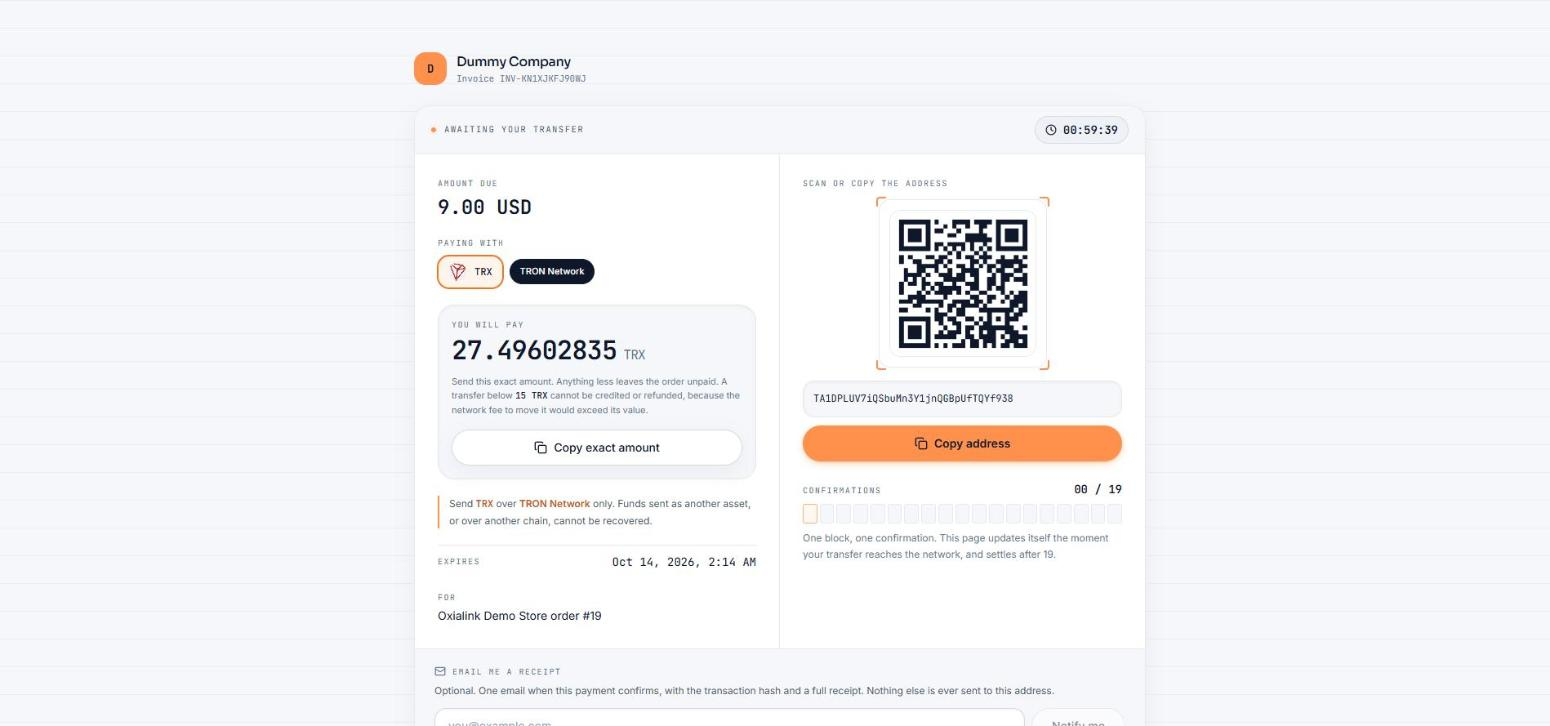
- They land on a hosted payment page with the exact amount, a QR code, and a live confirmation count. It works on desktop, on mobile wallets, and inside Telegram.
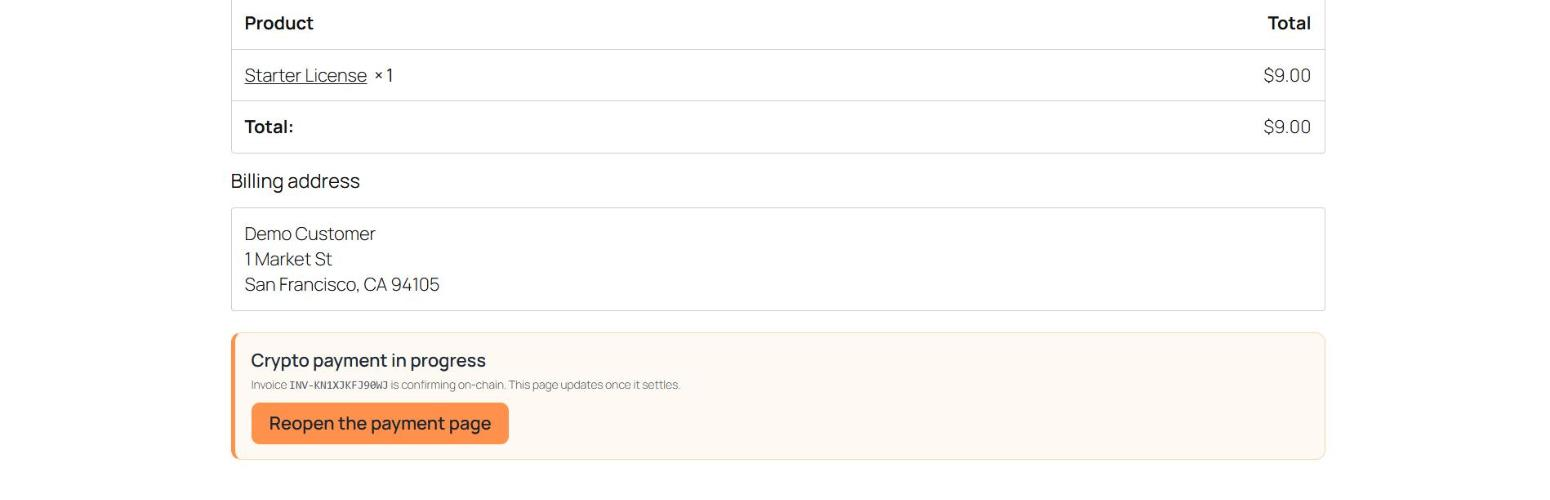
- Oxialink watches the chain. When the payment confirms, a signed webhook marks the order Processing (or Completed, your choice) and the customer is sent back to your thank-you page.
- The funds sit in your Oxialink wallet. Withdraw to your own address whenever you like, or let auto-withdraw do it for you.
What you get
- 14 coins across 6 networks: USDT on TON, Tron, BSC, Solana and Ethereum, USDC, Bitcoin, Ethereum, Litecoin, Dogecoin, Dash, BNB, TRX and Toncoin. You choose which ones to offer.
- Prices in 39 store currencies, converted at the live rate at the moment of checkout.
- Classic checkout and the block-based checkout, with the same coin picker on both. HPOS compatible.
- Orders complete automatically. Webhooks are HMAC-signed and verified byte-exactly before an order is touched, and an hourly status poll catches a webhook that never arrived.
- Underpayments put the order on hold with a note saying how much arrived. Expired invoices cancel the order.
- Merchant controls: order status after payment, invoice expiry, minimum order total, and a multiplier for a crypto surcharge or discount.
- Sandbox mode: one checkbox points the gateway at test networks, so you can take a full order through checkout with free faucet coins before going live. Every sandbox order is labelled as such in the admin.
- Failures are written to WooCommerce > Status > Logs, so you can see what the service actually said.
- No customer personal data leaves your store. The customer pays on the hosted page without entering a name, email or address there.
Who it is for
Digital goods, SaaS and licence sellers, hosting and domain resellers, stores with international customers, and any merchant tired of chargebacks and payouts held for weeks. If your customers already hold USDT or Bitcoin, this is the shortest path from their wallet to your order list.
This plugin connects your store to the Oxialink payment service. A free Oxialink account is required; Oxialink charges a processing fee per payment as published at https://oxialink.com/fees. All plugin functionality is included with the free plan.
Try it first: the demo store at https://woocommerce.oxialink.com runs this exact plugin against the live service.
Oxialink Crypto Payments for WooCommerce is developed and maintained by Oxialink (https://oxialink.com). It is an independent plugin and is not affiliated with, endorsed by, or sponsored by Automattic Inc. “WooCommerce” and “WordPress” are trademarks of their respective owners and are used here only to describe what this plugin is compatible with.
External services
This plugin talks to the Oxialink API (https://oxialink.com) to process payments. It is required for the plugin to work.
What is sent, and when:
- When a customer chooses Oxialink at checkout and places the order, the plugin sends the order total, store currency, chosen cryptocurrency, an order description (store name and order number), and your store’s callback and return URLs to api endpoint /api/v1/invoice/create, authenticated with your API key.
- Once per hour, for orders still awaiting payment, the plugin sends the invoice code to /api/v1/invoice/get to check the payment status.
- At most once every 10 minutes, the plugin reads the list of coins your account has wallets for from /api/v1/wallet/coins, authenticated with your API key, so the checkout offers only those. No order or customer data is sent with that request.
- At most once every 12 hours, the plugin reads the list of store currencies the service can invoice in from /api/public/currencies. No data about your store is sent with that request; the list is cached, and a built-in copy of it is used if the request fails.
- No customer personal data (name, email, address) is ever sent to Oxialink by this plugin.
With sandbox mode enabled the same two requests go to the Oxialink sandbox at https://sandbox.oxialink.com instead. It is the same service running against public test networks; nothing there moves real money. Sandbox mode is off unless you turn it on.
The service is provided by Oxialink: terms of service https://oxialink.com/terms and privacy policy https://oxialink.com/privacy.
Screenshots
Installation
- In WordPress, go to Plugins, then Add New, search for “Oxialink” and install and activate the plugin. WooCommerce must be active.
- Create a free account at https://oxialink.com and create a wallet for each coin you want to accept.
- In WooCommerce, go to Settings, then Payments, then Oxialink. Paste your API key, API secret and webhook secret (from the Oxialink dashboard under Settings), tick the coins to offer, and enable the gateway.
- Place a test order. Tick Sandbox mode first if you want to try it with free test coins; untick it before taking real orders.
Five minutes from install to the first crypto order is the usual experience.
FAQ
-
Do I need an Oxialink account?
-
Yes. The plugin is a connector for the Oxialink payment service. Accounts are free and no KYC is required to start.
-
Which store currencies are supported?
-
USD, EUR, GBP, JPY, IDR, INR, SGD, MYR, AUD, CAD, CHF, SEK, NOK, DKK, PLN, CZK, HUF, UAH, CNY, HKD, TWD, KRW, THB, PHP, VND, BDT, PKR, LKR, NZD, AED, SAR, ILS, TRY, ZAR, NGN, BRL, MXN, ARS and CLP. The invoice is converted at the live rate when the customer checks out.
A store priced in any other currency does not get a wrong quote: the gateway hides itself at checkout, the WordPress admin shows a notice naming the supported currencies, and if a currency switcher still places an order in an unsupported currency, the plugin refuses it with the same message before anything is sent to the service.
-
Where does the money go?
-
To your Oxialink wallet, withdrawable to your own address any time, or automatically with auto-withdraw.
-
No. The plugin sends only order totals, currency, the chosen coin and an order reference. The customer pays on Oxialink’s hosted page and never enters personal data there.
-
I ticked a coin in the settings but customers do not see it. Why?
-
The checkout shows only the coins your Oxialink account has a wallet for, because an invoice in any other coin would be refused at the moment of paying. Create the wallet in the Oxialink dashboard (Wallets, then Create wallet) and the coin appears at checkout within ten minutes, or at once after you save the gateway settings again.
-
What does it cost?
-
The plugin is free and so is the Oxialink account. Oxialink charges a processing fee per payment, from 0.2%, published at https://oxialink.com/fees. There are no monthly fees, setup fees or minimums.
-
What happens if a customer pays too little, or too late?
-
Too little: the order goes on hold with a note stating what arrived and what was due, so you can decide whether to ship or ask for the difference. Too late: the invoice expires after the number of minutes you set (60 by default) and the order is cancelled. A payment that arrives after expiry is still credited to your Oxialink wallet; it is just not matched to the order automatically.
-
Does it work with the block-based checkout?
-
Yes. The coin picker appears on both the classic shortcode checkout and the block checkout, and the plugin declares compatibility with High-Performance Order Storage.
-
Which wallets can customers pay from?
-
Any wallet that can send the chosen coin: exchange withdrawals, Trust Wallet, MetaMask, Tonkeeper, Phantom and so on. The payment page shows a QR code and the address, and inside Telegram it opens as a Mini App.
-
Can I test the checkout without spending real money?
-
Yes. Tick Sandbox mode in the gateway settings and the plugin talks to https://sandbox.oxialink.com, the same service running against public test networks. Register separately at sandbox.oxialink.com for the API key, secret and webhook secret: sandbox and live accounts are not shared. Only USDT_TRC20, USDT_BEP20, TRX, BNB and TON exist on the test networks, so the checkout picker narrows to those while sandbox mode is on, and your live coin list comes back when you turn it off. Checkout, the thank-you page and the WordPress admin all show a test-mode warning while it is on, so an order paid in sandbox can never be mistaken for a real one.
Reviews
There are no reviews for this plugin.
Contributors & Developers
“Oxialink Crypto Payments for WooCommerce” is open source software. The following people have contributed to this plugin.
Contributors
Translate “Oxialink Crypto Payments for WooCommerce” into your language.
Interested in development?
Browse the code, check out the SVN repository, or subscribe to the development log by RSS.
Changelog
1.1.3
- The coin picker at checkout shows only the coins your Oxialink account has a wallet for. A coin you ticked but have no wallet for used to appear and then fail at “Place order” with “No wallet found”; now it is simply not offered. The list is read from the service and cached for ten minutes; if the service cannot be reached the list you configured is shown as before.
- If none of the configured coins has a wallet, the payment method hides itself at checkout rather than showing an empty picker.
- Screenshots on the plugin page, and a fuller description.
1.1.2
- Store currency check: the gateway is hidden at checkout, an admin notice names the supported currencies, and an order in an unsupported currency is refused before an invoice is requested. The list is read from the service and cached, with a built-in copy as fallback.
- The invoice is created in the order’s currency rather than the store default, for stores that use a currency switcher.
1.1.1
- Checkout and thank-you page styles now load from assets/checkout.css through wp_enqueue_style, instead of an inline style block.
1.1.0
- Sandbox mode: a settings checkbox routes the gateway to Oxialink’s test networks at sandbox.oxialink.com.
- The coin picker narrows itself to the coins the test networks support while sandbox mode is on, instead of failing at the moment of payment.
- Test-mode warnings on the classic checkout, the block checkout, the thank-you page and the WordPress admin, plus an order note recording which environment paid for each order.
1.0.0
- First release: hosted checkout, coin picker on classic and block checkout, signed webhooks with status-poll fallback, underpaid and expired handling, HPOS compatible.