

Description
Find the topics your customers are searching for.
Owl SEO brings cloud-powered keyword research into your WordPress dashboard. Start with the topics you know, add competitor websites, and explore keyword ideas alongside their search volume in one simple workspace.
What you can do with Owl SEO
- Generate keyword ideas from your own seed keywords.
- Add competitor websites as inputs for your research.
- Review keyword suggestions, search volume and already-used status returned by the service.
- Choose whether to remove duplicate keywords.
- Save a local business profile with a language, activity and business goal.
- Decide when your site connects to the external Owl SEO service, and disconnect from Settings.
Get started in a few steps
- Install and activate Owl SEO.
- Open Settings, save your business profile, and click Connect to enable cloud research.
- Open Research, enter keywords or competitor websites, and click Generate.
Research is available to connected sites without requiring a paid plan in this plugin. A working internet connection and access to the external Owl SEO service are required. Your business settings can be saved locally without connecting.
Learn more at OWLSEO or contact OWLSEO support.
What is included in this free plugin?
The included tools focus on keyword research and local business settings. Research results include the keyword, search volume and whether the service marks the keyword as already used. Results stay on the Research screen until you leave or reload it; this release does not save a research history.
This free plugin does not create, schedule or publish articles. All included plugin functionality is available without a local premium feature lock. The Subscription screen describes separate Owl SEO cloud plans and links to checkout on owlseo.ai. Purchasing a plan does not add article creation or publishing to this plugin. Final prices, trial eligibility and billing terms are confirmed on the checkout website.
An internet connection and a working Owl SEO cloud connection are required for keyword research. Business settings can be saved without connecting. The remote service is operated separately from WordPress.org.
Owl SEO does not guarantee a search ranking, traffic increase or placement in AI answers. Keyword and volume data are supplied by the external service.
External services
Owl SEO: plugin.owlseo.ai
No Owl SEO cloud request is made before the administrator clicks Connect in Settings. Once connected, the plugin may retry an incomplete registration on administrator visits and check the site’s plan on the plugin’s admin screens. Disconnect stops these requests, including research. Saved settings and account credentials remain on this WordPress site for reconnection; uninstall removes them locally. Disconnect does not delete server-side data or cancel a subscription. Contact Owl SEO for remote account requests.
- Registration/reconnection sends the site’s URL, name, locale, tagline, icon URL and a randomly generated site authentication token to /api/plugin/register. The site ID returned by the service is saved locally.
- Plan checks send the site token as an Authorization bearer header to /api/api/session. Responses are cached for ten minutes on success, including free accounts, and two minutes on failure.
- Research sends only the submitted keyword lines, competitor URLs and remove-duplicates choice to /api/plugin/posts/autogenerate, with the bearer token, after you click Generate. The business profile is stored locally; these profile fields are not included in the current research request.
- The service also receives ordinary HTTP connection information, such as the connecting server’s IP address. Refer to its policies for retention and processing.
Service: https://www.owlseo.ai
Privacy: https://www.owlseo.ai/privacy-policy-2
Terms: https://www.owlseo.ai/terms-and-conditions-of-owlseo
Owl SEO checkout: www.owlseo.ai
When you choose a plan, a new browser tab opens the website checkout. That URL includes the chosen plan, billing cycle, site ID and site URL so that the purchase can be associated with the correct site. It does not include the authentication token. No payment details are collected by this plugin. The same Owl SEO privacy policy and terms linked above apply.
YouTube: www.youtube-nocookie.com
The demo player loads only after you click its video button on Posts or Research. It uses YouTube’s privacy-enhanced embed domain. Loading the player sends your browser’s IP address and ordinary browser request information to YouTube/Google. The preview image is bundled locally; the plugin makes no YouTube request merely to display the preview.
Privacy: https://policies.google.com/privacy
Terms: https://www.youtube.com/t/terms
Credits
Original plugin development credit: tommytech. Maintained and distributed by OWLSEO (WordPress.org account: owlseo).
Source and licenses
PHP, JavaScript and CSS are supplied as readable source in this package; no build or minification is required. This release bundles no third-party JavaScript or fonts. See license.txt and ASSETS.txt for licensing information.
Screenshots

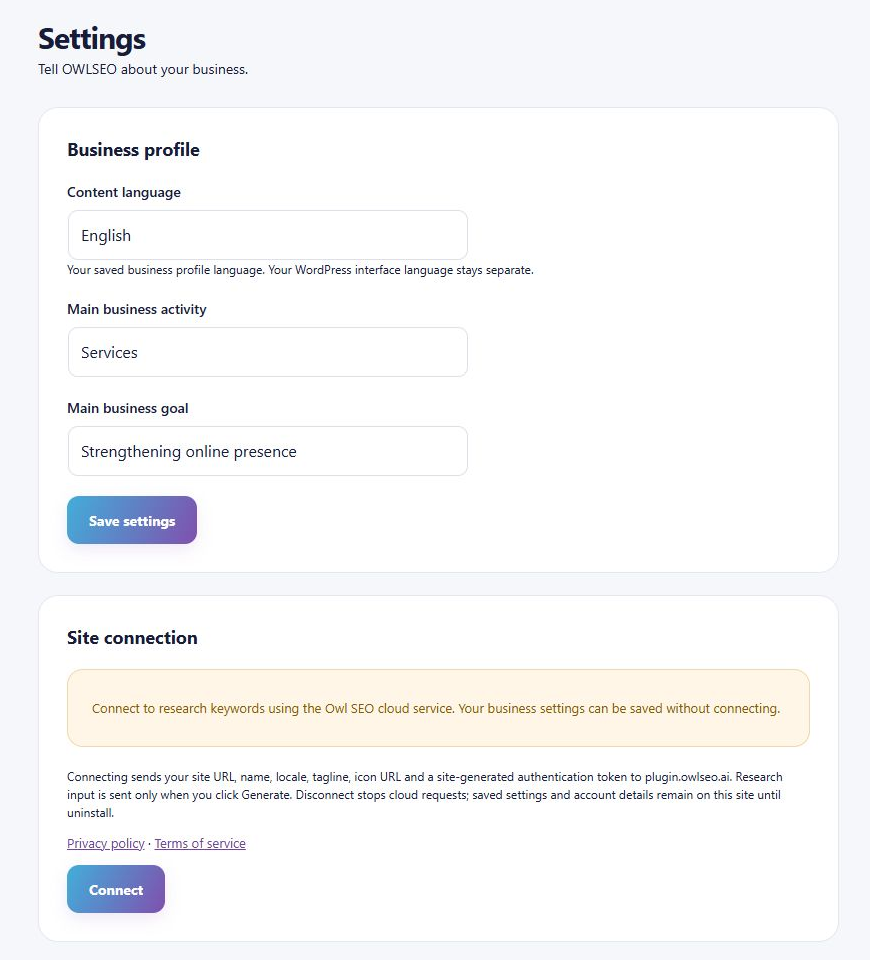
Installation
- Upload the owl-seo folder to wp-content/plugins, or install the ZIP through Plugins > Add New > Upload Plugin.
- Activate Owl SEO and open Owl SEO > Settings.
- Save your business settings. Click Connect if you wish to use the cloud research service.
- Open Research, enter keywords or competitor websites, and click Generate.
If replacing a development build installed in an owlseo folder, deactivate that build before activating this owl-seo package. Do not uninstall the old build first: uninstall removes the shared local settings table. Existing settings and account IDs are retained by this release.
FAQ
-
Is a paid plan required?
-
No local subscription gate is applied to keyword research. A successful connection to the Owl SEO service is required. Paid plans shown on Subscription describe a separate cloud service.
-
Does this plugin create or publish articles?
-
No. This release provides keyword research and local business settings. The wider OWLSEO service has separate commercial offerings; choosing a paid cloud plan does not add content creation, scheduling or publishing to this research-only plugin.
-
Does activating the plugin send data to Owl SEO?
-
No Owl SEO cloud request is made until an administrator clicks Connect in Settings. The connection screen explains which site information is sent. Research inputs are sent only when you click Generate. See External services for the full data-flow details.
-
Does it change my WordPress language?
-
No. The saved business profile supports English, Hebrew and Spanish. That preference does not change your WordPress administration language.
-
Does it work without JavaScript?
-
Settings, connection controls and the plugin’s informational content remain visible without JavaScript. Keyword generation, the video dialog and interactive pricing require JavaScript. A direct pricing link is supplied as a fallback.
-
Where are results stored?
-
The current research results are shown in your browser until you leave or reload the screen. The plugin does not save a research history. Your business settings and site credentials are saved in the local WordPress database.
-
Are suggestions filtered?
-
The plugin cleans extra whitespace and standalone asterisk decorations. It filters empty suggestions and structural artifacts such as a fragmented short seed term or a repeated seed word. Competitor-only research also filters known fragmented technical acronyms and repeated research terms without requiring seed keywords. This structural filtering runs whether or not duplicate removal is enabled. Explicitly entered seed phrases are preserved. With Remove duplicate keywords enabled, suggestions that become identical after formatting and case normalization are shown once. Different phrases are not merged and search volumes are not recalculated. This is a structural cleanup, not a guarantee of relevance or data accuracy.
-
What happens when I disconnect or uninstall?
-
Disconnect stops cloud requests and clears cached connection status. It retains local credentials and settings for reconnection. Uninstall deletes the plugin’s settings table, options, cached checks and legacy scheduled events. It does not delete WordPress posts or media and does not cancel cloud billing or delete a remote account.
Reviews
There are no reviews for this plugin.
Contributors & Developers
“Owl SEO” is open source software. The following people have contributed to this plugin.
Contributors
Translate “Owl SEO” into your language.
Interested in development?
Browse the code, check out the SVN repository, or subscribe to the development log by RSS.
Changelog
1.5.8
- Filter known fragmented acronyms and repeated technical terms in competitor-only research, including inside longer phrases.
- Keep structural cleanup independent of duplicate removal and preserve explicit seed phrases, original volumes and already-used status.
1.5.7
- Clean decorative keyword artifacts and filter malformed seed-term suggestions locally.
- Respect duplicate-removal choice and retain original volumes and already-used status.
- Show research connection guidance that matches the site’s current connection state.
1.5.6
- Run automatic connection verification after WordPress resolves the plugin admin screen.
- Retain opt-in, administrator permissions, disconnect behavior and status-check caching.
1.5.5
- Resolve header metadata, translation placeholders and text-domain alignment with the owl-seo directory slug.
- Keep settings visible without JavaScript and remove the blocking page loader.
- Process disconnect before network callbacks; allow disconnect after failed registration.
- Validate HTTP status and plan response types; show dated verification and actionable failures.
- Cache free-plan and failed checks and reduce the status-check timeout.
- Preserve existing account credentials on authentication failure and invalidate configuration cache after writes.
- Remove unused fonts, graphics and the SweetAlert2 dependency. First-party scripts remain readable.
- Clarify cloud functionality and external data flows, and fix privacy and terms links.
1.5.3
- Research-only connector with explicit cloud opt-in and local business settings.