

Description
🤖 Ovebot — an AI chatbot that knows your store
Ovebot adds an AI chat widget to your WordPress site. The AI answers questions using your content — the pages you choose, the documents you upload and, on a WooCommerce store, your live product catalog — and hands the conversation over to a human on your team whenever the visitor asks for one.
Install the plugin, connect your Ovebot.ai account from the setup wizard, and the widget goes live. There are no API keys to copy and no scripts to paste into your theme.
This plugin does not require WooCommerce. The chat widget, the knowledge base and the live-chat handover work on any WordPress site — a blog, an agency site, a booking site. If WooCommerce is installed, two extra features become available: product recommendations from your live catalog, and order-status lookup inside the chat.
The AI processing itself runs on the Ovebot.ai service, which requires an account — see External services below for exactly what is sent and when.
💬 What the AI can do
✅ Answer support questions from your own knowledge base: shipping, returns, warranty, payment — whatever you feed it.
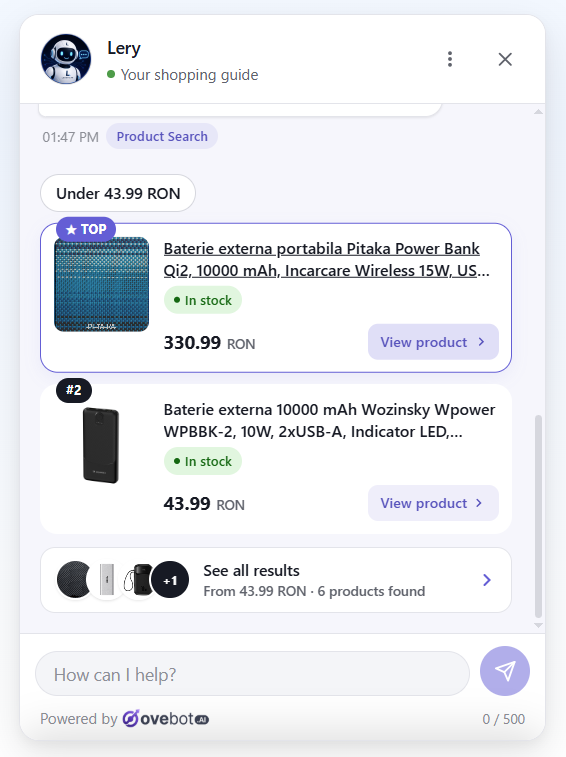
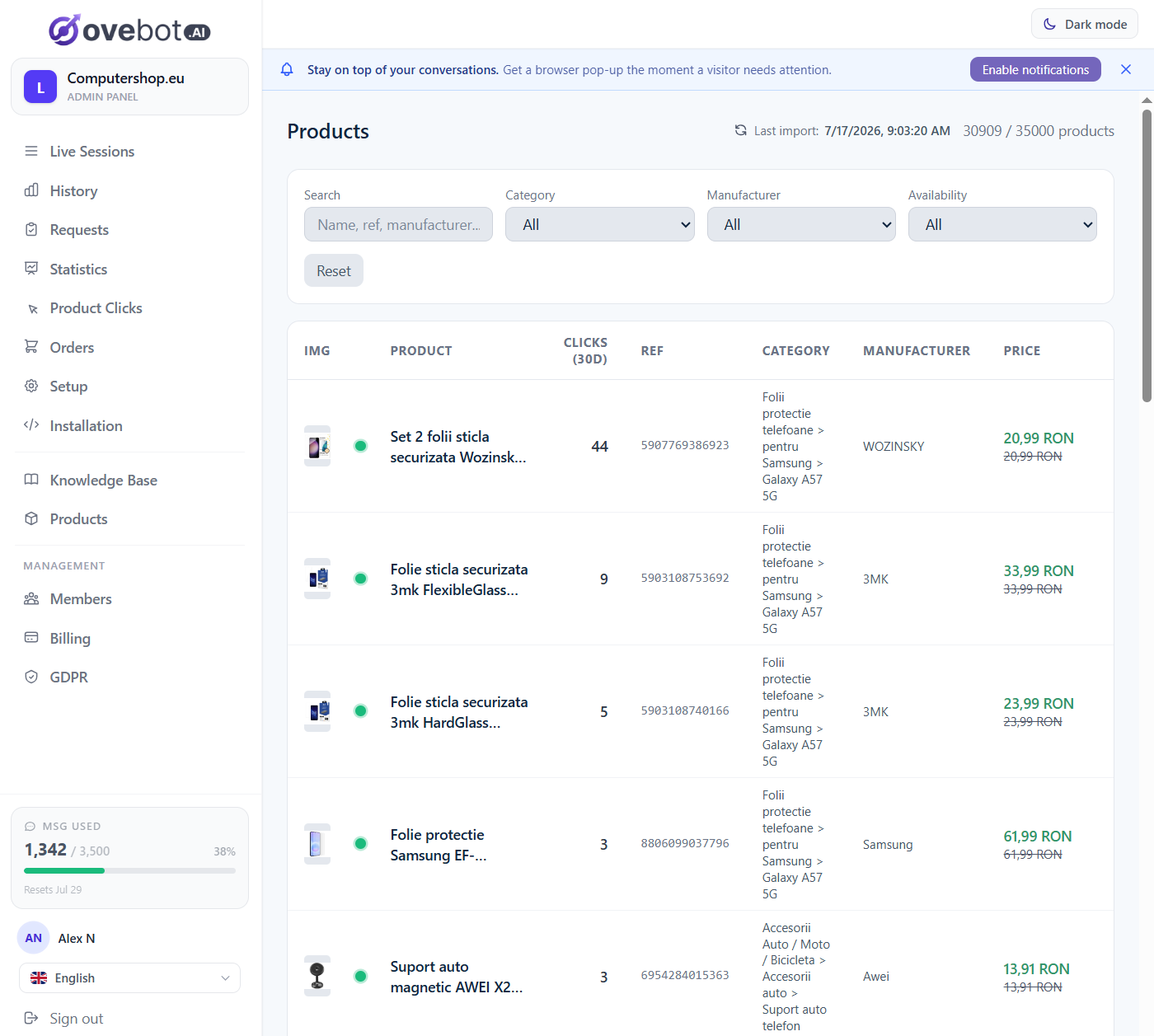
✅ Recommend products (WooCommerce) from your live catalog, with images, prices and a link to the product page. Products that go out of stock drop out of the catalog automatically, so they stop being recommended.
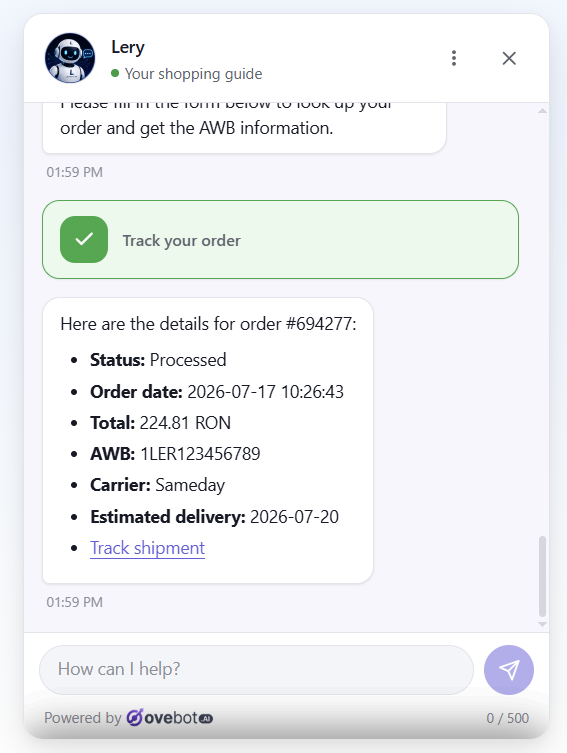
✅ Answer “where is my order?” (WooCommerce) with the real status and, when your shipping plugin has generated one, the tracking number.
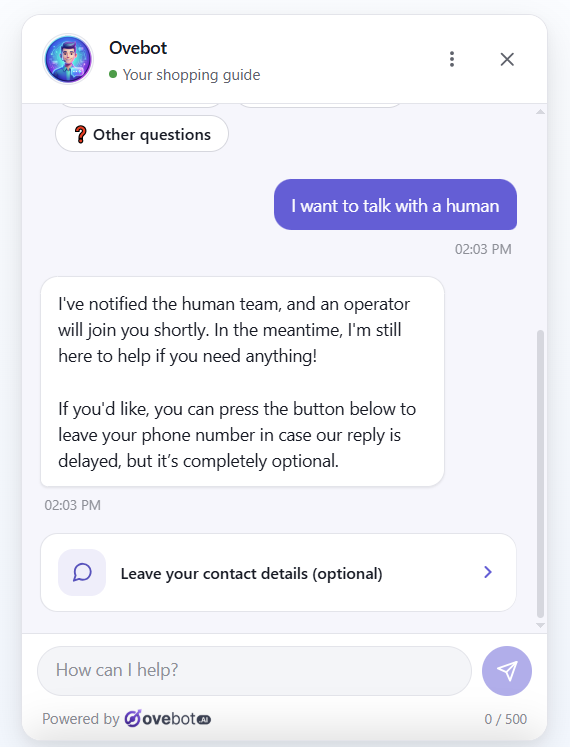
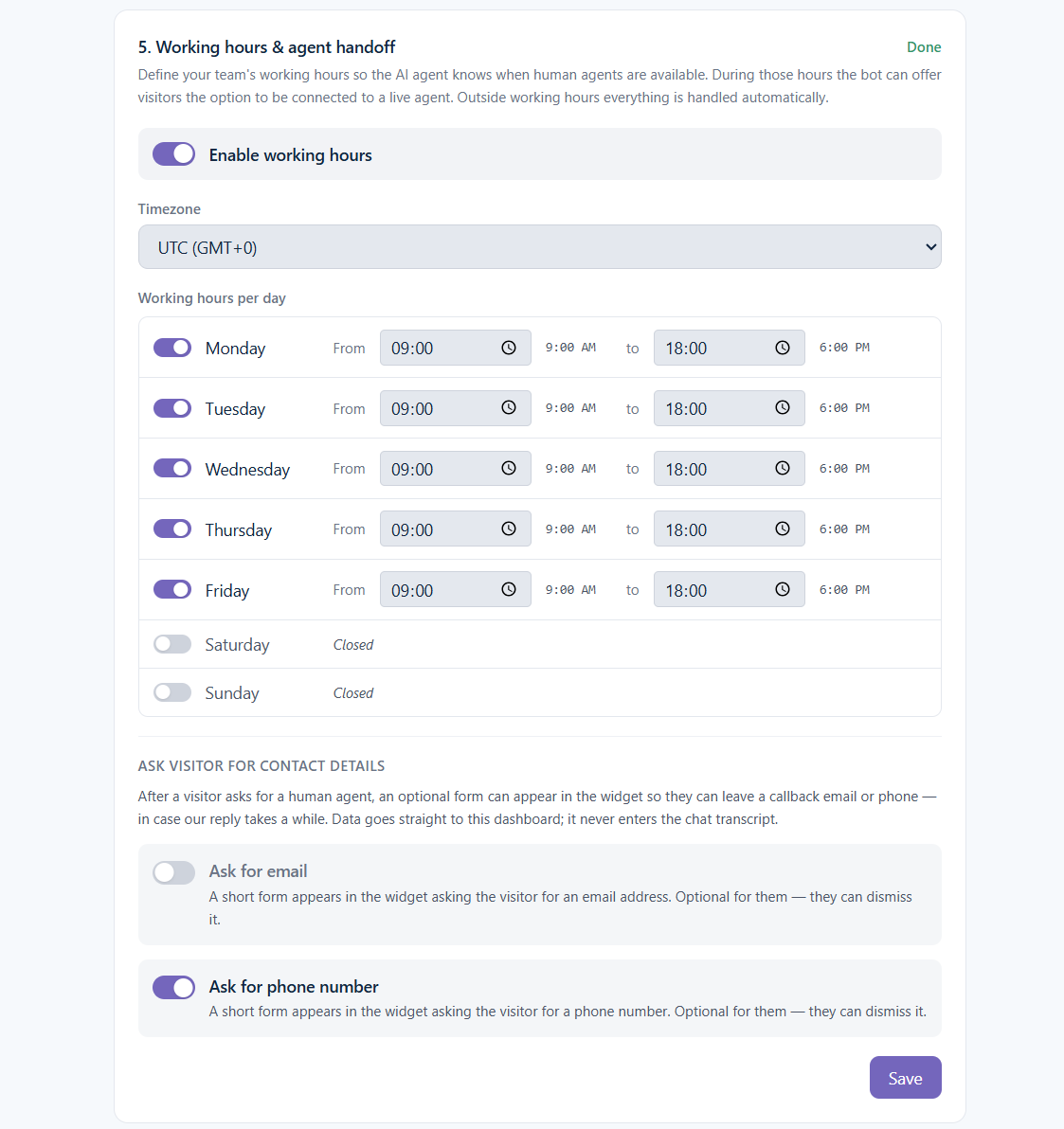
✅ Hand over to a human. Your team takes over a live conversation in one click; the AI resumes when they leave. Outside working hours the AI says so and leaves your contact details.
✅ Handle self-service requests — order cancellation, order modification, delivery or billing address change — through a secure form inside the widget, confirmed with a code emailed to the customer.
✅ Speak the visitor’s language. Set the language to auto and the widget follows the visitor’s browser language, switching mid-conversation if they do.
🧠 Training the AI on your own content
🟢 Website pages — pick the WordPress pages to sync from the setup wizard. Edit a synced page later and its knowledge-base entry updates on its own.
🟢 Uploaded documents — PDF, Word (.doc/.docx), OpenDocument (.odt), RTF, Excel (.xls/.xlsx), CSV, XML, TXT and Markdown.
🟢 Imported URLs — any public page.
🟢 Agent memory — a short always-on note the AI reads at the start of every conversation, for things like “Free shipping over 300 this week”. The AI also suggests things worth remembering, which you approve with one click.
🟢 Product feed (WooCommerce) — the plugin publishes a feed of your catalog with live stock, price and availability.
🟢 SKU and link lookup — paste a product link or type a product code and the AI resolves it against your catalog, answering about that exact product.
When there’s no good match in your content, the AI says so and offers the closest alternatives rather than inventing an answer.
🌍 Speaks your customer’s language
Set the widget to auto and it detects the visitor’s browser language on its own. If a visitor switches language mid-conversation, the AI switches with them — the replies, the forms, even the verification emails follow along.
Your welcome message is written once in your language and translated into every supported language automatically. You can review and hand-correct any translation; manual edits are never overwritten.
🛒 On a WooCommerce store
- Live catalog feed with real-time stock and availability
- Product carousels in chat with quick refine buttons like “In stock only” or “Under 500”
- Order tracking endpoint that reads the AWB from your shipping plugin
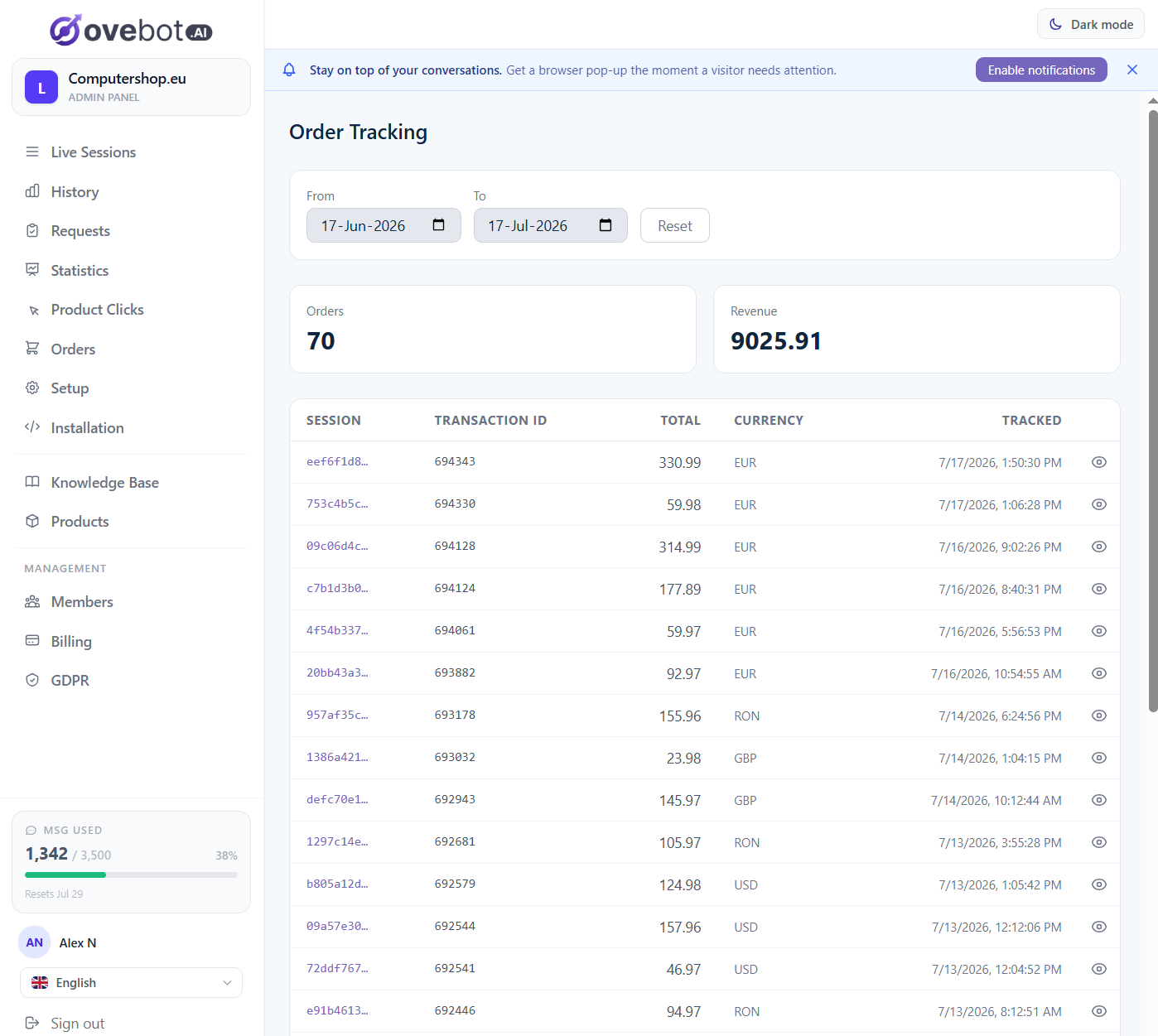
- Purchase tracking on the order-received page, linking orders back to the conversations that preceded them
- Product click analytics — which recommendations customers actually clicked
🎨 Making the widget yours
Everything is configured from Settings Ovebot.ai, live preview included:
- Accent colour and light/dark theme
- Title, subtitle, bot name and avatar
- A proactive teaser message, with a delay you choose
- Position (left or right corner) with X/Y offsets, so it sits clear of another floating button
- Size, z-index, notification sound and auto-open
Mobile-friendly out of the box.
👥 For your team
- Live sessions dashboard — see who is chatting right now and take over any conversation
- Take over — your name and avatar appear in the visitor’s chat header; click Leave and the AI picks up where you left off
- Predefined quick replies shared across the team
- Session history with transcripts, visitor country, working memory and linked orders
- Browser notifications when a visitor asks for a human — first teammate to take over gets the chat
- Roles — owners manage settings, billing and statistics; agents handle the chat
- Invite your team — agents join under your plan and are not charged separately
📊 Seeing what it does
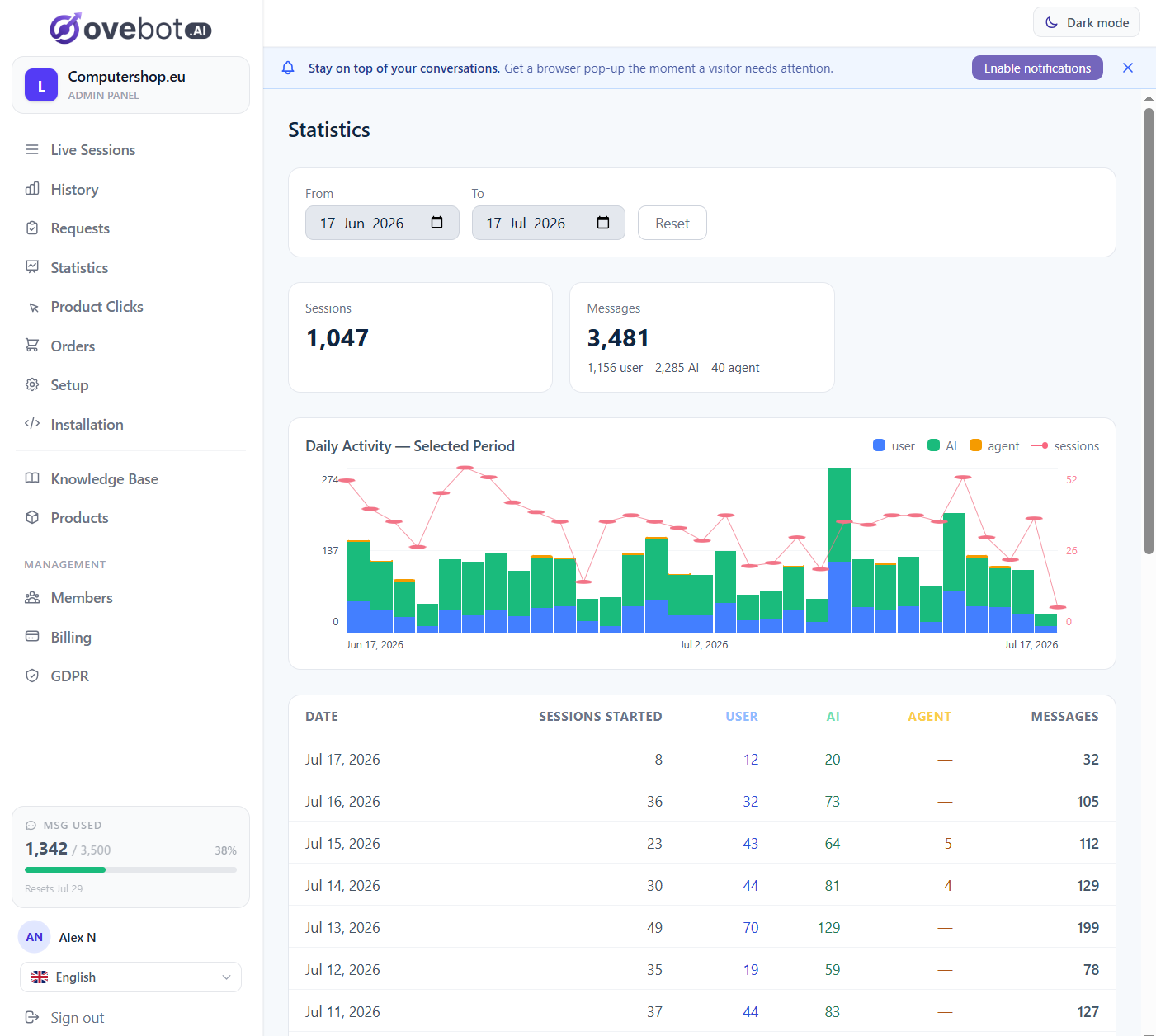
- Statistics — sessions, messages split by visitor/AI/human, tokens and cost, day by day
- Activity reports — an email twice a month with a PDF: conversations handled, autonomy rate (how much the AI resolved alone), estimated support hours saved, orders influenced and their value, top recommended products
- Product clicks — a full log of every recommendation customers clicked, ranked by popularity
🔐 GDPR
Ovebot was built with EU privacy rules in the design, not bolted on:
- AI disclosure and privacy notice shown as the first message of every chat — visitors always know they are talking to an AI
- Auto-generated privacy policy naming you as data controller and Ovebot as processor (Art. 28 GDPR) — or link your own
- Two first-party cookies only, holding nothing but a random identifier. No name, no email, no browsing data
- Visitors can download or permanently delete their conversation from the chat’s ⋮ menu, at any time
- Anonymize a session on request, straight from the session detail page
- Full workspace data export, delivered as a ZIP to your inbox
- Sensitive data never gets typed into the chat — cancellations and address changes use a secure form inside the widget, so nothing sensitive ends up in AI provider logs
- Data Processing Agreement and sub-processor list published and linked under External services below
⚡ Performance
The widget loads from a single lightweight script, asynchronously in the footer. Nothing is added to your pages while the chat is switched off.
🆓 Free plan — early access, first 200 stores
The plugin itself is free and fully functional: nothing in this code is locked behind a licence key, a trial period or a paid tier, and no feature of the plugin is gated on payment.
What the plugin does not include is the AI processing, which is performed by the Ovebot.ai service on its own servers. That service has a free plan, which is what the setup wizard signs you up for. It includes 100 AI replies per month, free forever, with no credit card and no time limit. Ovebot.ai is in early access, so the free plan is currently offered to the first 200 stores; paid plans with higher allowances are available at any time. Everything described above works on the free plan, within the resources that plan allocates.
🛟 If you run out of allowance
The chat does not switch off. The widget moves to contact-collection mode: visitors leave their name, phone, email and message, and every submission lands in your Requests inbox and your email. The AI resumes automatically when the allowance resets — or immediately if you upgrade. You also get a heads-up email at 80% of your allowance. Only the AI’s own replies count against it — visitor messages and replies your team types by hand are not counted.
🚀 Getting started
- Install and activate the plugin
- Connect an existing Ovebot.ai account from the setup wizard, or create a free one
- Pick your pages for the knowledge base, style your widget, and go live
You can also try the service before installing anything: paste your site URL at demo.ovebot.ai and chat with an agent trained on your own site. No signup.
⚖️ Trademarks
Ovebot and Ovesio are names of Aweb Design SRL, the author of this plugin. WooCommerce is a trademark of Automattic Inc.; this plugin is not affiliated with or endorsed by Automattic. FedEx, Colissimo, GLS, Packeta, Sameday, SEUR, UPS, Chronopost, Mondial Relay, DPD and FAN Courier are trademarks of their respective owners and are referenced here only to identify the shipping services whose tracking numbers this plugin can read from third-party plugins.
External services
This plugin relies on the Ovebot.ai service, operated by Aweb Design SRL. The AI processing cannot be performed locally by the plugin: understanding a visitor’s question and generating an answer requires large language models running on Ovebot.ai’s servers. An Ovebot.ai account is required; the setup wizard can create a free one for you.
The same terms and policies cover all of the Ovebot.ai endpoints listed below:
- Terms of Service: https://account.ovebot.ai/en/legal/terms
- Privacy & Cookie Policy: https://account.ovebot.ai/en/privacy
- Data Processing Agreement: https://account.ovebot.ai/en/legal/dpa
- Sub-processors: https://account.ovebot.ai/en/legal/sub-processors
- GDPR & data-protection overview: https://ovebot.ai/en/features#gdpr
1. account.ovebot.ai — account and authorization
Used to connect your site to your Ovebot.ai account over OAuth 2.0 (PKCE), and to keep that connection alive.
What is sent, and when:
- When you click Connect or Start free in the setup wizard, you are sent to
https://account.ovebot.ai/oauth/authorizewith your site’s domain name, the WordPress admin URL to return to, and the requested permission scopes. You then sign in (or register) on Ovebot.ai and approve the connection there. - Immediately after you approve, and afterwards roughly once an hour for as long as the connection lasts, the plugin posts to
https://account.ovebot.ai/oauth/tokento exchange the authorization code for access tokens and later to refresh them. Only the OAuth code / refresh token is sent.
No visitor data and no store data are sent to this host.
2. api.ovebot.ai — configuration and knowledge base
The plugin’s admin-side API. Every request is authenticated with the OAuth access token above; nothing here happens on the front end of your site.
What is sent, and when:
- On finishing the setup wizard, on saving the settings screen, and on plugin activation: your widget configuration (colours, texts, position, language), and — only if WooCommerce is active and you left the corresponding switches on — the public URL of this site’s product feed and the URL plus generated user/password of this site’s order-lookup endpoint. This is what lets Ovebot.ai read your catalog and answer order questions.
- When you pick pages for the knowledge base in the wizard, and whenever you later edit one of those pages: that page’s title, plain-text content and permalink.
- When the plugin’s admin screens load: a status request, to show your connection state and your catalog / knowledge-base counts.
- When you click Disconnect, and on uninstalling the plugin: a request to revoke the stored token.
3. .ovebot.ai — the chat widget
The visitor-facing part. <your-workspace> is the workspace slug of the account you connected.
What is sent, and when:
- On every page view of your site, for every visitor, while the chat widget is enabled: the browser loads
https://<your-workspace>.ovebot.ai/widget/chat-loader.js. Loading it necessarily discloses the visitor’s IP address and user agent to Ovebot.ai, as with any externally hosted script. From then on, the conversation itself (the messages the visitor types, the page they are on, and two first-party cookies holding a random visitor/session identifier) is exchanged with Ovebot.ai so the AI can reply. - On the WooCommerce order-received page, once per order, while the chat widget is enabled: the browser loads
https://<your-workspace>.ovebot.ai/widget/event.jsand reports the order number, total and currency. Ovebot.ai records only these — the order id and its total — and keeps them to produce the account’s activity / justification report (attributing an order to the conversation that preceded it). No line items, customer names, emails, phone numbers or addresses are sent by this event.
4. Requests Ovebot.ai makes back to your site
Not an outbound connection the plugin opens, but disclosed here because this is how your product and order data actually reaches Ovebot.ai. Once configured, Ovebot.ai’s servers call two REST endpoints on your own site. Both require WooCommerce, both can be switched off in the plugin’s settings, and both are served as Forbidden while the chat widget is disabled.
/wp-json/ovebotai/v1/feed— your product catalog, protected by a secret hash in the URL. For each purchasable, in-stock product it returns: the internal product id, name, description, category path, brand/manufacturer, availability, price and sale price, currency, main image URL, product-page URL, product attributes and — for managed-stock products — the available quantity. Out-of-stock and zero-priced products are left out. This is the product data Ovebot.ai uses to answer questions and recommend items./wp-json/ovebotai/v1/orders— order-status lookup, protected by HTTP Basic credentials generated on your site. The order is always found by this plugin, looking it up live in your own site’s WooCommerce database — Ovebot.ai keeps no copy of your orders and does not search for it on its side. When a customer asks “where is my order?”, Ovebot.ai simply forwards the order number they gave, together with the email address or phone number they entered so ownership can be proven, to this endpoint; the plugin does the lookup and hands back the answer. The email/phone is used only to check it matches that one order in that single request — it is never stored or logged, on your site or on Ovebot.ai. Only on a match does the endpoint return the order number, creation date, status, total and currency, plus — when your shipping plugin has stored one — the tracking (AWB) number, carrier name and a public tracking URL. Nothing is returned for an order the request cannot prove ownership of.
What Ovebot.ai keeps, and what it does not:
- Product feed: Ovebot.ai stores the catalog it reads from
/feedso the AI can recommend your products to visitors, and refreshes it as your stock and prices change. Remove a product, or let it go out of stock, and it drops out on the next refresh. - Orders: Ovebot.ai records only the order id and order total (from the order-received event above), and keeps them solely to build your account’s activity / justification report.
- Customer contact details are not retained: the email address or phone number a customer enters when asking “where is my order?” is used only to authorize that one lookup. It is not stored or logged by this plugin, and it is not saved by Ovebot.ai either — it never becomes part of your account’s stored data.
5. Courier tracking links
*Only …
Screenshots
Installation
- Upload the plugin to
/wp-content/plugins/or install it through the WordPress plugins screen. - Activate the plugin.
- Go to Settings Ovebot.ai and follow the setup wizard: connect an existing Ovebot.ai account, or create a free one from the wizard.
- Choose the pages to sync into the knowledge base, customize the widget, and finish the wizard.
The connection uses OAuth, so there are no API keys to copy and paste by hand.
FAQ
-
Do I need an Ovebot.ai account?
-
Yes. The AI runs on Ovebot.ai’s servers, so the plugin has to be connected to an account. You can create one from the setup wizard without leaving WordPress, and the free plan needs no payment details.
-
Does this work without WooCommerce?
-
Yes. The chat widget, the knowledge base and the live-chat handover work on any WordPress site, and WooCommerce is never required to install, activate or use the plugin. Two features only appear when WooCommerce is active: product recommendations from your catalog, and order-status lookup.
-
Is the plugin free?
-
The plugin is free and fully functional — nothing in its code is locked, time-limited or gated behind a licence key. The AI processing is provided by the Ovebot.ai service, which has a free plan covering everything described here within that plan’s allocated resources.
-
Does Ovebot cost anything to try?
-
No. The free plan includes 100 AI replies per month, free forever, with no credit card and no time limit. Ovebot.ai is in early access, so the free plan is currently offered to the first 200 stores. Paid plans with higher allowances are available at any time — that is a limit of the hosted service, not of this plugin, whose own code has no paid tier and no licence check.
-
Is Ovebot GDPR compliant?
-
Ovebot is built for it. Every chat opens with an AI disclosure and a privacy notice linking to your privacy policy (yours, or an auto-generated one naming you as data controller and Ovebot as processor under Art. 28 GDPR). Only two first-party cookies are used and they hold nothing but a random identifier. Visitors can download or permanently delete their conversation at any time from the chat’s ⋮ menu, you can anonymize any session on request, and you can export all of your workspace data as a ZIP. A Data Processing Agreement and the current sub-processor list are linked under External services above.
-
Can I run more than one website from one account?
-
Yes, on plans that allow it. Each agent has its own products, knowledge base, appearance, languages and statistics, while the message allowance is shared across all of them.
-
Which messages count toward my plan’s allowance?
-
Only the AI assistant’s replies. Messages typed by your visitors, and replies you send manually after taking over a conversation, are not counted.
-
Can I try it before installing?
-
Yes. Paste your website URL at demo.ovebot.ai — about a minute later you will be chatting with an AI agent trained on your own site content. No signup required.
-
What data leaves my site?
-
See the External services section above, which lists each Ovebot.ai host, what is sent to it and when, together with the terms and privacy policy.
-
Where does the AI get its answers from?
-
From your own data: the WordPress pages you selected, documents and URLs you added to the knowledge base, your agent memory, and — on a WooCommerce store — your product catalog. It does not browse the web to answer.
-
What file types can I upload to the knowledge base?
-
PDF, Word (.doc, .docx), OpenDocument (.odt), RTF, Excel (.xls, .xlsx), CSV, XML, plain text (.txt) and Markdown (.md). The text is extracted and pre-filled for you to review before saving.
-
Can the AI recommend products that are out of stock?
-
No. Products that are out of stock, or that drop out of the feed, are removed from the catalog automatically and stop appearing in recommendations. They reappear when they are back in stock.
-
Can my team take over a conversation from the AI?
-
Yes. Click Take over on any live session — your name and avatar appear in the visitor’s chat header and you reply directly, optionally with predefined quick replies. Click Leave and the AI resumes.
-
What languages does the chat speak?
-
Set the language to
autoand the widget follows the visitor’s browser language, including if they switch language mid-conversation; forms and verification emails follow along. You can also force a fixed language. -
Can customers cancel or change an order through the chat?
-
Yes. Order cancellation, order modification, delivery address change and billing address change are collected through a secure form inside the widget. Each request is confirmed with a 6-digit code emailed to the customer, so only the person who placed the order can submit it, and your team is notified by email.
-
How is order lookup protected?
-
Ovebot.ai authenticates to the endpoint with a user/password pair generated on your site (regenerable at any time from the settings screen), and repeated authentication failures from an IP are rate-limited. On top of that, an order is only ever returned when the request also carries an email address or a phone number matching that order — either one works, and the endpoint verifies whichever it was given. The endpoint can be switched off entirely, and it returns 403 whenever the chat widget is disabled.
-
What happens when I use up my monthly allowance?
-
The chat stays on your site and switches to contact-collection mode: visitors leave their name, phone, email and message, and every submission lands in your Requests inbox and your email. The AI resumes when the allowance resets, or immediately if you upgrade. You also get a warning email at 80% of the allowance.
-
Which shipping plugins does order tracking read tracking numbers from?
-
The order-lookup endpoint reads the AWB / tracking number that one of these plugins has already stored for the order — no extra setup, and no courier account of your own is needed:
- FedEx Rates & Labels
- Colissimo shipping methods for WooCommerce
- GLS Shipping for WooCommerce
- Packeta
- SamedayCourier Shipping
- SEUR Oficial
- WCMultiShipping — Mondial Relay, Inpost & Chronopost for WooCommerce (UPS, Chronopost and Mondial Relay)
- DPD Baltic Shipping
- HgE: Shipping Zones for FAN Courier Romania
If none of them is installed, the AI still answers with the order status — just without a tracking link. Missing a courier? Tell us at ovebot.ai/contact.
-
Where do I manage the widget’s appearance?
-
Settings Ovebot.ai Settings Appearance.
-
Yes. Change the side (left/right) and raise the X/Y offsets in the appearance settings. The proactive teaser bubble follows the new position.
-
What happens when I uninstall the plugin?
-
All of the plugin’s options, cached feed data and knowledge-base id mappings are deleted from your database, and a request is sent to Ovebot.ai to revoke the stored access token so it cannot be reused.
Reviews
There are no reviews for this plugin.
Contributors & Developers
“Ovebot – AI Chatbot & Sales Agent” is open source software. The following people have contributed to this plugin.
Contributors
Translate “Ovebot – AI Chatbot & Sales Agent” into your language.
Interested in development?
Browse the code, check out the SVN repository, or subscribe to the development log by RSS.
Changelog
1.0.1
- Expanded the External services documentation: what data is sent and when, what Ovebot.ai retains (product feed for recommendations, order id/total for the activity report) and what it never stores (the email/phone a customer enters for an order lookup), and terms/privacy links for every courier whose public tracking page the plugin can build a link to.
- Sanitized the HTTP Basic credentials read from
$_SERVERon the order-lookup endpoint. - Hardened the OAuth return handler: explicit
state/PKCE origin validation before the authorization code is read, and the connect-error message is now passed through a per-user transient instead of a query-string parameter.
1.0.0
- Initial release.