

Description
OrderBuster (formerly OrderRescue — renamed Oct 2026 at WP.org’s request, see Changelog) targets a gap generic abandoned-cart tools miss: orders that were already placed and are sitting on-hold or pending payment, most commonly stores using manual payment methods (bank transfer, Zelle, crypto, P2P apps) instead of an auto-capturing card processor.
Unlike cart-abandonment plugins, which key off cart state and can misfire on manual-payment orders that are already placed and just awaiting confirmation, OrderBuster watches actual order status — so it never sends a false “you forgot something” email to a customer who already paid and is just waiting on manual confirmation.
What it does:
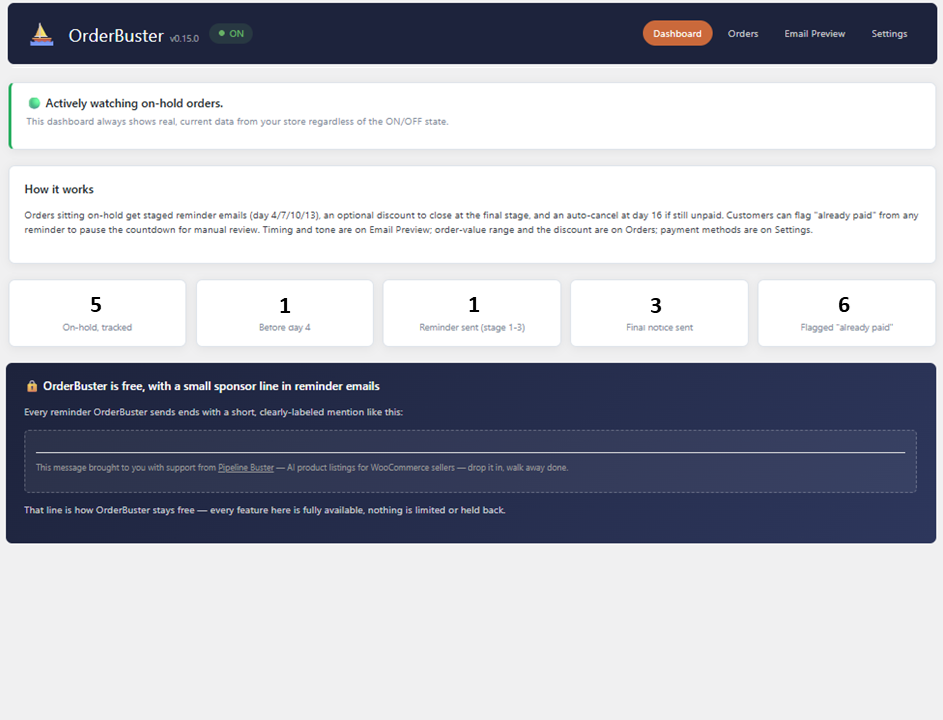
- Staged reminder emails at configurable day intervals while an order sits on-hold
- Auto-cancels orders that go unpaid past a final threshold
- Optional one-time discount at the final reminder to try to close the sale before cancellation, capped per customer so it can’t be gamed by repeat stalling
- A self-service “I already paid” link in every reminder — pauses the countdown for merchant review instead of risking a wrongful auto-cancel
- Per-order override to force a discount on or off, and a settings page to include/exclude specific payment gateways or exempt an order-value range from auto-cancel
- Reminder-stage column added directly to your existing WooCommerce Orders list — no separate dashboard
Runs entirely on your own site’s WP-Cron — no external service, no API key, no account required.
External services
This plugin does not connect to any external API or service to function. The free version includes a small, clearly-labeled sponsor line in reminder emails; clicking it is an ordinary outbound link, not a call made by the plugin itself.
Screenshots

Installation
- Upload the plugin to
/wp-content/plugins/. - Activate through the ‘Plugins’ screen in WordPress.
- Go to WooCommerce OrderBuster to configure payment methods, order-value range, and the discount-to-close settings.
FAQ
-
Does this replace my abandoned-cart plugin?
-
No. Abandoned-cart tools key off cart state, before checkout is ever completed. OrderBuster watches order status, for orders that were already placed and are sitting on-hold or pending payment — most commonly stores using a manual payment method (bank transfer, Zelle, crypto, other P2P apps) instead of an auto-capturing card processor. The two don’t overlap and won’t double-email the same customer for the same reason.
-
Does it need an API key or account?
-
No. Everything runs on your own site’s WP-Cron. No external service call is required for the plugin to function.
-
What happens to an order that gets auto-cancelled?
-
It’s marked Cancelled in WooCommerce and the customer gets a branded cancellation email explaining why. Nothing else on the order changes, and cancelling is always reversible from the native WooCommerce order screen like any other order.
-
Can a customer stop the countdown if they already paid?
-
Yes. Every reminder includes a self-service “I already sent payment” link. Clicking it pauses that order’s countdown and flags it for merchant review instead of risking a wrongful auto-cancel.
Reviews
There are no reviews for this plugin.
Contributors & Developers
“OrderBuster” is open source software. The following people have contributed to this plugin.
Contributors
Translate “OrderBuster” into your language.
Interested in development?
Browse the code, check out the SVN repository, or subscribe to the development log by RSS.
Changelog
0.15.1
- Fixed: the Orders page’s reminder-stage strikethroughs were computed from elapsed calendar days on hold rather than the actual reminder-stage meta the send engine itself advances — for the window between a day threshold crossing and the next twice-daily cron tick, a stage could show as already sent when nothing had actually gone out yet. Now keyed off the real stage/auto-cancel state.
- Fixed: the admin menu icon was blank — a non-existent dashicon class name failed silently with no error anywhere. Corrected to the real WordPress life-ring glyph.
0.15.0
- Renamed to OrderBuster, at WP.org’s own direction after they reassigned this submission’s slug to “orderbuster”: display name, Text Domain, internal class/function/option/meta-key prefix (
ORDRES_/ordres_ORDBUST_/ordbust_), file names, and the Plugin URI subpath (zoa.captelek.net/wpplugins/orderrescue.../orderbuster) all updated to match. A one-time migration (runs automatically on an already-active install, not just on reactivation) carries over any settings and in-flight order data stored under the old option/meta-key names, so existing installs don’t lose configuration in the switch. Everything below this entry describes OrderRescue’s own history under its original name — left as originally written, not rewritten after the fact.
0.14.7
- Addressed the WP.org Plugins Team’s pre-review findings (automated + manual pass, Oct 26, 2026): removed the licensing/premium-gate mechanism (
ORDRES_Licensing::is_premium(), the “Upgrade — coming soon” CTAs) — OrderRescue already shipped 100% free with no paid tier, this just removes the dead gate-shaped code the review correctly flagged; the sponsor line and its cross-promotion copy stay, just without any premium-unlock framing. Moved a hardcoded<style>echo (hiding one submenu item) to a properly enqueued/registered style. Hardened the Email Preview page’s “full store theme” render to escape its HTML viawp_kses_post()instead of a bare echo with a blanket escaping exception. Added aRequires Plugins: woocommerceheader plus a runtime check: if WooCommerce isn’t active, OrderRescue now shows a plain admin notice instead of fataling.
0.14.6
- Fixed a real text-domain mismatch WP.org’s own submission scanner caught: the plugin’s
Text Domainheader and every translation call usedorder-rescue, but the slug WP.org actually assigned this submission isorderrescue(derived from the “OrderRescue” plugin name, which has no space/hyphen to split on). Renamed theText Domainheader and all 248 translation-domain arguments toorderrescueto match. The two internal admin-menu-slug constants that happened to share the old string (DASHBOARD_SLUG, the enqueue-assets page check) are unrelated to the WP.org plugin slug and were deliberately left unchanged. No functional change.
0.14.5
- Ran WordPress.org’s own “Plugin Check” scanner live against the plugin (static checks: general, plugin-repo, security, accessibility) and fixed everything it found: 39 additional missing
translators:comments, 2 unordered placeholder strings (now positional,%1$s/%2$s), 5 outputs that were already escaped upstream but the scanner couldn’t trace (annotated, not re-escaped), a nonce value not unslashed before verification, and 2 intentional non-prefixed hook invocations (WooCommerce’s ownwoocommerce_email_header/_footer, used on purpose to reuse its email template) annotated so they read as intentional. The 3 “no nonce” findings on the public “I already paid” link are by design — that link has no WP session to carry a nonce;order_keyis the verified auth token instead — now annotated accordingly. No functional change.
0.14.4
- Pre-submission WP.org-readiness pass, informed by the revision rounds Pipeline Buster went through on its own WP.org review: added missing
// translators:comments on every multi-placeholder string (5 found), confirmed the plugin’s own prefix (ORDRES_/ordres_) has zero collision risk, confirmed no stray untracked files would ship, confirmed no.distignoreis present (one briefly blocked PB’s own automated scan). No functional change.
0.14.3
- Declared explicit compatibility with WooCommerce’s High-Performance Order Storage (HPOS/custom order tables) feature. The plugin’s order queries and column rendering were already storage-agnostic (
wc_get_orders(),WC_Ordermeta accessors, both legacy and HPOS column hooks), but never formally declared compatible — stores running HPOS would have shown OrderRescue as unverified under WooCommerce Settings Advanced Features. - Corrected the Plugin URI header, which had drifted to an old pipelinebuster.com path — now points to the actual ZOA subpath (
zoa.captelek.net/wpplugins/orderrescue). That landing page itself is still pending (goes live once the plugin clears WP.org review), so the link won’t resolve yet.
0.14.2
- Reminder Timing row labels no longer bake in the currently-saved day value (“Day 4 reminder”) — now generic (“Reminder 1 (days)”, etc.) so they stay accurate the moment you type a new value, before saving.
- BabelTones: the Order Cancelled and Day-16 auto-cancel previews’ bold headline now genuinely differs between the Professional and Formal tones (was accidentally identical text).
- Email Preview: selecting a different BabelTone now updates the copy preview immediately, no Save required to see how it reads (still requires Save to persist the choice).
- Save Settings button on Email Preview moved below the copy-preview card instead of above it.
- Orders, Email Preview, and Settings now warn — both an on-page notice and the browser’s own native “leave page?” prompt — if you navigate away with unsaved changes on that page’s settings form.
0.14.1
- Reminder Timing polish: Auto-cancel and Discount to close now show the same locked/checked checkbox as the 4 reminder rows, for consistent alignment. Widened the label column so “Day 13 reminder — final notice” (and any other row) stays on one line instead of wrapping.
0.14.0
- Reminder Timing (Email Preview) gained a checkbox per reminder day, letting a merchant shorten the chain by skipping any of the 4 staged reminders. Auto-cancel has no checkbox — it’s not a reminder, it’s what OrderRescue actually does, and always fires last regardless of which reminders are on.
- Discount to close now shows as a read-only reflection on this page too (edit it on the Orders page, unchanged).
- Unchecked reminders keep their configured day (grayed out) rather than losing it, in case they’re re-enabled later.
0.13.1
- Email Preview’s “Order Cancelled” pill: unselected state changed from white/red-outline to OrderRescue’s dark navy fill (white text), preview-only ask, selected state unchanged.
0.13.0
- Cancelled orders (auto or via the “Cancel order” button) now stay visible in “Orders OrderRescue is watching” — capped at the 25 most recent, dimmed, tagged Cancelled (auto)/(by request) — instead of disappearing the moment they leave on-hold, so the View link stays reachable inside OrderRescue itself.
- Removed the “View in OrderRescue” link added last version to the native WooCommerce order screen — the Orders list fix above is the in-plugin way back instead, no need to route through WooCommerce’s own screen.
0.12.0
- “Cancel order” on Order Detail now sends its own plain cancellation email, distinct from auto-cancel’s non-payment-focused copy — a manual cancel may have nothing to do with payment.
- Email Preview gained a genuinely separate “Order Cancelled” pill for that manual-cancel copy, kept apart from the existing Day-16 pill (which still previews the real auto-cancel wording, unchanged).
- Added a “View in OrderRescue” link to the native WooCommerce order screen’s own OrderRescue box — a permanent way back into Order Detail for any order, any status, since the Orders list only ever shows on-hold orders.
0.11.1
- Order Detail now clearly marks a cancelled order (a “Cancelled” tag, plain-language notes on the Discount card and the OrderRescue settings snapshot) instead of the misleading “Not yet tracked” / “Nothing further scheduled” copy those cards fell back to once cancellation cleared the order’s tracking data.
- Discount to close picker on Order Detail now grays out and hides Save/Remove discount once an order is cancelled, matching the existing already-applied lock.
- Email Preview’s Cancelled pill is now visually set apart from the Day N reminder pills (its own color, right-aligned in the same row) instead of reading as a fifth equivalent stage.
0.11.0
- Added a “Cancel order” button on Order Detail, next to the order summary — a merchant no longer needs the native WooCommerce screen for this. Reuses OrderRescue’s own branded cancellation note (same one auto-cancel sends), so the customer always gets a proper notice either way.
0.10.2
- Copy Notifications intro line reworded for a first-time reader — leads with the action (“add your own address as CC or BCC”) instead of “no email address is built in.”
0.10.1
- Copy Notifications moved above Reminder Timing on Email Preview.
- Order Detail’s “OrderRescue settings for this order” card now strikes through a reminder’s “Day N” text once that reminder has actually gone out, not just the leading checkmark.
0.10.0
- Added a “Copy Notifications” card on Email Preview — CC/BCC fields (blank by default, no email baked in) so a merchant can get their own copy of the reminder/cancellation emails OrderRescue sends. Comma-separated, multiple addresses supported.
0.9.0
- Order Detail’s “OrderRescue settings for this order” card now shows the customer’s own discount-eligibility countdown (eligible now, or the exact date they’re eligible again) and the actual date/time the next reminder (or auto-cancel) is estimated to go out, based on the live twice-daily cron schedule.
0.8.0
- Order Detail’s discount override picker now locks once a discount has actually been applied to the order — previously it stayed clickable and appeared to work, but silently did nothing (the applied-discount guard runs before the override is ever read again).
- Added a “Remove discount” action on the Order Detail page — reverses an applied discount (removes the fee line item, re-totals the order, clears the applied flag, and reopens the customer’s eligibility window) entirely from OrderRescue’s own interface, no need to touch WooCommerce’s native order screen.
- Discount fee line items are now tagged with their own meta key so removal can find them reliably.
0.7.0
- Fixed: the Order Detail “View” link could 403 with “Sorry, you are not allowed to access this page” — caused by hiding the page via remove_submenu_page(), which strips WordPress’s own capability lookup for it. Switched to CSS-only hiding.
- Order Detail page: added a “Back to Orders” link, a Domestic/International shipping note, and a read-only “OrderRescue settings for this order” card (reminder timing, discount-to-close rule, payment method, BabelTone voice) — flagged as reflecting live global settings, not a per-order snapshot.
0.6.0
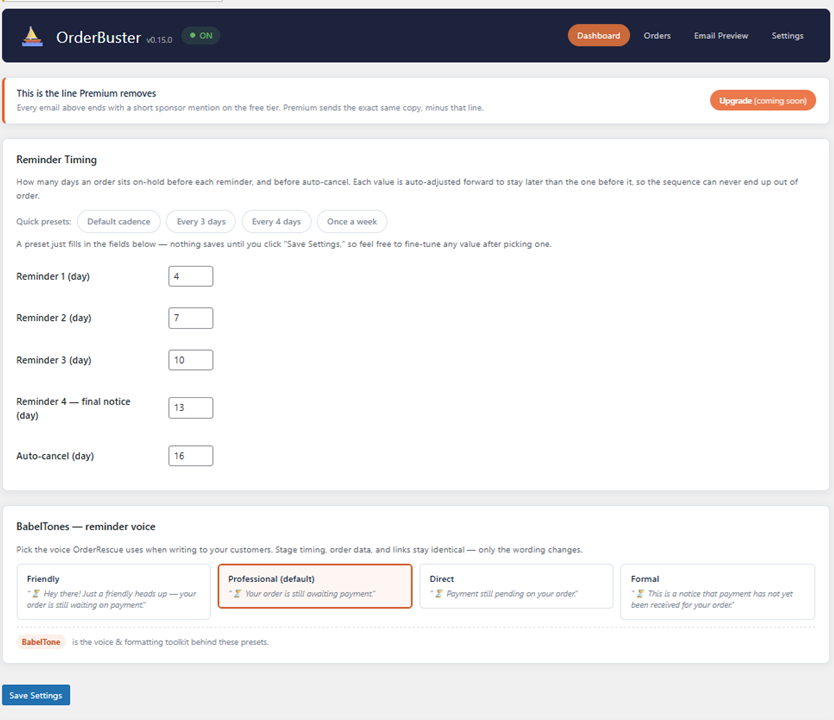
- Reminder template packs (“BabelTones”): four tone presets (Friendly, Professional, Direct, Formal) selectable per store, applied to both reminder and cancellation copy.
- Settings reorganized so each setting lives on the page that uses it — Reminder Timing + tone picker on Email Preview, Order Value Range + Discount to Close on Orders, Settings itself down to ON/OFF + Payment Methods.
0.5.0
- Configurable reminder day-ranges and auto-cancel threshold, with quick-preset buttons.
- Discount-override visibility inside OrderRescue’s own Orders list and Order Detail pages, alongside the existing native WooCommerce control.
0.4.0
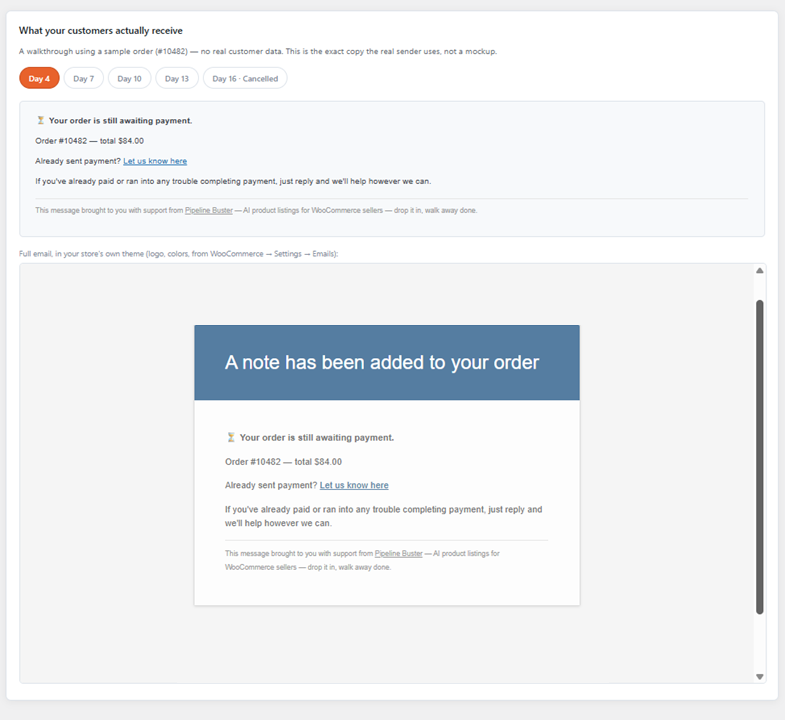
- Full store-themed customer email preview, rendered through WooCommerce’s own email header/footer/styling.
0.3.0
- Real branded cancellation email, replacing the placeholder shown in earlier previews.
- Experimental cross-promotion cards on the Orders and Email Preview admin pages.
0.2.0
- Added dedicated Orders and Email Preview admin pages alongside Dashboard and Settings.
- Payment methods grouped into collapsible sections; feedback link added to Settings.
0.1.0
- Initial internal build — staged reminders, auto-cancel, discount-to-close, self-service paid link, orders-list column, per-order override.