
Description
OneStudio Vietnam Address for WooCommerce integrates the Vietnamese administrative address system into the WooCommerce checkout form. All Province/City, District, and Ward data is bundled with the plugin – no API key required, no dependency on an external service, no risk of interruption.
This is an independent plugin, not affiliated with, endorsed by, or sponsored by WooCommerce or Automattic. WooCommerce is a trademark of Automattic Inc.
Key features
- Vietnamese address integration: Replaces or extends WooCommerce’s default address fields with the Province/City – District – Ward system
- Supports both structures:
- Old structure (before 1 July 2025): 63 provinces with 3 levels (Province – District – Ward)
- New structure (after 1 July 2025): 34 provinces with 2 levels (Province – Ward)
- Both Classic Checkout and Block Checkout supported: see “Block Checkout support” below
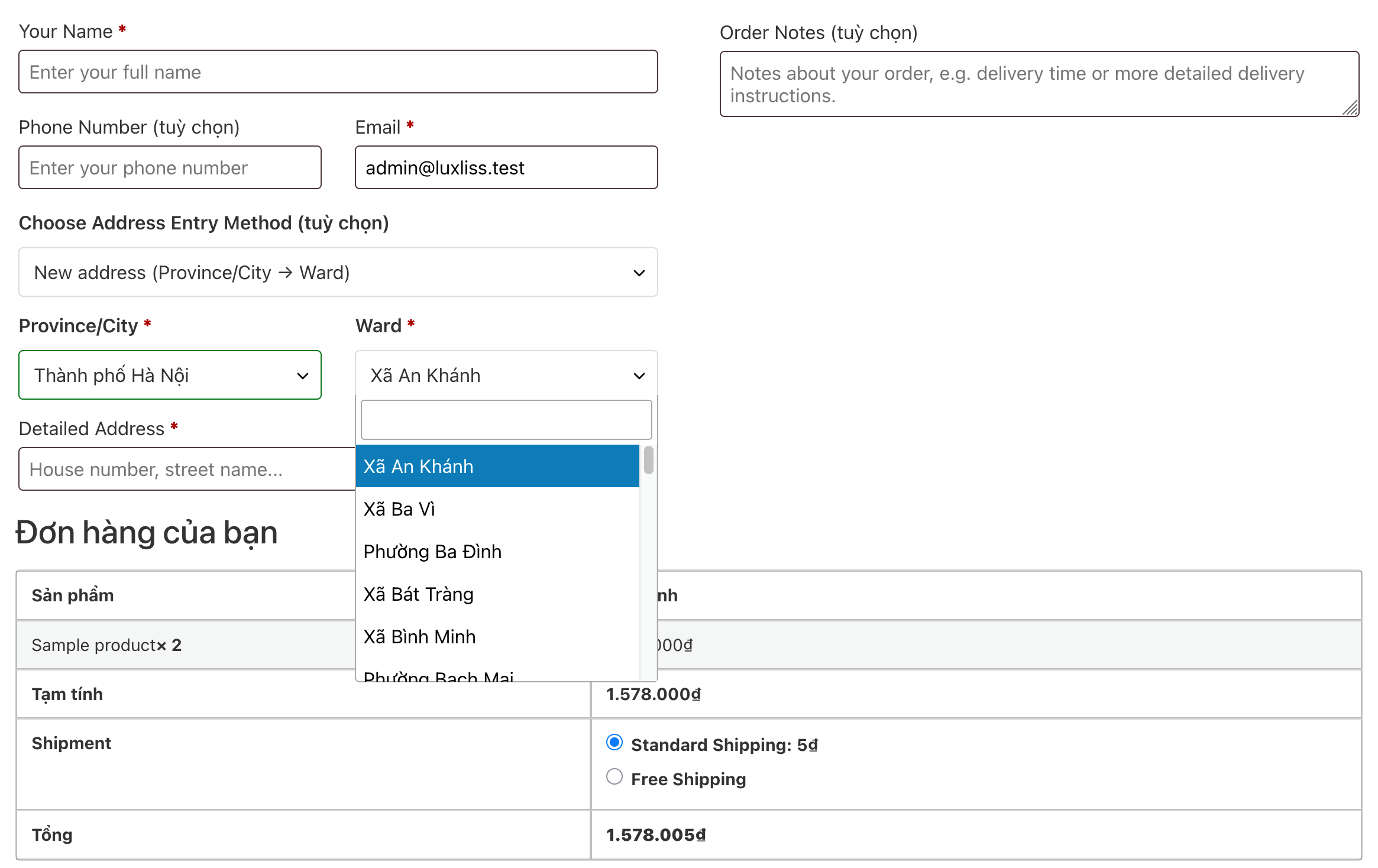
- Searchable dropdowns: Province/City, District, and Ward fields are searchable (type to filter) on Classic Checkout, using the Select2 library already bundled with WooCommerce – toggleable in settings if it ever conflicts with a theme
- Bundled data: The full list of Provinces/Cities, Districts, and Wards (both structures) ships inside the plugin – works immediately after installation, no external API calls, no internet connection or API key required
- Central data server: Defaults to
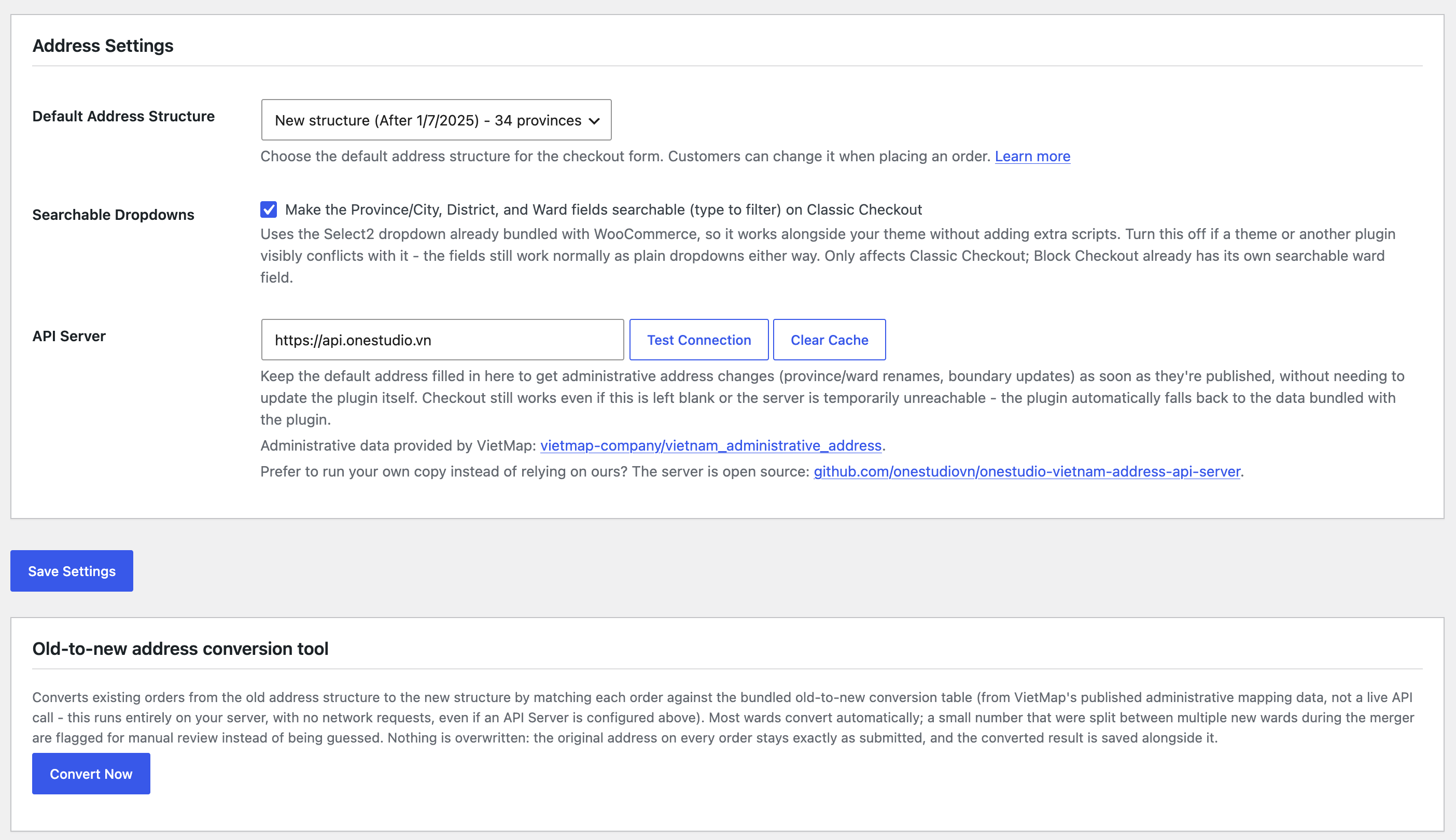
https://api.onestudio.vnto receive administrative changes as soon as they’re published, without needing a plugin update. Can be pointed at a self-hosted server instead, or left blank to use only the bundled data – however it’s configured, the plugin always automatically falls back to the bundled data if the server is unreachable, so checkout is never interrupted - Automatic conversion: Converts existing orders from the old address structure to the new one, using a bundled conversion table
- Friendly interface: A complete, easy-to-use settings page inside WooCommerce Admin
- Admin display: View detailed address information on the order edit screen
Requirements
- WordPress 5.8 or later
- WooCommerce 5.0 or later
- PHP 7.4 or later
Block Checkout support
The plugin supports both Classic Checkout (shortcode) and Block Checkout (the default for new stores since WooCommerce 8.3+):
- Classic Checkout: full support for both address structures (new: Province/City Ward, and old: Province/City District Ward).
- Block Checkout: new structure only (Province/City Ward) with a real-time ward-search autocomplete field. Requires WooCommerce 8.9 or later. The old structure (with District) is currently only available on Classic Checkout.
If your WooCommerce version is older than 8.9 and you’re using Block Checkout, the plugin shows a notice in the admin area, and you can enable “Cart and checkout shortcodes” under WooCommerce > Settings > Advanced > Features to switch to Classic Checkout.
Languages
The plugin ships with: Vietnamese (default), English, Français, Deutsch, 日本語. Since most customers run Vietnamese-language stores, the plugin displays Vietnamese for any site without a dedicated matching translation (including sites running WordPress’s default English locale), rather than falling back to English. Sites explicitly configured for English/Français/Deutsch/日本語 still display in that language as expected.
Usage
- Install and activate the plugin
- Go to WooCommerce > Vietnam Address
- Choose the default address structure (new or old)
- To convert existing orders, scroll to the “Old-to-new address conversion tool” section and click “Convert Now”
External services
This plugin can optionally connect to a central data server, https://api.onestudio.vn, operated by the plugin author (OneStudio, https://onestudio.vn), to fetch up-to-date Vietnamese administrative address data (provinces, wards, and old-to-new mapping tables) without requiring a plugin update whenever administrative boundaries change (renames, mergers, new codes).
What is sent: only administrative lookup codes (e.g. a province or ward code) as GET request query parameters. No personal data, customer information, or order data is ever sent to this service.
When it is used: when a customer loads the checkout page (to look up province/ward lists for the address autocomplete), when a site administrator clicks “Test Connection” on the plugin’s settings page, and via a background cache-warming job that runs shortly after the API Server setting is saved (never automatically on plugin activation).
This connection is entirely optional. Leaving the “API Server” field blank, or if the server is temporarily unreachable, the plugin automatically and transparently falls back to the Vietnamese administrative address data bundled inside the plugin itself – checkout is never interrupted by this.
Site owners who prefer not to connect to this service at all may run their own copy instead: the server is open source at https://github.com/onestudiovn/onestudio-vietnam-address-api-server.
Terms of Service: https://onestudio.vn/terms-of-service/
Privacy Policy: https://onestudio.vn/privacy-policy/
Support
If you need support, please visit https://onestudio.vn
Credits
- Developed by OneStudio (https://onestudio.vn)
- Vietnamese administrative address data provided by VietMap (https://github.com/vietmap-company/vietnam_administrative_address), used under the VietMap Administrative Data License
- Built for WooCommerce
Screenshots
Installation
Automatic
- Log in to your WordPress Admin
- Go to Plugins > Add New
- Search for “OneStudio Vietnam Address for WooCommerce”
- Click “Install Now” and then “Activate”
Manual
- Download the plugin file
- Unzip and upload the
onestudio-vietnam-address-for-woocommercefolder to/wp-content/plugins/ - Activate the plugin from WordPress Admin > Plugins
- Configure the plugin under WooCommerce > Vietnam Address
After installation
- Go to WooCommerce > Vietnam Address
- Choose the appropriate default address structure
- Save settings
No account registration or API key is required at any step – the address data already ships with the plugin.
FAQ
-
Does the plugin require an API key or an external account?
-
No. All Province/District/Ward data is bundled with the plugin and works immediately after installation, with no registration or connection to an external service required.
-
Can I use both address structures at the same time?
-
No, you can only choose one of the two structures (old or new) at a time.
-
How does old-to-new address conversion work? Is it reliable?
-
When you click “Convert Now” in the Old-to-new address conversion tool section of the settings page, the plugin looks up each order against a bundled old-to-new mapping table (built from administrative mapping data officially published by VietMap, not a live API). The lookup happens entirely locally on your own server – no network requests are made during conversion, even if you have an API Server configured, so the speed and reliability of conversion never depend on any external service.
About 97% of old wards convert automatically with an exact 1-to-1 match. A small number (~3%) were split into multiple new wards after the administrative merger; those cases are flagged as “needs manual review” instead of being guessed, so you can confirm the correct address yourself for those orders. The original address the customer entered is never overwritten or deleted – the converted result is saved to separate fields, entirely apart from the original data, so it can always be cross-checked if needed.
-
Is the plugin compatible with my theme?
-
The plugin is designed to be compatible with most WooCommerce themes. If you run into a display issue, please reach out via support.
-
What is the “API Server” field on the settings page?
-
This is where continuously-updated Vietnamese administrative address data is served from, defaulting to
https://api.onestudio.vn. We recommend keeping this default so you receive administrative changes (renamings, province/ward mergers, etc.) as soon as they’re published, without needing to update the plugin. Administrative data comes from VietMap (https://github.com/vietmap-company/vietnam_administrative_address).This isn’t a requirement: leaving this field blank, the plugin still works fully using the data bundled with the plugin, and if the server is unreachable for any reason, the plugin automatically falls back to the bundled data immediately – checkout is never interrupted because of this. If you’d rather be fully self-sufficient, you can self-host your own server based on the open-source code at https://github.com/onestudiovn/onestudio-vietnam-address-api-server and point the plugin at it.
Reviews
There are no reviews for this plugin.
Contributors & Developers
“OneStudio Vietnam Address for WooCommerce” is open source software. The following people have contributed to this plugin.
Contributors
Translate “OneStudio Vietnam Address for WooCommerce” into your language.
Interested in development?
Browse the code, check out the SVN repository, or subscribe to the development log by RSS.
Changelog
1.1.6
- Renamed the plugin to “OneStudio Vietnam Address for WooCommerce” and updated the slug/Text Domain to
onestudio-vietnam-address-for-woocommerce, per WordPress.org plugin review feedback that the previous name was too generic/descriptive to be sufficiently distinctive in the directory (an initial “OneWPStudio” choice was also rejected by the automated checker for containing the restricted term “wp”) - Updated the Author/Author URI to OneStudio / https://onestudio.vn to match the new plugin identity
- Fixed the “Tested up to” header, which had fallen behind the current WordPress version
- Fixed the Contributors field, which listed a username that didn’t match the actual WordPress.org account for this plugin
- Scoped the Block Checkout compatibility notice to this plugin’s settings page and the WooCommerce settings/Plugins screens only, instead of showing on every admin page
- Limited the “WooCommerce is required” admin notice to users who can actually act on it (install/activate plugins), instead of showing it to every logged-in admin user on every screen
- Moved translation loading from the
plugins_loadedhook toinit, per WordPress 6.7+ guidance (calling translation functions beforeinitnow triggers a_doing_it_wrong()notice) - The WordPress.org submission package no longer bundles compiled .po/.mo translation files (WordPress.org generates and serves these automatically via translate.wordpress.org); the .pot template is still included. The GitHub-distributed version is unaffected and still ships with all bundled translations
1.1.5
- Fixed a critical text domain mismatch: this plugin was renamed to “Vietnam Address for WooCommerce” in 1.1.0, but its Text Domain and translation files were never updated to match – WordPress.org derives the plugin’s slug from the Plugin Name, which would have been
vietnam-address-for-woocommerce, not thevn-address-for-woocommerceused everywhere in the code since. All translation calls, the Text Domain header, and the language files (.po/.mo/.pot) are now renamed tovietnam-address-for-woocommerceto match. This is required for translations to work correctly once hosted on WordPress.org - Fixed stale
Project-Id-VersionandX-Domainheaders in the language files, left over from the very first 1.0.0 release under the old plugin name
1.1.4
- Fixed uninstall.php not removing the “Searchable Dropdowns” setting, left over from a plugin uninstall
- Removed two unused converter methods left over from an earlier version of the admin UI (no behavior change – they were never called from anywhere)
- Final pre-submission code review: fresh pass with the official Plugin Check tool, full manual read-through of every file for escaping/sanitization/nonces, and a check for leftover debug code – none found beyond what’s already fixed above
1.1.3
- Added searchable dropdowns (type to filter) for Province/City, District, and Ward on Classic Checkout, using Select2 already bundled with WooCommerce – no extra scripts loaded. New setting to turn this off if it ever conflicts with a theme
- Fixed a real Block Checkout display bug: on stores where the default country isn’t Vietnam, WooCommerce’s own Country/State/City/Postcode fields weren’t being hidden and visibly overlapped this plugin’s own Province/Ward fields. These are now always hidden regardless of the store’s configured country
- Fixed the Ward field on Block Checkout showing two overlapping pieces of text (its own label plus a redundant placeholder) in the empty state
- Removed INSTALLATION.md – its content was already duplicated (and, in a few places, outdated) in this readme’s Installation and FAQ sections
- Verified checkout rendering across 10 of the most-used free WooCommerce themes (Storefront, Astra, OceanWP, GeneratePress, Neve, Kadence, Hello Elementor, Blocksy, Woostify, Sydney), on both Classic and Block Checkout and both address structures
1.1.2
- Fixed the “Convert Now” button staying stuck on “Converting…” after a conversion finished
- Address conversion now runs in small batches (50 orders per request) instead of one single request, so stores with a very large number of orders can no longer hit a PHP timeout or memory limit during conversion; the progress bar now reflects real progress instead of a simulated animation
- Fixed orders that can’t be matched to a new ward being re-processed on every conversion run instead of being marked as a final “failed” state
- Fixed several WordPress.org plugin-guideline items: missing output escaping, missing input unslashing, missing sanitization callback on a registered setting, and a few code-quality warnings from the official Plugin Check tool
- readme.txt is now written in English (WordPress.org’s directory-wide requirement since July 2025); the plugin’s own admin interface is unaffected and still defaults to Vietnamese
1.1.1
- Fixed the “API Server” field showing empty for some customers (it displayed a placeholder instead of the actual value in use), which made “Test Connection” fail with a confusing error; it now always shows the value actually in use, defaulting to the plugin’s own server
- Removed the “Enable Conversion” checkbox and its separate Save Settings step – the address conversion tool is now always available with a single “Convert Now” button
- The plugin no longer automatically contacts the API Server immediately on activation; it only connects once an administrator actively saves settings, clicks “Test Connection”, or a customer actually visits checkout
- Added an “External services” section to the readme describing exactly what data is sent and when
- Added uninstall.php to clean up options, cache, and the scheduled cron event when the plugin is uninstalled
- Removed leftover console.log/console.error debug statements from the checkout script
- Updated the Vietnamese admin text per user feedback
1.1.0
- Renamed the plugin to “Vietnam Address for WooCommerce”
- Added a “Settings” link directly on the Plugins list screen
- API Server: defaults to https://api.jungdev.com, automatically warms the cache on activation or when the server is changed (runs in the background, non-blocking)
- Address conversion tool: switched entirely to local data, no more network calls during bulk conversion, even with an API Server configured
- Added a note about the VietMap data source and self-hosting instructions directly on the settings page
- Updated the Vietnamese admin text
1.0.0
- Initial release
- Vietnamese administrative address integration with bundled data, no API key required
- Support for both address structures (old and new)
- Classic Checkout and Block Checkout support
- Automatic address conversion using a bundled conversion table
- Full admin settings page
- Multilingual: English (default), Vietnamese, Français, Deutsch, 日本語
- HPOS (High-Performance Order Storage) compatible