

Description
Onartline Multisite Domain Mapping allows you to map any domain to a site in your WordPress Multisite network. It is lightweight, easy to configure, and designed for both beginners and experienced administrators.
Features:
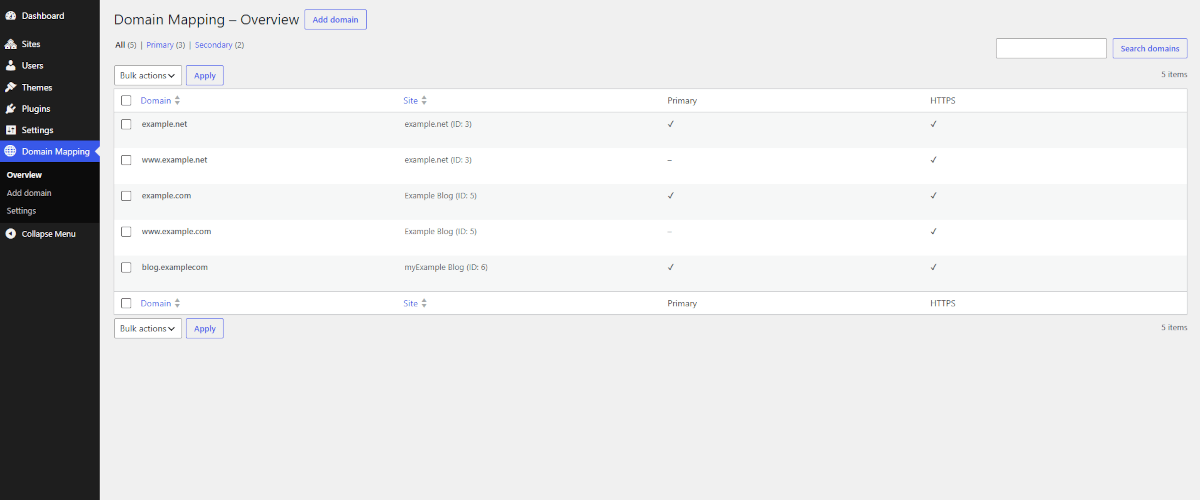
– Map multiple domains to any site in your network
– Set a primary domain with automatic redirect
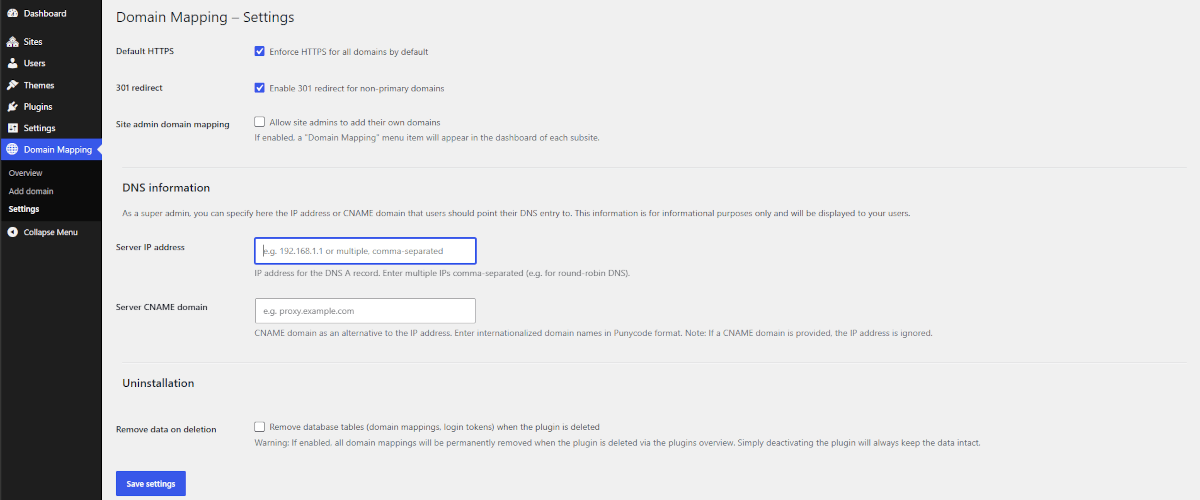
– Force HTTPS per domain or globally
– 301-redirect support for non-primary domains
– DNS information display for site administrators
– Site-level domain management (optional, controlled by Super Admin)
Requirements:
– PHP 8.3 or higher
– WordPress 7.0 or higher
– WordPress Multisite installation
Screenshots

Installation
Important – Please Read Before Installing
This plugin is recommended for new WordPress Multisite network installations.
Installing Onartline Multisite Domain Mapping on an already existing, active Multisite network is not recommended and is done entirely at your own risk. It may interfere with existing domain configurations, redirects, or other plugins that handle similar functionality.
If you already run a Multisite network and want to use this plugin, it is strongly recommended to set up a fresh, new Multisite installation first, and then migrate or import your existing content and data into that new installation – rather than adding this plugin to your current, active network.
1. Upload the Plugin
Upload the onartline-multisite-domain-mapping folder to /wp-content/plugins/ or install it directly via the WordPress Network Admin under Plugins Add New.
2. Activate the Plugin
Activate the plugin via Network Admin Plugins Network Activate.
3. Set Up sunrise.php
Onartline Multisite Domain Mapping requires sunrise.php to be loaded before WordPress initializes.
Automatic installation:
If wp-content/ is writable, the plugin copies sunrise.php automatically on activation. You will see a success notice in the Network Admin.
Manual installation:
If the automatic copy fails, copy sunrise.php manually:
- Copy
sunrise.phpfrom the plugin folder to/wp-content/sunrise.php Add the following line to your
wp-config.php– directly beforerequire_once ABSPATH . 'wp-settings.php';:define( ‘SUNRISE’, true );
4. Configure wp-config.php
Make sure the following line is present in your wp-config.php:
define( 'SUNRISE', true );
5. ⚠️ Plesk Users – Disable “Preferred Domain”
If your server runs Plesk, you must disable the “Preferred Domain” setting for each domain you want to map. Otherwise Plesk will intercept the redirect before WordPress can handle it, causing redirect loops or broken mappings.
- Log in to Plesk
- Go to Websites & Domains your domain Hosting Settings
- Set Preferred Domain to None
- Save the settings
6. Add Your First Domain Mapping
- Go to Network Admin Domain Mapping Add Domain
- Select the target site
- Enter the domain (without
http://orhttps://) - Optionally set it as Primary Domain and enable HTTPS
- Save
7. Configure DNS
Point your domain to your server by setting the following DNS records:
- A Record – Name:
@– Value: Your server IP address - CNAME Record – Name:
www– Value: Your primary domain or server CNAME
The required values are displayed in Network Admin Domain Mapping Settings.
8. Uninstallation
When you deactivate and delete Onartline Multisite Domain Mapping via Network Admin Plugins, the plugin automatically removes:
- The plugin files
- The
sunrise.phpfile from/wp-content/ - The database tables (only if “Delete data on uninstall” was enabled in the plugin settings)
Important – Manual step required
The plugin cannot automatically remove the following line from your wp-config.php:
define( 'SUNRISE', true );
This line was added manually during installation and must also be removed manually after uninstalling the plugin. If this line remains in wp-config.php after sunrise.php has been deleted, WordPress will try to load a file that no longer exists, resulting in warnings such as:
Warning: include_once(.../wp-content/sunrise.php): Failed to open stream: No such file or directory
and potentially headers already sent errors on the login page or elsewhere.
To fix this: Open your wp-config.php and remove (or comment out) the line define( 'SUNRISE', true );, then save the file.
FAQ
-
Can I install this plugin on an existing, active Multisite network?
-
This is not recommended and would be done entirely at your own risk. Onartline Multisite Domain Mapping is designed for new Multisite installations. If you already run an active Multisite network, it is strongly recommended to set up a fresh installation first and migrate your existing content into it, rather than adding this plugin to your current network. Please see the note at the beginning of the Installation section for details and our recommended approach.
-
The domain redirects in a loop – what should I do?
-
Check if Plesk “Preferred Domain” is set. Set it to “None”. Also verify that
define( 'SUNRISE', true );is present inwp-config.php.If you are using the plugin’s 301-redirect feature, check the hosting settings for the specific domain (e.g. in Plesk, cPanel, or other hosting panels) and disable any existing redirect rules there if necessary.
If 301 redirects are already configured at the hosting level for that domain and you want to keep them, disable the 301-redirect option in the plugin settings instead – otherwise a redirect loop will occur.
-
sunrise.php was not copied automatically – what now?
-
Copy
sunrise.phpmanually from the plugin folder to/wp-content/sunrise.phpand adddefine( 'SUNRISE', true );to yourwp-config.php. -
The plugin is not working on my Website – why?
-
Onartline Multisite Domain Mapping requires a WordPress Multisite installation and PHP 8.3+. Single-site installations are not supported.
-
Can site administrators manage their own domains?
-
Yes – the Super Admin can enable this under Network Admin Domain Mapping Settings Site-Admin Domain Mapping.
-
Does the plugin support automatic updates?
-
Yes – once published on the WordPress plugin repository, automatic updates are fully supported.
-
I uninstalled the plugin, but now I see errors about sunrise.php or “headers already sent” – what happened?
-
This happens if the line
define( 'SUNRISE', true );was not removed fromwp-config.phpafter uninstalling the plugin. Sincesunrise.phpno longer exists after uninstallation, WordPress fails when trying to load it. Simply remove that line fromwp-config.phpto resolve the issue.
Reviews
There are no reviews for this plugin.
Contributors & Developers
“Onartline Multisite Domain Mapping” is open source software. The following people have contributed to this plugin.
Contributors
Translate “Onartline Multisite Domain Mapping” into your language.
Interested in development?
Browse the code, check out the SVN repository, or subscribe to the development log by RSS.
Changelog
1.0.0
- Initial release