

Description
Social Login Plugin
Social Login is a professionally developed and free WordPress plugin that allows your visitors to comment, login and register with 40+ Social Networks like for example Facebook, Twitter / X, TikTok, Google, LinkedIn, PayPal, LiveJournal, Instagram, Вконтакте or Yahoo amongst other.
Data Protection Guarantee
Social Login is fully compliant with all European and U.S. data protection laws. As required by the General Data Protection Regulation (GDPR) the OneAll Terms of Service include a Data Processing Agreement that we can countersign on request.
Seamless Integration
Social Login is fully customizable and seamlessly integrates with your existing login/registration system so that your users don’t have to start from scratch. Existing existing accounts can add/remove their social network accounts in their WordPress profile settings and then also use the linked social networks to login.
Eliminates Spam and Bot Registrations
Get rid of long and complicated forms, improve your data quality and instantly eliminate spam and bot registrations. Social Login increases registration rates by up to 50% and provides permission-based access to users’ social network profile data, allowing you to start delivering a personalized experience.
Maintenance Free
Do not take the risk of losing any users or customers due to outdated social network integrations. Unlike other Social Login providers we monitor the APIs and technologies of the different social networks and update our service as soon as changes arise.
By using OneAll you can be sure that your social media integration will always run smoothly and with the most up-to-date calls.
Fully Customizable
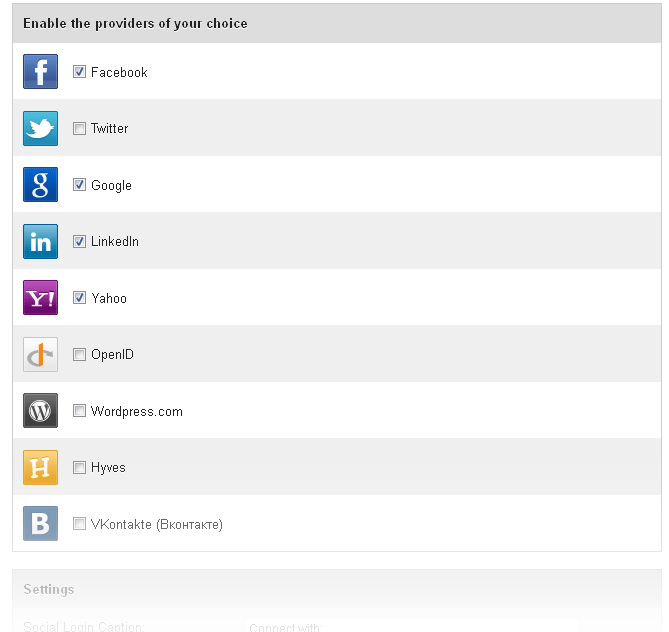
You can easily configure which social accounts to enable/disable for social login and on which areas of the website the social login icons should be displayed:
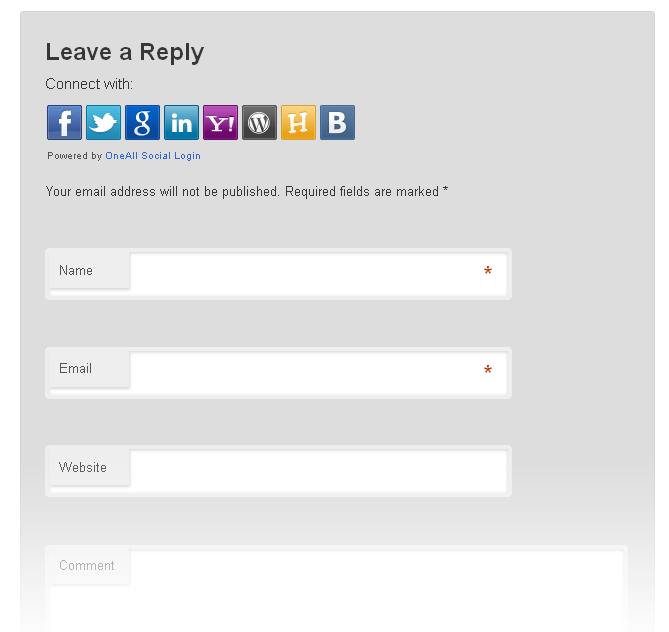
* On the comment formular
* On the login page
* On the registration page
* In your sidebar
* With a shortcode
Fully Compatible With Other Plugins
Social Login uses standard WordPress hooks and is compatible with all plugins that follow WordPress coding conventions,
like per example BuddyPress or WooCommerce amongst others.
Data Export
Easily export your users or automatically push data of users that login using Social Login to Mailchimp or Campaign Monitor.
This feature is available in the premium version of Social Login and can be enabled in your OneAll account.
45+ Social Networks
- Apple
- Amazon
- Battle.net
- Blogger
- Discord
- Draugiem
- Dribbble
- Epic Games
- Foursquare
- Github.com
- Line
- LiveJournal
- Mail.ru
- Meetup
- Mixer
- Odnoklassniki
- OpenID
- Patreon
- PayPal
- PixelPin
- Skyrock.com
- SoundCloud
- Spotify
- StackExchange
- Steam
- Strava
- TikTok
- Tumblr
- Twitch.tv
- Twitter / X
- Vimeo
- VKontakte
- Windows Live
- WordPress.com
- Yahoo
- Yandex
- YouTube
Social Login Features
- GDPR compliant
- Social Link – Users can use social login to link multiple social network accounts to their WordPress account.
- Woocommerce Connect – Automatic integration of the social login icons on the Woocommerce checkout, login and registration pages.
- Woocommerce Profile – Fill the user’s billing address with the first name, last name and email address received from the social network.
- BuddyPress Connect – Automatic integration of the social login icons on the BuddyPress account and registration pages.
- BuddyPress Profile – Use the social network avatar as BuddyPress avatar and fill out custom fields.
- User Insights – Access the analytics dashboard to discover which social networks your users prefer.
- Automatic Emails – Send emails to users that register using social login.
- Automatic Notifications – Send notifications to admins for every users that registers using social login.
- Comment Approval – Automatically approve comments left by users that connected by using social login.
- Email Retrieval – Ask users to enter their email when social login did not receive it from the social network.
- Custom Redirections – Fully customize the page to redirect user to after having connected using social login.
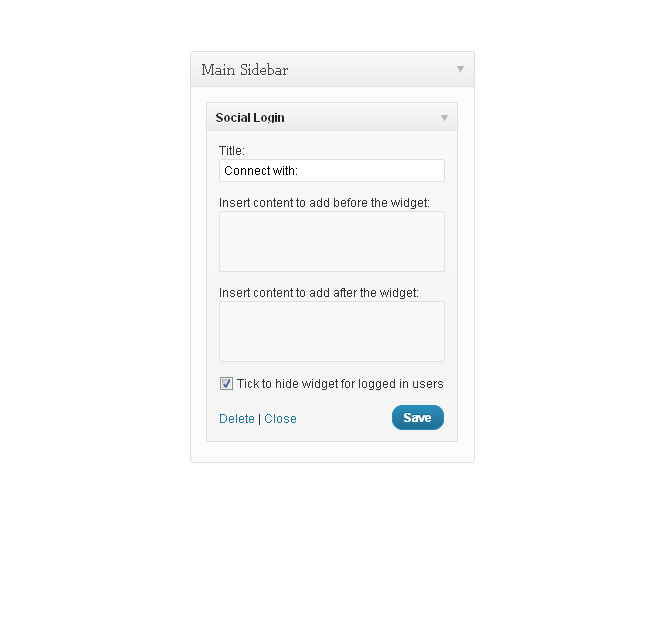
- Integrated Widget – Simply use the social login widget to display the icons wherever you want.
- ShortCodes – Easily embed social login anywhere by using the available shortcodes.
- Hook – Customize the social login behaviour by using the integrated hooks.
- Icon Themes – Choose amongst three different social login icon themes.
- Documentation – Access a complete documentation on the available Social Login hooks and filters for WordPress.
- Support – Any questions about Social Login? Our support team is there to assist you.
Social Login Premium Features
- Authentication Filters – Use customisable filters to restrict which users may login with social login.
- Data Export – Automatically export social login data to Campaign Monitor or MailChimp or export as CSV.
- User Insights – Access analytics and get demographic information about your social login users.
- Icon Themes – Choose amongst twenty different social login icon themes or use you own icons.
Professionally Developed and Maintained
Social Login is maintained by OneAll, a technology company offering a set of web-delivered tools to simplify the integration of 40+ social networks into business and personal websites and apps.
The OneAll API unifies 40+ Social Networks and consolidates the most powerful social network features in a single solution. You can work with multiple social networks at once and you will obtain a standardized field structure for data received from any of the social networks. Save time and development resources and focus on your core business.
Testimonials
Used by thousands of users around the world!
The plugin in is one of the best I’ve seen so far. Extremely easy to implement and run. The support is great too.
No concerns on my side. Keep it up!
livia
Loving the service, seen a massive increase in painless signups to my blog. Thanks!
Richard B.
You have no idea how it THRILLED me to integrate oneall. It was SO amazingly easy, your team has simplified the whole process of signing up for
authorization on multiple social media sites. I HAD NO QUESTIONS/STEPS THAT YOU HADN’T ALREADY ANTICIPATED. It saved me HOURS of work!
Kelly C.
This is cool. Nice work. I’m VERY impressed. You’ve made this about as painless as it gets and the value it adds is incredible.
Jason M.
This service is simply remarkable, I’ve tried integrating logins before and it has never been this easy!
Andrew C.
I found it extremely straightforward. I just figured it out easily and make my website capable of connecting
to many social networks by your plugin.
Deha K.
Just wanted to let you know how happy i am that i stumbled onto your service. This was the 6 Facebook/Twitter integration
i tried and was starting to lose hope that i could actually find one that worked for me.
Kyle L.
I would like to thank YOU! Seriously, the WordPress plugin has been a huge life saver for me.
Piero B.
Thank you for the wonderful plugin
Martin P.
The service is excellent for what i need, simple to set up. All situations about seting up are well explained, so
there are no difficulties
Facundo S.
I really like the plugin, the capabilities you provide for management and your prompt reply for support.
Tom B.
It was extremely easy to set up and use. The documentation to set up the FB and twitter API
was easy to follow and implement. I was struggling with a couple of other plugins till I stumbled on this one.
Deepa V.
Works like a charm!
Fredrik L.
Not sure how you can improve it’s a Damn! Good product. 100% User friendly easy to setup. Thanks!
Cody L.
So far oneall.com is the perfect solution for my site and works flawlessly. I am extremely impressed and grateful.
Terry P.
I’ve gone in and tweaked it, tested it and it’s good to go now! Wonderful, I feel like a grown up blogger now.
Brian J.
I am really impressed with your product! Its very dynamic and its gives me the flexibility I need for integration into my own business.
Braxton D.
Your delivery is superb. You should change your name to WONall because you won it all with me. You are awesome, stay that way please.
Nicholas L.
I especially enjoy the step by step process that guides you through the Social website App creation process. In the end I would like to thank you
for putting together such a great product that so many users can implement with ease.
Stefan C.
Thanks for a such a great plugin! I was really impressed with the simplicity of the installation directions and the clean design.
Janae S.
I love your service the way it is, it’s amazing how easy the logging-in-via-social-network is integrated into a wordpress website!
Martin S.
The site and the plugin are working magnificently. Thank you one million times for making your products/services available in the manner that you have.
Herman G.
Very user friendly, there are guides and screenshot on how to set things up. Thank you so much for this awesome plugin!
Cebututs
Screenshots


Installation
Plugin Installation
Upload the plugin folder to the following directory of your WordPress site:
/wp-content/plugins/,Login to your WordPress admin area, go to the Plugins page and activate Social Login there,
Go to the Settings\Social Login page in your WordPress admin area and setup the plugin,
Click on the Autodetect and Verify buttons to make sure that the API connection is working properly.
API Connection
The social network APIs are constantly changing and being updated. We monitor these changes and automatically update our APIs, so that you can be sure that Social Login will always run smoothly and with the most up-to-date API calls.
In order to enable the plugin you must connect with the OneAll API and create a free account at OneAll.
More information is available in our Social Login Documentation.
FAQ
-
You should not have to change your templates.
The Social Login plugin seamlessly integrates into your blog by using standard WordPress hooks. -
The Social Login shortcode
[oa_social_login]can be used in any page or post within your WordPress blog.
The shortcode will automatically be replaced by the icons of the social networks that you have
enabled in the Social Login settings in your WordPress administration area. -
I have a custom template and the plugin is not displayed correctly
-
Social Login uses standard WordPress hooks. If your theme does not support these hooks,
you can add the Social Login form manually to your theme by inserting the following code
in your template (at the location where it should be displayed, i.e. above the comments).<?php do_action('oa_social_login'); ?>Do not hesitate to contact us if you need further assistance.
-
My users cannot login or leave comment with VKontakte (Вконтакте)
-
Per default WordPress does not allow the use of special characters in usernames.
If you encounter any problems with users having cyrillic characters in their
usernames, please consider installing the following plugin to fix the problem:
WordPress Special Characters In Usernames -
Do I have to change my Rewrite Settings?
-
Social Login does not rely on mod_rewrite and does not need any additional rules.
It should work out of the box. -
Where can I report bugs, leave my feedback and get support?
-
Our team answers your questions at:
http://support.oneall.com/forums/The plugin documentation is available at:
http://docs.oneall.com/plugins/guide/social-login-wordpress/
Reviews


Contributors & Developers
“Social Login” is open source software. The following people have contributed to this plugin.
Contributors


“Social Login” has been translated into 4 locales. Thank you to the translators for their contributions.
Translate “Social Login” into your language.
Interested in development?
Browse the code, check out the SVN repository, or subscribe to the development log by RSS.
Changelog
5.10.0
- Fix vulnerability
5.9.0
- Social Network “X” added
- Twitter renamed to X
5.8.1
- User Register hook fixed
5.8.0
- Social Network “Epic Games” added
- Social Network “Spotify” added
- Social Network “Strava” added
- Social Network “Yandex” added
5.7.0
- Social Network “Apple” added
- Social Network “Patreon” added
5.6.1
- Direct Connect compatibily fixed
5.6
- Responsive admin interface
- CSS Tweaks for better integration
- Default icons changed
- Linked social networks in user list
- Tested with WordPress 5.3
5.5.1
- Notice fixed
5.5.0
- Text domain fixed
- German translations updated
5.4.4
- Social Network “Draugiem” added
- Social Network “Mixer” added
- Comment approval fixed
- New hooks added
- PHP 7.2 fixes
5.4.3
- Warning missing quotes fixed
5.4.2
- PHP 7.2+ compatibility added
5.4.1
- User website URL truncated (WordPress restriction)
5.4.0
- Social Network “Discord” added
- Social Network “Line” added
- Social Network “Meetup” added
- Social Network “SoundCloud” added
- Social Network “Tumblr” added
- Social Network “Weibo” added
- Social Network “XING” added
5.3
- New icon set added
- Social Login interface improved
- Social Network avatar removed when unlinking account
- Social Link reviewed and improved
- Undefined index fixed
5.2
- Buddypress avatar bugfix
- Do not create users without email addresses when plugin set to request emails
- Support for WP_PROXY_HOST added
- Filter for callback uri added
- More pannel added
5.0
- Social Network “Battle.net” added
- Social Link Hooks/Nonce added
- WooCommerce Actions added
- Login/Registration URL filters added
- Cache bug fixed
- WooCommerce Social Login Twice on Register Form
- Some minor bugs fixed
4.6
- Asynchronous JavaScript
- Social Network “Instagram” added
- Social Network “Vimeo” added
- Social Network “Reddit” added
- Social Network “Amazon” added
- French Translation Added
- Missing text domains added
- BuddyPress Avatars fixed
- Better WPEngine compatibility
- Email filter fixed
4.5
- Social Network “Twitch” added
- User Biography is now imported
- Better API Connection detection
- Many hooks and filters added
- Port detection improved
- WP Nonce added for Social Link
4.4
- Social Network “Xing” added
4.3
- Social Network Avatars improved
- Social Link shortcode/hook/action added
- Administration: Tabs for Social Login added
- Administration: Column Registration in the user list fixed
- Redirection filters added
- Settings security improved
- Button to cancel email confirmation added
4.0
- Social Link Service added
- Optimized for WordPress 3.5
- Meta “oa_social_login_identity_id” no longer used and removed
- German translations improved
- Social Network “YouTube” added
- Social Network “Odnoklassniki.ru” added
- Hook “after_signup_form” added
3.7
- Hook for BuddyPress Registration added
- Hook for BuddyPress Sidebar added
- Hook for Appthemes Vantage Theme added
- Filter for email addresses of new users added
- Admin page width fixed
- Minor text changes
- Social Network “Blogger” added
- Social Network “Disqus” added
3.6
- Debug Output Removed
3.5
- Social Network “Foursquare.com” added
- Github 16x16px icon fixed
- Optionally get an email when a users registers with Social Login
- Redirection settings improved
- Hook for Thesis Theme added
- Hook for WordPress Profile Builder added
- Select to use Port 80 or 443
- Custom CSS filter added
3.2
- Social Network “Skyrock.com” added
- Social Network “Github.com” added
- German translations improved
3.1
- SSL detection improved
- Buddypress avatars improved
3.0
- SSL detection with nginx load-balancer fixed
- CDN path bug fixed
- Table width in administration area fixed
- Administration split to two pages
- Optionally disable Social Login in comments
- Optionally request email from user
- Optionally show social networks in user list
- Social Network “Windows Mail” added
- Social Network “Mail.ru” added
- Error message if no social networks selected
- Class for Social Login label added
- Small icons fixed
- API settings verification fixed
2.5
- API Connection improved
- API Connection function moved to separate file
- Contact us link fixed
- Social Network Avatars fixed
- HTML for administration area fixed
- FSOCKOPEN Handler Added
- CURL/FSOCKOPEN selector added
- Social Network “Steam Community” added
- Social Network “StackExchange” added
- CSS served from CDN
- Optionally disable comment moderation
2.0
- WC3 Compliant callback uri
- HTTP/HTTPS Check for CSS files
- Shortcode handler fixed
- WordPress Cookie now set for 14 days
- WordPress display_name is now populated
- Redirection improved
- Now Buddypress compatible
- Link to settings page after installation
- Caching for socialize library improved
- Small buttons added as option
- Localization added
- German translation
1.6.1
- Provider unselect bug fixed
- Sanitize user strict added
- Custom namespace for add_settings_link
1.6
- LiveJournal added
- PayPal added
- Settings link added
- API Communication Check added
- Cyrillic character support
1.5
- Social Network Avatars fixed
- Social Buttons no longer displayed for customs hooks if logged in
- KISS for API Settings Setup
1.4
- Social Network Avatars can be displayed in comments
- Social Login can be disabled below the login form
- Social Login can be disabled below the registration form
- Select redirection target after login
- Select redirection target after registration
- Enable account linking
1.3.5
- Administration area redirection fixed
- Automatic email creation added
- Email verification added
1.3.4
- Multisite issues with Widget fixed
1.3.2
- Stable Version
1.0.2
- Version numbers fixed
1.0.1
- Hook oa_social_login fixed
- Plugin description changed
1.0
- Initial release