
Description
A central health dashboard for WordPress site owners. Instant diagnostic overview of core files, PHP, backups, and your top priority step.
The product page is https://nuem8.com/wordpress/nuem8-safety-pass.
Disabling a new administrator until approval is a feature of nuem8-safety-pass Pro. This plugin lists that account and does not block the sign-in.
It reads these facts:
- PHP version, and whether that version still receives security fixes.
- WordPress version, and whether an update is waiting.
- WordPress core files, compared with the official copy from WordPress.org. The result is saved for 12 hours. Plugins, themes, and uploads are not compared.
- Plugins that are installed and turned off.
- Every administrator, shown as active or disabled, any administrator added after the day nuem8-safety-pass was activated, and the last sign-in nuem8-safety-pass has recorded. This plugin does not block that sign-in. nuem8-safety-pass Pro disables a new administrator until a signed-in administrator approves them.
- File notes: must-use plugins that stay on, whether the theme and plugin editor is on, and whether .htaccess tells PHP to load another file first.
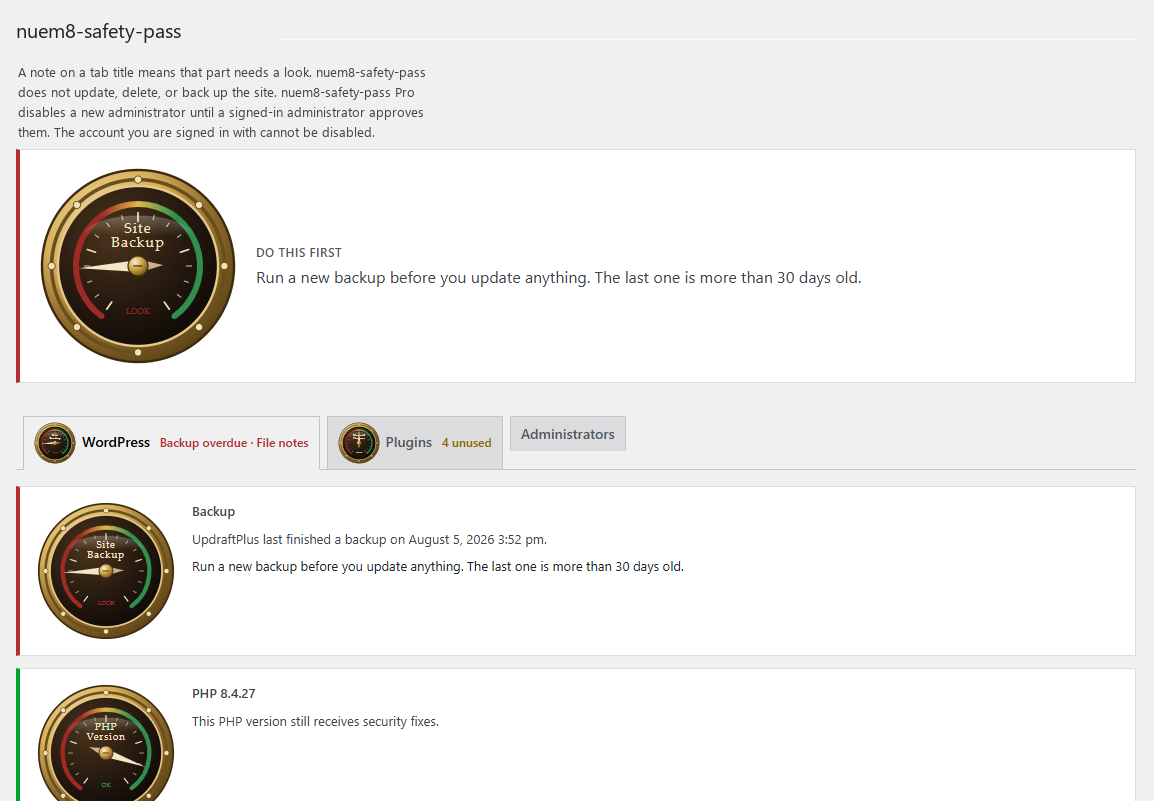
- Whether UpdraftPlus, BackWPup, or WPvivid has finished a backup in the last week.
The page also lists passwords and keys to change if you think someone broke in, and it recommends a new WordPress install. nuem8-safety-pass does not change those passwords and does not delete the old site.
The page tells you the one thing to do first. It does not update WordPress, delete plugins, or run a backup. Approve adds a new administrator to the expected list. With nuem8-safety-pass Pro, Approve also lets that account sign in. Disable and Enable change an account that is already expected.
nuem8-safety-pass does not scan for malware, does not search the database, does not read server logs, and does not send your site anywhere. A core file that does not match is something to look at, not a malware verdict.
Copyright
Copyright (C) 2026 NueM8 LLC
Screenshots
Installation
- Upload the
nuem8-safety-passfolder to/wp-content/plugins/. - Activate NueM8 Safety Pass from the Plugins screen.
- Open NueM8 Safety Pass in the admin menu.
Only an administrator can open the page. Other roles do not see the menu item, and a direct link does not show the report.
Activating the plugin saves the current administrator accounts. An account created or promoted to administrator after that is shown as new. nuem8-safety-pass Pro disables that account until a signed-in administrator clicks Approve. The new account then cannot sign in, so it cannot approve itself. The account you are signed in with is not disabled.
FAQ
-
Does nuem8-safety-pass change my site?
-
The free plugin records a new administrator and asks you to approve the account. It does not block that sign-in. nuem8-safety-pass Pro disables the account until a signed-in administrator clicks Approve. Approve marks the account expected and, when Pro disabled it, lets it sign in again. Disable and Enable still change an account that is already expected. Disable signs that account out. The account you are signed in with cannot be disabled. The sign-in time is saved when an administrator signs in. Updates, deletions, and backups stay in your hands.
-
Which backup plugins can it read?
-
UpdraftPlus, BackWPup, and WPvivid. If another backup plugin is turned on, nuem8-safety-pass says so and asks you to confirm the last copy in that plugin.
-
Who can see the report?
-
Only an administrator. Editors, authors, and subscribers do not see the nuem8-safety-pass data.
-
Does it need an account or a subscription?
-
No. The checks do not need nuem8-safety-pass Pro.
-
What license is it under?
-
GNU General Public License, version 2 or later. The gauge script included with nuem8-safety-pass is under that same license.
-
Does it send data anywhere?
-
No account data, site content, or visitor information is sent to NueM8 or any other service. The core file check downloads the public WordPress.org file list for this site’s WordPress version and language. The result is saved for 12 hours. That is the only external request. WordPress.org privacy: https://wordpress.org/about/privacy/ WordPress.org terms: https://wordpress.org/about/terms/
-
Does it scan for malware?
-
No. nuem8-safety-pass compares WordPress core files with the official copy from WordPress.org and shows three file notes. It does not search the database, read server logs, or delete files.
-
Will it email me?
-
The free plugin does not send email. nuem8-safety-pass Pro emails one administrator you choose when a check needs a look, and when a new administrator is waiting for approval. That message is sent by the site.
-
When does the sign-in time start?
-
nuem8-safety-pass records each administrator sign-in after it is active. An administrator who is already signed in keeps that session time. Earlier sign-ins are not on the site.
Reviews
There are no reviews for this plugin.
Contributors & Developers
“NueM8 Safety Pass” is open source software. The following people have contributed to this plugin.
Contributors
Translate “NueM8 Safety Pass” into your language.
Interested in development?
Browse the code, check out the SVN repository, or subscribe to the development log by RSS.
Changelog
1.0.1
- The Plugins screen, the admin menu, and the settings page show NueM8 Safety Pass.
1.0.0
- First release. One page for PHP, WordPress, core files, unused plugins, new administrators, last sign-in, active or disabled administrators, file notes, and backup status. A new administrator is reported here. nuem8-safety-pass Pro disables that account until approval. The page includes a short note on what to change if you think someone broke in.