

Description
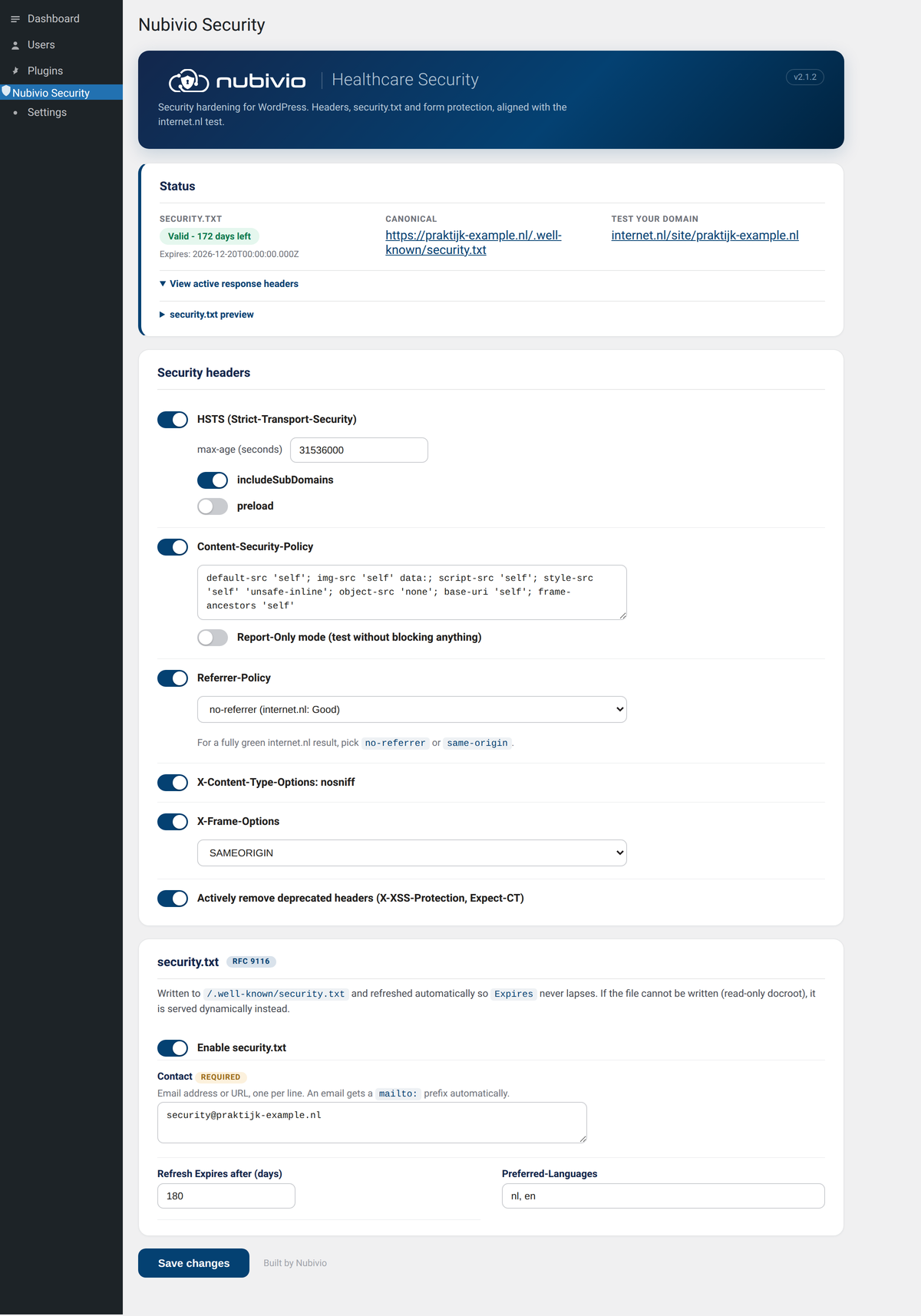
Security headers, a self-renewing security.txt (RFC 9116) and advanced form protection for healthcare related WordPress sites. Built for general practitioners, psychologists and other healthcare professionals. Recommended for NIS2, GDPR and NEN7510 compliance.
Everything is managed from one settings page, and the defaults are safe to ship on a live site. The plugin is built to move your score on the internet.nl test in the right direction.
It covers three areas:
Security headers
- Strict-Transport-Security (HSTS) with configurable max-age, includeSubDomains and preload
- Content-Security-Policy with an internet.nl compliant baseline and a Report-Only test mode
- Referrer-Policy with the internet.nl rating shown per value
- X-Content-Type-Options (nosniff)
- X-Frame-Options
- Permissions-Policy
- Active removal of the deprecated X-XSS-Protection and Expect-CT headers
security.txt (RFC 9116)
- Writes /.well-known/security.txt and serves it dynamically when the docroot is read-only
- Refreshes the Expires field automatically so it never lapses and stays under one year
- Fields for Contact, Encryption, Policy, Acknowledgments, Hiring (careers), CSAF, Preferred-Languages and Canonical
- Paste your PGP public key and the plugin hosts it at /.well-known/openpgp-key.txt and links it as Encryption automatically
- A free-text message to researchers and an optional signature line
- CRLF line endings and a valid Canonical URL, exactly as the internet.nl test expects
Gravity Forms (optional)
- Block submissions from one or more email domains, with a custom error message
- The section only appears when Gravity Forms is active
This plugin configures headers and a security.txt. It is one building block toward NIS2, GDPR and NEN7510, not a full compliance programme. It cannot change DNS or server level items such as IPv6, the CAA record, the TLS key-exchange hash or DANE. Those are handled at your host or DNS provider.
External Services
The core hardening features (security headers and security.txt) make no external requests. The optional Compliance tab, introduced in 2.2.0, uses the following external services only when you run a scan (manually or via the optional scheduled scan). Nothing here runs on normal front-end page loads.
WordPress.org Plugins API
When a compliance scan runs, the plugin looks up each active plugin in the WordPress.org Plugins directory to check update currency and compatibility.
- What is sent: the public plugin slug only (for example, “akismet”). No personal data, no site data.
- When: only during a manual or scheduled compliance scan.
- Endpoint: https://api.wordpress.org/plugins/info/1.0/{slug}.json and https://api.wordpress.org/core/version-check/1.7/
- Caching: results are cached in a transient for 12 hours.
- This is a first-party WordPress.org endpoint. Terms: https://wordpress.org/about/privacy/
Loopback self-request (header and REST probe)
When a compliance scan runs, the plugin makes a request to its own home URL to verify that the configured security headers are actually being sent and to check whether the REST users endpoint exposes user data.
- What is sent: a normal HTTP GET to the site’s own home URL. No third-party service is contacted.
- When: only during a manual or scheduled compliance scan, or admin/cron context. Never on normal front-end page loads.
- Timeout: short (8 seconds). Result cached in a transient for 10 minutes.
- If the request fails (some hardened hosts block self-requests), the plugin falls back to showing configured values and reports that live verification was unavailable.
Screenshots
Installation
- Upload the plugin folder to /wp-content/plugins/, or install the ZIP via Plugins, Add New, Upload Plugin.
- Activate the plugin.
- Open Settings, Nubivio Security.
- Set a Contact value under security.txt.
- To pass the internet.nl Content-Security-Policy check, enable CSP, test in Report-Only, add the domains your site needs, then turn Report-Only off to enforce.
FAQ
-
Will activating the plugin break my site?
-
No. HSTS, nosniff, X-Frame-Options, Referrer-Policy and Permissions-Policy are safe defaults. Content-Security-Policy is off by default because a strict policy needs tuning per site.
-
How do I get a fully green internet.nl result?
-
Enable and enforce a Content-Security-Policy that fits your site, set Referrer-Policy to no-referrer or same-origin, and set a Contact for security.txt. IPv6, CAA, the TLS hash and DANE are out of scope and must be fixed at your host or DNS.
-
Can I publish a PGP key?
-
Yes. Paste your ASCII-armored public key in the security.txt section. The plugin hosts it at /.well-known/openpgp-key.txt and references it from security.txt as the Encryption field automatically.
-
Does this make me NIS2, GDPR or NEN7510 compliant?
-
It covers the public web hardening part: transport security, browser protections and a vulnerability disclosure contact. It is a useful building block, not a full compliance programme.
-
Is Gravity Forms required?
-
No. The header and security.txt features work on any site. The form section only appears when Gravity Forms is active.
Reviews
There are no reviews for this plugin.
Contributors & Developers
“Nubivio Healthcare Security Hardening” is open source software. The following people have contributed to this plugin.
Contributors
Translate “Nubivio Healthcare Security Hardening” into your language.
Interested in development?
Browse the code, check out the SVN repository, or subscribe to the development log by RSS.
Changelog
2.2.0
- New Compliance tab: CRA, GDPR and NIS2 scanning plus site health checks
- Live verification that configured security headers are actually sent
- security.txt and headers now scored and mapped to CRA / NIS2 / GDPR clauses
- Compliance score with per-framework breakdown
- Generators: Vulnerability Disclosure Policy, CycloneDX SBOM, EU/NEN 7510 conformity declaration
- Printable compliance report (browser print to PDF, no added dependencies)
- Existing header and security.txt hardening unchanged
2.1.2
- Added plugin icon, banner and a settings page screenshot for the WordPress.org listing
2.1.1
- All filesystem reads, writes and deletes now go through the WP_Filesystem API and wp_delete_file()
2.1.0
- Renamed the plugin to Nubivio Healthcare Security Hardening
- Admin CSS and JavaScript are now enqueued instead of printed inline
- The security.txt and PGP key files are now located via get_home_path() so they land at the public site root on subdirectory and custom installs
- Internal option, cron and nonce keys renamed to the new namespace
2.0.0
- Settings page for all options
- internet.nl compliant Content-Security-Policy baseline with Report-Only mode
- Self-renewing security.txt with CRLF line endings and an expiry kept under one year
- Hosted PGP public key, linked from security.txt as Encryption
- Extra security.txt fields: Hiring, CSAF, researcher message and an optional signature
- Removal of deprecated X-XSS-Protection and Expect-CT headers
- Gravity Forms email-domain blocking, shown only when Gravity Forms is active