
Description
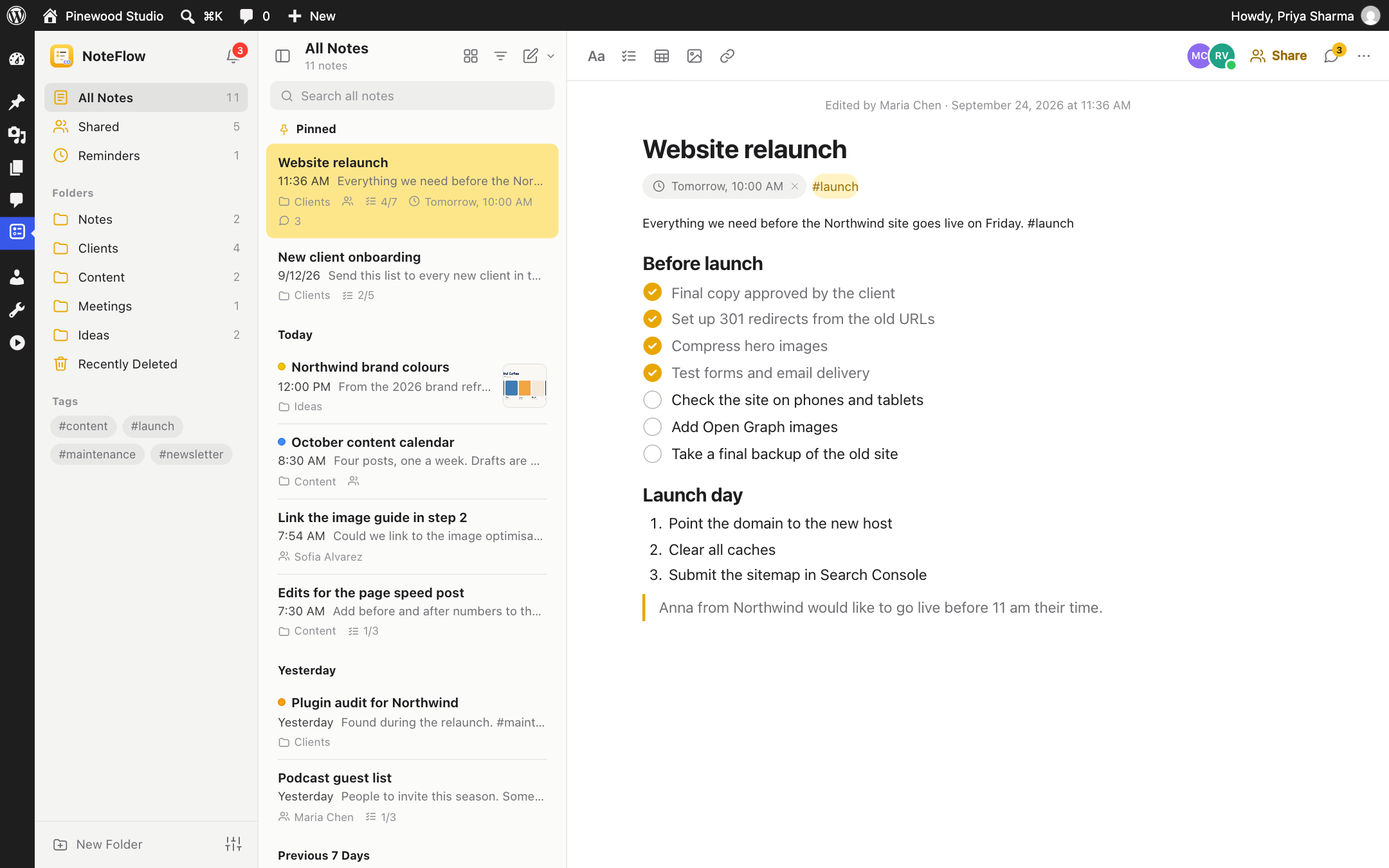
NoteFlow is a notes app that lives inside WordPress. Write down ideas, keep checklists, plan content, share notes with the people you work with, and discuss posts and pages right in the editor, without leaving your dashboard or signing up for another service.
It looks and feels like the notes app on your computer: folders on the left, your notes in the middle, and a clean page to write on. Everything is saved as you type, and everything stays in your own WordPress database.
Discuss posts and pages with your team
Leave feedback where the work is. NoteFlow adds a panel to the editor where everyone who can edit a post can talk about it, like in a shared document:
- Comment on any block from the block toolbar. Blocks with open comments are highlighted, so nothing gets missed.
- Raise issues and assign them to a teammate.
- @mention people to bring them in. They are told in the toolbar and by email.
- Reply, resolve and reopen. Open and resolved threads are kept apart.
- See what needs attention in the posts list, where a column shows how many comments and issues are open.
- Works on posts, pages and custom post types, in the block editor and the classic editor. Comments stay in the admin: they never appear on your site or among its comments.
Write the way you think
- Rich notes with titles, headings, bulleted, dashed and numbered lists, block quotes, code, links, tables and images.
- Checklists with round tick boxes. Tick items off, move ticked items to the bottom, and see progress like 3/5 in the notes list.
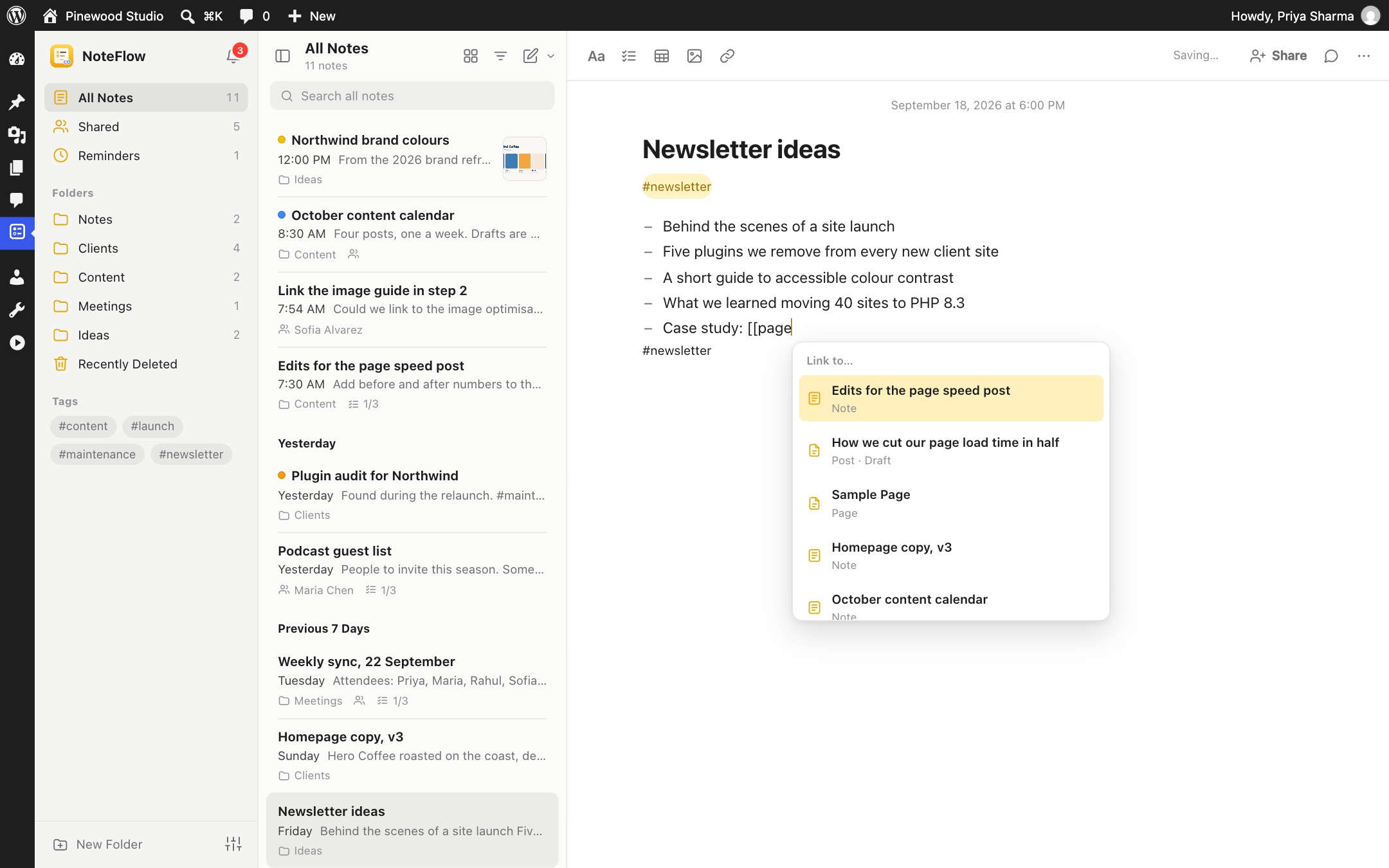
- Link to anything: type
[[and pick a post, page, custom post type or another note from the suggestions. - Shortcuts as you type:
[]starts a checklist,-a list,1.a numbered list,#a title,>a quote. - Autosave while you write. There is no Save button to forget.
- Paste from anywhere. Formatting from Google Docs, Word and web pages is cleaned up. Paste or drop an image and it goes to your Media Library.
Stay organised
- Folders for your own notes, plus smart views: All Notes, Shared, Reminders and Recently Deleted.
- Tags: write
#launchanywhere in a note and it shows up under Tags. - Pin the notes you need most at the top.
- Search every note you can open, with matches highlighted.
- List or gallery view, sorted by date edited, date created or title, and grouped by Today, Yesterday, Previous 7 Days and so on.
- Colours to spot notes at a glance.
- Light and dark appearance, or follow your system, with five accent colours to choose from.
- Keyboard shortcuts for almost everything. Press
?to see them. - Recently Deleted: deleted notes can be recovered for 30 days.
Work together
Notes are private until you share them. When you do, NoteFlow becomes a shared workspace:
- Share with people as viewers or editors, or with everyone who can use NoteFlow.
- See who else is here. Avatars show who has the note open, and who is typing.
- Live updates. Changes from other people appear in your note on their own.
- Safe editing at the same time. When two people edit a note at once, NoteFlow merges changes to different paragraphs, list items and table rows. If you both changed the same line, it asks which version to keep. It never silently overwrites someone’s work.
- Comments and @mentions in each note’s activity panel.
- Version history shows who changed a note and when. Preview any version and restore it.
- Notifications in a bell in the toolbar, in NoteFlow and by email when a note is shared with you, when someone mentions you or comments on your post, and when a reminder is due. Everyone can turn emails off for themselves.
Modules
Switch each one on or off in NoteFlow Settings.
- Dashboard widget: jot down a quick note and see pinned notes and upcoming reminders.
- Quick capture: a Note button in the toolbar, in the admin and on your site, to save an idea in seconds (Alt + Shift + N). On a post or page, you can attach the note to it.
- Toolbar notifications: a bell with your unread notifications on every screen.
- Reminders: set a date and time on a note and get notified when it is due.
- Discussions on content: comments and issues on posts, pages and custom post types, in the editor.
- Content notes: attach notes to posts and pages and see them next to the content in the editor.
- Templates: meeting notes, to-do list, content brief, bug report, launch checklist and weekly plan.
- Import and export: download a note as Markdown or HTML, print it, and move all your notes between sites with a backup file.
Private by default
- Each note belongs to the person who wrote it. Nobody else can see it until they share it.
- Choose which roles can use NoteFlow. Administrators always can.
- Every request checks who owns the note and who it is shared with.
- Notes never appear on your site, in search results, in feeds, or in the REST API for posts.
- NoteFlow makes no requests to outside services. Profile pictures come from WordPress, as they do everywhere in the admin.
Free to use
Everything in NoteFlow is free, and what’s free stays free. There is no account to create and no tracking.
More from the makers of NoteFlow
- Page Visit Counter: privacy-first analytics inside WordPress.
- PushRow for Google Sheets: keep Google Sheets in sync with WordPress.
- UltimaKit: admin tools, security and performance in one plugin.
Screenshots



Installation
- In your admin, go to Plugins Add New Plugin and search for “NoteFlow”.
- Click Install Now, then Activate.
- Open NoteFlow in the admin menu and write your first note.
- Optional: go to NoteFlow Settings to choose who can use NoteFlow and which modules are on.
FAQ
-
Who can see my notes?
-
Only you, until you share a note. You can share it with specific people as viewers or editors, or with everyone who can use NoteFlow. Administrators cannot open your private notes in NoteFlow either. Like all content, notes are stored in the site’s database and included when an administrator exports the site with Tools Export.
-
Who can use NoteFlow?
-
By default administrators, editors, authors and contributors. You can change the roles in NoteFlow Settings. Administrators always have access.
-
Can several people edit the same note at the same time?
-
Yes. Everyone sees who else has the note open, and changes appear in each other’s editor within a few seconds. Edits to different paragraphs, list items or table rows are merged. If two people change the same line at the same moment, NoteFlow asks which version to keep.
-
I used NoteFlow 1.x. What happens to my notes?
-
They are all still there. In 1.x every NoteFlow user could see and edit every note, so NoteFlow 2.0 keeps those notes shared with everyone, as they were. New notes are private. You can make an older note private from its Share button. Pinned notes stay pinned for the person who wrote them.
-
Where are notes stored?
-
In your WordPress database, as a private post type. Comments, sharing and reminders are stored with them. Nothing is sent to an outside service.
-
Can I move my notes to another site?
-
Yes. With Import and export switched on, open Preferences in NoteFlow and choose Export All My Notes, then import the file on the other site. You can also export any single note as Markdown or HTML.
-
How do reminders work?
-
Set a date and time from a note’s More menu. When it is due, you get a notification in NoteFlow and, if email notifications are on, an email. Reminders use WP-Cron, so on sites with little traffic they can arrive a few minutes late.
-
Does it work with the block editor and the classic editor?
-
Yes. In the block editor, NoteFlow adds a sidebar with the post’s discussion and notes, a Comment button in the block toolbar, and a highlight on blocks with open comments. In the classic editor, the same panel appears in a NoteFlow box.
-
Who can see the comments on a post?
-
Everyone who can edit that post and use NoteFlow. Comments and issues are stored with the post, but they never appear on your site, among its comments or in feeds.
-
Which post types can be discussed?
-
Posts and pages to start with. Choose more, including custom post types, in NoteFlow Settings.
-
Does it work on multisite?
-
Yes. Each site has its own notes and settings.
-
What happens when I delete the plugin?
-
Your notes are kept, in case you install NoteFlow again. To remove everything, turn on “Delete all NoteFlow data when the plugin is deleted” in NoteFlow Settings before you delete the plugin.
Reviews
There are no reviews for this plugin.
Contributors & Developers
“NoteFlow – Notes, Checklists & Team Collaboration” is open source software. The following people have contributed to this plugin.
Contributors
Translate “NoteFlow – Notes, Checklists & Team Collaboration” into your language.
Interested in development?
Browse the code, check out the SVN repository, or subscribe to the development log by RSS.
Changelog
2.0.1 – 2026-09-25
- Changed: clearer wording about what is free, in the readme and on the Settings page.
- Fixed: the notice for sites upgraded from 1.x no longer comes back after an update once it has been dismissed.
2.0.0 – 2026-09-24
NoteFlow has been rebuilt from the ground up.
- New: a notes app with folders, smart views, tags, pinned notes, list and gallery views, search, light and dark appearance, and keyboard shortcuts.
- New: writing with checklists, headings, lists, quotes, code, tables, links and images, shortcuts as you type, and autosave.
- New: share notes with people as viewers or editors, or with everyone.
- New: see who else has a note open, get their changes live, and edit at the same time safely.
- New: comments with @mentions, version history with restore, and email notifications.
- New: discussions on posts, pages and custom post types. Comment on blocks, raise and assign issues, @mention people, reply and resolve, in the block editor and the classic editor.
- New: type [[ to link to posts, pages and other notes.
- New: a notification bell in the toolbar, and five accent colours.
- New modules: Dashboard widget, quick capture, toolbar notifications, reminders, discussions on content, content notes, templates, and import and export.
- New: NoteFlow Settings, to choose who can use NoteFlow and which modules are on.
- Security: notes are now private to their owner, and every request checks the person’s access to that note. Please update.
- Removed: the Freemius SDK and the promotional notice.
- Upgrading keeps all 1.x notes, shared with everyone as before. Pins stay with each note’s author.
1.6.0 – 2026-02-24
- Minor fixes and improvements.
1.5.1 – 2026-01-31
- Minor fixes and improvements.
1.5.0 – 2025-11-25
- Minor fixes and improvements.
1.0.2 – 2025-04-03
- Minor fixes and improvements.
1.0.0
- Initial release.