

Description
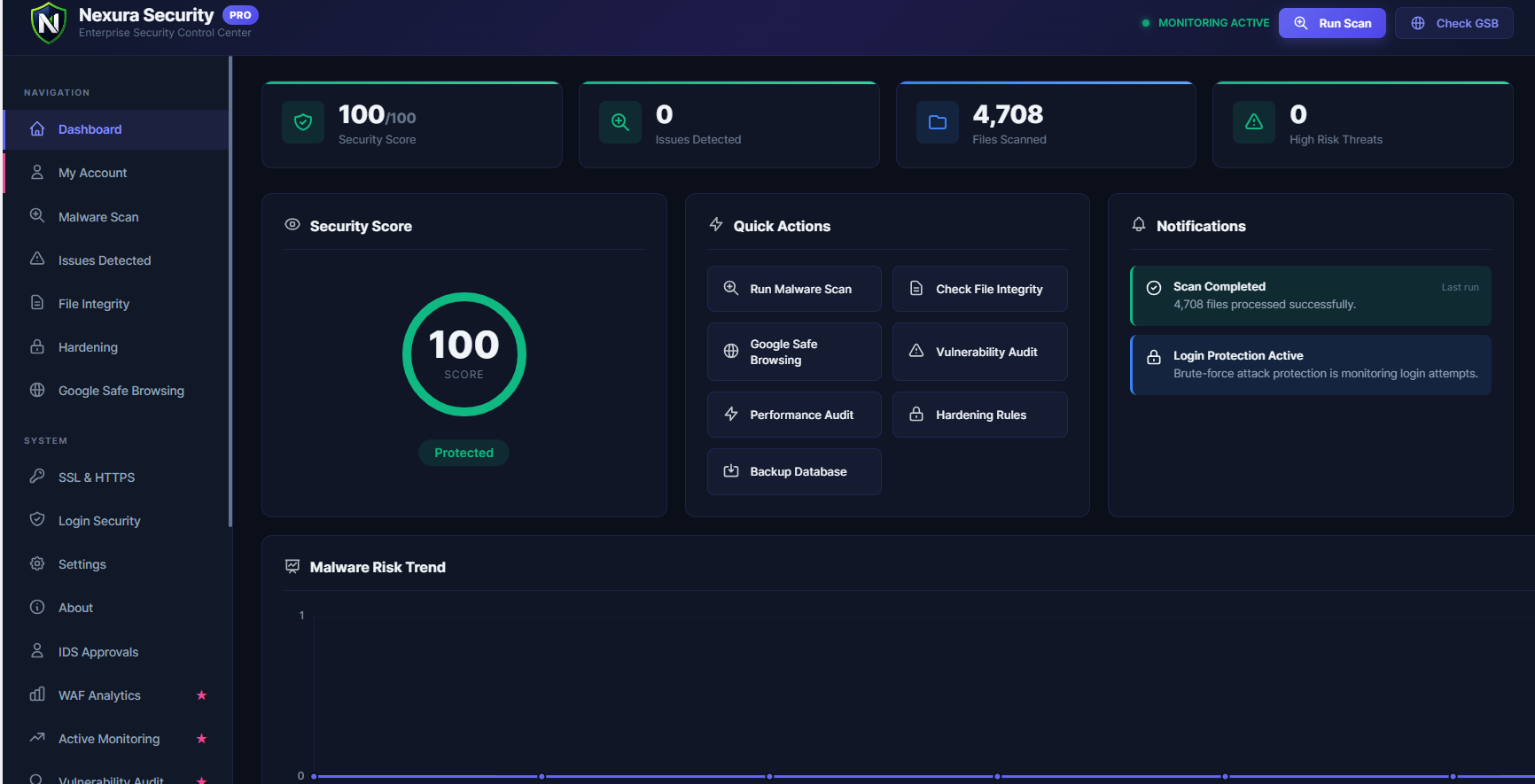
Nexura Security is a complete, advanced WordPress security plugin that protects your website from hackers, malware, and brute-force attacks — completely free.
Whether you run a personal blog, a WooCommerce store, or a business website, Nexura Security gives you the same level of protection used by enterprise websites — designed for low performance overhead and without expensive subscriptions.
⚡ The Faster, Lighter Alternative to Wordfence & Sucuri
Tired of heavy security plugins? Nexura is designed for low performance overhead and designed to minimize database growth, without charging a premium for basic features.
Nexura Security is built differently:
- Designed for low database overhead — Smart micro-batching runs scans quietly in the background without overloading your server.
- No Performance Hit — Designed to minimize performance impact during or after a security scan.
- One-Click Setup — No technical knowledge required. Get protected in under 60 seconds.
- 100% Free Core — Every essential security feature is included at no cost, forever.
🛡️ Free Features (Everything You Need to Stay Secure)
🔍 Deep WordPress Malware Scanner
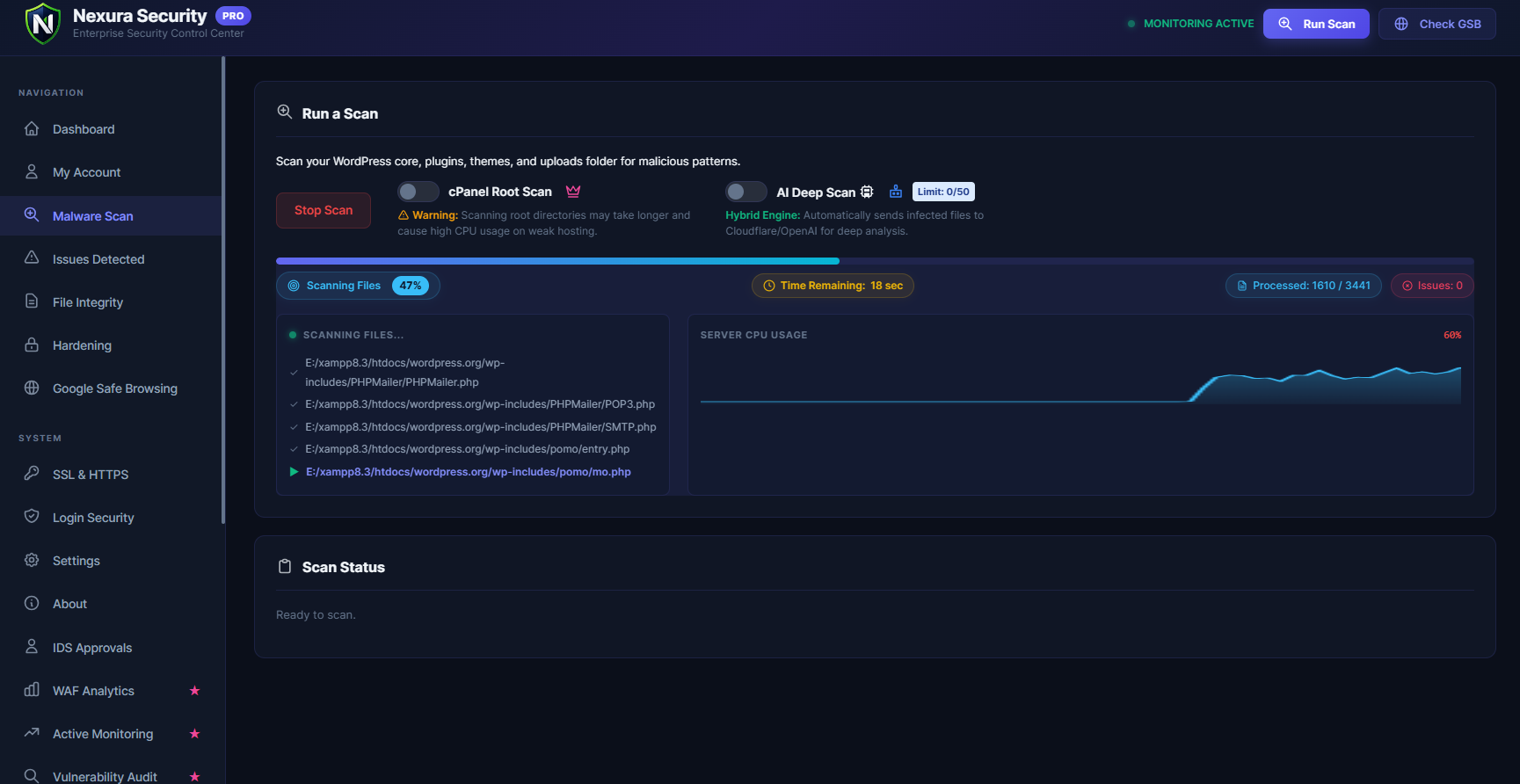
Automatically scans your entire WordPress installation — plugins, themes, uploads, and core files — for hidden backdoors, obfuscated PHP code, suspicious JavaScript injections, web shells, and known malware patterns. Detected threats are displayed with severity ratings and can be removed with a single click.
🔥 Web Application Firewall (WAF)
Blocks SQL injection (SQLi), Cross-Site Scripting (XSS), remote file inclusion (RFI), and other OWASP Top 10 attacks before they ever reach your WordPress database. The WAF loads via auto_prepend_file — before WordPress boots — for the earliest possible threat interception.
⚠️ Automated Security Alert Emails
When Nexura Security detects malware or threats during a scan, it automatically sends a beautifully formatted HTML security alert email to the site administrator with a full threat summary and a direct link to the dashboard. Alerts are rate-limited to once per 24 hours to prevent inbox spam.
📂 WordPress Core File Integrity Monitor
Compares every WordPress core file against clean, official checksums from WordPress.org to detect any unauthorized modifications. If a hacker modifies wp-login.php, wp-config.php, or any other core file, you will know immediately.
📁 Root Directory Integrity Checker
Detects suspicious and unknown files dropped directly into your WordPress root folder — a common technique used by attackers to plant backdoors and web shells.
🔐 Two-Factor Authentication (2FA)
Protect your WordPress admin login with TOTP-based two-factor authentication. Works with Google Authenticator, Authy, Microsoft Authenticator, and any standard TOTP app. Includes a full-screen QR code setup wizard.
🔗 Passwordless Magic Link Login
Allow trusted users to log in via a secure, time-limited link sent to their email — no password required. Eliminates password-based brute-force risks entirely.
🚫 Brute-Force Attack Protection
Automatically blocks IP addresses after repeated failed login attempts. Fully configurable lockout duration, attempt thresholds, and whitelisting.
🔑 Pwned Password Checker
When users set or change their passwords, Nexura Security silently checks against the HaveIBeenPwned database using the k-Anonymity model — your full password is never transmitted. If a compromised password is detected, the user is warned immediately.
🤖 Anti-Spam & Bot Protection (CAPTCHA)
Protect your login, registration, and comment forms from automated spam bots using Cloudflare Turnstile (privacy-respecting) or Google reCAPTCHA v2/v3 integration.
🌍 Real-Time Threat Intelligence
Syncs with the Nexura Threat Intel Cloud to receive up-to-date malicious IP blocklists and WAF attack signatures, keeping your firewall rules current against the latest threats.
🛠️ One-Click Security Hardening
Apply all WordPress security best practices in one click:
- Disable the built-in file editor
- Block PHP execution in the uploads folder
- Disable directory listing
- Block XML-RPC attacks
- Disable user enumeration via REST API
🚑 Fatal Error Auto-Heal (White Screen of Death Protection)
Uses the official WordPress Drop-in pattern (wp-content/fatal-error-handler.php) to catch PHP fatal errors before they crash your entire site. If a newly installed plugin or theme causes a “White Screen of Death,” Nexura automatically detects the faulty plugin, safely disables it, and reloads the page.
🗄️ Database Security Scanner
Scans your WordPress database for rogue administrator accounts, suspicious option values, and malicious content injected into posts and pages by attackers.
💾 Database Backup
Create a full database backup with one click before performing any cleanup operation — so you can always roll back safely.
📊 Real-Time Upload Scanning
Every file uploaded through WordPress (media, plugins, themes) is automatically scanned for malware signatures before it is saved to your server.
🔍 Google Safe Browsing Check
Instantly verify whether your website has been flagged by Google as containing malware or phishing content. Catch blacklisting before your visitors do.
📡 SSL & HTTPS Monitor
Monitors your SSL certificate health and enforces HTTPS redirects to prevent mixed-content warnings and insecure connections.
🌟 Pro Features — Advanced Protection & Automation
Nexura Security Pro extends the free version with powerful automation, advanced scanning, and robust protection:
- Tokenizer-Based Smart Scanner — Uses PHP’s
token_get_all()AST engine to detect zero-day backdoors and polymorphic malware that regex-based scanners miss entirely. - Automated Malware Cleanup — One-click automated removal of detected malware without needing developer access.
- WordPress Core Auto-Restore — Downloads clean copies of modified core files from WordPress.org and replaces them using atomic, crash-safe file writes.
- File Quarantine System — Moves suspicious files to an isolated, execution-blocked quarantine zone where they cannot cause harm while you review them.
- Custom Login URL (Hide wp-admin) — Rename
wp-login.phpandwp-adminto a secret URL, which helps reduce automated brute-force traffic before they even reach your login page. - HTTP Security Headers — Add Content-Security-Policy (CSP), HSTS, X-Frame-Options, Permissions-Policy, Referrer-Policy, and more. Includes Recommended, Strict, and Custom presets.
- REST API Security — Block unauthenticated REST API access and prevent username enumeration via
/wp-json/wp/v2/users. - Enterprise WooCommerce Security Mode — Comprehensive eCommerce protection including Fake Customer Registration Honeypot, Cart/Coupon Abuse Protection, Checkout Card Testing limits, and REST/AJAX limits, with payment gateway webhook whitelisting.
- Vulnerability Audit — Automatically detects plugins, themes, and WordPress core versions with known CVEs (Common Vulnerabilities and Exposures).
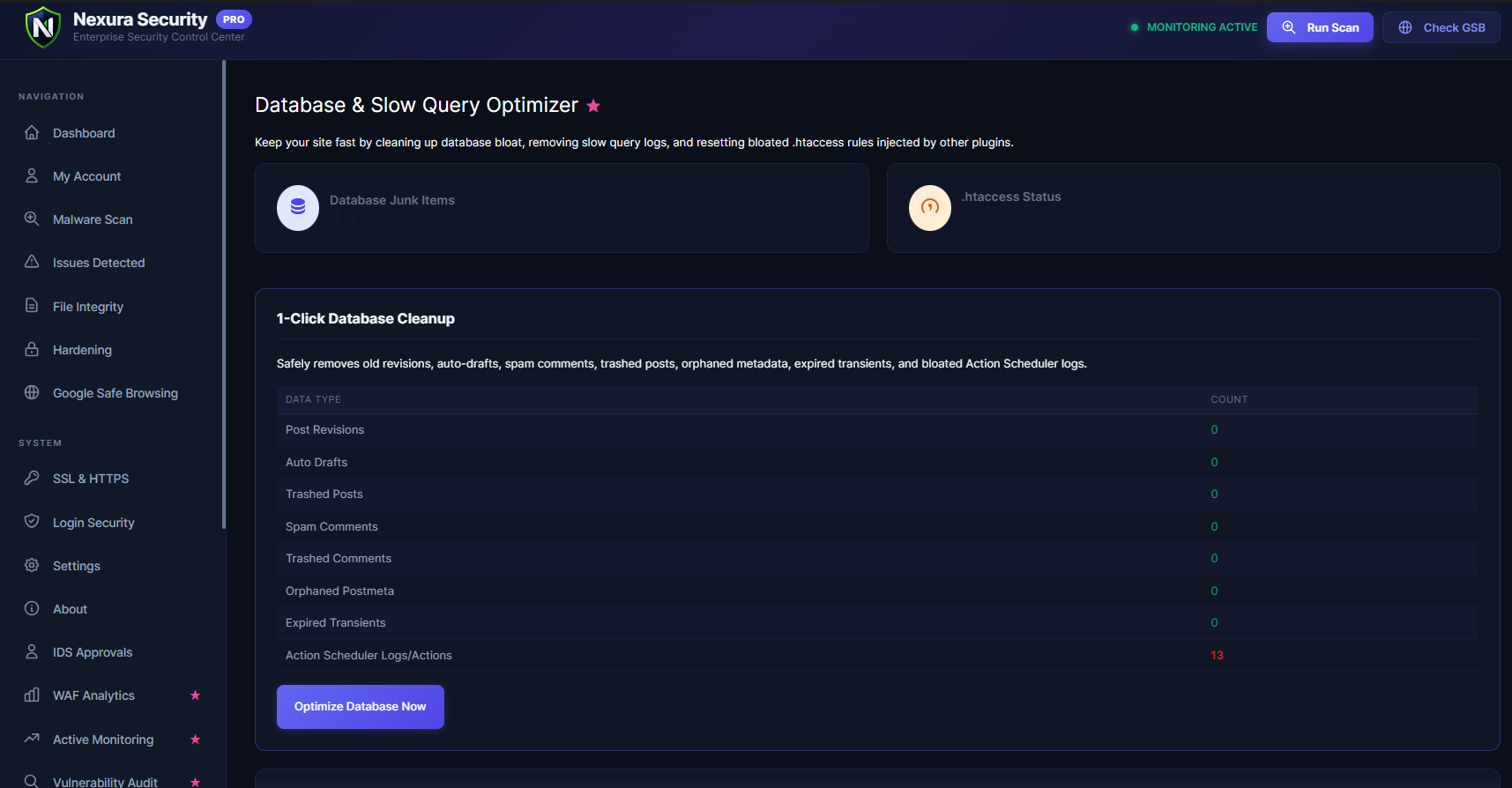
- Database Optimizer — Removes post revisions, expired transients, orphaned metadata, and spam comments to improve database performance.
- Storage Cleanup Scanner — Safely identifies unused images, PDFs, and orphaned upload files to reclaim disk space.
- Plugin Conflict Cleaner — Detects and safely removes database leftovers from conflicting or previously deleted security plugins.
- Security Trust Badge — Display a dynamic “Protected by Nexura Security” seal on your website to build visitor confidence.
- 📡 Active Visitor Monitoring — Real-time visitor tracking dashboard with live stats, 4 interactive charts (Traffic Trend, Browser, Device, OS), auto-refreshing visitor table, and intelligent bot detection.
- 📌 Visitor Stats Shortcodes — 5 shortcodes (
[nexura_visitors],[nexura_stats],[nexura_live],[nexura_popular],[nexura_page_views]) to display live security and visitor stats anywhere on your site. - Scheduled Automatic Scans — Set malware scans to run every 2 hours, daily, weekly, or monthly — fully automatic, no manual action required.
- Advanced Audit Logs — A complete, tamper-evident log of every security event, user login, file change, settings modification, and admin action.
- Priority Support — Direct access to the Nexura Security expert team for fast, personalized help.
Upgrade to Nexura Security Pro
🔗 Third-Party Services & External API Connections
To provide comprehensive security, Nexura Security connects to several trusted third-party services. All connections are opt-in — nothing is sent automatically without your explicit action. Here is a complete and transparent list:
1. Cloudflare Turnstile
Used for: Privacy-friendly CAPTCHA on login, registration, and comment forms to stop spam bots.
Data sent: Browser fingerprint and interaction data (processed by Cloudflare, never stored by us).
When: Only when you enable Turnstile in the Anti-Spam settings.
Links: Cloudflare Privacy Policy | Cloudflare Terms
2. Google reCAPTCHA
Used for: Alternative CAPTCHA option for login and registration pages.
Data sent: Browser data and interaction signals (processed by Google).
When: Only when you enable Google reCAPTCHA in the Anti-Spam settings.
Links: Google Privacy Policy | Google Terms
3. HaveIBeenPwned API (Pwned Passwords)
Used for: Checking whether a user’s password has appeared in known data breaches.
Data sent: Only the first 5 characters of a SHA-1 hash of the password (k-Anonymity model). Your actual password is NEVER sent.
When: Only when a user sets or changes their password and the feature is enabled.
Links: HaveIBeenPwned Privacy Policy | API Terms
4. Google Safe Browsing API
Used for: Checking whether your website has been flagged by Google as containing malware or phishing.
Data sent: Your website’s URL.
When: Only when you manually trigger a Safe Browsing check from the dashboard.
Links: Google Privacy Policy | Safe Browsing Terms
5. VirusTotal API
Used for: Scanning file hashes against 70+ antivirus engines to detect malware.
Data sent: Only the SHA-256 cryptographic hash of the file. The actual file is NEVER uploaded.
When: Only during a manual malware scan when unknown files are detected and the feature is enabled.
Links: VirusTotal Privacy Policy | VirusTotal Terms
6. Nexura Threat Intel Cloud
Used for: Syncing the latest WAF rules, malicious IP blocklists, and malware detection signatures.
Data sent: Blocked attacker IP addresses and blocked payload patterns (anonymized). No personal user data is ever collected.
When: Only when Global Threat Intelligence is enabled in settings.
Links: Nexura Privacy Policy | Nexura Terms
7. WordPress.org API
Used for: Downloading official WordPress core file checksums for integrity scanning and official WordPress ZIP files for the Core Auto-Restore feature.
Data sent: Your WordPress version number.
When: During core file integrity checks or when Core Auto-Restore is triggered.
Links: WordPress Privacy Policy
8. FlagCDN (flagpedia.net)
Used for: Displaying country flags next to IP addresses in the Blocked IPs table.
Data sent: Country code (derived from IP). No personal data is sent.
When: Only when viewing the Blocked IPs admin page.
Links: FlagCDN Privacy Policy | FlagCDN Terms
9. Nexura GeoIP Service
Used for: Identifying the country of origin for blocked attacker IP addresses, and (in Pro) displaying real-time visitor locations on the live traffic dashboard.
Data sent: IP addresses (attacker IPs in the Free version; visitor IPs in the Pro version only if the Live Traffic GeoIP feature is explicitly enabled).
When: When viewing the Blocked IPs page or the Active Visitor Dashboard.
Retention: IPs are processed in memory at the edge and instantly discarded. Zero data retention. No tracking or profiling occurs.
Links: Nexura Privacy Policy
10. External AI Services (Pro Only)
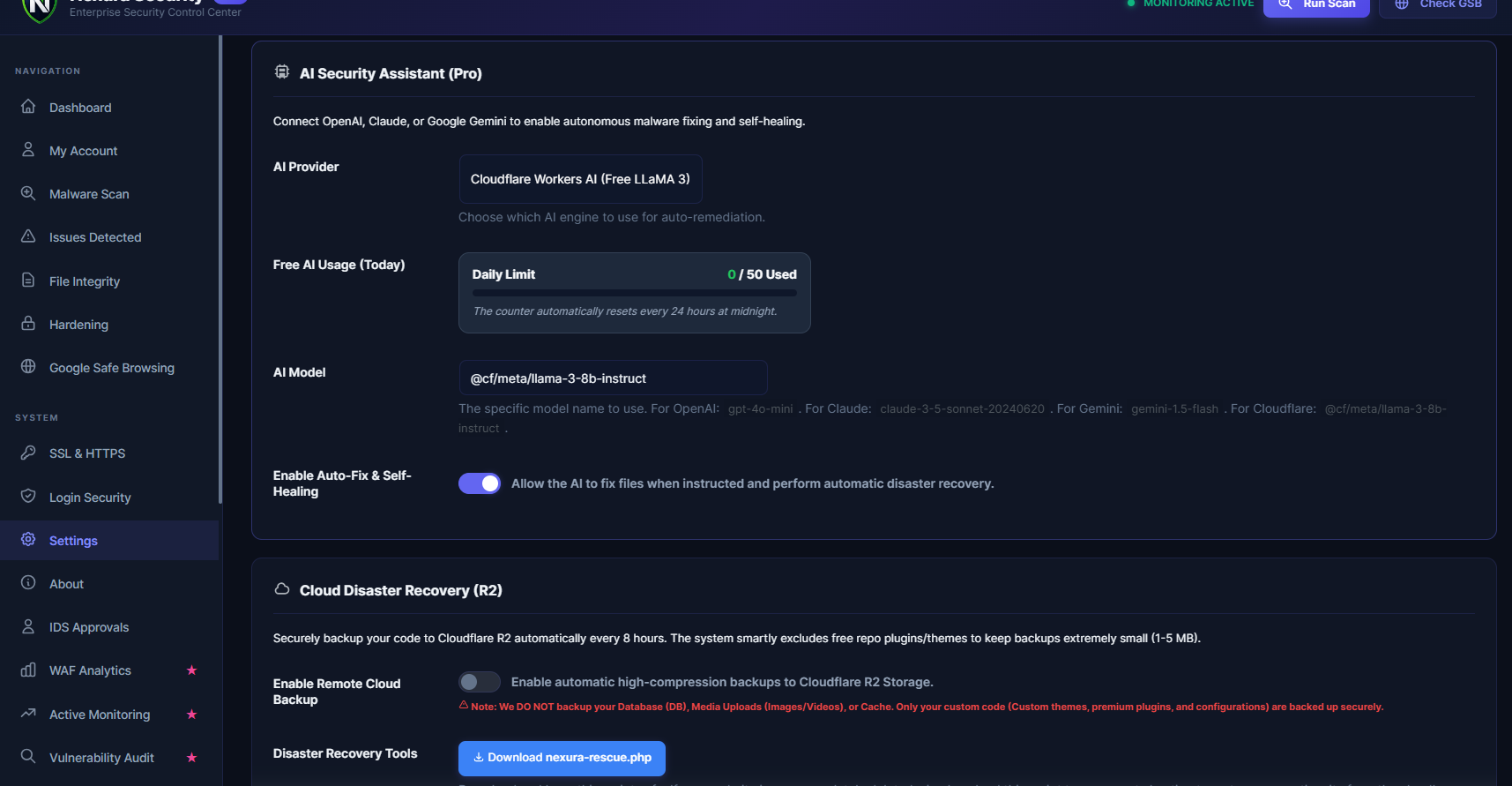
Used for: Analyzing potentially malicious files and auto-generating cleaned code via AI (OpenAI, Anthropic, Google Gemini, or Cloudflare AI).
Data sent: When AI analysis is enabled, selected/redacted file content and site URL may be sent to the selected AI provider.
When: Only when you explicitly configure an AI provider and click “Fix with AI” during a malware scan.
Retention: Depends on your chosen AI provider and your API key configuration (enterprise API endpoints typically do not train on user data).
Links: OpenAI Privacy | Anthropic Privacy | Google Privacy | Cloudflare Privacy
📜 Privacy Policy
What We Collect:
Nexura Security does NOT collect any personal data from your website visitors. We do not track users, sell data, or place tracking cookies.
What We May Report:
When the WAF blocks a malicious attack, the attacker’s IP and the blocked payload pattern may be anonymously reported to the Nexura Threat Intel Cloud to help protect other WordPress sites. You can disable this at any time in Settings Global Threat Intelligence.
Your Data, Your Control:
All scan results, logs, and settings are stored locally in your own WordPress database. Nothing is sent to any external server unless you explicitly enable a cloud feature.
Privacy Standards:
We are committed to respecting user privacy and designing our features with data protection in mind.
Full Policy: Privacy Policy | Terms & Conditions
Changelog (Full)
For a full structured changelog, see CHANGELOG.md on GitHub.
Screenshots


Installation
Automatic Installation (Recommended):
- Go to Plugins Add New in your WordPress dashboard.
- Search for “Nexura Security”.
- Click Install Now, then Activate.
- Navigate to the Nexura Security menu in your sidebar and run your first free security scan.
Manual Installation:
- Download the plugin
.zipfile from this page. - Go to Plugins Add New Upload Plugin.
- Select the downloaded zip file and click Install Now.
- Activate the plugin.
FAQ
-
Is Nexura Security really free?
-
Yes, 100% free. All core security features — malware scanning, file integrity monitoring, 2FA, brute-force protection, WAF, hardening, and more — are completely free with no usage limits. The Pro version adds advanced automation and enterprise features for sites that need maximum protection.
-
How to Fix “Site Ahead Contains Harmful Programs” or “Deceptive Site Ahead”?
-
If you see the red Google Chrome warning “The site ahead contains harmful programs”, “Deceptive site ahead”, or “The site ahead contains malware”, your website has been compromised with malware or phishing scripts and blacklisted by Google Safe Browsing.
To fix this issue (mengatasi “The site ahead contains harmful programs”):
1. Scan your site: Run a Nexura Security deep malware scan to find hidden backdoors, malicious redirects, and infected files.
2. Clean the malware: Remove all detected threats using our one-click cleanup tool.
3. Request a Review: Go to Google Search Console, navigate to “Security Issues”, and submit a review request. The warning is usually lifted within 24-72 hours.
Nexura’s built-in Google Safe Browsing Check lets you monitor your blacklist status directly from your WordPress dashboard. -
How to Fix “This site may be hacked” Message in Google Search?
-
If you see “This site may be hacked” next to your domain in Google Search results, Google has detected SEO spam (like the Japanese keyword hack or Pharma hack) on your site. Nexura Security’s deep scanner can find and remove these hidden spam injections so you can request a review and restore your SEO rankings.
-
Can it clean a hacked WordPress site?
-
Yes. The built-in malware scanner detects backdoors, obfuscated code, web shells, and known malware patterns. You can remove detected threats with a single click. For fully automated, zero-touch cleanup, upgrade to Nexura Security Pro.
-
Will it slow down my WordPress website?
-
No. Nexura Security uses a micro-batching architecture that runs all scans in small, non-blocking chunks in the background. It utilizes lightweight background scanning, even during a full site scan of 50,000+ files.
-
How does Nexura Security compare to Wordfence?
-
Nexura Security offers comparable malware scanning, firewall, 2FA, and brute-force protection — but with a significantly lighter performance footprint. Unlike Wordfence, Nexura Security does not insert blocking rows into your database during normal operation, and its WAF uses
auto_prepend_fileto intercept threats at the PHP level before WordPress even loads. -
How does it compare to Sucuri Security?
-
Sucuri’s core plugin on WordPress.org primarily offers activity auditing and basic hardening. Nexura Security provides a more complete free feature set including a built-in malware scanner, 2FA, brute-force protection, and automated security alert emails — all in one plugin.
-
Does it work with WooCommerce?
-
Yes. The free version fully protects WooCommerce sites. The Pro version adds WooCommerce-specific protections including anti-card-testing on checkout pages and customer account takeover prevention.
-
Does it send my data to external servers?
-
Only when you explicitly enable a cloud feature such as Threat Intelligence, Pwned Passwords, or Safe Browsing. All external connections are fully documented in the Third-Party Services section above. By default, everything runs on your own server.
-
Is it compatible with other caching plugins?
-
Yes. Nexura Security is compatible with all major caching plugins including WP Rocket, W3 Total Cache, LiteSpeed Cache, and WP Super Cache. The WAF and scanner operate at the PHP level and do not interfere with caching behavior.
-
Is it compatible with Cloudflare?
-
Yes. Nexura Security is fully compatible with Cloudflare proxied sites. The WAF and brute-force protection correctly identify and handle traffic passing through Cloudflare.
-
What PHP version is required?
-
PHP 7.4 or higher is required. PHP 8.1+ is recommended for the best performance.
-
Is it multisite compatible?
-
Yes. Nexura Security can be network-activated on WordPress Multisite installations.
-
Can I use it on client sites?
-
Yes. There are no restrictions on the number of sites you can protect with the free version.
Reviews

Contributors & Developers
“Nexura Security — Malware Scanner, Firewall, 2FA & WordPress Security” is open source software. The following people have contributed to this plugin.
Contributors

Interested in development?
Browse the code, check out the SVN repository, or subscribe to the development log by RSS.
Changelog
1.0.20
- Critical Fix / Security Hardening: Implemented Anti-Email-Storm Protection and Smart Rate Limiting in
Alert_Systemto prevent servers from exhausting 100% hourly email quotas and getting blocked by hosting providers during botnet and brute-force attacks. - Feature: Added configurable Hourly Email Rate Limit (default 5 emails/hour) with automated transient digest queue buffering.
- Enhancement: Added Brute-Force Alert Smart Policy with 15-minute cooldown, filtering out random botnet dictionary scans while preserving instant alerts for attacks targeting actual administrator accounts.
- Bug Fix: Fixed Visitor Tracker anomaly speed detection to apply a 1-hour cooldown transient and strict severity gating, preventing rapid email loops on fast browsing or web crawlers.
- Bug Fix: Added 24-hour source deduplication to Real-Time Scanner option hooks to prevent recurring alert emails on dynamic option updates.
- Bug Fix: Prevented duplicate alert emails on scan completion by dispatching webhooks instead of double emailing.
- Bug Fix: Protected Auto-Heal Drop-in crash notifications and Scheduled Scan reports with hard cooldown limits to eliminate email loops during site recovery.
1.0.19
- Bug Fix: Fixed a UI glitch in the loading button icon by switching from Dashicons to the plugin’s native spinner.
- Bug Fix: Resolved a false-positive issue in the Plugin Conflict Cleaner where WooCommerce’s Jetpack dependencies caused continuous false alerts.
- Bug Fix: Fixed a bug in the File Snapshots viewer where the PRO verification logic incorrectly hid snapshots for users with an active lifetime license.
- Enhancement: Added a “Clean All Logs” button to the IP Intelligence page, complete with a custom modal, to allow users to easily clear local or staging brute force logs.
- Security: Added 2026 modern JS malware signatures to detect obfuscated arrays (Balada Injector, Sign1) and dynamic script injections (ClearFake).
- Security: Expanded PHP backdoor signatures to block modern WP action hook droppers, variable function evasions, and known webshells (WSO, B374k).
- Bug Fix: Resolved a critical bug where malware scans would crash at 96% with a 500 error if the server’s
mail()function was disabled or misconfigured.
1.0.18
- Security Hardening: Upgraded security-sensitive MD5 hashes to SHA-256 (CAPTCHA cookies and core file restorer) to prevent cryptographic collisions.
- Security Hardening: Fixed XML-RPC payload inspection to decode HTML/XML entities, catching obfuscated attack strings.
- Security Hardening: Switched Remember Device cookie to use
SameSite=Strictand constant-timehash_equals()comparison. - Bug Fix: Removed infinite redirect loop caused by conflicting
wp_loginactions with third-party separate-prompt 2FA. - Bug Fix: Prevented fatal errors on deleted users during 2FA login checks.
- Bug Fix: Handled object cache compatibility by switching scan caching to the WordPress Transient API.
- Bug Fix: Removed deprecated
FILTER_SANITIZE_URLusage for WAF log tracking. - Enhancement: Added a visual warning banner when 0 recovery codes are remaining for Two-Factor Authentication.
- Enhancement: Improved multiple hardcoded strings to be properly translatable (i18n) and corrected escaping (
esc_js,esc_html__). - Code Health: Verified that Nexura Security is not affected by the deprecated
WP_Http_Curlclass, as the core does not use it.
1.0.17
- Bug Fix: Fixed an issue where the malware scanner incorrectly reported “0 issues found” despite detecting malware.
- Bug Fix: Added specialized signatures to detect and clean zero-day obfuscated malware droppers.
- Bug Fix: Fixed a JavaScript crash (“Canvas is already in use”) on the dashboard charts.
- Bug Fix: Restored missing backend logic for the WooCommerce XML-RPC Protection toggle.
- Bug Fix: Fixed WooCommerce Coupon Abuse Protection hooks to correctly block automated attacks on all WooCommerce versions.
1.0.16
- Important Bug Fix — No More “Website Down” After Saving Settings: Some users on certain hosting providers (like Bluehost, HostGator, and SiteGround) experienced an HTTP 500 error after enabling the Web Application Firewall. We’ve completely fixed this! Your site will now stay online no matter which hosting you use.
- Smart Auto-Recovery: We’ve added a new safety net to the plugin. If a security setting ever causes an issue on your server, the plugin will now automatically detect it within seconds and quietly undo the change — so your website stays live without you having to do anything.
- Better Spam Protection: Our comment spam blocker is now even smarter. We’ve added 8 new spam link domains to the blocklist that bots were actively using to sneak through (
shorturl.fm,t.ly,goo.suand more). Spam comments with these links will now be blocked automatically before they ever appear on your site. - Pro Feature Safety Upgrade: The same “no more website crashes” fix has been applied to the Pro Server Lock feature, making it safe to use on all types of hosting environments.
1.0.15
- WAF Hardening — Unified Bootstrap Architecture: Completely redesigned the WAF loading mechanism to use a fail-safe
nexura-waf-bootstrap.phpproxy file at the server root. This eliminates fatal errors when the plugin folder is renamed, moved, or the Pro version is installed alongside the free version. - Fix — Pro Path Compatibility: Resolved a fatal error (
Failed opening required 'nexura-security-pro/nexura-waf.php') that occurred on sites where the plugin was installed asnexura-securitywhile.htaccessstill referenced the oldnexura-security-propath. - Fix — WAF Dashboard API (Pro): Fixed undefined variable warnings (
$total_activity,$recent_attacks,$top_countries,$error_rate) in the WAF Analytics REST endpoint that caused the dashboard charts to fail to load on Pro installations. - Fix — DB Optimizer API (Pro): Fixed
foreach()onnullPHP warnings in the DB Optimizer Stats and Table List endpoints, which caused JSON parse errors preventing the Database Optimizer page from loading on some hosting environments. - Enhancement — Old Pro Plugin Auto-Deactivation: The plugin now automatically detects and deactivates the old standalone
nexura-security-proplugin on activation, displaying a clear admin notice to prevent conflicts and fatal errors.
1.0.14
- Enterprise WooCommerce Security Module: Complete overhaul providing granular protection against Checkout Abuse, Cart/Coupon spam, and Fake Registrations using Honeypots and advanced Rate Limiting. Also blocks WooCommerce REST API scraping and account enumeration, while automatically whitelisting legitimate webhooks from Stripe, PayPal, and Mollie.
- Advanced Database Malware Scanner: The malware scanner now scans deep inside
wp_options,wp_postmeta,wp_usermeta, and Custom Tables for hidden JavaScript injections, encoded PHP, SEO spam, and backdoor iframes. - Database Optimization & Log Retention: Added automatic WP-Cron log cleanup with customizable retention policies (7 days to 1 year) to prevent your database from ballooning in size.
- Hardened Filesystem Operations: We’ve introduced a 3-layer security model for advanced filesystem operations (like
chattr). Now strictly opt-in, properly capability checked, and fully audited. - Centralized Permission Engine: Upgraded access controls across 30+ files to use a new centralized
Nexura_Security::can_manage_security()method, making the plugin more reliable and extensible. - Advanced Backdoor Detection: We’ve completely overhauled our malware signature engine! The new system is highly optimized, fully transparent, and now includes enhanced detection rules for the latest WordPress malware variants (including WP-VCD).
- Hardened Passwordless Logins: Magic Link authentication is now even more secure with strict account-level rate limiting and ultra-secure session handling to prevent brute-force abuse.
- Ultra-Fast Local Geo-Blocking: We’ve integrated the industry-standard MaxMind GeoLite2 database! Enjoy lightning-fast country detection natively on your server, acting as a robust fallback for sites not using Cloudflare.
- Strict Security Headers: Refined our Security Headers engine to enforce rock-solid protections accurately across both Free and Pro versions without conflicting with advanced server setups.
- Dashboard Polish: Improved threat visibility in your Nexura Dashboard with enhanced, intuitive color-coded badges for Critical security alerts.
- Core Optimizations: Under-the-hood privacy improvements with a new proprietary server-side IP geolocation engine that keeps your visitors’ data secure and private.
1.0.13
- Major Upgrade (Unified Architecture): We have completely rebuilt the plugin core! Free and Pro versions are now merged into a single, highly optimized codebase. Enjoy lightning-fast performance, zero plugin conflicts, and a seamless experience.
- Instant Pro Upgrades: Upgrading to Pro is now easier than ever! No need to download or manage separate “Pro” plugins. Simply activate your license, and all premium enterprise features unlock instantly within your existing dashboard.
- Performance Boost: Removed legacy dual-WAF loading constraints, significantly reducing server response times and lowering CPU usage across all hosting environments.
- Fix: Enhanced dynamic path resolution to ensure maximum compatibility with advanced WordPress setups and custom deployment workflows.
1.0.12
- Enhancement: Streamlined the Pro license activation process for a seamless, instant upgrade experience without caching delays.
- Enhancement: Improved menu integration with the Freemius SDK for a cleaner admin dashboard experience.
- Fix: Resolved a critical initialization issue in the Pro module loader to ensure maximum stability on all hosting environments.
- Fix: Restored and optimized the 3D Geo-Location Map visualization within the WAF Analytics dashboard.
- Fix: Addressed a display issue on feature preview pages to ensure smooth navigation for Free tier users.
1.0.11
- Feature: Added Vulnerability Scanner to detect known CVEs in plugins and themes.
- Feature: Added Security Audit Logs for comprehensive tracking of user actions and security events.
- Feature: Added Security Headers Manager (HSTS, X-Frame-Options, CSP, X-XSS-Protection).
- Feature: Added DB Security & Safe Cleanup module to optimize database and clear malicious transients.
- Feature: Added Cron Job Auditor to detect hidden malicious WordPress scheduled tasks.
- Feature: Added Security Score & Reporting for real-time site posture analysis.
- Performance: Completely decoupled and removed the Freemius SDK for a faster, fully independent architecture.
- Performance: Reduced Cloud Threat Intelligence signatures highly targeted PHP/WordPress malware signatures — eliminates false positives and dramatically speeds up scans.
- Performance: Added a 1.5-second CPU breathing gap between scan steps to prevent server CPU overload on shared hosting.
- Performance: Reduced per-step scan execution time from 10s to 6s for better server resource balance.
- Fix: Fixed a fatal error that occurred when specific plugin files were missing or manually deleted.
- Fix: Malware scan no longer flags legitimate theme/plugin files with Windows binary (Armadillo, UPX, PE32) or domain-matching YARA rules.
- Fix: Database options and post content scan now uses targeted injection detection (eval/script/iframe) instead of generic cloud YARA patterns — eliminates thousands of false positives.
- Fix: Moved hardcoded malware regex patterns to encoded external file to prevent cPanel ClamAV from flagging the plugin ZIP during upload.
1.0.10
- Security: Added Base64 and Hex payload decoding to the WAF — catches obfuscated malware that bypasses standard filters.
- Security: Added Wp2shell Zero-Day blocking rule (CVE-2026-60137 / CVE-2026-63030).
- Security: Fixed SSL verification in Rescue Script —
CURLOPT_SSL_VERIFYPEERis nowtrueto prevent MITM attacks. - Security: Replaced
esc_url_rawwithwp_validate_redirect()in 2FA login to prevent Open Redirect attacks. - Security: Secured dynamic table names with
preg_replacesanitization in DB Backup and Plugin Conflict Cleaner. - New Feature: Ghost Admin Protection — detects and automatically demotes rogue administrator accounts injected via SQL injection or zero-day exploits. Runs a background scan every 12 hours.
- Chore: Version bumped to 1.0.10.
1.0.9
- Fix: Reduced plugin tags to comply with WordPress.org 5-tag limit.
- Fix: Shortened plugin short description to comply with 150-character limit.
- Enhancement: SEO and metadata improvements for WordPress.org listing.
1.0.8
- Enhancement: Under-the-hood stability improvements and version synchronization.
1.0.7
- New Feature: Added a Nexura Security notifications icon to the WordPress admin bar (frontend and backend) to show active threat alerts.
- Enhancement: The admin bar icon features a dropdown menu for quick access to all Nexura Security dashboard pages.
1.0.6
- Enhancement: Revamped the native WordPress dashboard widget to match the WordPress Site Health design with a dynamic security score ring.
- New Feature: Added a “Protected by Nexura” dynamic marketing and page health badge at the top of the Publish meta box for pages and posts.
1.0.5
- Critical Fix: Fixed HTTP 500 error (Maximum execution time exceeded) during plugin activation by delaying the initial File Integrity Monitoring (FIM) and Google Safe Browsing scans by 1 hour.
- Critical Fix: Fixed HTTP 500 error after plugin deactivation. The Web Application Firewall (WAF)
auto_prepend_filedirective is now correctly removed from.htaccessand.user.iniduring deactivation.
1.0.4
- New Feature: Automated HTML security alert email when malware or threats are detected during a scan.
- Enhancement: Email is rate-limited to max 1 per 24 hours to prevent inbox flooding.
- Enhancement: Nexura Security branding logo added to alert email header.
- Enhancement: Upgraded all alert notifications from plain text to fully styled HTML with CTA button.
- Fix: Minor stability improvements and code hardening.
1.0.3
- New Feature: Automated HTML security alert emails — when malware is detected, the site admin receives a beautifully branded email with a full threat summary and dashboard link.
- Enhancement: Security alert emails are rate-limited to a maximum of 1 email per 24 hours to prevent inbox flooding.
- Enhancement: Upgraded all alert notifications from plain text to fully styled HTML with Nexura Security branding.
- Fix: Minor stability improvements and code hardening.
1.0.2
- Stability improvements and performance optimizations.
- Updated scanner signature database.
- Improved compatibility with PHP 8.2.
1.0.1
- Initial release.
- Deep recursive malware scanner with micro-batching architecture.
- WordPress core file integrity monitoring.
- Root directory integrity checker.
- Two-Factor Authentication (2FA) with TOTP support.
- Passwordless Magic Link login.
- Brute-force attack protection with IP lockout.
- Pwned Password checking via HaveIBeenPwned API (k-Anonymity).
- Anti-spam protection with Cloudflare Turnstile and Google reCAPTCHA.
- Cloud-based Threat Intelligence sync.
- Google Safe Browsing integration.
- One-click security hardening.
- Database security scanner.
- Database backup tool.
- Real-time upload scanning.