

Description
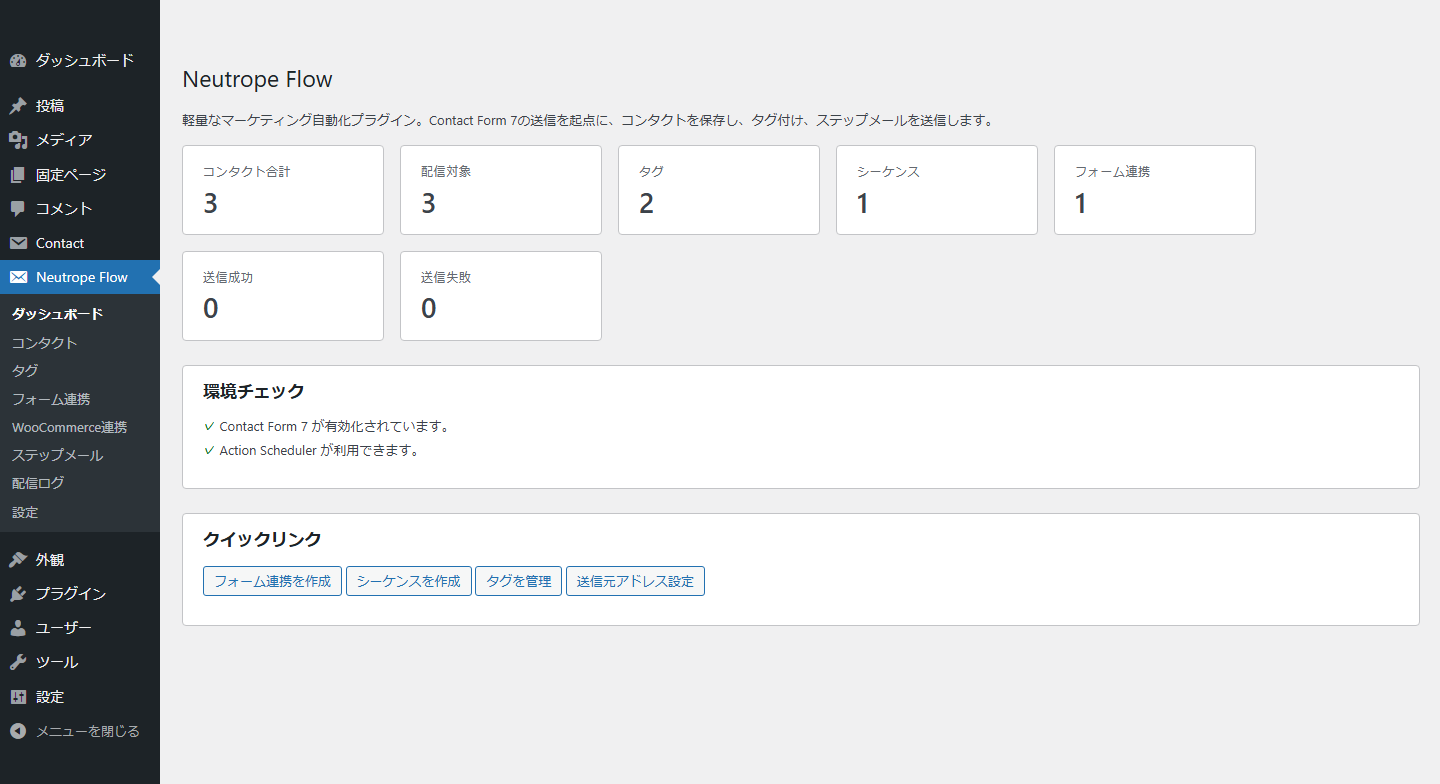
Neutrope Flow helps site owners manage contact records and send scheduled follow-up emails from their own WordPress installation.
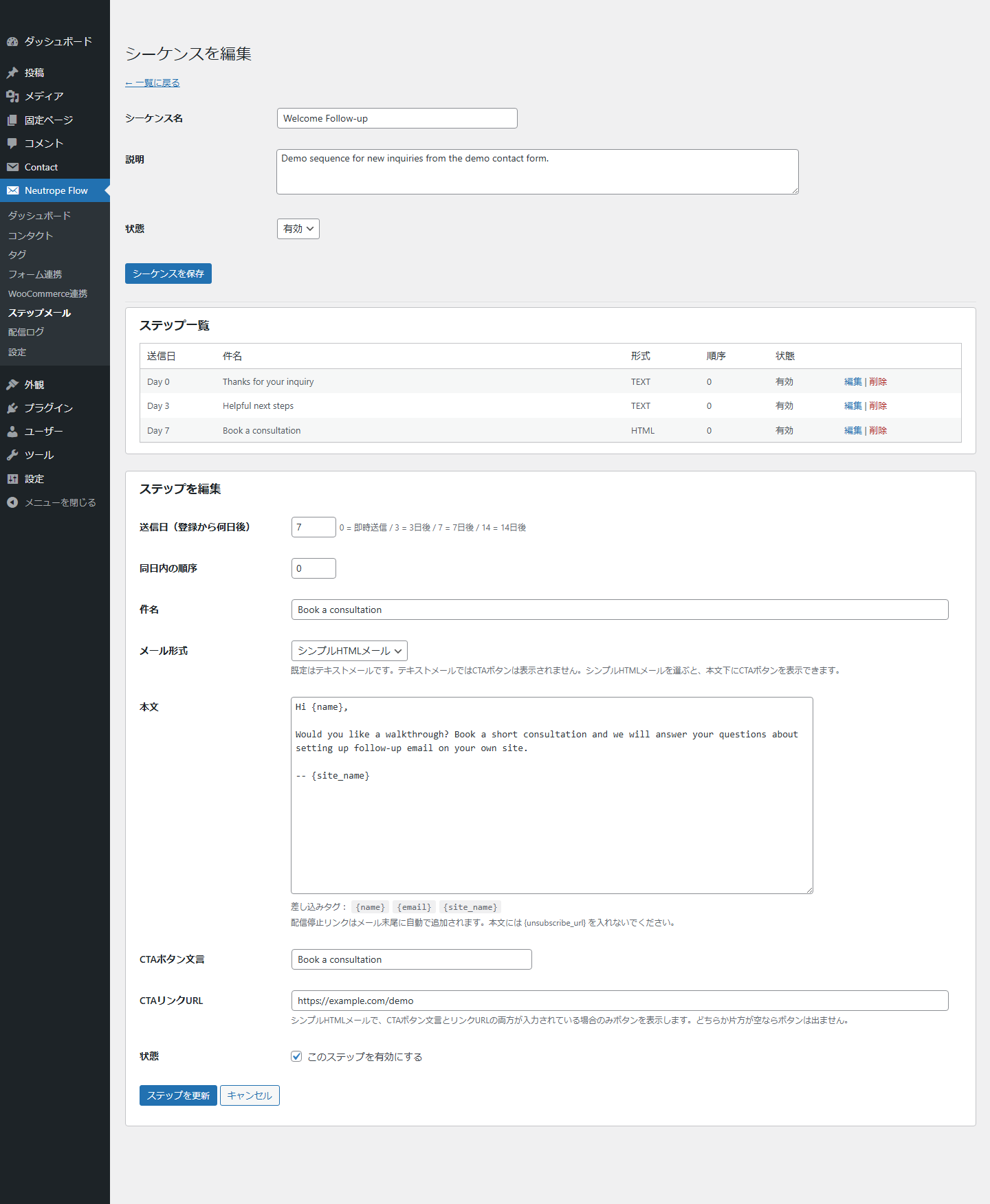
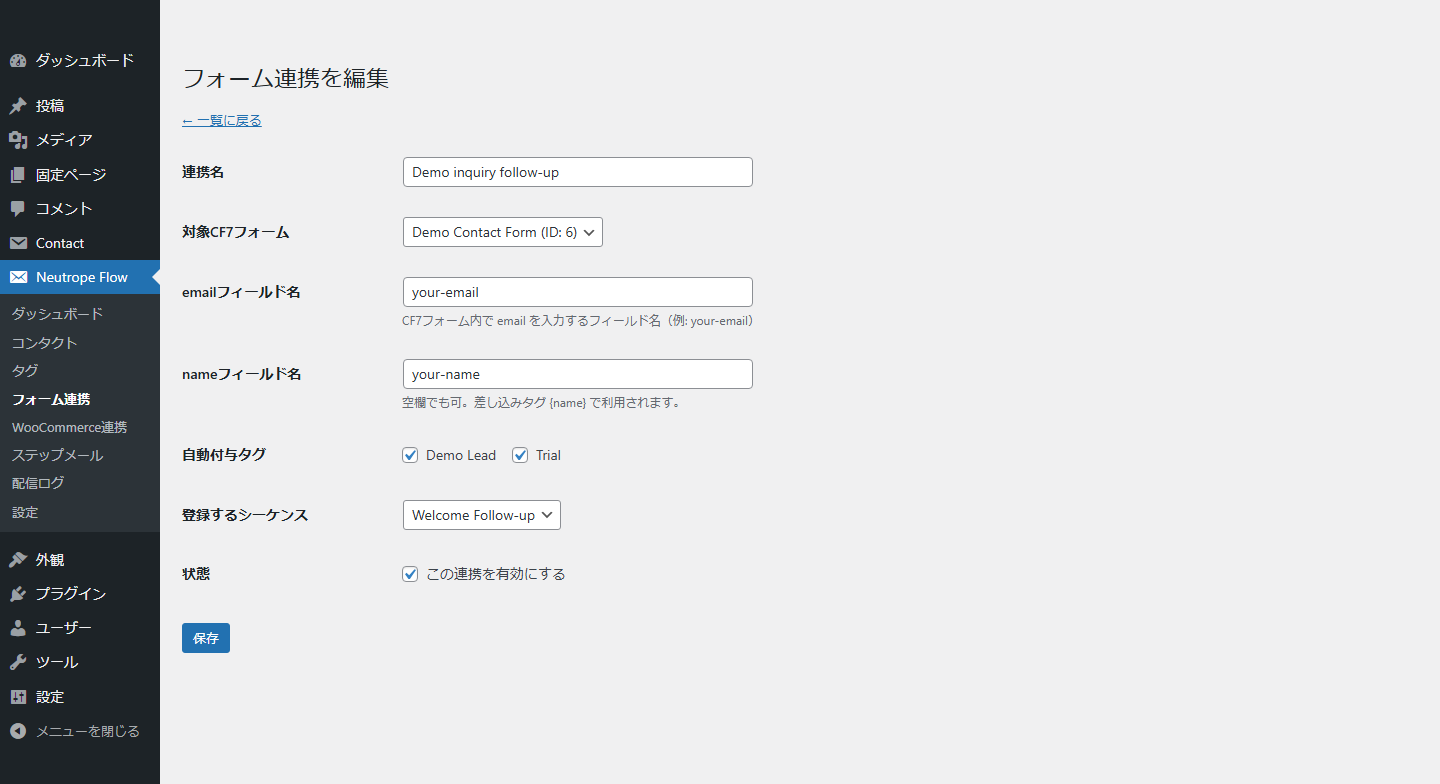
The plugin can create or update a contact after a configured Contact Form 7 submission or WooCommerce order event. A mapping can add tags and enroll the contact in an email sequence. Each sequence contains one or more steps, such as an immediate message followed by messages several days later.
Email is sent through WordPress wp_mail(). Neutrope Flow is not an SMTP service or an email delivery provider. Delivery depends on the mail configuration of the WordPress site. Scheduled timing also depends on Action Scheduler or WP-Cron and may not run at an exact time on low-traffic sites.
Main features
- Store contact names and email addresses in dedicated WordPress database tables.
- Organize contacts with tags.
- Create text or simple HTML follow-up email sequences.
- Start sequences from configured Contact Form 7 submissions.
- Start sequences from configured WooCommerce order events.
- Schedule later steps with Action Scheduler when available, with WP-Cron as a fallback.
- Add an unsubscribe link and List-Unsubscribe headers to sequence emails.
- Skip unsubscribed contacts and prevent duplicate delivery of the same step.
- Record delivery results in a local log when logging is enabled.
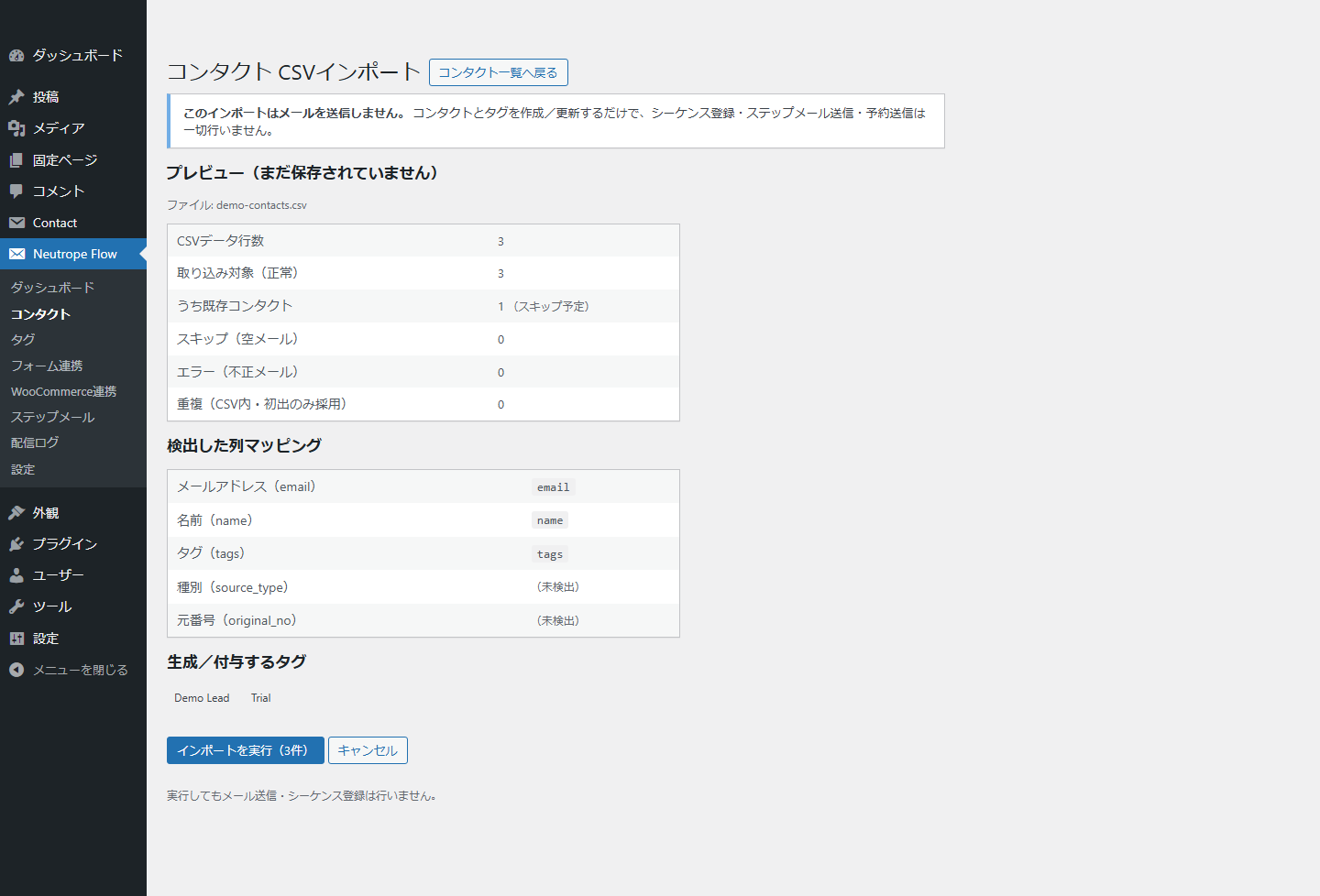
- Import contacts and tags from a UTF-8 CSV file without sending email or enrolling sequences.
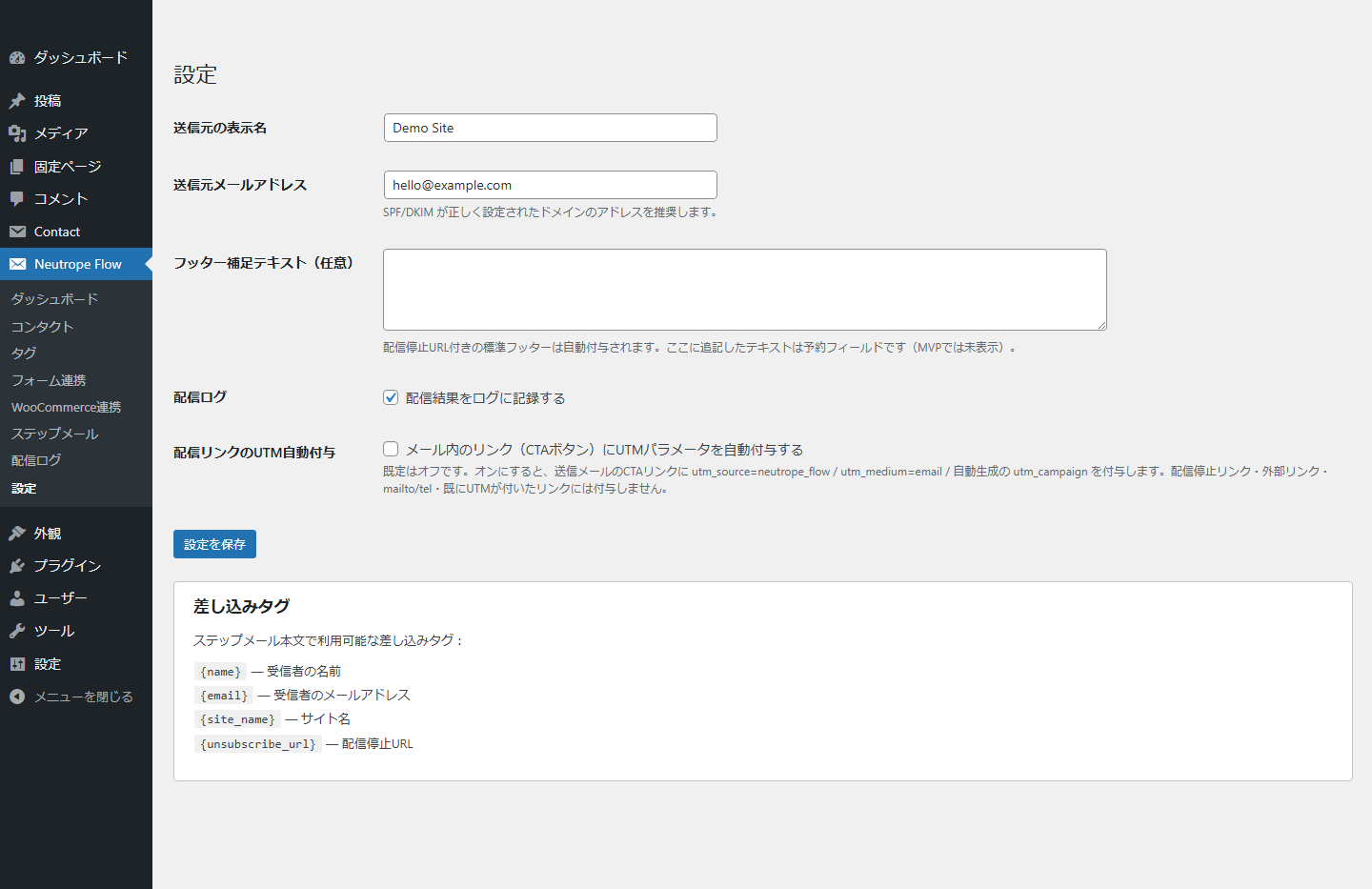
- Optionally add UTM parameters to eligible CTA links. This option is disabled by default.
- Emit a recipient-free campaign-template content snapshot after a successful send for compatible local reporting extensions.
External services and tracking
Neutrope Flow does not make outbound API requests, require an API key, or send contact data to Neutrope or another external service.
The optional UTM feature only adds parameters to eligible links in outgoing email. It does not connect to Google Analytics or transmit analytics data.
Email delivery is handled by the site’s WordPress mail configuration. If the site uses an SMTP or transactional email plugin, that plugin may send data to its configured provider under its own terms and privacy policy.
Privacy
Neutrope Flow stores contact email addresses, names, source information, tags, sequence settings, delivery-log details, and random unsubscribe tokens in the site’s WordPress database. It does not store IP addresses and does not send this data to Neutrope.
After a successful send, the plugin can notify compatible local extensions with the canonical sequence-step subject, body, format, CTA, send time, and UTM metadata. This campaign-template snapshot excludes the contact ID, recipient email address, recipient name, recipient-rendered body, unsubscribe URL, and delivery-log recipient fields.
Site owners are responsible for obtaining any consent required for follow-up email, setting an appropriate retention period, and describing this processing in their privacy policy. Deleting the plugin removes its settings and custom database tables.
Screenshots
Installation
- Upload the
neutrope-flowfolder to/wp-content/plugins/, or install the plugin ZIP through the WordPress Plugins screen. - Activate Neutrope Flow.
- Open Neutrope Flow > Settings and review the sender address and logging options.
- Create tags and an email sequence, then configure a Contact Form 7 or WooCommerce mapping.
- Send a test message using a non-production recipient before enabling a mapping for live submissions.
Contact Form 7 is required only for Contact Form 7 mappings. WooCommerce is required only for WooCommerce mappings. Action Scheduler is optional; Neutrope Flow falls back to WP-Cron when it is unavailable.
FAQ
-
Does Neutrope Flow provide an email delivery service?
-
No. It sends through WordPress
wp_mail(). Configure WordPress mail or a compatible SMTP plugin separately and test delivery before using a sequence. -
Does CSV import send email or enroll contacts in a sequence?
-
No. CSV import only creates or updates contacts and tags. The preview and result screens explicitly confirm that no email or sequence enrollment is performed.
-
Does the plugin connect to Brevo, Google Analytics, or another API?
-
No. Neutrope Flow makes no outbound API requests and stores no API keys. Optional UTM parameters may later be processed by an analytics system already used by the site, but the plugin does not connect to that system.
-
How are follow-up emails scheduled?
-
Action Scheduler is used when available. Otherwise, Neutrope Flow uses WP-Cron. WP-Cron runs when WordPress receives traffic, so delivery may occur later than the configured time on low-traffic sites.
-
How does unsubscribe work?
-
Each contact receives a random unsubscribe token. Sequence emails include a visible unsubscribe link and List-Unsubscribe headers. Unsubscribed contacts are excluded from later sequence deliveries.
-
What personal data is stored?
-
The plugin can store a contact’s email address, name, source metadata, tags, delivery-log details, and unsubscribe token. Data stays in the site’s WordPress database. The plugin does not store IP addresses or transmit contact data to Neutrope.
Reviews
There are no reviews for this plugin.
Contributors & Developers
“Neutrope Flow” is open source software. The following people have contributed to this plugin.
Contributors
“Neutrope Flow” has been translated into 1 locale. Thank you to the translators for their contributions.
Translate “Neutrope Flow” into your language.
Interested in development?
Browse the code, check out the SVN repository, or subscribe to the development log by RSS.
Changelog
0.4.9
- Added a recipient-free campaign-template content snapshot event after successful email dispatch.
- Added stable monthly source references, canonical subject/body/format/CTA/UTM metadata, and a deterministic SHA-256 content hash for compatible local reporting extensions.
- Added request-local duplicate suppression and listener-exception isolation so snapshot consumers cannot interrupt email delivery.
- Added no database migration and no dependency on a reporting plugin.
0.4.8
- Standardized admin request, nonce, upload, and transient identifiers with the full plugin-specific prefix.
- Added nonce validation to the central admin action router before dispatching any handler.
- Re-audited enqueued assets, admin permissions, unsubscribe confirmation, and prepared SQL identifiers.
0.4.7
- Removed invalid plugin and author URL headers for WordPress.org review.
- Replaced inline unsubscribe-page CSS with WordPress enqueue APIs.
- Added nonce validation for admin edit links that read GET parameters.
- Renamed the admin notice transient key to a longer plugin-specific prefix.
- Updated database queries to use prepared identifier placeholders where supported.
- Raised the minimum WordPress version to 6.2 for prepared identifier placeholder support.
0.4.6
- Prepared the plugin for WordPress.org review.
- Rewrote the readme in English and added screenshot captions.
- Renamed internal PHP classes to longer Neutrope_Flow_* names.
- Audited database-query warnings and clarified fixed internal table usage.
- Added uninstall cleanup for WooCommerce mapping data and fallback cron cleanup.
- Added WordPress 7.0 smoke-test verification.
0.4.5
- Added a two-step CSV contact import with preview and explicit confirmation.
- Added UTF-8 validation, row and file-size limits, column detection, duplicate handling, and tag import.
- CSV import does not send email, enroll sequences, or schedule delivery.
0.4.4
- Added extension hooks for reporting integrations.
- Added optional UTM parameters for eligible CTA links. The setting is disabled by default.
0.4.3
- Improved List-Unsubscribe header compatibility across WordPress mail transports.
0.4.2
- Added RFC 8058 one-click unsubscribe support.
0.4.1
- Added a confirmation step for visible unsubscribe links.
0.4.0
- Added simple HTML email and CTA button support.
0.3.0
- Added built-in sequence templates.
0.2.0
- Added WooCommerce order mappings.
0.1.0
- Initial release.