
Description
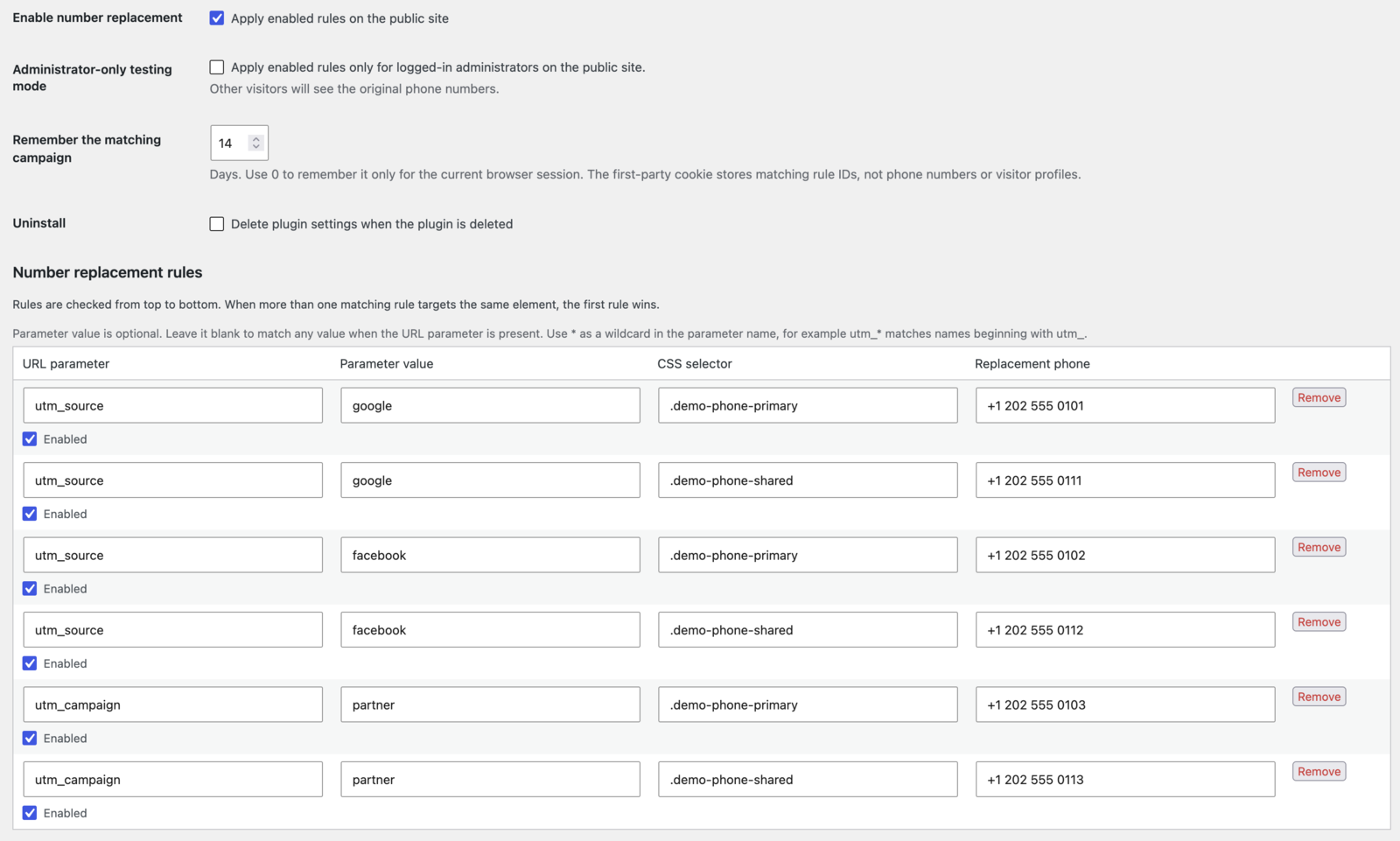
NeedToMe Phone Number Switcher displays a campaign-specific phone number on your WordPress site. Create a rule with a URL parameter, an optional value, a CSS selector, and the replacement number. Use * in the parameter name to match a pattern such as utm_*.
Features:
- Match UTM parameters such as
utm_source,utm_medium, andutm_campaign, or any other query parameter. - Match parameter names with
*wildcards, for exampleutm_*, and optionally match a specific parameter value. - Create and order multiple replacement rules.
- Keep the selected campaign number on later pages with a first-party cookie; this is enabled by default so a visitor continues seeing the correct campaign number after leaving the landing page.
- Optionally connect campaign memory to the WordPress Consent API or a configurable JavaScript consent state and change event.
- Update the destination of matching
tel:links as well as their visible phone text. - Re-apply the number to matching content added later by a popup or page builder.
- Test enabled rules on the public site for logged-in administrators only.
- Configure the attribution period from the current browser session up to 365 days.
- Use the plugin without sending visitor or campaign data to a third-party service.
- Migrate settings and honor existing visitor selections from the former PDX Different Phones for Different UTM plugin.
Enter utm_source to match one parameter, or utm_* to match any parameter whose name begins with utm_. A rule with a blank parameter value matches whenever the parameter is present; enter a value such as newsletter to require an exact value match. Use a selector that targets the phone text itself, such as .header-phone or .contact-phone a.
The new first-party cookie stores the IDs of matched rules so the same configured number can be shown on later pages. It does not store the visitor’s IP address, URL, or phone number. During the transition, the plugin can also read the earlier pdxphone_for_utm cookie until it expires; that legacy cookie contains selectors and replacement numbers and is not written by this plugin. Site owners are responsible for documenting cookies used on their site and determining whether consent is required for their visitors.
Campaign memory can be set to always remember the matching rule (the default), use the selected category from WP Consent API, or read a custom JavaScript consent signal. In consent-based modes, the number still changes on a page whose URL matches a rule. If consent is denied, the plugin clears and stops using campaign cookies; when the visitor opens a later page without the matching URL parameter, the original number remains. If the consent interface is unavailable or has not supplied a state, the plugin does not read or write campaign cookies.
Privacy
The plugin does not send data to external services and does not record visitor IP addresses or page views. When a rule matches, it may set the first-party needtome_phone_number_switcher cookie containing the matching rule IDs. The cookie is used to remember which configured number to show on subsequent pages. Campaign memory is enabled by default; site owners can optionally require consent through WP Consent API or a custom JavaScript signal. The site owner controls the cookie duration and consent category and is responsible for documenting the cookie and determining applicable notice or consent requirements.
Screenshots
screenshot-1.png).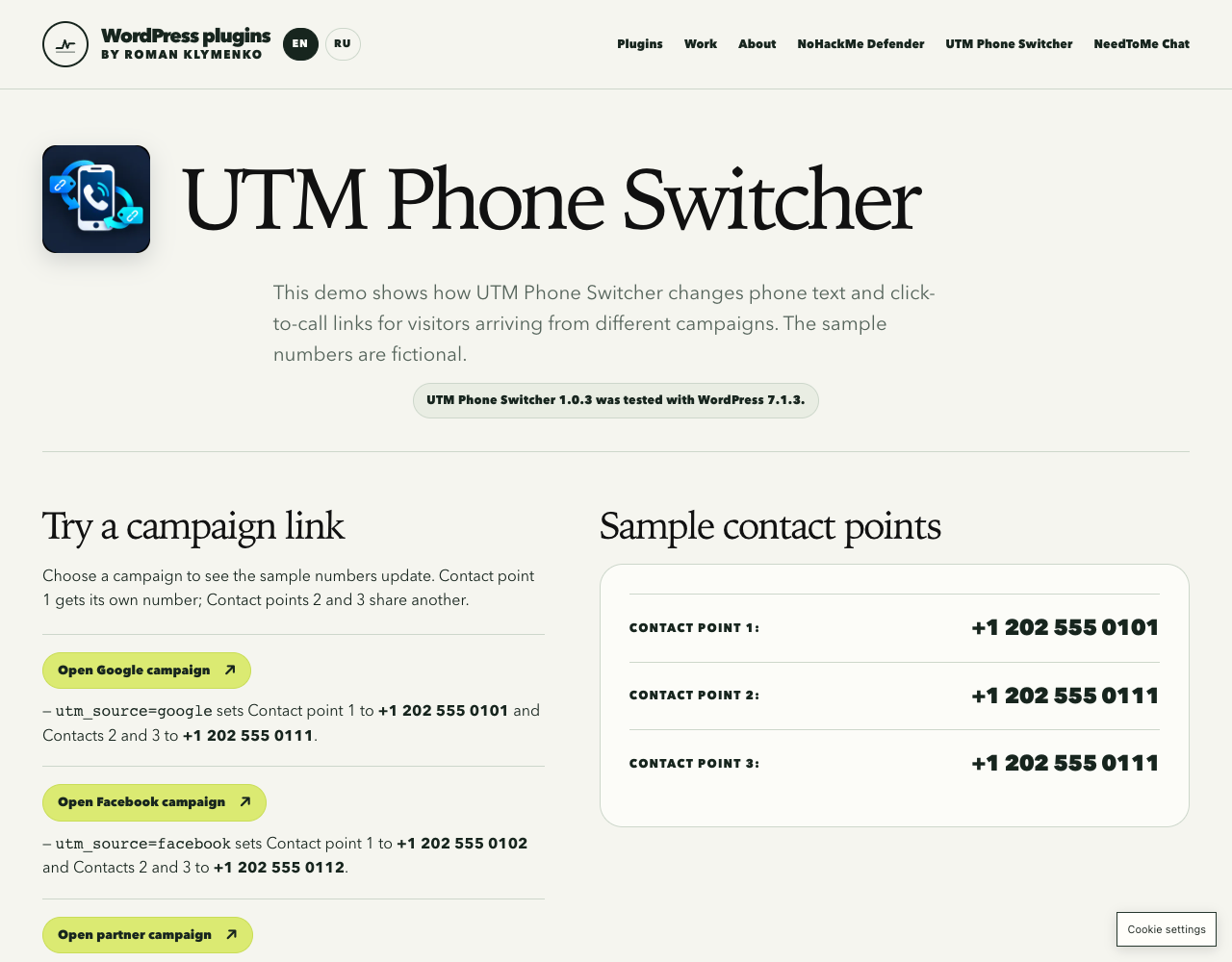
screenshot-2.png).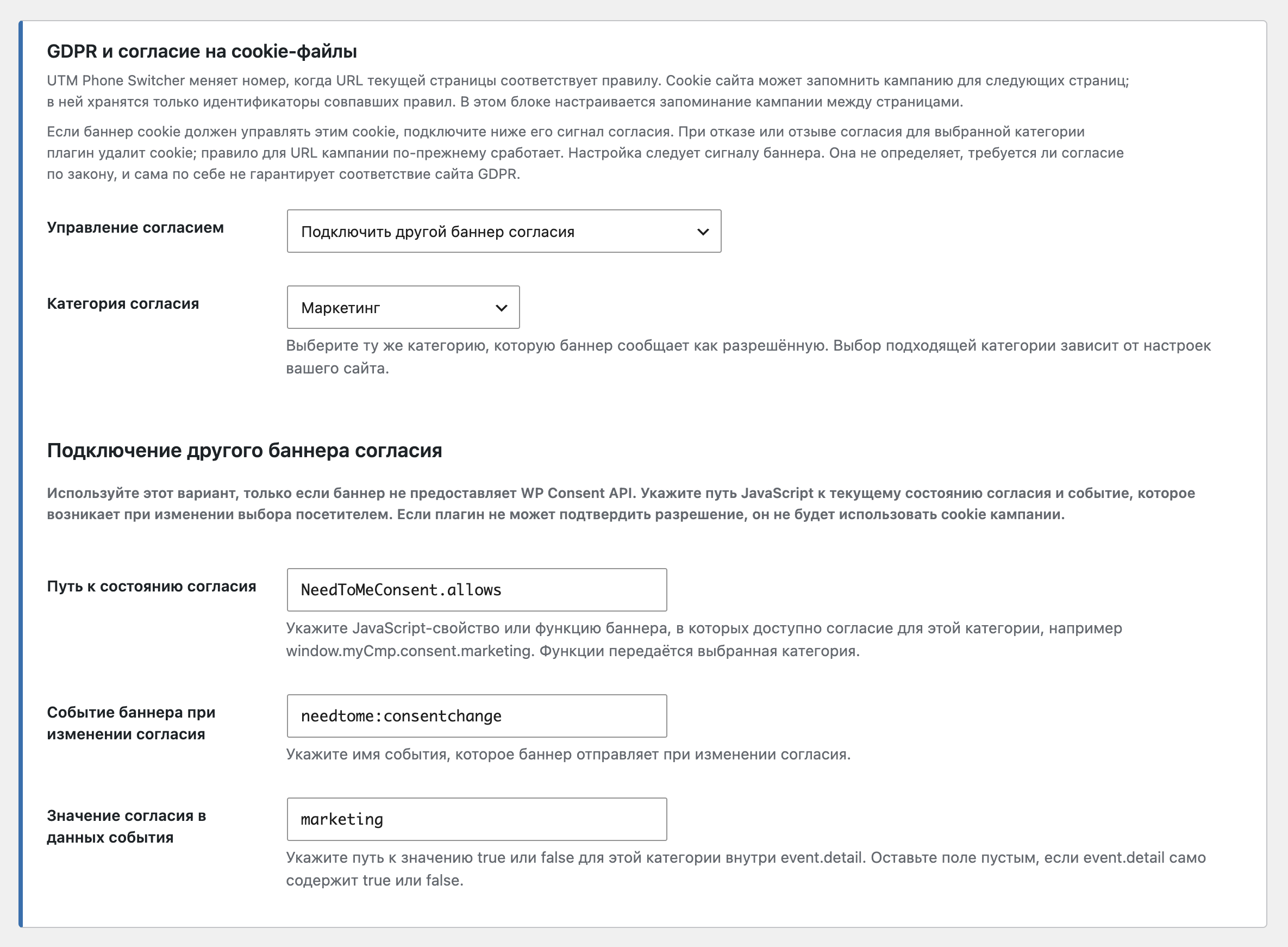
screenshot-3.png).Installation
- Upload the
needtome-phone-number-switcherfolder to the/wp-content/plugins/directory, or install the plugin through the WordPress Plugins screen. - Activate the plugin.
- Open Settings > NeedToMe Phone Number Switcher.
- Add a rule with a URL parameter, an optional value, CSS selector, and replacement number. Use
*in the parameter name to match a pattern such asutm_*; leaving the value blank matches the parameter regardless of its value. - Add the CSS selector to the phone text element in your theme or page builder and save the rule.
- Test the rule by opening a page with the matching parameter, for example
https://example.com/contact/?utm_source=newsletter.
FAQ
-
Can I use a parameter other than UTM?
-
Yes. Enter any URL query parameter, such as
campaign,ref, orgclid. Use*in the parameter name to match a pattern, and leave the parameter value blank to match its presence regardless of value. -
Yes. When connected to your cookie banner through the WordPress Consent API or a custom signal, NeedToMe Phone Number Switcher follows the category you select. If the visitor refuses that category or withdraws consent, the plugin deletes and stops using the campaign-memory cookie. The number still changes while a matching campaign URL is open; without that URL on a later page, the original number is shown. The plugin follows your banner’s signal; it does not decide whether this cookie legally requires consent or certify GDPR compliance.
-
Yes, if the banner exposes a JavaScript value or function and emits an event when consent changes. Enter the state path, event name, and path to the consent value in the event details. The value must be
true/falseor a recognized consent state such asgranted/denied. -
Does the plugin change the phone number in the WordPress database?
-
No. It changes matching text in the visitor’s browser. Your saved pages and posts are not modified.
-
Will it update click-to-call links?
-
Yes, when the selected element is an anchor whose
hrefstarts withtel:. The displayed number and telephone link are then updated together. -
How does the plugin remember a campaign on later pages?
-
It stores the matching rule IDs in a first-party cookie. Set the duration to 0 to keep the choice for the current browser session only, or choose 1 to 365 days.
-
Do I need a call-tracking account?
-
No. The plugin maps a URL parameter to a phone number that you provide. It does not provision numbers or report calls.
-
What happens when the selector is invalid?
-
That rule is skipped in the browser. Check the selector in your theme or page builder and use the browser developer console to diagnose selector syntax.
-
What happens to settings when I delete the plugin?
-
Settings are retained by default. If you enable “Delete plugin settings when the plugin is deleted”, the plugin removes its settings and legacy PDX settings during uninstall.
Reviews
There are no reviews for this plugin.
Contributors & Developers
“NeedToMe Phone Number Switcher” is open source software. The following people have contributed to this plugin.
Contributors
“NeedToMe Phone Number Switcher” has been translated into 1 locale. Thank you to the translators for their contributions.
Translate “NeedToMe Phone Number Switcher” into your language.
Interested in development?
Browse the code, check out the SVN repository, or subscribe to the development log by RSS.
Changelog
1.0.5
- Rename the plugin to NeedToMe Phone Number Switcher (slug needtome-phone-number-switcher).
- Rely on WordPress.org language packs instead of bundled translation files.
1.0.4
- Add a consent-settings screenshot to the plugin documentation.
- Expand the developer tab with an experience summary, $30/hour rate, services, and selected project descriptions.
1.0.3
- Render translated profile tabs directly so Polylang’s selected language applies to their contact details and links.
1.0.2
- Follow the Polylang admin language filter on the plugin settings page so its translations are visible even when the WordPress user locale differs.
1.0.0
- First public-ready release.
- Add ordered rules for matching URL parameters and replacing selected phone numbers.
- Remember matching rules in a configurable first-party cookie.
- Update visible phone text,
tel:links, and dynamically inserted page-builder content. - Migrate settings and read existing campaign selections from the earlier PDX plugin without deleting its stored settings.