
Description
AI agents read your work to answer questions. They do not click your ads, they do not subscribe, and they rarely send a reader back. naulon prices that read.
A human visitor is never affected. They see exactly what they always saw, at the same speed. An automated agent asking for the full text of an article gets a price instead, pays it, and then reads. What it pays goes to the people credited on that article, straight to their wallets, with nothing pooled or held in between.
How it decides
- Human traffic reads free. This is not a setting and there is no switch to change it.
- Titles, excerpts, your sitemap and your feeds stay free, because agents need to find you.
- Full article text is what carries a price.
- Nothing is ever charged with nowhere to send it. An article whose authors have no wallet anywhere, not on this site and not on the service it connects to, reads free.
What you configure
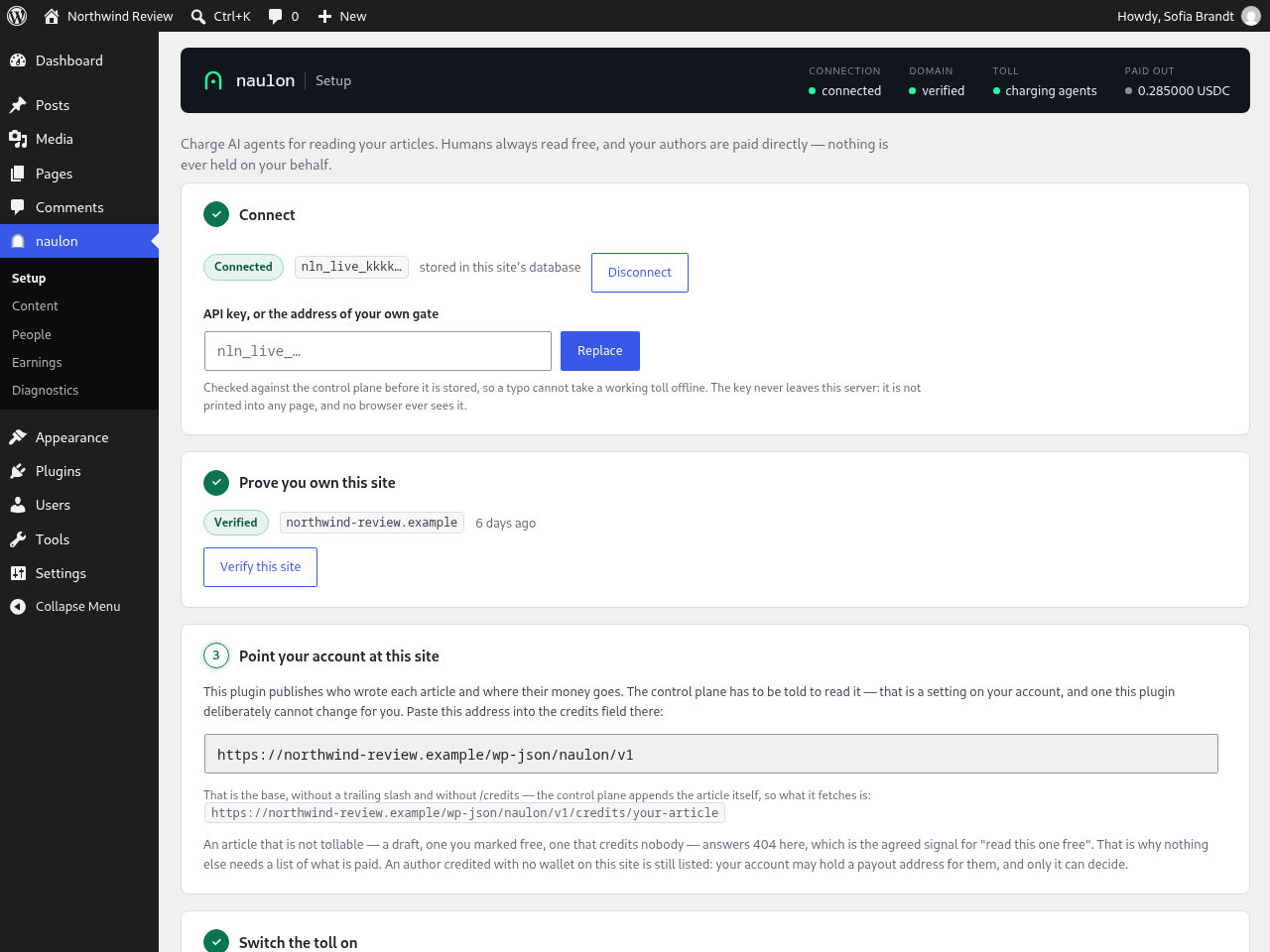
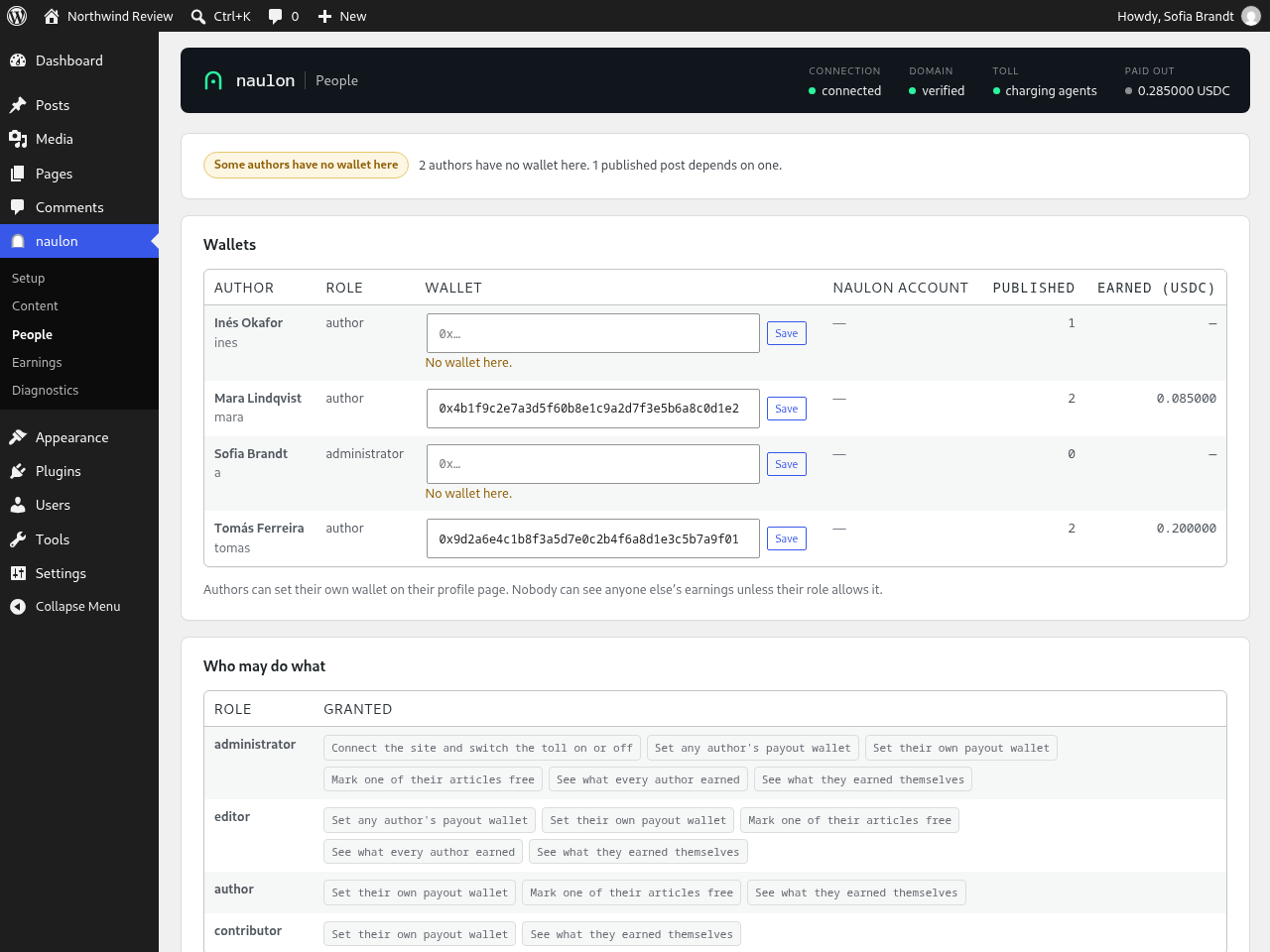
You paste one key, click verify, and choose what is tolled. Your authors each add their own wallet address from their normal WordPress profile. An author never sees anyone else’s earnings, and only editors and administrators can see the site’s total.
How you know it is working
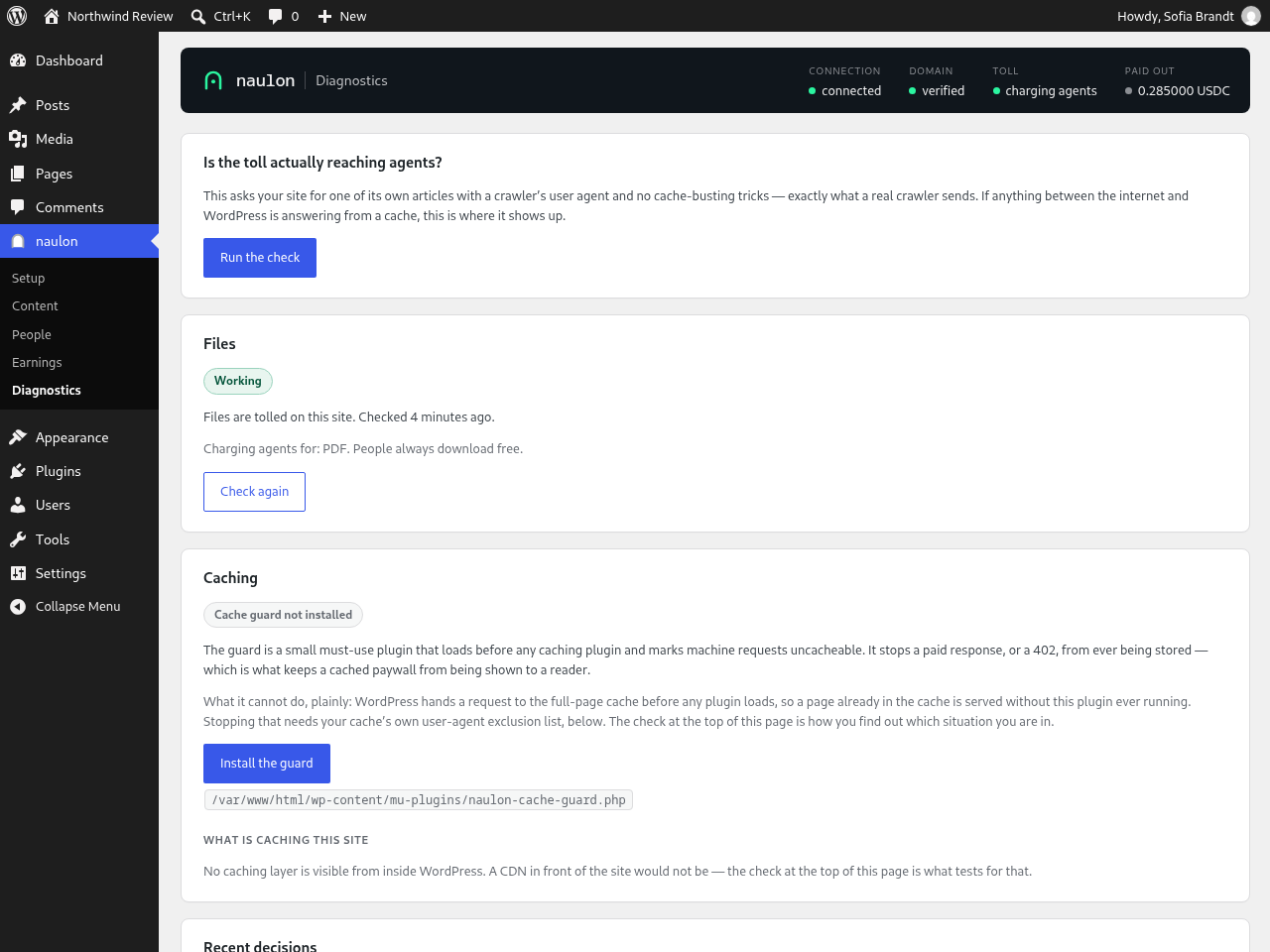
The Setup screen has a Test toll button that asks your own site for one of your articles while presenting a crawler’s user agent, over real HTTP, and shows you what came back: the status, the price, the chain, and the wallet being paid. Diagnostics runs the same check against caching, lists the last decisions the toll made (machine requests only, since readers are never logged) and says plainly when something between the internet and WordPress is answering from a cache.
Where the money goes
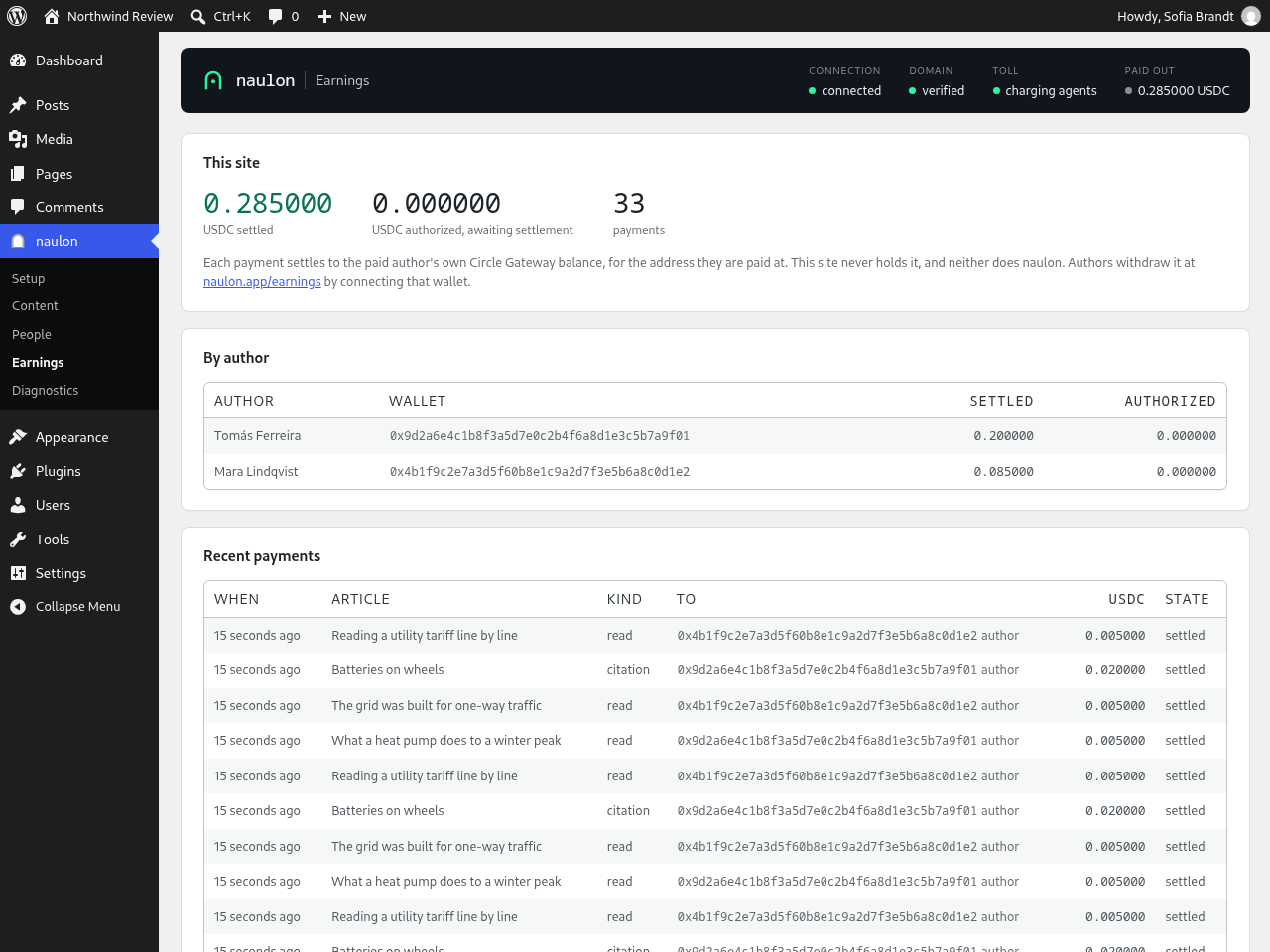
Payment is direct: the agent pays your authors. Each payment settles to the author’s own Circle Gateway balance for the wallet address on their profile, and only that wallet can withdraw it, at https://naulon.app/earnings, with no naulon account needed. This plugin never takes custody of funds, never holds a balance, and never asks you to top anything up. There is no wallet on this site holding money.
Self-hosting
The whole protocol is open source. The connectivity field takes either a hosted key or the URL of a gate you run yourself, and everything else works identically.
External services
This plugin relies on an external service to price a read and to settle a payment, because
settlement cannot be performed inside WordPress. Nothing is contacted until you enter a key.
Entering it is the consent, and until then the plugin makes no outbound requests at all,
not one, to anywhere.
Service: naulon (https://naulon.app), reached at https://gate.naulon.app.
When it is contacted, and what is sent:
- When you connect or rotate a key, and hourly thereafter, to confirm the connection is live.
Sent: your API key and your site’s domain. - When you verify ownership of your site. Sent: your API key and your site’s domain. The
service then fetches a challenge file or your homepage to confirm you control the domain. - When an automated agent requests a full article and a price is needed. Sent: your API key,
the URL and slug of the requested article. - When an agent pays. Sent: your API key, the article URL, the payment the agent signed, and
the wallet addresses credited on that article. - When an administrator or editor approves an author’s request for a naulon payout account
(People screen). Sent: the author’s email address, the author’s id on this site
(wp-user-followed by their user number), and the email address of the person who
approved. naulon uses them to email the author an invitation. Nothing is sent for an author
who never asked, or whose request nobody approved.
What is never sent: your article content, your readers, your visitor logs, and anything
about human traffic. Human requests never contact the service at all.
The plugin adds a suggested paragraph to Settings Privacy that says all of this, for your own
privacy policy.
If you point the connectivity field at your own self-hosted gate instead of a key, the plugin
talks only to that server and never to naulon.app.
Terms of service: https://naulon.app/terms
Privacy policy: https://naulon.app/privacy
Screenshots
Installation
- Install and activate the plugin from Plugins Add New. Later versions arrive on the Plugins screen like any other update.
- Open naulon Setup and paste your key.
- Click Verify this site. The plugin proves you own the domain by serving a challenge file and a meta tag, with no DNS changes needed.
- Paste the credits address shown on that screen into your naulon account, so the service knows where to read your author data.
- Switch the toll on, and press Test toll to watch a crawler get charged.
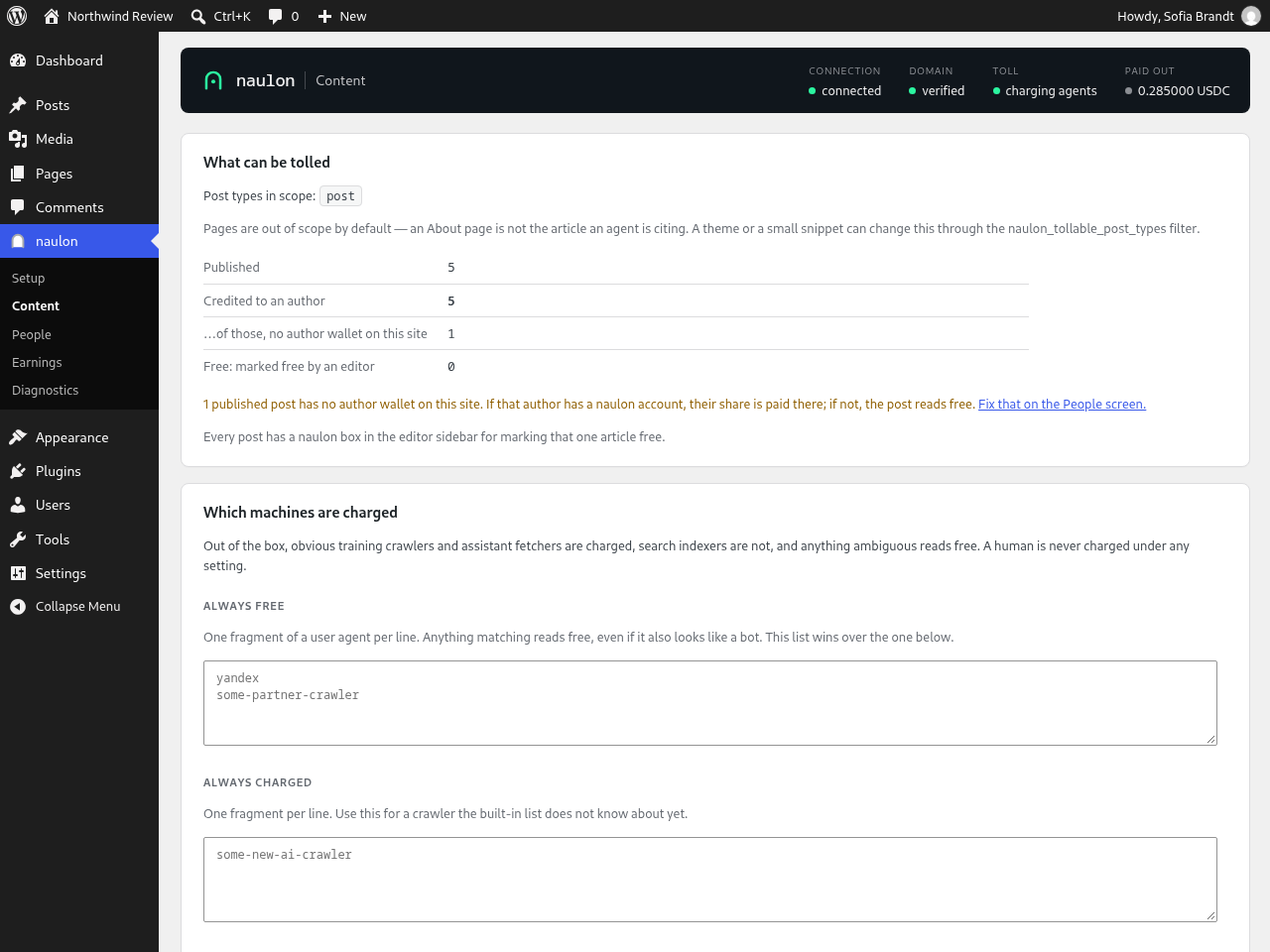
- Choose what is tolled under naulon Content.
- Ask your authors to add a wallet address to their profile. A post by an author without one reads free, unless the service this site connects to holds a wallet for them.
Permalinks must not be set to Plain: with plain permalinks an article has no address to identify it by, and nothing can be tolled. The Setup screen says so if that is the case.
If anything caches pages on your site, install the cache guard from naulon Diagnostics. A cached article is served before any plugin runs, so without it crawlers can read from the cache for free.
For the strongest key storage, add it to wp-config.php instead of the settings screen:
define( 'NAULON_API_KEY', 'nln_live_…' );
A key in wp-config.php stays out of your database, so it does not travel in database exports or backups. The settings screen will tell you which storage is in use.
FAQ
-
Will this slow down or break my site for readers?
-
No. Human requests are not touched, and if the control plane is unreachable the plugin serves everything normally rather than failing. A plugin that breaks a site is a plugin nobody keeps.
-
Do I need to understand crypto to use this?
-
You need a wallet address to receive payments, the same way you would need a bank account number. Nothing else.
-
Can I charge for PDFs and other files?
-
Yes. Tick the file types on your site’s page in the naulon dashboard. The plugin adds a short rule to your .htaccess so those files reach WordPress, and removes it when you deactivate the plugin. If the plugin’s own files go missing without that, the rule switches itself off and your server serves files as it always did. On nginx, Diagnostics gives you the rule to add yourself. Charged files are never stored by a CDN, because a cached copy would be handed to the next agent free.
-
Their posts still credit them, with no destination attached. If the service this site connects to holds a payout wallet for that author, their share goes there. If nothing does, the post reads free, because nothing is charged when there is nobody to pay.
-
Does this block search engines?
-
No. Search crawlers reading titles, excerpts and feeds are unaffected, and those surfaces are free by design.
-
I already sell memberships. Will readers be charged twice?
-
No. Content behind a membership plugin is excluded, and there is a filter (
naulon_is_tollable) for anything custom. -
Does the plugin send my content anywhere?
-
No. Your content never leaves your server. The plugin talks to the control plane only to price a read and to settle a payment, and it does not contact anything at all until you enter a key.
-
Does it log my visitors?
-
No. Human requests are never recorded: not their address, not their browser, not the fact that they arrived. The Diagnostics screen lists recent decisions, and every line on it is a machine. A request whose user agent names a crawler counts as a machine, because that is what it says it is.
-
What happens to my data if I delete the plugin?
-
It stays. Your authors’ wallet addresses, your earnings record and your settings survive a delete, so reinstalling puts you back where you were. Only our own code goes: the cache guard drop-in and the hourly schedule, because leaving those running for a plugin that no longer exists is a bug.
If you do want everything removed, naulon Diagnostics has a box for it, next to a count of exactly what it would destroy and a button to export a copy first. That order is deliberate, because WordPress removes a plugin’s data before it removes the plugin’s files, and it cannot be undone.
-
WordPress says it could not fully remove, or could not copy, the plugin’s files
-
The plugin’s folder is not writable by the user your web server runs as. Removing or replacing a file needs write permission on the folder holding it, not on the file, so one folder owned by someone else stops both updates and deletion. It usually means the plugin was installed by a different user, over SSH or as root. naulon Diagnostics names the exact folder; fix its ownership and both work again.
-
How do I update the plugin?
-
The same way as any other: Dashboard Updates, or the notice on the Plugins screen. Turning on “Enable auto-updates” there works too, and nothing about this plugin needs you to treat it differently.
-
Will this ever charge Googlebot?
-
Only a request that names Googlebot from an address outside Google’s published list, and only after the real Googlebot has been seen on your site at verified addresses. Behind a firewall or proxy, set the trusted client IP header, or claims are simply not checked.
-
I use a caching plugin. Does that matter?
-
Yes, and the plugin is direct about it. A page cache answers before any plugin runs, so a cached article can be handed to a crawler for free. Install the cache guard from Diagnostics, which stops agent responses being cached at all, then add the listed user agents to your caching plugin’s own exclusion list, and use the check on that screen to confirm a crawler is actually being charged.
Reviews
There are no reviews for this plugin.
Contributors & Developers
“naulon – Get paid when AI reads your work” is open source software. The following people have contributed to this plugin.
Contributors
Translate “naulon – Get paid when AI reads your work” into your language.
Interested in development?
Browse the code, check out the SVN repository, or subscribe to the development log by RSS.
Changelog
0.7.3
- New name: naulon – Get paid when AI reads your work. Nothing else changed.
0.7.2
- Setup no longer warns that a verified site “cannot pass” verification because its WordPress address says http. A verified site already passed the https check, often behind a proxy or CDN.
0.7.1
- The plugin’s answer about who is paid for a post or file is never stored by a CDN. Cloudflare caches any address ending in .pdf, so it kept the answer for a tolled file for four hours, and a changed author or wallet was not seen until it expired.
0.7.0
- Charge AI agents for files. Tick PDF, JSON, TXT or XML on your site’s page in the naulon dashboard and the plugin tolls those files in your media library the way it tolls articles. People still download free. A file is credited to the post it is attached to, with that post’s authors and price, and a file on a free post stays free.
- The plugin checks your server can do this before the dashboard offers it. It asks your own site for a small test file and only reports “working” when WordPress itself answered. Diagnostics shows the result, with the exact fix when your server ignores .htaccess (nginx), cannot write it, or a cache in front serves files on its own.
- Saving your key now lights up your site in the naulon dashboard straight away, instead of waiting for the first crawler.
0.6.5
- Co-written posts are credited to every author. Co-Authors Plus, PublishPress Authors and Molongui Authorship are read automatically, with nothing to set up. Each author gets an equal share, paid to the wallet on their own profile. A guest author with no WordPress account is credited too, without a wallet, so your naulon setting for unclaimed author shares decides where their share goes. Before this, only the post’s main author was credited.
- AI agents can no longer read a charged article free through WordPress’s other routes to it. The REST API (
/wp-json/wp/v2/, including lists and?rest_route=), feeds (RSS and Atom) and listing pages such as the home page now give an agent the teaser and a link, and the article itself is where it pays. People, signed-in users and crawlers your rules let read free still get everything. - A request is no longer treated as your own site because of a
Referer,OriginorX-WP-Nonceheader. Any client can send those, and each let an agent read every article free. - New catalog endpoint,
/wp-json/naulon/v1/catalog. naulon now reads your list of articles from the plugin itself, with every author under the same id they are paid under, instead of from the public WordPress API.
0.6.4
- Observe mode. When your naulon dashboard is set to observe, AI agents read your posts free while the plugin prices each read and reports it, so you can see the demand before charging anyone. Payments are not taken while observing. Blocked crawlers stay blocked.
- Reports whether a crawler’s stated price (
crawler-max-price) covered yours, on charged and observed reads alike.
0.6.3
- Authors’ profiles and the Earnings screen now link to naulon’s withdrawal page. Payments settle to each author’s Circle Gateway balance, not straight into their wallet, and the plugin never said where to withdraw them.
- Corrected the profile and Earnings text that said there was nothing to withdraw.
0.6.2
- The External services section now says what an author approval sends: the author’s email address, their id on this site, and the approver’s email address. It had left this out.
- Settings Privacy now offers a suggested paragraph listing everything the plugin sends to naulon.
0.6.1
- Diagnostics names a caught impostor even when it read free, calls an allowlisted crawler an allowed crawler rather than a person, and lists the companies whose crawlers’ impostors your site charges.
0.6.0
- Requests that claim to be a known crawler are now checked against that crawler’s published addresses. Once naulon has seen the real crawler on your site, an impostor using its name no longer reads for free.
- New setting on the Content screen: the trusted client IP header, for sites behind a proxy or firewall other than Cloudflare.
- Responses that must not be cached now also carry LiteSpeed Cache’s own no-cache header.
- Diagnostics shows, for each crawler decision, whether its address was checked and what it showed, and adds the crawlers this site checks to the user agents to keep out of your page cache.
0.5.9
- A request that cannot pass the signature checks no longer makes your site fetch naulon’s key list. After a failed fetch the plugin waits ten seconds before trying again, so a slow key server cannot hold up your pages.
0.5.8
- Serves naulon’s own signed origin fetch without charging, so the plugin can run beside a crawler route.
0.5.7
- Opening your licence at /license.xml in a browser now shows the terms instead of downloading a file. Crawlers still receive it as an RSL document.
0.5.6
- The crawler choices you make on naulon.app now apply on this site. A crawler you block there is refused here, one you let read free reads free, and one you charge is charged. Before this they only applied to sites routed through naulon.
- What AI may do, set on naulon.app, is enforced here too. Refusing training turns the training crawlers away, refusing AI reading turns every agent away, and making reads free stops charging agents. People always read free.
- A refusal is answered with a 403 that says why, on the article and through the REST API alike.
- A reader never waits on this: the rules are refreshed by a crawler request or the hourly check, and a person’s page view only reads the copy already stored.
0.5.5
- Your earnings figures are what the people on this site were paid. naulon’s fee is charged to the agent on top of an author’s share, and it was being added into the totals, so every figure read high by the amount of that fee and the fee wallet appeared in your list of authors.
- The fee is now stated on its own line beneath the totals, so you can see it rather than having a number quietly change.
- The toll test tells you what the agent pays, what your author gets, and which chain the money lands on by name. Each side of the split says whose it is.
- The table of who may do what describes each permission in a sentence. The capability name is still there if you need it for code.
0.5.4
- Your licence document is checked before it is published. A response that is not a licence, whether an interstitial from whatever sits in front of your site or an error page, is refused instead of being served as your terms, and the terms already published stay up.
- The Diagnostics check that names an unwritable plugin folder now asks WordPress’s own filesystem layer, so it answers correctly on hosts where WordPress does not write files directly.
0.5.3
- Exa’s crawler is now recognised. It identifies itself as a search engine, and for its consumer site it is one, but the same crawler feeds an API that hands an application the full text of your page from Exa’s cache, and a reader who gets your article that way never arrives at your site. Exa publishes one user agent for both, so there is no way to welcome the indexing and price the retrieval separately. It is charged by default.
- That default costs something, and you can change it. Charging Exa means dropping out of its index, consumer surface included. If reach matters more to you than revenue from that channel, set Exa to Allow on your Crawlers screen and it reads free, exactly like Google.
- Until now this plugin did not know the crawler at all, so it served Exa free whatever your account said.
0.5.2
- When an agent is asked to pay, the response now points at your licence. An agent that meets your toll already has that response in its hand. Before, it had to go back and read your robots.txt to find out what you allow and what it costs. Now it learns both in the same breath, which is one fewer reason for it to give up and read something else.
- Nothing is advertised that is not served: if your licence has not been published yet, the pointer stays off rather than sending a crawler to a page that is not there.
0.5.0
- Your site now publishes its licence. RSL, or Really Simple Licensing, is the open standard AI crawlers are starting to check before they read: a machine-readable statement of what a site permits and what it costs. Yours is served at /license.xml, pointed at from robots.txt and from the head of every page, and built from the price and scope already in your naulon account. Nothing to write and nothing to configure.
- Search indexers stay free in the licence, because they are free at the toll. What the document says and what the plugin does are the same thing, from the same settings.
- The licence is refreshed in the background, so a price change reaches crawlers within hours without you republishing anything. If naulon cannot be reached, the licence already published stays up rather than disappearing.
0.4.3
- Your dashboard now shows what the toll actually did. Every decision the plugin makes about a crawler, whether charged, served free, or re-read on a license it already paid for, is reported to your naulon account, so the Audit and Readiness screens stop telling a working site that nothing has been priced yet. Readers are still never reported: not sampled, not counted, not touched.
- Settlements are not reported from here. What you were paid is recorded from the payment itself, so nothing on your earnings screen can come from this plugin claiming it.
- A report that cannot be delivered, through a timeout or your site being offline for a moment, is kept and sent with the next one, rather than lost.
0.4.2
- Three more agent user-agents are now charged: Meta’s external fetcher, Amazon’s user-triggered fetcher and Mistral’s. They were reading your articles for free because the plugin only knew one of Meta’s five tokens. Search indexers are still never charged.
0.4.0
- Deleting the plugin no longer erases your data. WordPress removes a plugin’s data before it removes its files, so a delete that fails can still have wiped everything, and it did, on a real site. Your authors’ wallet addresses and your earnings record now survive a delete, and full removal is a box you tick in advance, on a screen that shows what it would destroy.
- Export your wallets and earnings to a file from naulon Diagnostics, so nothing is one click from gone.
- Diagnostics now tells you if the plugin’s own folder is not writable by your web server, which is the reason an update reports that files could not be copied, or a delete reports that the plugin could not be fully removed. It names the folder and what to fix.
0.2.3
- A shared cache could hand a crawler the copy it made for a human, so a read that should have been paid was served free. The cache guard now varies on what the toll actually decides on.
- The toll test named two wrong causes and never the real one: a network edge in front of your site turning the crawler away before it ever reaches WordPress. It now names that, and what to change.
- The version in the plugin header, the readme and the code is checked against the last release, so a build can no longer ship under a version you already have.
0.2.0
- Refuse in-app enforcement on a domain the naulon fleet already tolls, so one read is never charged twice.
- Reconcile ownership on the hourly heartbeat: a proof withdrawn in the dashboard now stands the toll down here.
- A spent connect key reads as finished instead of failing, because the key drops its domain-management scope once the domain verifies.
- Clearer message when a key cannot claim domains, naming the key preset that can.
0.1.0
- First release: credits contract, author wallets, site ownership verification, roles and capabilities.
- Admin screens: setup with one-click verification and a real toll test, content policy, author payouts, earnings, diagnostics.
- Cache guard drop-in, plus a live check that tells you whether a crawler is actually being charged.
- Hourly heartbeat that keeps the connection alive and stands the toll down if DNS-based enforcement is already charging for the same domain.