

Description
Natives Appointment Booking for Contact Form 7 adds two native Contact Form 7 form tags: [appointment_date] and [appointment_time]. Visitors choose a date and then receive only the available times through AJAX. All availability checks are repeated on the server when the form is sent.
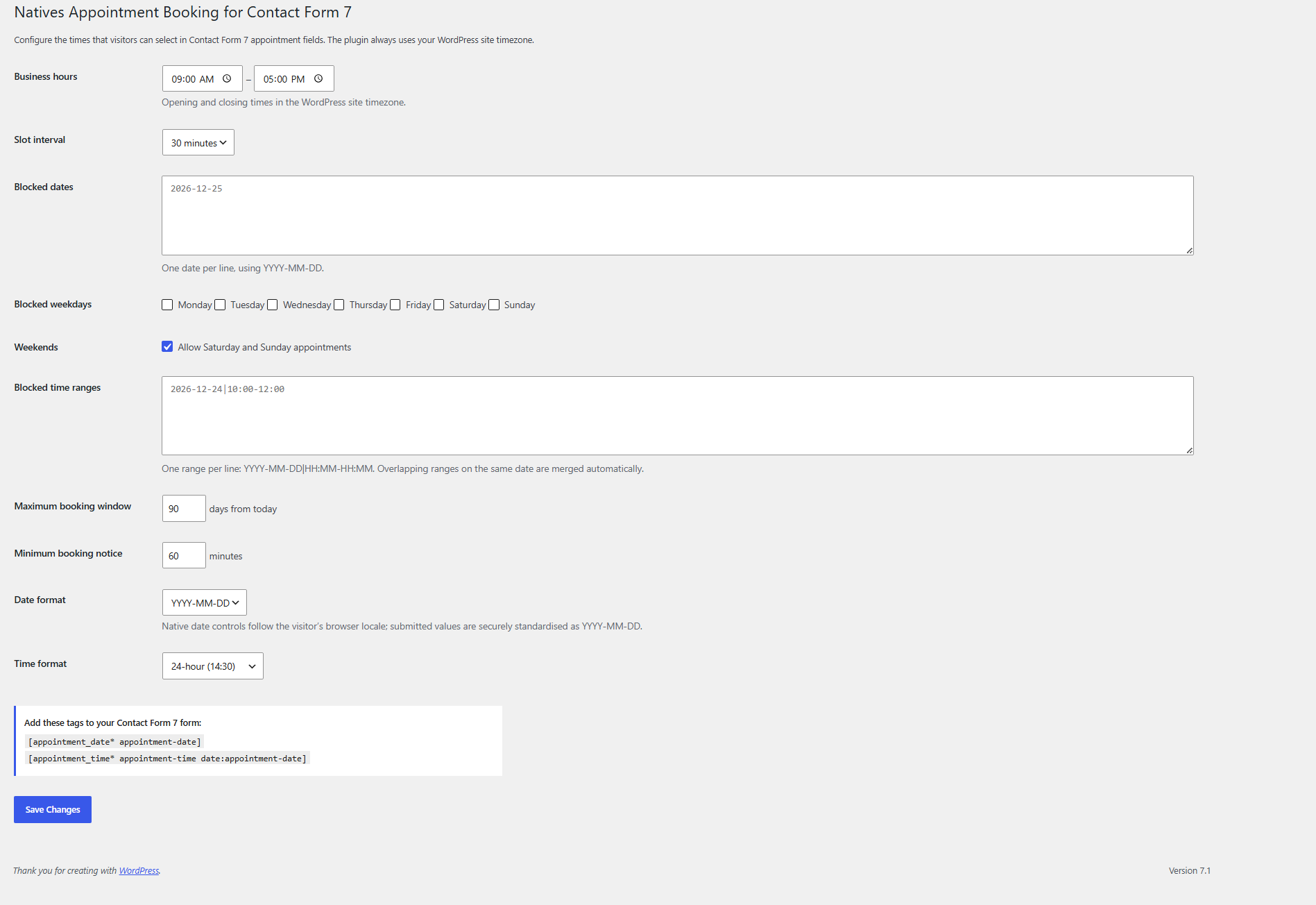
Configure business hours, intervals, dates, weekdays, date-specific time ranges, booking window, lead time, and time format under Settings > CF7 Appointment Slots. The plugin uses the timezone configured in WordPress.
This plugin does not create bookings, store visitor data, call remote services, track users, or add a custom post type.
Features
** – Seamless integration with Contact Form 7 using native custom form tags.**
** – Add multiple independent appointment date fields to a single Contact Form 7 form.**
** – Choose from a variety of customizable date formats, including dd/mm/yy, mm/dd/yy, yy-mm-dd, and more.**
** – Set minimum and maximum selectable dates to control how far in advance users can book.**
** – Disable weekends with a single option.**
** – Block specific dates such as holidays, vacations, company closures, or fully booked days.**
** – Restrict users from selecting past dates.**
** – Simple and intuitive WordPress admin interface.**
** – Fully responsive and works across desktop, tablet, and mobile devices.**
Screenshots
Installation
- Upload the
natives-appointment-booking-for-contact-form-7folder to/wp-content/plugins/, or install it through the WordPress Plugins screen. - Activate Contact Form 7 and Natives Appointment Booking for Contact Form 7.
- Go to Settings > Natives Appointment Booking for Contact Form 7 and save the availability configuration.
- Add
[appointment_date* appointment-date]and[appointment_time* appointment-time date:appointment-date]to a Contact Form 7 form.
FAQ
-
Does this create bookings?
-
No. It provides scheduling fields and validation for a Contact Form 7 submission. Contact Form 7 handles the form email as normal.
-
Are time slots validated without JavaScript?
-
Yes. JavaScript only loads choices. The same availability engine validates submitted date and time values on the server.
-
How do I block a partial day?
-
Under Settings > Natives Appointment Booking for Contact Form 7, add a line such as
2026-12-24|10:00-12:00. Multiple overlapping ranges for a date are merged automatically. -
Can I disable weekends?
-
Yes. Untick “Allow Saturday and Sunday appointments” in the plugin settings.
Reviews
There are no reviews for this plugin.
Contributors & Developers
“Natives Appointment Booking for Contact Form 7” is open source software. The following people have contributed to this plugin.
Contributors
Translate “Natives Appointment Booking for Contact Form 7” into your language.
Interested in development?
Browse the code, check out the SVN repository, or subscribe to the development log by RSS.
Changelog
1.0.0
- Initial release.