
Description
nanoconsent is a cookie consent banner that is 2,631 bytes gzipped in English — the whole thing, and under 2,750 bytes in every one of its eleven languages. Cookiebot’s stack is 113,994 bytes. The sizes are measured, not claimed, and the measurement script ships with the source.
What it does
- Blocks known trackers before they load — Google Analytics, Meta Pixel, Hotjar, Clarity, LinkedIn, TikTok and others are marked to wait for consent before the page is sent to the browser. Only scripts it recognises by name; it never guesses, so it cannot break a form, a menu or a cart.
- Holds YouTube, Vimeo, Google Maps, Facebook, Instagram, TikTok, Spotify and X embeds behind a small notice until marketing cookies are allowed. youtube-nocookie.com is not enough, and this handles it.
- Sends all six Google Consent Mode v2 signals, denied by default, updated when the visitor decides. Basic mode by default; advanced mode (Google tags load with signals denied, for conversion modelling) is one checkbox.
- Honours the Global Privacy Control signal — legally binding in twelve US states — records the refusal as proof, and shows “Opt-out signal honored” on the page, as California requires from 1 January 2026.
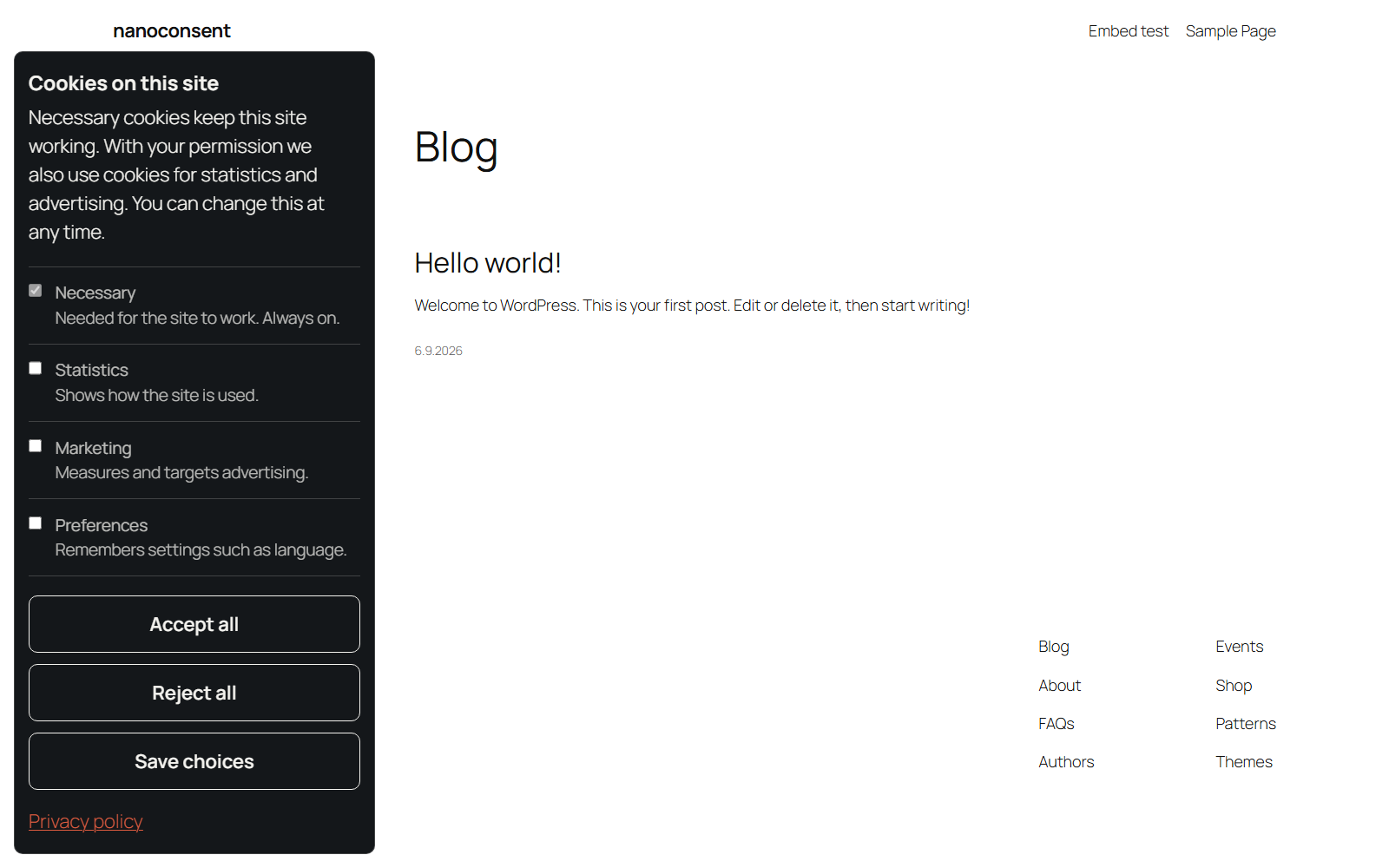
- Accept and reject buttons are identical in size and colour. Rejecting is one click, on the first layer.
- Stores every decision in your own database — time, choice, categories and text version. No IP address, no fingerprint. Export it as CSV; set a retention period or keep it forever.
- Makes no network requests of its own. Not to us, not to anyone — not even before consent.
- Accessible: a real dialog with a real heading, focus moves in and back out, Escape rejects, no keyboard trap, readable at 400 % zoom. Zero violations in axe-core against WCAG 2.2 AA on every state of the banner, and walked through with NVDA and Chrome by a person on 7 September 2026 — dialog announced on load, every control reachable and readable, focus returns after the choice.
What you see in the admin
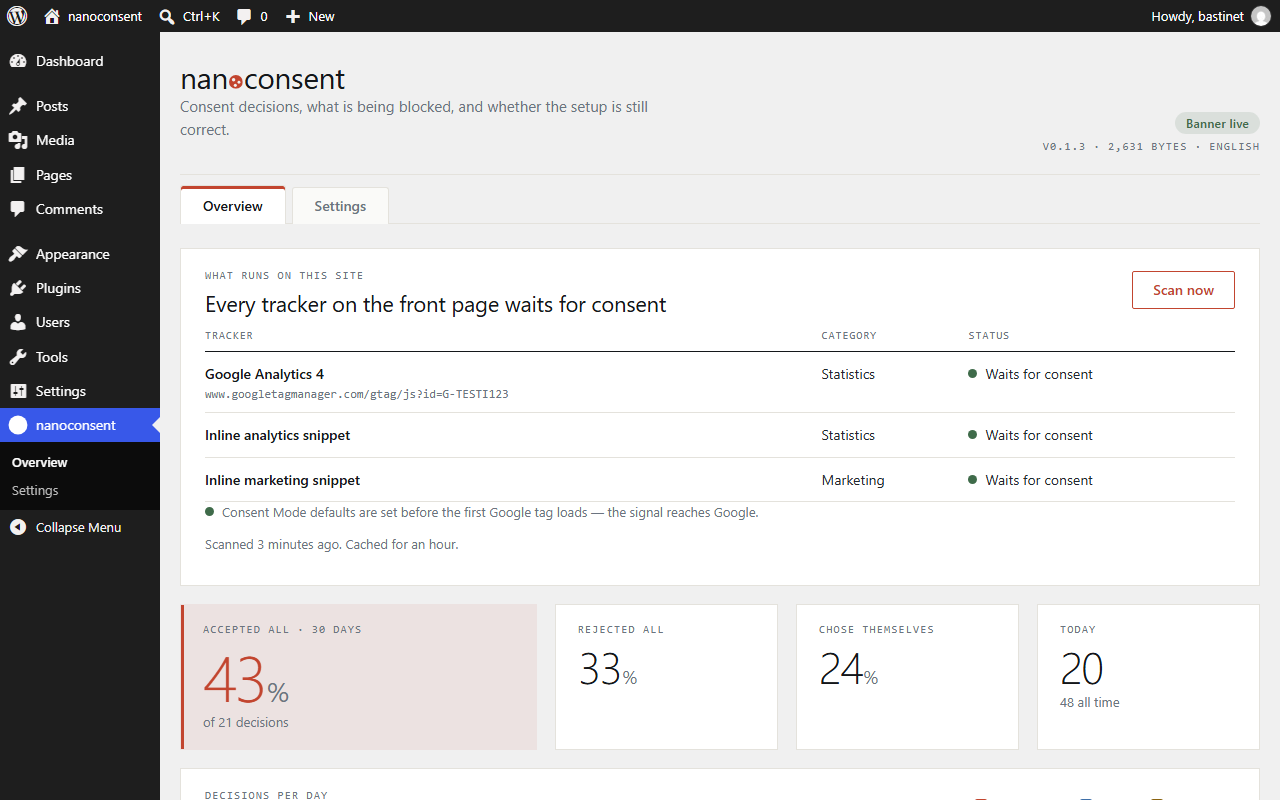
- A health check that scans your front page and shows every tracker with its status: waits for consent, or loads before it. It also checks that Consent Mode defaults are set before the first Google tag — the silent misconfiguration that makes reports look fine while consent is ignored.
- Consent decisions per day, accepted-all rate, and what visitors allow per category.
- A live preview that runs the real banner while you change settings: position, colours, radius. The font is always your theme’s own.
- Finnish translation included.
What it is not
- Not a certified Google CMP. Certification is required only for publishers selling ad space through AdSense, Ad Manager or AdMob.
- Not legal advice. Compliance depends on how you configure it and what your site runs.
Source code
The banner is shipped minified, one file per language, as assets/nanoconsent.<lang>.min.js (en, fi, sv, da, no, de, nl, fr, es, it, pl). Its human-readable source is included as assets/nanoconsent.src.js (MIT) together with the texts in assets/nanoconsent.languages.json; each minified file is built from those two with esbuild and terser, nothing else.
External services
This plugin uses no external or third-party services. It makes no network requests of its own, on the front end or in the admin: no fonts, no CDN, no analytics, no licence check and no phoning home. Everything it needs ships inside the plugin folder. The only request the plugin makes is from your own server to your own front page (home_url) when the settings page runs its health check, to verify that the banner is in place and loads before any tracking script; nothing is sent anywhere else.
The banner is embedded in the page itself, so it never fetches a script from anywhere. The consent log is written to your own database. The Google Consent Mode v2 signals are pushed to the dataLayer on the visitor’s own page; the plugin does not contact Google, and any request that does reach Google comes from the Google tag your site already loads — which this plugin blocks until the visitor consents.
Screenshots


Installation
- Install and activate.
- Open nanoconsent Overview. The health check shows what runs on your front page.
- Open nanoconsent Settings to choose categories and language. The preview on the right is the real banner.
To gate a script by hand, give it two attributes: <script type="text/plain" data-nc="analytics" src="…">.
FAQ
-
Does it work with Google Tag Manager?
-
Yes. The banner sends Consent Mode v2 defaults before the container loads, so tags that respect consent signals wait. If your tags ignore signals, turn on strict mode in Settings to gate the container itself.
-
Where is the consent log stored?
-
In a table in your own WordPress database. It is never sent anywhere. Download it as CSV from Overview or Settings when an auditor asks.
-
Does it block YouTube and other embeds?
-
Yes. Known embeds are replaced by a short notice with an “Allow and load” button until the visitor allows marketing cookies. The button opens the normal banner — consent is always given in the same dialog.
-
No. It is a dialog the visitor can leave with Tab, and the page stays usable, as most regulators prefer. Focus moves into it on load and back out after the choice, Escape rejects, and every control works with the keyboard.
-
Is there a free version?
-
This is it, and it is complete. A paid licence compiles a build for your domain and language only and adds every jurisdiction’s rule pack. Agencies get white label and monitoring.
Reviews
There are no reviews for this plugin.
Contributors & Developers
“nanoconsent” is open source software. The following people have contributed to this plugin.
Contributors
Translate “nanoconsent” into your language.
Interested in development?
Browse the code, check out the SVN repository, or subscribe to the development log by RSS.
Changelog
0.1.3
- Every global name now uses the full nanoconsent prefix: the admin JavaScript object is nanoconsentAdmin, and the scan and export actions use nanoconsent_scan and nanoconsent_export.
- CSV export no longer raises a deprecation notice on PHP 8.4 and later (fputcsv escape parameter).
0.1.2
- WooCommerce order attribution (sbjs_* cookies) now waits for marketing consent. The plugin uses WooCommerce’s own consent switch (the same one its WP Consent API integration uses) instead of blocking the scripts, because order-attribution.js must load after sourcebuster.js. Consent given on the landing page keeps the original traffic source.
- Config and banner are printed in one script tag. A page optimizer deferred the small config tag and left the banner alone, so the config ran after the banner and overwrote its API.
- load_plugin_textdomain() is back: core only auto-loads translations from wp-content/languages/plugins/, so a self-installed package stayed in English. The Pro package ships its .mo files; the WordPress.org package does not.
- Google Tag Manager printed as an inline snippet (gtm.start) is now gated like the gtm.js script tag.
- Banner heading resets text-transform, letter-spacing and line-height so theme h2 rules do not restyle it. Embed placeholder text no longer overlaps inside containers with line-height 0.
- Readme: documented the settings-page health check (a request from your server to your own front page).
0.1.1
- Styles and scripts that are not order-critical now go through the enqueue system. The banner itself is printed with wp_print_inline_script_tag() at the very start of the head, because the Consent Mode defaults have to precede any Google tag.
- The admin page no longer loads fonts from Google. It uses system fonts.
- Translation files removed from the package; the directory serves them.
- load_plugin_textdomain() removed, not needed since WordPress 4.6.
- The output buffer used for script gating is now closed explicitly on shutdown.
- Documented that the plugin uses no external services.
0.1.0
- First release.