

Description
Munjr Subscriptions with Recurly for WooCommerce connects a WooCommerce store to Recurly for subscription billing and PCI-friendly card tokenization.
- Configure and verify a Recurly API key from WooCommerce settings.
- Mark products as Recurly subscription products and sync plan configuration to Recurly.
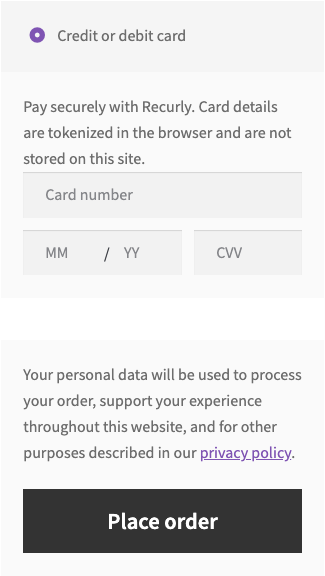
- Use the Recurly payment gateway with Recurly.js Elements at checkout when the cart contains subscription items.
- Charge the checkout total in Recurly, including WooCommerce shipping and tax, on the first invoice and on each renewal.
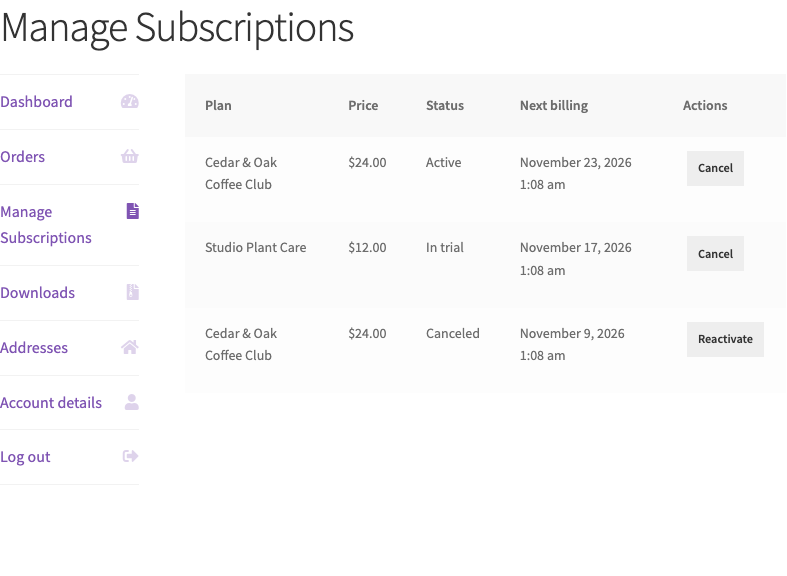
- Let customers view, cancel at period end, and reactivate Recurly subscriptions from My Account.
Requires WooCommerce 8.0 or higher. A Recurly account and private API key are required. This plugin does not require a separate license key.
This plugin is not affiliated with, endorsed by, or sponsored by Recurly, Inc. or WooCommerce. Recurly is a trademark of Recurly, Inc. WooCommerce is a trademark of Automattic Inc.
The public name is Munjr Subscriptions with Recurly for WooCommerce. Munjr is the author. “with Recurly” and “for WooCommerce” name the third-party services this plugin connects. The directory slug is munjr-subscriptions-with-recurly-for-woocommerce. The payment gateway id remains recurly, and the subscription product type remains recurly_subscription.
External services
This plugin connects to Recurly in order to create plans, accounts, and subscriptions, and to collect card details.
Recurly API (https://recurly.com/)
When a store manager saves a Recurly API key, verifies the connection, reloads currencies, saves a subscription product, or when a customer checks out or manages a subscription, the plugin sends requests to the Recurly API for the site configured by that API key. Data sent can include the API key, product and plan fields (name, price, billing interval, trial), order billing details (name, email, address), the WooCommerce customer or guest account code, and a Recurly.js payment token. Card numbers are not sent to the WordPress site.
- Terms of service: https://recurly.com/legal/terms/
- Privacy policy: https://recurly.com/legal/privacy/
Recurly.js (https://js.recurly.com/v4/recurly.js)
On checkout, when the cart needs a Recurly payment method, the plugin loads Recurly.js from Recurly’s servers. The shopper’s card data is entered in those fields and tokenized by Recurly. The token, not the card number, is posted back to WooCommerce.
- Terms of service: https://recurly.com/legal/terms/
- Privacy policy: https://recurly.com/legal/privacy/
Screenshots




Installation
- Upload the plugin files to
/wp-content/plugins/munjr-subscriptions-with-recurly-for-woocommerce, or install the plugin through the WordPress plugins screen. - Activate Munjr Subscriptions with Recurly for WooCommerce through the Plugins screen in WordPress.
- Go to WooCommerce Settings Recurly, enter your Recurly private API key, and use Verify Connection.
- Enable the Recurly gateway under WooCommerce Settings Payments.
- If the My Account subscriptions URL returns 404 after install or upgrade, open Settings Permalinks and click Save once.
FAQ
-
Does this replace WooCommerce Subscriptions?
-
No. This integration uses Recurly as the subscription system of record and WooCommerce for catalog and checkout.
-
Where do I get an API key?
-
In the Recurly admin under Integrations API Credentials. Use the private key for the site (production or sandbox) you want WooCommerce to bill.
-
Do I need a license key?
-
No. Install and activate the plugin, then connect your own Recurly account.
-
Can I sell a subscription and a one-time product in the same cart?
-
No. Mixed carts are blocked at checkout. One-time products and Recurly subscription products need separate orders.
-
What happens when the quantity is 2 or more?
-
That quantity is one Recurly subscription. The Recurly invoice shows the quantity, and the plan price is the unit price multiplied by it. The WooCommerce order keeps the same quantity and line total. Shipping and tax are the amounts WooCommerce calculated for that quantity. When the tax does not divide into even cents per unit, Recurly is sent the WooCommerce tax total.
-
Can I sell a physical subscription?
-
Yes. Checkout creates a WooCommerce order, and Recurly charges the plan, shipping, and tax. A paid renewal creates another WooCommerce order. A physical renewal stays Processing so it can be fulfilled. A virtual renewal is Completed. Paste the webhook URL from WooCommerce Settings Recurly Webhooks into Recurly and enable the renewed subscription notification. Plan details stay locked in WooCommerce after the plan is created. Changing the plan in both places is part of Recurly Integration Pro.
Turn on Shipping in the Recurly admin under Configuration Shipping. The plugin creates a matching shipping method. The fee itself is a billable add-on. If Shipping is off, checkout still charges that add-on instead of failing the order.
WooCommerce calculates shipping and shipping tax. Recurly does not recalculate them. Shipping, tax on the subscription, and tax on shipping are separate billable add-ons, each at the subscription quantity when the amount divides evenly. Recurly prints every add-on on a trial invoice at $0 and labels it “Trial period for …”, including tax. That $0 tax line is the recurring tax add-on, not another charge for the trial. The plugin does not attach those add-ons when it creates a trial subscription. It schedules them for the next bill date. Shipping and shipping tax that are due today are purchase line items on the signup invoice, with the subscription quantity. A renewal shows the shipping add-on plus a tax line for the subscription and a tax line for shipping. When there is no trial, the add-ons are charged immediately. If scheduling those renewal add-ons fails after Recurly has already charged the signup, checkout still completes and the order keeps the subscription. Placing the order again does not create a second subscription or a second charge. A later attempt sends only the subscription change.
-
Does a plan get a price in every WooPayments currency?
-
No. The plan is priced in the one currency saved when it is created. Checkout in another currency, including a WooPayments currency, is refused.
Reviews
There are no reviews for this plugin.
Contributors & Developers
“Munjr Subscriptions with Recurly for WooCommerce” is open source software. The following people have contributed to this plugin.
Contributors
Translate “Munjr Subscriptions with Recurly for WooCommerce” into your language.
Interested in development?
Browse the code, check out the SVN repository, or subscribe to the development log by RSS.
Changelog
1.2.3
- Settings and cache names use the rci_free prefix. Existing values are copied, so the store does not have to reconnect.
1.2.2
- Admin JavaScript is loaded with WordPress enqueue functions.
- Classes, functions, and hooks use the rci_free prefix. Stored settings keys are unchanged.
1.2.1
- If loading the new subscription fails after Recurly has charged the signup, checkout still completes. The order keeps that subscription. Placing the order again does not create a second subscription or a second charge.
1.2.0
- A paid Recurly renewal creates a WooCommerce order. A physical renewal stays Processing. A virtual renewal is Completed. The same invoice does not create a second order. A failed renewal payment does not create an order.
- WooCommerce Settings Recurly Webhooks shows the URL to paste into Recurly, can send a test webhook, and logs receipts under WooCommerce Status Logs (recurly-webhooks).
- Plan details stay locked after the Recurly plan is created. Two-way plan sync is not part of this edition.
1.1.7
- The public name is Munjr Subscriptions with Recurly for WooCommerce. Recurly and WooCommerce come after “with” and “for”. The directory slug is munjr-subscriptions-with-recurly-for-woocommerce. The payment gateway id and the subscription product type are unchanged.
- The connection warning stays on product and WooCommerce screens. It no longer appears on the main WordPress dashboard.
- The Recurly PHP client is updated to 4.81.0.
1.1.6
- If scheduling renewal shipping and tax fails after Recurly has charged the signup, checkout still completes. The order stores the subscription. Placing the order again does not create a second subscription or a second charge. A later attempt sends only that subscription change.
1.1.5
- A quantity of 2 or more is one Recurly subscription. The invoice quantity matches the WooCommerce quantity, and the price is the unit price multiplied by that quantity. The WooCommerce order keeps that quantity and total.
- Shipping, subscription tax, and shipping tax are separate add-ons at the subscription quantity. Recurly would list each of those add-ons on a trial invoice as “Trial period for …” at $0, including tax. That $0 tax line is the recurring tax add-on. The add-ons are scheduled for the next bill date, and the signup invoice charges shipping and shipping tax as purchase line items. A renewal shows shipping plus a tax line for the subscription and a tax line for shipping.
1.1.4
- When the store taxes shipping, a free trial collects that tax on the signup invoice. WooCommerce calculates it. The plugin sends it as a line item on the Recurly purchase that creates the subscription.
- Each physical subscription in one order is billed its own shipping fee and its own shipping tax.
1.1.3
- Each subscription in a cart is billed its own tax. Each physical subscription is billed its own shipping. A virtual subscription has no shipping line.
- A free trial with shipping due today asks for a card and does not mark the order paid or create a subscription until that charge succeeds.
1.1.2
- The public name is Munjr Recurly Integration for WooCommerce. WordPress.org does not allow a plugin name or slug to start with another company’s trademark, and this plugin is not an official Recurly product. The directory slug is munjr-recurly-integration-for-woocommerce. The payment gateway id and the subscription product type are unchanged.
- The directory readme records the tested WordPress version as 7.1, which is the format the plugin directory requires. That value is only in this readme, not in the plugin header.
1.1.1
- When one subscription in an order fails, Recurly is billed the tax for the subscription that succeeds, plus shipping. Tax from the failed line is not charged.
1.1.0
- Recurly bills the WooCommerce sale price, not the regular plan price.
- Shipping and tax are billed on the first subscription Recurly accepts, including when an earlier subscription in the order fails.
- After a free trial, renewal invoices include WooCommerce tax on the plan price.
- A free trial that does not require a card still creates the Recurly subscription.
- A guest checkout always gets a new Recurly account, even when the email matches an earlier guest.
1.0.4
- Recurly charges the WooCommerce shipping amount and tax with the subscription, on the first invoice and on each renewal.
- The settings screen states that a guest checkout is not attached to a registered customer’s Recurly account.
- The settings screen states that a later renewal does not create a WooCommerce fulfillment order.
1.0.3
- Subscription carts can only be paid with Recurly.
- A guest checkout no longer attaches to a registered customer’s Recurly account.
- Unchecking Auto renew is saved on the Recurly plan.
- Uninstall deletes the API key and other plugin options.
- Checkout errors and My Account subscription statuses can be translated.
- Loading a subscription product no longer creates a dynamic property on PHP 8.2+.
- Checkout is blocked when the active currency is not the plan currency.
- WooCommerce currencies fall back to the store currency when no payment integration reports a currency.
1.0.2
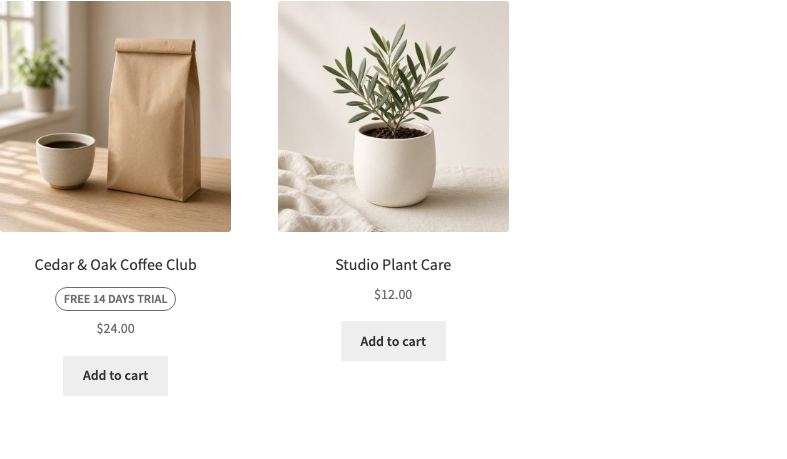
- The trial badge stays in normal flow under the product title instead of covering the breadcrumb.
1.0.1
- Unchecking “Trial requires billing info” stays off.
- Coupons cannot discount a Recurly subscription cart on current WooCommerce.
- A partial subscription checkout charges only the quantity that succeeded.
- Mixed carts disable the block cart checkout button.
- The trial badge no longer covers the product title on block themes.
1.0.0
- Initial WordPress.org release.
- Recurly API connection, subscription products, Recurly.js checkout, trials, and My Account subscription management.
- No license key is required.