

Description
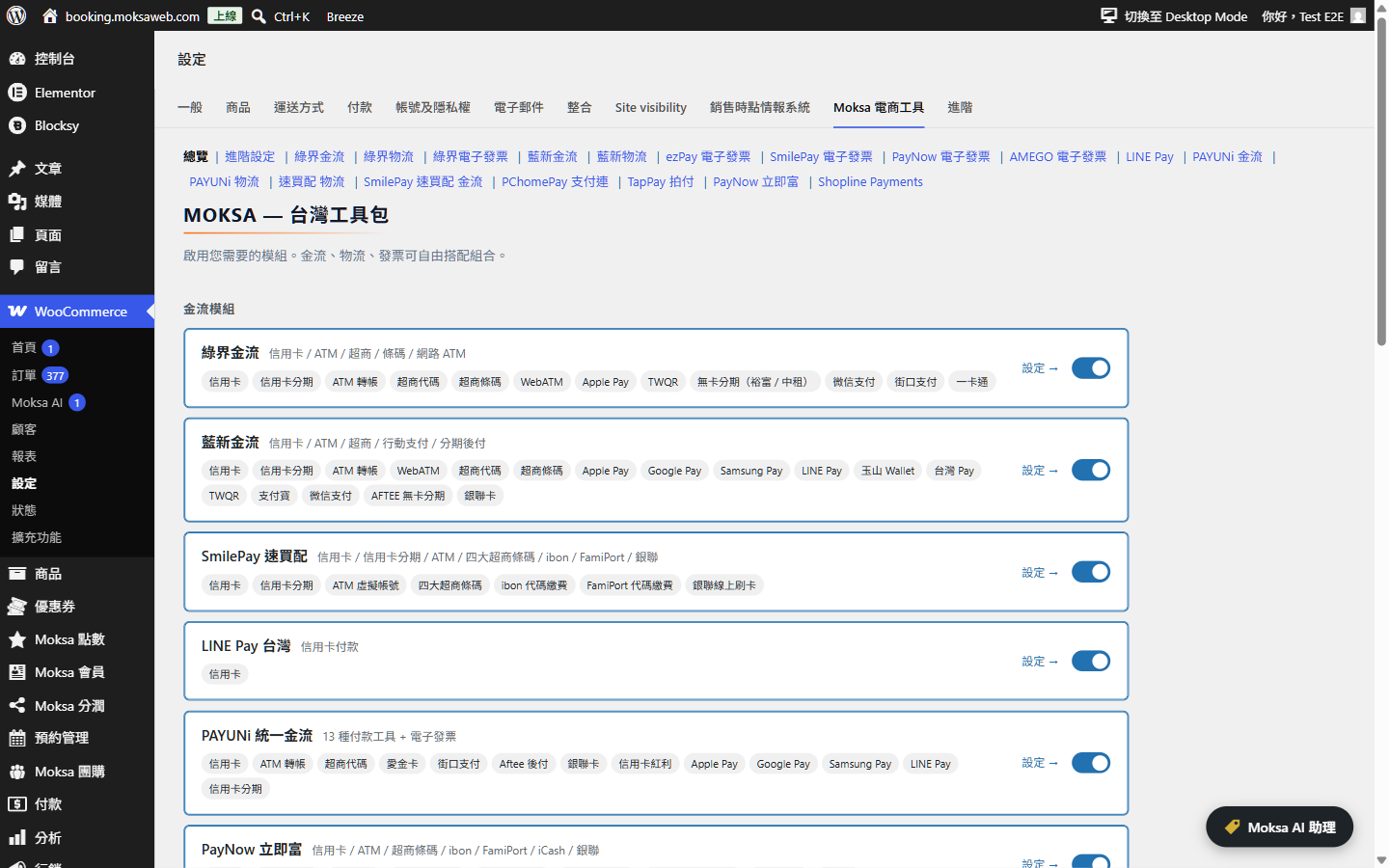
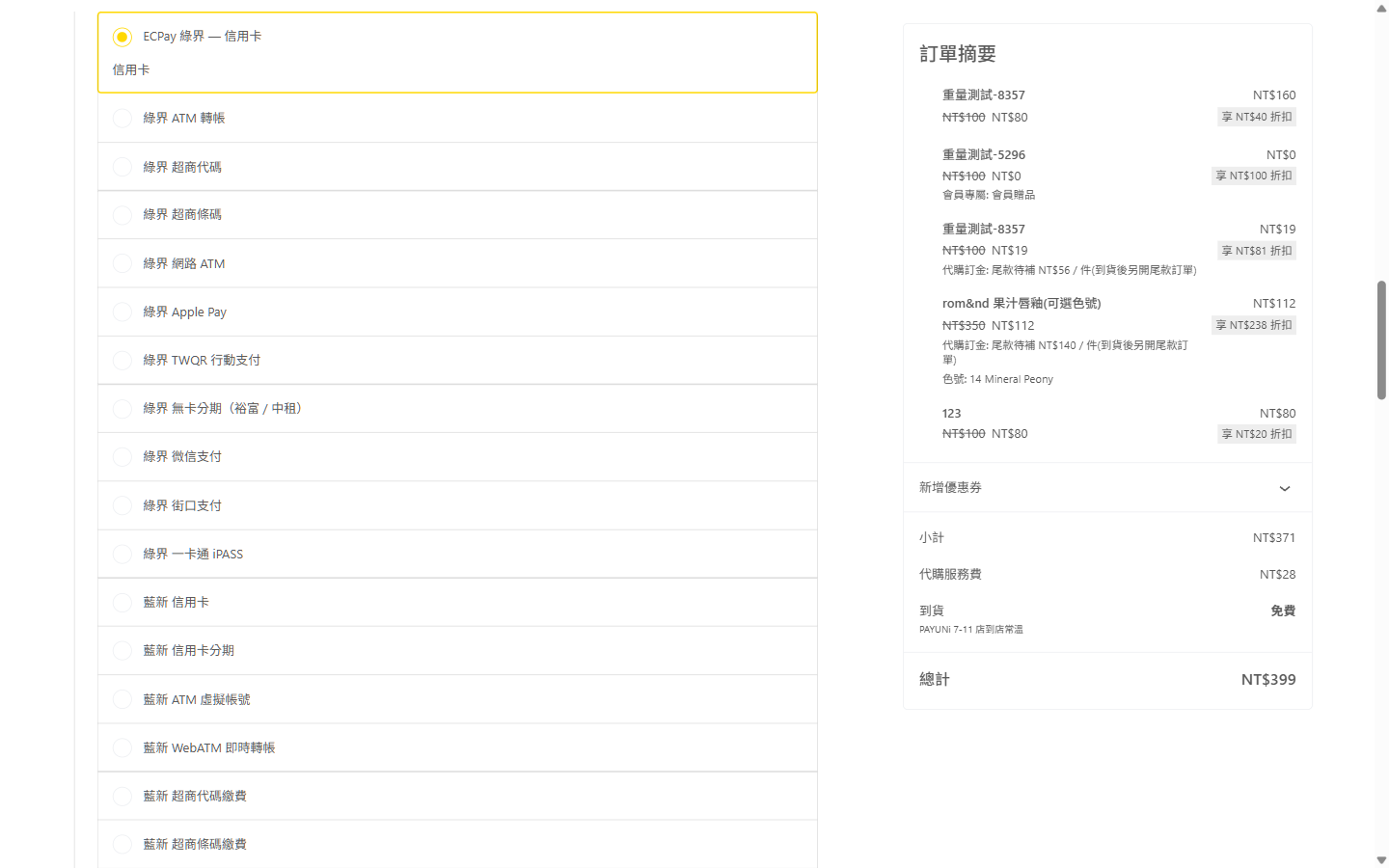
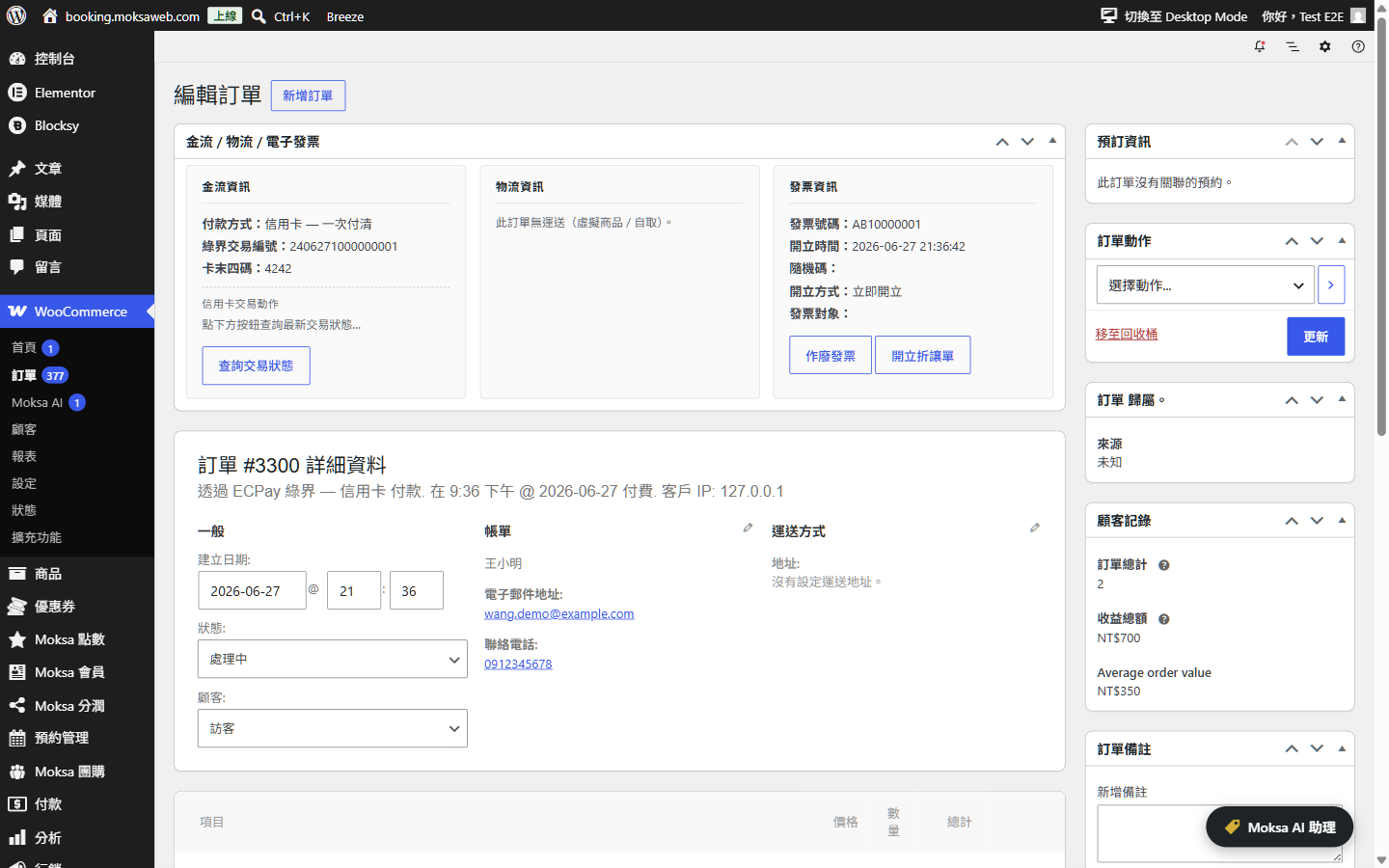
A Taiwan-focused WooCommerce extension. Toggleable modules cover ECPay (綠界), NewebPay (藍新), SmilePay (速買配), LINE Pay, PAYUNi (統一金流), PayNow (立即富), PChomePay (支付連), TapPay and Shopline Payments for payments; ECPay, NewebPay, SmilePay, PAYUNi and PayNow for convenience-store + home-delivery shipping; ezPay, ECPay, SmilePay, PayNow and AMEGO for Taiwan e-invoicing.
Enable only the providers you need from a single settings page — payment, shipping and invoice modules are fully independent and can be mixed in any combination.
HPOS-native, Block Checkout-native, PHP 8.2+ strict-typed, GPLv3, no premium gating.
Moksa AI assistant (new in 1.3.0)
Built on the WordPress 7.0 AI Client, Moksa AI is an optional in-admin chat assistant that lets you run common store tasks in natural language: find orders by invoice / shipping / payment number, look up order details and counts, change order status (single or batch), add order notes, issue / void / allowance e-invoices, create and print shipping labels, and enable or disable modules, individual payment methods and invoice issuing methods. Every action that changes data first shows a summary and waits for your explicit confirmation before it runs. The assistant uses whichever AI provider you connect under Settings Connectors — the plugin never handles your AI keys, refunds, or credentials.
Source
Source code and issue tracker: github.com/Moksa1123/moksa-for-woocommerce.
External Services
This plugin is a toolkit of optional integrations. Each integration only loads and only transmits data when you, the site administrator, explicitly enable that module and a customer chooses the corresponding payment / shipping / invoice option. No data is sent to any third party unless the relevant module is enabled and used. The plugin never sends data to Moksa or any analytics/telemetry service.
For every integration below, requests are made server-to-server over HTTPS using your own merchant credentials, and typically include the order number, order amount, buyer name, e-mail, phone, shipping/billing address, item descriptions, and (for e-invoices) the buyer tax ID or carrier number that the customer enters at checkout.
When a module is set to test/sandbox mode, requests go to the provider’s corresponding staging hostname instead of the production one listed below (for example payment-stage.ecpay.com.tw, logistics-stage.ecpay.com.tw, einvoice-stage.ecpay.com.tw, ccore.newebpay.com, sandbox-api.payuni.com.tw, sandbox-api.pchomepay.com.tw, sandbox-api-pay.line.me, sandbox.tappaysdk.com, api-sandbox.shoplinepayments.com, cinv.ezpay.com.tw, test.paynow.com.tw, testinvoice.paynow.com.tw, ssl.smse.com.tw/api_test).
Payment gateways
These run when a customer selects the gateway at checkout (to create the payment) and when you query, capture, refund or void the payment from the order screen.
- ECPay (綠界科技) — credit card, ATM, CVS, barcode, installments, wallets. Endpoints: payment.ecpay.com.tw, ecpayment.ecpay.com.tw (test mode: payment-stage.ecpay.com.tw, ecpayment-stage.ecpay.com.tw). Terms: https://support.ecpay.com.tw/10075/ — Privacy: https://www.ecpay.com.tw/CreditCard/Privacy
- NewebPay (藍新金流) — credit card, ATM, CVS, barcode, wallets. Endpoints: core.newebpay.com (test mode: ccore.newebpay.com). Terms: https://www.newebpay.com/website/Page/content/new_service_policy — Privacy: https://www.newebpay.com/website/Page/content/privacy
- PAYUNi (統一金流) — credit card, ATM, CVS, wallets. Endpoints: api.payuni.com.tw (test mode: sandbox-api.payuni.com.tw). Terms: https://www.payuni.com.tw/terms — Privacy: https://www.payuni.com.tw/privacy
- SmilePay (速買配) — credit card, ATM, CVS, barcode. Endpoints: ssl.smse.com.tw (SmilePay’s own API hostname — smse.com.tw and smilepay.net are both operated by the same company, 訊航科技 Shinhang Technology; its policies are published on the smilepay.net brand site; test mode uses the /api_test path on the same hostname). Terms: https://www.smilepay.net/em/servicepolicy.asp — Privacy: https://www.smilepay.net/em/servicepolicy.asp (SmilePay publishes a single combined service & personal-data-protection document, so both links point at that document)
- PayNow (立吉富) — credit card, ATM, CVS, installments. Endpoints: www.paynow.com.tw (test mode: test.paynow.com.tw). Terms: https://www.paynow.com.tw/PayNowUserAgreement.aspx — Privacy: https://www.paynow.com.tw/safepolicy.aspx
- PChomePay (支付連) — credit card, ATM, CVS, barcode. Endpoints: api.pchomepay.com.tw (test mode: sandbox-api.pchomepay.com.tw). Terms: https://www.pchomepay.com.tw/other/service_treaty — Privacy: https://web.pchomepay.com.tw/introduction/privacy
- LINE Pay — LINE Pay wallet. Endpoints: api-pay.line.me (test mode: sandbox-api-pay.line.me). Terms: https://terms2.line.me/linepay_TW_TermsofUse?lang=zh-Hant — Privacy: https://terms2.line.me/linepay_TW_PP
- TapPay — credit card via the TapPay Fields SDK loaded in the browser (js.tappaysdk.com). Card data is tokenised client-side; only the token reaches your server. Endpoints: prod.tappaysdk.com, js.tappaysdk.com (test mode: sandbox.tappaysdk.com). Terms: https://www.tappaysdk.com/taiwan-en/privacy-term — Privacy: https://www.tappaysdk.com/taiwan-en/privacy-term (TapPay publishes a single combined terms & privacy document, so both links point at that document)
- Shopline Payments — credit card, wallets. Endpoints: api.shoplinepayments.com (test mode: api-sandbox.shoplinepayments.com). Terms: https://book.shoplineapp.com/pages/shopline-payments-terms-and-conditions — Privacy: https://www.shopline.com/shopline-payments-privacy
Shipping / logistics
These run when a customer opens the convenience-store map at checkout (the store-selection map is hosted by the provider), when a shipment is created after an order is placed, and when you print a label or query shipment status.
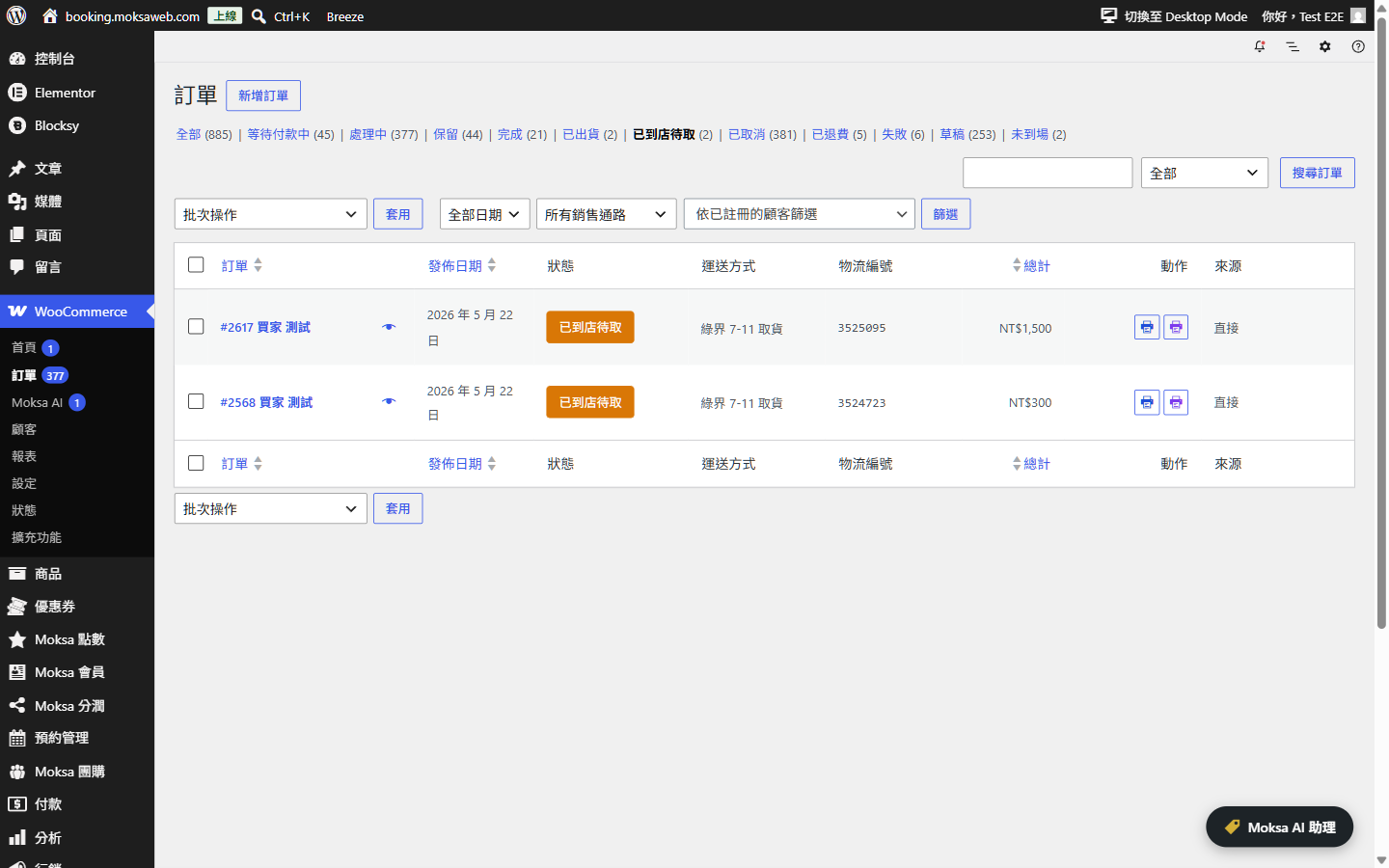
- ECPay Logistics (綠界物流) — 7-11 / FamilyMart / Hi-Life / OK / home delivery. Endpoints: logistics.ecpay.com.tw (test mode: logistics-stage.ecpay.com.tw). Terms: https://support.ecpay.com.tw/10075/ — Privacy: https://www.ecpay.com.tw/CreditCard/Privacy
- NewebPay Logistics (藍新物流) — CVS / home delivery. Endpoints: core.newebpay.com (test mode: ccore.newebpay.com). Terms: https://www.newebpay.com/website/Page/content/new_service_policy — Privacy: https://www.newebpay.com/website/Page/content/privacy
- PAYUNi Logistics (統一物流) — 7-11 / home delivery (incl. cold chain). Endpoints: api.payuni.com.tw (test mode: sandbox-api.payuni.com.tw). Terms: https://www.payuni.com.tw/terms — Privacy: https://www.payuni.com.tw/privacy
- SmilePay Logistics (速買配物流) — 7-11 / FamilyMart / home delivery. Endpoints: ssl.smse.com.tw (SmilePay’s own API hostname; see the SmilePay entry above — same operator as smilepay.net; test mode uses the /api_test path on the same hostname). Terms: https://www.smilepay.net/em/servicepolicy.asp — Privacy: https://www.smilepay.net/em/servicepolicy.asp (single combined service & personal-data-protection document)
E-invoice (Taiwan electronic invoicing)
These run when an invoice is issued for an order (immediately on payment, on completion, or manually, per your setting) and when you void / issue an allowance / query an invoice. Data includes the order amount, item descriptions and the buyer’s carrier number, donation code or company tax ID entered at checkout.
- ECPay e-Invoice (綠界電子發票) — Endpoints: einvoice.ecpay.com.tw (test mode: einvoice-stage.ecpay.com.tw). Terms: https://support.ecpay.com.tw/10075/ — Privacy: https://www.ecpay.com.tw/CreditCard/Privacy
- ezPay e-Invoice (ezPay 電子發票) — Endpoints: inv.ezpay.com.tw (test mode: cinv.ezpay.com.tw). Terms: https://www.ezpay.com.tw/info/Site_description/service_page/member — Privacy: https://www.ezpay.com.tw/info/Site_description/service_page/member (ezPay publishes a single combined membership & data-protection terms page, so both links point at that page)
- SmilePay e-Invoice (速買配電子發票) — Endpoints: ssl.smse.com.tw (SmilePay’s own API hostname; see the SmilePay entry above — same operator as smilepay.net; test mode uses the /api_test path on the same hostname). Terms: https://www.smilepay.net/em/servicepolicy.asp — Privacy: https://www.smilepay.net/em/servicepolicy.asp (single combined service & personal-data-protection document)
- PayNow e-Invoice (立吉富電子發票) — Endpoints: invoice.paynow.com.tw (test mode: testinvoice.paynow.com.tw). Terms: https://www.paynow.com.tw/PayNowUserAgreement.aspx — Privacy: https://www.paynow.com.tw/safepolicy.aspx
- AMEGO e-Invoice (光貿電子發票) — Endpoints: invoice-api.amego.tw. Terms: https://invoice.amego.tw/term — Privacy: https://invoice.amego.tw/privacy
Carrier tracking links (hyperlinks only — the plugin itself never contacts these hosts)
When a shipment has a tracking number, the order screen renders a plain hyperlink to the carrier’s own public parcel-tracking page. The plugin makes no HTTP request to any of these hosts and transmits no data to them; the shipment number only leaves your site if a person clicks the link, at which point the carrier’s own terms and privacy policy apply in their browser:
- T-Cat 黑貓宅配 (t-cat.com.tw, incl. the tracking link shown for PAYUNi home-delivery shipments) — Privacy: https://www.t-cat.com.tw/member/privacy.aspx
- 7-ELEVEN (eservice.7-11.com.tw) — Privacy: https://www.7-11.com.tw/privacy.asp
- 7-ELEVEN pickup status via PAYUNi logistics (tracking.shopmore.com.tw, operated by the Uni-President group for PAYUNi shipments) — service info: https://help.shopmore.com.tw/ ; the PAYUNi logistics policies above apply to the shipment itself
- FamilyMart 全家 (fmec.famiport.com.tw), Hi-Life 萊爾富 (www.hilife.com.tw), OK Mart (ecservice.okmart.com.tw) — public tracking pages of each chain; their site policies are linked from those pages
- Chunghwa Post 中華郵政 (postserv.post.gov.tw) — Privacy: https://www.post.gov.tw/post/internet/Group/index.jsp?ID=156739569921
Moksa AI assistant (optional, admin-only)
When an administrator actively uses the in-admin Moksa AI assistant, the typed question and the store/order data needed to answer it (for example an order number, status, totals or invoice/shipping numbers) are sent to the AI provider you have connected in WordPress under Settings Connectors — Anthropic, Google or OpenAI — through the WordPress 7.0 AI Client. This never happens automatically and only for the administrator using the assistant. The plugin does not store these conversations on any Moksa server, sends nothing to Moksa, and never transmits your AI provider keys (WordPress manages the connector credentials). The transmitted data is governed by the terms and privacy policy of the provider you choose: Anthropic — Terms: https://www.anthropic.com/legal/commercial-terms — Privacy: https://www.anthropic.com/legal/privacy ; Google — Terms: https://ai.google.dev/gemini-api/terms — Privacy: https://policies.google.com/privacy ; OpenAI — Terms: https://openai.com/policies/terms-of-use/ — Privacy: https://openai.com/policies/privacy-policy/
MCP server (optional, off by default)
This plugin can optionally expose a standards-compliant, stateless MCP (Model Context Protocol) endpoint on your own site at /wp-json/moksa-for-woocommerce/v1/mcp, so a standard MCP client you control (for example mcp-remote or Claude) can look up orders and reports through the WordPress REST API. This is not a Moksa service and is not a phone-home: nothing is sent to Moksa, the endpoint only runs on your server and only exposes the plugin’s own WordPress Abilities. It is off by default and must be turned on under WooCommerce Moksa AI Settings. Access requires authentication with a WordPress Application Password for a user that has the “edit orders” capability (use a dedicated, limited account). By default only read-only tools are exposed; order-changing tools stay hidden unless you also enable the separate “allow external AI to make changes” option, and every request is permission-checked on your server.
Screenshots
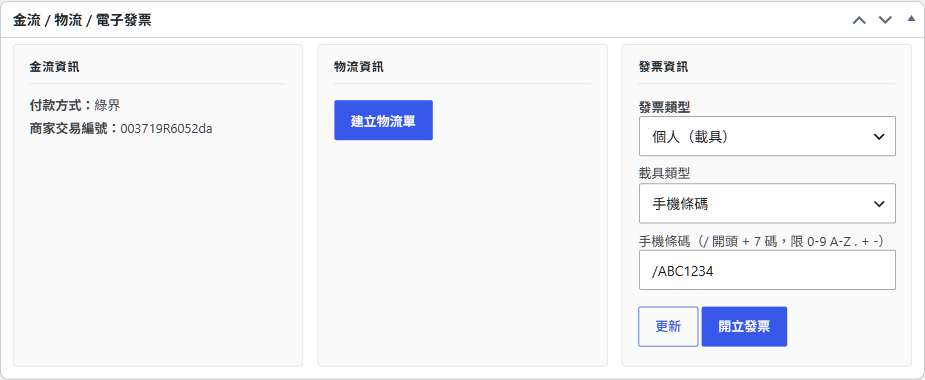
Installation
Minimum Requirements
- PHP 8.2+
- WordPress 7.0+
- WooCommerce 9.9+
Setup
- Install and activate the plugin.
- Go to WooCommerce Settings Moksa for WooCommerce to enable the modules you need.
- Configure the credentials for each enabled provider on its dedicated tab.
FAQ
-
Does it work with the Block-based Checkout?
-
Yes. Every payment method ships an
AbstractPaymentMethodType+ React component, and the convenience-store picker / invoice fields render inside the Checkout block. -
Is it HPOS-compatible?
-
Yes. All order meta uses
$order->update_meta_data()/$order->save(), neverupdate_post_meta(). -
Can I mix providers?
-
Yes. Payment, shipping and invoice modules are fully independent — any combination works.
-
What is the Moksa AI assistant and what does it need?
-
It is an optional in-admin chat assistant for managing orders, e-invoices, shipping labels and module settings in natural language. It requires WordPress 7.0 (for the built-in AI Client) and an AI provider connected under Settings Connectors; enable it under the plugin’s Advanced settings. Every action that changes data first asks for your confirmation, and the assistant can never read or change your provider credentials, switch sandbox/live mode, or issue refunds.
-
Can external AI tools connect to my store over MCP?
-
Yes, optional and off by default. Turn it on under WooCommerce Moksa AI Settings “Enable external MCP server”. The plugin then serves a standards-compliant, stateless MCP (Model Context Protocol) endpoint at
/wp-json/moksa-for-woocommerce/v1/mcpthat any standard MCP client (for example mcp-remote or Claude) can connect to directly — no bridge required.Authentication uses a WordPress Application Password for a user that has the “edit orders” capability; use a dedicated, limited account rather than an administrator. Connect your client to the endpoint with an
Authorization: Basic <base64 of username:application-password>header. By default only read-only tools (look up orders, reports, settings overview) are exposed; order-changing tools stay hidden unless you also enable the “allow external AI to make changes” option, and destructive actions still require in-store confirmation. Every request is permission-checked on the server.
Reviews
There are no reviews for this plugin.
Contributors & Developers
“Moksa for WooCommerce” is open source software. The following people have contributed to this plugin.
Contributors
Translate “Moksa for WooCommerce” into your language.
Interested in development?
Browse the code, check out the SVN repository, or subscribe to the development log by RSS.
Changelog
1.4.9 – 2026-07-26
- Security: two SmilePay logistics endpoints (T-cat tracking-number retrieval and C2B label data) were still declared with plain http://; both now use https:// (verified reachable), so every request the plugin makes is TLS-encrypted as the readme states.
- Security: the module on/off save handler and the order-status colour save handler verified neither a nonce nor a capability inside the method, relying on the WooCommerce settings page upstream. Both now verify the WooCommerce settings nonce and the manage_woocommerce capability inline, in the same form WooCommerce core uses.
- Security: the quick-edit and bulk-edit handlers for the product temperature-zone field verified a nonce name that WooCommerce never issues for those forms, so the check always failed and the field silently stopped saving from quick/bulk edit. They now verify the same woocommerce_quick_edit_nonce that WooCommerce core verifies, restoring the feature.
- Security: the classic-checkout store validation and the PAYUNi store-restore handler now verify their nonces first, in straight-line form, before touching any request field.
- readme: every provider entry now lists its test/sandbox hostname inline and carries an explicit Terms link and an explicit Privacy link (providers publishing a single combined document have both links pointing at it, with a note); the AMEGO terms link points at the actual terms page; added the previously undocumented ecpayment-stage.ecpay.com.tw test hostname.
1.4.8 – 2026-07-19
- i18n: the text domain is now
moksa-for-woocommerce, matching the assigned plugin slug (all 4,000+ gettext calls, the plugin header, the block-checkout scripts and the bundled zh_TW translation files were updated; the main plugin file was renamed accordingly). - Security: the PChomePay webhook no longer trusts its payload at all. On top of the source-IP allowlist, every notification now triggers a server-to-server query back to PChomePay (
GET /v1/payment/{id}) and the authoritative API response gates the order transition:order_confirmrequires API status S with a matching amount, and expiry/failure notifications are rejected for orders the API reports as paid. The allowlisted IPs are now filterable viamoksafowo_pchomepay_notify_ips. - Security: the product temperature quick-edit / bulk-edit / product-save / variation-save handlers now re-verify the WooCommerce nonce and check
edit_productcapability in-place (fail-closed) instead of relying on the upstream caller having done so. - readme: each SmilePay integration now explains that ssl.smse.com.tw is SmilePay’s own API hostname (smse.com.tw and smilepay.net are operated by the same company, 訊航科技); OpenAI policy links point at the individual terms and privacy pages.
1.4.7 – 2026-07-12
- Naming: the PHP namespace root was changed from
MoksaWeb\Mowc\toMoksafowo\, so every global identifier the plugin declares (namespaces, constants, options, hooks, AJAX actions, database tables) now shares the singlemoksafowoprefix. - Naming: six filters were still published under WooCommerce-prefixed hook names (
woocommerce_get_sections_*,woocommerce_get_settings_*,woocommerce_shipping_*_is_available) even though the methods that fire them fully override WooCommerce and never call the parent implementation. They are nowmoksafowo_*. - Naming: the checkout field namespace and admin CSS class prefix were unified under
moksafowo; the unused legacyMOWP_VAULT_KEYconstant fallback was removed. - Database: every table name now goes through
$wpdb->prepare()using the%iidentifier placeholder, and everyLIKEpattern through%s. No table name or search term is interpolated into SQL anywhere in the plugin, includinguninstall.php. - Fix:
Aes::decrypt_cbc_hex()validated its input only after callinghex2bin(), which emitted a PHP warning on malformed input before the exception was thrown. It now validates first. - Admin: order detail notes no longer expose the internal plugin codename.
1.4.6 – 2026-07-12
- Security fix: the NewebPay logistics store-map callback verified its signature only when a HashData value was actually supplied, so an attacker could omit it to skip verification. Now rejected (fail-closed) whenever HashData is missing.
- Security fix: PayNow’s secondary PassCode2 check (barcode/e-wallet payments) was skipped when the field was empty instead of being required; now fail-closed.
- Settings: corrected the SmilePay “Mid” field description, which still described the old skip-if-empty behaviour after the fail-closed fix.
- readme: OpenAI’s Terms/Privacy links replaced with OpenAI’s policy hub, which several individual policy sub-pages intermittently blocked as bot traffic.
- Added explicit references to the exact WooCommerce core methods (
WC_Settings_Page,WC_Shipping_Method::is_available()) that mandate thewoocommerce_*-prefixed filter tag names flagged by the automated prefix scan — these are WooCommerce’s own extension-point names, not ones this plugin defines.
1.4.5 – 2026-07-12
- Security hardening: the SmilePay payment callback now rejects requests when the merchant verification code (參數碼) is not configured (fail-closed) and only accepts callbacks for orders actually paid via SmilePay.
- The LINE Pay admin confirm action now uses the standard check_ajax_referer() flow.
- Readme: clarified SmilePay/ezPay combined terms & privacy documents and documented carrier tracking links (pure hyperlinks — the plugin never contacts those hosts) with verified policy links.
1.4.4 – 2026-07-05
- Removed a non-functional leftover PAYUNi credentials migrator (its map used identical source and target option names, so it did nothing).
- The e-invoice donation-organization option is now written under a statically-prefixed, allow-listed option name.
- Reworked the PAYUNi store-selection restore so the nonce verification is inline and explicit.
1.4.3 – 2026-06-28
- Completed the “External services” documentation in the readme to list every payment, shipping and e-invoice endpoint the plugin can contact, including the credit-card query endpoint and all sandbox/test hostnames.
- Minor security hardening of the PAYUNi store-selection AJAX handler: the request nonce is now verified before any other processing.
1.4.2 – 2026-06-21
- Improved the AI assistant’s handling of multi-part questions (e.g. asking for revenue and pending-shipment counts in one message) so they are answered reliably in a single reply.
1.4.1 – 2026-06-20
- Further hardened output escaping on the admin order payment panel and the customer payment-information notice and email (allow-listed HTML at the point of output).
1.4.0 – 2026-06-20
- E-invoice fields on the block checkout now show, hide and validate through WooCommerce’s native conditional field logic (JSON Schema) instead of custom scripting, for reliable behaviour across WooCommerce updates.
- The mobile-barcode and personal-certificate carrier inputs are now separate fields, each with its own format validation.
- Raised the minimum WooCommerce version to 9.9, required by the native conditional checkout fields.
- Internal consolidation of the e-invoice checkout-field code, plus further hardening of asset loading and input handling.
1.3.0 – 2026-06-18
- New Moksa AI in-admin assistant (requires WordPress 7.0 AI Client and a configured AI connector): query and manage orders, e-invoices, shipping labels and module settings in natural language, with a human confirmation step before any change is applied.
- Order tools via the WordPress Abilities API: find order by number, order details, order counts, status changes (single and batch), order notes, and an advanced order list.
- Taiwan e-invoice actions: issue, void and allowance, plus per-channel issuing-method toggles.
- Shipping: create a logistics booking and print labels (single and batch).
- Manage settings by natural language: enable or disable provider modules, individual payment methods and invoice issuing methods — each behind a confirmation step. Credentials and sandbox/live switches are never exposed.
- Raised the minimum WordPress version to 7.0, required by the AI assistant and the Abilities API. Core payment, shipping and invoice features are unchanged.
- Removed the unused SMS module.
1.1.0 – 2026-06-05
- All global identifiers renamed to the unique
moksafowoprefix (options, hooks, AJAX actions, gateway IDs, script handles, order meta, custom order statuses) per WordPress.org review. - Hardened all payment / logistics webhook handlers: signature verification before any use, full per-field input sanitization, no raw request logging.
- Store-selection restore at checkout now requires a nonce.
- All inline
<script>/<style>output replaced withwp_enqueue_*,wp_add_inline_*andwp_print_inline_script_tag(). - All dynamic admin card / tracking-link HTML now escaped through explicit
wp_ksesallowlists at output time.
1.0.0 – 2026-05-26
- Initial public release on the WordPress.org Plugin Directory.