

Description
A one-time code by SMS is the simplest way to know that a phone number is real
and belongs to the person typing it. This plugin sends those codes through your
Meser 10 account and checks them, in three places you switch on separately:
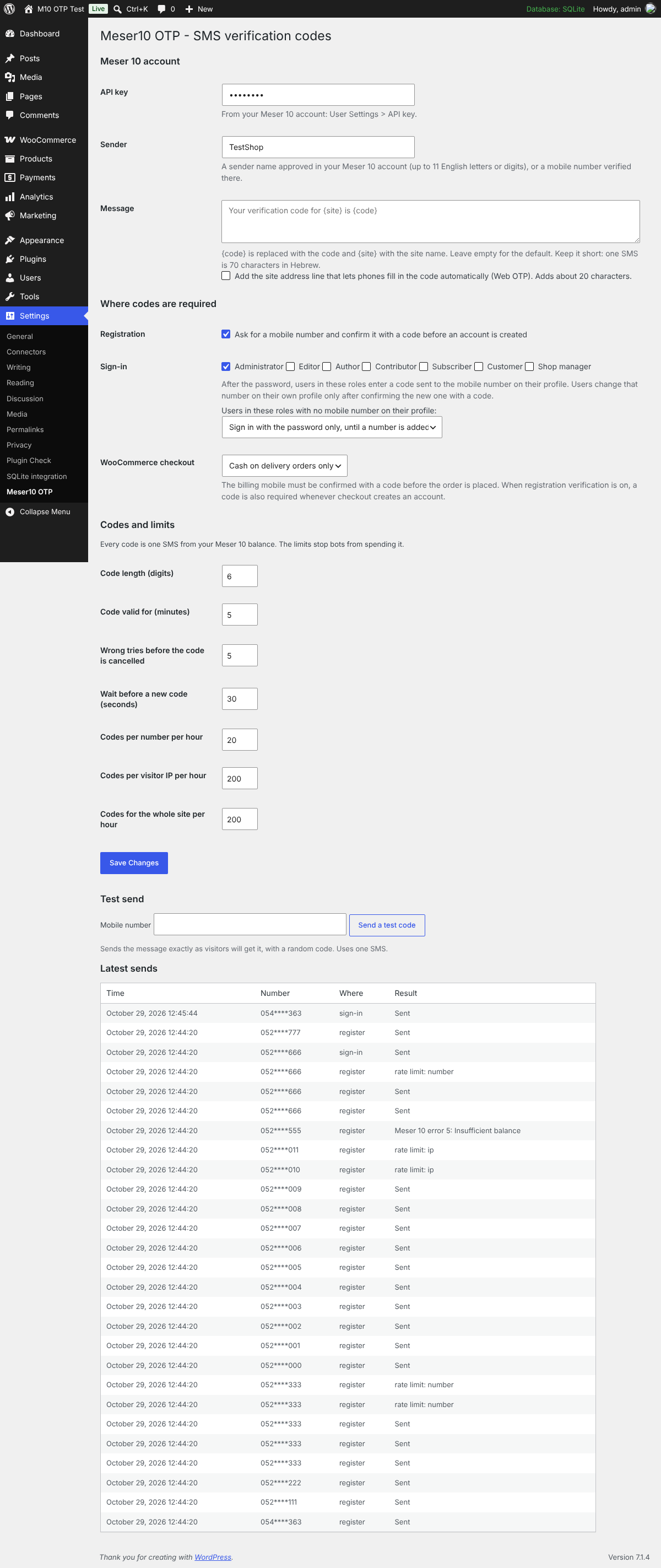
- Registration. The WordPress registration form and the WooCommerce My Account registration form ask for a mobile number, and the account is created only after it was confirmed with a code.
- WooCommerce checkout. The billing mobile is confirmed with a code before the order is placed, for every order or only for cash on delivery orders, which is where fake orders cost the most. When registration verification is on, a code is also required whenever checkout creates an account. Signed-in customers who already verified the same number are not asked again.
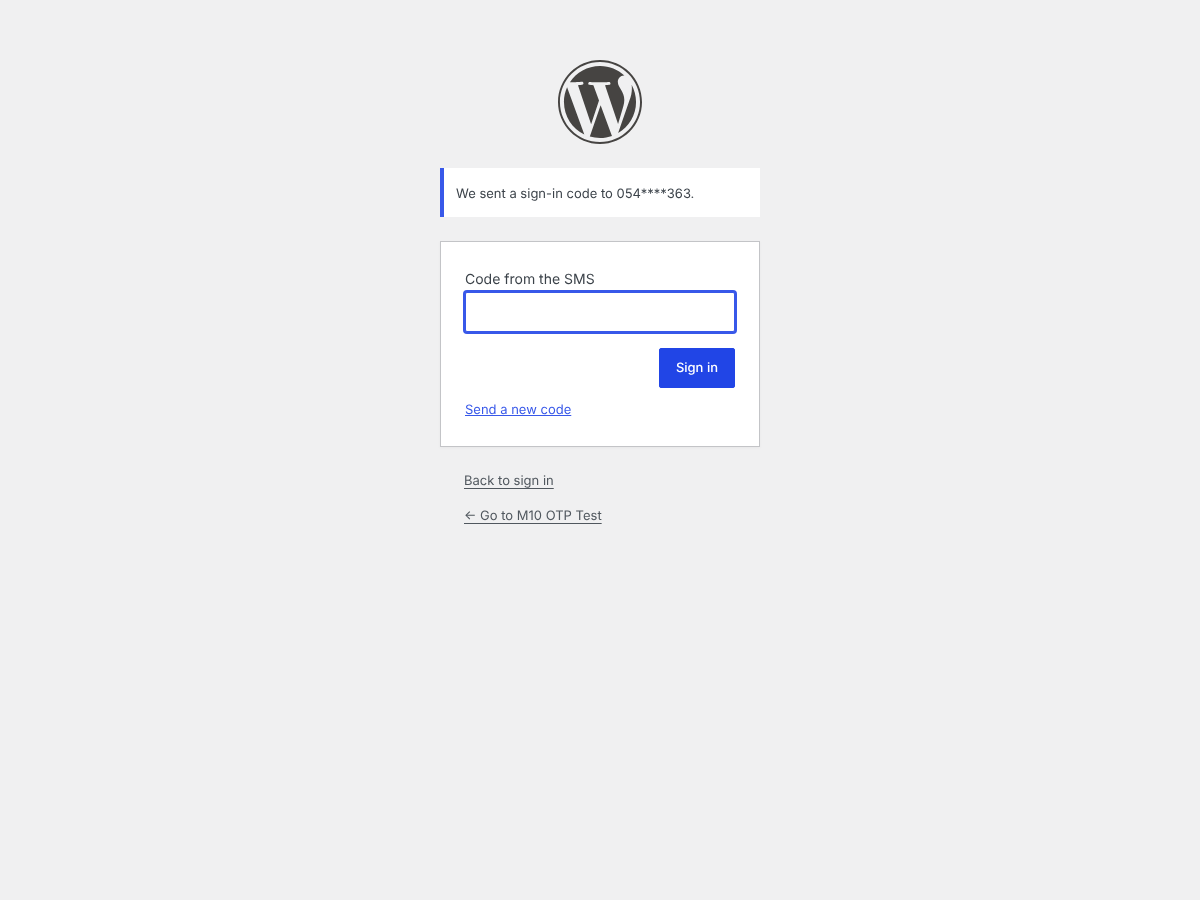
- Sign-in. After the password, users in the roles you choose enter a code sent to the mobile number on their profile. No session is created until the code is right, and users who need sign-in codes confirm both their current and their new number with codes before changing it on their own profile.
Who it is for
Israeli sites that already send SMS with Meser 10. Codes go out from the same Meser 10 account, SMS balance and approved sender name the site owner uses for SMS campaigns, so there is no separate SMS gateway (such as Twilio) to sign up for, fund or configure. Israeli mobile numbers are accepted the way people type them (05X, +972, 00972), anything that is not a valid Israeli mobile is rejected rather than guessed, and masked numbers display correctly inside Hebrew right-to-left text. Sites that also send abroad can widen the number check with the meser10_otp_normalize_phone filter.
Built so codes cannot be abused
Every code is a paid SMS, so the plugin is strict about who can ask for one:
- Limits per number, per visitor IP (IPv6 by /64 network) and for the whole site, per hour, plus a wait before a new code can be requested. Sign-in codes have their own counters, so nobody can use your public forms to lock users out of signing in.
- Sending and checking for a number are locked against parallel requests, so the limits and the wrong-try count cannot be raced.
- A code works once, expires after the time you set (5 minutes by default) and is cancelled after too many wrong tries. Sign-in codes are always at least 6 digits.
- Codes are created with a cryptographically secure generator and stored only as a keyed hash, never in plain text.
- The AJAX endpoints only answer for the places you switched on.
Other details
- Phones fill in the code by themselves: the code field uses
autocomplete="one-time-code", and an optional Web OTP line lets Android Chrome read it from the SMS. - A test send on the settings screen, and a list of the latest sends with masked numbers.
- Works with the same API key as the Meser10 Connect plugin, if you use it.
- Hebrew translation included.
For developers
Use codes in your own forms:
$sent = meser10_otp_send( $phone, 'my_form' );       // true or WP_Error
$ok   = meser10_otp_verify( $phone, $code, 'my_form' ); // true or WP_Error
Filters: meser10_otp_normalize_phone (accept numbers outside Israel), meser10_otp_client_ip (real visitor IP behind a proxy or CDN), meser10_otp_before_send (return a WP_Error to refuse a send, e.g. after a failed CAPTCHA), meser10_otp_login_required, meser10_otp_checkout_required, meser10_otp_ajax_contexts. Actions: meser10_otp_sent, meser10_otp_verified.
Before you start
You need a Meser 10 account with an SMS balance and an approved sender. Every code sent uses one SMS from that balance. By default, numbers are accepted in Israeli mobile format (05X, +972 or 00972).
External services
This plugin connects to Meser 10, an email and SMS messaging platform operated by Meser-Eser Ltd. It cannot send codes without a Meser 10 account, and nothing leaves your site until you save an API key and a sender.
What the service is used for: sending the SMS that carries the one-time code.
What data is sent, and when: each time a code is sent (a visitor asks for a code on a form you switched on, a user in a protected role signs in, or an administrator sends a test), the plugin sends the recipient’s mobile number, the text of the message including the code, the sender name, and your Meser 10 API key. Nothing else is sent, and nothing is sent on any other event.
Where it is sent: to the Meser 10 JSON API at https://heb.mesereser.com/Services/JsonServices.aspx over HTTPS. This is the only external endpoint the plugin contacts.
This service is provided by Meser-Eser Ltd:
- Terms of use: https://www.meser10.co.il/terms/
- Privacy policy: https://www.meser10.co.il/privacy/
Please make sure your site’s own privacy policy tells visitors that their mobile number is sent to Meser 10 to deliver verification codes.
The plugin also sets one functional cookie, meser10_otp_cid, only when a visitor asks for a code. It holds a random identifier that links the verified number to the form the visitor then submits, and expires after one day.
Screenshots


Installation
- Install and activate the plugin.
- Go to Settings > Meser10 OTP.
- Paste the API key from your Meser 10 account (User Settings screen), enter your approved sender, and save.
- Send yourself a test code from the same screen.
- Switch on registration, checkout or sign-in, and save.
FAQ
-
Does it work with the WooCommerce Checkout block?
-
Not in this version. The code step is shown on the classic checkout, the
[woocommerce_checkout]shortcode. Orders that need a code are refused when they come through the Store API (the Checkout block or direct API calls), so nobody can skip the step that way. The settings screen warns you if your checkout page uses the Checkout block. -
What happens to a user who must use sign-in codes but has no number?
-
You choose. By default they sign in with the password until a number is added, and their profile screen asks them to add one (confirmed with a code). Or you can refuse their sign-in until an administrator adds a number. A user cannot switch codes off by clearing their own number.
-
What about XML-RPC, the REST API and AJAX logins?
-
For users who need a code, XML-RPC requests with the normal password are refused, and so are password logins made through AJAX or REST. Application passwords keep working: they are separate credentials the user created on purpose, and they never open a browser session.
-
How long does a code take to arrive?
-
Codes are sent through the Meser 10 API’s single-message function, which sends at once, without a campaign, list or schedule.
-
Can I change the text of the SMS?
-
Yes. Use
{code}for the code and{site}for the site name. If the text has no{code}, the code is added at the end.
Reviews
There are no reviews for this plugin.
Contributors & Developers
“Meser10 OTP” is open source software. The following people have contributed to this plugin.
Contributors
Translate “Meser10 OTP” into your language.
Interested in development?
Browse the code, check out the SVN repository, or subscribe to the development log by RSS.
Changelog
1.0.0
- First release: codes at registration, WooCommerce checkout and sign-in, with rate limits, a test send and a send log.