

Description
MediaZard builds a local index of supported WordPress media references. Use it to understand detected uses before replacing or deleting an attachment. A missing reference is not proof that a file is unused.
Free features
- Overview, Media Library, Scan, Possibly Unused, Bulk Cleanup, Replace Media, Diagnostics and Settings screens.
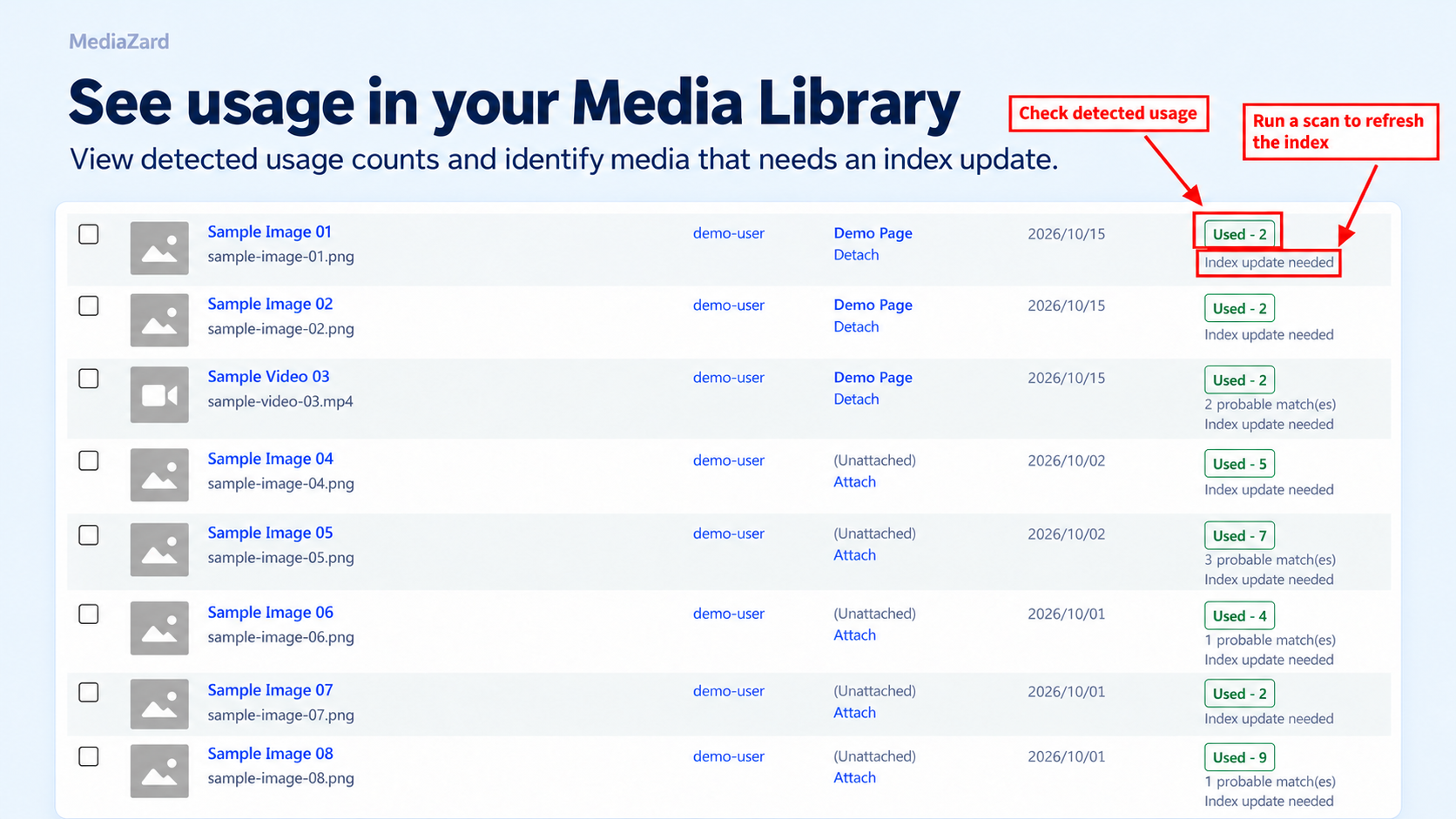
- Used On information in the native Media Library, attachment details and attachment edit screen.
- Indexed usage, MIME type and original-file size filters, plus title/filename search and upload-month filtering in the plugin’s Media Library.
- Batched full scans with saved progress, pause, resume and reset; targeted updates after supported native edits.
- Supported post-content attachment IDs and local upload URLs, featured images, site logo and site icon detection.
- Basic Elementor saved-data detection for supported Image, Image Box and self-hosted Video controls on ordinary posts/pages.
- Attachment-specific deletion checks and deliberate administrator review for single and selected bulk permanent deletion.
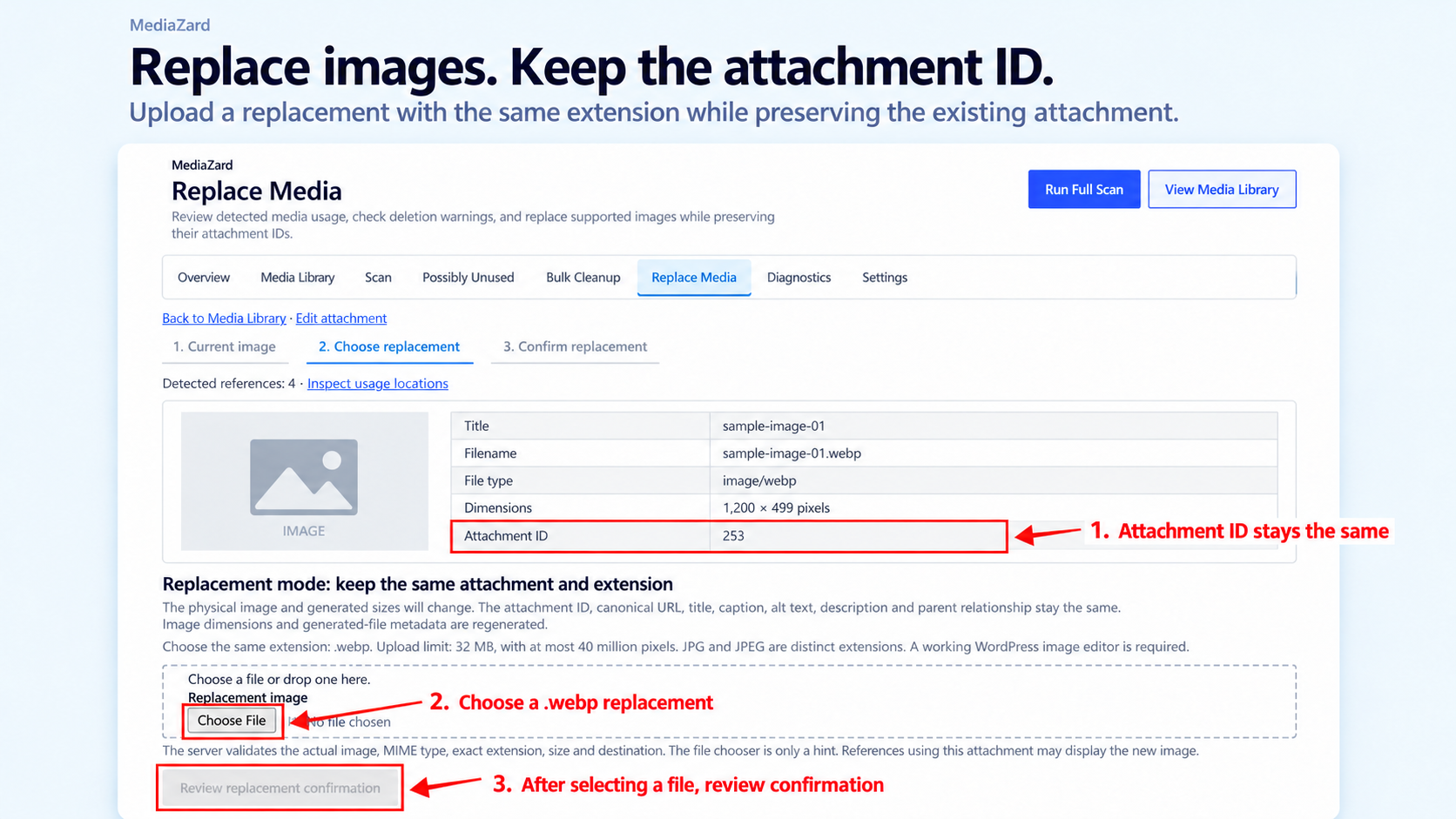
- Same-extension replacement of supported local raster images, with validation, operation locks, temporary rollback backups and recovery controls.
No Pro code, paid feature gate, license service or subscription is included.
Understand the statuses
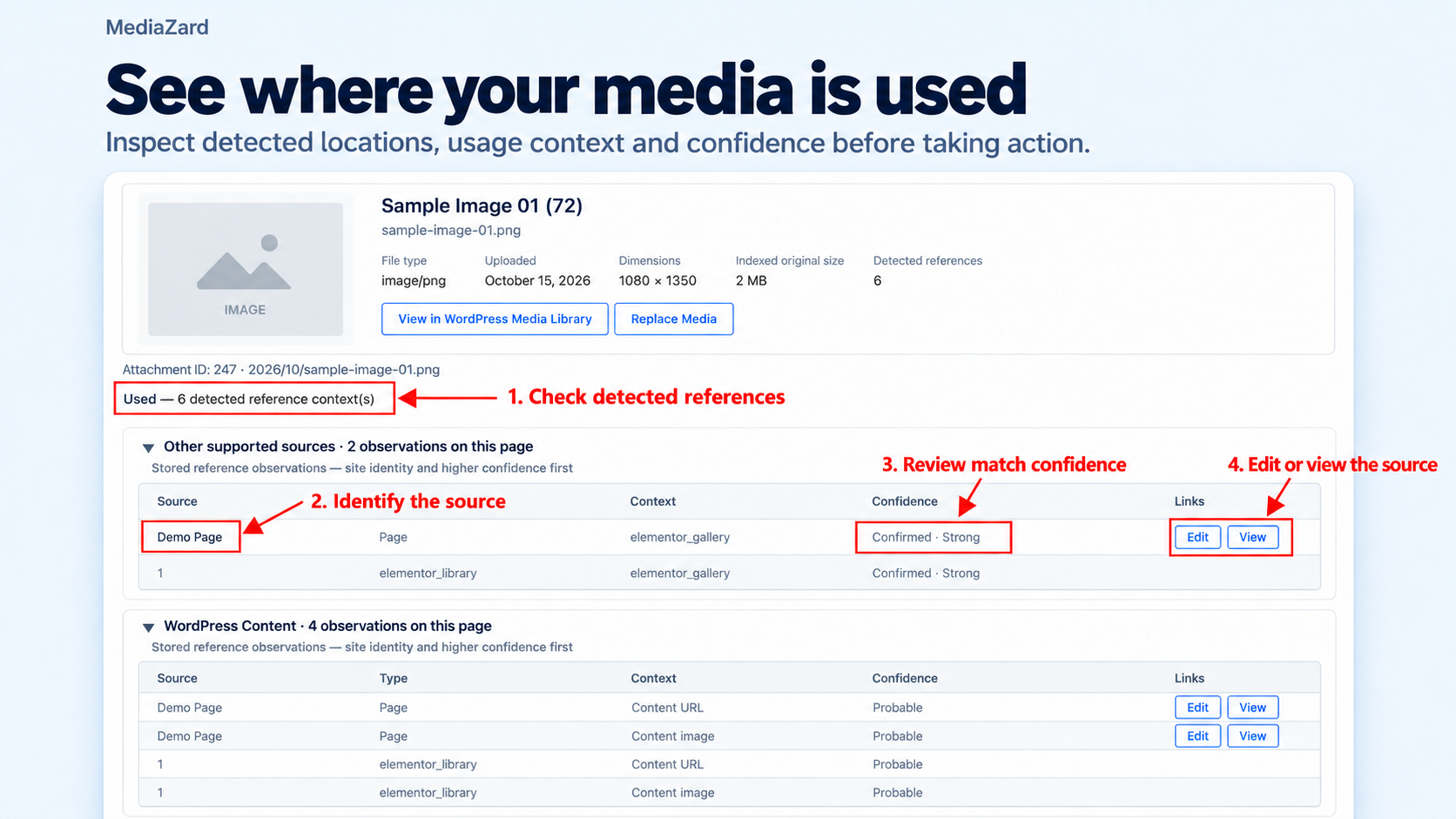
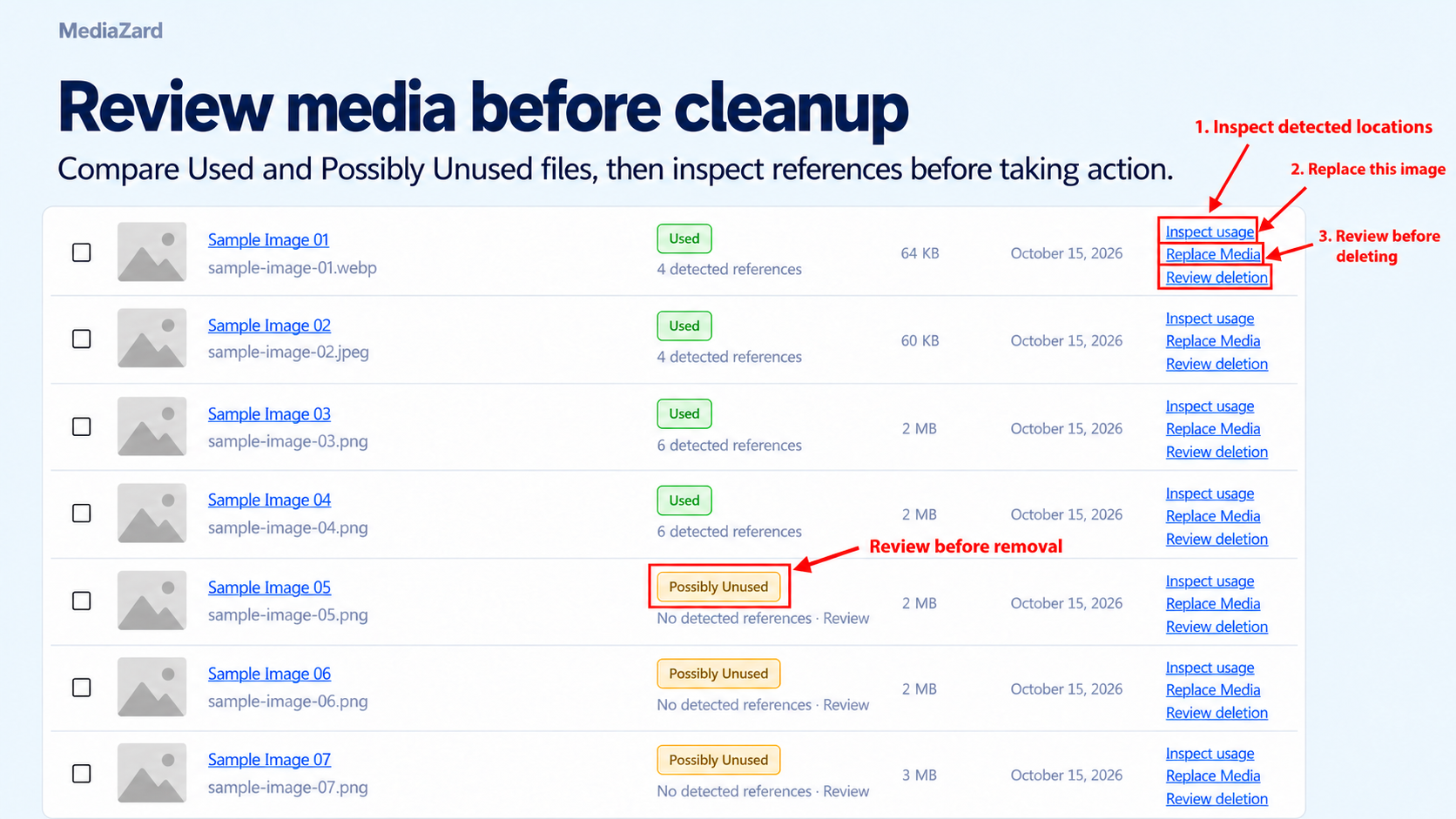
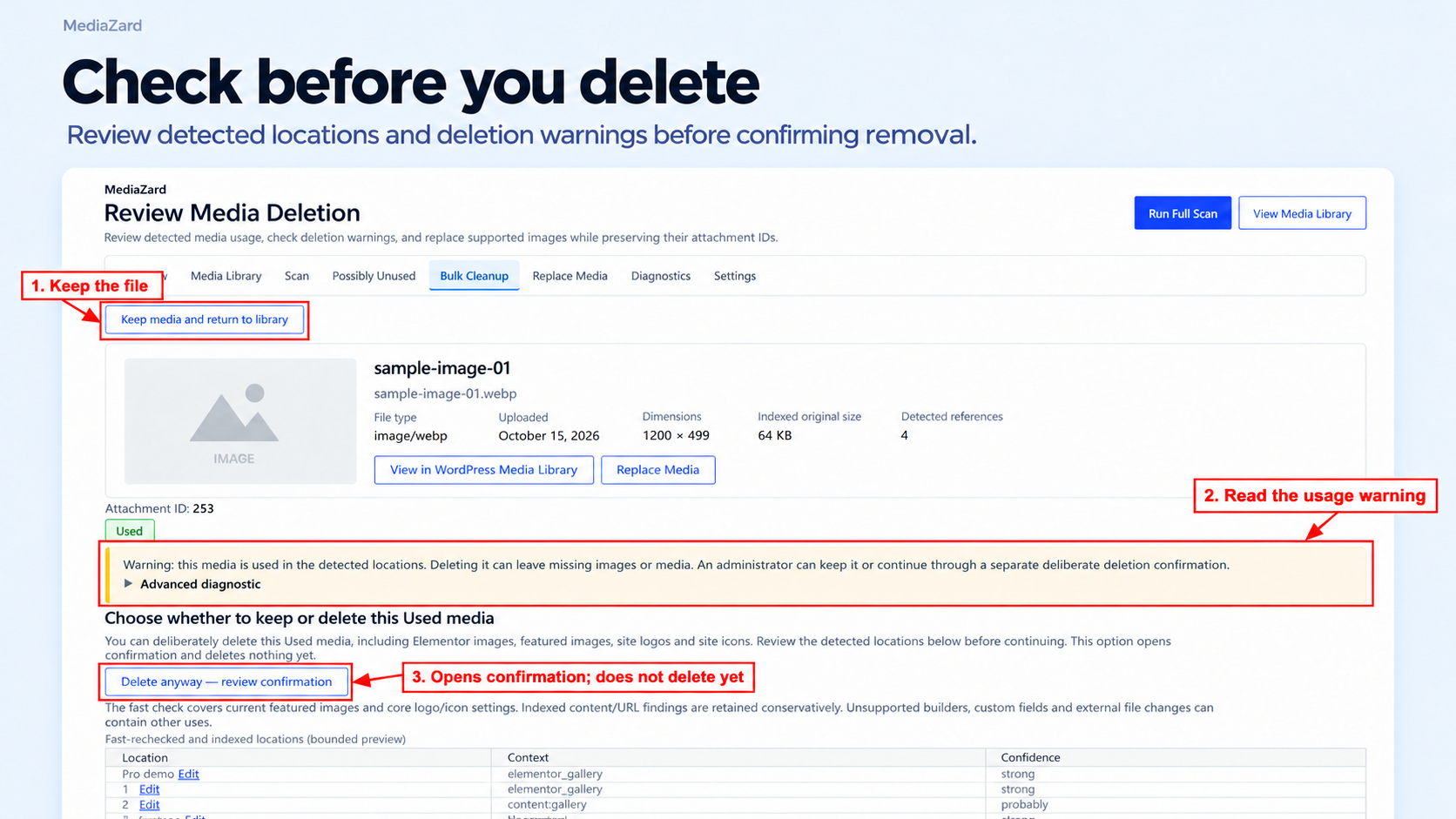
- Used: at least one supported reference was detected. Details distinguish confirmed, probable and weak evidence.
- Possibly Unused: current supported coverage found no qualifying reference. Unsupported uses can still exist; review the file and keep a backup before deletion.
- Scan Needed or Unknown: coverage is absent, incomplete, stale or unavailable. Finish the required scan or pending targeted updates before relying on the index.
Protection uses supported evidence and current permissions. It cannot guarantee every use is detected or that deletion will not break content.
Scanning
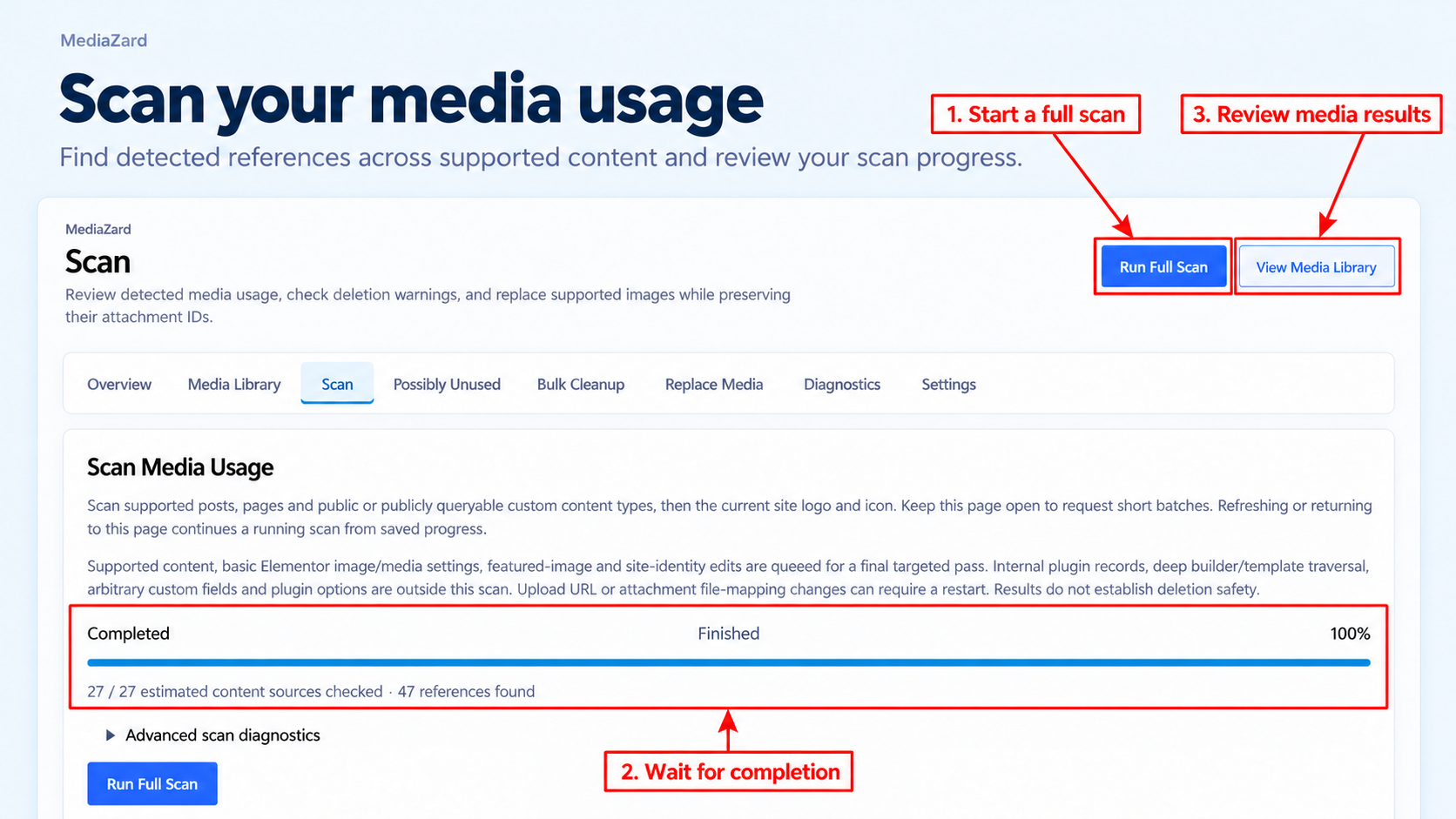
Open Media > MediaZard > Scan, start a full scan and keep that screen open while batches run. Progress is saved on the server. Pause or return to resume an interrupted run; without JavaScript, use Continue one batch. Closing the screen stops new browser batch requests. Free has no scheduled full scans.
Supported native changes queue bounded targeted updates. Edits while inactive, direct database/file changes, changed attachment mappings and unsupported integrations can require a new full scan. Media Library browsing does not start a site-wide scan.
Deletion
Administrators with the required attachment permissions can review one attachment or up to 100 explicitly selected attachments. Bulk work runs in groups of at most five. Used items require Delete anyway and additional confirmation. Single permanent deletion requires the attachment ID; bulk permanent deletion requires the displayed DELETE count. Unknown, restricted, busy or recovery-blocked items cannot be confirmed.
Delete anyway can remove media used in content, Elementor, featured images or site identity and break those uses. Permanent deletion uses WordPress APIs, creates no media backup and does not repair content/settings. Cancellation keeps remaining bulk items. Inspect interrupted in-flight items before a fresh review. Direct SQL/file deletion and other code removing guard hooks are outside these safeguards.
Replacement
Replace local JPEG, PNG, WebP, GIF or AVIF images only when WordPress and the server image editor support the format. Use the exact same extension: .jpg and .jpeg are not interchangeable. The limit is the lower of 32 MiB and the WordPress upload limit; images above 40 million pixels are rejected. Remote/offloaded files, SVG, PDF, audio and video replacement are unsupported.
Successful replacement preserves the attachment ID, original stored URL/path, title, caption, description and alt text, and regenerates metadata/subsizes. A required failure aborts or restores the previous file/metadata. Unresolved recovery blocks new replacement/deletion. Temporary rollback files are transaction recovery, not a general backup service. Separate page, browser or CDN caches may need their own purge; delivered image URLs can include a cache revision.
If an interrupted operation or temporary-file cleanup leaves a recovery record, open Tools > Replacement Recovery, or follow Review recovery on the attachment’s Replace Media screen. Confirm the attachment ID and recovery acknowledgement. Recovery uses the existing verified record to restore an interrupted file/metadata mutation or clear completed temporary backups. It cannot start a new replacement. Use the guided Replace Media workflow for ordinary replacement.
Limitations
- Detection covers supported patterns, not every database field or file.
- Content covers posts, pages and supported public/publicly-queryable custom post types; internal plugin records are excluded. WooCommerce product content and featured images use these core rules; product galleries, variations and taxonomy images have no dedicated scanner.
- Elementor reads saved JSON on ordinary builder posts/pages, including native layout children. Templates, pop-ups, theme-builder documents, backgrounds, overlays, galleries/carousels, dynamic/global controls and third-party widget schemas are excluded.
- Arbitrary custom fields, theme/plugin options, custom CSS, custom code and external-site uses can be missed. Ambiguous/over-limit sources do not become current successful coverage.
- Offloaded files, CDN/rewritten URLs and unsupported local URL mappings may not resolve.
- Original-file size totals exclude thumbnails, unknown sizes and other files; they do not promise recovered storage.
- Network-wide activation, cross-site scanning and multisite network management are unsupported. Activate on an individual site only.
- Settings is read-only and describes enforced policy. There are no image conversions, scheduled full scans or unattended ordinary-media cleanup. Verified WordPress temporary installer ZIPs have separate bounded cleanup/recovery; ordinary user media is excluded.
Privacy and external services
Scanning and reference analysis run inside the site’s WordPress installation. This plugin has no telemetry, analytics, cloud scanning, external license validation or custom remote updater. It does not send scan content, filenames, usage statistics or site identifiers to an external service.
The local database stores attachment IDs, MIME types, original-file sizes, upload-relative paths, detected source IDs/contexts/confidence and scan state. Local options/transients hold pending work, user/session-bound confirmation state, bounded outcomes and short diagnostic codes. The latest protection event includes attachment ID, administrator user ID and UTC time. Replacement recovery can retain local file/metadata snapshots and protected temporary backups until cleanup succeeds.
Admin previews use WordPress media URLs; existing site/CDN configuration and third-party hooks can affect their delivery. Optional LiteSpeed integration requests a local plugin cache purge through WordPress hooks; this plugin makes no separate service request. WordPress’s own update checks, hosting logs and other plugins are outside this statement. MediaZard enables no persistent production debug log.
Data retention
Deactivation keeps plugin data and invalidates freshness because edits cannot be observed while inactive. Uninstall retains all plugin tables, options, scan progress, pending work, recovery records and media files. Free has no remove-data-on-uninstall setting and performs no automatic purge. WordPress can expire transients normally. If you want to remove retained data, plan a separate backed-up cleanup and resolve recovery records first.
Screenshots
Installation
Back up the database and uploads before replacement or permanent cleanup.
Install from the WordPress Plugin Directory
- Open Plugins > Add New Plugin in your WordPress dashboard.
- Search for MediaZard and choose the plugin by Harish Bisht.
- Click Install Now, then Activate.
Install the ZIP manually
- Open Plugins > Add New Plugin > Upload Plugin.
- Select the installable mediazard ZIP, click Install Now, then Activate.
- Alternatively, extract the ZIP and upload its mediazard folder to wp-content/plugins/, then activate it from Plugins.
Start reviewing media
- Open Media > MediaZard. Diagnostics shows plugin 1.0.2 and schema 3.
- Start a full scan and keep its page open until it completes. Let pending targeted updates finish before relying on usage results.
- Use the Media Library and Detected Media Usage screens to inspect references. Reset can discard an incomplete scan; live references are retained until a completed scan reconciles them.
- Review the usage details and detection limits before deletion or replacement. Test destructive operations on staging first.
Requires WordPress 6.5+ and PHP 7.4+. Replacement needs writable/readable local uploads, a supported WordPress image editor and permission to upload/edit the attachment. Scanning/deletion/replacement require the relevant administrator and object capabilities. Elementor is optional; saved basic detection remains available when it is inactive or removed.
FAQ
-
Does Possibly Unused mean a file is safe to delete?
-
No. It means supported scanners found no qualifying reference under current coverage. Unsupported uses can exist. Review the attachment and keep your own backup.
-
Can I delete a Used image?
-
Yes, through deliberate single or bulk administrator Delete anyway review if permissions and current checks pass. Deletion is permanent, can break uses and does not fix content automatically.
-
Can this plugin restore a permanently deleted image?
-
No. Restore from your own backup. Replacement rollback applies only to replacement transactions.
-
Does a scan continue after I close the browser?
-
No new browser batches are sent. Saved progress can be resumed. Free does not schedule full scans.
-
Does it detect every Elementor or WooCommerce image?
-
No. Only the basic controls and core content/featured-image rules above are supported. Deep builder/commerce relationships are outside Free coverage.
-
Does it send data to you or remove data on uninstall?
-
No telemetry is included. Uninstall retains local plugin data and media. See Privacy and Data retention above.
-
Can I replace a PDF or convert a JPEG to WebP?
-
No. Replacement is limited to the exact same extension of supported local raster images.
Reviews
There are no reviews for this plugin.
Contributors & Developers
“MediaZard” is open source software. The following people have contributed to this plugin.
Contributors
Translate “MediaZard” into your language.
Interested in development?
Browse the code, check out the SVN repository, or subscribe to the development log by RSS.
Changelog
1.0.2
- Prepare MediaZard for its initial WordPress Plugin Directory submission.
- Provide local usage indexing, batched scans, basic Elementor detection, and guided single/bulk deletion and image replacement.
- Validate protected operations with capability checks, action-specific nonces, and deliberate confirmation.
- Include filter and diagnostic form protection, replacement recovery, and data-retaining uninstall.
- Use native installer completion receipts for verified package cleanup without caller-stack inspection.
- Preserve PHP’s original temporary upload path and protect the recovery inspection form.