

Description
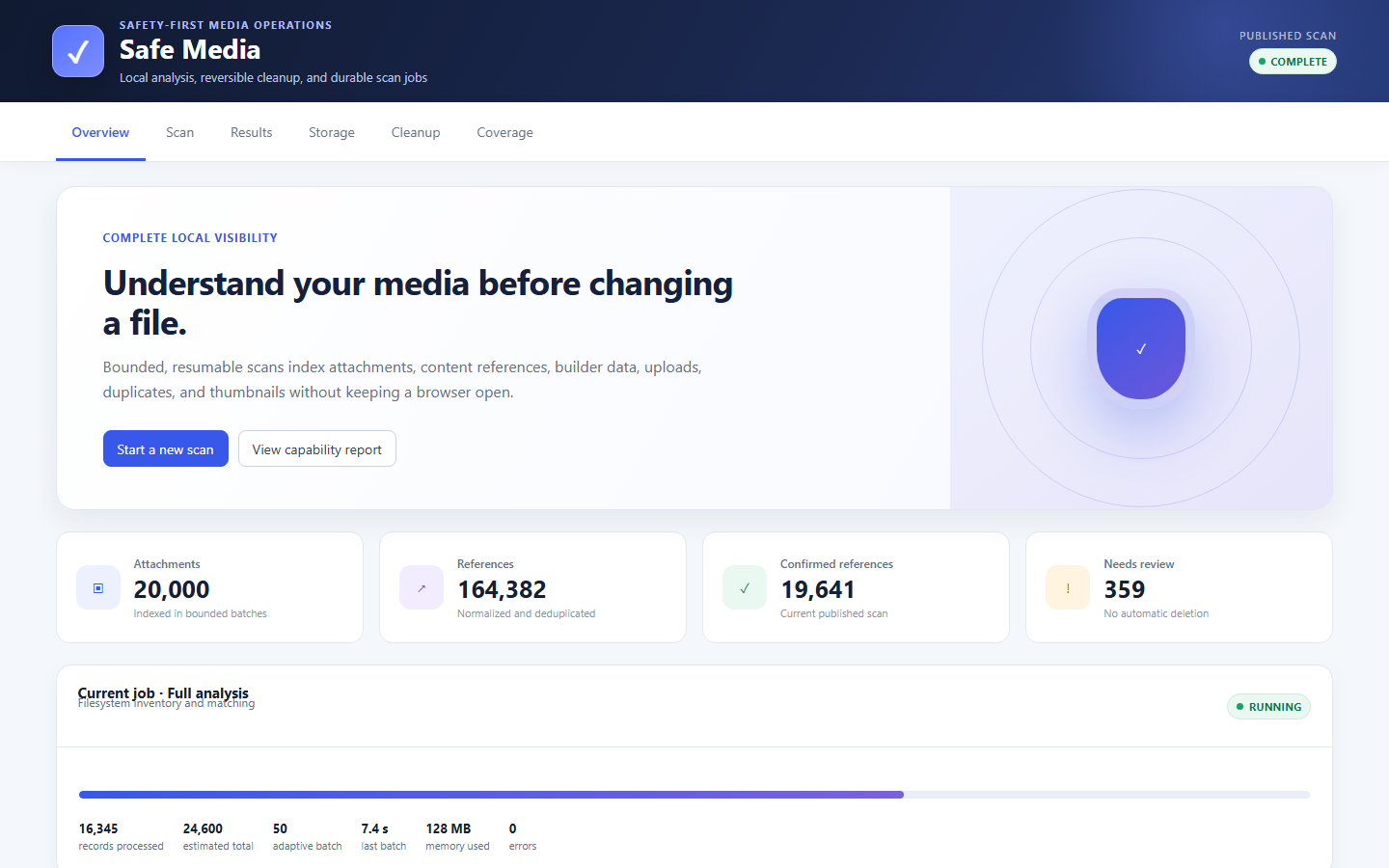
MediaRef Cleanup Auditor analyses attachment records, content, metadata, and the uploads filesystem using durable,
bounded jobs. It includes exact duplicate hashing, thumbnail analysis, optional live verification,
quarantine and restoration, builder and plugin capability reporting, REST workers, and WP-CLI.
There is no paid edition, scan limit, license server, advertising gate or required external service.
All processing occurs on the WordPress installation. Donations may support development but do not
change functionality.
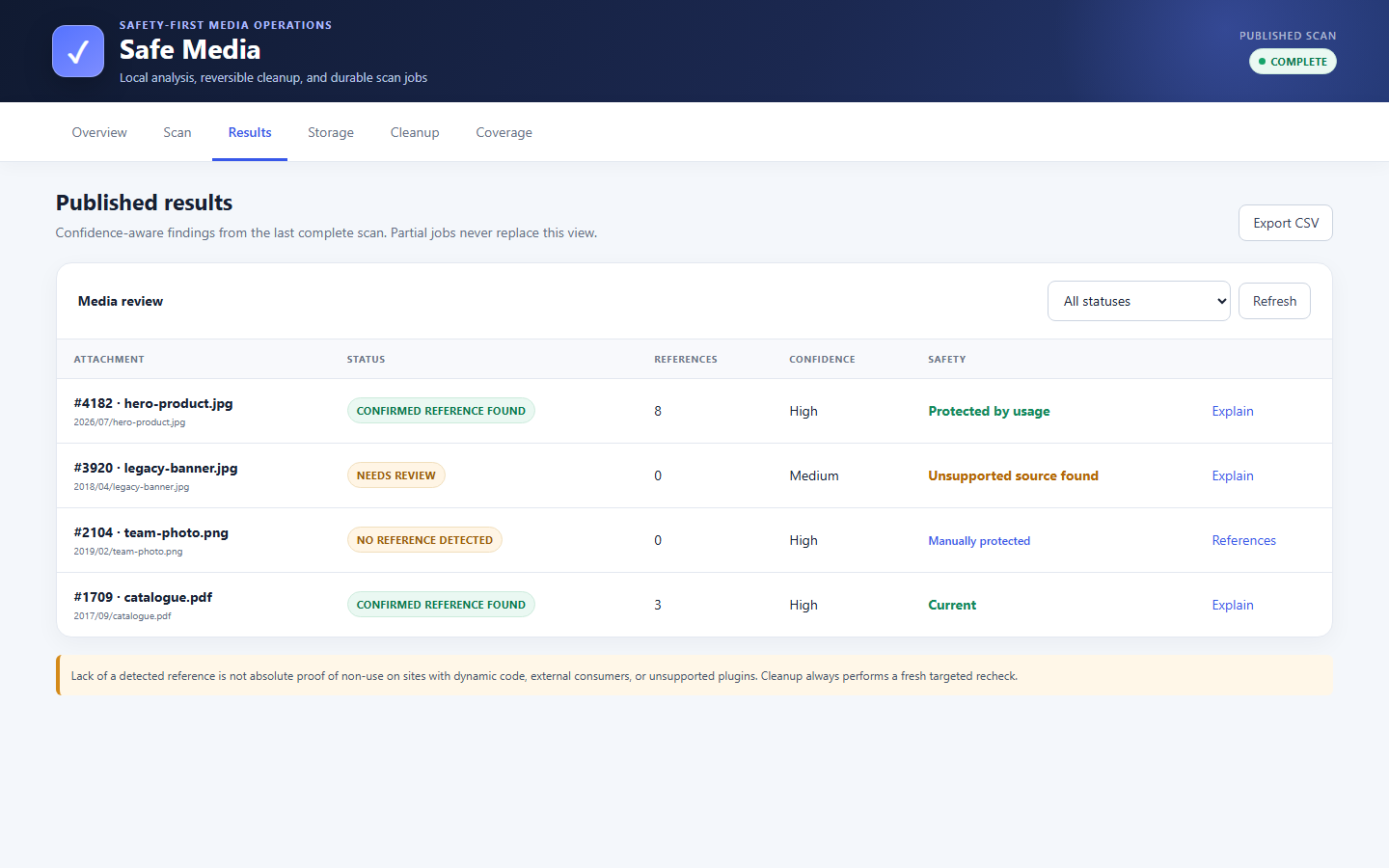
Safety language is deliberate: “No reference detected” is not proof that an item is unused.
Dynamic code, remote consumers and unsupported data stores can create blind spots. Every cleanup
attempt performs a fresh targeted reference check and verifies file identity.
Built for large and old media libraries
Scans use database-backed jobs, keyset cursors, adaptive bounded batches, staged publishing, and
expiring worker locks. A browser refresh does not erase progress, and the same job can be resumed
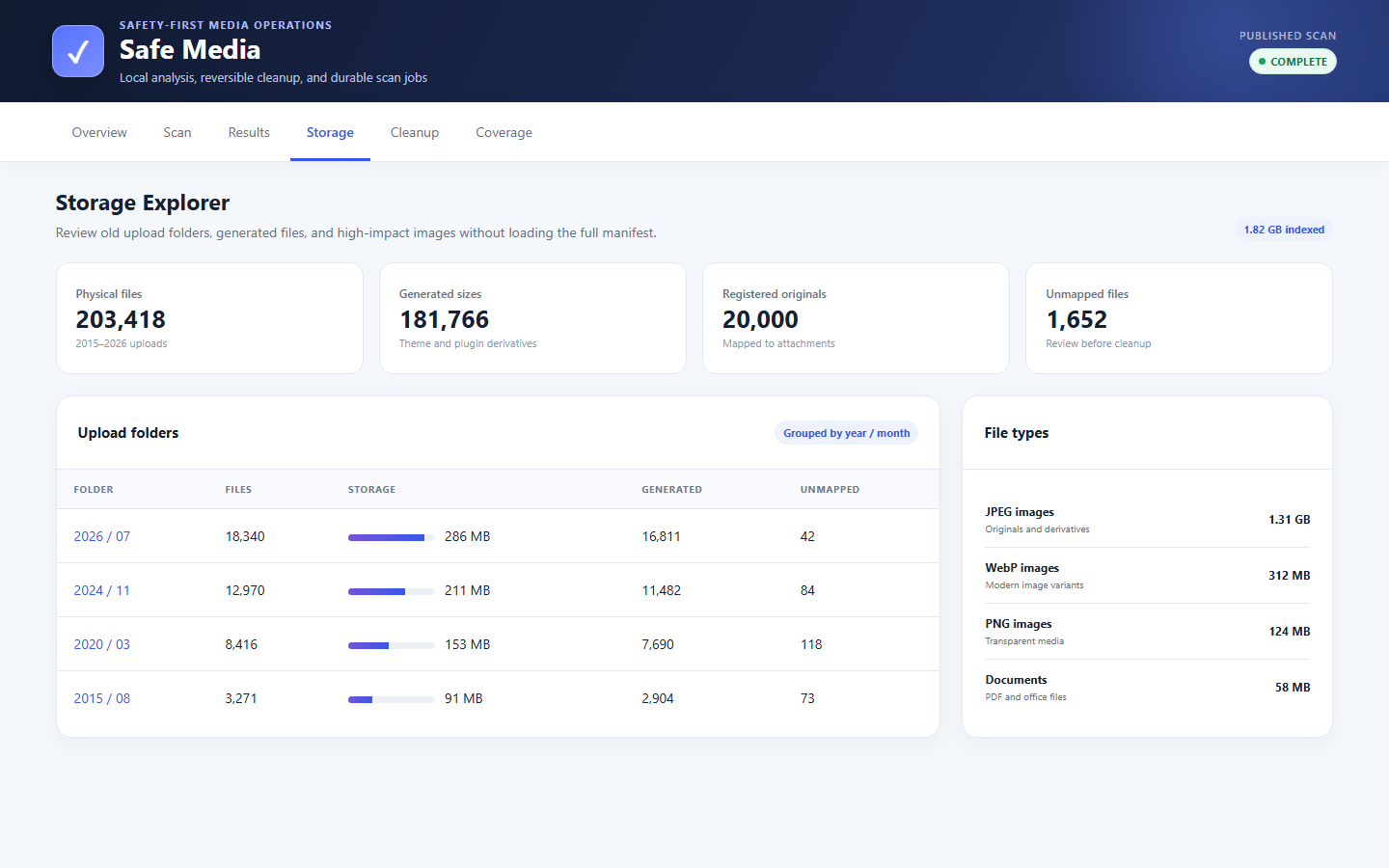
with WP-CLI. The Storage Explorer groups files by year, month, MIME type, attachment ownership, and
derivative type, making sites with upload folders spanning many years easier to review.
Included without feature locks
- Media Library, metadata, options, builder, and filesystem reference analysis.
- Durable uploads manifest with missing, unknown, generated, and orphan-file classification.
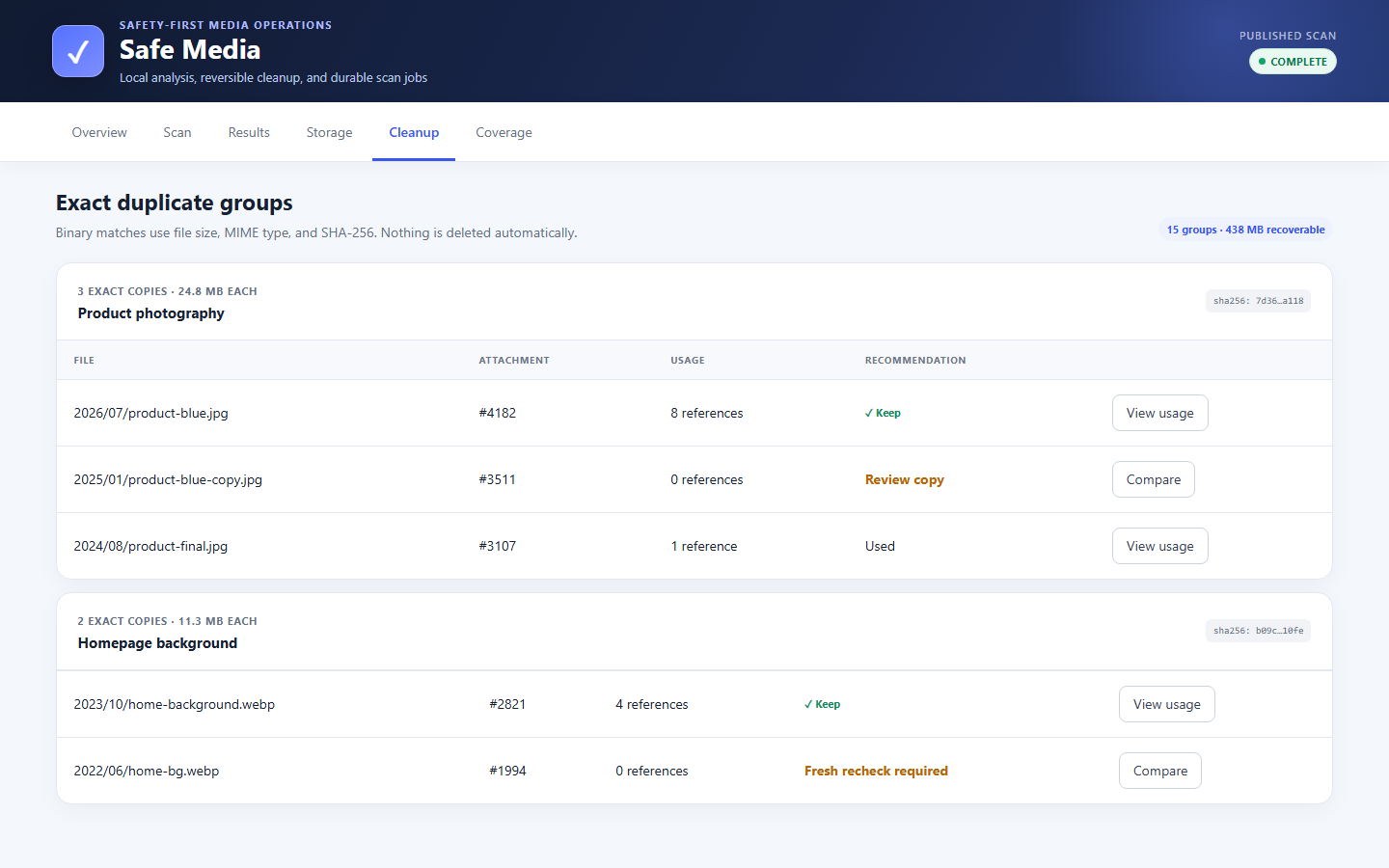
- Exact duplicate groups using file size, MIME type, and SHA-256 fingerprints.
- Thumbnail inventory, missing-size analysis, selective cleanup review, and reporting.
- Optional same-origin live-page verification, disabled by default.
- Storage Explorer and Large Image Analyzer with date, folder, dimension, and size filters.
- Protected and ignored media states.
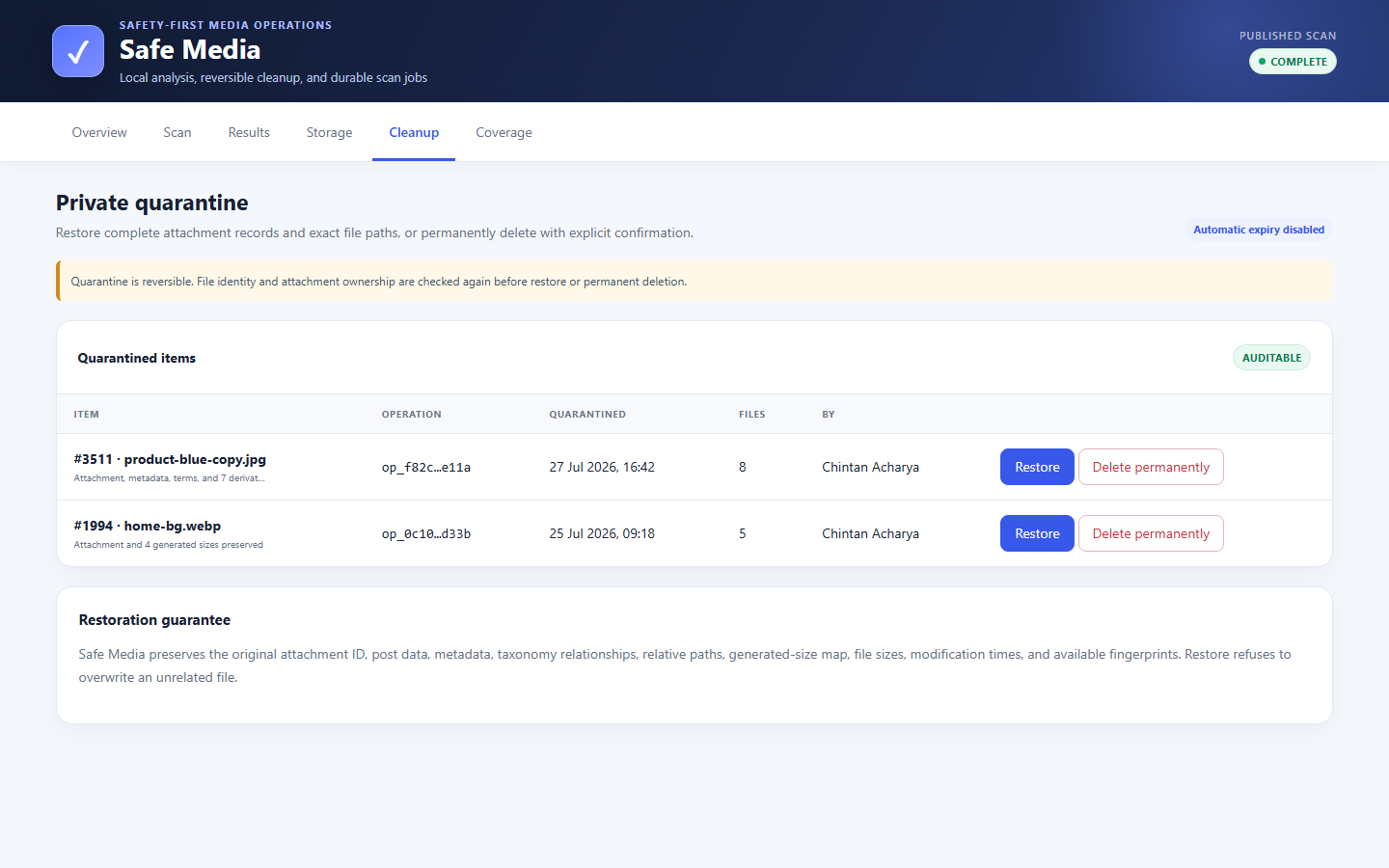
- Identity-checked private quarantine, restoration, and separate permanent deletion.
- REST dashboard workers and the complete
wp mediaref-cleanup-auditorWP-CLI command set. - Individual scanner classes for supported builders, galleries, commerce, LMS, membership,
multilingual, cache, and custom-field ecosystems.
There is no Pro edition, image limit, scan limit, remote license validation, or required account.
WP-CLI
Common commands:
wp mediaref-cleanup-auditor status
wp mediaref-cleanup-auditor capabilities --format=json
wp mediaref-cleanup-auditor scan library --batch-size=250
wp mediaref-cleanup-auditor scan filesystem
wp mediaref-cleanup-auditor scan duplicates
wp mediaref-cleanup-auditor scan thumbnails
wp mediaref-cleanup-auditor scan live
wp mediaref-cleanup-auditor scan all
wp mediaref-cleanup-auditor scan resume --job=123 --batch-size=500
wp mediaref-cleanup-auditor results --status=potentially_unused --format=csv
wp mediaref-cleanup-auditor references 1250
wp mediaref-cleanup-auditor explain 1250
wp mediaref-cleanup-auditor protect 1250
wp mediaref-cleanup-auditor unprotect 1250
wp mediaref-cleanup-auditor ignore 1250
wp mediaref-cleanup-auditor unignore 1250
wp mediaref-cleanup-auditor trash 1250 --dry-run
wp mediaref-cleanup-auditor restore 10
wp mediaref-cleanup-auditor delete 10 --yes
wp mediaref-cleanup-auditor empty-trash --older-than=30 --yes
wp mediaref-cleanup-auditor export --status=potentially_unused --format=csv
wp mediaref-cleanup-auditor verify 1250
wp mediaref-cleanup-auditor repair
wp mediaref-cleanup-auditor cleanup-jobs
Machine-readable result commands support table, JSON, CSV and count formats through WP-CLI.
Security
Live verification is off by default. It accepts only the current site host, resolves and rejects
private/reserved IPs, validates every redirect, sends no cookies, limits redirects, response bytes
and time, and parses returned text without executing scripts or submitting forms.
Quarantine paths are exact, contained within uploads, and never selected through wildcard matching.
Remote objects are never deleted by the bundled local storage adapter.
Privacy
MediaRef Cleanup Auditor stores scan jobs, cursors, normalized media references, file-manifest data, results,
operation logs, and quarantine records in this WordPress database. This operational data is used
only to perform and audit media analysis and cleanup.
The plugin does not send telemetry or site data to the author. Optional live verification makes
unauthenticated requests only to approved URLs belonging to the current site. It does not execute
scripts, submit forms, or send administrator cookies.
Support
For support, use the MediaRef Cleanup Auditor support forum on WordPress.org after the plugin is approved.
Before reporting a problem, include the WordPress and PHP versions, scan type, job ID, current
stage, and the sanitized error shown in MediaRef Cleanup Auditor. Never post private server paths or credentials.
Screenshots
Installation
- Upload the
mediaref-cleanup-auditordirectory to/wp-content/plugins/. - Activate MediaRef Cleanup Auditor.
- Open Tools MediaRef Cleanup Auditor.
- Review the capability report before starting a scan.
- Back up the site before cleanup, then use quarantine before permanent deletion.
FAQ
-
Is every feature free?
-
Yes. Library and filesystem scans, parsers, duplicate hashing, thumbnail analysis, live verification,
WP-CLI, quarantine, restoration and export are available without payment or an external connection. -
Can a scan survive a closed browser or SSH disconnect?
-
Yes. Jobs, locks, stage cursors and staged results are stored in database tables. Resume browser jobs
withwp mediaref-cleanup-auditor scan resume --job=<id>. -
Does “potentially unused” mean safe to delete?
-
No. It means enabled scanners detected no reference. Review blind spots and run the mandatory fresh
recheck. Quarantine is reversible; permanent deletion is separate and explicitly confirmed. -
Does it support multisite?
-
Rows are scoped by blog ID and commands respect WP-CLI
--url. Run and report scans per site. -
Will MediaRef Cleanup Auditor delete files automatically after a scan?
-
No. Scanning never deletes media. Cleanup is a separate, auditable job. Each item receives a fresh
usage recheck and file-identity validation before it can be moved to private quarantine. Permanent
deletion is another explicit action. -
Does MediaRef Cleanup Auditor contact an external service?
-
No. The plugin does not require an external service, account, telemetry endpoint, or license server.
Optional live verification requests only approved URLs on the current site and is disabled by default.
Reviews
There are no reviews for this plugin.
Contributors & Developers
“MediaRef Cleanup Auditor” is open source software. The following people have contributed to this plugin.
Contributors
Translate “MediaRef Cleanup Auditor” into your language.
Interested in development?
Browse the code, check out the SVN repository, or subscribe to the development log by RSS.
Changelog
1.2.2
- Added bulk filesystem manifest writes and larger adaptive browser batches.
- Added cursor indexes for large staged runs.
- Reused unchanged duplicate fingerprints from the previous published scan.
- Replaced per-file matching and thumbnail queries with joined batch operations.
- Deferred expensive image probing and populated dimensions from metadata and derivative filenames.
1.2.1
- Added cleanup candidates with age, status, folder, MIME and size filtering.
- Added exact duplicate groups with usage-aware keep recommendations.
- Added durable dry-run and quarantine jobs with one-item fresh rechecks.
- Added a quarantine manager with restoration and confirmed permanent deletion.
- Added browser-to-WP-CLI cleanup job continuity.
1.1.0
- Added a Storage Explorer with year/month, MIME, original, generated and unmapped totals.
- Added a paginated Large Image Analyzer with folder, byte-size and dimension filters.
- Added bounded image-dimension probing during filesystem scans.
- Added conservative optimization-saving estimates without modifying files.
1.0.6
- Added WordPress-bundled jQuery for delegated actions and smooth transitions.
- Replaced the result notice with a detailed reference dialog.
- Added working protect and unprotect actions from the result dialog.
1.0.5
- Prevented incomplete job data from rendering immediately after starting a scan.
- Kept scan-type controls stable and disabled during job creation.
1.0.4
- Rebuilt the administration application in dependency-free vanilla JavaScript.
- Added delegated events, cached DOM access, targeted scan updates, and GPU-friendly transitions.
- Removed the React and WordPress Components runtime from the admin screen.
1.0.3
- Replaced the generic REST parser with an explicit same-origin JSON client.
- Improved REST error reporting and environment recommendations.
1.0.2
- Rebuilt the administration interface with the native WordPress Components library.
- Added a professional overview, scan monitor, results table, environment report, and parser coverage view.
- Added responsive, accessible interaction and visual states without external UI services.
1.0.1
- Fixed scan cursors repeatedly restarting a stage instead of advancing.
- Added a no-progress guard and clearer processed-row wording.
1.0.0
- Durable staged scan engine and REST/CLI workers.
- Library, metadata, filesystem, duplicate, thumbnail and live scanners.
- Capability and parser blind-spot reporting.
- Identity-verified quarantine, restoration and permanent deletion.