

Description
Additional filter effects for the Image block and the Featured Image block of the FSE block editor.
This simple plugin adds some image filters to the image block and featured image block. These are preset filters that add static color effects and hover color effects.
This plugin does not add new blocks to the editor but enriches the choice of filters available in the Styles section of the Image block and Featured image block of posts and pages.
Media Licenses
The original images used in this plugin’s banners, screenshots and icons were captured by the plugin author.
-
Banner Images:
The images visible within the banners and screenshot-1.jpg are variations of the same image Specifically:- Creator: Tommaso G. Scibilia (https://profiles.wordpress.org/masino1967/)
- Source: WordPress Photo Directory (https://wordpress.org/photos/photo/88166d412d/)
- License: Creative Commons Zero – CC0 1.0 Universal (Public Domain) (https://creativecommons.org/publicdomain/zero/1.0/)
banner-772×250.jpg,
banner-1544×500.jpg- Creator: Tommaso G. Scibilia (https://profiles.wordpress.org/masino1967/)
- License: Creative Commons Zero – CC0 1.0 Universal (Public Domain) (https://creativecommons.org/publicdomain/zero/1.0/)
-
Icon Images:
icon-128×128.jpg and icon-256×256.jpg- Creator: Tommaso G. Scibilia (https://profiles.wordpress.org/masino1967/)
- License: Creative Commons Zero – CC0 1.0 Universal (Public Domain) (https://creativecommons.org/publicdomain/zero/1.0/)
-
Screenshot Image:
screenshot-1.jpg- Creator: Tommaso G. Scibilia (https://profiles.wordpress.org/masino1967/)
- License: Creative Commons Zero – CC0 1.0 Universal (Public Domain) (https://creativecommons.org/publicdomain/zero/1.0/)
-
Plugin Images:
The image used in this plugin’s were captured by the plugin author and are officially hosted on the WordPress Photo Directory.images/lampioni.jpg
- Creator: Tommaso G. Scibilia (https://profiles.wordpress.org/masino1967/)
- Source: WordPress Photo Directory (https://wordpress.org/photos/photo/88166d412d/)
- License: Creative Commons Zero – CC0 1.0 Universal (Public Domain) (https://creativecommons.org/publicdomain/zero/1.0/)
images/banner-772×250.jpg,
images/screenshot-1.jpg- Creator: Tommaso G. Scibilia (https://profiles.wordpress.org/masino1967/)
- License: Creative Commons Zero – CC0 1.0 Universal (Public Domain) (https://creativecommons.org/publicdomain/zero/1.0/)
Screenshots
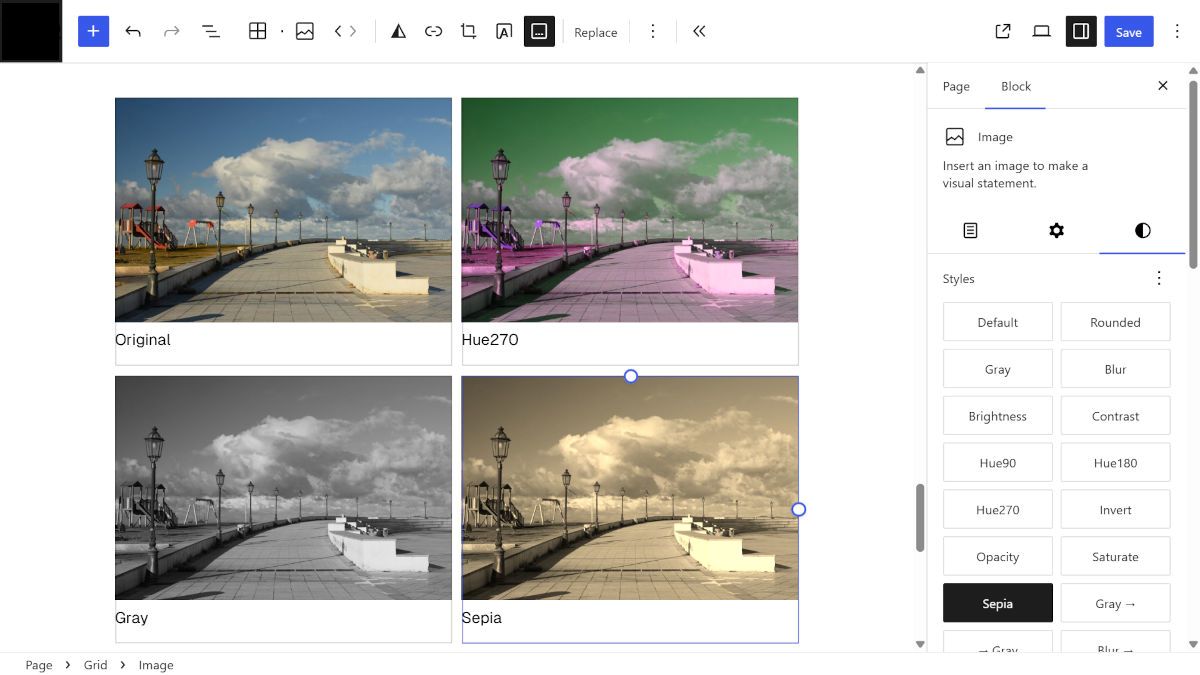
Installation
Option 1 1. Log into your WordPress admin panel. 2. Go to Plugins > Add New and search for Masino1967 Image Filters Collection. 3. Click Install Now, then Activate.
Option 2 1. Download the plugin zip from WordPress.org. 2. Go to Plugins > Add New > Upload Plugin. 3. Upload the zip file and click Install Now. 4. Click Activate Plugin.
FAQ
-
How do I apply filters to my images?
-
Select the image in edit mode. Open the “Style” section of the “Image” block or the “Featured Image” block on the right side of the edit screen, and click on the name of one of the available effects.
Reviews

Contributors & Developers
“Masino1967 Image Filters Collection” is open source software. The following people have contributed to this plugin.
Contributors
“Masino1967 Image Filters Collection” has been translated into 3 locales. Thank you to the translators for their contributions.
Translate “Masino1967 Image Filters Collection” into your language.
Interested in development?
Browse the code, check out the SVN repository, or subscribe to the development log by RSS.
Changelog
1.0.1
First stable release.