

Description
MammothWP Acceptance Logs asks logged-in users in the roles you choose to accept your Terms & Conditions, and keeps a verifiable record of who accepted which version, and when.
- Versioned archive. Every published version is stored in full and never deleted, so each acceptance can be tied to the exact text shown.
- Tamper-evident log. Each record is signed twice (immutable core, erasable context) and chained to the previous one. A verifier on the log screen flags altered rows.
- Role-scoped prompt. A popup with “skip for now” (not recorded) and a persistent admin notice until the user accepts.
- Receipts. An acceptance confirmation e-mailed to the user, with a PDF copy of what was accepted attached when the bundled PDF library is present.
- GDPR tooling. Personal-data exporter and eraser, retention-based anonymisation, and suggested privacy policy text.
- Manage it your way. Admin screens, a REST API (
mmwp/v1), WP-CLI (wp mmwp terms) and the WordPress Abilities API (read-onlylist-acceptancesand more). - A public block that shows the current terms, effective date and history.
This is not a consent plugin
Recording acceptance of terms is an access-control and contractual-compliance mechanism (GDPR Art. 6(1)(b) and 6(1)(f)), not consent under Art. 6(1)(a). Acceptance is therefore not withdrawable and records are not deleted on request; see the FAQ.
Privacy and external services
The plugin makes no outbound requests, loads no remote scripts, fonts or images, and sends no telemetry. It never phones home. It sends e-mail in two cases, both through your site’s normal wp_mail(): the acceptance receipt to the accepting user only (the PDF copy is attached when the bundled PDF library is present), and, only when an administrator presses Send on the Support screen (Mammoth WP > Support), a support request to info@mammothwp.com. The support request includes a site report only if the administrator ticks the box after previewing the exact text. Nothing is ever sent automatically.
Screenshots
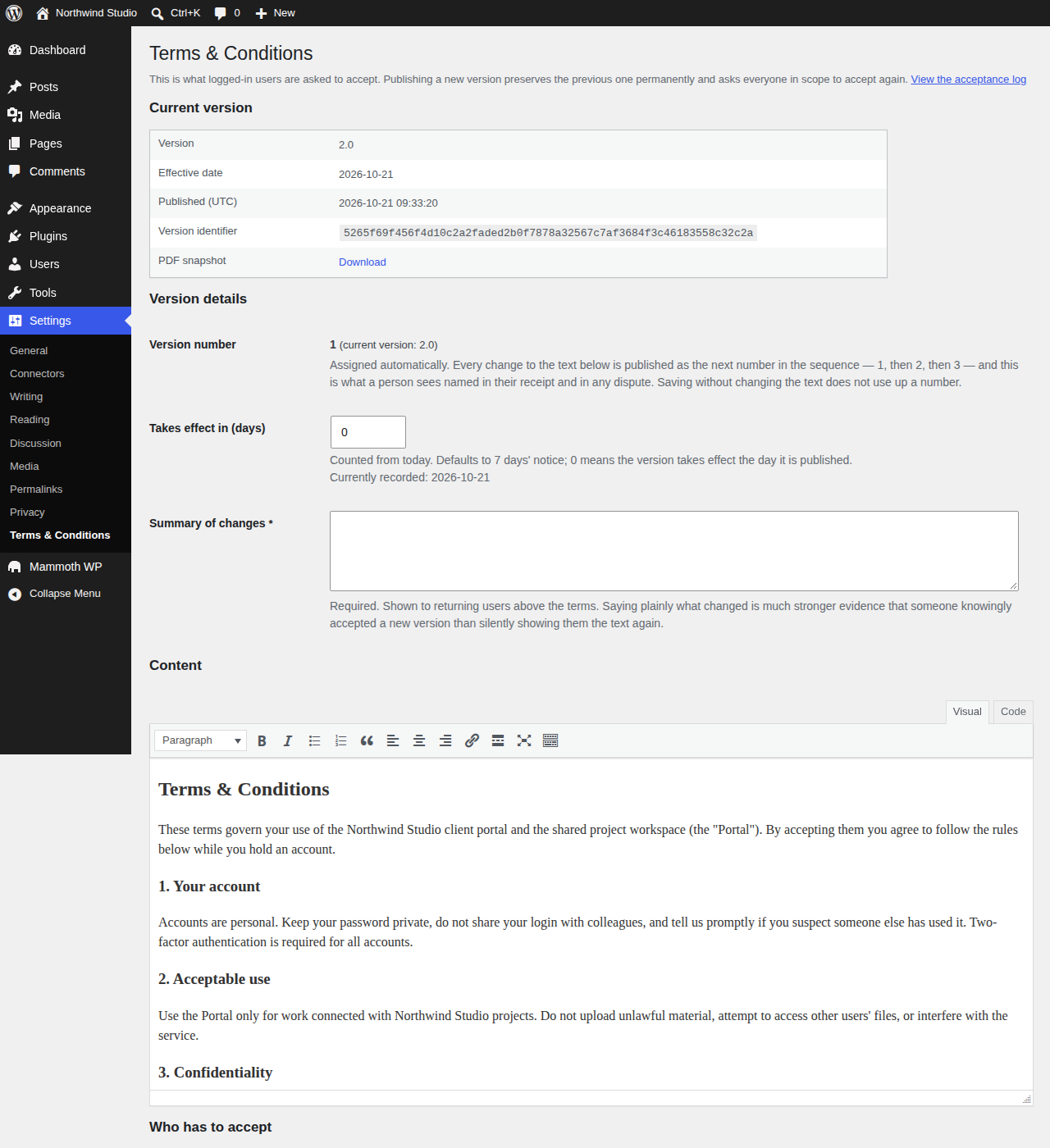
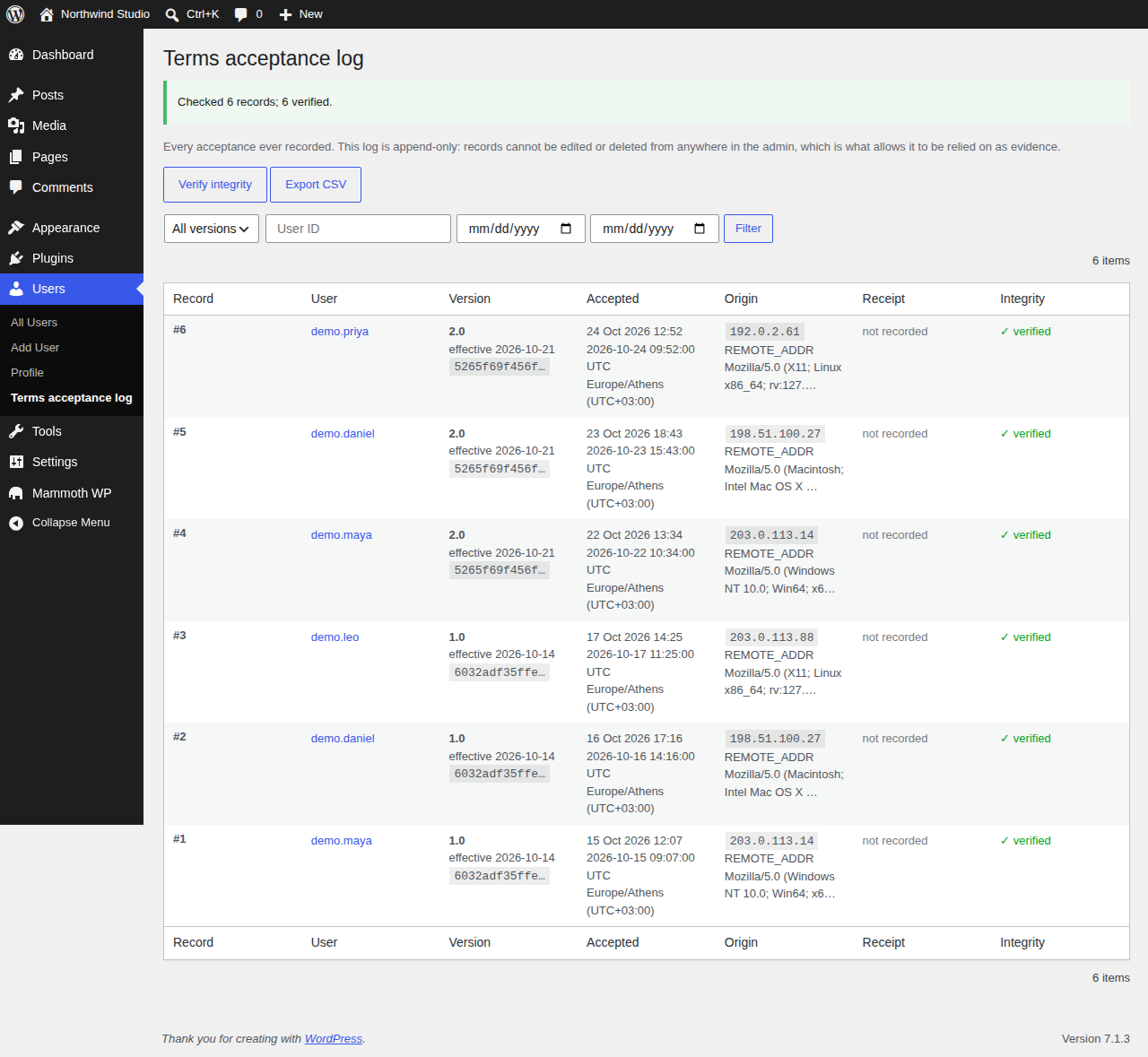


Blocks
This plugin provides 1 block.
- Terms & Conditions Shows the current Terms & Conditions — version, effective date and summary — with the full text in a modal.
Installation
- Install and activate the plugin from Plugins > Add New, or upload the zip.
- Go to Settings > Terms & Conditions and write your terms.
- Choose which roles must accept them, then publish the version.
Users in the selected roles are prompted the next time they load the site or the dashboard while logged in. Whoever activated the plugin becomes its first manager; managers are the only people who can read the acceptance log. Records appear under Users > Terms acceptance log.
FAQ
-
No, and the distinction drives the whole design. Accepting Terms & Conditions
is an access-control and contractual-compliance mechanism resting on
Art. 6(1)(b) and 6(1)(f) GDPR, not consent under Art. 6(1)(a). Practically:
acceptance is not withdrawable in the Art. 7(3) sense, and records are not
deleted on request. If you need cookie consent, you need a different plugin —
run both. -
Which roles are prompted?
-
Until you choose, every role. The plugin does not guess a safe subset, and
picking the roles is step 3 of the setup for that reason. Settings Terms &
Conditions lists every role on the site. -
Does it lock users out until they accept?
-
No. The popup has a “skip for now” button, and a user who clicks it keeps
working. Skipping is not recorded as an acceptance or a decline: it only hides
the popup for that user for 12 hours (filterable with
mmwp_terms_skip_duration) and fires themmwp_terms_skippedaction; nothing
is written to the acceptance log or audit events. What persists is a
non-dismissable notice on every wp-admin screen, shown only to logged-in users
in scope who have not accepted the current version, until they accept. It is a prompt with no exit, not a wall — a hard lockout
risks stranding an administrator who needs the backend to fix the terms. -
What happens when I edit the terms?
-
Editing and publishing creates a new version with the next sequential
number, archives the full text permanently, and re-prompts everyone in scope.
Previous versions are never deleted, and republishing earlier text is a new
publication with a new number rather than a silent return to an old one — so
“revert the text and everyone counts as accepted again” cannot happen.Changing the text without publishing changes nothing. The daily cron only
picks up changes made through a content source that bypasses the settings
screen. -
Can a user withdraw their acceptance?
-
No. The record is evidence that a particular version was accepted at a
particular moment; that fact does not stop being true. A user who
does not want to accept can only skip the popup for now; that is not recorded
(see above), and the acceptance prompt returns until they accept. -
How do I handle an erasure request?
-
Through WordPress’s own Tools Erase Personal Data — the plugin registers an
eraser. It returns the acceptance records as retained, with the reasoning
shown to the requester rather than applied silently, and erases the context
(IP, User-Agent) of any record already past its retention period. Art. 17(3)(b)
and (e) disapply the right to erasure where processing is necessary for legal
claims, which is what proof of acceptance is. See the retention policy document in the plugin repository. -
How long is data kept?
-
Records live while the account exists, plus a dispute period defaulting to
five years, after which the IP address, IP source and User-Agent are erased
and the record is retained in anonymised form. Records are anonymised, never
deleted. Published versions of the terms are never deleted at all — an
acceptance whose text cannot be reproduced proves almost nothing. -
I’m an administrator. Why can’t I see the acceptance log?
-
Access is an explicit list of user accounts, not a capability. That is
deliberate:manage_optionsgets handed out liberally by role plugins and
during onboarding, and the log is evidence about other people. Whoever
activated the plugin is the first manager and can appoint others; the last
manager cannot be removed. -
Can I delete a record, or fix a wrong one?
-
No, by design. There is no update or delete path in the code and no edit or
delete affordance in the admin. If a record is wrong, the answer is a new
record plus an audit event. Their absence is the control, not an oversight. -
Does it work behind Cloudflare or a load balancer?
-
Yes, but configure the trusted proxies first or the audit log records the
proxy’s address instead of the visitor’s. Return your proxy’s address or CIDR range
from themmwp_terms_trusted_proxiesfilter. Forwarded IP headers are ignored by default because trusting
them unconditionally would let any client write its own address into the log. -
Does it support multisite?
-
Each site gets its own tables and settings, so activate it per site. Network
activation is not supported: the tables are created for the site the
activation runs on, not for every site in the network. -
Where do I get evidence for a dispute?
-
Users Terms acceptance log, which shows every record with its integrity and
delivery status, filterable, with CSV export and an on-demand integrity check.
the evidence-handling document in the plugin repository covers the procedure, what the evidence actually
shows, and the limitations you should disclose alongside it. -
What personal data is stored?
-
Per acceptance: user ID, login and e-mail as they were at the time, the version accepted, UTC and local timestamps with timezone, the site identifier, IP address (and how it was determined), User-Agent and cryptographic signatures. Three user-meta markers record the version each user accepted. No fingerprinting, MAC address or geolocation is collected.
-
Does it support the WordPress personal data tools?
-
Yes. It registers a personal-data exporter and eraser (
wp_privacy_personal_data_exporters,wp_privacy_personal_data_erasers) and adds suggested text to the Privacy Policy guide withwp_add_privacy_policy_content(). -
Does it contact any external service?
-
No. There are no remote calls, no CDN assets, no update checks and no telemetry. The bundled Support screen (Mammoth WP > Support) sends one e-mail through
wp_mail()to info@mammothwp.com, only when an administrator presses Send. A site report is attached only if they tick “Include site report” after previewing exactly what it contains. -
What happens when I delete the plugin?
-
By default the acceptance evidence is kept. When you click Delete on the Plugins screen, a dialog asks whether to keep the acceptance evidence (recommended) or delete it permanently; deleting requires typing the plugin name. Either way the plugin’s settings, scheduled tasks and options are removed. If you keep the evidence, the log, the version archive, the audit events, the per-user acceptance markers and the signing key stay in your database, so they can still be verified later.
You can change the choice at any time under Settings > Terms & Conditions, or purge the evidence immediately with
wp mmwp terms purge(it only reports what exists; add--forceto delete,--dry-runto never delete). Developers can override the choice with themmwp_terms_drop_data_on_uninstallfilter. -
Can I manage it without the admin screens?
-
Yes: REST (
mmwp/v1/terms/...), WP-CLI (wp mmwp terms ...) and the Abilities API, all declared once. Reading the acceptance log over any of them requires being a plugin manager and returns a redacted shape (no IP address, User-Agent or e-mail).
Reviews
There are no reviews for this plugin.
Contributors & Developers
“MammothWP Acceptance Logs” is open source software. The following people have contributed to this plugin.
Contributors
Translate “MammothWP Acceptance Logs” into your language.
Interested in development?
Browse the code, check out the SVN repository, or subscribe to the development log by RSS.
Changelog
1.0.0
- First release on wordpress.org. See CHANGELOG.md for the full history.