
Description
Luminarix is a payment gateway provider that helps merchants accept, process and manage payments securely. This plugin connects your WooCommerce store to the Luminarix payment API.
About Luminarix
Luminarix Sdn. Bhd. provides payment gateway services including FPX, cards, e-wallets (such as Touch ‘n Go, GrabPay, Boost, ShopeePay and MAE) and DuitNow QR. Learn more at lmnrx.com.
What the plugin does
The plugin creates payment orders, redirects customers to the Luminarix hosted checkout, receives signed status callbacks and keeps WooCommerce order status in sync.
An active Luminarix merchant account and API credentials are required. Credentials are provided by Luminarix when you apply at lmnrx.com and are not included with the plugin.
Features
- Separate sandbox and production URLs and credentials
- Environment-specific settings display
- HMAC-SHA256 Base64 request checksums
- Signed callback verification with timestamp and replay protection
- Hosted checkout redirects and channel-specific payment instructions
- Automatic and manual transaction-status synchronization
- Scheduled polling for pending payments
- Full and partial WooCommerce refunds
- Refund callback tracking isolated from the original payment transaction
- HPOS and Cart/Checkout Blocks compatibility
- Optional masked WooCommerce debug logs
- Admin order transaction details and gateway diagnostics
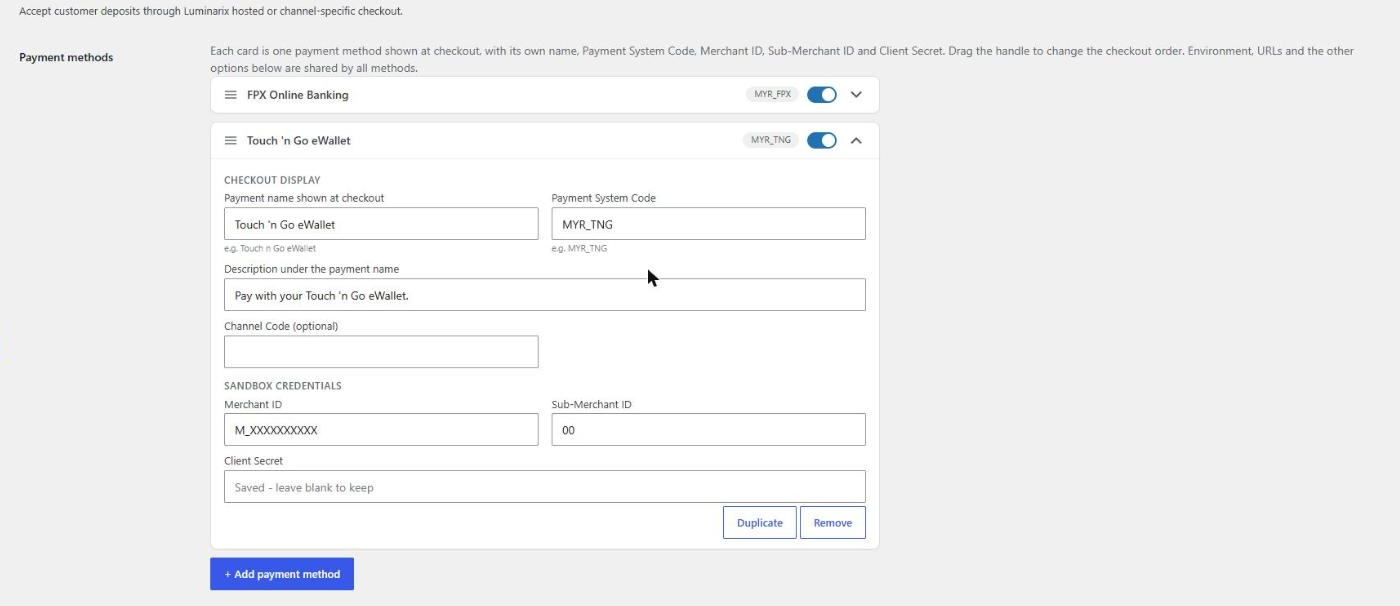
- Multiple payment methods (for example FPX and Touch n Go) from a drag-and-drop repeater; each has its own checkout name, Payment System Code, Merchant ID, Sub-Merchant ID and Client Secret (sandbox and live)
- Configurable payment system, channel, currency, phone country code, timeout, and order prefix
External services
This plugin connects to the Luminarix payment API only after a store administrator enables and configures the gateway and a customer selects it, or when an administrator/automated status task manages an existing Luminarix transaction.
Data sent can include merchant credentials, order reference, amount, currency, return and callback URLs, payment system/channel, and optional customer billing name, email, phone, and address. Refund and transaction-status requests send the corresponding transaction identifiers and amounts. This data is required to provide the payment service and is sent to the sandbox or production API base URL entered by the store administrator.
Service provider: Luminarix Sdn. Bhd. (lmnrx.com). Privacy Policy: https://www.lmnrx.com/agreements/Privacy%20Policy.pdf. The Terms of Service and Merchant Agreement are available from the Luminarix website and onboarding. Store owners should provide their customers with Luminarix’s applicable terms and privacy policy.
Privacy
The plugin stores Luminarix transaction identifiers, references, statuses, environment, synchronization timestamps, callback fingerprints, payment instructions, and refund records as WooCommerce order metadata. Optional debug logs are stored through the WooCommerce logger and mask sensitive fields. Uninstalling the plugin removes gateway settings and its last-callback diagnostic; order transaction metadata remains as part of the store’s financial records.
Suggested privacy-policy text is registered with WordPress under Settings > Privacy > Policy Guide.
Screenshots
Installation
- Upload the
luminarix-payment-gateway-for-woocommercedirectory to/wp-content/plugins/, or install the ZIP through Plugins > Add New > Upload Plugin. - Activate the plugin. WooCommerce must already be active.
- Go to WooCommerce > Settings > Payments > Luminarix Payment.
- Select Test / Sandbox and enter the base URL, merchant ID, numeric sub-merchant ID, and client secret supplied by Luminarix.
- Confirm the payment system code, allowed currency, and optional channel code.
- Save changes and use Test API Connection.
- To offer more than one payment method, click Add payment method under Additional payment methods, enter the checkout name, Payment System Code and credentials for each, and drag the cards to set the checkout order.
- Place and complete a sandbox order before configuring and enabling Live / Production.
FAQ
-
Can I offer more than one payment method?
-
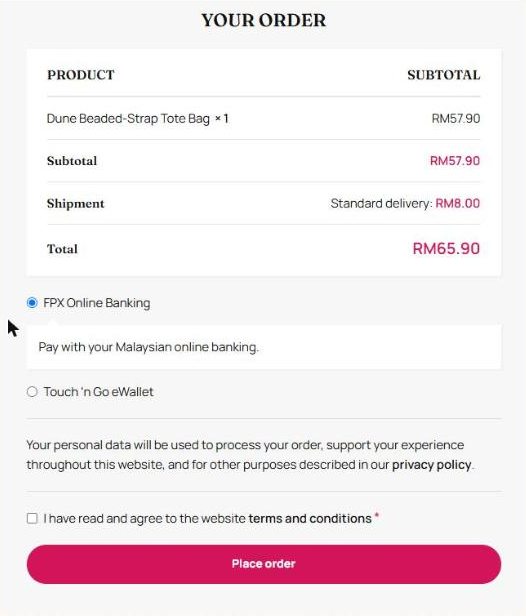
Yes. Under WooCommerce > Settings > Payments > Luminarix Payment, click Add payment method for each one (for example FPX and Touch ‘n Go). Each has its own checkout name, Payment System Code, Merchant ID, Sub-Merchant ID and Client Secret. Drag the cards to set the order shown at checkout.
-
Does it require WooCommerce?
-
Yes. WooCommerce 7.8 or later must be active.
-
Where do I get API credentials?
-
Luminarix provisions sandbox and production credentials during merchant onboarding.
-
Where can I find the callback URL?
-
The exact callback URL is displayed in the gateway settings. The plugin includes it automatically in payment and refund requests.
-
Where are debug logs stored?
-
Enable Debug log in the gateway settings, then open WooCommerce > Status > Logs and select the
luminarix-wcsource. Checksums, secrets, phone numbers, account/card numbers, and CVV values are masked. -
Does it support WooCommerce HPOS and Checkout Blocks?
-
Yes. The plugin declares compatibility with High-Performance Order Storage and Cart/Checkout Blocks.
-
What happens when I switch environments?
-
Sandbox and live credentials are stored separately. Existing orders retain their environment so later callbacks are verified with the correct secret.
Reviews
There are no reviews for this plugin.
Contributors & Developers
“Luminarix Payment Gateway for WooCommerce” is open source software. The following people have contributed to this plugin.
Contributors
Translate “Luminarix Payment Gateway for WooCommerce” into your language.
Interested in development?
Browse the code, check out the SVN repository, or subscribe to the development log by RSS.
Changelog
1.6.0
- Added an Additional payment methods repeater: unlimited methods, each with its own checkout name and description, Payment System Code, optional channel code, and sandbox and live Merchant ID, Sub-Merchant ID and Client Secret.
- Each method appears as its own option at checkout (classic checkout and Checkout Blocks); drag and drop sets the order.
- Callbacks, return handling, status polling, retries, refunds and Test API Connection use the credentials of the method the customer chose.
- Added the countryCallingCode payer field required by the Luminarix deposit API.
1.5.2
- Generate a unique Luminarix order ID for every payment attempt so failed payments can be retried safely.
1.5.1
- Prevented Checkout Blocks from saving the Store API order and its line items twice during checkout.
1.5.0
- Added WooCommerce Action Scheduler synchronization with a WP-Cron fallback.
- Added per-order retries with exponential backoff and Retry-After support for API rate limits.
- Added a durable callback event queue and transaction-status verification before callback success completion.
- Added automatic provider/WooCommerce status mismatch repair with paid-order downgrade protection.
- Added per-order synchronization source, result, retry, error, and callback diagnostics.
- Added a WooCommerce synchronization health dashboard and bulk reconciliation tool.
- Added configurable admin and daily email alerts for potentially stuck orders.
1.4.5
- Replaced the fragile custom recurring WP-Cron schedule with self-renewing single events.
- Automatically migrates and repairs polling events created by earlier versions.
- Prevented overlapping polling workers and duplicate cron events.
- Reduced the default polling batch to 10 orders and made the batch size configurable to limit API request bursts.
1.4.4
- Return callback acknowledgements as application/json with a SUCCESS status.
1.4.3
- Return a plain SUCCESS response body after accepting new or duplicate callbacks.
1.4.2
- Move orders to Completed after a signed success callback or a successful server-to-server transaction status check.
- Automatically reconcile legacy Luminarix orders left in Processing after a previously stored successful payment confirmation.
1.4.1
- Added a persisted unique suffix to new Luminarix order references.
- Included orderId in the deposit signature and moved outbound signatures from JSON bodies to the X-Signature header.
1.4.0
- Hardened signed callback order and transaction reference validation.
- Prevented delayed PENDING, FAILED, or CANCELLED events from downgrading paid orders.
- Normalized common success, failure, cancellation, and expiry status aliases.
1.3.9
- Changed the customer return endpoint to a query-free WooCommerce API path.
- Added compatibility parsing for legacy double-question-mark return URLs.
- Validate returned order and transaction references and confirm status server-side.
1.3.8
- Persist deferred Store API orders before WooCommerce invokes legacy payment gateways.
- Added explicit logging for successful and failed deferred-order persistence.
1.3.7
- Added order-reference capture for classic shortcode checkout flows.
- Added compatibility with themes that invoke the gateway with order ID zero after classic order creation.
1.3.6
- Captured the Store API order before payment-method assignment for compatibility with WooCommerce checkout hook ordering.
- Retained Luminarix validation before a captured session order can be used for payment.
1.3.5
- Preserved the Luminarix Checkout Blocks order ID before theme status hooks run.
- Added recovery for customized checkout flows that invoke the gateway with order ID zero.
1.3.4
- Added a clear diagnostic when Cloudflare blocks requests to the Luminarix API.
- Added the Cloudflare Ray ID and response content type to gateway debug logs.
- Added a descriptive integration User-Agent to Luminarix API requests.
1.3.3
- Fixed blank admin-post responses from Test API Connection and manual payment-status actions.
- Registered admin action routes independently of WooCommerce gateway initialization.
1.3.2
- Added Checkout Blocks session-order resolution for themes that pass a non-standard payment order reference.
- Added diagnostic logging when a checkout order reference cannot be resolved.
1.3.1
- Prevented a redundant pending-status transition during Checkout Blocks payment processing.
- Added order persistence checks so deleted or unavailable orders return a controlled checkout error.
- Persisted the Luminarix order reference before the deposit request so immediate callbacks can resolve the order.
- Added validation for malformed successful payment responses.
1.3.0
- Added WordPress.org-compatible licensing, metadata, readme sections, privacy disclosure, uninstall cleanup, and distribution rules.
- Added privacy-policy guide content.
- Documented the external Luminarix service and transmitted data.
1.2.0
- Added optional WooCommerce-style debug logging.
- Added configuration and callback diagnostics.
- Added a direct gateway Settings link.
1.1.1
- Added environment-specific settings visibility.
1.1.0
- Added environment-aware callbacks, exact order matching, detailed validation errors, unique API order prefixes, and isolated refund callback tracking.
1.0.0
- Initial release.