

Description
Lucid Lab Media & Products Cleanup finds unused, duplicate and missing media in your WordPress library and helps you clean it up safely. Nothing is deleted without your confirmation, and files go to a restorable quarantine first.
Free includes:
* Orphan Images scan, with shared-reference protection for featured images, galleries, categories and supported page-builder content.
* Byte-identical duplicate detection (SHA-256) and manual image comparison.
* Shared Images usage report (with file names) and Missing Images report.
* Change image: upload a replacement file for an image that is used in many places. The image keeps its ID, so every page, product and gallery shows the new file at once; thumbnails are rebuilt and Undo puts the old file back.
* Manual selection, restorable quarantine, and undo of earlier merges and renames (also after Pro is deactivated).
* Single-image renaming from the attached post title, image title or a cleaned-up slug, with collision handling and rename history.
* Thumbnail regeneration with progress, Stop, Resume and Cancel.
* Full-library WebP conversion and delivery, plus a ten-image WebP/AVIF comparison.
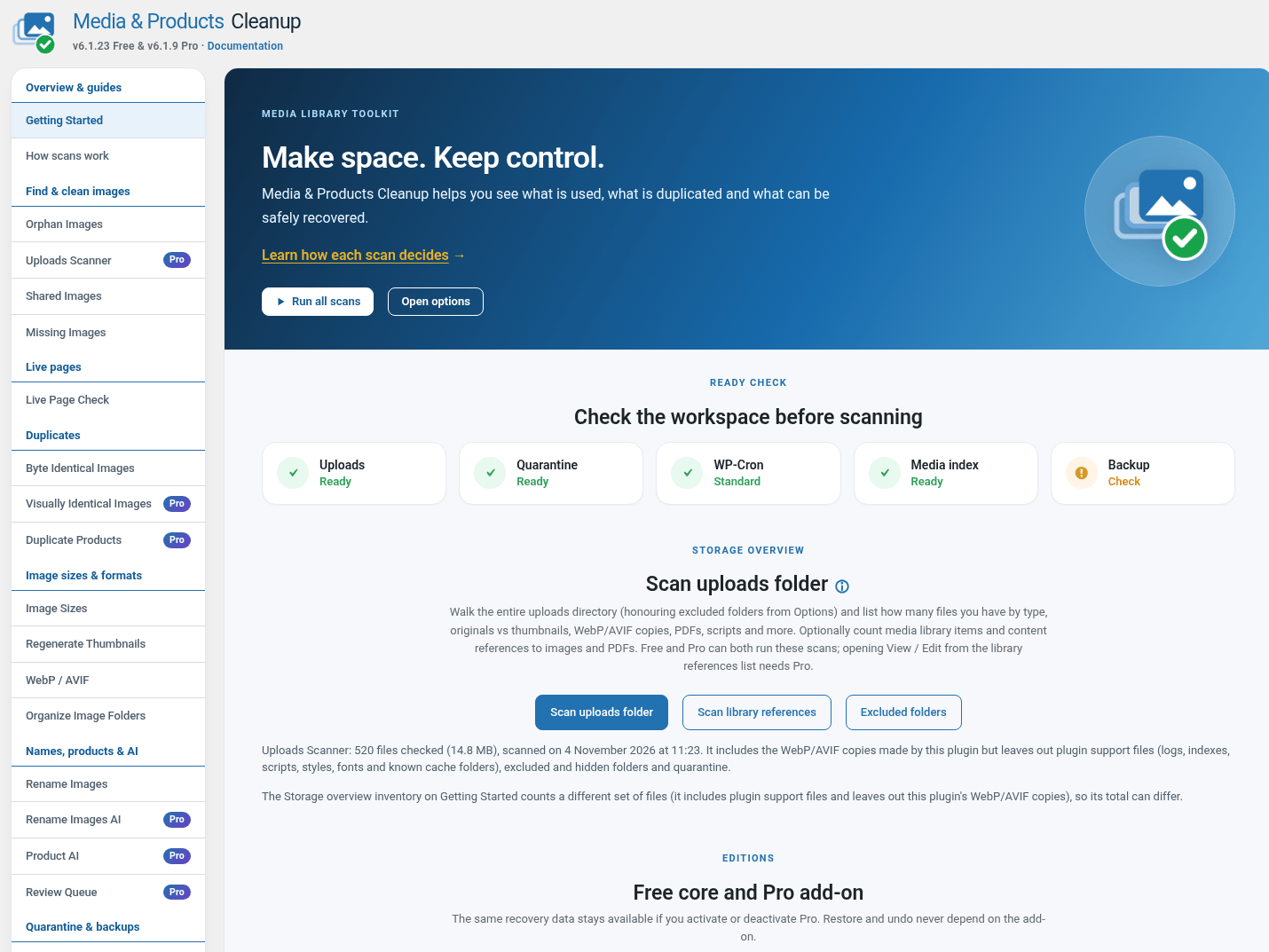
* Live Page Check (own menu item): opens every public page of the site and reports broken images, stylesheets, scripts, fonts, video, audio, documents and internal links, with the page each was found on.
* Byte-identical duplicates can be merged one group at a time, with Undo.
* WebP conversion with a careful mode that skips files which fail repeatedly, a failure log (CSV) and counts per reason.
* Long result lists have a “Go to page” box next to the pager.
* The left menu is grouped under section headers: Overview & guides, Find & clean images, Live pages, Duplicates, Image sizes & formats, Names, products & AI, Quarantine & backups, Tools & logs, Settings.
* Debug logging warns you while it is on (since when, log size, when it switches off), has a one-click Turn off, and switches itself off after 7 days unless you change that.
* Saved scan statistics, CSV reports, and optional weekly or monthly email summaries.
* Database, uploads and full-site backups. Database backups are signed, and Restore only accepts dumps this plugin made on this site.
The separate Pro add-on (not included in this package) adds the Uploads Scanner, unused image-size cleanup, visually similar candidates, reference merging, Duplicate Products, bulk renaming, AVIF conversion, AI filename and alt-text suggestions, Product AI review (title, descriptions, tags and image alt text from the product image, reviewed field by field before anything is saved), Change image with “Pick another image” (points every use of an image to a different Media Library image, with Undo), Run All, scheduled scans and WP-CLI, and checking of links on other sites.
The source code of this Free plugin is on GitHub: https://github.com/lucidlab-eu/mpc
Safety
- Quarantine can be undone as long as the files are in quarantine. Manual Purge and the Missing Images record purge are permanent; without a backup they cannot be undone.
- Free never purges automatically. The automatic 30-day quarantine cleanup needs Pro and is off until you turn it on in Options.
- Reference checks are the same in Free and Pro. Review the findings before you change media.
- The full-site backup contains WordPress core files, plugins, themes, uploads and a database dump. Other wp-content folders and custom files in the site root are not included. Restore a full-site backup with your hosting provider’s tools or a WordPress recovery tool.
External services
AI suggestions connect only when an administrator configures a provider and requests an analysis or connection test. The selected image and any related title, filename or product text in that request, together with the configured API credential, are sent to that provider. OpenAI requests go to api.openai.com (terms: https://openai.com/policies/business-terms/ ; privacy: https://openai.com/policies/privacy-policy/). Anthropic requests go to api.anthropic.com (commercial terms: https://www.anthropic.com/legal/commercial-terms ; privacy: https://www.anthropic.com/legal/privacy). The local Ollama option sends the same analysis input to the administrator-configured local endpoint, normally 127.0.0.1:11434; it is not a hosted third-party service. AI is optional and is not contacted on activation.
Install count (off by default): only when an administrator opts in, with “Yes, count this site” in the notice shown on the plugin screen 7 days after installation or by ticking “Tell Lucid Lab that this site uses the plugin” under Options, the site sends a POST request to Lucid Lab at https://lucidlab.eu/wp-json/lucidlab/v1/free/ping with the site address (home URL), the plugin version, the plugin name and a random install ID. It is sent right after opting in, after each plugin update and once a week, and is used only to count active installs. No users, e-mail addresses, content, database data or settings are sent; the HTTP request necessarily includes the site’s network address. Unticking the box stops it at once. A licensed Pro add-on does not turn it on: it is sent only after the opt-in. Lucid Lab privacy policy: https://lucidlab.eu/privacy/ .
Check live pages requests only this site’s own pages and the addresses they load or link to; it sends nothing to Lucid Lab. With the Pro add-on and “Check other sites” ticked, it also sends HEAD or GET requests (no cookies, no content of this site) to the other sites the pages link to or load from, which receive the site’s network address and user agent like any visitor request.
Core-file checking requests official checksums from api.wordpress.org only when an administrator starts that check. WordPress version and locale are sent; the HTTP request necessarily includes the site’s network address. WordPress.org terms: https://wordpress.org/about/license/ ; privacy: https://wordpress.org/about/privacy/ .
Source code
The JavaScript and CSS are shipped unminified and are the editable sources: assets/js/admin.js (shared helpers and job list), the job modules in assets/js/admin/ (WebP and AVIF, Regenerate Thumbnails, Backup, Uploads inventory, Database Cleaner, core file check, Other Sizes on Disk, Rename Images, AI suggestions, duplicate merging, quarantine and duplicate trash, and the Change image dialog) and assets/css/admin.css. No build step or bundler is needed. The paid Pro add-on has its own source and is not part of this package.
Screenshots




Installation
- Install and activate this Free core.
- For premium features install and activate the separate Media & Products Cleanup Pro ZIP.
- Both editions use the same settings, queues and recovery records. No data migration is required.
- Deactivate Pro to return to Free. Do not delete quarantine folders manually.
- Uninstall preserves recovery data and settings for reinstallation.
FAQ
-
Does Free stop working after a trial or image quota?
-
No. Free has no trial period or image-count limit.
-
Does Pro require an AI API key?
-
Pro AI supports a configured hosted provider or local Ollama. Hosted providers require your own credentials and may charge for requests.
-
What is the difference between “Upload replacement file” and “Pick another image”?
-
Upload replacement file (Free) puts a new file behind the same image, so its ID and every place it is used stay the same. Pick another image (Pro) changes every place that uses the image (featured images, galleries, categories, content, page builders, widgets) to a different image from your Media Library. Both can be undone; undoing a Pick another image change needs Pro to be active.
-
Does Product AI review change my products by itself?
-
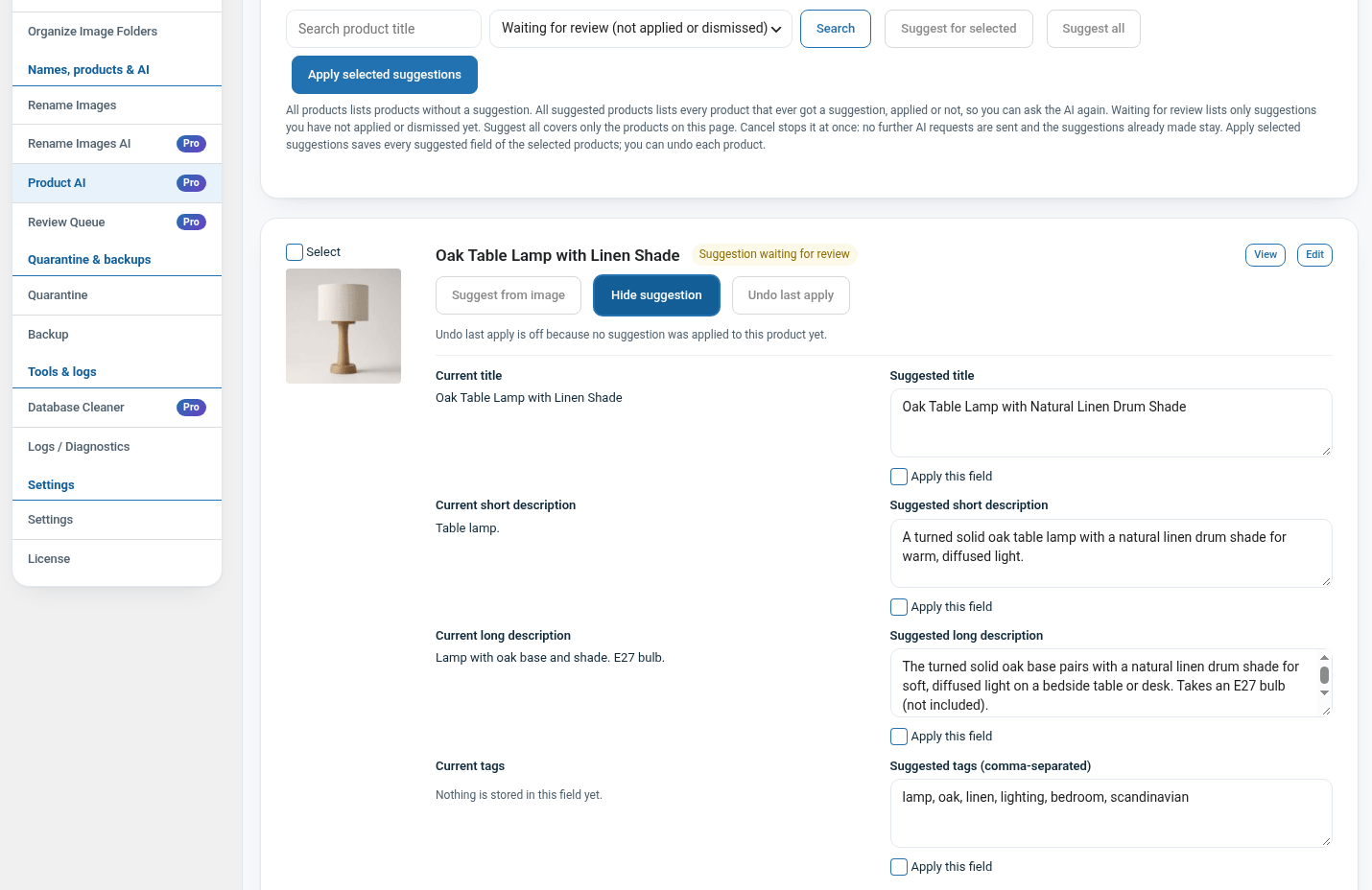
No. Suggestions for title, short and long description, tags and image alt text are stored first. You open “See suggestion”, compare them with the current text, edit them, and apply only the fields you tick (or Apply all, or Dismiss). Undo restores the previous text unless the product was edited again in the meantime. Suggest all can be cancelled; no further requests are sent after Cancel. Product AI review needs Pro and an AI provider you configure.
-
Why does the plugin show a “detailed logging is on” notice?
-
Detailed logging stores extra data and slows the plugin down a little, so while it is on every plugin page shows when it was turned on, how big the log is and when it switches off. Use Turn off logging in the notice, or untick “Turn logging off automatically after 7 days” on the Logs page to keep it on. On the Dashboard and Plugins screens you can hide the notice until your next login.
-
Several media records can point at one file on disk. They are listed with the group but are not counted as copies, and merging never moves a file another record still uses.
-
How long does Live Page Check take?
-
It requests your pages politely: at most 4 requests per second, it pauses when the server answers 429 or 503, and it identifies itself as LucidLabLiveCheck. On a fast host it checks about 2 pages per second, so a site with 4,400 pages takes about 35 minutes; when each page takes about 1.2 seconds to build, expect about 70 to 75 minutes. Links to pages it already checked and to files on your own site are resolved without extra requests.
-
Which translations are included?
-
The Free plugin ships only the translation template (.pot). Translations come from WordPress.org language packs, made by the community at translate.wordpress.org, and WordPress installs them automatically. The Pro add-on includes Dutch, German, French, Spanish, Italian, Brazilian and European Portuguese and Polish for its own screens.
-
How are images found that are used in custom fields, page builders or other plugins’ tables?
-
Before an image is called unused, the scanners read post content and excerpts (blocks, shortcodes, HTML, CSS), all custom fields (serialized, JSON and builder data such as Elementor, Divi, WPBakery and Beaver Builder, without creating PHP objects), term descriptions and term meta, theme and widget settings, other saved settings, ACF image, file and gallery fields (also on options pages), Code Snippets and WooCommerce galleries. IDs, URLs (also relative, resized, escaped or on a CDN) and bare file names all count. Orphan Images and the Uploads Scanner check current references again just before anything moves, and everything goes to a quarantine you can restore.
Images used only by code, or stored in a plugin’s own table, can be declared with two filters (for example in a small must-use plugin):
add_filter( 'lucidlab_mpc_extra_references', function ( $refs ) { $refs['ids'][] = 123; $refs['urls'][] = 'brand-logo.png'; return $refs; } );

add_filter( 'lucidlab_mpc_reference_sources', function ( $sources ) { $sources[] = array( 'table' => 'my_slider_slides', 'columns' => array( 'settings' ), 'id_columns' => array( 'image_id' ) ); return $sources; } );
lucidlab_mpc_extra_references takes attachment IDs and upload URLs, paths or file names. lucidlab_mpc_reference_sources adds database tables: “columns” are searched for URLs, file names and IDs under media keys in serialized or JSON data, “id_columns” hold attachment IDs. Table and column names are checked against the database, and the tables are only read, in batches. lucidlab_mpc_acf_media_field_types adds third-party ACF field types that store attachment IDs.
-
Does licence expiry disable recovery?
-
No. The Free plugin never contacts a licensing server and has no licence to expire. Only the separate Pro add-on checks its licence with Lucid Lab. Quarantine, restore and undo are part of Free and keep working without Pro.
Reviews
There are no reviews for this plugin.
Contributors & Developers
“Lucid Lab Media & Products Cleanup” is open source software. The following people have contributed to this plugin.
Contributors
Translate “Lucid Lab Media & Products Cleanup” into your language.
Interested in development?
Browse the code, check out the SVN repository, or subscribe to the development log by RSS.
Changelog
6.1.24
- Improved: the WebP/AVIF failure list shows a “No preview” box of the same size when an image file is missing, unreadable or not a valid image, instead of a broken image icon. The file is checked on the server before the list is made.
- Improved: every plugin thumbnail that fails to load in the browser (Orphan Images, Shared Images, duplicates, Rename and other result lists) is replaced by the same “No preview” box, so rows keep their size. Quarantine previews keep their own retry and placeholder.
- Screenshot captions updated.
- Works with Pro 6.1.9.
6.1.23
- Improved: WPBakery image ID lists are references: images=”1,2,3″ in vc_gallery and vc_images_carousel and other shortcode attributes named after media (photo, photos, gallery_ids, logo_id …), and the attachment ID kept in row and column background URLs (css=”…?id=123″). Size, opacity or height numbers do not count.
- Improved: serialized objects in custom fields, such as Beaver Builder layouts (_fl_builder_data, _fl_builder_draft), are read property by property without creating PHP objects, so photo, bg_image, photos and gallery IDs and their URLs count. Serialized data that PHP cannot read is searched as text for upload URLs and IDs under media keys.
- Improved: ACF image, file and gallery fields saved as options (options pages, widgets) count by ID. A number in an option only counts when ACF’s own field reference says it is a media field, so unrelated numeric settings never protect an image.
- New: lucidlab_mpc_extra_references filter to declare attachment IDs, URLs or file names used by code, and lucidlab_mpc_reference_sources filter to add a plugin’s own database tables to every scan. Registered tables are checked against the database and only read, in batches. lucidlab_mpc_acf_media_field_types filter for third-party ACF media field types.
- Improved: Orphan Images checks current references once more right before a batch is quarantined, like the Uploads Scanner. An image used since the scan (edited content, a featured image, an ACF field) is skipped and listed as in use now.
- The reference index is rebuilt once after updating.
- Works with Pro 6.1.9.
6.1.22
- Fixed: starting a job no longer replaces a job with the same name that is still running, paused or waiting for a free job slot. The start is refused with a message that says to resume or cancel the saved job in Current Running Jobs; a job that was abandoned (closed browser tab, no background hand-off) is still replaced. Scheduled Pro automations try again a few minutes later when the same job is still running.
- Fixed: a PHP warning (Undefined variable $job) logged on every job start.
- Fixed: “Restore all in this section” and “Quarantine all” on the Uploads Scanner did one batch per request instead of continuing for several seconds, and logged a PHP warning (Undefined variable $repeatable).
- Works with Pro 6.1.9.
6.1.21
- Table quarantine never accepts a protected table: WordPress core (also multisite), every table that WooCommerce creates (orders and HPOS order tables, order items, customers and lookups, sessions, tax, shipping, payment tokens, webhooks, admin notes, download log, stock and fulfillment tables) and the Action Scheduler tables, plus this plugin’s own tables. They stay protected even while WooCommerce is inactive. Developers can protect more tables with the lucidlab_mpc_protected_tables filter; built-in entries cannot be removed.
- Works with Pro 6.1.9.
6.1.20
- Quarantine Health: “Purge selected broken artifacts” now disables itself with a spinner while the purge runs, and every artifact checkbox gets an info icon that explains what the artifact means on hover.
- Works with Pro 6.1.8.
6.1.19
- Fixed: “Restore all in this section” aborted with “No items remain” before it started, and the Quarantine page could print a piece of PHP source under the section buttons.
- Works with Pro 6.1.8.
6.1.18
- Quarantine: new “Restore all in this section” button next to “Purge all in this section”. One click restores every set in that section, after a confirmation. The sections that are undone with “Undo merge” (Byte Identical and Visually Identical Images) keep only their per-set buttons. A section restore runs as a background job that walks the sets one by one with the same resumable restore used for single sets, so an Uploads Scanner section with tens of thousands of files keeps working across requests. Without JavaScript the restore runs in one request. Free can also restore sections whose purge needs Pro.
- Restoring a set or an item no longer reloads the whole Quarantine page: the restored set disappears from its list at once, the result is shown above the page and the other Restore buttons come back immediately. While a restore runs the other restore buttons stay disabled, so a second restore can no longer start during the wait.
- Works with Pro 6.1.7.
6.1.17
- WebP and AVIF copies are now written next to the original image (for example 2024/05/photo.jpg.webp) instead of in uploads/lucidlab-mpc-cleanup/webp/ or avif/. The two files stay together in the media folder, and the browser is still served the copy through the uploads rewrite.
- When a copy already exists and the new conversion is smaller, the existing copy is moved to uploads/lucidlab-mpc-cleanup/replaced/ before the new one is written, so the older file can be put back. A copy that is linked from content is left in place and the new conversion is not written. When the new conversion is not smaller, the existing copy is kept.
- Copies made by earlier versions in the plugin folder and in uploads/webp/ and uploads/avif/ keep being served; they are not moved and no longer block a new copy beside the original.
- Works with Pro 6.1.7.
6.1.16
- An attachment can record a WebP/AVIF copy that no longer exists while the image the copy was made from is still in the uploads folder. Regenerate Thumbnails used to count those as “source file missing” and leave the product image broken. It now rebuilds the sizes from the original file, moves the attachment record to that file (including its type) and generates the thumbnails next to it, so the image displays again.
- Works with Pro 6.1.7.
6.1.15
- Older versions kept the WebP/AVIF copies in uploads/webp/ and later moved them to uploads/lucidlab-mpc-cleanup/webp/. The site still served the old address through an Apache rule, but on the server the recorded file no longer existed, so Regenerate Thumbnails counted thousands of visible product images as “source file missing” and never built their thumbnails. The plugin now uses the copy that exists on disk when the recorded file is gone, for Regenerate Thumbnails, Missing Images and every other reader of the attachment path.
- An image whose original was removed but whose generated WebP/AVIF copy is still present is no longer reported as missing either.
- Works with Pro 6.1.7.
6.1.14
- A stored attachment path that starts with a slash (some imports and converters write
/webp/photo.webp) was read as an absolute server path, so the source file looked missing and Regenerate Thumbnails skipped the image even though its address worked in the browser. The path is now read the way WordPress reads it, relative to the uploads folder. - When the stored path points at a file that no longer exists but the attachment metadata still names the real file, Regenerate Thumbnails now uses that file, repairs the stored path and rebuilds the missing sizes instead of counting the image as missing.
- Works with Pro 6.1.7.
6.1.13
- Restoring a quarantine set that was made on another server, or before the site moved, put files back under the path recorded in the set, outside the current uploads folder, so the restored file stayed invisible. Restore now always uses this site’s uploads folder.
- The scans that decide whether an image is unused now read the Code Snippets table, in both the unused-image scan and the Pro Uploads Scanner, so an image used only in a snippet’s CSS (for example an admin bar or login logo) counts as in use and is not quarantined.
- Works with Pro 6.1.7.
6.1.12
- Only one job is paused when several scans share a WP-Cron request: a scan that has done no work yet waits for a fresh request instead of being paused at 0% because an earlier job used most of the memory or time. After five clean starts still meet the cap, it is paused as before.
- Read-only scans that an older version paused with the memory guard now resume once on their own instead of waiting for a manual Resume.
- A paused row now shows the guard’s reason (for example the memory cap) instead of the generic “Paused; Resume to continue”.
- Works with Pro 6.1.7.
6.1.11
- Checkboxes and radio buttons on every Lucid Lab admin screen now match the Image to Video plugin: 18×18 boxes with a blue ring, a blue fill and the white check when selected, and a darker blue on hover. The ring is an inset shadow, so WordPress 7.1 can no longer override its colour.
- Works with Pro 6.1.7.
6.1.10
- The shared pager accepts a list’s own URL, and the Database Cleaner selection total keeps counting the whole group when a group is paged (Pro 6.1.7).
- Opening a saved Duplicates page link now shows the saved results even without the scan flag.
- Works with Pro 6.1.7.
6.1.9
- Byte Identical Images primes post and metadata caches in batches while building groups, so a scan on a large library no longer runs separate lookups for every image.
- Works with Pro 6.1.6.
6.1.8
- Missing Images also caps the places that use an image when the saved result comes from an older version, so upgrading does not require a rescan to shrink that tab.
- Works with Pro 6.1.5.
6.1.7
- Faster admin pages: each tab now loads only the scripts it uses, the job list polls a smaller response, the job watcher no longer reads every finished job on each poll, and the Logs tab caches its WooCommerce counts for ten minutes.
- Preview thumbnails on Shared Images, Orphan Images, Byte Identical Images, Rename Images and Change image use an existing smaller copy instead of downloading the full-size original, load lazily, and reserve their space so the table does not jump while loading.
- Missing Images lists the first 20 places that use an image and states how many more there are, instead of rendering thousands of rows for one heavily reused image.
- Works with Pro 6.1.5.
6.1.6
- Internal: the AJAX dispatcher, the job command handler and the table-quarantine row collectors are split into smaller, single-purpose methods. No behaviour changes.
- Works with Pro 6.1.4.
6.1.5
- Compatibility release for Pro 6.1.4, which polishes its translations (quoted button and tab names, German thumbnail wording, Dutch orphan-image wording). Free behaviour is unchanged.
- Works with Pro 6.1.4.
6.1.4
- Compatibility release for Pro 6.1.3, whose screens now ship complete Dutch, German, French, Spanish, Italian, Portuguese and Polish translations. Free behaviour is unchanged.
- Works with Pro 6.1.3.
6.1.3
- Fixed: “Action error: Cannot read properties of undefined (reading ‘sync’)” when a job was still running while a plugin page loaded. The running-job cards are painted while admin.js is still executing, which is before the job modules have loaded, so the Live Page Check sync helper now does nothing until the page is fully loaded; later status polls sync as before.
- Works with Pro 6.1.2.
6.1.2
- Internal: the quarantine engine moved out of class-lucidlab-mpc-quarantine.php into separate files under includes/: paths and settings, storage locations, file quarantine and restore, database row quarantine, the browser, maintenance (retention, purge, sizes) and original-file backups. The class keeps its constants and loads the files, so behaviour is unchanged and a change to one quarantine area can no longer reach another.
- The translation template was regenerated against the current source (new file references, up-to-date header metadata).
- Works with Pro 6.1.2.
6.1.1
- Internal: the remaining admin JavaScript job areas moved out of admin.js into their own modules under assets/js/admin/: the Product AI cards (product-copy.js), the scan-exclusion and report-recipient chips (settings.js), the restore, purge and undo-merge forms (restore-purge.js), the image lightbox (lightbox.js), row selection with Select all and the Database Cleaner size total (selection.js) and the Review Queue bulk quarantine (review-bulk.js). admin.js keeps the shared helpers, the Current Running Jobs list and the job polling, and every module loads after it. Behaviour is unchanged; a change for one job can no longer reach another job’s code.
- Fixed: a job started from a page that has no card for it (for example a form action that belongs to another tab) ended in “Action error: Cannot read properties of null”. It now reports the result the job already has, or says that the job runs in the background so the page can be reloaded.
- Works with Pro 6.1.1.
6.1.0
- Internal: the admin JavaScript split by job area now also covers duplicate merging (Byte Identical Images and, with Pro, Visually Identical Images), quarantine, duplicate trash with the Keep choice, and the Change image dialog. They live in assets/js/admin/merge.js, quarantine.js and change-image.js; admin.js keeps the shared helpers, the Current Running Jobs list and the job polling, and every module loads after it. Behaviour is unchanged; a change for one job can no longer reach another job’s code.
- Fixed: after the first split, the quarantine buttons, preview sizes and the live-page check button could fail to resolve a shared helper. Every module now reaches the shared helpers reliably, and a new regression test catches a module that calls admin.js directly.
- Works with Pro 6.1.0.
6.0.436
- Internal: the admin JavaScript is split by job area into separate files under assets/js/admin/ (WebP / AVIF, Regenerate Thumbnails, Backup, Uploads inventory, Database Cleaner, core file check, Other Sizes on Disk, Rename Images and the AI suggestions). admin.js keeps the shared helpers, the Current Running Jobs list and the job polling; every module loads after it and is only active on the tab that uses it. Behaviour is unchanged; a change for one job can no longer reach another job’s code.
- Works with Pro 6.0.307.
6.0.435
- Internal: the main plugin class is split by job area into separate files (regenerate, backup, webp, orphans, shared, missing, live page check, duplicates, product copy, quarantine, exports, jobs, admin pages, rendering, scan state and rename). Behaviour is unchanged; a change for one job can no longer reach another job’s code.
- Works with Pro 6.0.306.
6.0.434
- Byte and Visually Identical Images: the checkbox “I understand — enable deletion for this action” now really guards merging. The Merge buttons stay disabled until it is ticked, and the server refuses a merge without it (nothing is changed). The same applies to the other actions with this checkbox: Orphan Images, Uploads Scanner and Other Sizes on Disk (move to quarantine) and Duplicate Products (trash, Pro).
- Merge all runs on the server as a job, like scans: it goes on when you leave the page or close the browser, and shows in Current Running Jobs at the top of the page (“Merging 94/603…”) with Stop, Resume, Cancel and Continue in background, also when you come back. All merges of one run form one quarantine set, so Undo merge reverses it as a whole. A job that gets close to the PHP time limit continues in the next request instead of pausing.
- While a merge runs, the other Merge buttons, Reset Keeps and the Keep choices wait, and Merge all keeps its spinner; they are available again when the merge is done or cancelled.
- Visually Identical Images (Pro 6.0.305) uses the same layout as Byte Identical Images: the same group cards, image rows and buttons, and at the bottom Reset Keeps, the checkbox and the red “Merge all groups on this page” button.
- Background jobs: a batch that has started finishes even when the page that sent it closes, and Continue in background (also sent by a page that is being closed) waits for the running batch instead of getting lost.
- Works with Pro 6.0.305.
6.0.433
- Quarantine: previews no longer stay an empty white box on busy hosts. When the server held a preview request or answered 502/503, the thumbnail stayed empty. Previews now load by script when they come into view, three at a time; a try that fails or takes longer than 15 seconds is retried once, and a preview that still cannot load shows the placeholder icon with the reason (for example HTTP 503 or no answer in time). While a preview loads it shows a grey box. Without JavaScript the image loads as before.
- Quarantine: the thumbnail uses the smallest stored size that is still sharp (at least 96 pixels), not the first size in the list; clicking it opens the original. A preview may be kept by the browser for an hour (private), so opening a set again does not request every thumbnail again. Downloads are not cached.
- Lighter on the server: the list of running jobs is checked every 8 seconds only while a job is active. With nothing running, or when the server answers with an error such as 502/503, the check slows down step by step to once a minute, and two checks never run at the same time. Starting a job makes it fast again.
- Works with Pro 6.0.304.
6.0.432
- Byte and Visually Identical Images (merge with Pro 6.0.304): merging now points every reference of the duplicate at the image that is kept, not only its ID: image URLs of every size (the same size of the kept image, else its closest size, else the full image), srcset, WebP/AVIF copy URLs, absolute, protocol-less and relative URLs, wp-image classes, data-id attributes, attachment links, gallery shortcodes and blocks, Elementor and other page-builder data (also JSON-escaped and serialized), WooCommerce product images and galleries, featured and category images. Before, pages kept the duplicate’s file URL, which is in quarantine after the merge, so the image showed as broken.
- Undo merge restores the exact text that was there before the merge. A reference edited after the merge is left as edited and counted in the message.
- Quarantine: new “Repair image links of earlier merges” card, shown only when there are merges made before this version. One click points the links those merges left on the merged duplicates at the kept images, using the merge records. Nothing changes until you click it; the changes are saved with the merge, so Undo merge still works. The result is shown and written to the log.
- Quarantine: WebP/AVIF copies that an interrupted quarantine request had already moved are now recorded when the batch is sent again, so Restore brings them back. Two requests for the same set can no longer overwrite each other’s manifest. Existing sets with such unrecorded copies (shown in Quarantine health as “Disk files not in manifest”) are repaired once on the next admin page.
- Quarantine previews and downloads, backup downloads: text printed by another plugin or theme during admin requests (for example an empty line or a byte order mark) is removed before the file, so previews no longer show as an empty box and downloads are not damaged. The log names it once per hour. A preview that still cannot be shown is replaced by a placeholder that says why.
- Live Page Check: addresses that Cloudflare adds to pages at its edge (/cdn-cgi/ scripts such as Email Obfuscation, Rocket Loader, Zaraz, challenges and RUM, /cf-fonts/ fonts, the Web Analytics beacon and Turnstile) are no longer reported as 404: they do not exist on the server, so a check from the server cannot load them. They are skipped (also for WordPress in a subfolder) and the results show “Cloudflare resources ignored: N”. Developers can change the lists with the lucidlab_mpc_crawler_edge_paths and lucidlab_mpc_crawler_edge_hosts filters.
- Buttons keep their width while they show the spinner.
- Works with Pro 6.0.304.
6.0.431
- Security (Nginx and other servers that ignore .htaccess): the private folders in uploads/lucidlab-mpc-cleanup/ (quarantine, work files, backups, Change image backups, Pro’s swap logs) now have a long random name (for example quarantine-<32 random characters>), generated once per site. The index.php, .htaccess and web.config deny files stay as extra layers. Nothing is stored outside the uploads folder.
- Quarantine: every quarantined file is stored under a random name ending in .bin, without its image or script extension. The real path stays in the set’s manifest, so the Quarantine tab, Restore, Purge, Undo merge, Quarantine health and the Database Cleaner restore work as before.
- Backups: a finished backup is stored under an encrypted name ending in .bin. The backup list, download (with the real file name), restore, delete and the signature check use the real name. Change image keeps the replaced files under random .bin names.
- Quarantine tab: every quarantined file is listed with its full original path (all files of a media item, not just its title), with a preview and a Download button. Previews and downloads go only through an authenticated admin request (administrator capability, nonce, path listed in the manifest). Downloads use the original file name and the right type; scripts and other files a browser could run are sent as a plain binary download.
- Upgrade: existing folders get their random name (one rename each) and existing quarantine sets and backups get their stored names, in batches, on the next admin page or daily cron run. Every rename is checked (new file present, same size, old name gone); a file that cannot be renamed keeps its old name, keeps working and is tried again later. Folders from an older uploads backup are merged again without overwriting newer files. If the options are lost (for example after restoring an older database), the folders already on disk are used again, and the key for the stored names is read from a recovery copy (a PHP file that only exits) in the private quarantine folder.
- The security warning only appears while private files can still be reached at a guessable address (a folder that could not be moved yet). Once everything is moved there is no warning; Diagnostics shows “Private folders: OK”. When it does appear, it names the folders and gives an updated Nginx rule that covers the old and the new folder names.
- Works with Pro 6.0.303.
6.0.430
- Visually Identical Images: the counters no longer show internal fields after a merge (“Algo”, which was the version number of the image-matching method, and “Sorted”). The page always shows Images checked, Candidate groups, Skipped and Reclaimable, in that order, also on sites where the old counters were already saved. When every group is merged, Reclaimable shows 0 B instead of the old total.
- Visually Identical Images: the merge button of each group is the same blue button as on Byte Identical Images (same colour, hover, spinner inside while busy). A header rule meant for the Show/Hide items button made it light grey. With Pro 6.0.303 the button is never greyed out: on a closed group it opens the group first, so you see the images while the preview asks you to confirm.
- Merge all groups (Byte and Visually Identical Images) shows the spinner inside the button while it runs and keeps its icon afterwards.
- Works with Pro 6.0.303.
6.0.429
- Visually Identical Images: merging a group now shows how far it is, the same as Byte Identical Images. A blue “Merging 94/493…” notice under the group header counts up while the group is merged in batches, followed by the result (“Merged … duplicate image(s) and updated … reference(s)”). Before, the progress line was printed below the last image of the group, so on a large group you only saw “Merging…” in the button. Merge all groups shows the same notice per group.
- Duplicate Products: while selected products are trashed, the Scan button and the status line no longer say “Scanning…”. The trash button shows the spinner instead, and the progress is shown in Current Running Jobs (items processed).
- Works with Pro 6.0.302.
6.0.428
- License is now a tab of the Media & Products Cleanup screen (Settings > License, with the same header and menu as every other page) when Pro is active. The page is laid out like the Database Cleaner License tab: a banner, the license status as four counters (status, domain, valid until, saved key) and the license key form. Old links to the separate License page open the tab.
- Works with Pro 6.0.302.
6.0.427
- No more movement while a page loads: scan buttons (such as Analyze sizes) keep their label and icon, the counters on every scan page (including WebP / AVIF) are printed with the page instead of replacing a placeholder, and the Options chips and the Shared Images View current results link are in the page from the start.
- Regenerate Thumbnails: an image whose original file is missing on disk is now counted as “source file missing” instead of “failed”. The completed box lists the failures by reason (for example: WordPress could not read the image, no image editor supports the format) and links to a CSV of every image that was not regenerated with its reason. The Logs tab gets one line per reason. Retry failed only retries real failures and tolerates deleted media records.
- Organize Image Folders: images whose Media Library file is a WebP/AVIF copy made by an older version (in uploads/lucidlab-mpc-cleanup/webp/…) are now previewed and moved. Their kept JPEG/PNG original and its old thumbnails move along, a name that already exists at the destination is shown in the preview (and skipped), and year/month folders left empty are removed.
- Orphan Images, Shared Images, Duplicate content and Visual duplicates no longer skip Media Library images whose file is such a WebP/AVIF copy. Moving one of them to quarantine takes the kept original along (restore brings everything back).
- Works with Pro 6.0.301.
6.0.426
- WebP/AVIF: the page no longer starts a stats refresh on load for a conversion that had already finished, so the Current Running Jobs card no longer flashes above the counters and the counters no longer jump. The counters refresh automatically only after a conversion that ran while the page was open; use Refresh stats otherwise.
- Every action button now shows its busy state inside itself: white with a blue border and a spinner on the text line, disabled until the action finishes. Spinners next to buttons (Refresh stats, Refresh in Shrink database, Purge, restore from quarantine, Undo rename, Rename) and buttons hidden behind a spinner are gone. Buttons lift slightly on hover.
- The space between the Completed notice and the counters is the same on every scan page (Missing Images, Shared Images and Duplicate content had a smaller gap when a hidden notice followed the Completed notice).
- Works with Pro 6.0.300.
6.0.425
- Show the Completed notice with its final time on the first paint on every scan page, with the counters loading below it. A user’s older scan job no longer replaces a newer completion time (for example a scheduled scan) after the page has loaded, and an old Live Page Check job no longer adds a notice to Missing Images. Live Page Check prints its Completed notice with the page as well.
- WebP/AVIF: the conversion notice is printed with the page on Free as well, and its time always comes from the saved job.
- Original / WebP / AVIF report: image IDs open the attachment edit screen in a new tab (the link carried an HTML-encoded ampersand and opened the wrong screen), and the product, page or post the image is attached to is linked too. The Check image copies button turns white with a border and an inline spinner while it runs.
- Works with Pro 6.0.299.
6.0.424
- Resolve Missing Images completion against the saved job before showing its time. Keep the WebP conversion completion in its single blue notice and remove the transient generic notice above it.
- Remove the image-copy report progress bar and open image edit links in a new tab.
- Works with Pro 6.0.299.
6.0.423
- Check all original/WebP/AVIF image copies through automatic 100-image AJAX batches, with progress and an in-place findings list.
- Refresh saved job status immediately on load and prevent old Run All WebP completion notices from duplicating a newer conversion result.
- Center the Getting Started Disclaimer link and improve its dialog border, spacing and Close button.
- Works with Pro 6.0.299.
6.0.422
- Keep newer standalone scan completion times ahead of older Run All stage times. Fix the image-copy report link and show the copy-check spinner inside its button.
- Serve quarantine image previews through an authenticated endpoint, including when the storage folder blocks direct web access.
- Add background progress for image-folder moves, a clearer empty preview, and an optional daily WordPress core-file check with admin email and per-file ignore controls.
- Add a backup and staging reminder on Getting Started.
6.0.420
- Display completion times in the site timezone and prevent the scheduled email and automation report from sending twice on the same day. Use each recipient account language, or English for an unlinked address.
- Works with Pro 6.0.299.
6.0.419
- Add a read-only, paged Original / WebP / AVIF discrepancy report with missing-file and larger-copy reasons.
- Works with Pro 6.0.298.
= 6.0.417 …