

Description
Your product carousel should not be a guessing game. 🎠
You drop in a carousel widget, set a few options, and then… reload. Squint. Reload again. The editor shows one thing, the live page shows another, and the client is waiting.
Watch it work in one minute:
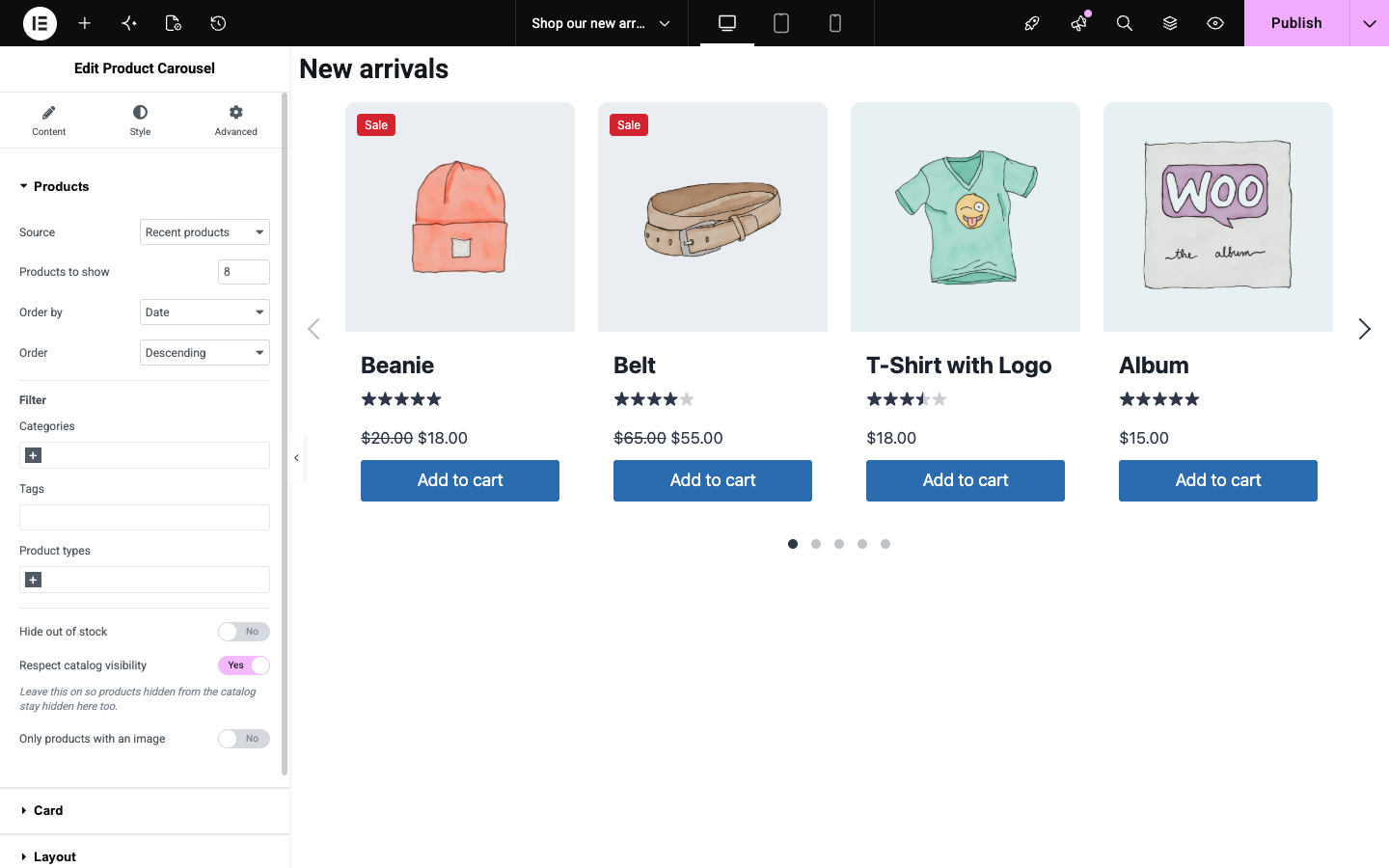
LoopKit fixes that. It adds one Elementor widget that builds a WooCommerce product carousel live in the canvas. Change a control and the carousel redraws instantly — same markup, same CSS, same result your customers will see. No reload. No preview tab. No shortcode to paste.
😤 The four things that make product carousels painful
- “It looked fine in the editor.” Most carousel plugins render on the server, so the editor is an approximation and the page is a surprise.
- “I need custom CSS for every client.” Fixed card layouts force you into the one design the plugin author liked.
- “My PageSpeed score dropped.” jQuery, a full slider bundle and stylesheets loaded on every page, carousel or not.
- “The accessibility audit failed.” Keyboard traps, invisible focus, autoplay that cannot be paused — and a plugin that charges you extra to fix it.
LoopKit answers all four, in the free version. 👇
✨ What you get
🪄 True live editing
Every control — style, card layout, motion, carousel behaviour — redraws the canvas with no page reload and no server request. Only a change to the product query fetches anything, and your old products stay on screen while it does.
🧱 A real Card Builder
Eight elements: image, sale badge, stock badge, title, price, rating, short description and add to cart. Drag them into the order you want across three zones: image area, content area and a hover overlay. Hide any element per device using your own Elementor breakpoints.
🎨 Eight presets that still look like your site
Classic, Minimal, Overlay, Compact, Editorial, Promo, Reviewed and Showcase. A preset is an arrangement, not a skin — colours and type keep coming from Elementor’s Style tab and your Global Fonts. Built a card you love? Save it as your own named preset and reuse it on every carousel on the site.
🛒 Queries that match how you actually sell
Six sources — recent, featured, on sale, best selling, top rated and manual selection — plus filters for category, tag, product type, stock and catalog visibility. Variable, grouped, external and out-of-stock products all render correctly, with prices through WooCommerce so multi-currency plugins keep working.
♿ Accessibility included, not upsold
Labelled carousel region, slide positions announced as “3 of 12”, off-screen slides made inert so focus never disappears, real buttons with aria-current, pagination dots as a single Tab stop with arrow-key navigation, a visible pause control whenever autoplay runs, and full prefers-reduced-motion support. Escape leaves the carousel — no keyboard traps.
⚡ Light enough to forget about
About 4.4 KB of gzipped CSS and JavaScript on pages that use it, and nothing at all on pages that don’t. The carousel engine is fetched only when a carousel approaches the viewport. No jQuery.
🎬 Motion with taste
Six hover effects (zoom, lift, tilt, overlay fade, slide-up, border draw), six easing curves plus your own cubic-bezier, a staggered entrance as the carousel scrolls into view, and drag with adjustable edge resistance. Transform and opacity only, so it stays smooth on a mid-range phone.
🌍 Ready for real-world sites
Right-to-left layouts, translation-ready strings, WPML and Polylang support, HPOS declared, and verified every release on Storefront, Astra, Hello Elementor, GeneratePress and Kadence.
🏆 Why LoopKit instead of the others
- What you see is what ships. The editor canvas renders the exact same card as the front end. Not a mockup of it.
- Accessibility is free here. Other carousel plugins put WCAG features behind a Pro licence. That seemed like a strange thing to charge for.
- No advertising noise. No settings page to hunt through, no recommended-plugin panels, no review nags, no activation redirect, no dashboard banners. One welcome notice on the Plugins screen that disappears the moment you dismiss it. That is the whole footprint.
- Zero tracking. No telemetry, no phone-home, no external requests of any kind.
- Your design, not ours. Presets set what a card contains; your Style tab decides how it looks.
- Built for client work. Carousel settings live on the widget, so they travel with the page — copy a section to another site and the carousel comes with it.
👤 Who it’s for
Freelancers and agencies building WooCommerce stores in Elementor who are judged on PageSpeed scores, accessibility audits, and how rarely the client calls back. And anyone who just wants a carousel that behaves.
🚀 Getting started takes a minute
- Install WooCommerce and Elementor (the free one is enough).
- Edit any page with Elementor and search the widgets for Product Carousel.
- Drag it in. It renders immediately with your recent products — there is nothing to configure before you see something real.
📋 Requirements
WordPress 6.0+ · WooCommerce 7.0+ · Elementor (free) 3.15+ · PHP 7.4+
🔎 Source code and third-party libraries
The JavaScript and CSS in assets/ are compiled. Their human-readable source ships with the plugin in src/, and is built with @wordpress/scripts (webpack).
LoopKit bundles one third-party library:
- Swiper 11.2.10, Copyright 2014-2025 Vladimir Kharlampidi, released under the MIT License. Its source is at https://github.com/nolimits4web/swiper, and its licence text ships with the plugin in
assets/swiper-license.txt.
Screenshots




Installation
- Make sure WooCommerce 7.0 or newer and Elementor 3.15 or newer are installed and active.
- Upload the plugin to
/wp-content/plugins/, or install it from Plugins > Add New. - Activate it.
- Edit any page with Elementor and search the panel for “Product Carousel”.
FAQ
-
Do I need Elementor Pro?
-
No. LoopKit works with the free version of Elementor.
-
Is there a settings page?
-
No, deliberately. Everything is configured on the widget in the Elementor panel, so your settings travel with the page. The LoopKit page in the admin menu is for getting started, documentation, support and the changelog; it has nothing to configure.
-
Is there a shortcode?
-
No. LoopKit is an Elementor widget.
-
Does it work with High-Performance Order Storage?
-
Yes. LoopKit declares HPOS compatibility. It only reads products, never orders.
-
Where are saved card presets stored?
-
In a single WordPress option, shared by every carousel on the site. Saving or deleting one needs the capability to edit other people’s posts (Editors and Administrators), because a change reaches pages other people wrote. Deleting the plugin removes the option.
-
Does it work with WPML or Polylang?
-
Yes. With WPML, the carousel’s screen reader name and the sale badge text appear in the translation editor. With Polylang, translate the page as usual; every carousel setting travels with it. Product queries follow the language through WooCommerce.
-
Can I use more than one carousel on a page?
-
Yes. Each carousel is independent.
Reviews
There are no reviews for this plugin.
Contributors & Developers
“LoopKit – Product Carousel, Slider & Card Builder for WooCommerce” is open source software. The following people have contributed to this plugin.
Contributors
Translate “LoopKit – Product Carousel, Slider & Card Builder for WooCommerce” into your language.
Interested in development?
Browse the code, check out the SVN repository, or subscribe to the development log by RSS.
Changelog
1.0.1
- Added a link to the one-minute video tour on the LoopKit page.
1.0.0
- A Product Carousel widget for Elementor that redraws in the canvas as you change any control.
- Card Builder with eight elements across image, content and hover zones, with per-device hiding.
- Eight card presets, plus presets you save from the panel and reuse across the site.
- Six product sources with category, tag, product type and stock filters.
- Six arrow styles and positions, dots, fraction and progress pagination, autoplay with a pause button.
- Six hover effects, custom easing, a staggered entrance and adjustable drag resistance.
- WCAG AA accessibility: labelled region and slides, inert off-screen slides, single-tab-stop dots.
- Right-to-left layouts, translation files, and WPML and Polylang support.
- A LoopKit admin page with a quick start, documentation, support and this changelog.