

Description
You spend money and effort getting people to your website. The only question that matters: what is actually working? Which ads, which pages, which campaigns turn visitors into sales and leads?
That answer comes from tracking, and tracking on the modern web is quietly broken. Cookie banners, Apple and Firefox privacy features, and ad blockers hide a large share of your real sales and leads from Google Analytics, Google Ads, and Meta. You make decisions – and pay for ads – based on half the picture.
LookerSolution Conversion Tracking fixes the foundation, free. Built for online shops and lead-generation businesses alike. Five-minute setup, no code:
- Records what matters on your site. Every product view, add to cart, checkout, and purchase on WooCommerce shops – and clicks, calls, and sign-ups on lead-generation sites.
- Hands it all to Google Tag Manager, Google’s free tool that passes your data on to Google Analytics, Google Ads, Meta, and any platform you use. Paste in your container ID and it loads on every page.
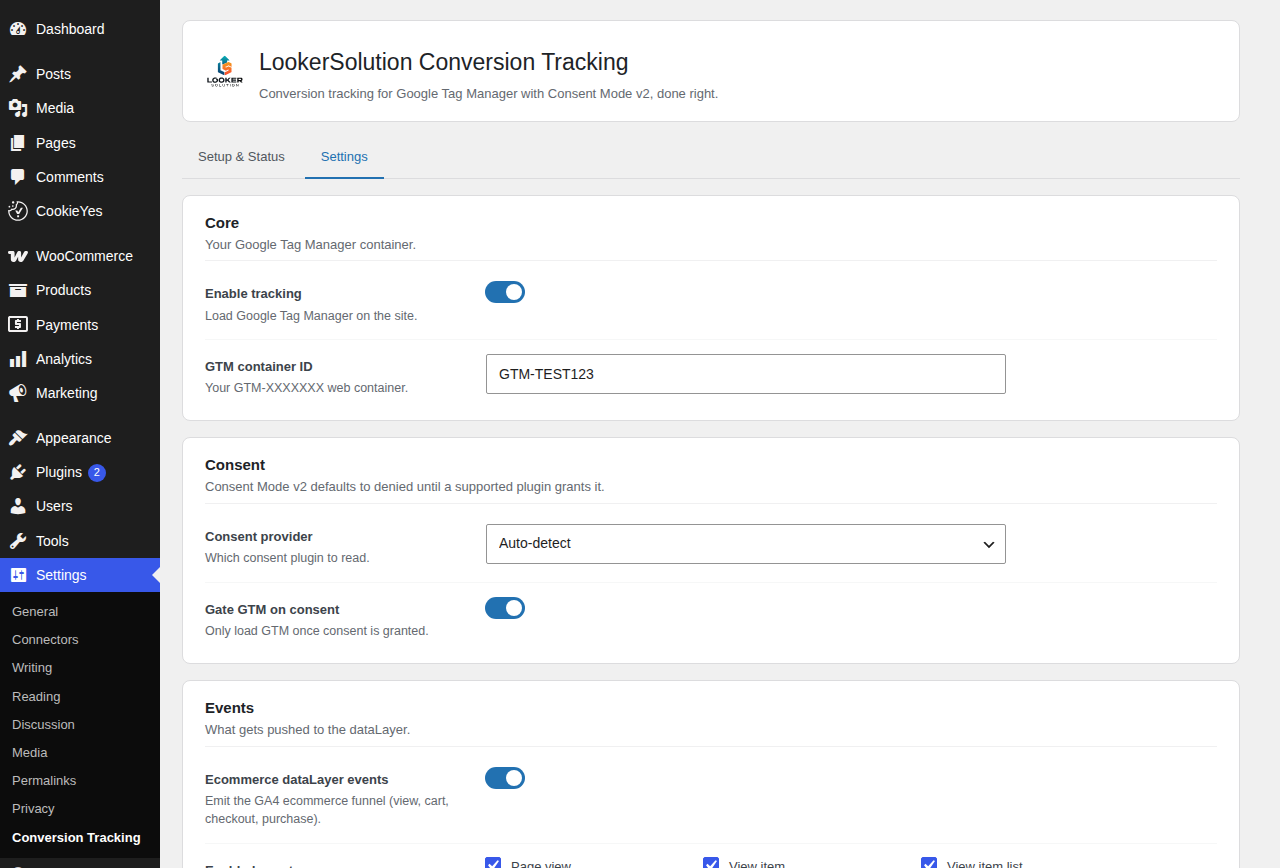
- Keeps you on the right side of cookie law automatically. Nothing fires until your visitor consents, using Google Consent Mode v2 exactly as Google prescribes. Works with the cookie banner you already have – WP Consent API, CookieYes, Complianz, or Cookiebot, auto-detected.
- Doing consent right has a bonus. Google can statistically recover conversions from visitors who decline cookies – sales that are simply invisible to you today.
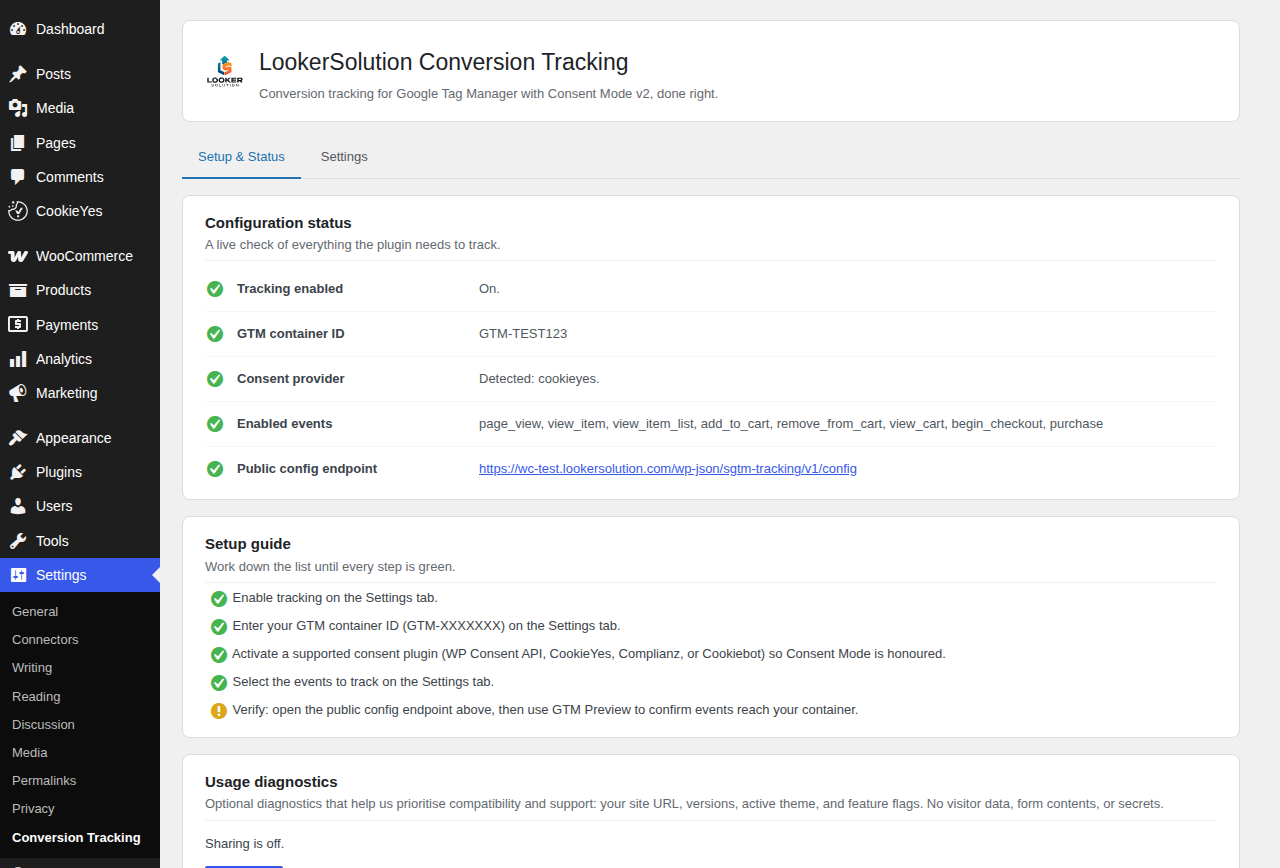
- A Setup and Status screen tells you in plain language whether everything is wired correctly.
One honest note: this plugin delivers your data to Google Tag Manager. What happens from there depends on the tags inside your container – if you already have GA4 or ad tags set up, they start receiving richer, consent-safe data straight away. The plugin never creates or changes tags in your container. And if this paragraph sounded like a foreign language: that is exactly the problem the Pro managed service solves for you.
Consent Mode is implemented the way Google expects: analytics_storage, ad_storage, ad_user_data, ad_personalization, personalization_storage, functionality_storage, and security_storage all default to denied, and GTM only loads once consent is granted (unless you turn gating off).
The Pro managed service: we do the whole thing for you
Here is the truth most of the industry avoids saying plainly: even with perfect on-site tracking, ad blockers, browser privacy limits, and consent gaps combined stop 20 to 40 percent of conversion data from ever reaching your ad platforms. Industry reports are consistent on it. Those are real sales and real leads that Google Ads and Meta never learn about, so their algorithms optimise blind and your cost per sale creeps up.
The fix is called server-side tracking: your data travels through a first-party server instead of the visitor’s browser, out of reach of ad blockers and browser limits. Setting that up yourself is genuinely technical, so we run it as a managed service.
Everything comes ready-made: a GTM container with GA4, Google Ads, Meta Conversions API, TikTok, Pinterest, and many more already wired, connected to our managed server-side tracking. Lead-generation businesses get full lead and form tracking with GA4 Enhanced Conversions for Leads on top. A few clicks on your side – install the plugin, import the container, done. We do all the heavy lifting behind the scenes and keep it current.
Plans start at 15 dollars a month, cancel anytime. Learn more at https://lookersolution.com/services/server-side-tracking.
External services
This plugin loads the Google Tag Manager container you configure from googletagmanager.com. Google Tag Manager is a tag-management service operated by Google; it is used to load the marketing and analytics tags you have set up in your own container. When the container script loads, the visitor’s browser connects to googletagmanager.com and standard request data (IP address, user agent, page URL) is processed by Google, along with the events this plugin pushes to the dataLayer. By default the plugin does not load the container until your consent banner grants consent, and every Google Consent Mode v2 signal defaults to denied. Google terms of service: https://policies.google.com/terms – Google privacy policy: https://policies.google.com/privacy – Google Tag Manager use policy: https://marketingplatform.google.com/about/analytics/tag-manager/use-policy/
Optional usage diagnostics (off by default): if, and only if, you explicitly opt in, the plugin sends a small anonymous diagnostics payload once per week to https://license.lookersolution.com/telemetry, operated by LookerSolution. The payload contains your site URL; the plugin, WordPress, and PHP versions; your site locale; your active theme’s name and version; the detected consent plugin; and booleans for whether WooCommerce is active and whether a GTM container is configured. It never contains personal data, visitor data, form contents, or any container secrets. You can withdraw consent at any time from the plugin’s Setup tab. LookerSolution privacy policy: https://lookersolution.com/privacy.
Screenshots
Installation
- Install and activate the plugin.
- Go to Settings and paste your GTM container ID (it looks like GTM-XXXXXXX).
- Pick your cookie banner plugin, or let the plugin detect it for you.
- Save. The plugin now loads your container and feeds it events – open GTM Preview (the Preview button inside Tag Manager) and watch them arrive.
FAQ
-
Do I need a Google Tag Manager account?
-
Yes. This plugin loads your existing GTM web container. Creating one takes a few minutes and is free at tagmanager.google.com.
-
Do I need coding skills?
-
No. Install the plugin, paste your container ID, pick your cookie banner, save. If you also want the tags inside your container handled for you, that is what the Pro managed service is for.
-
Will my sales show up in Google Analytics and my ad platforms?
-
If your GTM container already has GA4 or ad platform tags, yes – they start picking up these events right away. If your container is empty, or you are not sure what a tag is, the free plugin alone will not get data into your ad platforms: that wiring is exactly what the Pro managed service delivers, as a ready-made container you import in one click.
-
Is server-side tracking included in the free plugin?
-
No. The free plugin gives you complete client-side (in-browser) tracking with correct consent handling. Server-side tracking, Enhanced Conversions, Meta CAPI, and lead and form tracking are part of the Pro managed service.
-
Does it support Google Consent Mode v2?
-
Yes. Every consent signal defaults to denied and is updated to granted when your consent banner allows it. This is the denied-by-default model Google requires for EEA traffic.
-
Which consent plugins are supported?
-
WP Consent API, CookieYes, Complianz, and Cookiebot. Set the provider explicitly or let the plugin auto-detect the active one.
-
Does it work without WooCommerce?
-
Yes. The GTM loader, Consent Mode, page_view, and the custom-event API work on any site – including lead-generation sites. The ecommerce dataLayer events activate when WooCommerce is present.
-
Does the plugin send any data to your servers?
-
Not by default. Only if you explicitly opt in to anonymous usage diagnostics does the plugin send a small weekly payload. See External services below. You can turn it off at any time from the Setup tab.
Reviews
There are no reviews for this plugin.
Contributors & Developers
“LookerSolution Conversion Tracking for Google Tag Manager” is open source software. The following people have contributed to this plugin.
Contributors
Translate “LookerSolution Conversion Tracking for Google Tag Manager” into your language.
Interested in development?
Browse the code, check out the SVN repository, or subscribe to the development log by RSS.
Changelog
1.0.0
- Initial release: GTM web container loader, Google Consent Mode v2 (denied by default), consent-plugin integration, page_view, WooCommerce client-side ecommerce dataLayer, custom-event API, and opt-in anonymous diagnostics.