
Description
LIOSFERA Schema Diagnostics examines the HTML that your public WordPress pages return and reports likely structured data problems. It supports JSON-LD, Microdata and partial RDFa. Its Google and Yandex diagnostic profiles are separate; warnings are guidance, not a promise of rich search results.
It helps you:
* Inspect one of your recently edited published pages.
* Scan up to 10,000 published WordPress posts/pages/public custom post types per audit.
* Find common Product, Offer, ProductGroup/variant, breadcrumb, Article and FAQ issues.
* Group repeated findings, see example affected URLs and export CSV.
* Compare conflicting entity properties and inspect likely schema generators with evidence and confidence labels (not confirmed attribution).
* On WooCommerce product pages, flag cautiously matched SKU, GTIN, currency, active price and inventory discrepancies without changing any store data.
* Pause, resume, cancel and repeat scans while retaining local history.
* Review confirmed new, known and resolved issue groups in the WordPress admin. No email alerts are sent.
* Supports network-wide WordPress Multisite activation with separate site-local audit tables and cron events.
Works alongside existing SEO plugins and WooCommerce. LIO CMS and LIOSFERA Cloud are not required.
Feedback and support: Use the two links at the top of Tools > Schema Diagnostics to report a bug or suggest an improvement by email to support@liosfera.com. For public questions, use the WordPress.org support forum. The links never send site, scan or store data automatically. Please do not post secrets, customer information or unredacted logs.
Limitations: It does not execute client-side JavaScript, fully validate remote Schema.org contexts or scan taxonomy archives. Some Microdata/RDFa rules are partial. A finding may require manual investigation. It never invents prices, reviews or ratings. Optional single-product WooCommerce Offer repairs require an explicit administrator confirmation; automatic bulk edits are not performed.
Screenshots

Installation
- Install the plugin ZIP in Plugins > Add New > Upload Plugin, then activate it.
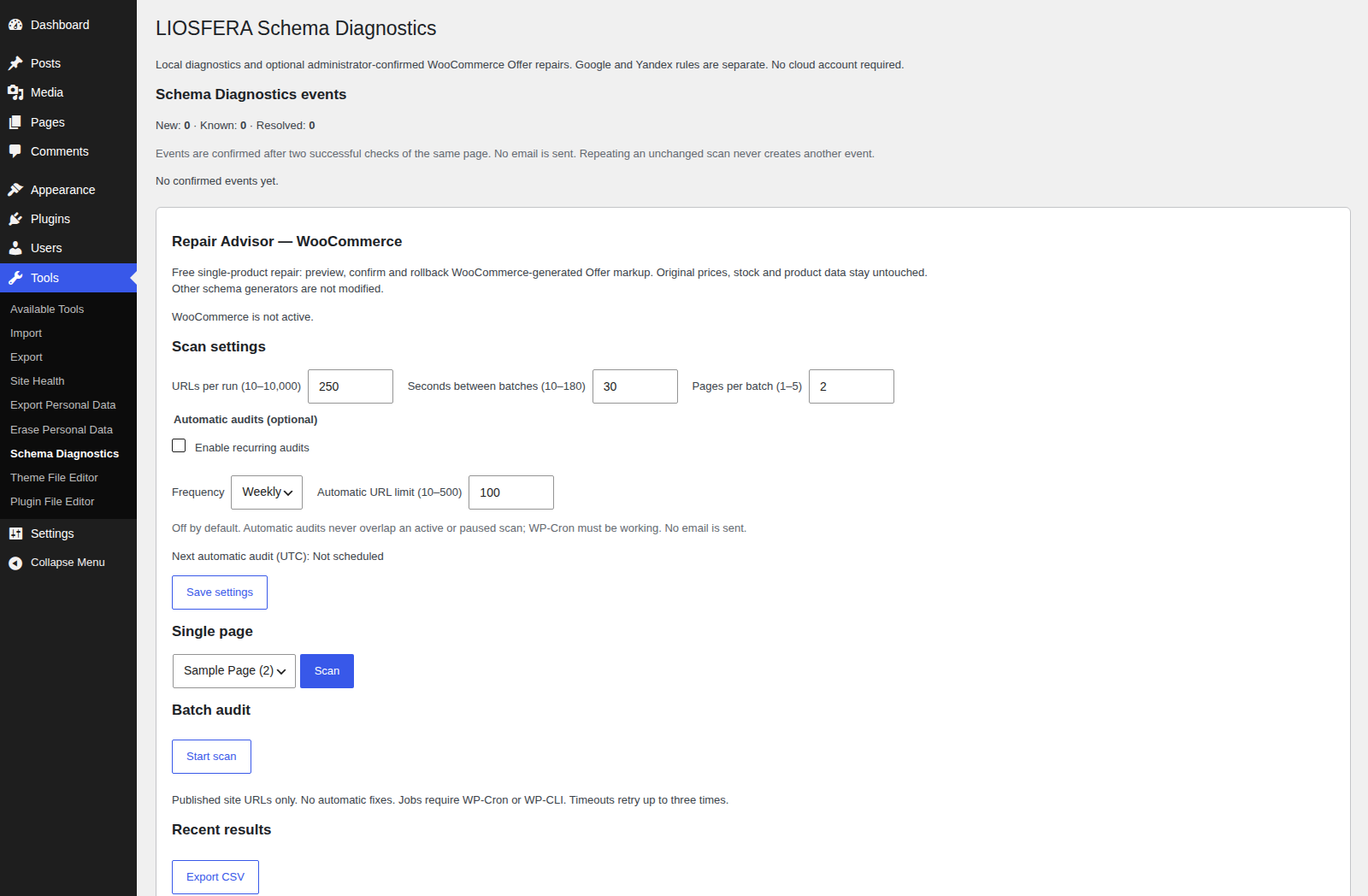
- Open Tools > Schema Diagnostics.
- Choose a published page for an individual check, or select the audit settings and start a batch scan.
- Review the grouped issues and example URLs. Fix your site’s real content or schema generator settings, then run another check.
WooCommerce comparisons require the WooCommerce plugin and matching published Product/Offer markup. Price comparisons are skipped when WooCommerce tax calculation is active; no comparison is made for ambiguous multiple offers, products without reliable identity, or variable products exceeding the bounded variation limit. Any discrepancy is a warning to investigate, not an automatic correction.
Automatic scans are disabled by default. When enabled, they use the separate automatic limit (10–500 URLs) independently from the manual batch limit and spread the initial schedule across sites. Large batch scans require WP-Cron to run. On low-traffic sites, the hosting provider may need a real system cron triggering WordPress cron. Each HTTP request is limited to 7 seconds and approximately 700 KB; pages beyond that limit are reported as incomplete, not as Schema errors.
FAQ
-
How can I report a bug or suggest an improvement?
-
Open Tools > Schema Diagnostics and choose Report a bug or Suggest an improvement. Both links open your email application addressed to support@liosfera.com with a topic-specific subject. The plugin sends no site data or attachments automatically. Include version numbers and steps to reproduce, but do not include passwords, customer data or unredacted logs. Public questions can use the WordPress.org support forum.
-
Can automatic audits run without sending emails?
-
Yes. Open Tools > Schema Diagnostics, enable recurring audits, select weekly or daily and set a separate limit of 10 to 500 URLs. The feature is disabled by default, never emails findings, and skips a scheduled run whenever another audit is running or paused. Scheduled audits require WP-Cron or an external cron triggering WordPress; they do not create server cron jobs.
-
Will it send notifications by email?
-
No. Schema Diagnostics never emails audit events. Its local events section groups repeated issues, confirms new or resolved problems after two successful checks of the affected page, and lets administrators mark a group as viewed. An unchanged issue does not create another alert.
-
Does it generate or automatically correct structured data?
-
No automatic corrections occur. Administrators may preview and opt in to a single simple-product WooCommerce Offer repair and roll it back. WooCommerce product data and third-party JSON-LD are never rewritten; variable products, taxes and ambiguous sale offers are deliberately excluded.
-
Does it send data to external services?
-
No. Audits make read-only HTTP requests to published URLs of the same WordPress site. Findings and URLs are stored locally in WordPress database tables. There is no telemetry, paid cloud connection or mandatory registration.
-
How many pages can I scan?
-
Choose 10 to 10,000 published posts/pages/public custom post types per audit. A 10,000-URL queue test does not prove that 10,000 HTTP checks will complete on your particular hosting.
-
What happens when a scan is interrupted?
-
WP-Cron processes small batches. It can recover expired leases and retry transient errors. Hourly maintenance can reschedule an active audit whose batch event was lost. All recovery depends on WordPress cron running.
-
How long are results stored?
-
The newest five completed audits and the active audit are retained. Older completed or cancelled audits are eligible for gradual cleanup after 90 days. Paused or otherwise unfinished scans require administrator action. Single-page check results retain up to 25 recent entries.
-
What happens on deactivation or uninstall?
-
Deactivation preserves the history. Explicitly deleting the plugin through the WordPress Plugins screen removes Schema Diagnostics’s own database tables, saved options and scheduled jobs, including in a multisite network uninstall. Back up the audit history before uninstall if needed.
-
Can this guarantee Google or Yandex search enhancements?
-
No. Their eligibility and search display rules differ and change independently. Check important pages with the official search engine validation tools.
-
Where can I get support?
-
See https://liosfera.com/plugins/liosfera-schema-diagnostics/ or https://liosfera.com/support/ . Publisher: LIOSFERA.
Reviews
There are no reviews for this plugin.
Contributors & Developers
“LIOSFERA Schema Diagnostics” is open source software. The following people have contributed to this plugin.
Contributors
Translate “LIOSFERA Schema Diagnostics” into your language.
Interested in development?
Browse the code, check out the SVN repository, or subscribe to the development log by RSS.
Changelog
0.5.3
Added opt-in bug-report and improvement-suggestion email links and an official support-forum link in the plugin admin, with clear privacy guidance. No telemetry, automatic email or data uploads. Updated the canonical Plugin URI.
0.5.2
Directory presentation release: added genuine desktop and mobile screenshots and their captions. Plugin diagnostics and repair behavior are unchanged.
0.5.1
Added a protected one-click verification of the published product HTML after manual repair, with clear status feedback; repair forms retain the selected product and return directly to its preview.
0.5.0
Added Repair Advisor and an administrator-confirmed, single-product WooCommerce Offer filter repair with before/after preview, local history and one-click rollback. No automatic changes, no modification of WooCommerce prices or stock, and no changes to other plugins’ JSON-LD.
0.4.1
Optional weekly or daily recurring scans with a separate 10–500 URL limit. Disabled by default, skipped when a manual or paused scan is already active, and never sends mail. Runs through bounded WP-Cron batches.
0.4.0
Added a local-only admin event center. Identical issue families are grouped, new problems require two successful scans of a page, confirmed resolutions require two clean scans, and administrators can mark issues viewed. No emails or global WordPress admin popups.
0.3.9
Added read-only WooCommerce consistency checks for reliably matched Product and variation markup: SKU, global unique ID, currency, active price and stock availability. Conflicts are warnings that require checking taxes, discounts, localization and page cache. Automatic corrections are intentionally not performed.
0.3.8
Added cautious generator hints for individual markup blocks, provenance and conflicting properties in diagnostic results and CSV export, and a Google FAQ rich-result retirement notice without marking FAQPage Schema.org invalid. Generator hints are not proof of which plugin produced the markup.
0.3.7
Improved WordPress Multisite support: network activation creates separate audit tables and scheduled jobs for every site, new sites initialize automatically, and network deactivation clears scheduled jobs on each site.
0.3.6
Added audit progress and WP-Cron status in the WordPress admin, explicit uninstall cleanup, and a reproducible ZIP package.
0.3.5
Added hourly recovery of missing WP-Cron batch events and adopted supported PHP 8.2 minimum.
0.3.4
Transactional queue and job finalization, concurrent worker verification, and transient SQL retry handling.
0.3.3
Responsive admin UI, gettext translations and multi-process WP-Cron testing.
0.3.2
Administrator cancellation of unfinished audits and PHP 8.5 integration checks.
0.3.1
Bounded retention for completed audit history and expanded recovery tests.
0.3.0
ProductGroup and Offer improvements, fewer false-positive conflicts, and prioritized issue cards.