
Description
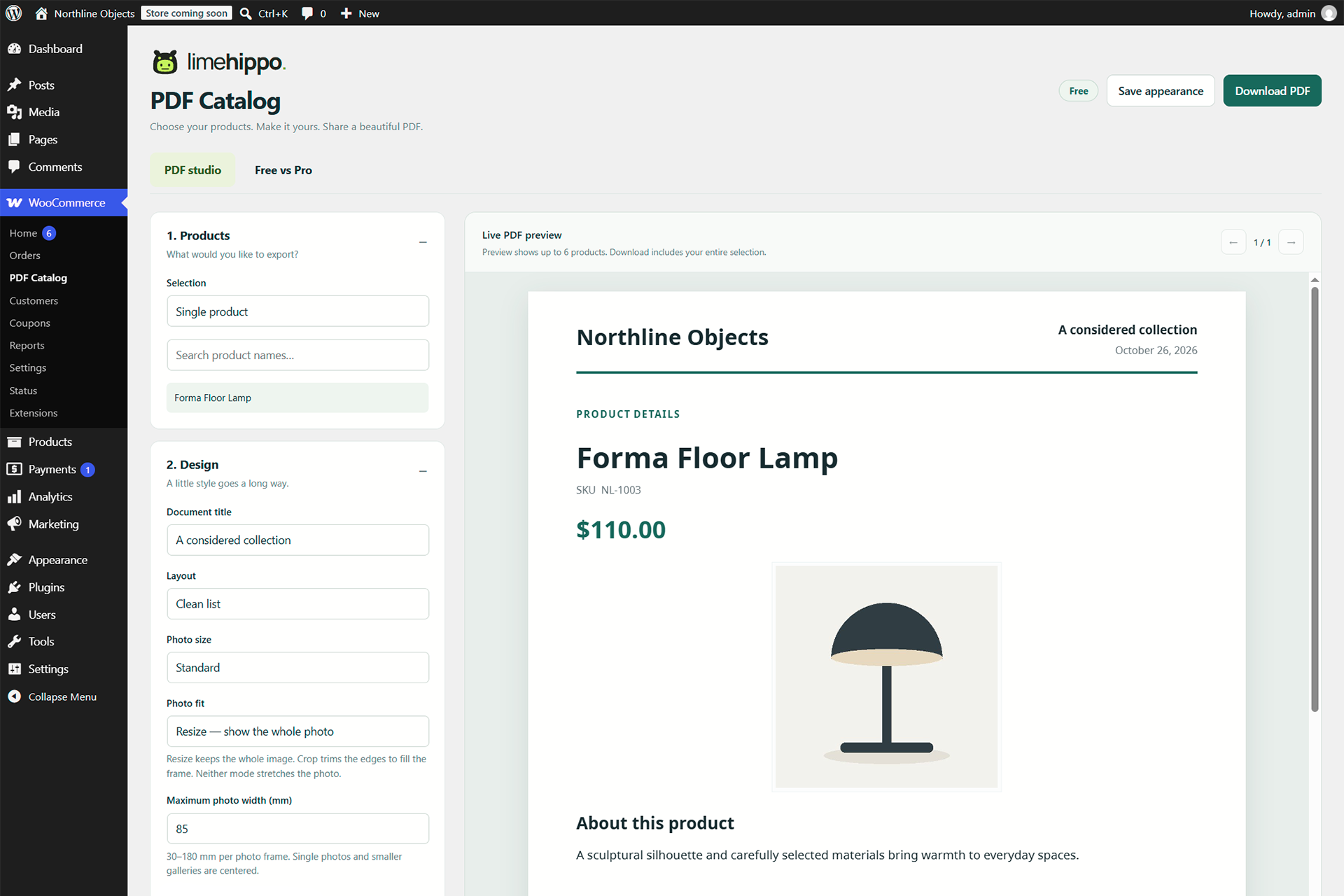
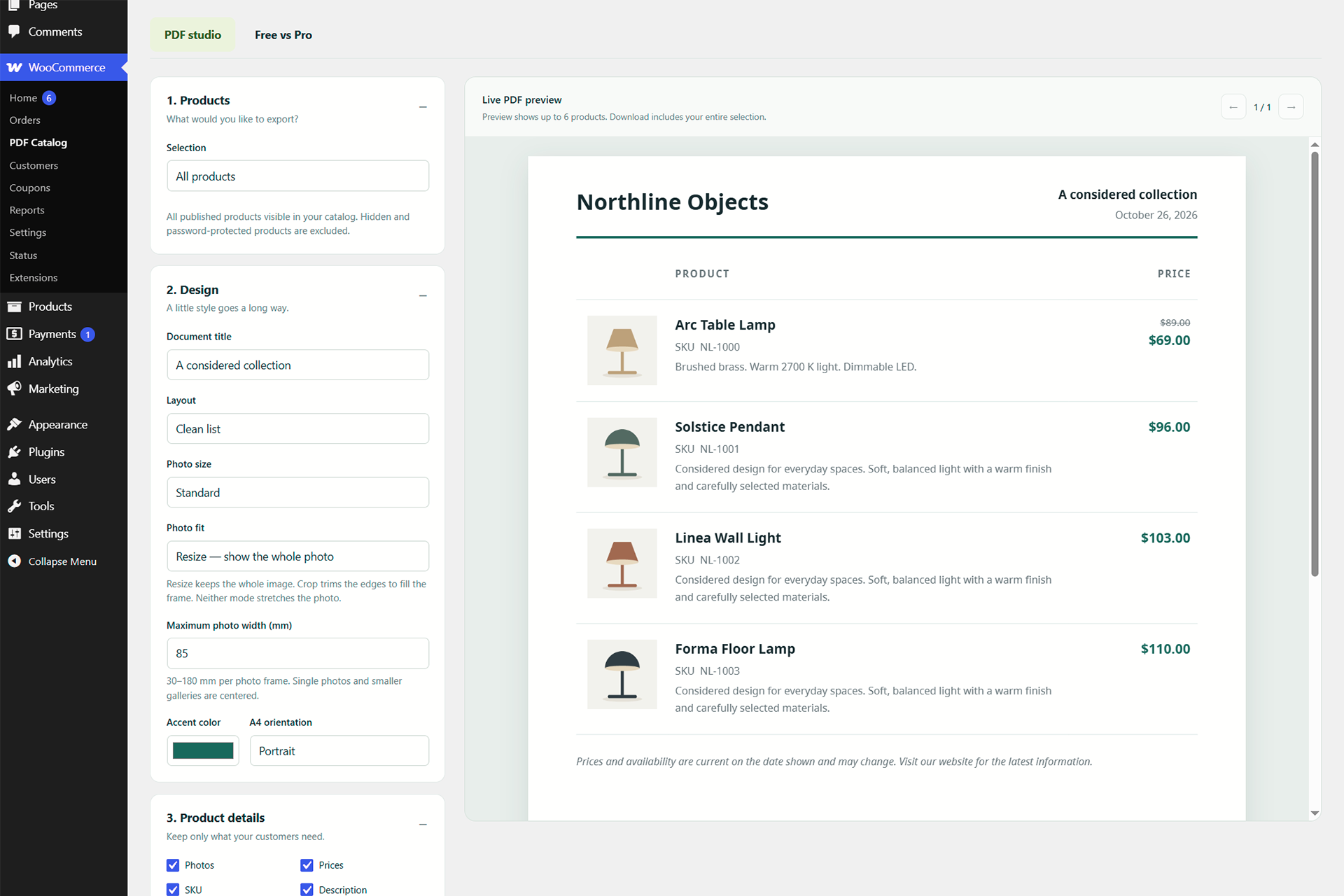
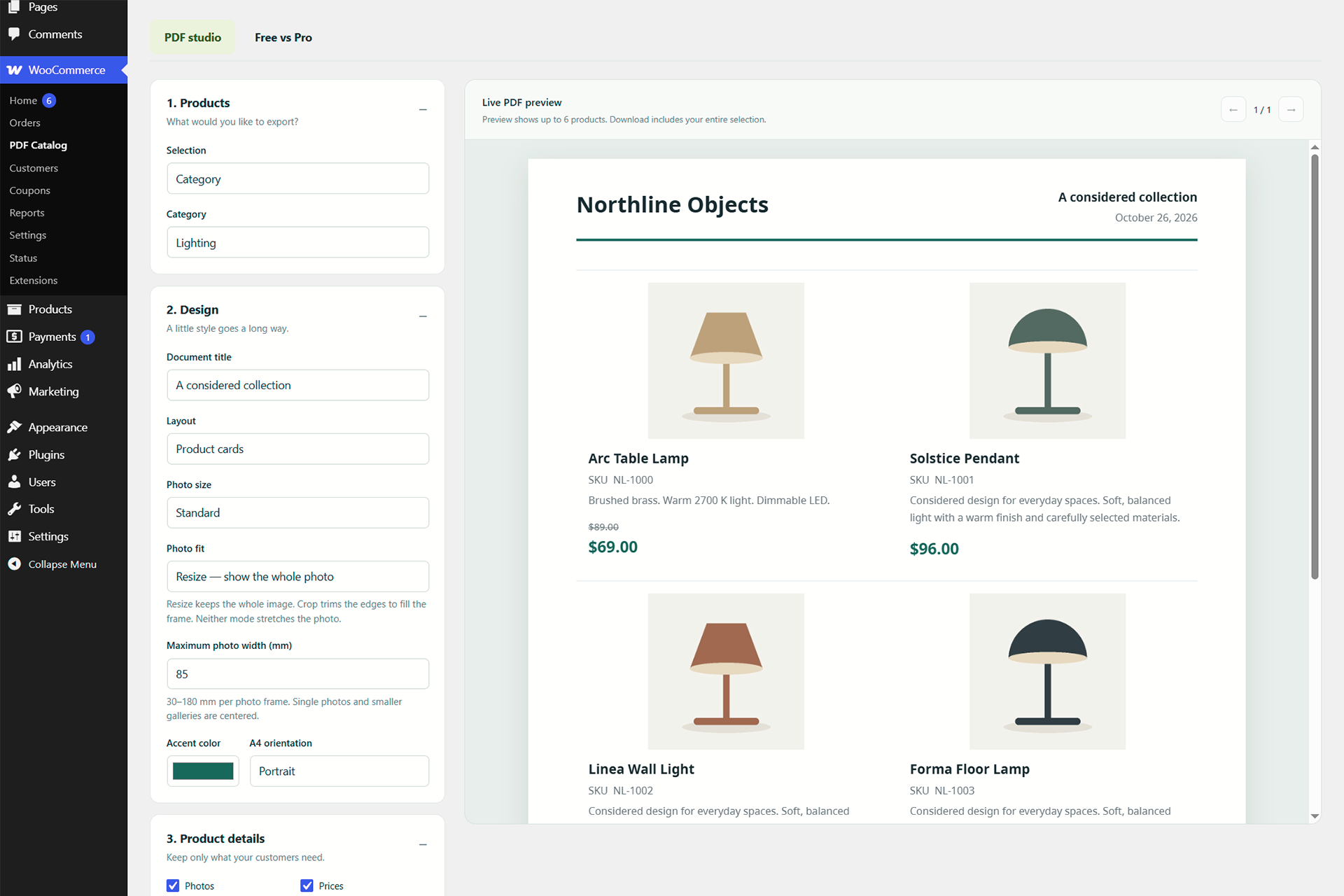
LimeHippo PDF Catalog turns your WooCommerce products into searchable PDF catalogs and individual product sheets. Choose all products, a category or one product, adjust the design, preview the PDF and download it from your browser.
Included in the free plugin
- Full-catalog, category and single-product exports from the WooCommerce administration screen.
- List and card layouts; A4 portrait and landscape.
- Product photographs, SKU, descriptions, regular/sale prices and optional availability.
- Accent colors with matching subtle backgrounds and separators.
- Compact, standard or large photographs, Resize/Crop fitting and an adjustable maximum photo width.
- Optional product links, website QR code, date and page numbers.
- Product-page PDF buttons, disabled until you enable them, and the [limehippo_product_pdf] shortcode.
- A real PDF preview with page navigation.
- No account, license key, tracking or remote PDF generation service required.
The preview uses up to six products. Downloaded PDFs contain the entire selection; there is no paid product-count limit. Browser memory and the size of photographs can limit very large catalogs.
The interface and built-in PDF labels are available in English, German, Spanish, French, Ukrainian and Russian. Product descriptions are not automatically translated. The bundled Noto Sans font supports Latin and Cyrillic scripts, including Ukrainian; CJK, advanced RTL shaping and emoji are not supported in this release.
PDF generation and preview libraries are bundled locally. Your browser loads photographs from the media URLs configured in your store. External image hosts must allow cross-origin access. Missing images are reported and replaced with a placeholder.
Documentation | Product and live demo
Support is available in English, Ukrainian and Russian. Please test your theme, tax settings, currency extensions and product images on staging before production use.
Optional Pro add-on
Pro is a separate plugin for branding, saved configurations, manual product selections and quotations. No paid license or account is needed to use the features included in this free plugin. Check the product page for current Pro availability; the Pro code is distributed separately from this package.
Privacy
The plugin does not collect analytics or send catalog data to an external PDF service. Catalog information passes between your WordPress site and the user’s browser. Photographs are requested from their configured media hosts, which receive normal image requests from the browser. Appearance settings are stored in the WordPress options table. No external account is required.
Source code and third-party libraries
The plugin’s JavaScript source and readable PDF library bundles are included in this package. See THIRD-PARTY.txt and the bundled license files for component versions and source links.
- pdfmake 0.3.12 (MIT): https://github.com/bpampuch/pdfmake/tree/0.3.12
- PDF.js 5.4.624 (Apache-2.0): https://github.com/mozilla/pdf.js/tree/v5.4.624
- Noto Sans (SIL Open Font License 1.1): https://github.com/notofonts/noto-fonts/tree/main/hinted/ttf/NotoSans
- Manrope (SIL Open Font License 1.1): https://github.com/googlefonts/manrope
Screenshots
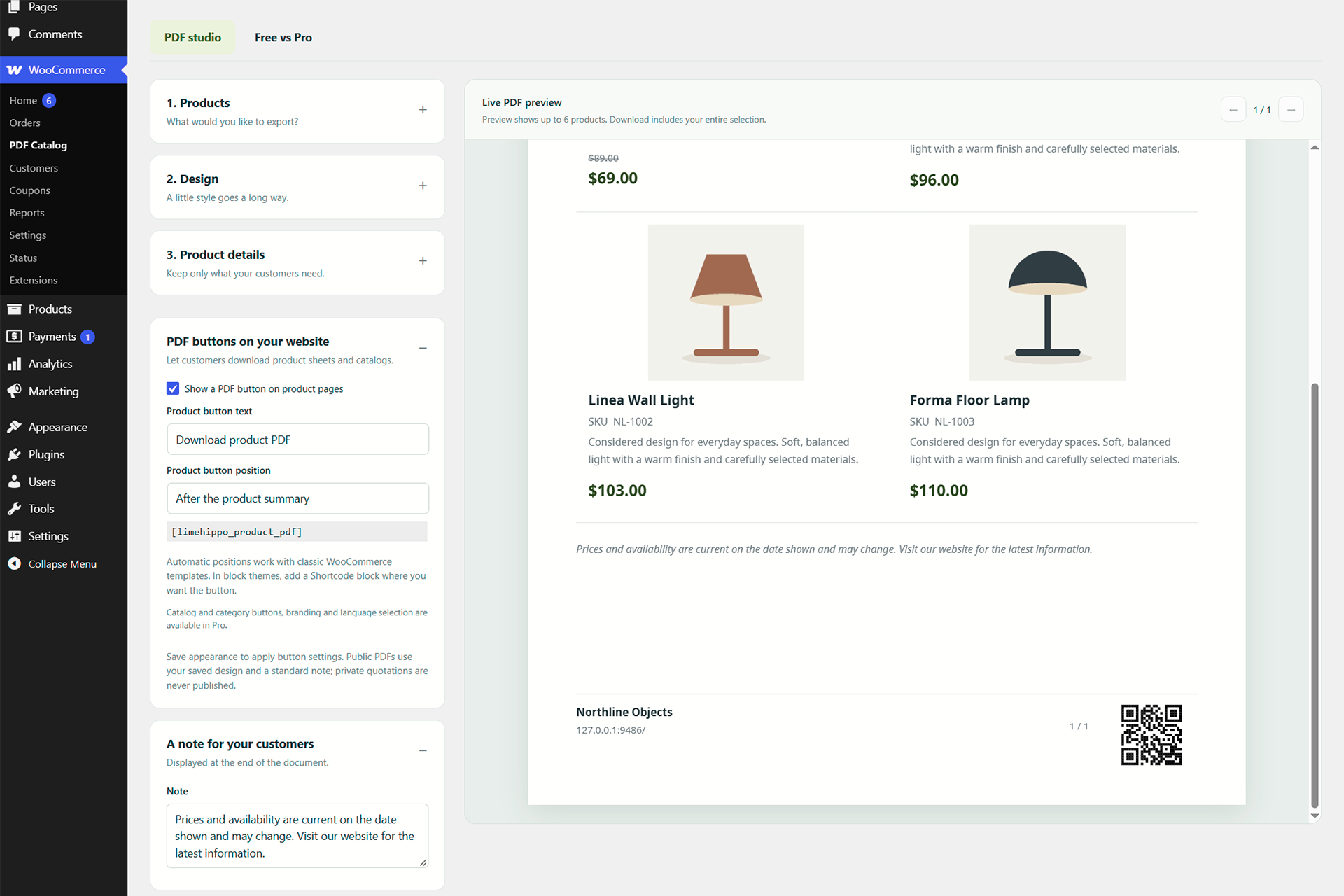
Installation
- Install and activate WooCommerce 9.0 or newer.
- Install LimeHippo PDF Catalog through Plugins > Add New Plugin, or upload its ZIP.
- Activate LimeHippo PDF Catalog.
- Open WooCommerce > PDF Catalog, choose products and download a PDF.
- To offer a visitor product PDF, enable the product-page button in the studio settings or add [limehippo_product_pdf] to a product page. Use [limehippo_product_pdf id=”123″] for a specific public product.
FAQ
-
Is the free plugin a trial?
-
No. Included features do not expire and do not require payment. Downloads contain the entire selected catalog; only the on-screen preview is limited to six products for speed.
-
Does it need mPDF or a remote PDF service?
-
No. PDF files are generated in your browser using locally bundled libraries. A modern browser with JavaScript enabled is required.
-
Is the preview the same PDF renderer as the download?
-
Yes. The preview renders the generated PDF. The full download may have more pages because it includes every selected product.
-
Can visitors download a product sheet?
-
Yes. Enable the product-page button or use the product PDF shortcode. These controls are off by default. Catalog/category visitor buttons belong to the separate Pro add-on; administrators can export complete catalogs and categories in Free.
-
No. Only published products visible in the catalog and without a password are exported. Draft and private products are excluded.
-
What happens to my existing settings if I deactivate the plugin?
-
Settings remain in your WordPress database for reactivation. Deactivating the optional Pro add-on also preserves its saved options.
-
Does Pro replace Free?
-
No. Pro is a separate add-on and uses the Free plugin. Public Pro sales and license availability are described on the LimeHippo website.
Reviews
There are no reviews for this plugin.
Contributors & Developers
“LimeHippo PDF Catalog” is open source software. The following people have contributed to this plugin.
Contributors
Translate “LimeHippo PDF Catalog” into your language.
Interested in development?
Browse the code, check out the SVN repository, or subscribe to the development log by RSS.
Changelog
0.4.12
- Prepare the LimeHippo plugin directory name and translation domain for WordPress.org.
- Expand installation, feature, privacy and source documentation.
- Preserve the PDF renderer and existing settings from 0.4.11.
- Keep the optional visitor catalog/category implementation in the separate Pro add-on.
0.4.11
- Derive subtle photo backgrounds, borders and separators from the selected accent color.
0.4.10
- Fit two rows of two products on A4 portrait with typical card content by reducing photo height and spacing.
0.4.9
- Add Resize/Crop photo fitting and a maximum photo width of 30-180 mm.
- Make product website links optional and off by default; improve sale-price hierarchy.
0.4.3
- Add German, Spanish and French alongside English, Ukrainian and Russian.
0.1.0
- Initial development build.