
Description
Likenook adds like and dislike buttons (thumbs up and thumbs down) to posts, pages, WooCommerce products, custom post types and comments. Readers vote with one click, you see which content works on a built-in analytics dashboard, and a Most Liked Posts list sends visitors to your best content.
Use it as a simple like button, an upvote and downvote score, heart reactions, or a “Was this helpful?” question on documentation. It works with the block editor, Elementor, widgets, any page builder that supports shortcodes, and page caching.
Everything is free, with no upsells.
How it works
- Install and activate. Like and dislike buttons appear under your blog posts straight away, with counts.
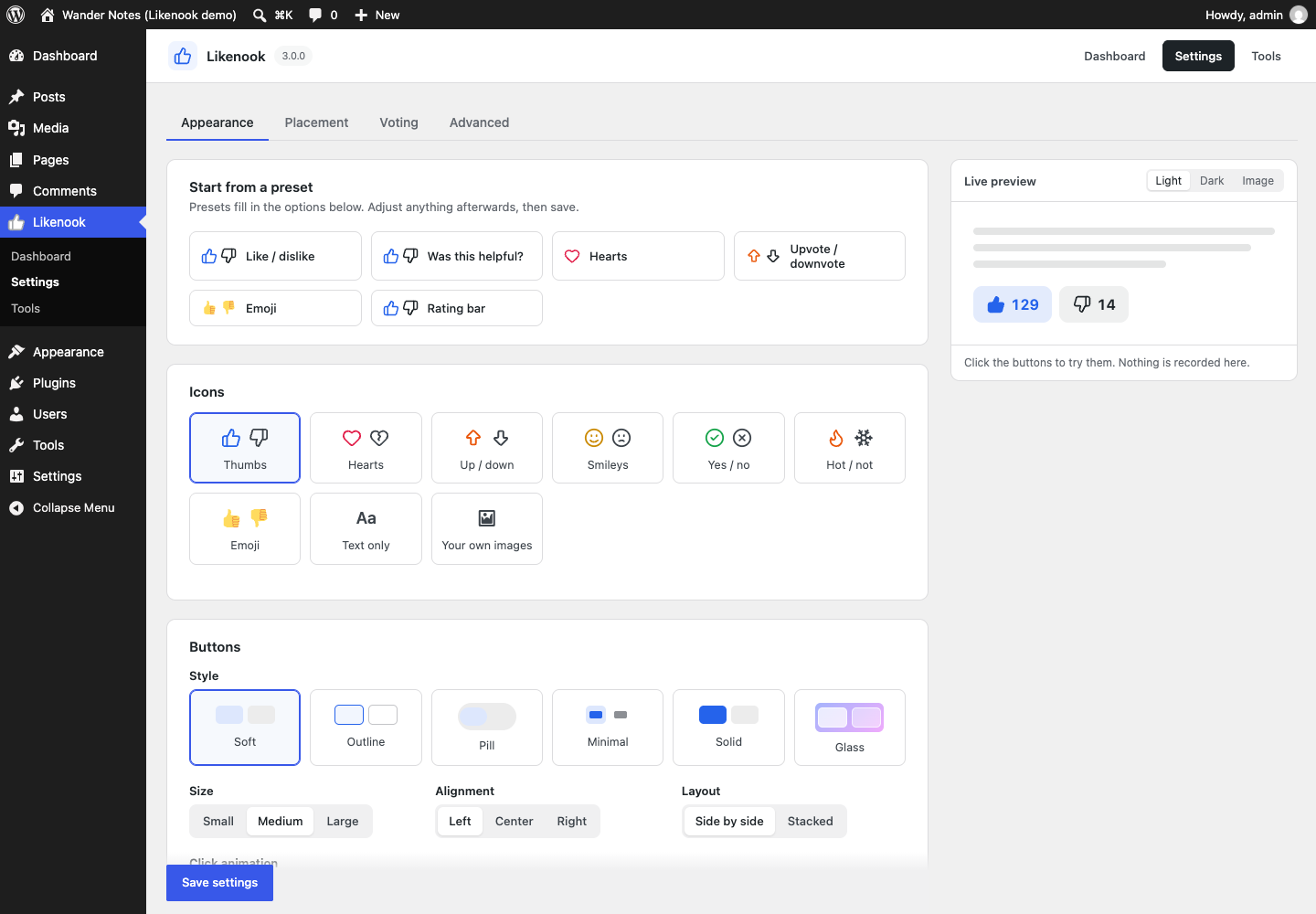
- Make them yours. Pick a preset or choose icons, style, colours and placement, with a live preview of every change.
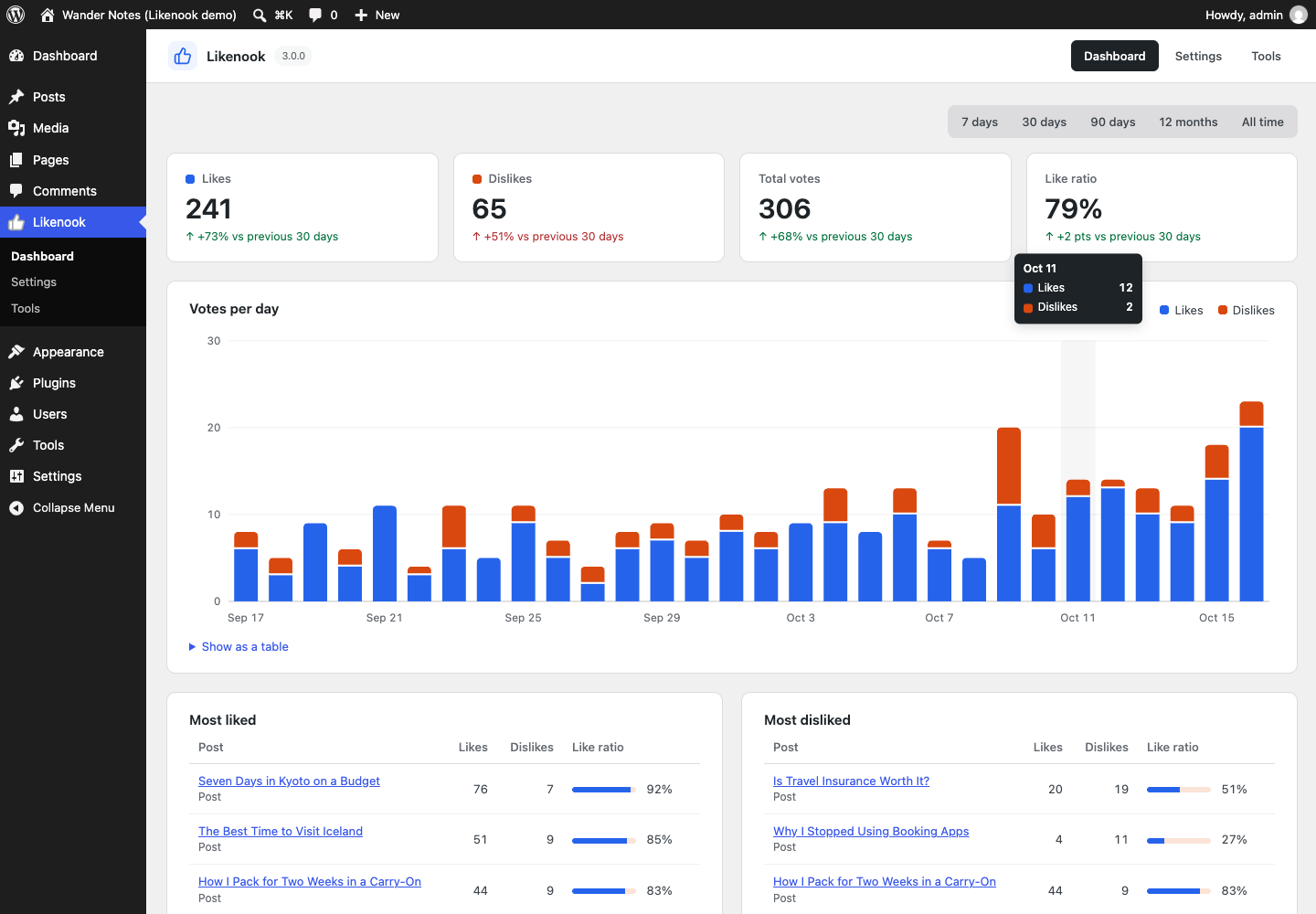
- Learn from the votes. The dashboard shows what readers like over time, your most and least liked content, and how this period compares with the last.
Use cases
- Blogs and magazines: readers like posts, and a Most Liked Posts list in the sidebar or after each article points them to more of your best writing.
- Documentation and help centres: ask “Was this article helpful?” with Yes and No buttons and a thank-you message, then find the articles that need work in the Most disliked list.
- WooCommerce stores: shoppers like products, and your most liked products can be shown on the shop page or in a sidebar.
- Recipe, travel and review sites: heart or thumbs-up buttons show readers what others enjoyed.
- Communities and comment threads: like and dislike buttons under each comment, or Reddit-style upvote and downvote scores on posts.
- Courses, changelogs and feature ideas: quick feedback on lessons, release notes or suggested features.
- News and opinion sites: see which stories readers agree with, by day, month or year.
Works with your editor and theme
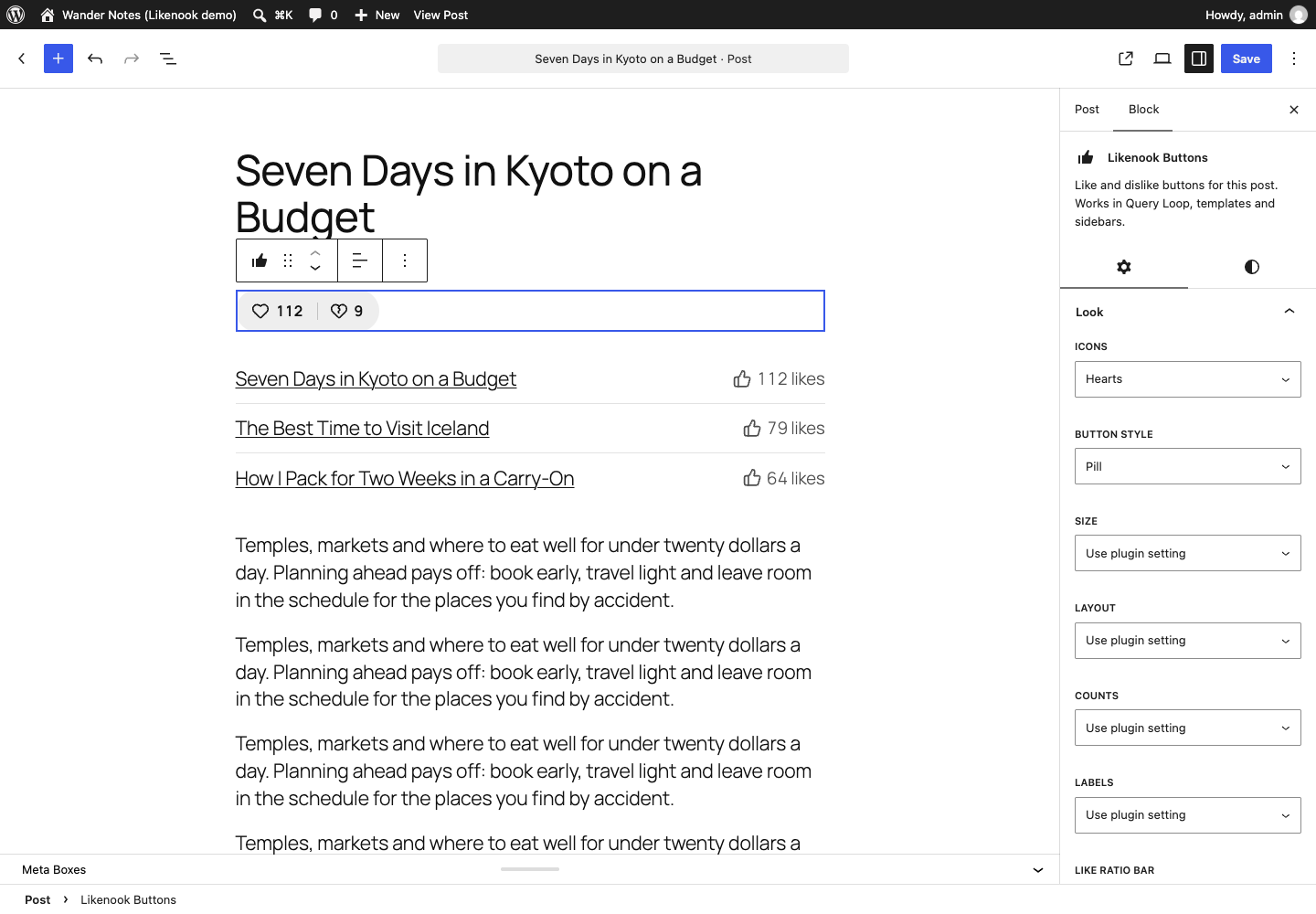
- Block editor (Gutenberg): Likenook Buttons and Most Liked Posts blocks with their own style options. They work in posts and pages, inside Query Loop, and in block theme templates and template parts.
- Elementor: Likenook Buttons and Most Liked Posts widgets, with style, text and colour controls.
- Sidebars and widget areas: both blocks, plus classic widgets for classic themes. In a sidebar, the buttons belong to the post being viewed and stay hidden on blog and archive pages.
- Divi, Bricks, Beaver Builder, WPBakery, Oxygen, Breakdance and others: add the
[likenook]shortcode in their shortcode or text module. - Theme templates:
<?php likenook_buttons(); ?>anywhere in a template, ordo_shortcode(). - Any theme: classic or block theme. The buttons keep their own style even when a theme styles every button on the page.
Looks the way you want
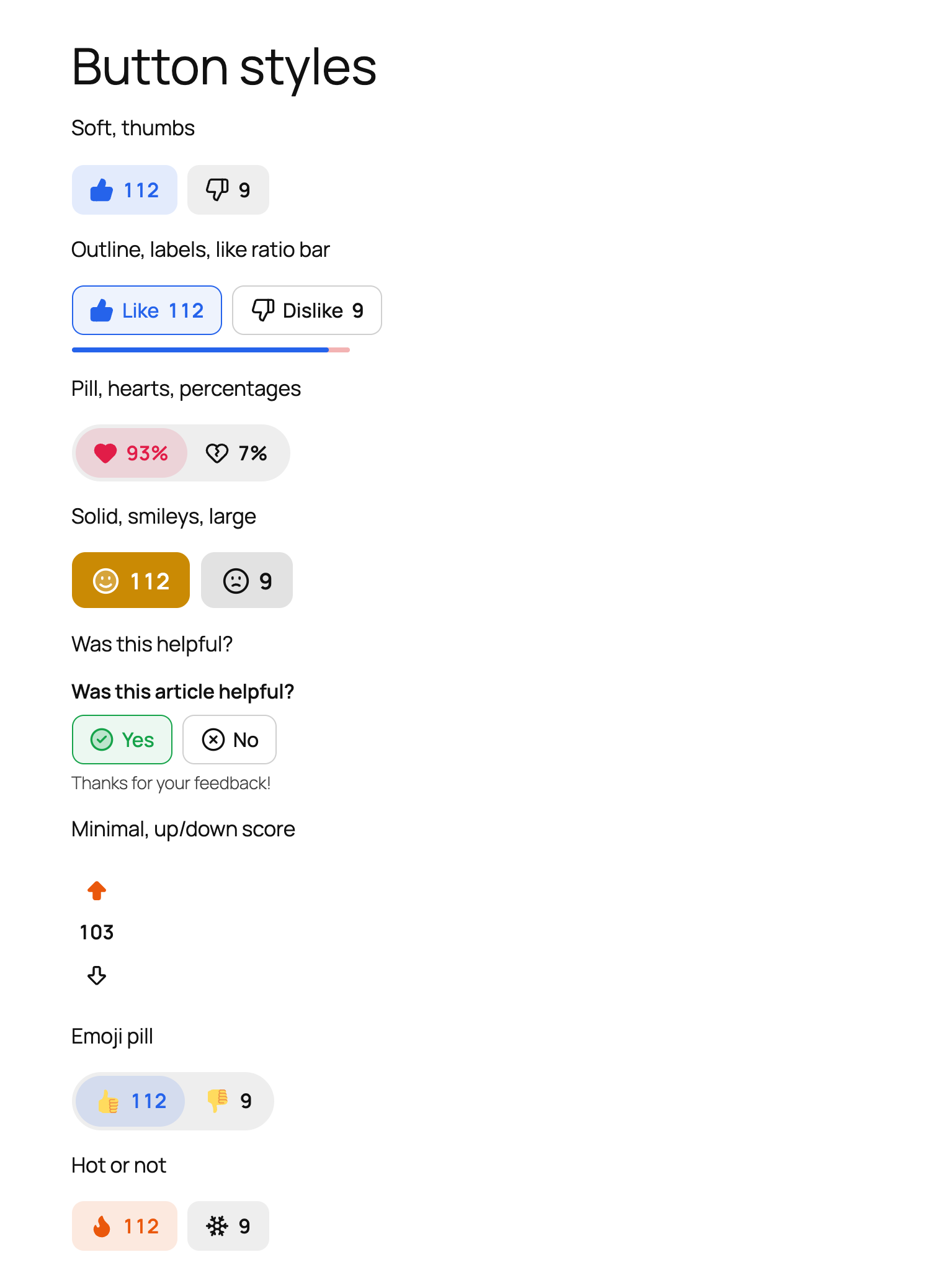
- 9 icon sets: thumbs, hearts, up/down arrows, smileys, yes/no, hot/not, emoji, text only, or your own images.
- 6 button styles: soft, outline, pill, minimal, solid and glass.
- Sizes, alignment and layout: small, medium or large; left, center or right; side by side or stacked (Reddit-style up/down votes).
- Counts your way: show, hide, show only after voting, percentages, or a single score (likes minus dislikes). Large numbers shorten to 1.2K.
- Like ratio bar under the buttons.
- Click animations: pop, bounce or a particle burst. Visitors who prefer reduced motion never see them.
- Presets in one click: Like / dislike, Was this helpful?, Hearts, Upvote / downvote, Emoji and Rating bar.
- Live preview on light, dark and image backgrounds while you change settings.
- Fits any theme: neutral colours follow your theme’s text colour, so buttons work on light and dark themes without setup. Or pick your own colours.
Voting that holds up
- One vote per person. Logged-in users vote with their account; visitors per browser or per IP address.
- People can change their mind or remove their vote (optional).
- Open to everyone, or to logged-in users only, or only to chosen roles. Visitors who can’t vote get a log-in link.
- Works with page caching (WP Rocket, LiteSpeed, Cloudflare and others). Counts and each visitor’s own vote load fresh after the page loads.
- Rate limiting stops scripted vote flooding.
- Works behind Cloudflare and proxies, with a setting for the visitor IP header.
Placement
- Automatically before or after content, or both, on the post types you choose.
- Small buttons under each comment.
- WooCommerce products show buttons in the product summary.
- Likenook Buttons block, widget, shortcode and Elementor widget, each with its own style options.
- Most Liked Posts block, widget, shortcode and Elementor widget: all time, or the last week, month or year, with optional featured images.
- A template tag for themes.
- Hide the buttons on any single post from the editor.
Built for SEO and content strategy
Likes are more than a vanity number. Likenook turns them into signals you and search engines can use.
- Structured data that fits your SEO plugin. Like and dislike counts are added to your page’s schema.org markup as
interactionStatistic(LikeAction and DislikeAction). They join your existing Article or WebPage entity instead of adding a competing one, and work with Yoast SEO, Rank Math, All in One SEO, and themes or plugins that print their own JSON-LD. - Guideline-friendly by design. Counts are only marked up where visitors can see the results, as search engines expect. No star ratings are added, so you stay clear of Google’s rules against self-serving review markup.
- Internal links to your best content. The Most Liked Posts block, widget and shortcode link to the posts readers already love, in your sidebar, after articles or on a “popular” page. That keeps visitors reading and sends internal links where they count.
- Know what to update. Most liked and most disliked posts by week, month or year show which articles earn their place and which need a refresh. On documentation, “Was this helpful?” votes point straight at the pages that leave readers stuck.
- Readable without JavaScript. Buttons and their counts are part of the page HTML, so search engines and AI crawlers see them as they are, and the buttons never pop in after the page loads.
- Fast pages stay fast. About 9 KB of JavaScript with no jQuery, loaded only on pages that show buttons, and full page caching keeps working.
Accessibility
- Real
<button>elements that work with a keyboard, with a visible focus ring. - Each button reports whether it is pressed, and vote results are announced to screen readers.
- Labels stay available to screen readers even when you hide them visually.
- Animations switch off for visitors who prefer reduced motion.
- Default colours follow your theme’s text colour, so contrast holds on light and dark themes.
Analytics
- Dashboard with likes, dislikes, total votes and like ratio, compared with the previous period.
- Votes per day or month chart, with a table view.
- Most liked and most disliked posts for 7, 30 or 90 days, 12 months or all time.
- Sortable Votes column in the posts list.
- “Likes this week” widget on the WordPress dashboard.
- CSV export.
Switching from another plugin
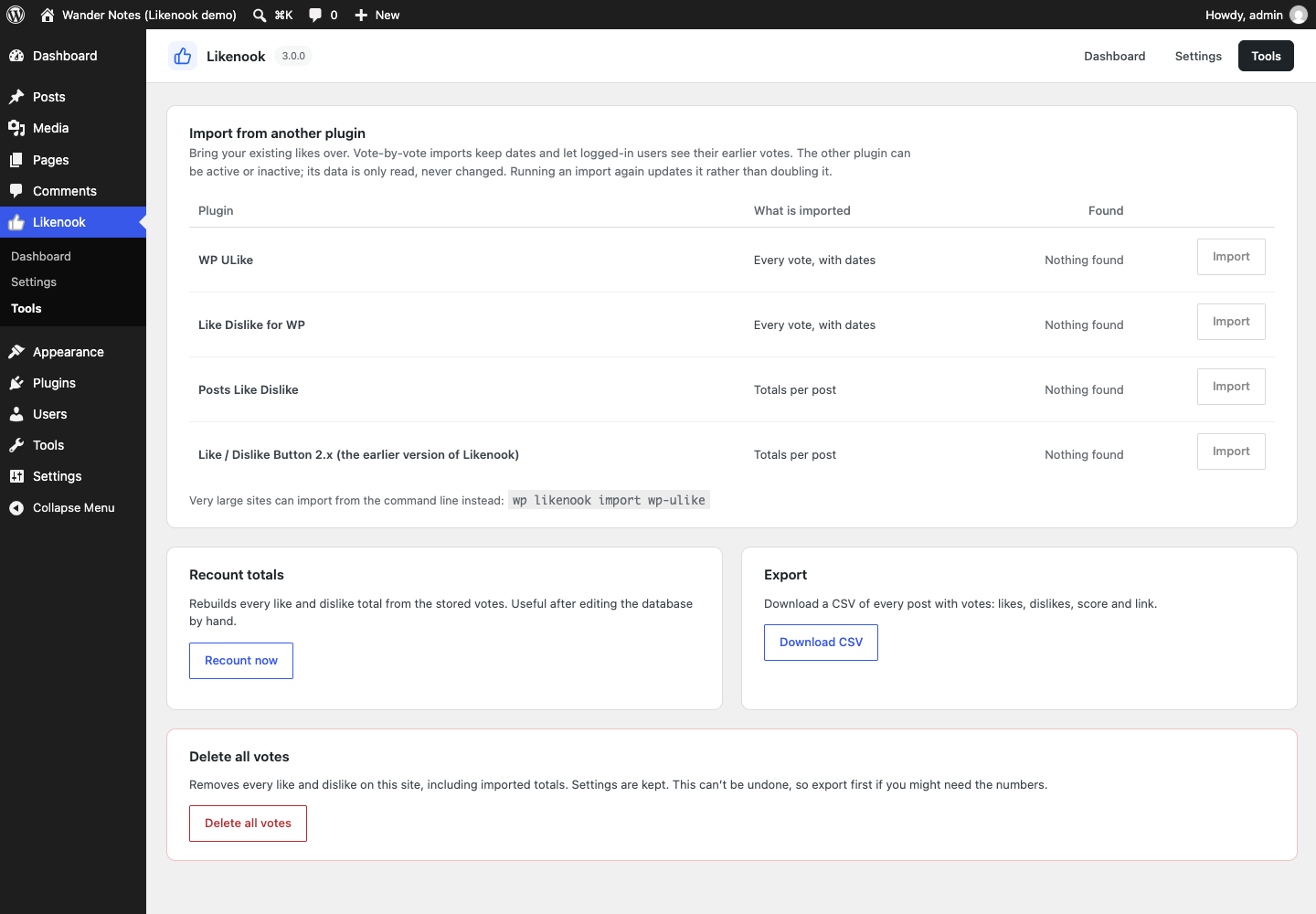
Import your existing votes from WP ULike, Like Dislike for WP and Posts Like Dislike in one click. Individual votes keep their dates, and logged-in users keep their earlier vote. Old shortcodes keep working after the import.
Privacy
- IP addresses are never stored, only a keyed one-way hash.
- The visitor cookie holds a random ID and is set only after someone votes.
- Works with the WordPress personal data export and erase tools.
- Suggested privacy policy text is included.
- No external requests, no tracking, no jQuery on the front end.
For developers
- REST API:
GET /wp-json/likenook/v1/stateandPOST /wp-json/likenook/v1/vote, plus anlikenook_votesfield on post endpoints. - Template tags:
likenook_buttons(),likenook_get_buttons(),likenook_get_counts(). - Action:
likenook_vote_recorded. Filters:likenook_buttons_html,likenook_can_vote,likenook_icon_sets,likenook_visitor_ip,likenook_rate_limit,likenook_schema_statistics,likenook_current_post_id. - WP-CLI:
wp likenook stats,wp likenook recount,wp likenook import <source>,wp likenook reset. - CSS custom properties such as
--likenook-like,--likenook-dislikeand--likenook-radius.
Support and feedback
Questions, bug reports and feature ideas are welcome in the support forum. The code is on GitHub if you’d like to contribute.
Likenook is built and maintained by Sanjay Shankar. If it helps your site, a review helps other site owners find it, and you can buy me a coffee to support development.
Credits
Icons are adapted from Lucide (ISC licence).
Trademarks
WP ULike, Like Dislike for WP, Posts Like Dislike, Yoast SEO, Rank Math, All in One SEO, WooCommerce, Elementor, Divi, Bricks, Beaver Builder, WPBakery, Oxygen, Breakdance, SiteOrigin, Cloudflare and WP Rocket are trademarks of their respective owners. Likenook is an independent plugin and is not affiliated with or endorsed by any of them. These names are used only to describe compatibility and imports.
Screenshots
Blocks
This plugin provides 2 blocks.
- Likenook Buttons Like and dislike buttons for this post. Works in Query Loop, templates and sidebars.
- Most Liked Posts A list of the posts with the most likes, all time or for a recent period.
Installation
- Install the plugin from Plugins Add New, or upload the
likenookfolder to/wp-content/plugins/. - Activate it. Buttons appear under your blog posts straight away.
- Go to Likenook Settings to choose icons, style and where buttons appear.
FAQ
-
Check that the post type is ticked under Likenook Settings Placement, and that Position isn’t set to “Only where I place them”. Some themes don’t use the standard post content. In that case, add the Likenook Buttons block, the
[likenook]shortcode, or<?php if ( function_exists( 'likenook_buttons' ) ) { likenook_buttons(); } ?>to your template. -
Does it work with Elementor, Divi or other page builders?
-
Yes. Elementor has its own Likenook Buttons and Most Liked Posts widgets. In Divi, Bricks, Beaver Builder, WPBakery, Oxygen, Breakdance and other builders, add
[likenook]or[likenook_most_liked]to a shortcode or text module. Buttons placed without an ID belong to the post being viewed. -
Add the Likenook Buttons block to a widget area (or the Likenook Buttons widget in classic themes). It shows the buttons for the post being viewed, and hides itself on blog and archive pages, where there is no single post to vote on. To keep the automatic buttons out of the content at the same time, set Position to “Only where I place them”.
-
Add the Most Liked Posts block or widget to the sidebar, or use
[likenook_most_liked number="5" period="month"]. Choose the post type, the period (all time, 7 days, 30 days or 12 months) and whether to show featured images. -
What can I set in the shortcode?
-
[likenook] accepts
id,icons(thumbs, hearts, arrows, smileys, checks, flames, emoji, none),style(soft, outline, pill, minimal, solid, glass),size(sm, md, lg),align,layout(row, stack),counts(show, hide, after_vote, percent, score),labels(yes, no),like_label,dislike_label,bar(yes, no),questionandthanks. Anything you leave out uses your settings.[likenook_most_liked] accepts `number`, `post_type`, `period` (all, week, month, year), `show_count` and `show_thumbnail`. -
Yes. Call
<?php if ( function_exists( 'likenook_buttons' ) ) { likenook_buttons(); } ?>in any template file, for example next to the post title or in the author box. Pass a post ID to show the buttons for a different post:likenook_buttons( 42 ). -
Does it work with WooCommerce?
-
Yes. Tick Products under Placement and the buttons appear in the product summary. The Most Liked Posts block, widget and shortcode can list products too.
-
Can visitors vote without an account?
-
Yes, by default. Each visitor gets one vote per item, recognised by a cookie or by a hashed IP address. To allow only logged-in users, or only certain roles, change “Who can vote” under Voting.
-
Will it slow down my site?
-
No noticeable effect. The front end adds one small stylesheet and about 9 KB of JavaScript (no jQuery), only on pages that show buttons, plus one small request to load live counts. Totals are cached, so lists and sorting never count votes on the fly.
-
Does it help SEO?
-
It adds like and dislike counts to your page’s structured data (schema.org
interactionStatistic), alongside the Article markup from your SEO plugin or theme. This describes engagement to search engines and AI crawlers. Counts are only added when visitors can see the results, and you can turn this off under Advanced. It does not create star ratings in search results, and no plugin can promise rankings. -
Does it work with caching plugins?
-
Yes. The page can be cached as usual. Counts and the visitor’s own vote load through a small request after the page loads.
-
In block themes, add the Likenook Buttons block inside the Post Template of a Query Loop. In classic themes, turn on “Also show on blog and archive pages” under Placement.
-
Can I use it for “Was this helpful?” on documentation?
-
Yes. Click the “Was this helpful?” preset. It adds the question, Yes / No labels and a thank-you message, and hides the counts.
-
Yes. Under Placement Which buttons, choose “Like only”. The Hearts preset does this too.
-
You chose “Per IP address” tracking, and your office shares one IP. Switch to “Per browser” under Voting.
-
Every visitor seems to have the same IP address
-
Your site is probably behind Cloudflare or a proxy. Under Voting, set “Visitor IP comes from” to the matching header.
-
How do I move my votes from another like plugin?
-
Go to Likenook Tools and click Import next to the plugin. You can run it again safely: it updates rather than doubles. On very large sites, use
wp likenook import wp-ulike. -
Is Likenook accessible?
-
Yes. The buttons are real buttons that work with a keyboard and screen readers, report their pressed state, announce vote results, and respect the reduced motion setting.
-
Yes. Everything uses CSS custom properties, so a few lines change the colours and shape everywhere, for example
.likenook { --likenook-like: #16a34a; --likenook-radius: 4px; }. Each style, size and icon set also adds its own class to the wrapper. -
Is Likenook translation-ready?
-
Yes. All text uses the
likenooktext domain and a translation template is included, so it can be translated on translate.wordpress.org or with a plugin like Loco Translate. -
Where can I get help or suggest a feature?
-
Use the support forum. Feature ideas are very welcome, and you can also open an issue on GitHub.
-
What happens to my votes if I delete the plugin?
-
They are kept, unless you switch on “Delete all votes and settings when the plugin is deleted” under Advanced first.
Reviews
There are no reviews for this plugin.
Contributors & Developers
“Likenook – Like Dislike Buttons” is open source software. The following people have contributed to this plugin.
Contributors
“Likenook – Like Dislike Buttons” has been translated into 5 locales. Thank you to the translators for their contributions.
Translate “Likenook – Like Dislike Buttons” into your language.
Interested in development?
Browse the code, check out the SVN repository, or subscribe to the development log by RSS.
Changelog
3.0.0
- Rebuilt from scratch.
- New: 9 icon sets, 6 button styles, sizes, layouts, colours, click animations and presets, with a live preview.
- New: count display options, short numbers and a like ratio bar.
- New: “Was this helpful?” question and thank-you message.
- New: change or remove a vote; like-only and dislike-only modes.
- New: logged-in only voting with role limits; per-browser or per-IP visitor tracking; rate limiting.
- New: comments and WooCommerce products.
- New: Likenook Buttons and Most Liked Posts blocks, widgets, shortcodes and Elementor widgets. Blocks work in Query Loop, templates and sidebars.
- New: in sidebars, buttons belong to the post being viewed and hide on blog and archive pages.
- New: button styles hold up against theme button CSS.
- New: analytics dashboard, posts list column, dashboard widget and CSV export.
- New: import from WP ULike, Like Dislike for WP and Posts Like Dislike.
- New: works with page caching.
- New: REST API, WP-CLI commands, hooks and template tags.
- New: like and dislike counts in schema.org structured data (interactionStatistic), merged into existing Yoast SEO, Rank Math, All in One SEO or theme markup.
- New: personal data export and erase, privacy policy text.