
Description
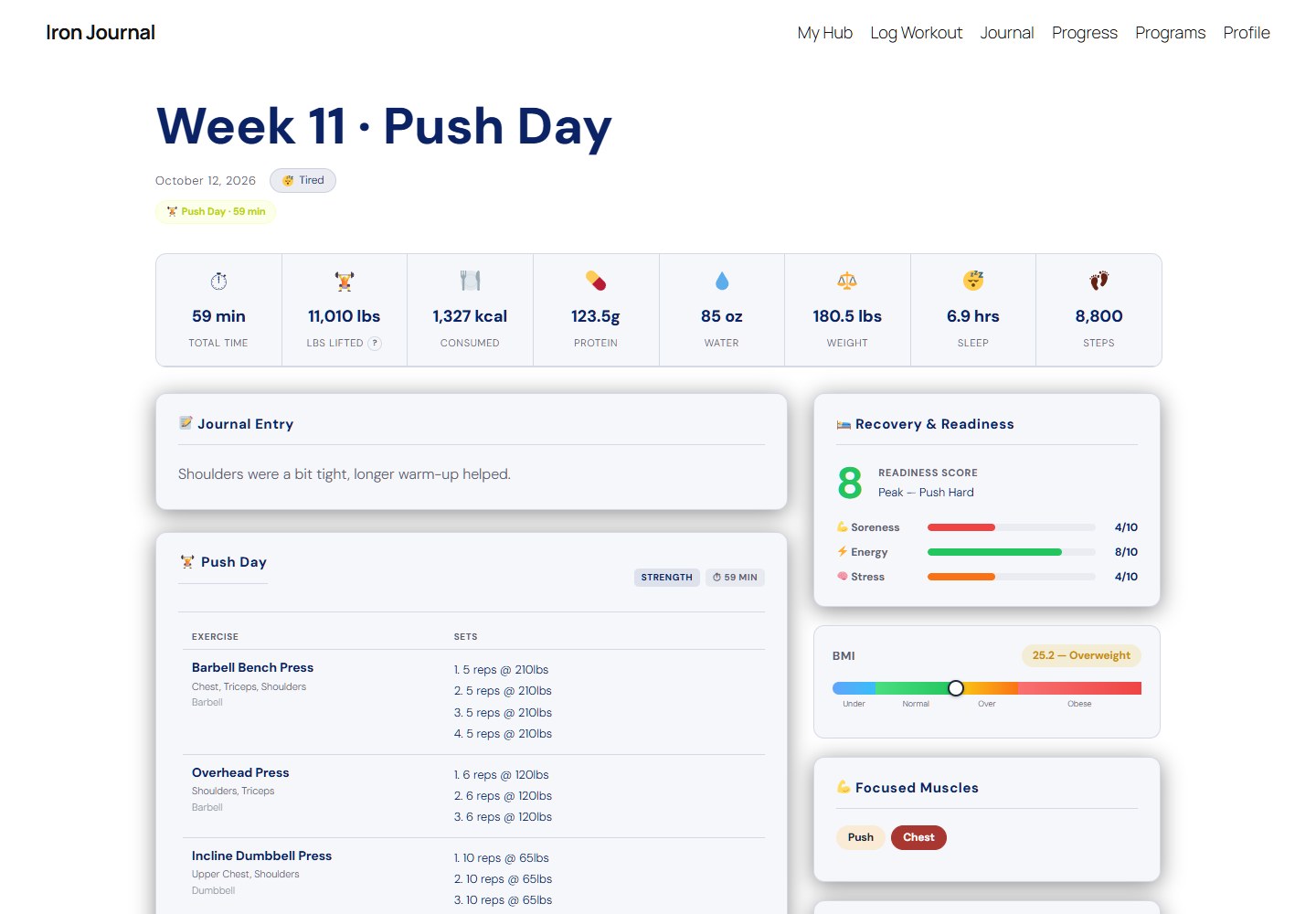
LiftPress turns any WordPress site into a fitness journal. Log every workout set by set, embed your YouTube vlogs, track meals and macros, watch your lifts and body weight trend over time, and earn trophies along the way. It works with almost any theme and looks good on phones.
Log workouts your way
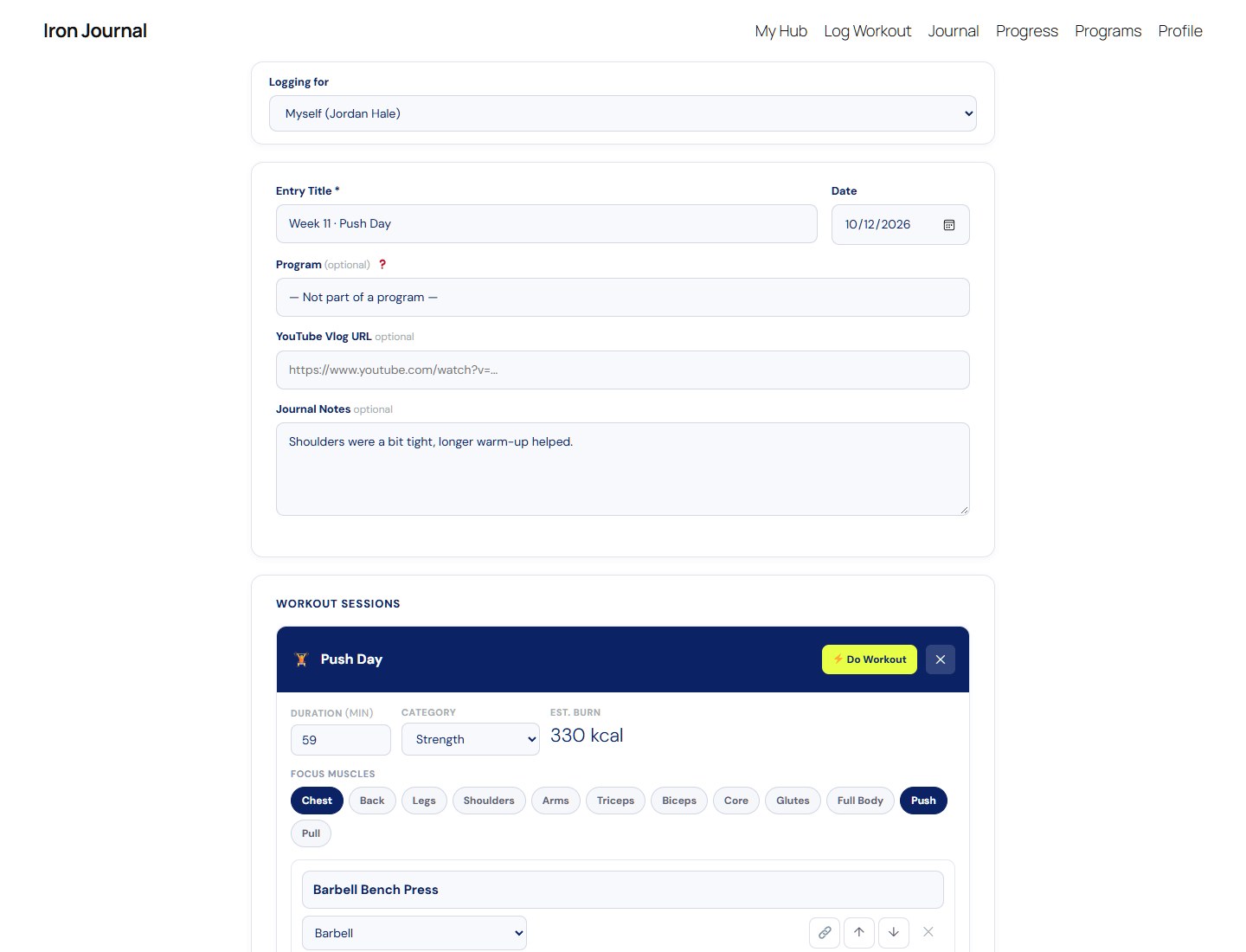
- Strength, circuit, cardio and stretching sessions in the same entry
- Per-set weight, reps, timed sets, bodyweight and assisted sets, with notes
- A built-in exercise library with muscle groups and equipment, plus your own custom exercises
- Save workouts you repeat and load them again in one click
- A front-end logger so you never need to open wp-admin
Nutrition and recovery
- Breakfast, lunch, dinner and snacks with a searchable food library and your own custom foods
- Calories, protein, carbs and fat totals for the day
- Sleep, water, steps, body weight, soreness, energy and stress, with a daily readiness score
See your progress
- Strength progression and body weight charts
- Workout history with personal records
- A profile page with your trophy case, body stats and BMI
- Starter achievements for your first workouts, workout counts and streaks
Publish it
- Journal grid, single entries and a featured homepage layout
- Exercise compendium page
- Privacy settings per user, and export / import of all your data
- Design settings with colors, fonts and three ready-made themes
Add-ons
Optional add-ons are available from getliftpress.com:
- Programs — ready-made training programs with week-by-week schedules, custom programs, and automatic day drafts
- Trainer Tools — a client dashboard for personal trainers
- Achievements Pro — the full trophy set and your own custom achievements
- Design & Dashboards — the Hub dashboard, Weekly Recap, advanced charts and more themes
- Active Workout — a gym-mode logger with rest timers for use mid-workout
LiftPress is fully usable without any add-ons.
External services
LiftPress connects to these services:
- Google Fonts (fonts.googleapis.com, fonts.gstatic.com) loads the fonts chosen in the LiftPress design settings. Visitors’ browsers send their IP address to Google when a page loads. Turn it off with “Don’t load fonts from Google” in the design settings. Privacy policy, terms.
- YouTube shows the videos linked to journal entries (in privacy-enhanced mode, youtube-nocookie.com) and their thumbnails (i.ytimg.com). Visitors’ browsers contact YouTube only on entries that have a video. Privacy policy, terms.
LiftPress does not send any data to the plugin’s author.
Screenshots


Installation
- Install LiftPress from Plugins Add New, or upload the
liftpressfolder to/wp-content/plugins/. - Activate it. The Quick Setup screen creates your journal pages.
- Make sure pretty permalinks are on (Settings Permalinks Post name).
- Start logging from the Log Workout page or Workout Entries Add New.
FAQ
-
Does it work with my theme?
-
Almost certainly. LiftPress has been used with Astra, GeneratePress, Kadence, Blocksy and many others. Its pages are built with shortcodes, so they work in any theme.
-
Journal entries show a 404
-
Go to Settings Permalinks and click Save. That refreshes WordPress’s links.
-
Is my data private?
-
Each user chooses whether their journal is public or private. Everything is stored in your own WordPress database.
-
Is this medical advice?
-
No. Calorie burns, macros, readiness scores and other figures are estimates for general guidance. Talk to a qualified professional before starting a new exercise or nutrition program.
Reviews
There are no reviews for this plugin.
Contributors & Developers
“LiftPress” is open source software. The following people have contributed to this plugin.
Contributors
Translate “LiftPress” into your language.
Interested in development?
Browse the code, check out the SVN repository, or subscribe to the development log by RSS.
Changelog
2.1.4
- Code tidy-up for the WordPress.org review: the entry editor, entry page and history page escape names, notes and labels only when they’re printed (not when they’re read), and the export files are sent with wp_send_json(). No visible change.
2.1.3
- Code tidy-up for the WordPress.org review: the journal grid shortcode opens and closes its output buffer in one place. No visible change.
2.1.2
- Security hardening from the WordPress.org review: all markup built by LiftPress’s helpers (session cards, charts, program switchers, add-on tips, menu pickers, import rows) is now escaped when it’s printed, and page scripts are added without output buffering.
- Fix: Confirm Import on Settings > Export / Import works again (the preview had lost its security field and Skip/Overwrite choices), and its Cancel buttons go back to the Export / Import tab.
2.1.1
- Fix: moving a workout session up or down in the editor, then clicking Do Workout before saving, could open the wrong session in Active Workout, and saving the new order afterwards could copy one session over another (two of the same workout, the other one gone). Every session now has a lasting id, so Active Workout always works on the session you picked, wherever it moves; moving a session counts as an unsaved change; and a session that’s never been saved asks you to save first.
- Logged sets keep their checkmarks on the right session when you reorder sessions in the editor.
2.1.0
- Everything LiftPress stores now uses the “liftpress_” prefix (settings, entry and profile fields, the entry post type, the trainer capability and the workout history table). Your data moves across automatically the first time 2.1 loads; nothing to do. Links to entries keep working.
- Fix: new sites now get the workout history table (History and personal records could stay empty on a fresh install).
- Scripts and styles are loaded through WordPress’s script and style queues instead of inline tags.
- The add-ons notice for existing customers shows only on LiftPress screens and the Plugins screen.
- Requires WordPress 6.2 or newer.
- Add-ons need their 2.1-ready versions (Programs, Trainer Tools, Achievements Pro and Design & Dashboards 1.1, Active Workout 1.15).
2.0.3
- Security hardening: the equipment badge in the exercise details pop-up is escaped in the browser too.
- Tested with PHP 8.5: no warnings or notices on any LiftPress page or screen.
2.0.2
- Fix: adding or editing a food (and opening any other pop-up) in the entry editor no longer jumps the page back to the top; it stays where you were.
2.0.1
- Log Workout editor refresh: each set fits on one line (set, weight, reps) with notes, timed, assisted and bodyweight options under a ⋯ button; “+ Add set” copies the set above; “+ Add Exercise” opens the exercise search straight away; sessions are clear cards; cardio and stretching fields are labelled; and on phones the Save buttons stay at the bottom of the screen.
- Phones: History tables show each exercise as a card, the year heatmap on Progress scrolls (starting at this week), buttons and links are easier to tap, and small labels are easier to read. The quick bar shows labels under its icons.
- Fix: the History Exercise Library had its “Sessions” and “Total Sets” headings swapped.
- Journal entries show weight added to bodyweight sets, e.g. “8 reps (+25 lbs)”.
- New LiftPress Add-ons page listing the optional add-ons. Administrators see a few small, dismissible “Available with…” cards where an add-on’s features would appear, and one notice after 10 workouts or two weeks; members never see them, and “Hide add-on suggestions” turns them off. The locked “Do Workout” button now only shows to administrators and opens in a new tab.
- Hardening: imports only read genuine uploaded files, and form values in the entry editor use attribute escaping. Saved workout names with “&” no longer show as “&”.
- New setting “New journals are”: private or public, for people who haven’t picked a privacy setting. New sites start private; sites that already have entries keep public, as before. The site owner’s journal stays public unless they change it.
- New setting “Trainer access”: trainers reach every user, or only the clients assigned to them on each user’s profile (with Trainer Tools). Editing a client’s entry as their trainer now keeps it theirs.
- Privacy: private journals no longer appear in the WordPress sitemap or in embeds of their entries.
- Privacy: only an entry’s author and trainers can edit or delete it in wp-admin (WordPress Editors no longer can), and the Entries list shows other users their own entries only.
- Privacy: deleting a user account now deletes their journal entries and workout history (unless you give their content to another user). Deleting an entry removes its history rows.
- Privacy: LiftPress is now part of Tools > Export Personal Data and Erase Personal Data, and suggests text for your privacy policy (Settings > Privacy).
- Privacy: new “Don’t load fonts from Google” setting. YouTube videos use YouTube’s privacy-enhanced mode.
- Fix: workouts saved from the front-end Log Workout page (since 1.0.16) weren’t added to the workout history or checked for achievements. They are now, and a one-time repair rebuilds the history from your existing entries (achievements found this way show up on members’ next visit, without emails).
- Fix: the Body & Recovery tab on profiles showed chart code instead of the charts.
- Fix: “Hide theme title & date on entry pages” now also works with block themes such as Twenty Twenty-Five.
- Fix: a blank type badge on sessions logged from the front end, and the Quick Setup steps are numbered 1, 2, 3.
- Privacy: “previous / next entry” links in block themes skip private journals.
- Fix: importing journal entries with “Overwrite” could replace another user’s entry from the same date. It now only replaces your own.
- Security: the [liftpress_entry] shortcode follows the journal’s privacy setting and doesn’t show drafts. Imported entries only restore LiftPress data. Journal page links no longer use the request’s Host header. Values in the classic editor’s exercise rows are escaped.
2.0.0
- LiftPress is now free. Programs, Trainer Tools, Achievements Pro, Design & Dashboards and Active Workout are optional add-ons. Existing customers get all add-ons free, and all existing data (programs, achievements, clients, settings) is kept and comes back when the add-ons are active.
- Neutral wording for the health disclaimer shown on your pages.
1.0.18
- Removed old function names kept for the Active Workout add-on (update Active Workout to 1.7.21 or newer).
1.0.17
- Tested with WordPress 7.1.
1.0.16
- Full WordPress Plugin Check clean-up: escaped output, sanitized input, prefixed functions and hooks.
- Fixed a crash when two entries were shown on the same page, and uninstall now only removes LiftPress data.