

Description
LBC Animate Any Block brings the wildly popular AOS – Animate On Scroll library straight into the WordPress Block Editor (Gutenberg).
Bring your pages to life without writing a single line of code. Simply select any block, toggle the animation switch, and choose from dozens of professional scroll-triggered effects.
Core Features
- Universal Block Support: Works flawlessly with all Core blocks (Paragraph, Image, Group, Cover) AND third-party plugins (WooCommerce, Kadence, GenerateBlocks, ACF, etc).
- 28 Animation Types: Choose from elegant Fades, Slides, Flips, and Zooms.
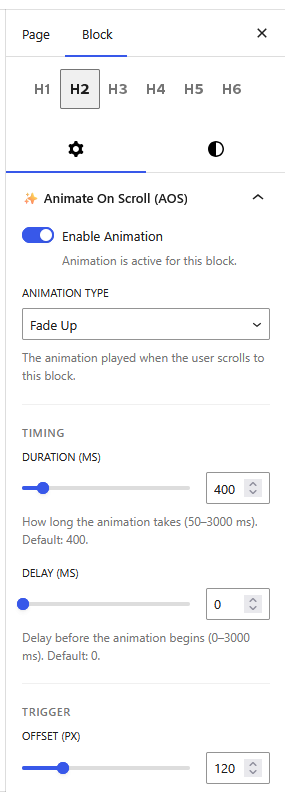
- Granular Control: Tweak animation Duration, Delay, Easing, and Offset on a per-block basis.
- Advanced Triggers: Configure Anchor Placement, CSS Anchor selectors, and specify whether animations should play once or mirror on scroll up.
- FSE Compatible: Fully compatible with WordPress Full Site Editing (FSE) themes.
- Performance Focused: No jQuery required. The AOS library is bundled locally (only ~14 KB minified) with zero external CDN requests.
- Clean DOM: Animations are strictly opt-in. Unaffected blocks remain completely untouched with zero added bloat.
How it works
- Select any block in the page or post editor.
- Open the “✨ Animate On Scroll (AOS)” panel in the block sidebar.
- Toggle Enable Animation and customize your effect.
- Save the page and scroll down on the front end to watch it trigger!
Speed up WordPress Website
Take your website’s performance to the next level with Leverage Browser Caching Pro! Unlock lightning-fast load times, improve your Core Web Vitals, and dominate search engine rankings with our premium optimization suite.
- 🚀 Ultimate Caching & Compression: Take full control with customizable cache lifespans, GZIP compression, Keep-Alive connections, and optimal Cache-Control headers to instantly serve pages to your visitors.
- ⚡ Deep Code Minification: Shrink your CSS, JavaScript, and HTML footprints. Delay non-critical JS execution to skyrocket your Google PageSpeed Insights scores.
- 🖼️ Smart Media & Font Delivery: Drastically reduce initial load weight with intelligent lazy loading for images and iframes, plus seamless Google Fonts optimization.
- 🛠️ Database Cleanup & Site Health: Keep your backend running smoothly with automated database optimization, DNS prefetching, heartbeat control, and enhanced security by disabling XML-RPC.
- 🛒 WooCommerce Optimized: Fully compatible with WooCommerce—speed up your online store without breaking checkout flows or dynamic cart data.
- ⚙️ Intuitive Dashboard: Manage all your advanced performance tweaks effortlessly through a clean, user-friendly settings panel.
- 🛡️ Priority Support & Updates: Enjoy peace of mind with fast, expert assistance from our dedicated team, plus continuous feature updates.
Upgrade to Leverage Browser Caching Pro!
Credits & Acknowledgements
- AOS (Animate On Scroll): The core animation engine of this plugin is powered by the fantastic AOS Library, developed by Michał Sajnóg and available under the MIT License.
Open Source & GitHub
We believe in open-source development! If you’re a developer looking to contribute, report an issue, or simply explore the code, visit our official repository:
LBC Animate Any Block on GitHub
Screenshots
Installation
Option 1: Install via WordPress Dashboard (Recommended)
- Navigate to Dashboard Plugins Add New.
- Search for LBC Animate Any Block.
- Click Install Now, and then click Activate.
Option 2: Upload via WordPress Dashboard
- Download the plugin ZIP from the official repository: https://wordpress.org/plugins/lbc-animate-any-block/
- Go to Dashboard Plugins Add New Upload Plugin.
- Select the downloaded ZIP file and click Install Now.
- Click Activate Plugin.
Option 3: Upload via FTP
- Download the plugin ZIP file.
- Extract the ZIP to reveal the
lbc-animate-any-blockfolder. - Upload the entire folder to the
/wp-content/plugins/directory on your server. - Go to Dashboard Plugins, locate the plugin, and click Activate.
FAQ
-
Does this slow down my site?
-
Not at all. The plugin uses the lightweight AOS library (~14 KB minified) and has absolutely zero dependencies (no jQuery). It only loads on the front-end when activated.
-
Can I use it with third-party blocks?
-
Yes! The plugin universally attaches to the WordPress rendering pipeline. It automatically adds animation controls to any third-party block out of the box.
-
Will it conflict with my theme?
-
No. The plugin stores its data in dedicated block attributes and cleanly injects
data-aos-*HTML attributes on render. This avoids any CSS class conflicts. -
Why is my animation not showing in the editor?
-
Animations are intentionally not previewed inside the editor. This prevents elements from jumping around or blocking your ability to click and edit them. Simply preview the page on the front end to see the animations in action.
Reviews
There are no reviews for this plugin.
Contributors & Developers
“LBC Animate Any Block” is open source software. The following people have contributed to this plugin.
Contributors
Translate “LBC Animate Any Block” into your language.
Interested in development?
Browse the code, check out the SVN repository, or subscribe to the development log by RSS.
Changelog
1.1
- Fix plugin review
- Avail both min and non-min
- Fix readme: installation section
- GPL license ready check
- Provide a public source code: added in readme GitHub Repo
1.0
- Initial release.
- 28 AOS animation types & 20 easing functions.
- Per-block duration, delay, offset, once, mirror, and anchor controls.
- AOS 2.3.4 bundled locally.