

Description
Lavo Bulk Edit is a free WooCommerce plugin for editing products, prices, stock, and variations in bulk – with no row caps, full variable product support, and real post-save undo.
Why Lavo Bulk Edit is different
No row caps, ever.
Edit your entire catalog in one session. Whether you have 500 products or 500,000, Lavo Bulk Edit pages through them cleanly at 25, 50, 100, or 200 rows at a time – no artificial limits.
Variable products that actually work.
Every variation appears as its own editable row, directly beneath its parent, with full attribute labels shown inline (e.g. Size: Large / Color: Red). No collapsing, no guessing, no clicking into individual products just to change a price.
Queue multiple changes, apply once.
Add as many field changes as you need before committing – price adjustments, stock updates, category reassignments, status changes – then apply them all in a single operation. One request. One save per product.
Bulk thousands of products without timeouts.
Operations on more than 200 products automatically run in the background using WooCommerce’s own Action Scheduler. A live progress bar shows you exactly how far along the job is. If you close the tab or refresh the page mid-operation, the progress bar reconnects automatically when you return – no lost work.
Real post-save undo.
Not a pre-save preview. Not a session-only rollback. Lavo Bulk Edit records a before/after snapshot of every field it touches. Made a mistake? Hit Undo from the on-screen notification – your products are restored exactly as they were.
Edit inline, without the action bar.
Click any price, SKU, stock quantity, stock status, or publish status directly in the table and edit it in place. Changes save immediately. A green flash confirms success; a red flash tells you something went wrong. No modals, no reloads.
Features
Bulk editing
* Apply changes to any number of selected products and variations simultaneously
* Queue multiple field changes and apply them all in one operation
* Supported fields: regular price, sale price, stock quantity, stock status, product status, SKU, categories, featured flag, catalog visibility
* Price operations: set fixed value, increase/decrease by fixed amount, increase/decrease by percentage
* Stock operations: set, increase, decrease
* Category operations: add to, remove from, or overwrite categories entirely
* Live progress bar for large batches – shows processed / total in real time
* Background processing for batches over 200 products – no PHP timeouts, no browser hanging
* Progress reconnects automatically if you navigate away and return mid-job
Undo
* Every bulk operation is logged with full before/after snapshots
* On-screen toast notification with a one-click Undo button – stays visible until you dismiss it
* Reverts the complete batch instantly, product by product, via the WooCommerce ORM
Inline cell editing
* Click-to-edit: regular price, sale price, stock quantity directly in the table
* Dropdown-to-edit: stock status, product status – no typing needed
* Press Enter or click away to save; press Escape to cancel with no changes
Product table
* Sticky grouped column headers: Image · Product · Inventory · Pricing · Status
* Variable products expand to show all variations in-line with attribute labels
* Collapse/expand toggle per variable product
* Per-row checkbox selection, header checkbox for select-all, independent parent/variation selection
* Type badges distinguish Simple, Variable, Variation, External, and Grouped products
Filtering
* Filter by: product name (contains), product type, publish status, category, tag, price range, stock status, SKU (partial match)
* Compound attribute filtering with AND logic across multiple taxonomy attributes
* Active filters shown as removable chips – easy to read, easy to clear
* Page resets automatically on every filter change
Pagination
* 25 / 50 / 100 / 200 products per page
* Variation rows are shown within their parent’s page and do not count against the per-page total
* Total product count and current range shown at all times
Built for performance
Lavo Bulk Edit is engineered to stay fast as your catalog grows:
- Batches over 200 products run as background Action Scheduler jobs – a live progress bar in the action bar shows processed / total and fills in real time
- Jobs are persisted in the database. If you close the browser tab or refresh mid-operation, the progress bar reconnects automatically when you return
100% Free
Lavo Bulk Edit is completely free. Every feature listed above is included at no cost – no account required, no license key, no expiry. Install directly from the WordPress plugin directory and start editing in under a minute.
A Pro version with more features is coming soon.
Development
The JavaScript and CSS in this plugin are compiled from source. The uncompiled source files are included in the plugin zip under the src/ directory, alongside package.json, package-lock.json, and webpack.config.js.
To build from source:
- Install Node.js (v18 or higher) and pnpm (
npm install -g pnpm). - From the plugin root directory, run:
pnpm install - For a development build:
pnpm run build - For a production (minified) build:
pnpm run build:production
Build output is written to plugin/assets/build/.
Screenshots
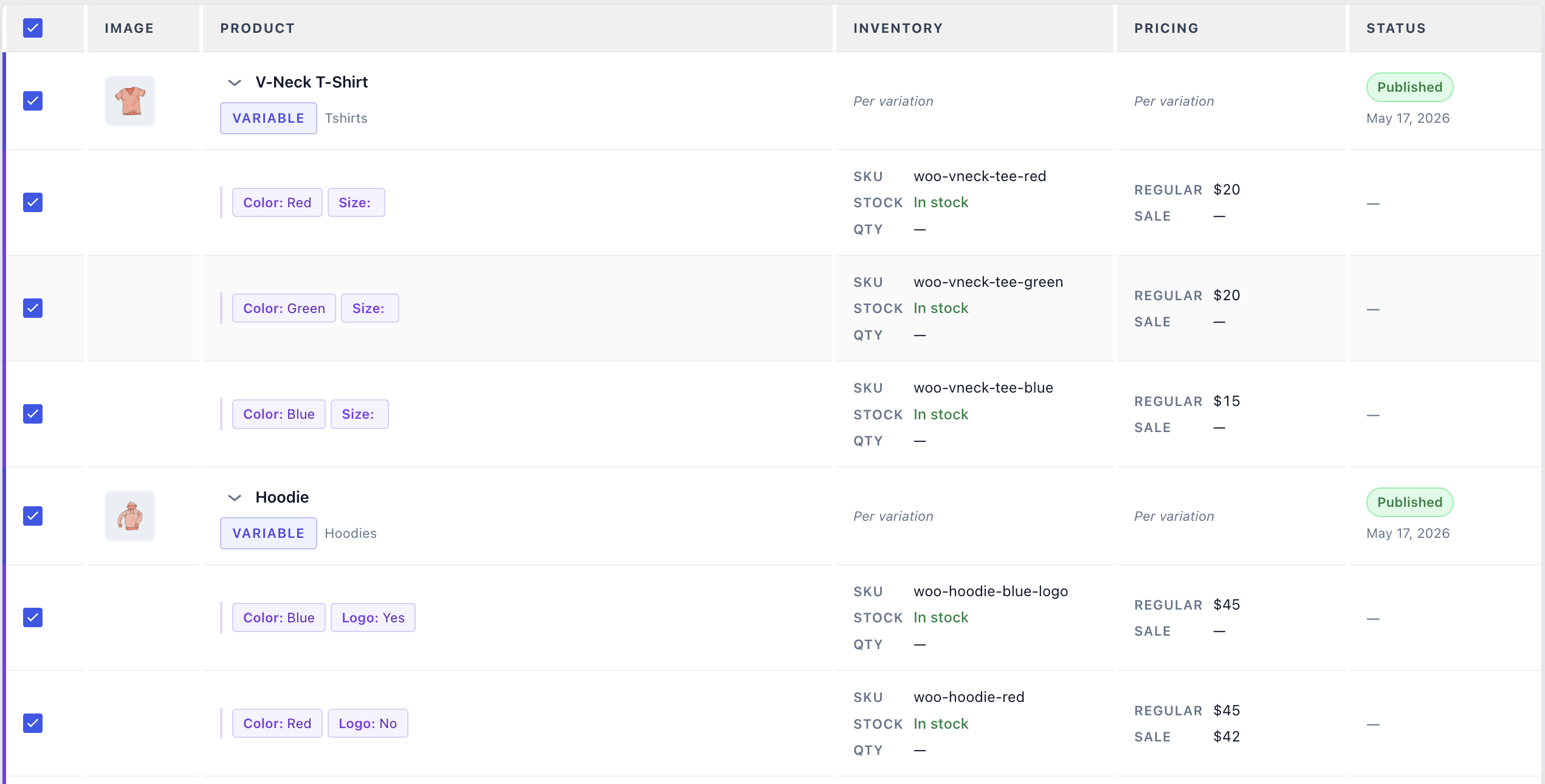
The product table – grouped columns for Inventory, Pricing, and Status. Variable products expand to show all variations with attribute labels. 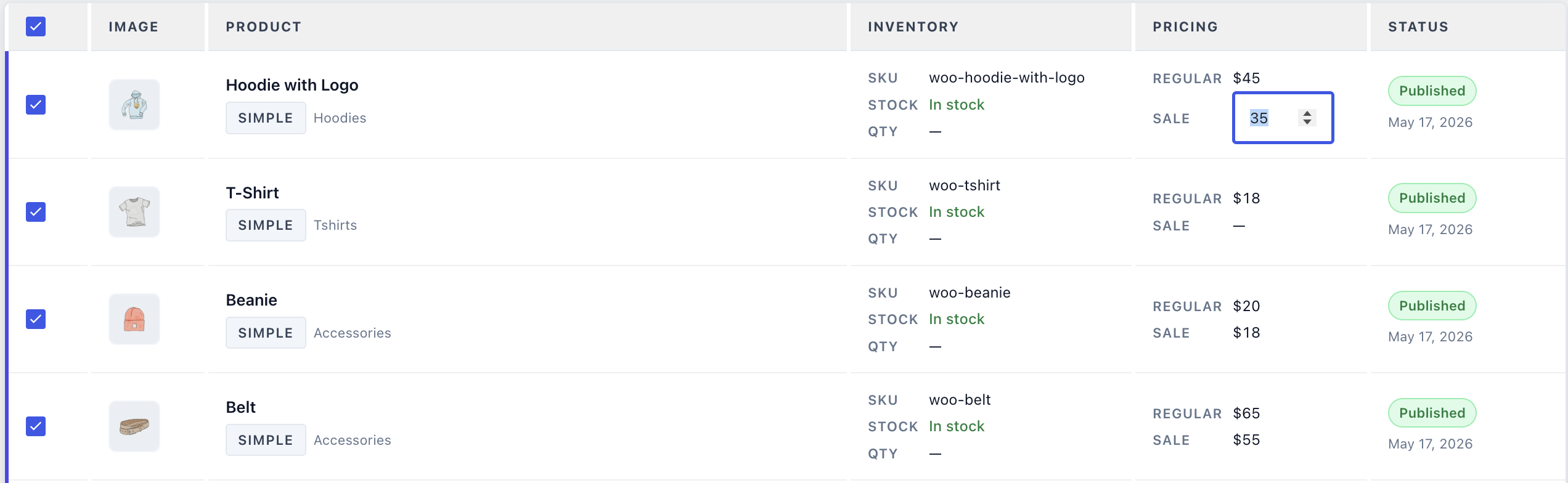
Inline editing – click any price, SKU, or status field directly in the table to edit it in place. 
Filter bar – active filters shown as removable chips. Compound attribute filtering with AND logic. 
Action bar – queue multiple field changes as chips, then apply them all at once. 
Progress bar – live processed / total indicator for large background operations. Reconnects after page refresh. 
Undo toast – a persistent on-screen notification after every bulk operation. One click to revert.
Installation
- Upload the
lavo-bulk-editfolder to/wp-content/plugins/, or install directly from the WordPress plugin directory. - Activate the plugin through the Plugins screen in WordPress.
- Navigate to Lavo Bulk Edit in the WordPress admin sidebar – it appears just below the WooCommerce menu.
- Your products load automatically. No setup wizard, no configuration required.
Requirements
* WordPress 6.4 or higher
* WooCommerce 8.0 or higher
* PHP 8.0 or higher
FAQ
-
Is there a limit on how many products I can edit at once?
-
No. You can edit your entire catalog in one operation – there are no row caps. Large batches run in the background so your browser stays responsive.
-
Yes. The undo batch is saved to the database, so it survives page navigation within the same session.
-
Can I edit variations independently from their parent?
-
Yes. Every variation appears as its own row with its own checkbox, so you can select any mix of parent products and variations.
-
Does it work with variable products that have many attributes?
-
Yes. Attribute labels are shown inline with each variation row (e.g. Color: Red / Size: Large).
-
Will this slow down my store?
-
No. The plugin only loads on the Lavo Bulk Edit admin page and has no impact on your storefront.
-
Is it compatible with WooCommerce HPOS?
-
Yes. HPOS compatibility is fully declared.
-
Can I filter by multiple attributes at the same time?
-
Yes. Multiple attribute filters combine with AND logic – for example, Color = Red AND Size = Large.
Reviews
There are no reviews for this plugin.
Contributors & Developers
“Lavo Bulk Edit for WooCommerce” is open source software. The following people have contributed to this plugin.
Contributors
Translate “Lavo Bulk Edit for WooCommerce” into your language.
Interested in development?
Browse the code, check out the SVN repository, or subscribe to the development log by RSS.
Changelog
1.0.0
- Initial release
- Product table with grouped columns: Image, Product, Inventory, Pricing, Status
- Variable product support with inline variation rows and attribute labels
- Inline cell editing: regular price, sale price, stock quantity, stock status, product status
- Bulk apply: regular price (fixed, +/- fixed, +/- percent), sale price, stock quantity, stock status, product status, SKU, categories, featured, catalog visibility
- Multi-field change queuing – apply multiple fields in one operation
- Category operations: Add, Remove, Overwrite
- Real post-save undo via database snapshots – persistent on-screen toast with one-click revert
- Auto-refresh of the product table after every bulk operation or inline edit
- Filter bar: name contains, type, status, category, tag, price range, stock status, SKU (partial match), compound attribute filters
- Pagination at 25 / 50 / 100 / 200 products per page
- Standalone admin menu page positioned below WooCommerce
- Background job processing via Action Scheduler for batches over 200 products – no PHP timeouts
- Live progress bar showing processed / total for large background operations
- Job persistence – progress bar reconnects automatically after a page refresh or tab close
- Full WooCommerce HPOS compatibility