

Description
Kookies Consent helps site owners manage consent for optional services in a clear and auditable way. Configuration and consent records remain in WordPress. The plugin does not require a cloud service, telemetry, or external frontend libraries.
Features include:
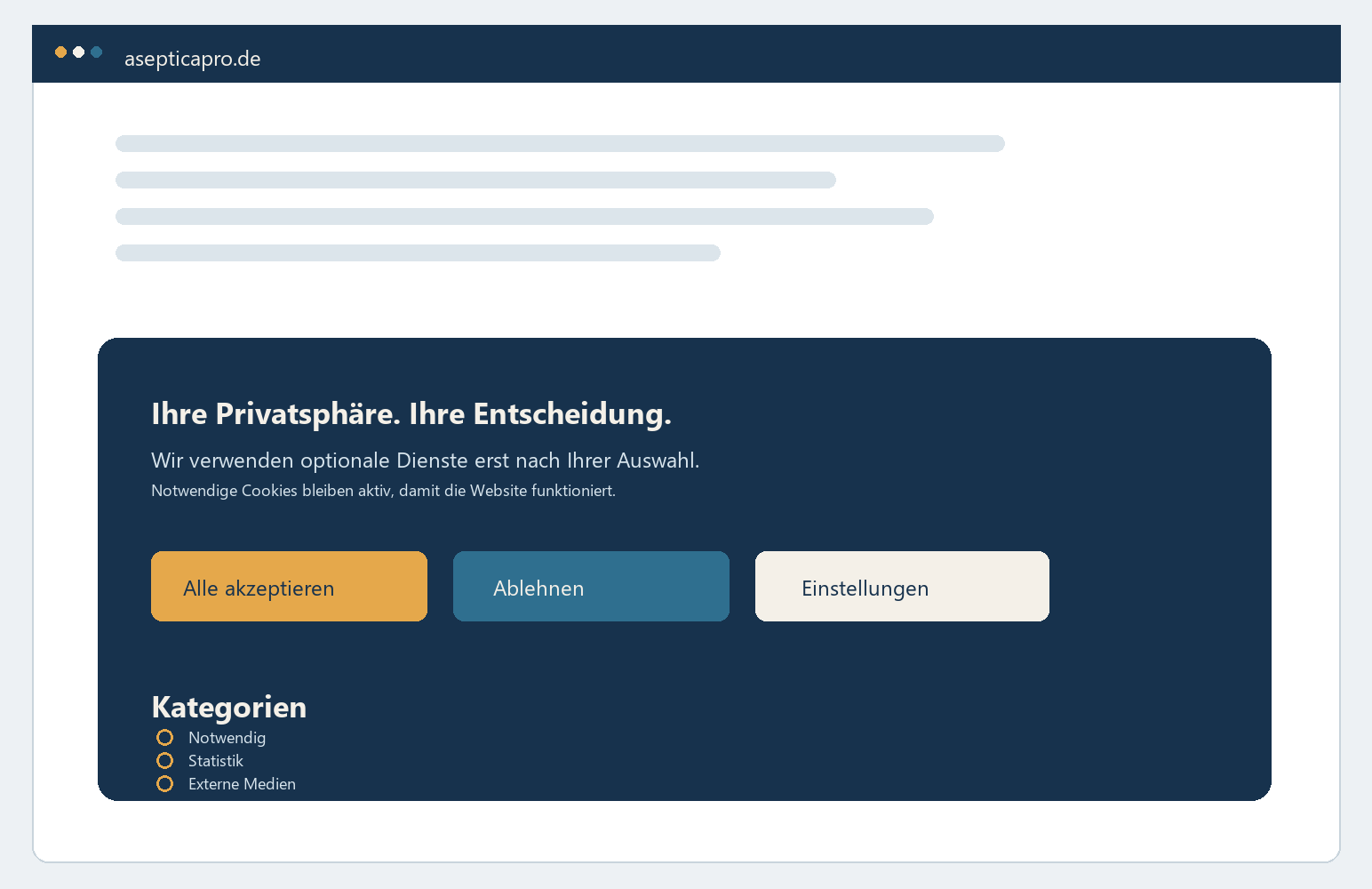
- A consent banner with accept, reject, granular selection, and later withdrawal.
- Fail-closed blocking of external content that has not been approved, including dynamically inserted resources. Visible embeds are replaced by a placeholder exactly where the content stands; blocked scripts and resources in the document head are neutralised silently, because there is no visible place for a consent box.
- A local service registry with purpose, provider, origins, data categories, international-transfer information, and storage details.
- Signed, pseudonymous records of consent decisions.
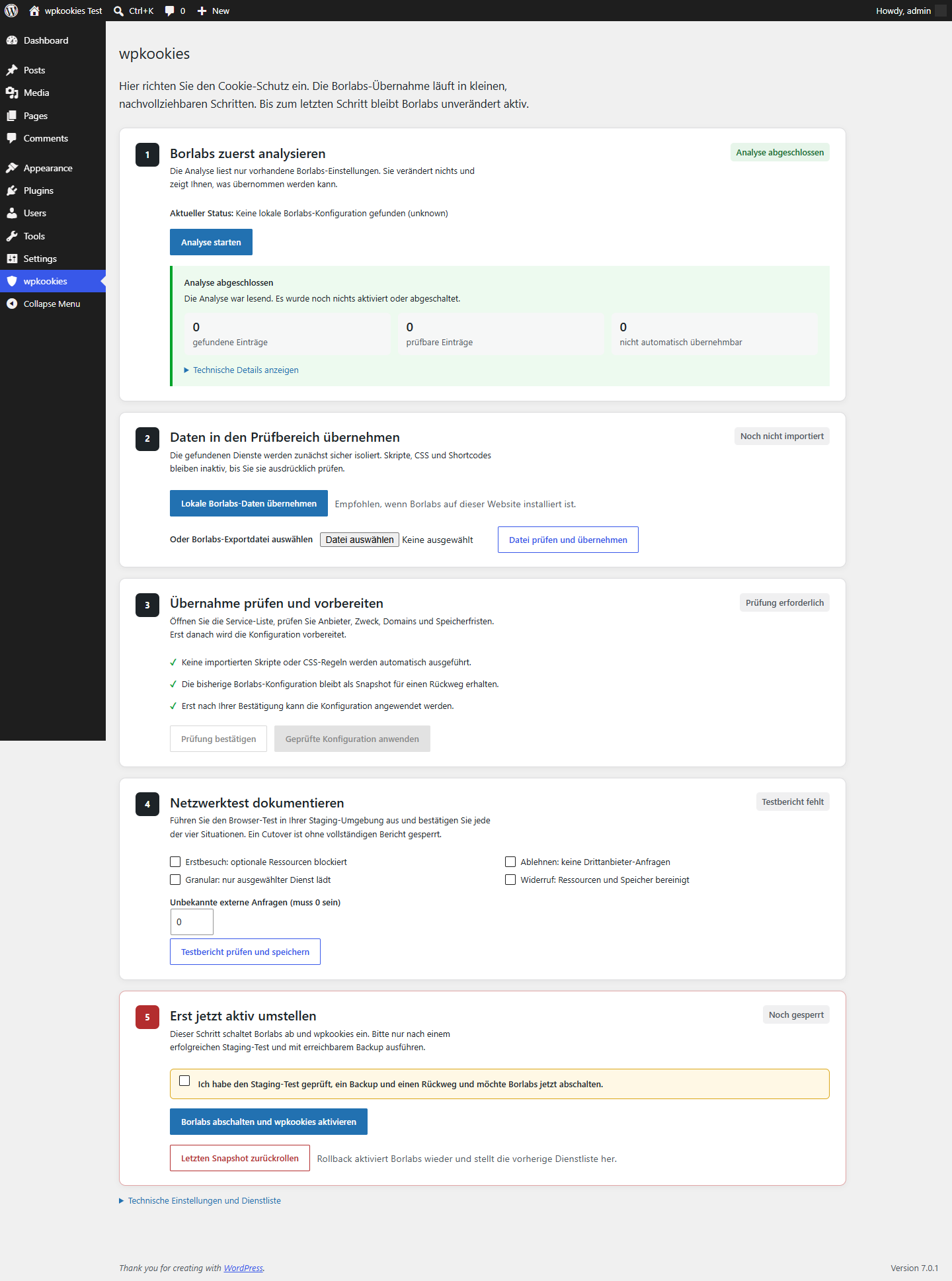
- A guided Borlabs Cookie migration with read-only analysis, quarantine, review, snapshot, automatic browser testing, cutover, and rollback.
- Diagnostic and Content Security Policy features for testing the configured site.
- Local placeholders that remain keyboard accessible and a settings view that can be reopened at any time.
- Site-wide consent for recognized embedded services, with an optional one-time alternative and downloadable signed TXT and JSON selection receipts.
- An administrator-only technical evidence package containing configuration checks and aggregate proof counts, but no individual consent IDs, IP addresses, email addresses, user agents, or cookie values.
Important when using cache plugins: A full-page cache stores one rendered copy of a page and serves it to every visitor — including the consent state of whoever happened to fill the cache. Consent-dependent pages must never be stored that way. Kookies Consent therefore detects the common page-cache plugins by name, measures before every browser check whether the site really serves fresh pages, and offers to switch a blocking cache off with one click — remembering exactly what it touched so it can be switched back on. A cache run by your hoster or CDN is named with concrete header evidence, but can only be switched off by the hoster.
Kookies Consent supports the technical implementation of privacy requirements. Legal assessment, service selection, and site-specific configuration remain the site owner’s responsibility. The plugin does not provide legal advice or guarantee compliance with any specific law.
Borlabs Cookie® is a registered trademark of its respective owner. Kookies Consent is an independent product and has no commercial affiliation with the provider of Borlabs Cookie. It is neither operated nor endorsed by that provider. The name “Borlabs Cookie” is used solely to describe compatibility and migration options.
Borlabs migration
The guided assistant runs as one continuous operation with visible progress across six phases. You start it once; read-only analysis, quarantined import and the completeness check then run without further clicks. The assistant stops at exactly two points: once for the answers only the site owner can give, and once before the irreversible cutover. That is four clicks in total.
Detected configuration is imported into quarantine, where services can be reviewed without executing imported scripts, CSS, regular expressions, or shortcodes. Everything the operator must answer — missing mandatory provider details and the explicit confirmation that the imported service data is correct — is collected on a single screen. After that confirmation, Kookies Consent creates a snapshot, applies the reviewed service list and runs an automatic browser test for first visit, rejection, granular consent, and withdrawal. The final cutover is available only after those checks pass. The saved snapshot can restore the previous configuration and reactivate Borlabs.
The progress state is derived from signed facts on the server, never from the browser, so a page reload, a request timeout or a closed browser resumes exactly where the run stopped. Large installations are imported in resumable batches. Everything except the browser test itself works without JavaScript.
Historical Borlabs consent cookies, TCF data, logs, statistics, license information, and account data are never converted into new Kookies Consent consent.
External services
Kookies Consent itself does not require or contact a cloud service, does not send telemetry, and does not automatically enable any provider listed below. It contains a local catalogue so a site owner can identify and configure services already used by that WordPress site. A catalogue entry alone creates no external connection.
An external connection occurs only when the site owner has configured the corresponding service and a visitor has granted the required consent (or deliberately requests a one-time load). The visitor’s browser then connects directly to that provider to load the selected map, media, font, form protection, analytics, marketing, payment, booking, review or chat content. Depending on the provider and configured content, the provider receives the visitor’s IP address, ordinary HTTP request and device/browser data, the referring page and the requested content identifier; the provider may also use cookies or similar browser storage. Exact processing and retention are controlled by the site owner and provider, not by Kookies Consent. Without the required consent, Kookies Consent keeps these resources blocked.
The local catalogue currently recognises these optional providers. The links below are supplied so operators can review the applicable terms and privacy information before enabling a service:
- Google (YouTube, Google Maps, Google Analytics, Google Ads/DoubleClick, reCAPTCHA, Google Tag Manager and Google Fonts): Terms, Privacy.
- Meta (Facebook, Instagram and Meta Pixel): Terms, Privacy.
- Vimeo: Terms, Privacy.
- hCaptcha / Intuition Machines: Terms, Privacy.
- Matomo Cloud: Terms, Privacy. For a self-hosted Matomo installation, the site operator’s own terms and privacy notice apply instead.
- OpenStreetMap Foundation: Terms, Privacy.
- X/Twitter: Terms, Privacy.
- Cloudflare Turnstile: Terms, Privacy.
- TikTok (embeds and Pixel): Terms, Privacy.
- LinkedIn Insight Tag: Terms, Privacy.
- Pinterest Tag: Terms, Privacy.
- Microsoft Clarity and Microsoft Advertising (UET): Terms, Privacy.
- Hotjar: Terms, Privacy.
- Calendly: Terms, Privacy.
- Doctify: Terms, Privacy.
- HubSpot: Terms, Privacy.
- Intercom: Terms, Privacy.
- Mapbox: Terms, Privacy.
- Adobe Fonts: Terms, Privacy.
- Spotify: Terms, Privacy.
- SoundCloud: Terms, Privacy.
- Dailymotion: Terms, Privacy.
- Twitch: Terms, Privacy.
- Stripe: Terms, Privacy.
- PayPal: Terms, Privacy.
- Yumpu / i-Magazine: Terms, Privacy.
Site owners can also configure a custom provider or a self-hosted service. In that case Kookies Consent connects only to the domains entered by the operator after the configured consent, and the operator must supply and review that provider’s purpose, data, terms and privacy information.
The plugin also contains an optional connection test. Only a logged-in administrator holding the plugin’s own capability can run it, and only from the plugin’s settings screen — either by pressing the test button there, or as one step of the guided migration that administrator is already working through. It never runs for visitors, and it never starts unless an administrator has that screen open. The test opens a preview of the site’s own pages inside that administrator’s browser and deliberately attempts to load small probe resources from the hosts of the services configured on that site: providers from the list above, hosts the operator entered for a custom service, and hosts carried over from a previous consent plugin during migration. The purpose is the opposite of loading them: every attempt is expected to be refused by the plugin’s own blocking layer, and the resulting report lists which attempts were refused and which were not. Thirteen of the fourteen probe types are stopped inside the browser before a request leaves it. The fourteenth is a dynamic JavaScript import(), which JavaScript cannot intercept; it is stopped by the enforced Content-Security-Policy the plugin sends on those pages instead. That header is absent when the operator has switched strict blocking off, when only a report-only policy is in place, or when a server or another plugin replaces it — in each of those cases this one probe does reach the provider, and the report says so. A probe address carries no payload, no site identifier and no visitor data; for that one probe the provider sees the ordinary data of a single request, which includes the administrator’s IP address and the address of the site. No result is transmitted anywhere: the report is stored in the site’s own database and shown only in the administration area.
Privacy
Kookies Consent stores the configured service registry and, when enabled, pseudonymous signed consent records in the WordPress database. A record contains its consent ID, decision, selected optional service IDs, configuration hash, language, expiry time, and integrity hashes/signature; it does not contain a full IP address, email address, full user agent, or raw cookie value. Records are deliberately not linked to an email address; WordPress privacy export and erasure requests therefore never guess an identity association. Visitors can instead download the signed choice stored in their current browser. The administrator evidence package reports verified, invalid, and legacy records separately without exporting individual consent IDs. The plugin does not send usage or diagnostic data to Kookies Consent. Provider and privacy-policy links entered by the site owner are used only in the local site configuration.
Screenshots
Blocks
This plugin provides 1 block.
- Wpkookies Protected Content
Installation
- In WordPress, open Plugins > Add New Plugin > Upload Plugin and upload the plugin ZIP file.
- Activate Kookies Consent.
- Open Kookies Consent in the WordPress administration menu.
- Add only the services that are actually used on the site, and review the provider, purpose, data categories, origins, and storage details.
- Test the site completely with strict origin blocking enabled before completing a Borlabs cutover. Strict mode adds a consent-dependent enforced CSP and reloads the page after a changed decision so that the new policy applies to every browser request path.
FAQ
-
Does Kookies Consent transmit data to a Kookies Consent server?
-
No. The plugin contains no cloud integration and no telemetry. Third-party connections occur only when a site owner configures a service and the visitor grants the corresponding consent.
-
Does Kookies Consent provide legal advice?
-
No. Kookies Consent supports technical consent and blocking workflows. The site configuration and its legal assessment must be reviewed by the site owner or a qualified professional.
-
What happens during uninstall?
-
Deleting the plugin through the WordPress plugin administration removes its stored settings, services, migration state, scheduled task, capability, one-time grants, and optional consent-log table. Deactivation alone retains the configuration. When both the legacy Kookies Consent package and Kookies Consent are installed, removing the inactive duplicate must not delete data still used by the active package.
Reviews
There are no reviews for this plugin.
Contributors & Developers
“Kookies Consent” is open source software. The following people have contributed to this plugin.
Contributors
Translate “Kookies Consent” into your language.
Interested in development?
Browse the code, check out the SVN repository, or subscribe to the development log by RSS.
Changelog
1.5.71
- The WordPress.org review team raised three points about the 1.5.70 submission. This release answers all three.
- Fixed: the PayPal terms and privacy links took four redirects to arrive. They now point at PayPal’s own legal hub and take one.
- The readme now describes the optional connection test an administrator can start from the settings screen: which hosts it probes, that every probe is meant to be refused rather than loaded, and the one probe type that depends on the enforced Content-Security-Policy.
- Security: a used-up one-time load is recorded in an option row of its own instead of two hand-built transient rows. Those rows were left to the WordPress garbage collector, and that collector returns without doing anything as soon as a persistent object cache is installed. On those sites the rows grew without end until the ceiling of 5000 was reached — after which one-time loading was refused permanently and silently. The markers now have a sweep of their own on the existing daily event, the ceiling sweeps before it refuses, and an update removes what the old form left behind.
- The one-time cookie is now listed among the cookies the storage cleaner must never delete. The gatekeeper in the browser already protected it.
- Removed a dead call to an action named wpk_cache_flush, whose comment claimed it was WP Super Cache’s integration hook. Measured against that plugin’s own sources: the name does not occur in any of its 40 PHP files. Its real function is already called two lines above.
- An adversarial review of this release found five further faults in it before it shipped, all fixed: the sweep cleared the object cache one row at a time, which rewrites a single shared cache entry on every deletion; a count that could not run was read as “no markers”, which switched the ceiling off at the moment the database was in trouble; a request crossing a second boundary could sweep its own marker and then redeem a used grant twice; the daily event the sweep hangs on was assumed to exist rather than checked, although an older second copy of this plugin clears that very event when it is deactivated; and expiring the one-time cookie after the page had started rendering produced a PHP warning in the middle of it.
1.5.70
- Fixed: the readme declared “Tested up to: 7.0” while WordPress had moved on to 7.1, so the WordPress.org upload was refused with outdated_tested_upto_header. A plugin whose readme is behind the current WordPress release does not appear in searches.
- This value ages without anybody touching it — it goes stale when WordPress ships, not when we change something. The release gate now asks api.wordpress.org for the current version and refuses a release whose readme is behind. When the API cannot be reached, the gate says so instead of reporting a check it did not perform, and compares against the last recorded version.
1.5.69
- The code scan is now ranked by what the browser check really met. On a real site with 36 plugins it named 17 providers and the check met none of them on twelve pages — seventeen equal work items that nobody could decide, and setting them up would have put seventeen services into the consent banner that the site never loads.
- What the check really met and blocked stays at the top, with the date of that measurement. Everything else folds into one line that states what its claim rests on, and a code match is described as what it is: proof that the code CAN reach a provider.
- The attribution goes through the recognised service, not the host name. www.google.com belongs to Google Maps and to reCAPTCHA at the same time, and only the URL path tells them apart.
- No green badge without a measurement, and none for a search that was aborted or is out of date.
- Fixed: the purely diagnostic “search again” button threw away the site’s passed check report, so a checked website fell back to “a new browser check is required”.
- Fixed: a cache finding disappeared after every update instead of only when the question behind it changed — and when it is discarded, the screen now says so instead of going quiet.
1.5.68
- Fixed, and it is a bad one: the browser check failed on every installation of 1.5.66 and 1.5.67 with “not all required page and service evidence”. The run was raised from five pages to twelve, the server that validates the report was not, and it refused every report whose page count did not match its own number.
- The number now lives in one place. The server publishes it and the browser run reads it, so the two cannot drift apart again — and a test compares them across both languages.
1.5.67
- Fixed: the warning about a cache outside WordPress was a false alarm on ordinary hosting. It reported that the home page is stored somewhere — which is true almost everywhere and harmless, because the stored page is the anonymous one where everything is blocked anyway.
- The check now asks the question that matters: does the cache serve that same stored page to a visitor who carries a consent cookie? Only then can a decision fail to take effect, and only then is anything reported.
- When there is something to report, the text says what goes wrong and what actually helps — passing pages with the consent cookie through to WordPress — instead of asking for the cache to be switched off.
1.5.66
- New: Kookies Consent searches your active plugins, your must-use plugins and both your theme and its parent for the addresses of known providers, and offers to set up each one it finds. That reaches what a page crawl cannot: a form, a shortcode, a page nobody visited, or a plugin installed this morning.
- A hit is described for what it is — evidence that the installed code can contact the provider, not proof that every page loads it. Links and share buttons are not counted as embeddings, and the provider lists other consent plugins carry are skipped.
- If the search has to stop early it says so, with how much of the site it read. A partial measurement is no longer reported as “nothing found”.
- The browser check now visits up to twelve pages instead of five.
1.5.65
- The reset that wipes an installation now lives behind the technical settings, states the measured loss of your site before it can be triggered — service count, completed migration, rollback backup and the real number of consent log rows — and takes a second explicit confirmation whenever there is anything that cannot simply be recreated.
- Two other ways to lose the same data are closed: an empty service list is refused instead of stored, and the service editor now shows what is stored rather than a filtered view that would delete hidden services on save.
- On a multisite the uninstall opt-in is read per site, so one site can no longer delete another site’s data.
- After a passed check the Privacy Guardian says there is nothing to do — but only the server may call a site protected. The browser check proves one of six checks, and claiming otherwise contradicted the screen’s own red rows.
1.5.64
- Before every browser check the plugin now measures whether the site really serves fresh pages: the identical preview URL is loaded twice and must carry two different per-request tokens. A cookie-aware cache caught serving stored answers loses its free pass and can be switched off like any other; the cutover refuses a report without this measurement, so every installation has to run the check once more.
- A bold warning at the top of the settings screen names the exact blocking cache plugins with the switch-off button right next to it — visible outside the guided migration, working without JavaScript.
- Eight more page caches are recognized by name: Super Page Cache, NitroPack, Swift Performance and Lite, Comet Cache, Cachify, Powered Cache, FlyingPress.
- Hoster and CDN caches are detected with a differential probe and named with concrete header evidence; the plugin says honestly that only the hoster can switch them off.
1.5.63
- The browser check now measures what it certifies. Borlabs blocks third-party content of its own and stays active until the cutover, so “0 unknown connections” was measured with the old layer helping. Its hooks are now removed for the check’s own page loads, and the cutover refuses a report that was not measured that way. Every existing installation has to run the browser check once more.
- A URL is read the way the browser reads it before PHP parses it. Where the two parsers disagreed, an address could be taken for the site’s own and load unblocked.
- Consenting to one service no longer authorizes everything else on a shared apex, and an origin you removed by hand stays removed across updates.
- The policy size limit now bounds the whole response instead of a single header, so an enabled report-only header can no longer produce the oversized header block that ends in HTTP 502.
- Deleting the plugin keeps your consent log unless you switch the removal on in the settings.
- A rollback switches the old consent plugin back on before it switches Kookies Consent off, and a second press of the cache button no longer erases what the first one recorded.
- The switch-off button for a blocking page cache appears on every screen that reports the cache, including a refused cutover.
1.5.62
- Who owns the advanced-cache.php drop-in is now read from the file instead of guessed from the active plugins. A drop-in left behind by a deactivated cache plugin was treated as harmless when another, cookie-aware cache was active; it now blocks the check and can be removed with the same button.
1.5.61
- A page cache that blocks the browser check can now be switched off with one button inside the guided flow, instead of sending you to find it in the plugin list. Kookies Consent remembers exactly what it switched off and can switch it back on. Cookie-aware caches such as Surge are allowed and are never touched.
1.5.60
- The advertised PHP requirement is now the truth. Every declaration said PHP 8.1, but three classes need 8.2 — on an 8.1 host the plugin stopped with a parse error instead of a useful message. The requirement is 8.2 everywhere now; nothing else changes.
1.5.59
- The check now derives a probe path from the service it is actually testing, not from the first member of that service’s consent group. A shared provider origin ties several services together, so the group’s first entry is usually somebody else — the probe then belonged to nobody and came back as an unknown finding the check had invented itself.
1.5.58
- The check no longer probes Google Ads on a path that service does not own. On a Google country host it owns exactly its two marketing endpoints, so probes on any other path were reported back as unknown addresses — findings the check had invented itself.
1.5.57
- The check now binds the applied Borlabs takeover to the configuration it is about to measure. Any legitimate change to the service list since the import — an operator action or an automatic repair on update — otherwise let the run execute for a minute and a half and then be refused, with no way out.
1.5.56
- Completes the automatic repair: it changes the service list, which broke the binding between a running Borlabs takeover and its browser evidence — every later run was then rejected with “the service list changed”. The upgrade path now rebinds the takeover, exactly as setting up a service already did.
1.5.55
- Fixes the automatic repair shipped in 1.5.54: it was correct, but the data migration version was not raised, so it never ran on an existing installation. The too broad Google rule is now really narrowed on update.
The complete history of all releases is in CHANGELOG.md inside the plugin folder.
1.5.54
Hardening release after an adversarial review of the two previous versions. Two findings could take a running site down.
- Security: an oversized security policy made servers such as nginx answer the whole page with an error. Measured, 30 configured services produced 7.7 kB. The policy is now really capped, and the screen names what had to be given up.
- Security: the late re-assertion recomputed the policy instead of repeating the one that was sent. Two different own policies could then apply at once, silently blocking content the visitor had consented to.
- Security:
Cache-Control: private, no-storeis re-asserted together with the policy, so a consent-dependent answer cannot reach the next visitor. - Security: blocking evidence now requires our own policy to arrive. That some enforced policy refuses the probe is not proof that the Kookies Consent protection works.
- Setting up a Google endpoint carries the measured host instead of the whole domain, which had tied advertising, maps and reCAPTCHA into a single consent decision and opened every subdomain in the policy. Existing installations are repaired automatically.
- Meta Pixel: the browser’s path rule now applies server-side too, so a finding is no longer dropped as “already configured”.
- The consent-mode endpoint follows the tag id instead of always claiming Google Ads.
- A takeover can be finished after a service was set up during the run; uninstalling now also cleans up when the plugin folder was renamed.
1.5.53
- A finding no longer falls between the browser’s matcher and the server’s: an address the browser reports as unknown stays a finding the operator can act on.
- Google’s consent mode endpoint is recognised and offers the usual one-click setup.
- An expired WordPress session during a check is named as such instead of sending the operator to clear caches.
1.5.52
- Security: another security plugin could silently delete the enforced policy, because PHP’s
header()replaces a header of the same name. The policy is now re-asserted beside the other one, which keeps working. - Security: a report-only policy no longer counts as blocking evidence.
- With the policy missing, the check names that one cause instead of repeating the symptom once per service.