

Description
Kibian Reservations lets your guests send a booking request in seconds. They choose their dates and number of guests, and WhatsApp opens with the message already written, ready to send to you.
Every request is also saved in an inbox inside WordPress (Reservations > Requests) and you get an email, so you never lose a request even if the guest does not press send in WhatsApp.
Features
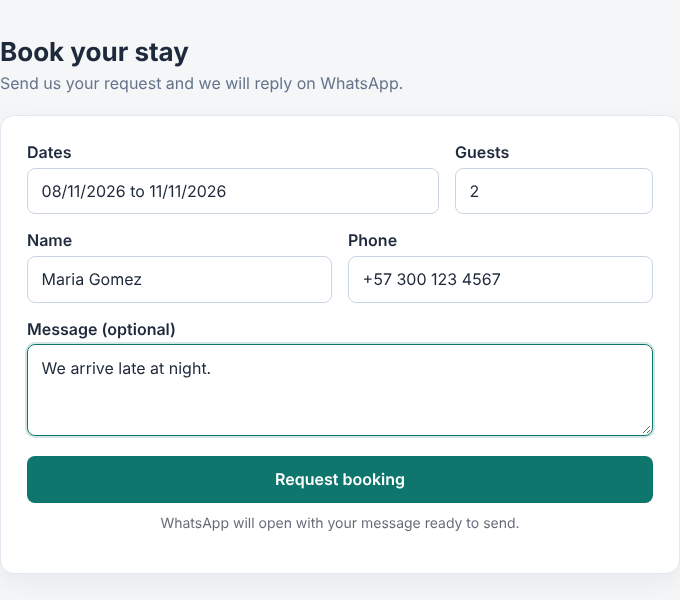
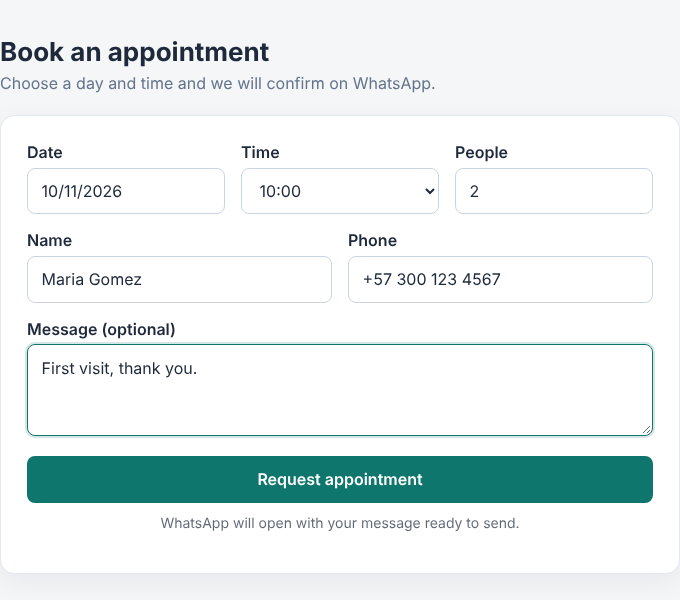
- Booking request form with date range picker, guests, name, phone and an optional message. Also works for appointments (day and time) and one-day requests.
- Minimum nights, maximum guests and optional automatic deletion of old requests.
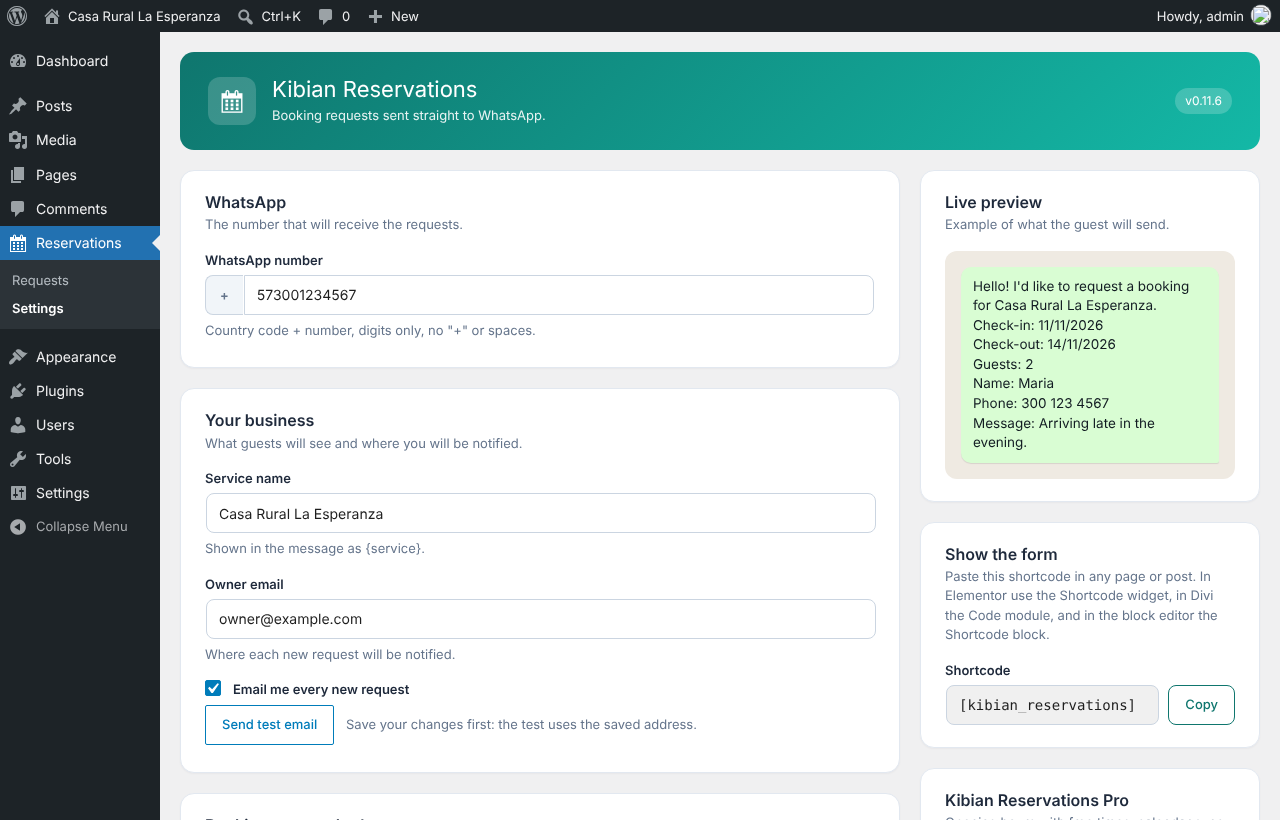
- Opens WhatsApp with a message built from a template you can edit.
- Request inbox in your WordPress dashboard.
- Email notification for every new request, with a test email button.
- Uses your theme’s font and colors. Change texts, colors and corner radius from the settings page.
- Works with any page builder: Elementor (Shortcode widget), Divi (Code module), block editor (Shortcode block).
- Protection against spam without external services: hidden trap field, rate limit and strict validation.
- Spanish and English.
Add the form to any page with the shortcode [kibian_reservations].
“WhatsApp” is a trademark of Meta Platforms, Inc. This plugin is not affiliated with or endorsed by Meta.
External services
This plugin does not connect to any external service from your server. When a guest sends the form, their browser opens a link to WhatsApp (https://wa.me/) with the message already written, so the guest can send it from their own WhatsApp. The data in that link (dates, guests, name, phone and message) is the data the guest typed. WhatsApp is provided by Meta Platforms, Inc.: Terms of Service, Privacy Policy.
Privacy
Requests are stored in your own WordPress database: name, phone, dates, guests and the optional message. Visitor IP addresses are not stored; a hashed IP is only kept for a few minutes to limit abuse. As the site owner you are responsible for informing your visitors, for example in your privacy policy.
Third-party libraries
This plugin bundles flatpickr 4.6.13 (MIT license) for the date picker: https://flatpickr.js.org/ (source: https://github.com/flatpickr/flatpickr).
Screenshots


Installation
- Upload the
kibian-reservationsfolder to/wp-content/plugins/, or install it from the Plugins screen. - Activate the plugin.
- Go to Reservations > Settings and enter your WhatsApp number with the country code (digits only).
- Paste
[kibian_reservations]in any page or post.
FAQ
-
Does it work with Elementor and Divi?
-
Yes. In Elementor use the Shortcode widget, in Divi use the Code module, and in the block editor use the Shortcode block.
-
Do I need a WhatsApp Business account?
-
No. Any WhatsApp number works. Guests open a regular chat with you.
-
Where are the requests stored?
-
In your own WordPress database. Nothing is sent to our servers.
-
I did not receive the notification email.
-
Use the “Send test email” button in the settings page. If it fails, your server is probably not set up to send emails: a plugin such as WP Mail SMTP fixes that.
-
Can I change the texts and colors?
-
Yes, from Reservations > Settings: texts, accent color, button text color and corner radius. For anything else, use your theme’s Additional CSS (Appearance > Customize).
-
What happens to my data if I delete the plugin?
-
Nothing, unless you enable “Delete all settings and requests when the plugin is deleted” in the settings page.
Reviews
There are no reviews for this plugin.
Contributors & Developers
“Kibian Reservations” is open source software. The following people have contributed to this plugin.
Contributors
Translate “Kibian Reservations” into your language.
Interested in development?
Browse the code, check out the SVN repository, or subscribe to the development log by RSS.
Changelog
0.11.6
- Fixed: in block themes the calendar and form script did not start (the form was not interactive).
- Fixed: the inbox showed “1 nights” for one-night stays.
0.11.5
- Removed the custom CSS setting. Colors, corner radius and texts are still editable from the settings page.
0.11.4
- Fixed: a constant name clashed with the Pro add-on.
0.11.3
- A “Learn about Pro” link in the plugins list and two short hints in the settings (only shown when the Pro add-on is not installed).
0.11.2
- A small card in the settings page tells about the optional Pro add-on (only shown when it is not installed).
0.11.1
- New: “Fill the list for me” in the available times (from, until, every N minutes).
- Fixed: a notice about the time label in the settings page.
0.11.0
- Developers: more extension points for add-ons: closed week days in the calendar, times that depend on the chosen day, a check for the chosen time and minimum nights that change with the season.
0.10.0
- New: booking type. Besides stays (check-in and check-out), the form can now ask for a single day with a time (appointments, tables, courts) or just a day (events, rentals, quotes). Times come from a list you write, or the guest types them. The WhatsApp message, the inbox and the email adapt to the type.
- New message tags: {date} and {time}.
0.9.0
- New: booking rules. Set a minimum number of nights and a maximum number of guests; the form and the server both enforce them.
- New: optionally delete old requests automatically (after 90 days, 6 months, 1 year or 2 years). Off by default.
- Developers: the form now fires a
kr:datesevent when the dates change, and the extra-fields filter receives the stay data.
0.8.0
- More extension points for add-ons: blocked dates in the calendar, choice of service and WhatsApp number, notification email format and attachments, and form design.
0.7.1
- Chat number helper made available to add-ons.
0.7.0
- Fix: the “Send test email” button did nothing.
- Extension points (hooks) so add-ons can add form fields, validate them and show them in the inbox and the email.
0.6.0
- New design for the requests inbox: guest avatar, compact dates with nights, call and chat buttons, shorter message and a “New” tag.
- Fix: requests were not being saved because of a mismatch in the form endpoint name.
0.5.2
- Unique code prefix and other fixes from the Plugin Check review.
- Spanish translation loads without load_plugin_textdomain().
- Tested up to WordPress 7.1.
0.5.1
- Fix: uneven shade in the selected date range of the calendar.
0.5.0
- Code review with the WordPress coding standards and security fixes.
- Option to delete all data when the plugin is deleted (off by default).
- Readme with external services and privacy information.
0.4.0
- Email notification to the owner for every new request (can be turned off).
- “Send test email” button on the settings page.
0.3.0
- Requests are saved and listed in an inbox (Reservations > Requests).
- Protection against spam: hidden trap field, rate limit and strict validation.
- New confirmation message after sending, and the form is cleared.
0.2.2
- Pressing the button again with the same data no longer opens WhatsApp a second time.
0.2.1
- Copy button for the shortcode and instructions for Elementor, Divi and the block editor.
- Customize form texts, colors and corner radius from the settings page.
- The submit button is locked for a few seconds after sending to avoid duplicate messages.
0.2.0
- Booking request form with date range picker, shortcode
[kibian_reservations]. - Opens WhatsApp with the message built from your template.
0.1.1
- New settings page design with live message preview.
- Spanish translation now works for every Spanish locale.
- The default message template follows the site language.
0.1.0
- Plugin structure and settings page.