

Description
JustWhat Accessibility Audit tests your pages against the Web Content Accessibility Guidelines (WCAG 2.2, 2.1 or 2.0, levels A and AA) and keeps the results in wp-admin.
How it works. Pick the pages to check under Accessibility Scan. Each page opens out of sight in your browser tab and is tested with axe-core, the open-source engine most accessibility auditors use. Nothing is sent to any outside service, and no server-side browser is needed, so it works on any host.
What you get
- An accessibility score and the issues by rule and severity (critical, serious, moderate, minor), with the WCAG success criteria each one fails.
- Every failing element: page, CSS selector, HTML and what exactly failed, with a guide on how to fix it.
- The pages with the most problems, so you know where to start.
- An image alt-text review: missing alt text, file-name alt text, “image of…”, overly long or generic text. Fix media-library images right on that screen.
- “Check accessibility” under every published post and page in the admin lists.
- CSV export of the latest scan’s issues.
- Built-in help (Accessibility Help, plus a Help tab on every screen): how to run a scan, read the score, find and fix the most common problems, review images, and the manual checks a scan can’t do.
- No limits: scan as many pages and as often as you like. You choose how many scans keep their full results (Settings Scans to keep); older scans keep their score.
Automated testing finds a large share of accessibility problems, not all of them. Keyboard use, screen-reader wording, captions and how content reads still need a person. Treat a clean scan as a strong start, not a certificate.
Pro
JustWhat Accessibility Audit Pro is a separate add-on for sites that need accessibility checked continuously: scheduled scans of every page, headless and external front ends, full history and trends, fix tickets, email alerts, an executive report and an accessibility statement generator. Nothing in this plugin is locked or time-limited.
The command-line scanner
The same checks run from the command line, in CI or on any site, with the free and open-source @pbpyrojust/justwhat-accessibility-audit package.
Powered by Vinny
JustWhat Accessibility Audit is part of Vinny, the website checkup from JustWhat: accessibility, SEO, security and AI visibility for any site, with fix plans and client reports. This plugin works on its own and needs no Vinny account. Guides: wordpress.justwhat.net/docs.
All three plugins
JustWhat SEO Audit and JustWhat Security Audit follow the same approach. Their Pro add-ons come together in the JustWhat Audit Bundle: all three for the price of two.
External services
The plugin contacts one outside service, and only when an administrator asks it to:
- Plugin updates newsletter (justwhat.net). If you type your email on the Accessibility dashboard and click Subscribe, the plugin sends that email address, your site’s address and the plugin version to
https://justwhat.net/api/newsletter/, which adds you to the Vinny / JustWhat newsletter (run on Mailchimp) for release notes, new features and tips. Nothing is sent if you don’t subscribe, and you can unsubscribe from any email. Terms, Privacy policy.
Third-party libraries
This plugin bundles axe-core (assets/axe.min.js), copyright Deque Systems, Inc., under the Mozilla Public License 2.0 (https://www.mozilla.org/en-US/MPL/2.0/), which is compatible with the GPL. Source: https://github.com/dequelabs/axe-core
Screenshots

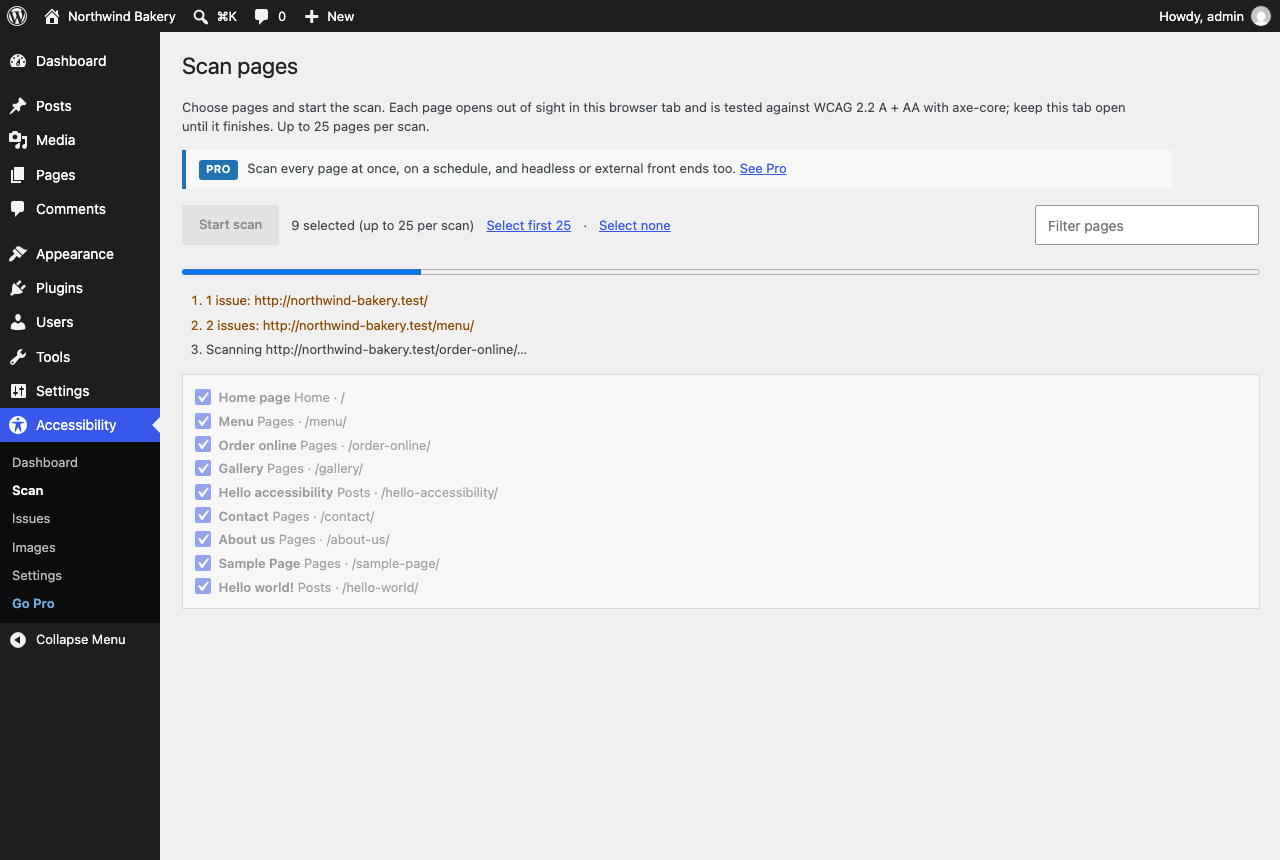


Installation
- Install and activate the plugin.
- Go to Accessibility Scan, choose pages and select Start scan. Keep the tab open until it finishes (a few seconds per page).
- Review the results under Accessibility Dashboard, Issues and Images.
Settings (Accessibility Settings): the WCAG version and level, whether to include axe-core best practices, and which content types appear in the scan list.
FAQ
-
Does this make my site compliant?
-
No tool can by itself. The plugin finds the problems automated testing can detect and tells you how to fix them; a full audit also includes manual checks. Many of the issues it finds (contrast, missing labels and alt text, heading structure, link names) are the ones most often cited in complaints.
-
Does it slow down my site?
-
No. Nothing runs for visitors. Scans run only when an administrator starts one, in their own browser.
-
Some pages couldn’t be scanned. Why?
-
A page that refuses to be shown in a frame (a strict Content-Security-Policy or X-Frame-Options header from a security plugin or your host), or that takes longer than 45 seconds to load, is reported as not scanned. Allow your own site to frame itself (
frame-ancestors 'self'/SAMEORIGIN). -
Is any data sent anywhere?
-
Scans and results, no: the scan runs in your browser against your own pages, and the results are saved in your WordPress database. The only thing that can leave your site is the optional “Get plugin updates by email” sign-up on the dashboard (see External services), and only when you click Subscribe.
-
Can it fix issues automatically?
-
It fixes image alt text for media-library images from the Images screen. Other issues are in your theme, plugins or content; the plugin shows exactly where and links to a guide for each. Overlay widgets that claim to “fix” accessibility automatically don’t, and can make it worse.
Reviews
There are no reviews for this plugin.
Contributors & Developers
“JustWhat Accessibility Audit” is open source software. The following people have contributed to this plugin.
Contributors

Translate “JustWhat Accessibility Audit” into your language.
Interested in development?
Browse the code, check out the SVN repository, or subscribe to the development log by RSS.
Changelog
1.3.1
- Help: each screen’s Help tab links to its online guide at wordpress.justwhat.net/docs, open to everyone.
1.3.0
- New name: JustWhat Accessibility Audit (was Universal Accessibility Audit). Your scans and settings carry over; deactivate and delete the old copy.
- Changed: no page limit. Select all scans every page in the list, and Settings Scans to keep sets how many scans keep their full results.
- Security: the plugin’s admin links, filter forms and REST requests all carry and check a nonce.
1.2.0
- New: Accessibility Help, a complete guide inside wp-admin (first scan, reading the score and impact levels, what to fix first, finding an element from its selector, fixes for the most common problems, image alt text, manual checks, settings, troubleshooting, your data), and a Help tab on every Accessibility screen.
- Developer:
Browser_Scan::build_payload()turns scanned pages into a run, so add-ons can store results from other scanners;uaaudit_help_sectionsanduaaudit_help_topicsfilters for add-on help.
1.1.0
- New: optional “Get plugin updates by email” sign-up on the dashboard (release notes, new features, tips). Nothing is sent unless you click Subscribe; “No thanks” hides it for good.
1.0.0
- First release: in-browser WCAG 2.2/2.1/2.0 A + AA scans with axe-core 4.14 (plus optional Section 508, EN 301 549 and AAA rules), dashboard and score, issues, image alt-text review with in-place fixes, “Check accessibility” row actions, CSV export.