
Description
Sell to businesses without retyping their details. Jsonpage adds a company field with autocomplete to your checkout, your account creation form and your contact forms.
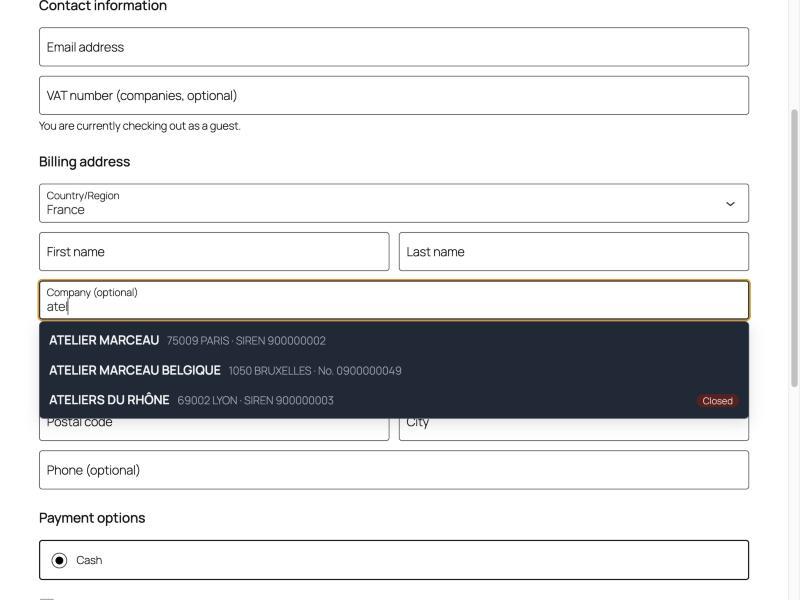
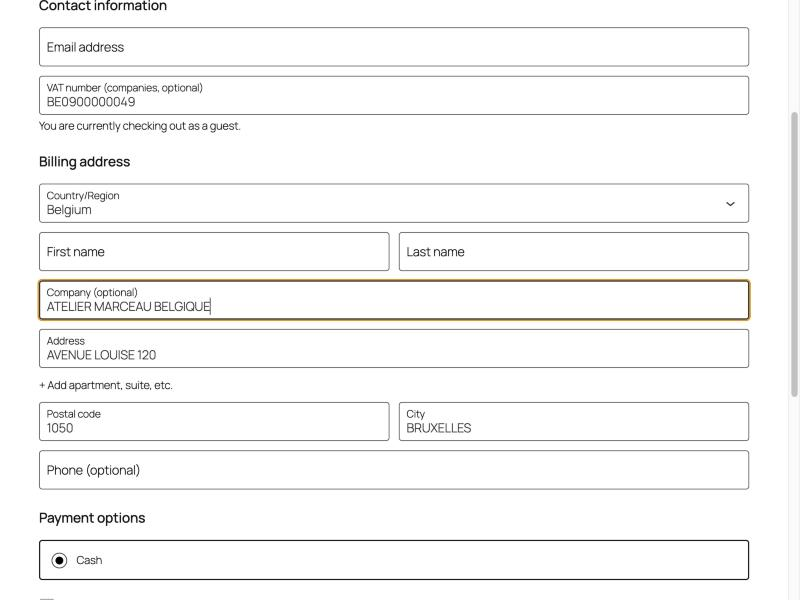
- Autocomplete from 3 letters: name, city and company number appear as the customer types. One click fills in the company name, the address, the company number and the VAT number.
- VAT verified: the VAT number is checked when the customer orders. A valid number from another country removes VAT from the order automatically (you can switch this off).
- Closed companies flagged: you choose to block the order, flag it for review, or do nothing.
- Both checkouts: works with the classic checkout and with the block checkout, and when a customer creates an account.
- Contact Form 7, WPForms and Gravity Forms: a Company field with autocomplete for quote and contact forms, which gives you a clean and verified company.
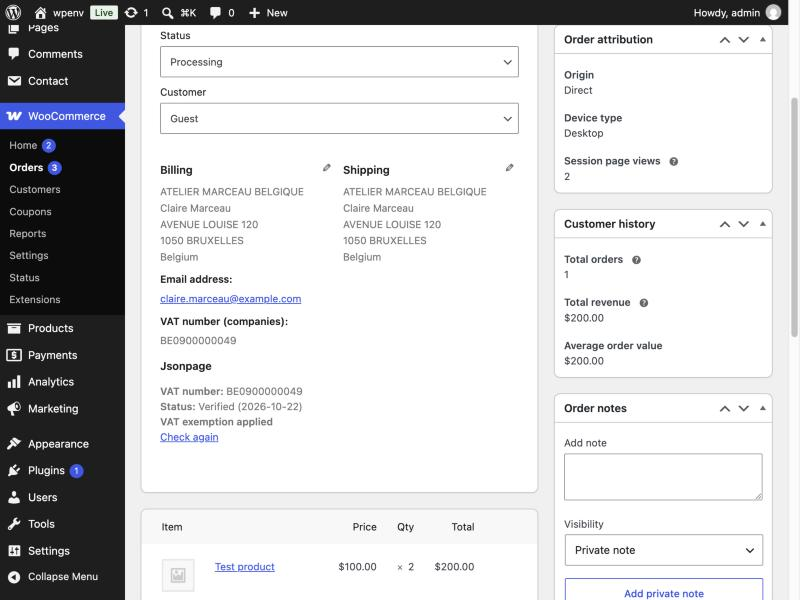
- Status where you need it: the verification (number, status, date) is shown in the order screen, on the customer order page, in the order e-mails and on invoices of PDF invoice plugins.
- Never blocks an order: if the service does not answer, the customer can type by hand, the order goes through and the check is repeated later.
- Accessible: usable with the keyboard and with screen readers.
- Ready for translation: every text can be translated on translate.wordpress.org.
Countries: France, Belgium, Switzerland, United Kingdom, Norway, Finland and Latvia. VAT numbers are checked for France, Belgium, Switzerland, Norway, Finland and Latvia.
Unlike plugins that only check a VAT number, Jsonpage suggests the company while the customer types and fills in the company number as well.
Free to start
The plugin is free. It works with a Jsonpage API key: the free account is enough to start, and the Standard and Pro plans take over for busy shops. There is no separate licence.
What is stored
On the order and on the customer account, only the VAT number, the verification status and the verification date, plus two yes/no flags for you (exemption applied, to be reviewed). Nothing else is stored by the plugin.
External services
This plugin connects to the Jsonpage API, a service operated by Jsonpage (https://jsonpage.com), at the address api.jsonpage.com. API documentation: https://jsonpage.com/en/docs. It is used for three things: company autocomplete (suggestions while a visitor types a company name or number), the company record (name, address, company number and VAT number of the company the visitor picked), and VAT number validation. Nothing is sent until you enter an API key in Settings > Jsonpage.
What is sent, and when
- While a visitor types in a company field (checkout, account registration, or a Contact Form 7, WPForms or Gravity Forms form), after at least 3 characters: the typed text and the allowed country codes, with your API key.
- When the visitor picks a suggestion: the identifier of that company, with your API key.
- When an order, an account or an address is submitted with a VAT number, and when you click “Check again” on an order: the VAT number, with your API key.
- When you click “Test the connection” in the settings: a lookup request with your API key.
The requests are made by your server, never by the visitor’s browser. The visitor’s IP address, name, email address and the content of the order are not sent. Results are cached on your site for 10 minutes (suggestions) to 24 hours (company records and VAT checks). The plugin contains no tracking and no advertising.
Service provided by Jsonpage. Terms of service: https://jsonpage.com/en/terms. Privacy policy: https://jsonpage.com/en/privacy.
Screenshots

Installation
- Install and activate the plugin from the Plugins screen.
- Go to Settings > Jsonpage.
- Click “Create a free account”, copy your API key from the dashboard and paste it in the API key field.
- Choose your countries and what to do if a VAT number is invalid. Save.
That is all. Your checkout now shows a VAT number field and the autocomplete on the company name.
For the forms: in Contact Form 7, add the tag [jsonpage_company* your-company]; in WPForms and Gravity Forms, add the “Company (Jsonpage)” field. To fill other fields of the form, give them the CSS class jsonpage-fill-address, jsonpage-fill-postal_code, jsonpage-fill-city, jsonpage-fill-country, jsonpage-fill-registry_id or jsonpage-fill-vat.
FAQ
-
Is it free?
-
The plugin is free. It needs a Jsonpage API key; the free account is enough to start. The Standard and Pro plans are for shops with more traffic.
-
Is my API key exposed in the browser?
-
No. The browser calls your own site, and your site calls Jsonpage with the key.
-
What happens if the service is down?
-
The order is never blocked. The company field stays a normal text field, and the VAT number is checked again automatically later. An order note tells you when this happened.
-
Does it work with the block checkout?
-
Yes, with the classic checkout and the block checkout. In the block checkout the VAT number field is added with the Additional Checkout Fields feature of WooCommerce 8.9 and later.
-
Does it support High-Performance Order Storage?
-
Yes.
-
Which countries are covered?
-
France, Belgium, Switzerland, United Kingdom, Norway, Finland and Latvia. VAT numbers are checked for all of them except the United Kingdom.
-
When is VAT removed from an order?
-
When the VAT number is valid, its country is the billing country, and it differs from your shop country. You can switch this off in the settings. Check the rules that apply to you with your accountant, in particular outside the European Union.
-
Does it work without WooCommerce?
-
Yes, for Contact Form 7, WPForms and Gravity Forms.
-
Where is the status shown on the invoice?
-
In the order e-mails and on the invoices of “PDF Invoices & Packing Slips”. Other invoice plugins can print the lines with
Jsonpage_WooCommerce::status_lines( $order ).
Reviews
There are no reviews for this plugin.
Contributors & Developers
“Jsonpage: company autocomplete and VAT check” is open source software. The following people have contributed to this plugin.
Contributors
Translate “Jsonpage: company autocomplete and VAT check” into your language.
Interested in development?
Browse the code, check out the SVN repository, or subscribe to the development log by RSS.
Changelog
1.0.2
- Fixed: on the block checkout, the company suggestions overlapped each other (the list now sets its own line height and text size).
1.0.1
- Security: every request from the browser is checked with a nonce, including the company autocomplete for visitors; capability checks on every admin action.
- Translations are now provided by translate.wordpress.org.
- Fixed the plugin and documentation links.
1.0.0
- First release: autocomplete, VAT verification and exemption for the classic and block checkout, account creation, Contact Form 7, WPForms and Gravity Forms.