

Description
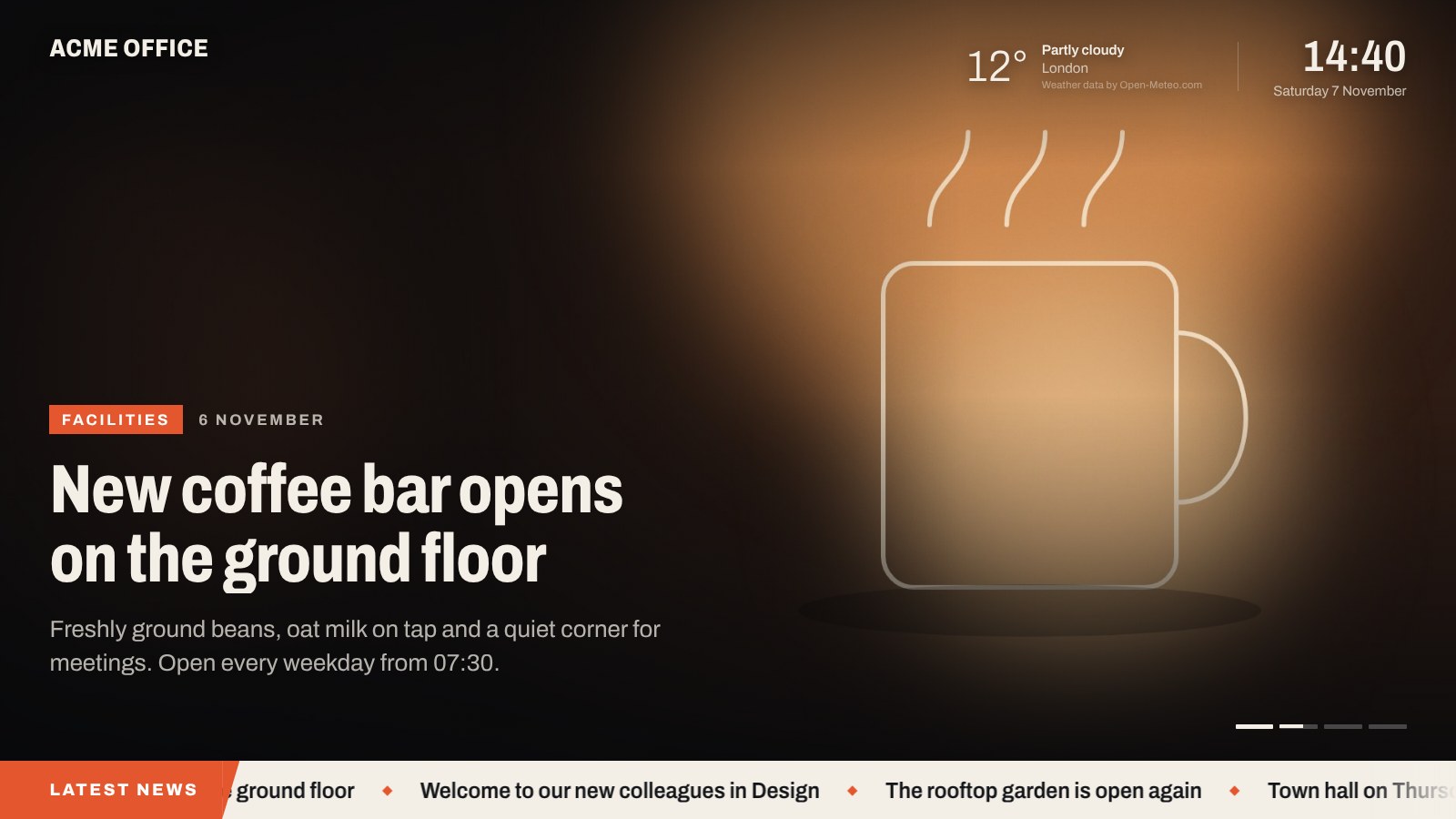
Publish a post in the chosen category and it appears on every screen within minutes, with no reload needed. Each slide uses the featured image with a slow zoom, a label, the date, the headline and the excerpt. A clock, optional local weather and a scrolling news ticker run alongside.
- Fullscreen, resolution independent: 720p, 1080p, 4K and portrait displays
- Picks up new and changed posts automatically
- Per-post layout: image with text, image only (poster) or text only
- Per-post display time, video (MP4, Vimeo or YouTube) and expiry date
- News ticker from the category headlines or any RSS feed
- Optional weather for any location
- Built for unattended screens: keeps the display awake, hides the cursor, keeps running offline and reloads itself every night at 04:00
- Works on older smart-TV browsers (Samsung Tizen, LG webOS) and signage players
- No tracking, no ads, no external fonts or scripts
- Translation ready
External services
The plugin works without any external service. The services below are only contacted when you switch on or add the related content yourself.
Open-Meteo (weather)
Used to show the current temperature and weather on the screen. Off by default. When switched on under Settings Info Screen Weather, your WordPress server sends the latitude and longitude you entered to Open-Meteo at most every 15 minutes (results are cached). If you enter an API key, it is sent along to the commercial endpoint. No data about screen viewers is sent, and the TV browser never contacts Open-Meteo.
The free Open-Meteo API is for non-commercial use only. Commercial use requires an Open-Meteo subscription and API key. Weather data is licensed CC BY 4.0 and credited on the screen.
- Terms of use and privacy policy: https://open-meteo.com/en/terms
- Pricing and API keys: https://open-meteo.com/en/pricing
RSS feed (news ticker)
If you enter an RSS feed address for the ticker, your WordPress server fetches that feed at most every 10 minutes. Which service is contacted depends on the address you enter; its own terms and privacy policy apply. Without an address, the ticker uses your own post titles and nothing is fetched.
YouTube and Vimeo (video)
If you add a YouTube or Vimeo link to a post, the screen embeds that video from the respective service while the slide is shown. The TV browser then connects to that service, which receives its IP address and browser information. YouTube videos use the privacy-enhanced youtube-nocookie.com domain, and Vimeo videos use the “do not track” option. MP4 links are played directly from the address you enter.
- YouTube terms: https://www.youtube.com/t/terms – Google privacy policy: https://policies.google.com/privacy
- Vimeo terms: https://vimeo.com/terms – Vimeo privacy policy: https://vimeo.com/privacy
Credits
The screen uses the Archivo typeface by Omnibus-Type, bundled with the plugin under the SIL Open Font License 1.1 (see assets/fonts/OFL.txt). https://github.com/Omnibus-Type/Archivo
Screenshots


Installation
- Go to Plugins Add New Upload Plugin, choose the zip file and activate.
- An “Info Screen” category is created automatically.
- Publish posts in that category. The featured image is used as the background.
- Open https://yoursite.com/info-screen/ in the browser on the TV (or ?infoscreen=1 if pretty permalinks are off).
- Go to Settings Info Screen for category, timing, screen name, colour, ticker and weather.
If /info-screen/ gives a 404, open Settings Permalinks and click Save.
FAQ
-
How do I make the screen fullscreen?
-
Press F11 (Windows/Linux) or Ctrl+Cmd+F (Mac), or click the screen. A hint is shown on the screen until it is fullscreen. Press the same key or Esc to exit.
-
What can I set per post?
-
The “Info Screen” box in the post editor sidebar has:
- Layout: image with text / image only (fullscreen poster) / text only
- Display time in seconds (overrides the default)
- Video: MP4 link (plays to the end), Vimeo or YouTube
- Show until: date and time when the post disappears from the screen automatically
-
Which keys work on the screen?
-
and step between items, R reloads the screen. Changing the settings makes every screen reload itself.
-
Can I change the date and time format?
-
The clock and date use British English formatting by default. Change it with a filter:
add_filter( 'inform_is_screen_locale', function () { return 'de-DE'; } );All other texts use the text domain
inform-info-screenand can be translated on translate.wordpress.org. -
Can I extend the plugin?
-
Yes. Add-ons can hook into the settings page, the per-post box, the slide data and the screen:
- Filters:
inform_is_defaults,inform_is_sanitize,inform_is_slide,inform_is_screen_config,inform_is_brand_html,inform_is_screen_handles,inform_is_screen_locale - Actions:
inform_is_settings_enqueue,inform_is_settings_appearance_fields,inform_is_settings_sections,inform_is_meta_box_fields,inform_is_save_post_meta,inform_is_screen_enqueue - JavaScript:
InformInfoScreen.on( 'slide', function ( node, slide ) { … } )runs for every slide as it is built.
- Filters:
-
Is there a Pro version?
-
Inform Info Screen Pro is a separate add-on from Inform Studio AS that adds your own logo and a QR code on each slide linking to the full article. Everything in this free plugin works without it.
Reviews
There are no reviews for this plugin.
Contributors & Developers
“Inform Info Screen” is open source software. The following people have contributed to this plugin.
Contributors
Translate “Inform Info Screen” into your language.
Interested in development?
Browse the code, check out the SVN repository, or subscribe to the development log by RSS.
Changelog
1.3.1
- First public release.