

Description
Image Integrity Scanner is a lightweight broken image checker for WordPress. Broken images damage user experience, slow content audits, and make your site look unfinished — and they are easy to miss because WordPress never alerts you when an <img> tag points to a dead URL. This plugin finds them for you, automatically.
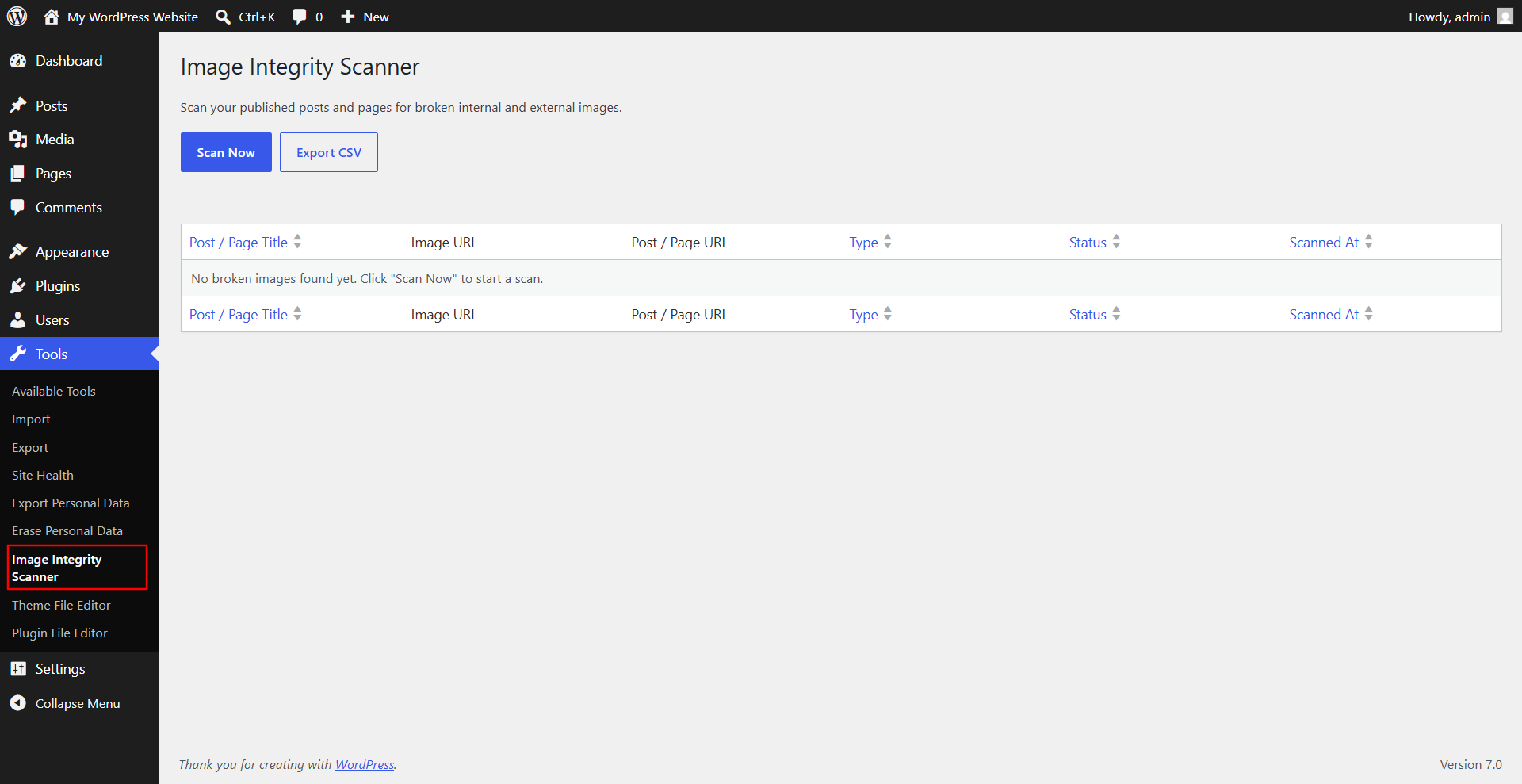
With one click of the Scan Now button, the plugin crawls every published post and page, checks every image it finds — including images embedded in post content and featured images — and reports any image that returns a 404 error, another bad HTTP status, or fails to load. Results appear in a clean, paginated, sortable table directly inside your WordPress admin, and the full report can be exported as a CSV file for sharing with your team or client.
Whether you are auditing a site after a migration, cleaning up content from a CDN change, fixing a broken hotlink, or doing routine site maintenance, Image Integrity Scanner gives you a fast and accurate broken image report without needing a third-party SEO crawler or command-line tool.
Why scan for broken images?
- Broken images create a poor experience for visitors and make pages look unfinished.
- Search engines can penalize pages with broken media when assessing overall page quality and image search ranking.
- Migrating servers, hosts, themes, or CDNs is one of the most common causes of sudden broken image links.
- Linking to external images that get deleted, renamed, or moved on another site silently breaks your content over time.
- Manually clicking through every page to check every image does not scale once your site grows.
Key Features
- One-click scanning — click Scan Now and the plugin does the rest, with a live progress bar so you always know how far along the scan is.
- Scans posts and pages — checks all published content including images inside the post body and featured/thumbnail images.
- Detects internal broken images — finds 404s and missing files hosted on your own WordPress site and media library.
- Detects external broken images — finds dead or unreachable images linked in from other websites.
- Clear, sortable report table — see the post/page title, the broken image URL, the post/page URL, image type (internal or external), and HTTP status for every broken image found.
- Native WordPress pagination — browse large reports comfortably with the same pagination UI used throughout wp-admin, 20 results per page by default.
- CSV export — download the full broken image report as a CSV file in one click for documentation, client reports, or further analysis in a spreadsheet.
- Fast and lightweight — built with batched AJAX scanning so even larger sites scan smoothly without timing out or overloading the server.
- Secure by design — every request is nonce-verified and capability-checked, and all database queries are properly prepared using $wpdb->prepare().
- No bloat, no dependencies — no third-party libraries, no tracking, no upsells. Just a focused broken image scanner.
- Developer-friendly code — built following WordPress Coding Standards (WPCS) and WordPress VIP coding standards.
How It Works
- Go to Tools Image Integrity Scanner in your WordPress admin.
- Click Scan Now.
- Watch the live progress bar as the plugin scans your published posts and pages in batches.
- Review the broken images found in a familiar, sortable WordPress admin table.
- Click Export CSV to download the full report.
Who Is This Plugin For?
- Bloggers and website owners who want to keep their content looking clean and professional.
- Agencies and freelancers performing site audits or post-migration checks for clients.
- SEO professionals who want to find and fix broken images that may affect page quality and image search rankings.
- Developers who need a quick, no-setup way to verify image integrity across a WordPress site.
Screenshots
Installation
From your WordPress dashboard
- Go to Plugins Add New.
- Search for “Image Integrity Scanner”.
- Click Install Now, then Activate.
- Go to Tools Image Integrity Scanner and click Scan Now.
Manual installation
- Upload the
image-integrity-scannerfolder to the/wp-content/plugins/directory. - Activate the plugin through the Plugins menu in WordPress.
- Go to Tools Image Integrity Scanner and click Scan Now.
FAQ
-
Does this plugin modify my content?
-
No. Image Integrity Scanner only reads your post and page content to extract image URLs and check them. It never edits, removes, or modifies any post, page, or media file.
-
How are broken images detected?
-
Each image URL found in your content is checked with an HTTP HEAD request, falling back automatically to a ranged GET request for servers or CDNs that do not support HEAD. Any response with a status code of 400 or higher, or any failed connection, is logged as broken.
-
Does it check external images too?
-
Yes. The scanner checks both internal images hosted on your own WordPress site and external images linked in from other websites, and clearly labels each result so you know which is which.
-
Will scanning a large site slow down my server?
-
The scanner processes posts and pages in small batches via AJAX rather than all at once, which keeps memory and execution time manageable even on larger sites. You can leave the scan running and watch the live progress as it works through your content.
-
Can I export the results?
-
Yes. Click the Export CSV button on the Image Integrity Scanner admin page to download a complete CSV report of every broken image found, including the post/page title, image URL, post/page URL, type, and HTTP status.
-
Does this plugin check images inside custom post types?
-
The current version scans standard WordPress posts and pages. Support for additional public post types is planned for a future release.
-
Who can run a scan?
-
Only users with the
manage_optionscapability (typically Administrators) can run a scan, view the report, or export the CSV. -
Does this plugin send any data to external servers?
-
No. All scanning happens on your own server. The plugin does not transmit any data to third-party services.
Reviews
There are no reviews for this plugin.
Contributors & Developers
“Image Integrity Scanner” is open source software. The following people have contributed to this plugin.
Contributors
Translate “Image Integrity Scanner” into your language.
Interested in development?
Browse the code, check out the SVN repository, or subscribe to the development log by RSS.
Changelog
1.0.0
- Initial release.
- Scan posts and pages for broken internal and external images.
- Live AJAX progress bar during scanning.
- Sortable, paginated broken images report table.
- CSV export of scan results.