
Description
ILM Size Chart for WooCommerce lets you create size charts and show them on your product pages.
Everything in this plugin works without limits: unlimited size charts, every display rule, the full popup designer, no trial period, no licence key and no account.
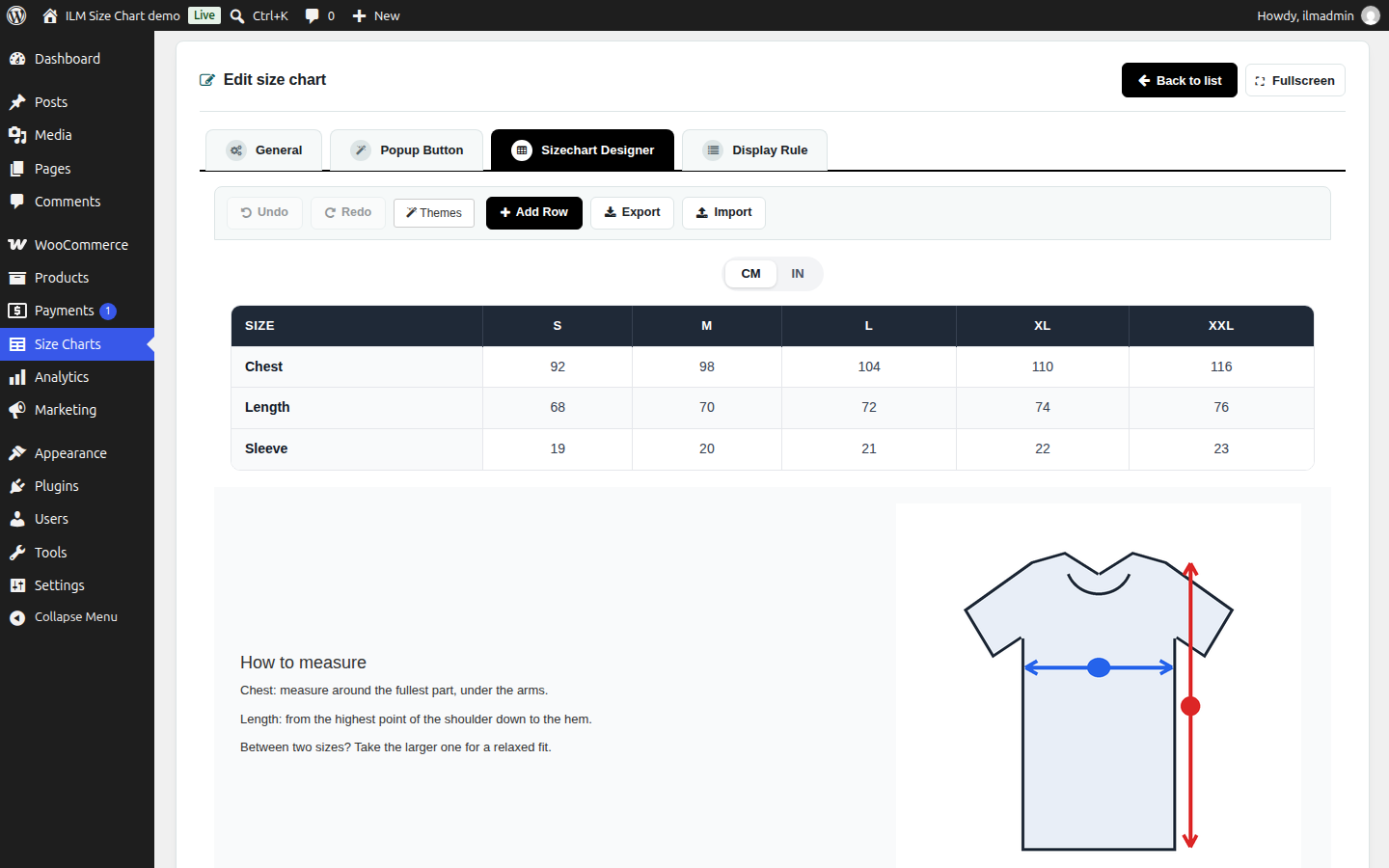
Drag-and-drop page builder
Build your chart with rows and columns:
- Up to 6 columns per row.
- Resize columns by dragging.
- Undo and redo.
- Export and import a design.
- Copy and paste components.
Components
- Table: paste from Excel or Google Sheets, unit switch with conversion (for example CM/IN), sticky first column, and full table styling.
- Text editor with a code view.
- Image: upload or pick from the library, with alt text.
- Video: add a YouTube or Vimeo link (the player is built from the video id).
- Tabs with components inside.
Style and Advanced tabs
Every component has a Style tab for spacing, background colour, image or gradient, border and shadow. The Advanced tab lets you set an ID and a class, so your theme’s stylesheet (or Appearance > Customize > Additional CSS) can style a component.
Themes
Eight themes are included: Default, Classic Mono, Paper & Ink, Slate Minimal, Sage Garden, Ocean Breeze, Indigo Denim and Rose Boutique. A theme styles the table, the popup button and the popup window in one click.
How a chart shows
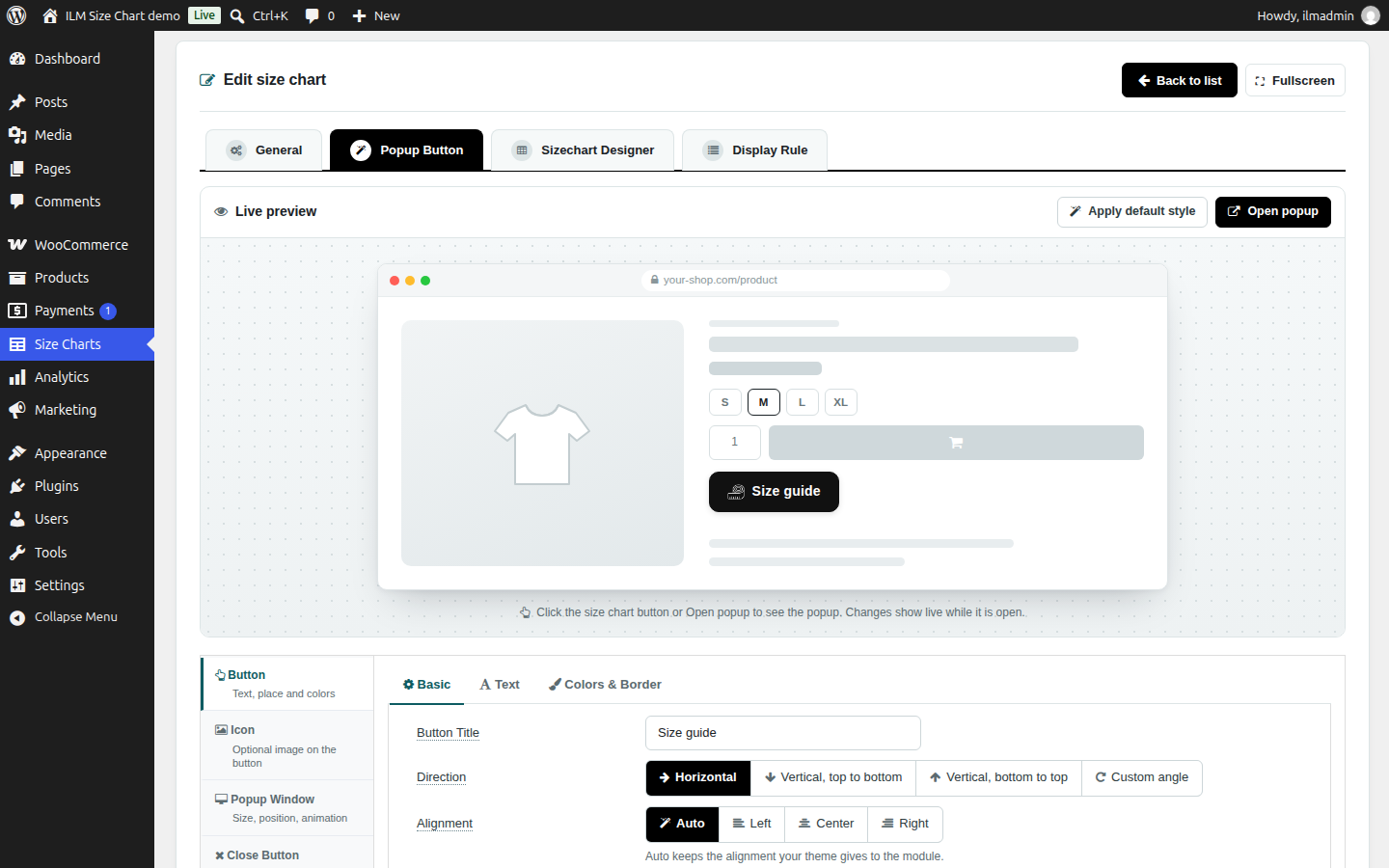
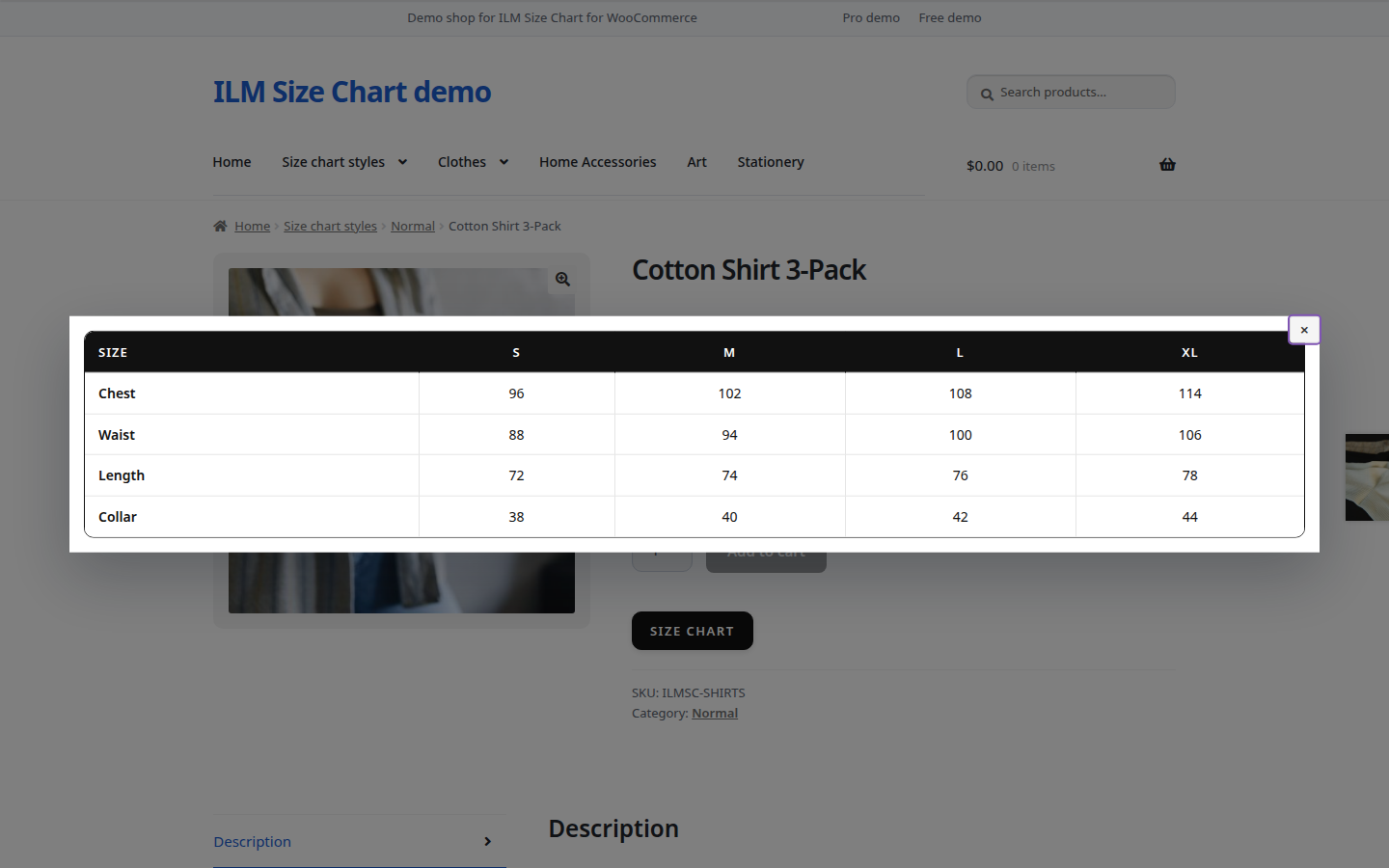
- A button that opens a popup. You set the button text, an optional icon or image, direction, alignment, font, colours, border and hover look, with a live preview.
- The popup window: size, position, background, border and opening and closing animation, and the look and position of its close button.
- Directly on the product page with a heading.
- An optional CSS selector lets you place the chart anywhere on the page.
Display rules
Choose which products get a chart:
- Products: selected products, or all products.
- Categories: child categories included.
- Tags.
- Brands (WooCommerce Brands).
- Attributes (global product attributes).
- Apply Constrain: show the chart only on products that match every rule you switched on.
When several charts match one product, the one with the highest priority wins.
Compatibility
- Works with classic and block (full-site editing) themes.
- Shortcode [ilm_size_chart] and [ilm_size_chart product=”123″].
Data
Charts are kept in their own database table. Uninstalling the plugin removes them. The plugin sends no data to ILM Tech and has no tracking. See “External services” below for the fonts and videos that load from other sites.
Pro add-on
A separate add-on, ILM Size Chart Pro, is sold at ilmtech.in. It is not part of this plugin, and this plugin works the same with or without it. The add-on adds an AI chart builder and AI chat (an online service), a “Find my size” feature for shoppers, five more themes with ready-made blocks, and support.
External services
The plugin works without any external service. Three kinds of content load from other sites, and only when you use them:
Google Fonts (chart editor only)
The chart editor offers Google fonts (for example Roboto, Poppins or Lato) for text, tables and the popup button. When you choose one of these fonts, or open a chart that already uses one, your browser loads the font from Google Fonts (fonts.googleapis.com and fonts.gstatic.com) so the preview shows it. Google receives the request of your browser (your IP address and browser details) and the font name. Nothing about your shop, products or customers is sent. This happens only in the admin chart editor, never on the shop pages. If you do not use Google fonts, nothing is loaded.
- Service: https://fonts.google.com/
- Privacy FAQ: https://developers.google.com/fonts/faq/privacy
- Terms of Service: https://policies.google.com/terms
- Privacy Policy: https://policies.google.com/privacy
YouTube and Vimeo videos
If you add a Video component to a chart, the video is embedded from YouTube or Vimeo. YouTube videos use YouTube’s privacy-enhanced mode (youtube-nocookie.com); this reduces, but does not remove, what YouTube stores and tracks. When the chart is shown as a popup, the player loads only after the visitor opens the popup. When the chart is shown directly on the product page, the player loads with the page. The video site then receives the visitor’s IP address and browser details and may store data in the browser, under its own policies. Nothing is loaded if you add no video.
- YouTube Terms of Service: https://www.youtube.com/t/terms
- Google Privacy Policy: https://policies.google.com/privacy
- Vimeo Terms of Service: https://vimeo.com/terms
- Vimeo Privacy Policy: https://vimeo.com/privacy
Bundled libraries
The plugin ships these third-party files. All of them have GPL-compatible licences; the licence texts are in the plugin’s assets/vendor folders. The admin screens use no third-party UI framework: their base styles are the plugin’s own (assets/css/ilmsc-admin-ui.css).
- Font Awesome Free 7.3.1 fonts (solid and regular), SIL Open Font License 1.1; the plugin’s icon CSS for them, MIT License, https://fontawesome.com/ (assets/vendor/icons/LICENSE.txt)
- Material Icons font, Apache License 2.0, https://github.com/google/material-design-icons (assets/vendor/material-icons/LICENSE)
- Pickr 1.10.2 colour picker, MIT License, https://github.com/simonwep/pickr (assets/vendor/pickr/LICENSE.txt)
Screenshots
Installation
- Upload the plugin files to the /wp-content/plugins/ilm-size-chart-for-woocommerce directory, or install the plugin through the Plugins screen in WordPress.
- Activate the plugin.
- Make sure WooCommerce is installed and active.
- Go to Size Charts in the admin menu and create a chart.
- Choose where the chart shows and save.
FAQ
-
Where are the charts?
-
Under “Size Charts” in the admin menu.
-
Can I show a chart on only some products?
-
Yes. You can show a chart on selected products, or on the products of the categories (child categories included), tags, brands or attributes you choose. When several charts match one product, the one with the highest priority wins.
-
Does it work with my theme?
-
It works with classic themes and block (full-site editing) themes.
-
How do I add a chart with a shortcode?
-
Use [ilm_size_chart] or [ilm_size_chart product=”123″], where 123 is the product ID.
-
Why does my chart use a different font in the shop than in the editor?
-
The editor loads the Google fonts you pick (Roboto, Poppins, Lato and others) from Google Fonts so the preview shows them. The plugin does not load these fonts on the shop pages. In the shop, the chart shows the font only if your theme (or another plugin) already loads it; otherwise the visitor’s browser uses the fallback font named in the setting (for example sans-serif). To get the same look, choose a font your theme uses, or a system font.
-
Does it slow my shop?
-
Assets load only on pages that show a chart.
-
Can I add custom CSS to a chart?
-
No. Give a component an ID or a class in its Advanced tab and style it from your theme, or from Appearance > Customize > Additional CSS.
-
Is data sent anywhere?
-
The plugin itself sends no data to ILM Tech and has no tracking. Google Fonts load in the chart editor when you use a Google font, and YouTube or Vimeo videos load on the shop pages only when you add it to a chart. See “External services”.
Reviews
There are no reviews for this plugin.
Contributors & Developers
“ILM Size Chart for WooCommerce” is open source software. The following people have contributed to this plugin.
Contributors
Translate “ILM Size Chart for WooCommerce” into your language.
Interested in development?
Browse the code, check out the SVN repository, or subscribe to the development log by RSS.
Changelog
2.0.2
- First public release: drag-and-drop size chart builder and popup designer, the same as the ILM Size Chart module for PrestaShop.